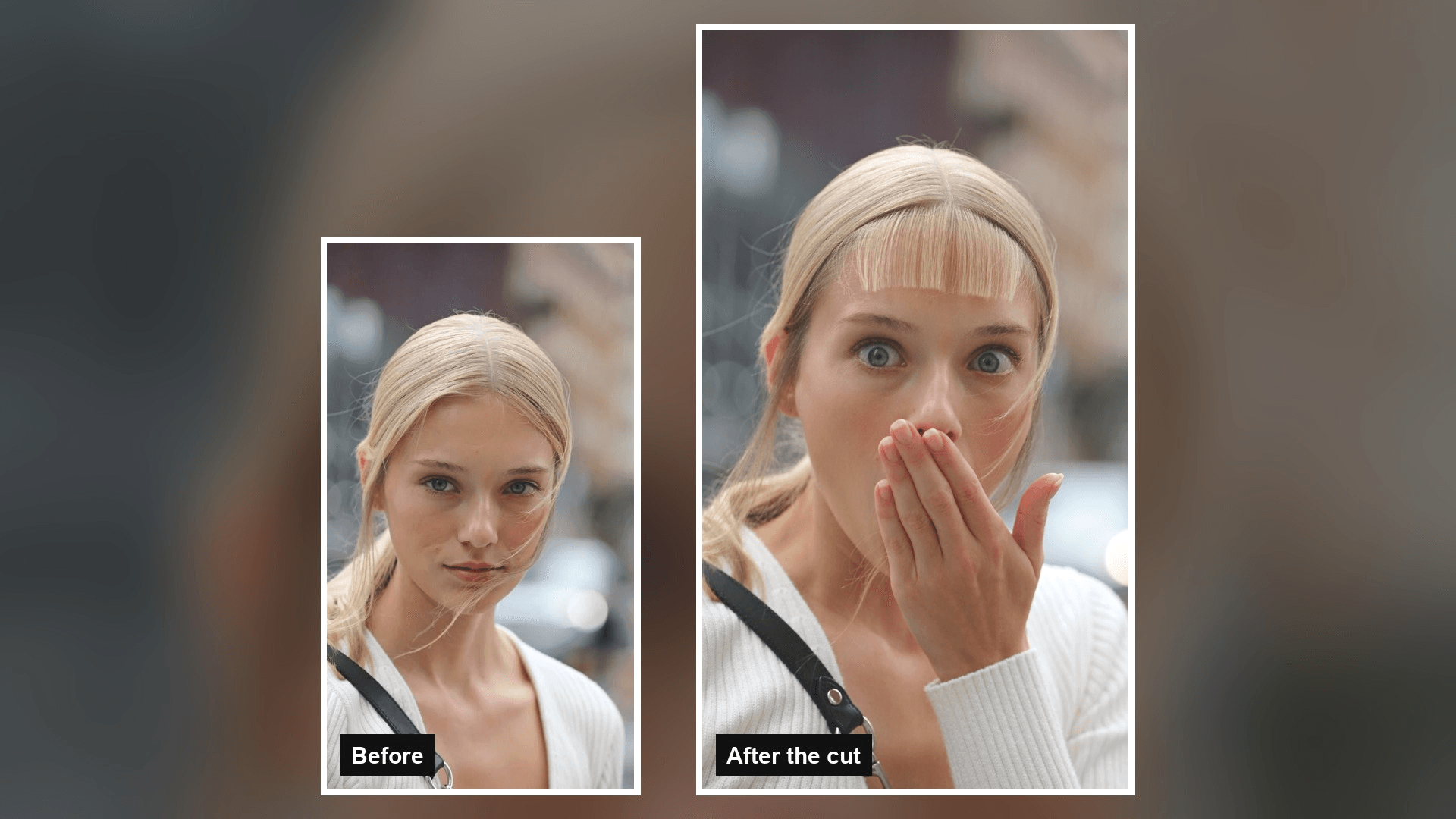
It is 11 p.m. and your best friend gets a video from you. You are standing on a city sidewalk, you pull a chunk of hair over your eyes, and a pair of scissors cuts straight across your forehead. Then your face drops. Wide eyes, hand over mouth.
None of it happened. That is the bangs filter prank: a 10-second AI clip built from one ordinary selfie. Below you will find the CapCut template the trend runs on, the prompt we used to make our own version from a single photo, and the details that decide whether anyone believes it.
Key Takeaways
- Thebangs filterprank is a 10-second AI clip where scissors cut a fringe into a single selfie.
- BANGS PRANK is the CapCut template under the most-viewed tutorial we found, and it ends on a hand over the mouth.
- The static bangs filter templates we checked only wipe a fringe onto a still photo, so nothing gets cut on screen.
- You can make the cut yourself in the Atlas Cloud video generator with Seedance 2.5, one photo, and one prompt.
- Time codes in the prompt let you choose the cut line, the moment the fringe appears, and the reaction.
What Is the Bangs Filter Prank on TikTok?
Bangs filters are not new. In February 2022, Dexerto covered a TikTok camera effect called Bangs that added a fringe to your face inside the TikTok camera. Fun to try, but nobody mistook it for a haircut.
The 2026 version shows the haircut instead. A hand pulls hair down over the forehead, scissors snip it, clippings fall, and the person in the clip reacts as if they just made a terrible decision.
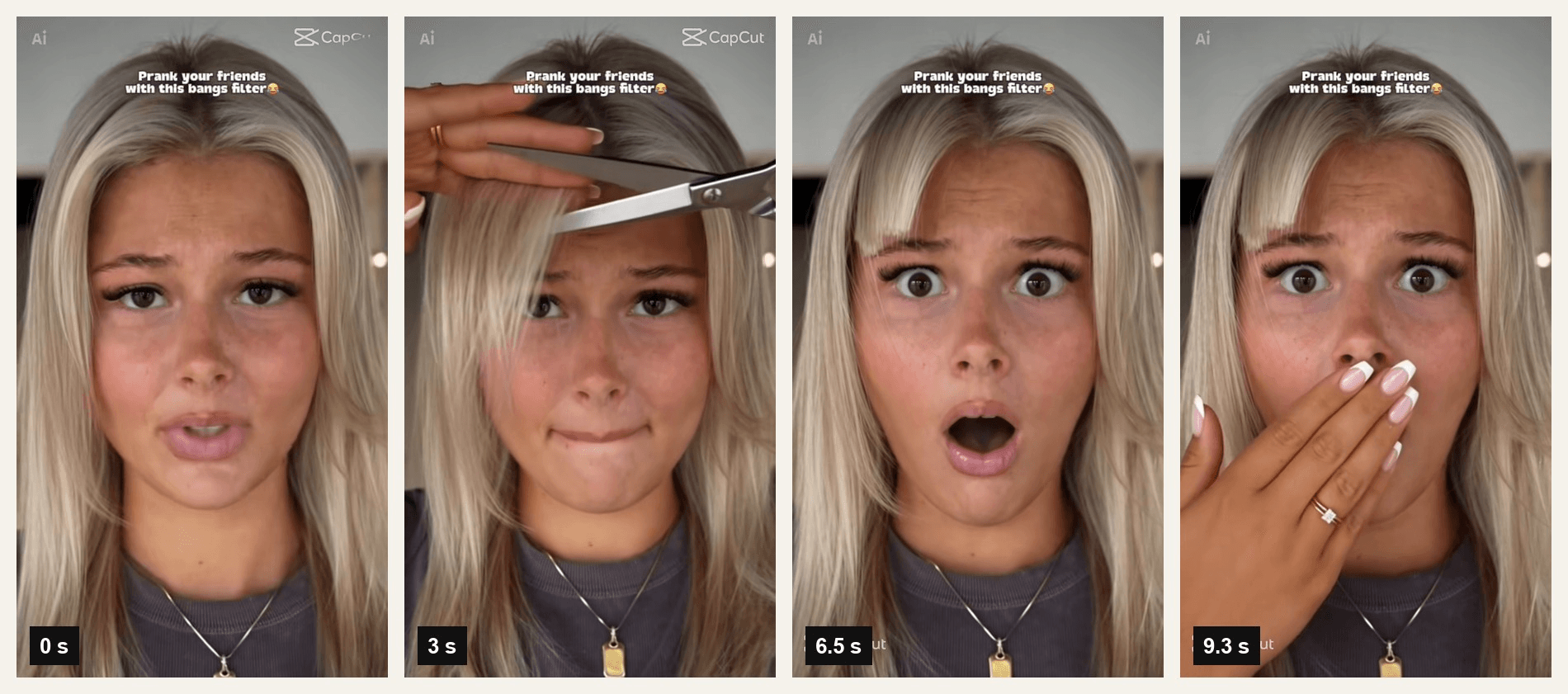
Template preview published by its creator on CapCut. The preview is a video; frames shown at 0, 3, 6.5 and 9.3 seconds.
That template is BANGS PRANK. It went up on CapCut in early August 2026 with the caption "Prank your friends with this bangs filter," and the most-viewed tutorial we found, CAPCUTAI's August 12 post, links straight to it. That post had 229,000 plays by October 28.
How to Make an AI Bangs Video From One Photo
A template gives you its cut and its ending. A prompt lets you pick both. Atlas Cloud runs Seedance 2.5, which takes one photo as the first frame and animates the haircut from it while the face, the cardigan, the bag strap and the street stay put. Here is the clip it made from a street photo of a woman with her hair slicked back into a low ponytail:
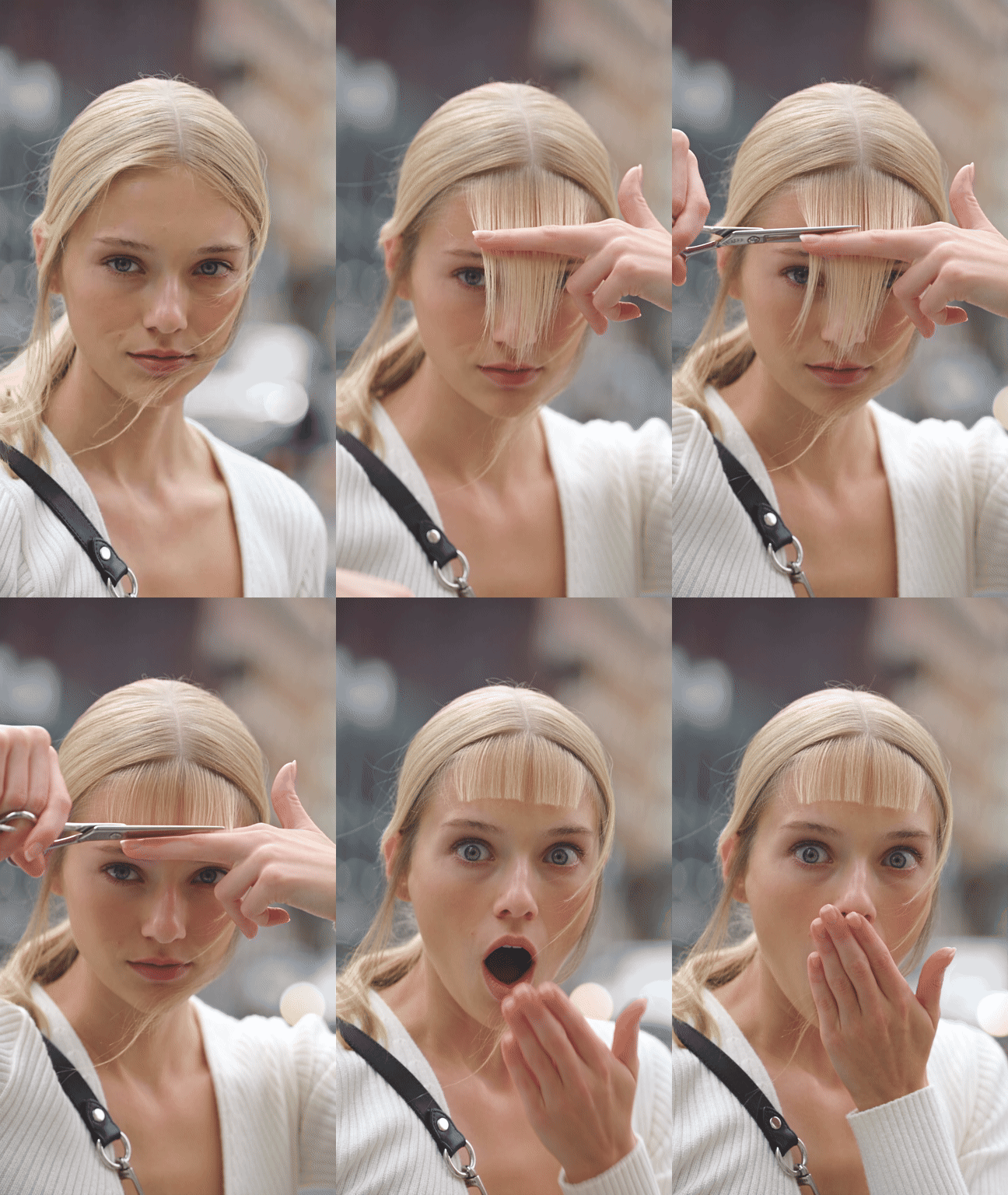
The fringe is in by the 6-second mark. Her eyes go wide at 8 seconds and the hand lands on her mouth right after, the same beat BANGS PRANK ends on. Notice the clippings: they fall past her face during the cut, which is the detail a quick viewer remembers.
Method 1: Cut Bangs in the Atlas Cloud Video Generator
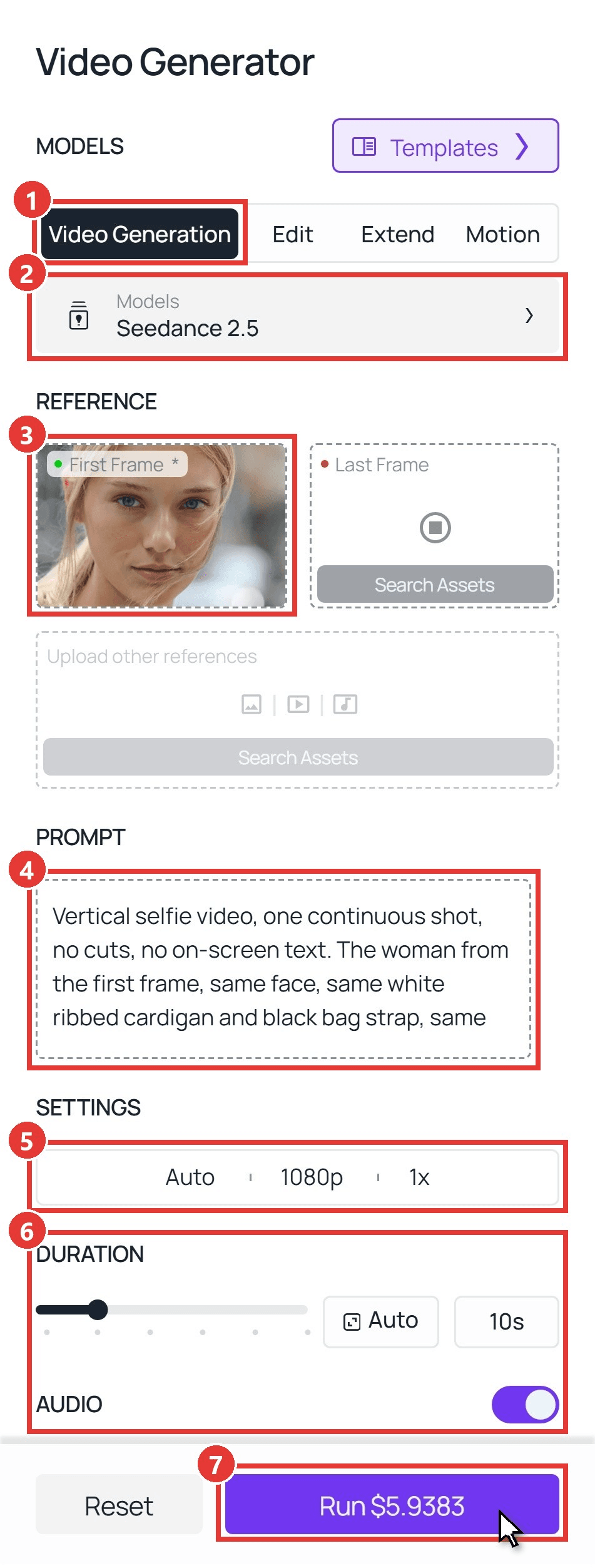
Sign in, open the Atlas Cloud AI video generator, and follow the numbers on the screenshot:
- Open the Video Generation tab.
- Keep Seedance 2.5 under Models.
- Upload your photo into First Frame. Crop it to 9:16 first. With the aspect ratio left on Auto, the clip takes its shape from the photo. Leave Last Frame empty.
- Paste the prompt below into the Prompt box.
- Open Settings and pick 1080p.
- Set Duration to 10 seconds and leave Audio on for the scissor snips.
- Click Run.
This is the exact prompt behind the clip above:
plaintext1Vertical selfie video, one continuous shot, no cuts, no on-screen text. The woman from the first frame, same face, same white ribbed cardigan and black bag strap, same blurred city street behind her. At the start her pale blonde hair is slicked back from a center part into a low ponytail. 20-2s: she pulls a thick section of hair forward from the center part so it hangs straight down over her forehead and eyes, and holds it flat between two fingers. 32-6s: her other hand cuts straight across just above her eyebrows with silver hair scissors in three quick snips. Blonde clippings fall past her face. 46-10s: her hands drop out of frame. She now has a blunt, eyebrow-length fringe covering her whole forehead, and the fringe stays exactly like that until the last frame. Her hair never goes back to the slicked-back look. Her eyes go wide and her mouth falls open, and at 8 seconds she claps one hand over her mouth and holds it there to the end. 5Same face and skin tone throughout, soft overcast daylight, scissor snips and street ambience as the only sound.
Swap the hair color, clothes and background for what is in your own photo. Leave the time codes alone until you have one clip you like.
Method 2: Send the Same Prompt Through the API
Making a clip for every friend in a group chat, or adding a bangs button to your own app? The API takes the same photo and prompt in one request.
Step 1: Create an API key. In the console, open Settings and create a key under API Keys. One key works for every model on the platform.
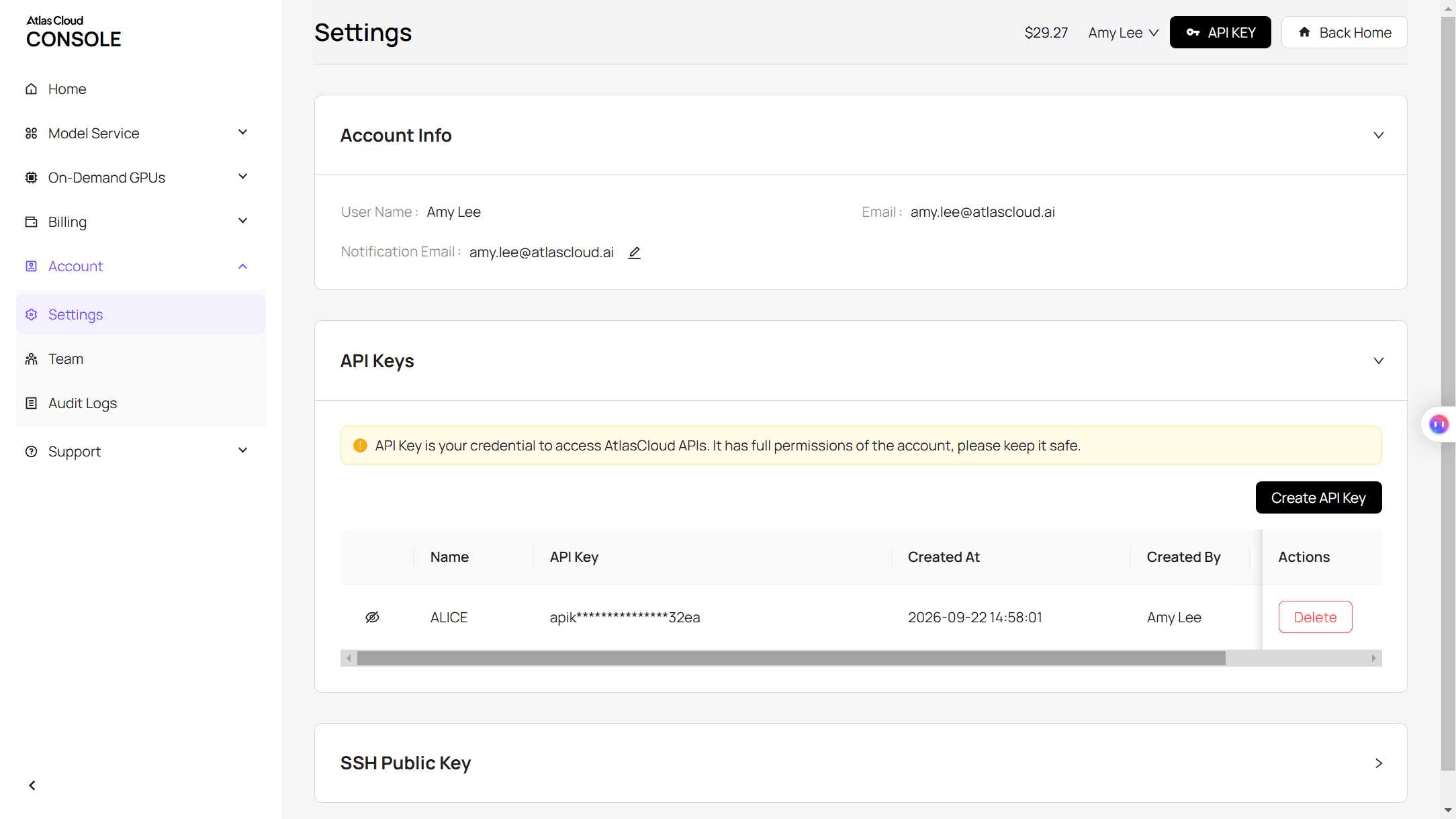
Step 2: Check the request format. The Atlas Cloud API docs cover authentication and the video endpoint.
Step 3: Send the request and poll. Put a public URL of your 9:16 photo in the image field:
plaintext1curl -X POST https://api.atlascloud.ai/api/v1/model/generateVideo \ 2 -H "Authorization: Bearer $ATLASCLOUD_API_KEY" \ 3 -H "Content-Type: application/json" \ 4 -d '{ 5 "model": "bytedance/seedance-2.5/image-to-video", 6 "prompt": "<paste the Method 1 prompt here>", 7 "image": "https://your-cdn.com/your-photo-9x16.jpg", 8 "duration": 10, 9 "resolution": "1080p", 10 "generate_audio": true 11 }'
The response returns a prediction ID. Poll it until the status reads completed, then download the MP4 from the outputs array:
plaintext1curl https://api.atlascloud.ai/api/v1/model/prediction/<prediction_id> \ 2 -H "Authorization: Bearer $ATLASCLOUD_API_KEY"
Same endpoint and same key for every video model, so testing another model on the prank is a one-line change to the model string.
Cut Bangs Prank Prompt for Blunt and Curtain Bangs
The prompt above has three time blocks, and each one has a job. The first describes the hair as it looks in the photo, so the model knows what it is starting from. The middle block names the cut line. The last one describes the finished bangs, says they stay until the final frame, and puts the reaction on the clock.
To get curtain bangs instead, we kept the opening and closing lines, then rewrote the cut and the finished shape. Same photo, second run:
plaintext1Vertical selfie video, one continuous shot, no cuts, no on-screen text. The woman from the first frame, same face, same white ribbed cardigan and black bag strap, same blurred city street behind her. At the start her pale blonde hair is slicked back from a center part into a low ponytail. 20-2s: she pulls two long sections of hair forward, one on each side of the center part, so they hang down beside her eyes and the middle of her forehead stays visible. 32-6s: silver hair scissors cut each side at a steep slant, shortest at the center part and longer toward her cheekbones, like an upside-down V. Blonde clippings fall onto her cardigan. 46-10s: her hands drop out of frame. Long curtain bangs, not a straight fringe, now frame her face: parted in the middle with a gap of forehead showing, each side sweeping outward and ending at her cheekbones. They stay exactly like that until the last frame and her hair never goes back to the slicked-back look. She tilts her head so the bangs swing slightly, then gives the camera a slow, pleased smile. 5Same face and skin tone throughout, soft overcast daylight, scissor snips and street ambience as the only sound.
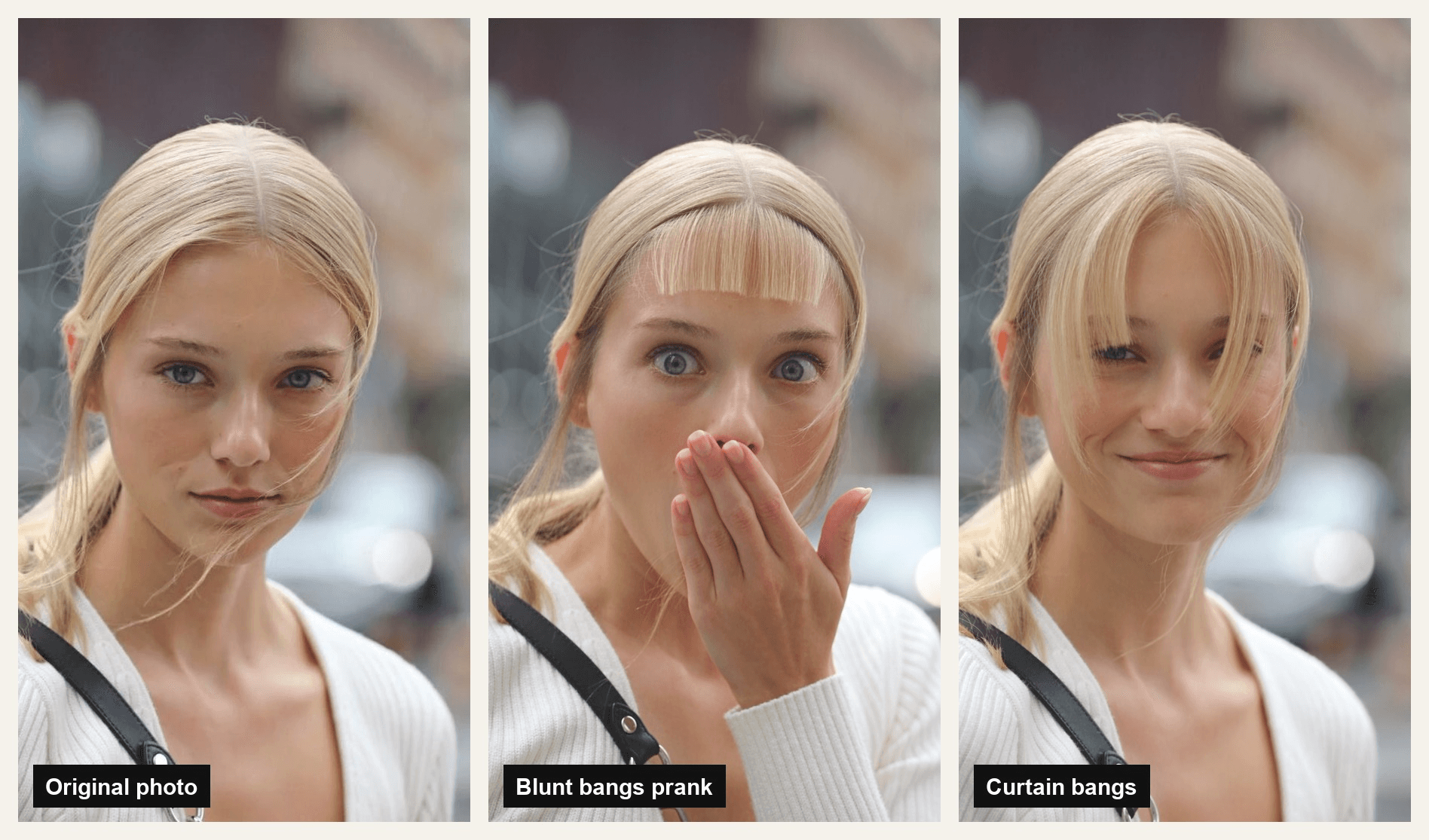
Two phrases did the heavy lifting in the curtain run. "Upside-down V" told the scissors which way to angle, and "not a straight fringe" kept the result from drifting back toward the blunt cut. The ending changed too. A smile fits curtain bangs, because the joke there is "I actually love it," while the blunt version sells regret.
Our guide to writing Seedance 2.5 prompts covers time codes in more depth.
Which Bangs Filter CapCut Template Is Behind the Trend?
Search "bangs" inside CapCut and you get two kinds of templates that look alike in the thumbnail. One kind shows the cut. The other wipes a fringe across a photo that never moves.
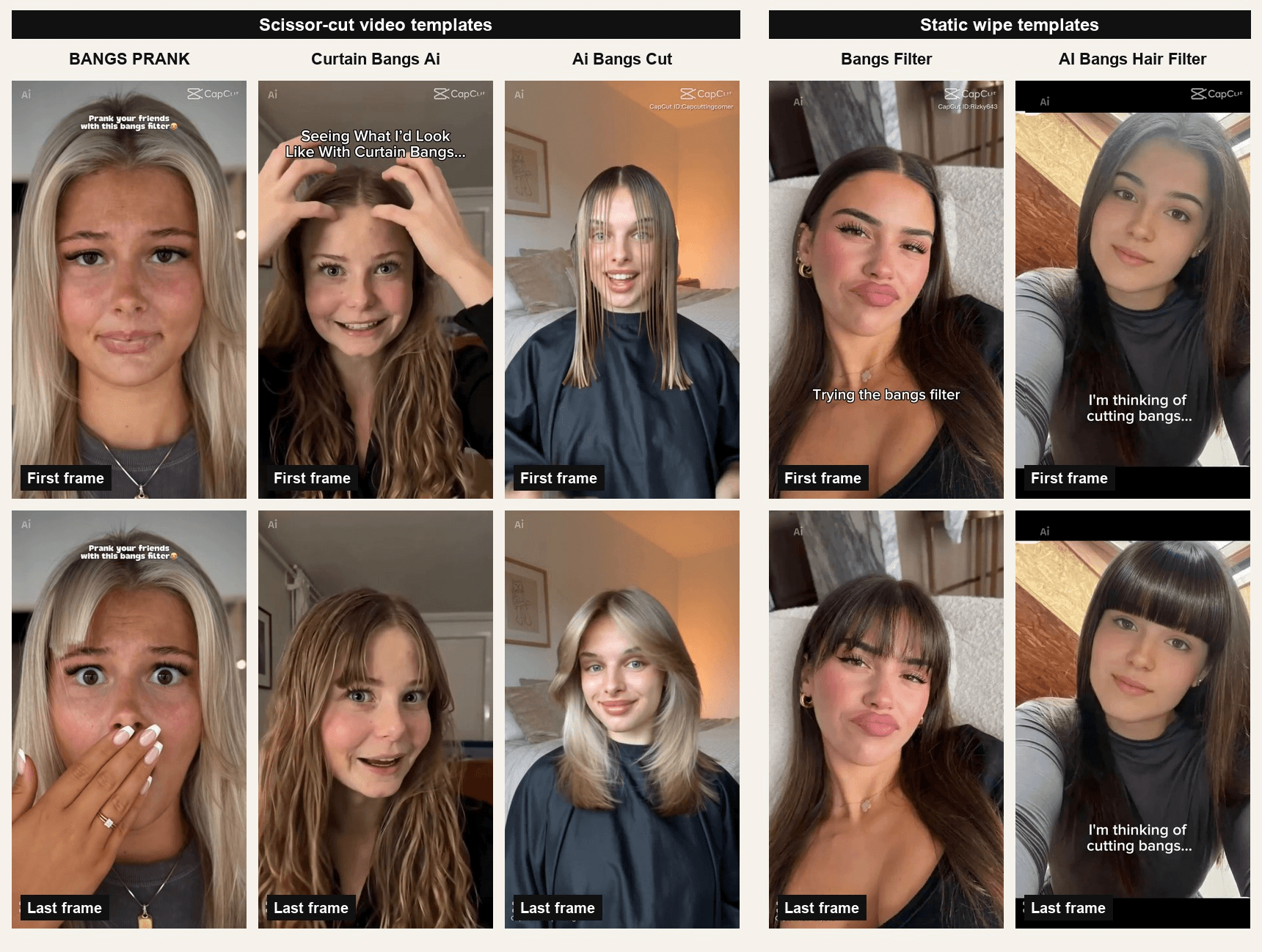
Template previews published by their creators on CapCut, checked on October 28, 2026.
| Template | On CapCut since | What the preview shows | Works as a prank? |
|---|---|---|---|
| BANGS PRANK | August 6, 2026 | Scissors cut a blunt fringe, then a shocked face and a hand over the mouth | Yes, this is the trend template |
| Curtain Bangs Ai | September 4, 2026 | She cuts curtain bangs herself and grins at the camera | Yes |
| Ai Bangs Cut | October 2, 2026 | Salon cape, comb and scissors, ends on face-framing layers | Yes, salon version |
| Bangs Filter | August 11, 2026 | A vertical wipe adds a fringe to a still photo | No, nothing gets cut |
| AI Bangs Hair Filter | September 24, 2026 | Same wipe, captioned "I'm thinking of cutting bangs..." | No, nothing gets cut |
These templates are small. None of them had passed 1,000 uses by October 28. The reach sits on the tutorial videos that link to them.
You will also run into haircut pranks that are not bangs at all. Both TikTok videos in Google's US results for "bangs filter prank" on October 28 used bob templates, and one of those, Bob Haircut Filter, had passed 466,000 uses. If the clip you are trying to copy ends with chin-length hair, you are looking at the bob version.
Realistic Bangs Filter Checklist: Photos That Sell the Cut
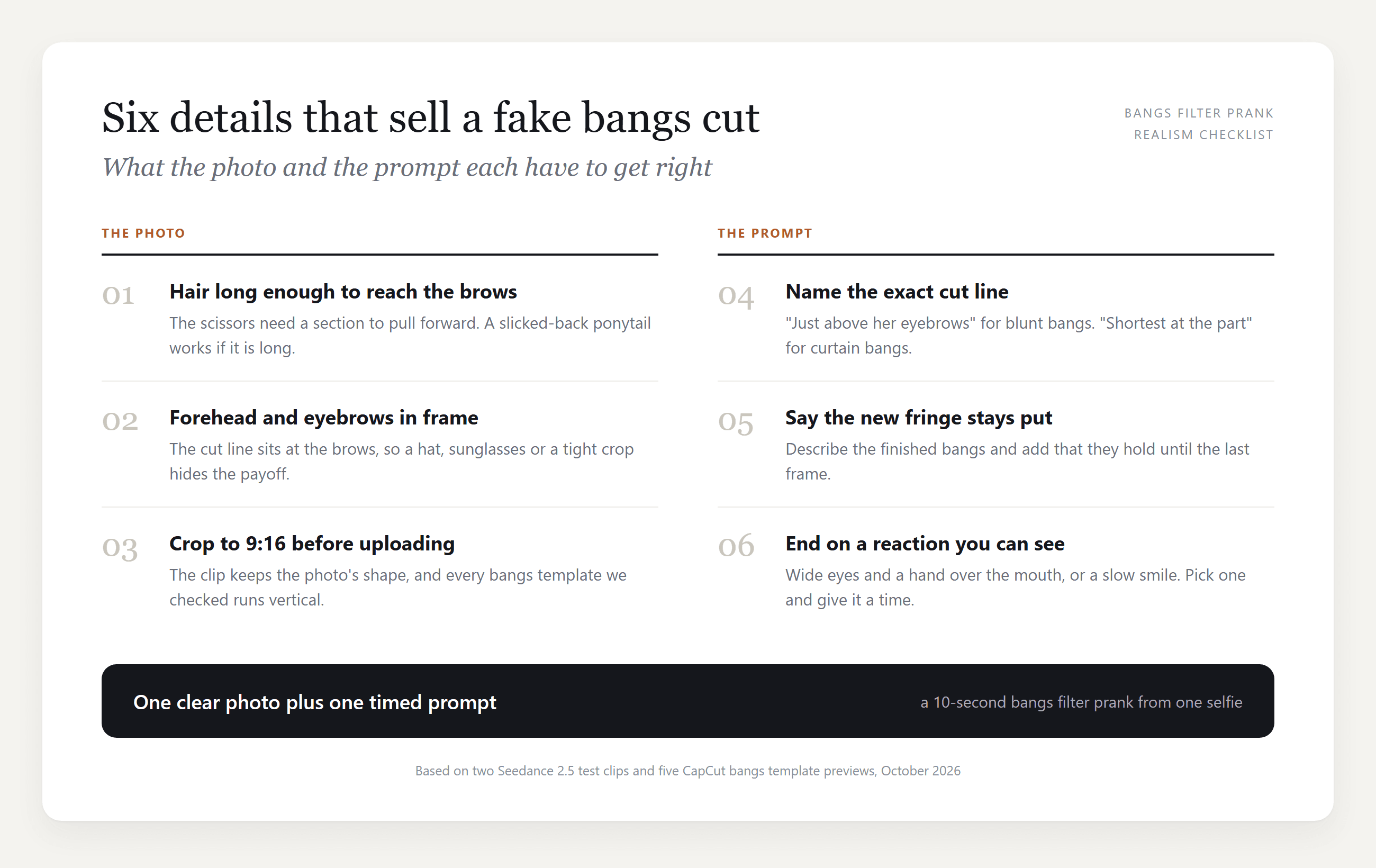
A fake bangs filter gets spotted when the new fringe has nowhere to come from. Every scissor template we checked starts from long hair, and the BANGS PRANK preview opens with that hair already falling around the face. Our photo did not: her hair was slicked straight back. It still worked because the prompt gave her hands a job, pulling a section forward before the scissors arrive.
AI Bangs Filter vs a Bangs Filter App: Which One Fools People?
Search "bangs filter" on Google and nearly every top result is a photo tool or an app listing. Those answer a different question, what you would look like with bangs, and our static bangs preview guide covers that side. For a prank, the format matters more than the style:
| Option | What goes in | What the viewer sees | Who picks the cut |
|---|---|---|---|
| TikTok camera effect | Your live camera | A fringe sitting on your face as you move | The effect |
| Bangs filter app or web tool | One photo | A still photo with bangs | You, from the tool's style options |
| CapCut scissor template | One photo | A 10-second haircut video | The template |
| AI video from a prompt | One photo and a prompt | A 10-second haircut video | You, in words |
The still photo and the camera effect both show a result. The two video options show the cut happening, and that is the part people believe. Between those two, the template is faster and the prompt gives you control over the length, the shape and how the clip ends.
Frequently Asked Questions
Is the bangs filter prank a TikTok effect or a CapCut template?
The 2026 clips are CapCut templates. The tutorials carry a "CapCut · Try this template" link that opens BANGS PRANK or one of its look-alikes. The 2022 Bangs effect was a separate TikTok camera filter with no cutting in it.
Can I make a bangs prank video of a friend?
Only with their OK. The clip puts their real face on a haircut they never got, and it can travel far beyond the group chat once it is posted. Ask first, or keep the prank on your own face and send it to them instead.
Can I choose how long the bangs are?
Yes. Name the length in the cut and in the finished description. "Just above her eyebrows" gave a blunt brow-length fringe, and "ending at her cheekbones" gave longer curtain bangs. Keep the two phrases consistent, so the cut and the result agree.
Why do bangs and bob haircut pranks show up together?
They are the same joke with a different cut. Both start from long hair and a single photo, end on a reaction, and get pitched the same way: BANGS PRANK says "Prank your friends with this bangs filter," and the bob tutorials say "Pranking my friends with the bob filter." The bob templates are far bigger, which is why they leak into searches for bangs.
How do I prank my mom with the bangs filter?
Send the clip right before a moment that matters to her, like a family photo or a dinner out, and add no caption. Let the panic run for one reply, then send the original photo. If she has been begging you to grow your hair out, the joke lands twice.
Conclusion
Bangs filters used to be a preview: a fringe painted on a face, gone the moment you closed the app. The version going around now is a short film of the mistake itself, scissors and clippings included, and that small shift is what makes people believe it. BANGS PRANK carries the trend on CapCut, while the static wipe templates and the bob haircut pranks sit right next to it under similar names.
If you want to decide the cut yourself, one photo and a prompt with three time blocks are enough. Describe the hair you have, name the line the scissors follow, and end on a reaction you can time. That is the whole bangs filter prank, and the bald version works the same way if you want a bigger scare.





