


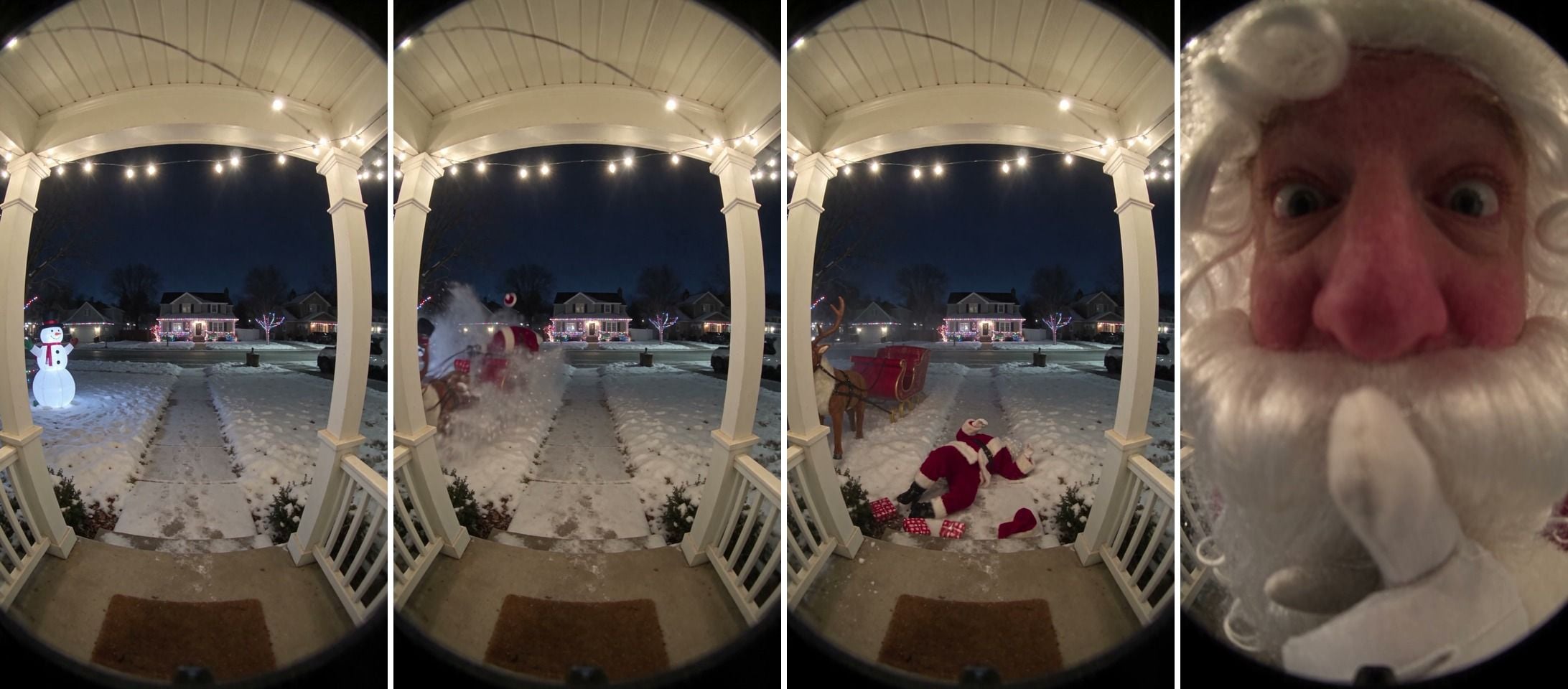
The porch is quiet. Then a sleigh comes in far too low, flattens the inflatable snowman and throws its driver head over heels down the front path. He lies there for a second. He finds his hat. Then he notices the doorbell, walks up until his nose fills the lens and whispers: "You didn't see that."
That is our own Santa caught on camera clip: 12 seconds, one doorbell-style photo, one prompt. The clips that fill Facebook and TikTok each December are made too, either by a seller who edits Santa onto your doorbell screenshot or by an AI model that generates him. This guide shows who makes them, then gives you the prompt we ran, with two more versions to try.
Key Takeaways
- Santa caught on camera clips that show Santa himself are made on purpose, by a seller's hand or by AI.
- No CapCut template drives the trend: none of the 149 TikTok posts we checked links one.
- One doorbell screenshot and one timed prompt in the AI video generator make a 12-second clip with sound.
- Our prompt spells out that the sleigh crashes rather than lands, and the first run delivered the crash.
- The same porch photo also makes a sleigh flyover, and a pet camera makes a third version.
What Is the Santa Caught on Camera Trend?
It is a short clip dressed up as doorbell or security footage. The view is a porch at night, often in black-and-white night vision. Then Santa walks up the path and waves, or his sleigh and reindeer cross the sky above the houses. Parents play it for the kids on Christmas morning. Everyone else shares it because it is funny.
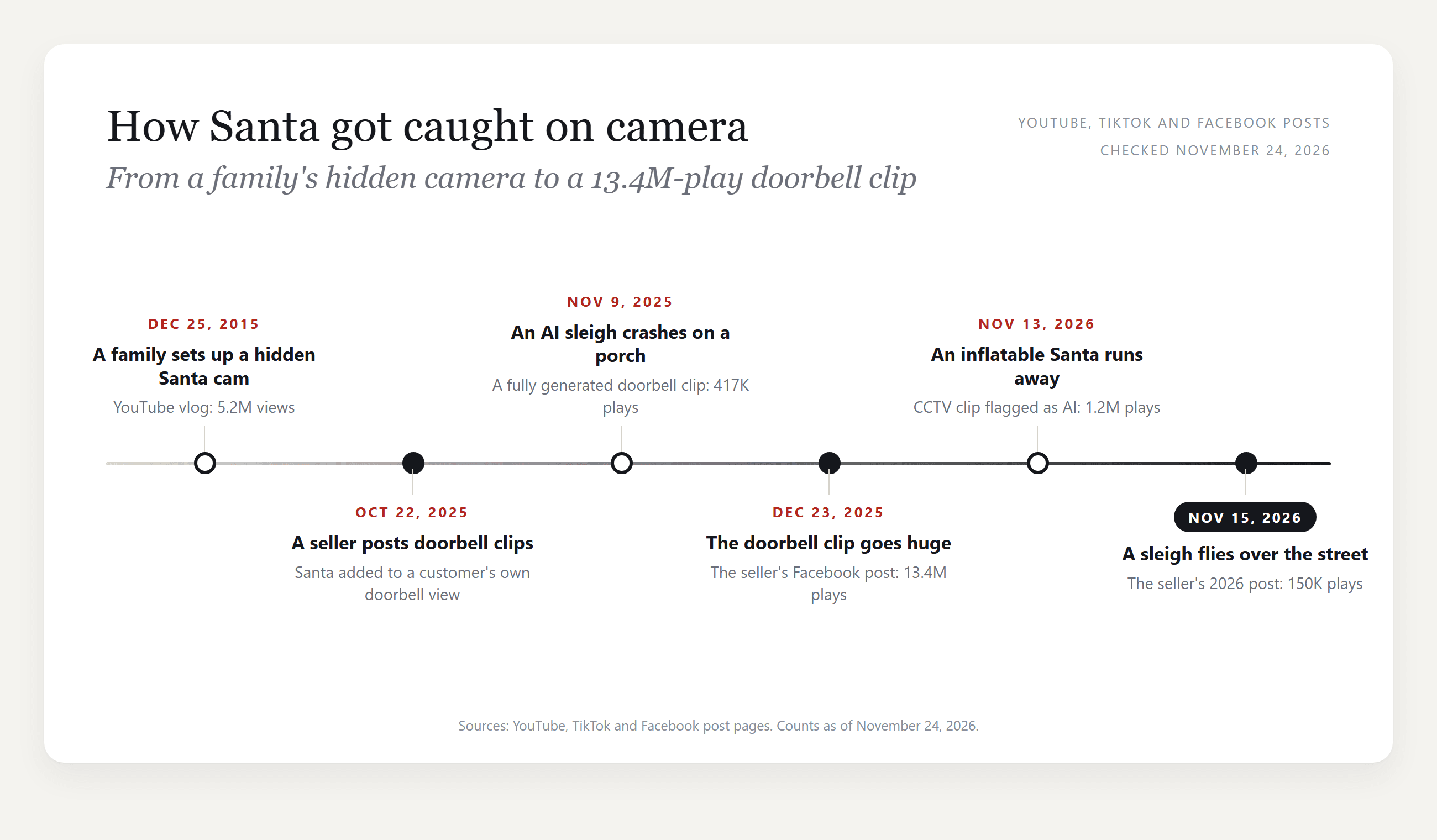
The idea is older than AI video. On Christmas Day 2015 a family vlog called Santa Caught on Santa Cam! showed a hidden camera set up for the kids, and it has 5.2 million views today.
The doorbell version took off last winter. The biggest doorbell clip we found is Front Door Santa's Facebook post from December 23, 2025. A fisheye doorbell view in black and white, Santa in full color climbing into a sleigh parked on the street, reindeer pulling it away, an empty road. By November 24, 2026 it had 13.4 million plays and about 160,000 likes.
That account is a shop. You upload a night screenshot from your own doorbell, and its product page says every video is edited by hand and delivered within 48 hours. Other sellers now do the same job with AI, and one states on its site that every video is created with AI from your photos.
We went through 149 TikTok posts from October 2025 onward, pulled from six hashtags and TikTok's topic pages. None links a CapCut template, and the one TikTok effect we saw was a basic Green Screen on a single post. This is a trend of finished clips, sold or generated one at a time.
Has Santa Claus Been Caught on Camera in Real Life?
Plenty of people ask after watching one. The clips we traced fall into three broad kinds.
| What you see | How it is made | Example, checked November 24, 2026 |
|---|---|---|
| A black-and-white doorbell view with Santa or his sleigh in color | A seller edits Santa onto the customer's own doorbell screenshot | The Facebook clip with 13.4M plays |
| A whole scene where Santa walks, falls or talks to the lens | An AI video model generates it from a photo or a prompt | A sleigh crash carrying a Sora watermark (417K plays); an inflatable Santa that runs off, flagged as AI-generated on TikTok (1.2M plays) |
| A bright dot crossing a dark sky while a family reacts | A phone video of a light in the night sky, plus a caption | A TikTok clip whose caption says "my 5 year old swears he saw him in the sky" (46.4M plays) |
The most-watched clip in our sample is the plainest one. There is no Santa in it at all, only a light and a child's certainty.
So is there footage of Santa Claus caught on camera in real life? For a parent, the useful answer is that the convincing ones are made on purpose. The second row is the one you can make yourself tonight.
How to Make a Santa Caught on Camera Video With AI
A seller picks the scene for you. A prompt lets you write it, down to what Santa says when he spots the camera. Here is our run on Atlas Cloud, made from one photo of a snowy porch.
Sound on. The crash and the whisper were generated together with the picture.
The gag comes from a doorbell clip posted on November 9, 2025, in which a sleigh skids onto a porch and Santa rolls out of it. We kept the crash, dropped the police lights from its second half and wrote a new ending at the lens.
The model is Seedance 2.5. It takes your photo as the first frame, so the porch in the video is the porch in your picture, and it generates the sound in the same pass. Our first run landed the beats the joke needs: the crash, the tumble, the hat coming off and going back on, the face at the lens. When we ran the audio through speech-to-text, the whispered line came back word for word.
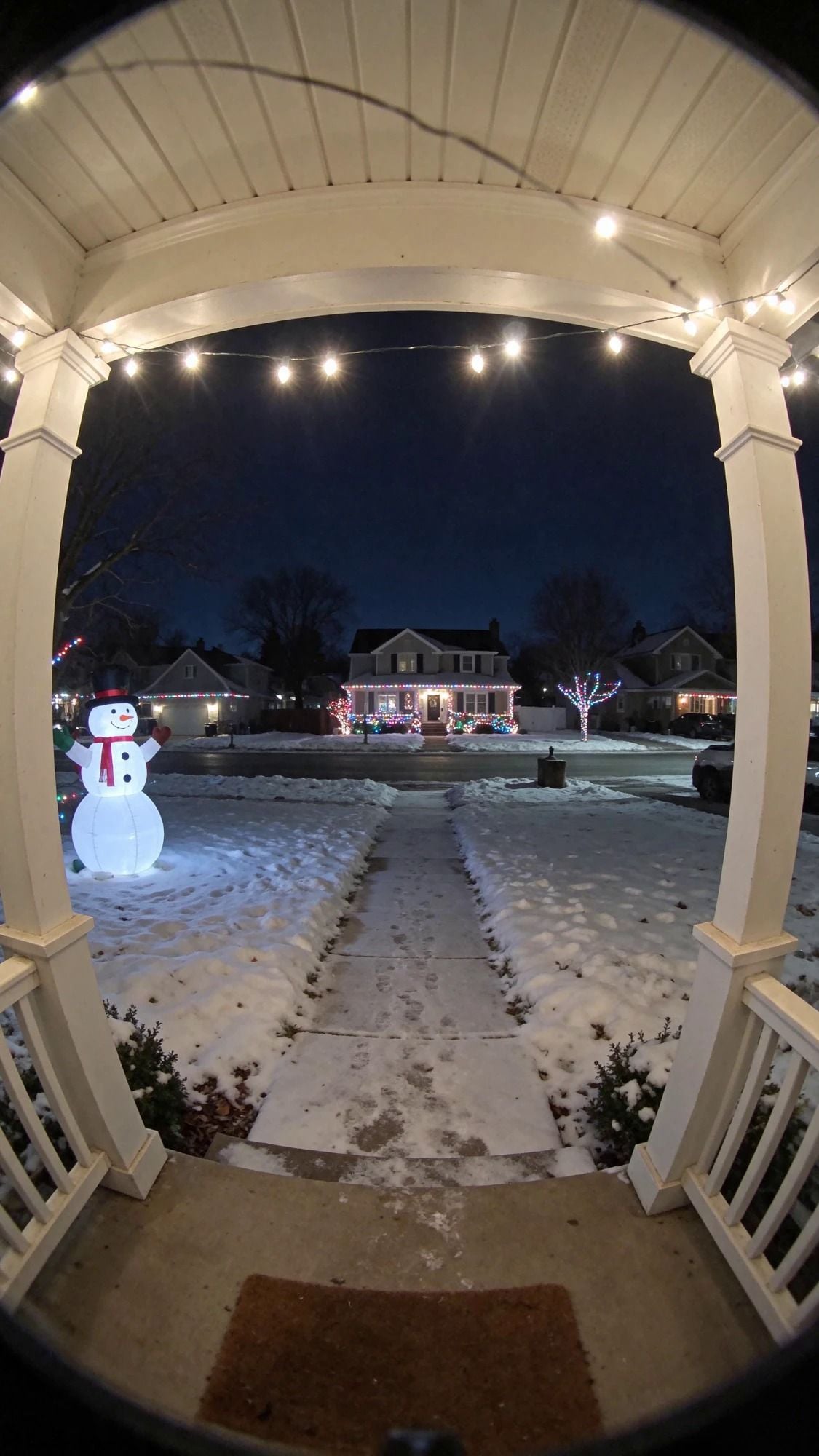
That porch is not ours. We generated the starting photo with an image model, prompted to look like a doorbell still. Yours should be the real thing: a night screenshot from your doorbell app. Three things make it work:
- Nobody in the frame. Santa should be the only person the camera catches.
- Open ground in front of the door. Santa needs somewhere to land.
- A strip of sky above the rooftops. The sleigh comes in from there.
Everything below happens in the Atlas Cloud video generator, on the Video Generation tab.
Method 1: Make the Doorbell Clip in the Atlas Cloud Video Generator
Follow the numbers on the screenshot:
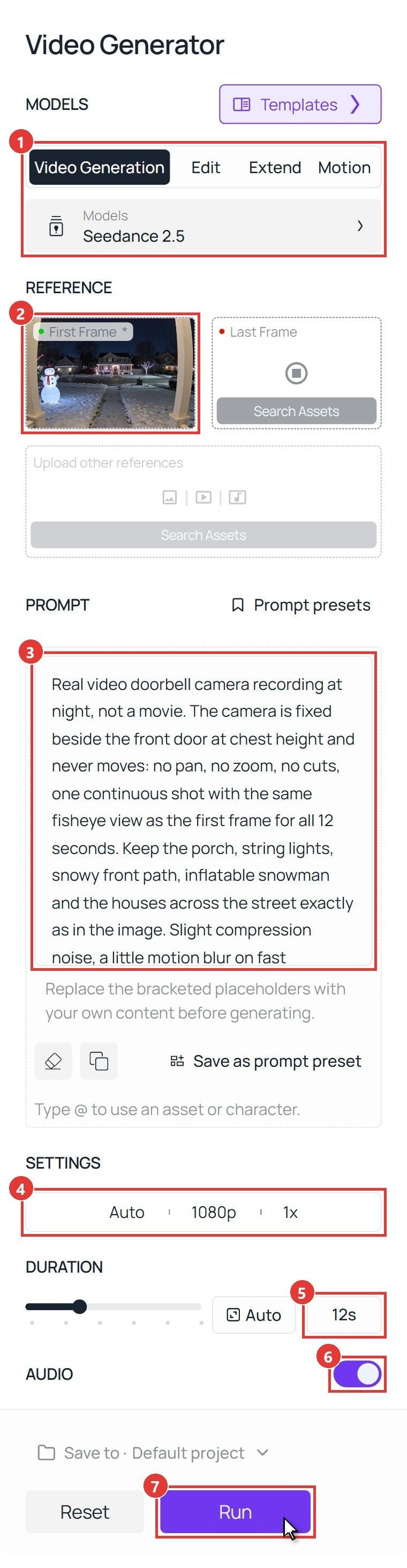
- Model: open Video Generation and keep Seedance 2.5.
- First Frame: upload your doorbell screenshot to the First Frame slot. Leave Last Frame empty.
- Prompt: paste the prompt below.
- Settings: pick 1080p, with one output. The ratio stays on Auto and follows your photo.
- Duration: set 12 seconds.
- Audio: leave it on.
- Run. The clip shows up in the panel on the right.
plaintext1Real video doorbell camera recording at night, not a movie. The camera is fixed beside the front door at chest height and never moves: no pan, no zoom, no cuts, one continuous shot with the same fisheye view as the first frame for all 12 seconds. Keep the porch, string lights, snowy front path, inflatable snowman and the houses across the street exactly as in the image. Slight compression noise, a little motion blur on fast movement. 2 3[0-1.5s] Quiet snowy night, only falling snow moves. 4[1.5-3s] Santa's red wooden sleigh, pulled by reindeer, comes in far too low and too fast from the upper left of the sky. It is a crash, not a landing: it slams into the snowy front yard, throws up a big spray of snow, knocks the inflatable snowman flat, and skids sideways to a stop at the left edge of the frame. The reindeer stumble to a halt behind it, tangled in their reins. Sleigh bells jangle wildly. 5[3-5s] The impact throws Santa out of the sleigh; he does not climb out. A real-looking Santa Claus in a red suit and white beard tumbles head over heels down the snowy path toward the porch, his hat flying off, and lands flat on his back near the doorstep. A few wrapped presents spill from his sack onto the snow. 6[5-8s] He lies still for a beat, then slowly sits up with a groan, finds his hat in the snow, puts it back on crooked, and brushes snow out of his beard. 7[8-10.5s] He looks left and right to check whether anyone saw, then notices the doorbell camera. He freezes, then walks right up to the lens; his face fills the top half of the frame and bulges in the fisheye. 8[10.5-12s] He leans in, raises a gloved finger to his lips and says in a low, embarrassed whisper with natural lip movement: "You didn't see that." Then he winks. 9 10Audio: real doorbell microphone sound: wind, a whoosh, a loud crunching crash, wildly jangling sleigh bells, a reindeer snort, Santa's groan, then his whisper. No music. 11Only Santa and his reindeer appear. No other people, no children, no police, no brand logos, no subtitles, no on-screen text.
Two sentences are there for the comedy. "It is a crash, not a landing" tells the model not to set the sleigh down gently, and "he does not climb out" asks for the tumble instead of a tidy exit.
The first paragraph does the doorbell look. It fixes the camera at chest height beside the door and forbids pans, zooms and cuts, which is what separates a doorbell clip from a movie scene. For the overhead CCTV angle, our tiger fight guide has the wording.
To make it yours, name what is really in your photo. Swap the inflatable snowman for your own mailbox, hedge or parked car, and keep the six timed beats.
Method 2: Send the Same Prompt Through the Seedance 2.5 API
Making one for every porch in the family group chat? The API takes the same photo and the same prompt.
Step 1: Create an API key. In the console, open Settings and create a key under API Keys.
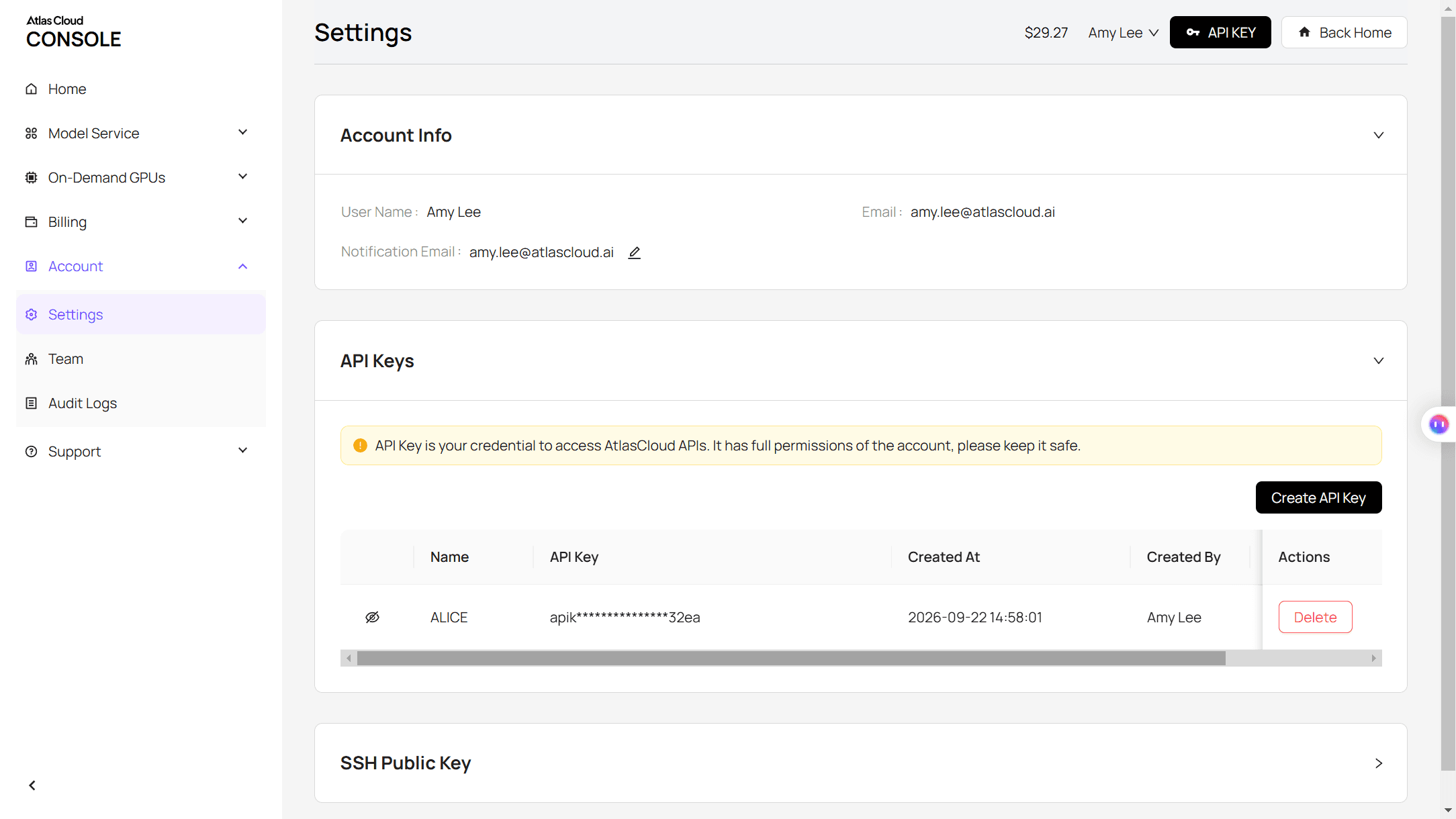
Step 2: Check the request format. The Atlas Cloud docs cover authentication and the video endpoint, and the API tab on the Seedance 2.5 image-to-video model page lists the fields. Duration accepts 4 to 30 seconds.
Step 3: Send the request and poll. The doorbell photo goes in the image field as a public URL:
plaintext1curl -X POST https://api.atlascloud.ai/api/v1/model/generateVideo \ 2 -H "Authorization: Bearer $ATLASCLOUD_API_KEY" \ 3 -H "Content-Type: application/json" \ 4 -d '{ 5 "model": "bytedance/seedance-2.5/image-to-video", 6 "prompt": "<paste the doorbell prompt here>", 7 "image": "https://your-cdn.com/your-doorbell-screenshot.jpg", 8 "resolution": "1080p", 9 "duration": 12, 10 "generate_audio": true 11 }'
Poll the returned prediction ID until the status reads completed, then download the clip from the outputs array:
plaintext1curl https://api.atlascloud.ai/api/v1/model/prediction/<prediction_id> \ 2 -H "Authorization: Bearer $ATLASCLOUD_API_KEY"
The same key and endpoint run the other video models on Atlas Cloud as well. Switching is a change to the model string.
More Santa Caught on Camera Ideas From One Photo
The crash is the loud version. The two below are quieter, and the first is the one to show a five-year-old on Christmas morning.
Santa's Sleigh Flying Over the House
This is the gentle one, and the seller behind the big Facebook clip posted its own take for 2026. Nothing lands. A sleigh and its reindeer cross the sky above the houses, and then the street is empty again.
It starts from the same porch photo. Keep the first paragrap h of the crash prompt, change 12 seconds to 10, and replace the timed beats and the audio lines with these:
plaintext1[0-2s] Quiet snowy night. Only a little falling snow moves. Very faint sleigh bells start, far away. 2[2-7s] High above the rooftops across the street, Santa's sleigh crosses the dark sky from left to right: a small red wooden sleigh pulled by a team of eight reindeer in pairs, Santa in his red suit holding the reins, a soft trail of golden sparkles behind the runners. It stays small and far away, never bigger than one of the houses, and it flies in a smooth gentle arc, never toward the camera. The sleigh bells grow louder as it passes, and a distant, happy "Ho ho ho!" carries across the street. 3[7-10s] The sleigh disappears behind the porch column on the right. The sparkle trail fades. The bells die away, and the porch is quiet again, exactly as in the first frame. 4 5Audio: real doorbell microphone sound: light wind, sleigh bells that approach and fade, one distant "Ho ho ho!". No music. 6Nothing lands. No people on the ground, no children, no brand logos, no subtitles, no on-screen text.
In our run the reindeer come in from the left first, and the sleigh follows about three seconds behind them with Santa at the reins. It came out as a bright storybook sleigh, much like the ones the doorbell sellers add to their clips, so it reads at a glance on a phone. One "Ho ho ho!" lands as it passes, and the porch is empty again before the tenth second.
Santa Caught on the Pet Camera
Pet cameras watch the living room all night too, and the dog is a better witness than any of us. This version swaps the porch for a living room and lets the pet do the reacting.
The starting photo is a night still from the pet camera, with your pet asleep in the frame and a window in view. Ours is generated, like the porch. The prompt:
plaintext1Real indoor pet camera recording at night, not a movie. The camera is fixed high in the corner of the room and never moves: no pan, no zoom, no cuts, one continuous shot with the same view as the first frame for all 10 seconds. Keep the room, the Christmas tree, the window, the rug and the dog exactly as in the image. The dog is a real dog on four legs and stays the same dog in every frame. Slight night-camera noise. 2 3[0-2s] The dog sleeps on the rug, its side rising and falling. Faint sleigh bells start outside, far away. 4[2-4s] One ear lifts. The dog raises its head and looks at the window. 5[4-8s] Outside the window, in the strip of dark sky above the snowy rooftops, Santa's sleigh crosses from left to right: a tiny red sleigh pulled by reindeer, Santa holding the reins, a soft trail of golden sparkles. It stays tiny and far away, always above the rooftops and never in front of the houses. The dog jumps up, trots to the window and puts its front paws on the sill, tail wagging fast, and follows the sleigh with its head as the bells grow louder. It gives one short, excited bark. 6[8-10s] The sleigh is gone and the bells fade. The dog drops back to the floor, turns around and looks straight up at the camera with its head tilted. 7 8Audio: real pet camera microphone sound: a quiet room, sleigh bells that approach and fade outside the window, paws on the floor, one bark. No music, no human voice. 9Exactly one dog. No people, no children, nothing enters the room, no brand logos, no subtitles, no on-screen text.
Our dog was up and at the window by the fifth second. It stood on its hind legs with its front paws on the sill while the sleigh crossed the strip of sky outside, then dropped down and turned to face the camera.
Want the pet to do the singing instead? Our singing pet guide has a dog in a Santa hat performing a carol.
Santa on a Ring Doorbell: Order a Clip, Use an App or Make Your Own?
The search for Santa on a Ring doorbell usually ends in one of four places. All of them start from a picture of your own home, and they differ in who decides what happens next.
| Route | You provide | You get | Who decides what Santa does |
|---|---|---|---|
| Order from a seller who edits by hand | A night screenshot from your doorbell | Santa or his sleigh added to your view, emailed within 48 hours | The seller's set scenes |
| Order from an AI seller | A photo of your door or room | One of a few fixed scenes, such as Santa waving at the door camera | The seller's set scenes |
| Use a Santa photo app | A photo or video of your room | Your photo or video with a ready-made Santa image laid over it | You place a ready-made Santa picture |
| Write a prompt (this guide) | A doorbell screenshot and a prompt | A 12-second clip at 1080p with sound | You write every beat, including the line he says |
Any doorbell works for the last row, and so does a phone photo taken from the doorway. This guide has no tie to any camera brand, and the prompt asks for no logos on screen.
Two habits are worth keeping. Use a frame with nobody in it, and switch on the AI label when you post the clip. Our AI Christmas photo guide covers the labeling rules and what to weigh before uploading family photos.
Frequently Asked Questions
Is there a Santa caught on camera app?
Yes, several. Catch Santa in My House, for example, has you take a picture, choose a Santa image and merge the two, and its site also lists a video editor that lays its characters over your own video. For a full moving scene with sound, the choices are a seller or the prompt route above.
What is a Santa cam?
The phrase covers three different things. It can mean a live webcam stream from a Santa village or reindeer farm, a toy camera ornament that tells kids Santa is watching, or a clip like the ones in this guide. If you are shopping, check which one a listing is selling before you pay.
Do I need a real video doorbell to catch Santa on camera?
No. Stand in your open doorway at night, hold the phone at chest height and take one photo of the path with the porch light on. That is where a doorbell sits, so the clip keeps the same point of view. A real doorbell screenshot saves you the step.
Does the Santa caught on camera clip come with sound?
Yes, as long as the Audio switch stays on. Our prompt asks for a doorbell microphone track with wind, the crash, sleigh bells and a whisper, and it says no music. Leaving music out keeps the clip sounding like a recording instead of a trailer.
How much does a Santa caught on camera video cost on Atlas Cloud?
A 12-second clip at 1080p with audio comes to about $9.01, which is 20% off the $11.26 list price, as of November 24, 2026. At 720p the same clip is about $3.64. If you also generate the starting photo, a 2K image from Seedream 5.0 Pro adds about $0.07. The discount can change, and the Run button shows the estimate before you generate.
Conclusion
A quiet porch, a sleigh that arrives badly and a man in a red suit who hopes nobody was watching. The clips that show Santa himself are made on purpose, by a seller's hand or by a model, and the best of them tell a small story.
To make your own Santa caught on camera video, start with a night screenshot of an empty porch, fix the camera in the first line of the prompt and write the action beat by beat. Then decide whether your Santa lands, waves or falls on his back.







