Ask AI for a summary
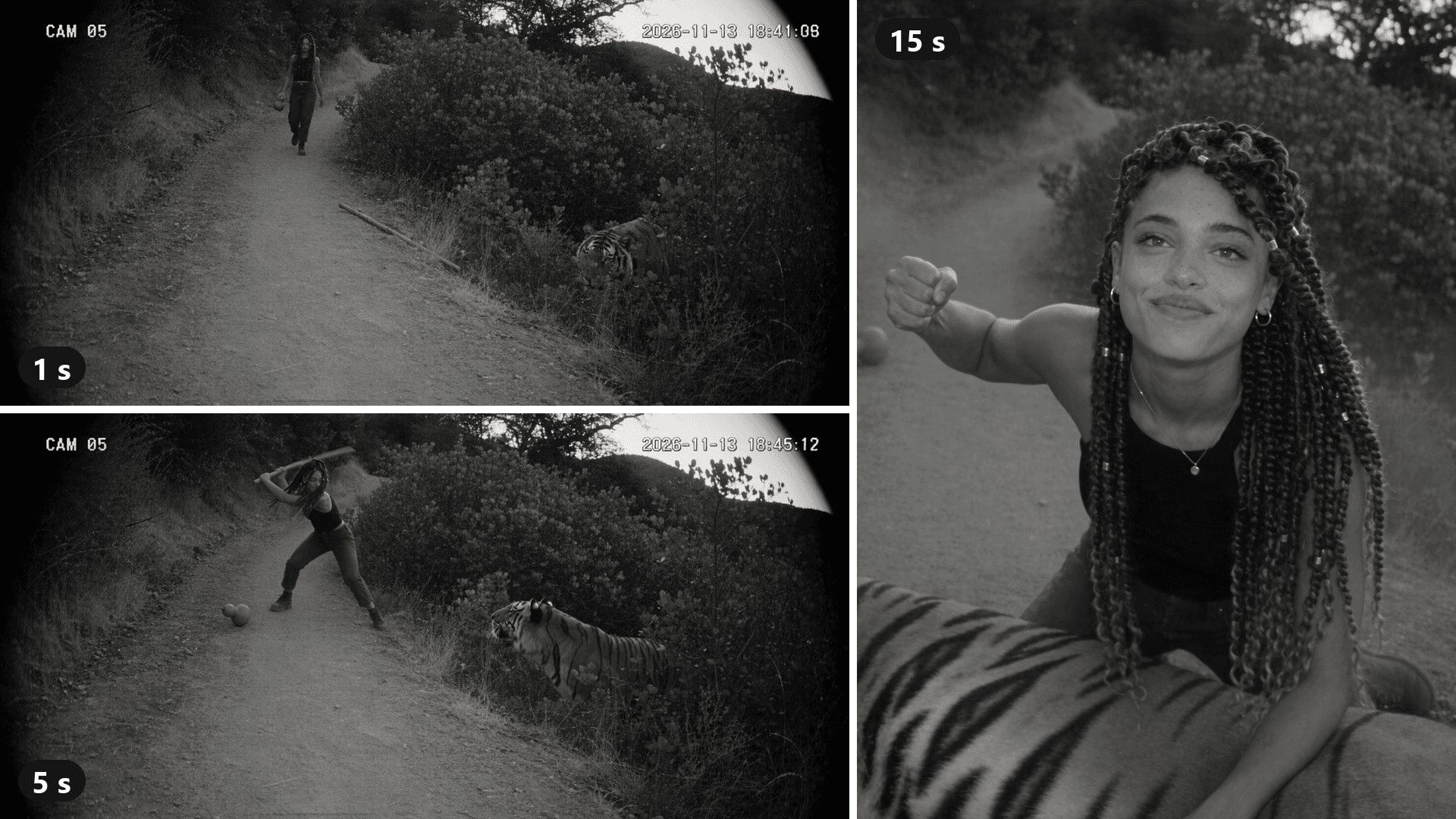
A grainy security feed. A woman walks up a forest path, swinging a gourd. In the bushes to her right, a tiger lifts its head. Fifteen seconds later she is kneeling on its back, out of breath, looking straight up into the lens.
That is what tiger fight AI makes: a fake CCTV clip that retells a classic Chinese tall tale with your face in it. It went from Chinese video sites to TikTok in under a week. This guide traces the template behind it, then rebuilds the scene from one photo with a prompt you can copy. The clip above is our own run.
Key Takeaways
- Tiger fight AI retells Wu Song's tiger fight from Water Margin as grainy black-and-white CCTV footage starring you.
- It began on Chinese video sites in early November 2026 and reached TikTok through a CapCut template.
- That one-photo CapCut template, titled just "AI trend," passed 47,000usesin its first five days.
- On Atlas Cloud, one photo and a timed single-camera prompt make the clip in the AI video generator.
- Use your own face or a friend whoagreed, keep the fight bloodless, and label the post as AI.
What Is the Tiger Fight AI Trend?
One photo goes in. Out comes a black-and-white "security camera" clip: you walk up a forest path, a tiger jumps out of the bushes, and you win. The usual version runs 10 seconds, with "CAM 05" in the corner like a real feed.
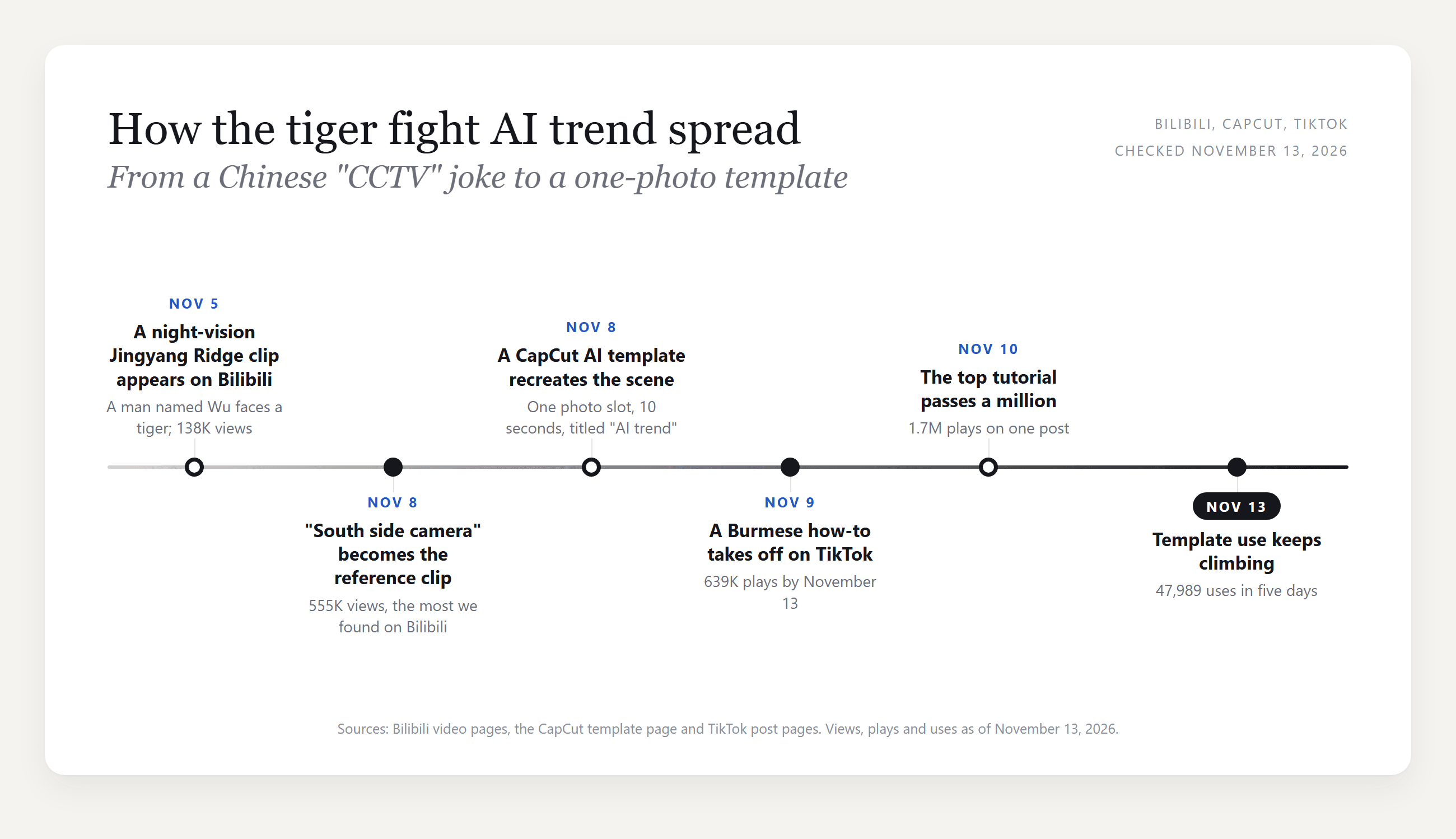
It moved fast. The earliest clip we found went up on Bilibili on November 5. Three days later, a "Jingyang Ridge, south side camera" version was posted on Bilibili and set the look the CapCut template later copied. It had about 555,000 views by November 13.
A CapCut AI template of that scene appeared the same day. On TikTok, how-to posts with Burmese captions picked it up on November 9, and one TikTok tutorial from November 10 passed 1.7 million plays.
Wu Song and the Tiger: Where the CCTV Tiger Fight Comes From
The story is from Water Margin, one of the four classic Chinese novels. Wu Song drinks at an inn below Jingyang Ridge, ignores a warning about a man-eating tiger and crosses at dusk. His staff snaps in the fight, so he finishes it with his fists.
That is why the hero of the CCTV tiger fight carries a wine gourd and grabs a stick.
The camera framing came from a wider joke. Chinese creators had started posting AI "security footage" of famous legends, and 36Kr reported on November 12 that the wave began with a fake recording of the Hongmen Banquet.
The Bilibili clip and the CapCut template tell the same story at different lengths:
| Bilibili "south side camera" clip | CapCut "AI trend" template | Our Atlas Cloud version | |
|---|---|---|---|
| Cameras | 3, with hard cuts | 2, with one cut | 1, one continuous take |
| Length | 29 s | 10 s | 15 s |
| Hero | Wu Song in a robe, hair tied up | Your photo in place of a woman in black | Your photo, any outfit you describe |
| The fight | Approach, stick, wrestling, pin | Approach and leap, then the pin | Approach, leap, tumble, pin, a look up at the lens |
The template drops the wrestling in the middle. We went the other way: one fixed camera that never cuts, which reads more like a real feed.
How to Make a Tiger Fight AI Video From One Photo
One photo and one run on Atlas Cloud produced the AI tiger video below.
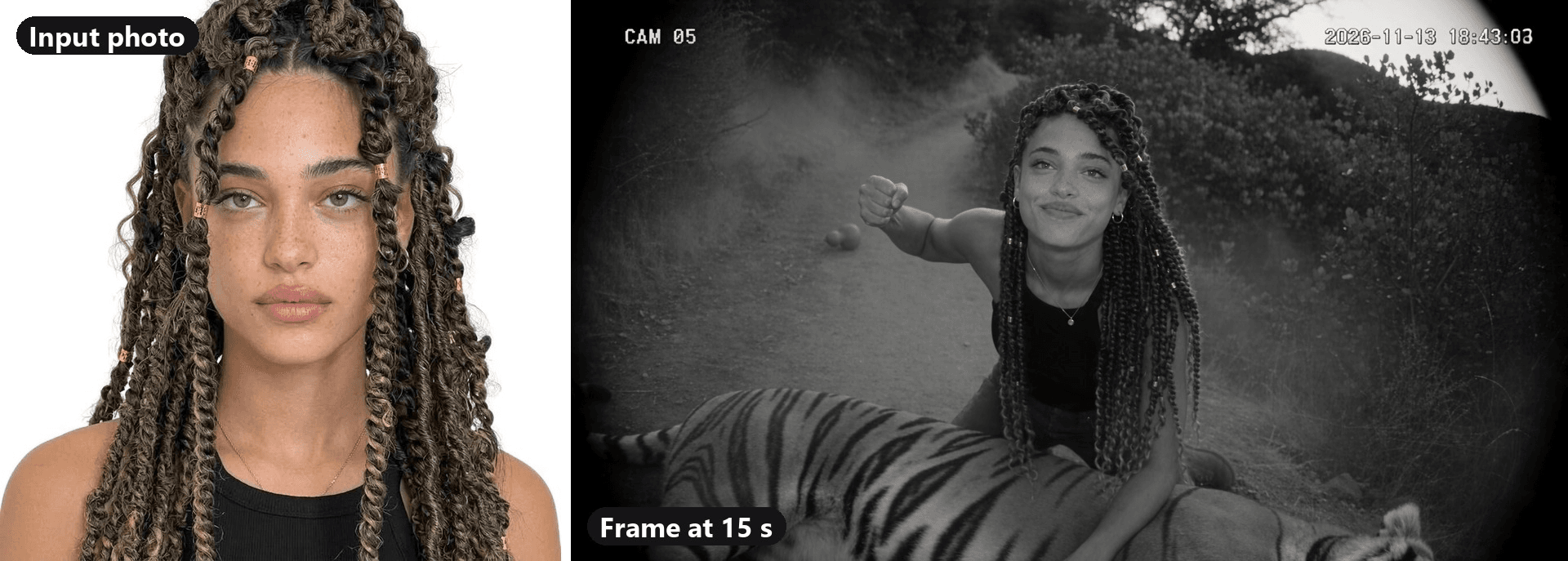
The model is Seedance 2.5. It worked from a single head-and-shoulders photo: by the closing frame, her face, braids and gold cuffs all match the picture, and the cargo trousers and boots came straight from the prompt. The footsteps, the growl and the thud of the tumble came out of the same run.
Pick a sharp photo with your face toward the camera. A plain top reads well in black and white, and anything below the shoulders can come from the prompt.
Everything happens in the video generator, on the Video Generation tab.
Method 1: Make the CCTV Tiger Fight in the Atlas Cloud Video Generator
Follow the numbers on the screenshot:
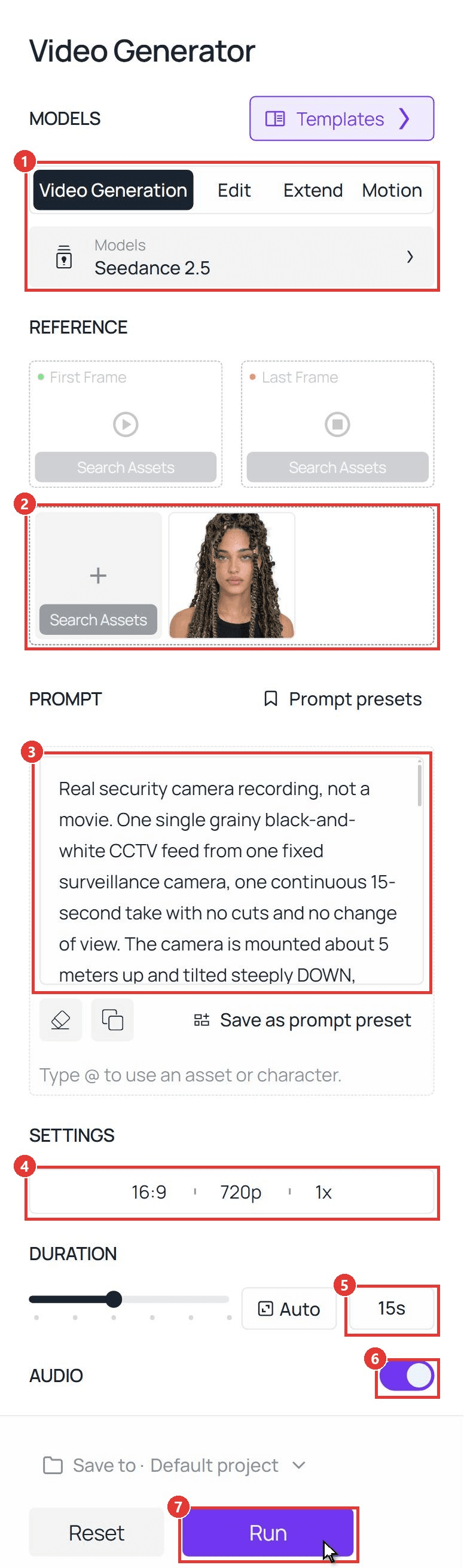
- Model: open Video Generation and keep Seedance 2.5.
- Reference: upload your photo under Upload other references. Leave First Frame and Last Frame empty.
- Prompt: paste the prompt below. @Image1 points at the photo you just uploaded.
- Settings: pick 16:9 and 720p, with one output. 720p costs less; the clip above was rendered at 1080p.
- Duration: type 15.
- Audio: leave it on.
- Run. The clip shows up in the panel on the right.
plaintext1Real security camera recording, not a movie. One single grainy black-and-white CCTV feed from one fixed surveillance camera, one continuous 15-second take with no cuts and no change of view. The camera is mounted about 5 meters up and tilted steeply DOWN, about 50 degrees below the horizon, onto a dirt path through a dense mountain forest at dusk: a top-down security view. NO sky and NO horizon anywhere in the frame; the ground, the path and the bushes fill the whole picture from the top edge to the bottom edge. Everyone is seen from above: we look down on the tops of their heads and shoulders, and their shadows fall on the ground. The path enters at the top of the frame and runs down toward the bottom of the frame. Wide-angle lens with barrel distortion and dark corners, deep focus, flat dull exposure, low resolution, video noise and compression blocks. The view is locked for the whole video: no pan, no zoom, no tracking, no shake, no cuts, no second camera, no close-ups, no eye-level view, no low camera, no landscape view, no shallow depth of field, no cinematic lighting. We only see what this camera sees: the camera itself, its housing, mounts, poles and cables never appear anywhere in the frame. 16:9. 2Small white text in the top left corner: "CAM 05". Small white running timestamp in the top right corner, starting at "2026-11-13 18:42:07" and counting forward second by second. No other text. 3 4The hero = the young woman in @Image1. Copy her face exactly: face shape, light eyes, thick dark eyebrows, nose, full lips, skin tone and the freckles across her nose and cheeks. Copy her hair exactly: long, waist-length twisted braids in dark brown with honey-blonde highlights, with small gold cuffs on some of the braids; the braids swing with every move. She is tall and slim with an athletic build. She wears the black ribbed tank top and the thin gold necklace from @Image1, plus dark cargo trousers and black lace-up boots. Use @Image1 only for who she is and what she wears; the white background never appears. The same woman in every frame. 5 6The action, in one unbroken shot: 7[0-3s] She walks up the path from the top of the frame toward the camera, small in the frame and seen from above, relaxed, swinging a round gourd bottle in one hand. A large tiger lies low inside the dense bushes on the right side of the path; only its head shows through the leaves. 8[3-5s] The tiger lifts its head. She stops, startled, drops the gourd, which rolls on the path, and snatches up a long wooden stick lying at the edge of the path. 9[5-7s] The tiger leaps out of the bushes at her. She swings the stick; the tiger dodges and the stick flies out of her hands. 10[7-11s] She grabs the tiger by the thick fur of its neck with both hands. They tumble over once on the dirt in a cloud of dust, rolling closer to the camera, and she ends up on top of the tiger in the lower half of the frame. 11[11-13s] Still in the same fixed view, now nearer to the camera and seen from above: the tiger lies flat on its side, beaten and still, breathing. She kneels on its back, presses its neck down with one hand and raises her other fist high. [13-15s] Then she pushes a braid out of her face, tilts her head back and stares straight up into the camera lens. She holds that direct eye contact with the camera until the very last frame, out of breath, with a small, cool half-smile: her whole face is clearly visible, seen from above, looking right at us. 12 13Anatomy: exactly one person and one tiger in the frame. She is one woman with one head, two arms, two hands with five fingers each. The tiger has one head, four legs, one tail and normal stripes. Bodies never merge, stretch or melt during the leap and the tumble. 14Safety: no blood, no wounds, no bites, no claws in skin. The tiger is only pinned down and is not hurt; nobody is hurt. 15Sound: thin and slightly muffled like a cheap security camera microphone: forest birds, footsteps on gravel, the gourd hitting the ground, a low tiger growl and one roar at the leap, the whoosh of the stick, a heavy thud and scuffling in the dust, her hard breathing, a faint electrical hum. No music, no dialogue, no narration. 16No subtitles, no captions, no logos, no watermark, no color.
To make it yours, rewrite only the hero paragraph (face, hair, outfit) and switch "she" to "he" if needed. Keep the camera paragraph and the timing. For two people in one clip, our I Love The Smiths guide shows how to share one reference photo.
Method 2: Send the Same Prompt Through the Seedance 2.5 API
Making one for every friend in the group chat? The API takes the same photo and the same prompt.
Step 1: Create an API key. In the console, open Settings and create a key under API Keys.

Step 2: Check the request format. The Atlas Cloud docs cover authentication, and the API tab on the Seedance 2.5 reference-to-video model page lists every field.
Step 3: Send the request and poll. The photo goes in the reference_images array as a public URL:
plaintext1curl -X POST https://api.atlascloud.ai/api/v1/model/generateVideo \ 2 -H "Authorization: Bearer $ATLASCLOUD_API_KEY" \ 3 -H "Content-Type: application/json" \ 4 -d '{ 5 "model": "bytedance/seedance-2.5/reference-to-video", 6 "prompt": "<paste the CCTV tiger prompt here>", 7 "reference_images": ["https://your-cdn.com/your-photo.jpg"], 8 "ratio": "16:9", 9 "resolution": "720p", 10 "duration": 15, 11 "generate_audio": true 12 }'
Poll the returned prediction ID until the status reads completed, then download the clip from the outputs array:
plaintext1curl https://api.atlascloud.ai/api/v1/model/prediction/<prediction_id> \ 2 -H "Authorization: Bearer $ATLASCLOUD_API_KEY"
The endpoint and the key stay the same across every video model on Atlas Cloud. To try another one, change the model string.
Which Tiger Fight AI Template Is the Real One?
We opened 86 recent trend posts on TikTok, from four tags and one sound page. 53 of them link to the same CapCut template, and its title gives nothing away.
| Route | You upload | You get | Checked on November 13, 2026 |
|---|---|---|---|
| CapCut template "AI trend" (by GG-Bond) | 1 photo | 10 s, 16:9, the Jingyang Ridge camera label | 47,989 uses; created November 8 |
| CapCut template "AI" (a second creator) | 1 photo | 14 s, 16:9, sepia tint, no camera label | 1,281 uses; created November 9 |
| Atlas Cloud video generator (this guide) | 1 photo and a prompt | 15 s here, with the setting and outfit you write | The run shown above |
Neither the "AI trend" title nor the template description mentions a tiger, so a search for "tiger" inside CapCut is unlikely to surface it. The way in is the template link at the bottom left of a trend post on TikTok.
A template is quick, and its scene is fixed. A prompt lets you move the fight, swap the gourd for a coffee cup, or run past 10 seconds.
Getting the Security Camera Effect Right
The joke only lands if the clip looks like real camera footage. Five details do most of that work, each one a line in the prompt.
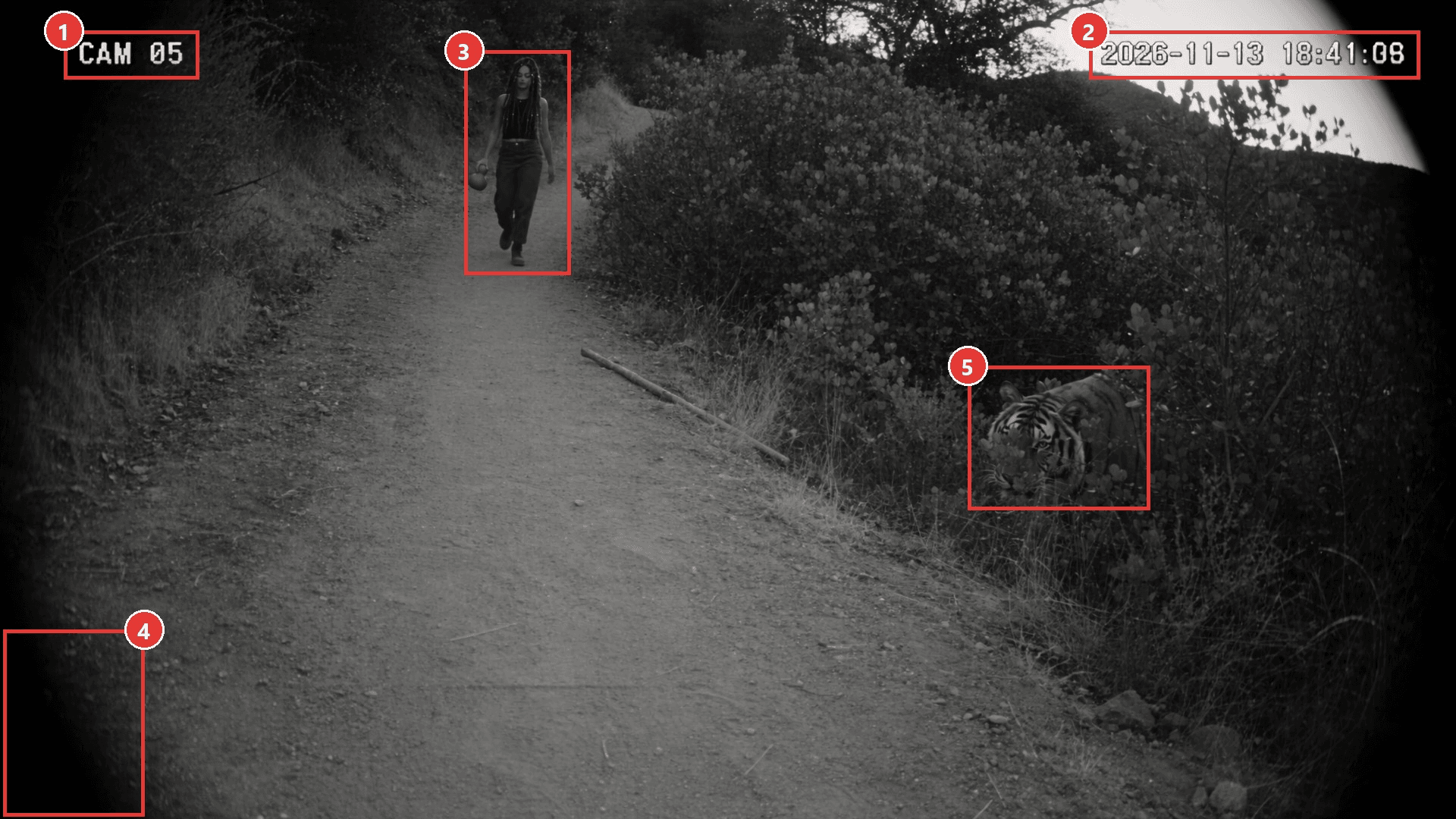
| # | What sells it | The prompt line that does it |
|---|---|---|
| 1 | A camera label | Small white text in the top left corner: "CAM 05" |
| 2 | A running clock | A timestamp that counts forward second by second |
| 3 | A view from above | Tilted about 50 degrees down, no sky and no horizon in the frame |
| 4 | A cheap lens | Barrel distortion, dark corners, low resolution, compression blocks |
| 5 | A slow reveal | Only the tiger's head shows through the leaves at first |
Two lines matter more than they look. "No sky and no horizon" points the camera at the ground, so give it along with the height. "We only see what this camera sees" keeps the camera itself out of the shot. And skip music: thin, muffled sound is half of the CCTV effect.
CCTV Filter or AI Video: Which One Makes the Tiger Fight?
A CCTV filter or security camera filter app restyles footage you already have. Good for a hallway prank, but it cannot put a tiger on the path.
| CCTV filter app | AI CCTV video (this guide) | |
|---|---|---|
| What you start with | A video you filmed | One photo |
| The tiger | Not possible | Generated with the scene |
| Camera angle | Wherever you held the phone | Written into the prompt |
| Best for | Making real footage look like a security feed | The whole tiger fight from scratch |
Fake Security Camera Footage: Keep the Tiger Fight a Joke
The look that makes the clip funny can also make it believable. In November 2025, Alt News and The Quint debunked an AI-made "CCTV" clip of a tiger dragging a man away in Maharashtra, India, after it spread as real. The Quint reported that police registered a case against one user for circulating it.
The gourd gives the joke away to anyone who knows the story. Most followers will not, so post with that in mind:
| Do | Don't |
|---|---|
| Switch on the platform's AI label | Caption it as real footage or a news clip |
| Use your own face, or a friend who said yes | Use a celebrity, a stranger or a child |
| Keep the fight bloodless, with the tiger pinned | Add injuries to make it look rougher |
| Name the trend or Wu Song in the caption | Tag a real location as if it happened there |
The labeling switches on TikTok and Instagram are covered in our he is nonchalant guide.
Frequently Asked Questions
Is the CCTV tiger fight video real?
No. The trend clips are AI-generated, and the security camera look is part of the joke. Nobody filmed a tiger: the hero comes from an uploaded photo, and the tiger, the path and the camera come from a template or a prompt.
Can I add the phonk music from the trend?
Yes, at the posting step. The biggest trend posts we checked use a phonk track from TikTok's sound library. Our prompt asks for camera-mic sound only, so add the music from the app's sound library and keep the footsteps and growl underneath.
Can my dog or cat fight the tiger instead?
Yes. Upload a photo of your pet and rewrite the hero paragraph around it: breed, fur, four legs, paws. Swap the stick for a leap and the kneel for standing on the tiger's back. Our AI cat dance guide shows how to pin down fur and markings so the pet stays the same.
How much does a 15-second tiger fight AI video cost on Atlas Cloud?
A 15-second clip with audio costs about $4.52 at 720p, which is 20% off the $5.65 list price, as of November 13, 2026. At 1080p, the resolution of our clip, it is about $8.90 against an $11.12 list price. The discount is time-limited, and the Run button shows the exact price before you generate.
Can I make it in color or 9:16?
The prompt controls both. For color, delete "black-and-white" and "no color" but keep the grain and dark corners. For vertical, pick 9:16 in the settings and change "16:9" in the prompt. We ran the 16:9 black-and-white version shown here.
Conclusion
The trend is a centuries-old story with a security camera bolted on. A gourd, a stick and a label in the corner tell people the joke before the tiger even jumps.
For your own tiger fight AI clip, one sharp photo and the prompt above will do it. Keep the camera high, keep the fight clean, and turn the AI label on before you post.