

最新更新: Gemini Omni Flash 1.1 已於 2026 年 9 月 1 日上線。
價格不是最難的部分;難的是知道哪一秒值得付費。
關於 Gemini Omni Flash 1.1 定價,已發佈的 API 列表價格為每輸出秒:360p $0.03、720p $0.10、1080p $0.15、4K $0.30。因此,5 秒的 720p 輸出為 $0.50。先在 360p 測試鏡頭、決定方向,再為最終解析度付費。
Google 列出穩定版 gemini-omni-1.1-flash 的輸出為 3 至 10 秒、24 FPS。延伸以 10 秒為增量,累計可達 40 秒,因此請將預算設為一連串輸出,而非一次 40 秒的渲染(Google AI for Developers,2026 年 8 月)。
重點摘要
- 720p 5 秒:已發佈 API 列表價格約為 $0.50。
- 360p 草稿讓構圖測試變得更便宜。
- 決定預算的是成功生成的次數,而非單純的時長。
- 一個 40 秒的故事是四個相連的 10 秒延伸段。

案例 1:以瀏覽器渲染的決策卡,用於 5 秒咖啡館發布簡報,將 3 次低成本 360p 測試與 1 次 4K 最終版分開。
為什麼 Gemini Omni Flash 1.1 定價常被誤解
Omni 1.1 結合了 360p 預覽、首尾影格插補、放大至 4K、影片參考輸入與場景延伸。Google 表示,360p 預覽最多可快 60%,成本僅為標準 720p 輸出的三分之一(Google 發布公告,2026 年 8 月)。
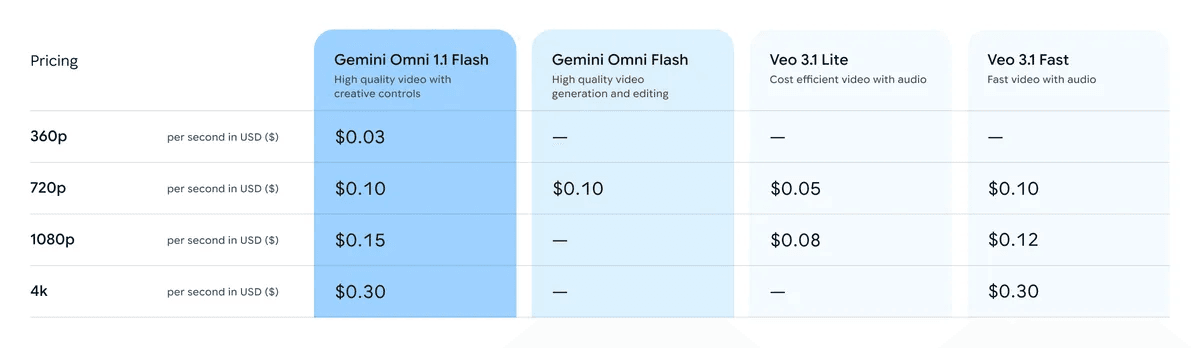
Google 發佈的 Gemini Omni Flash 1.1 定價表裁圖
Google 發佈的定價表,查核日期為 2026 年 9 月 1 日。這是下方已發佈 API 列表價格計算的來源。
常見的誤解很簡單:把每秒費率當作每部影片費率、把 40 秒視為單次輸出,以及忽略重跑。在將片段用於活動之前,應審查複雜動作、跨延伸段的身分一致性和精確文字。
Gemini Omni Flash 1.1 定價工作流程:一份簡報,明確證據
將簡報、草稿和選定的最終版本保存在可重現的工作空間中。本指南中的三張卡片使用相同格式:左側是具體簡報,右側是已發佈的計算結果。這些數字保持可選取、可稽核,而非被嵌入合成影像中。
| 生產支援模型 | 文章用途 | 目前列表價格 | 目前折扣 |
| Seedream v5.0 Pro Text-to-Image | 參考靜態圖 | $0.045 / 張 | 未顯示折扣 |
| MiniMax H3 Image-to-Video | 短片動態樣本 | $0.08 / 秒 | 未顯示折扣 |
| Seedance 2.5 Reference-to-Video | 備用參考驅動動態 | $0.134 / 秒(1080p) | 顯示 -36% |
對於正在驗證多份創意簡報的團隊,Atlas Cloud 可以作為一個獨立工作空間,用於在預算決策時保留參考靜態圖與動態測試。它不是 Gemini 的計費管道。
步驟 1:建立一份已估價的咖啡館鏡頭簡報
在生成之前,先定義一個五秒的鏡頭。咖啡館草稿計算為 5 seconds × 3 runs × $0.03 = $0.45。
plaintext1Cinematic commercial still, a young female barista in a sunlit independent coffee shop, pouring a precise spiral of water over a ceramic dripper, warm amber morning light, natural steam, customers softly visible in the background, 35mm lens, shallow depth of field, realistic skin texture, editorial product-film composition, no text, no logo, 16:9.
選擇 Seedream v5.0 Pro Text-to-Image、16:9、2K、一張圖,並使用可用的最高品質。將選定的靜態圖與簡報一起儲存,以便最終版本不會偏離草稿決策。
步驟 2:製作咖啡館動態樣本
上傳選定的靜態圖。在投入更高解析度的最終版本之前,先測試三個可用的鏡頭變化。
plaintext1Five-second premium coffee commercial. Start on the barista’s focused face, cut to a macro view of hot water blooming the grounds, then use a side tracking shot as a customer receives the cup. Keep the same barista, café, morning light, ceramic dripper, and steam. No text, no logo, no zoom-only motion.
選擇 MiniMax H3 Image-to-Video、5 秒、2K、16:9。在 Gemini 中,使用選定的簡報製作 360p 草稿,然後以交付物所需的解析度生成最終版本。
步驟 3:為 Gemini Omni Flash 1.1 關鍵影格轉場估價
當兩個結束影格都能為活動服務時,請使用 10 秒的產品轉場。此簡報從設計桌移動到一位設計師戴著霧面黑色耳機、位於夜晚窗邊的場景。
plaintext1Create a five-second elegant product transition from the design desk to the evening city window. Begin with a top-down close view of matte-black wireless headphones, orbit gently as the designer picks them up, then reveal the designer wearing them by the window. Preserve the headphone design and identity. Use a top-down shot, product macro, and medium portrait. No text, no logo, no zoom-only movement.
選擇 MiniMax H3 Image-to-Video、5 秒、2K、16:9 作為動態樣本。對 Gemini 而言,10 秒的已發佈數字為 360p $0.30、720p $1.00、1080p $1.50、4K $3.00。發布前請檢查 Google 目前的關鍵影格控制項。

案例 2:以瀏覽器渲染的 10 秒關鍵影格揭曉卡片,包含端點決策與 360p 至 4K 範圍。
步驟 4:為 Gemini Omni Flash 1.1 延伸段規劃預算
讓每個延伸段都能獨立發揮效用。漂浮圖書館的簡報讓團隊可以在某個段落不再支援故事時停下。
plaintext1Five-second cinematic magical-realism sequence. Start with a female librarian in a dark green coat at an oak table, move past a floating book in the foreground, then make a smooth half-orbit revealing a vast dusty library and drifting shelves. Preserve the librarian, green coat, oak table, warm dusty light, and realistic depth. No text, no logo, no zoom-only movement.
選擇 MiniMax H3 Image-to-Video、5 秒、2K、16:9 作為文章動態樣本。在 Gemini 中,四個相連的 10 秒延伸段為 360p $1.20、720p $4.00、1080p $6.00 或 4K $12.00。
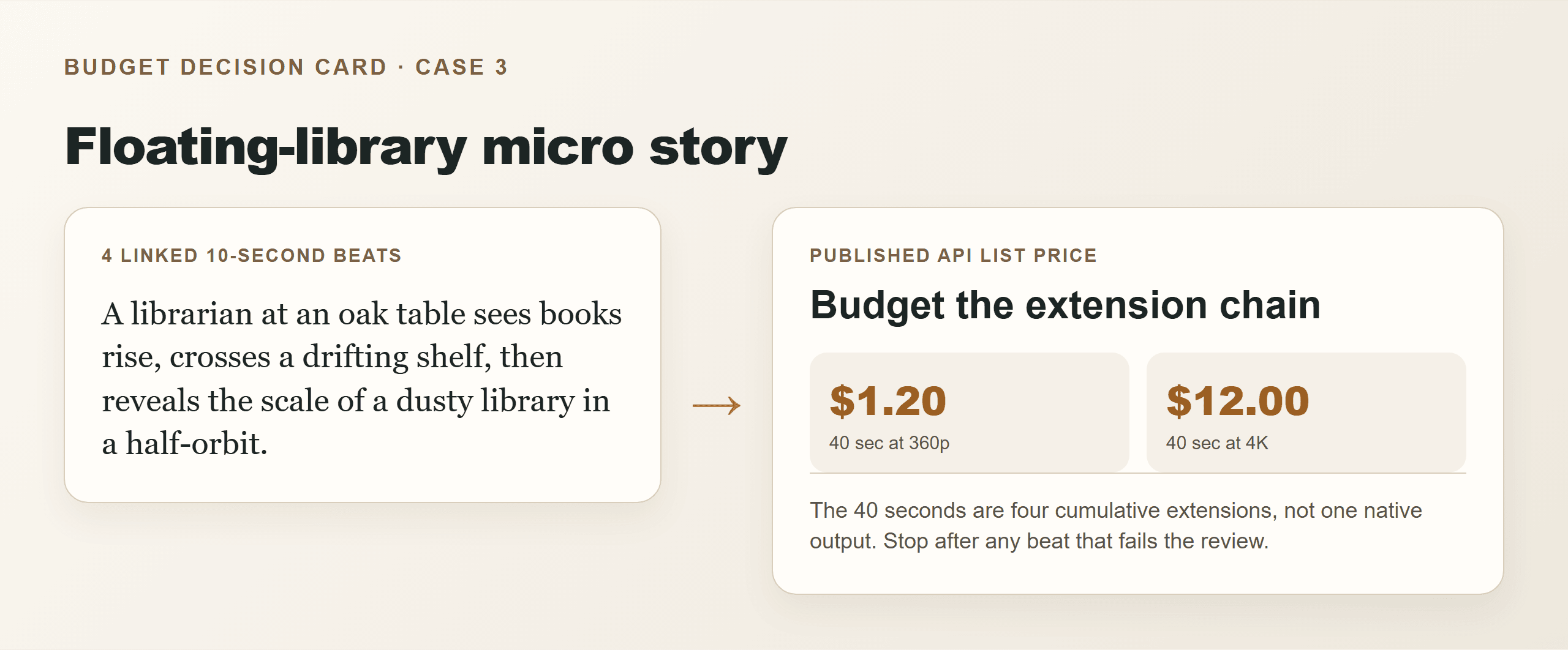
Gemini Omni Flash 1.1 定價:漂浮圖書館延伸卡片
案例 3:以瀏覽器渲染的 40 秒延伸卡片,清楚呈現四個段落的結構與已發佈範圍。
Gemini Omni Flash 1.1 定價變化
plaintext1Total estimated output cost = seconds × published price per second × successful generations
- 快速測試: 3 個五秒 360p 構圖和 1 個 4K 最終版等於
$0.45 + $1.50 = $1.95,假設每個輸出都成功。 - 關鍵影格轉場: 僅當兩個端點影格都具有活動價值時,才使用 10 秒 $3.00 的 4K 範例。
- 微故事: 將 40 秒的故事分成 4 個可行段落。4K 輸出計算為 $12.00,不含重跑。
請勿將此公式用於訂閱點數、地區稅、儲存空間、剪輯軟體、人工審查或後期製作。Flow 點數與 Gemini API 定價是不同單位。
Gemini Omni Flash 1.1 定價:成本、權利與限制
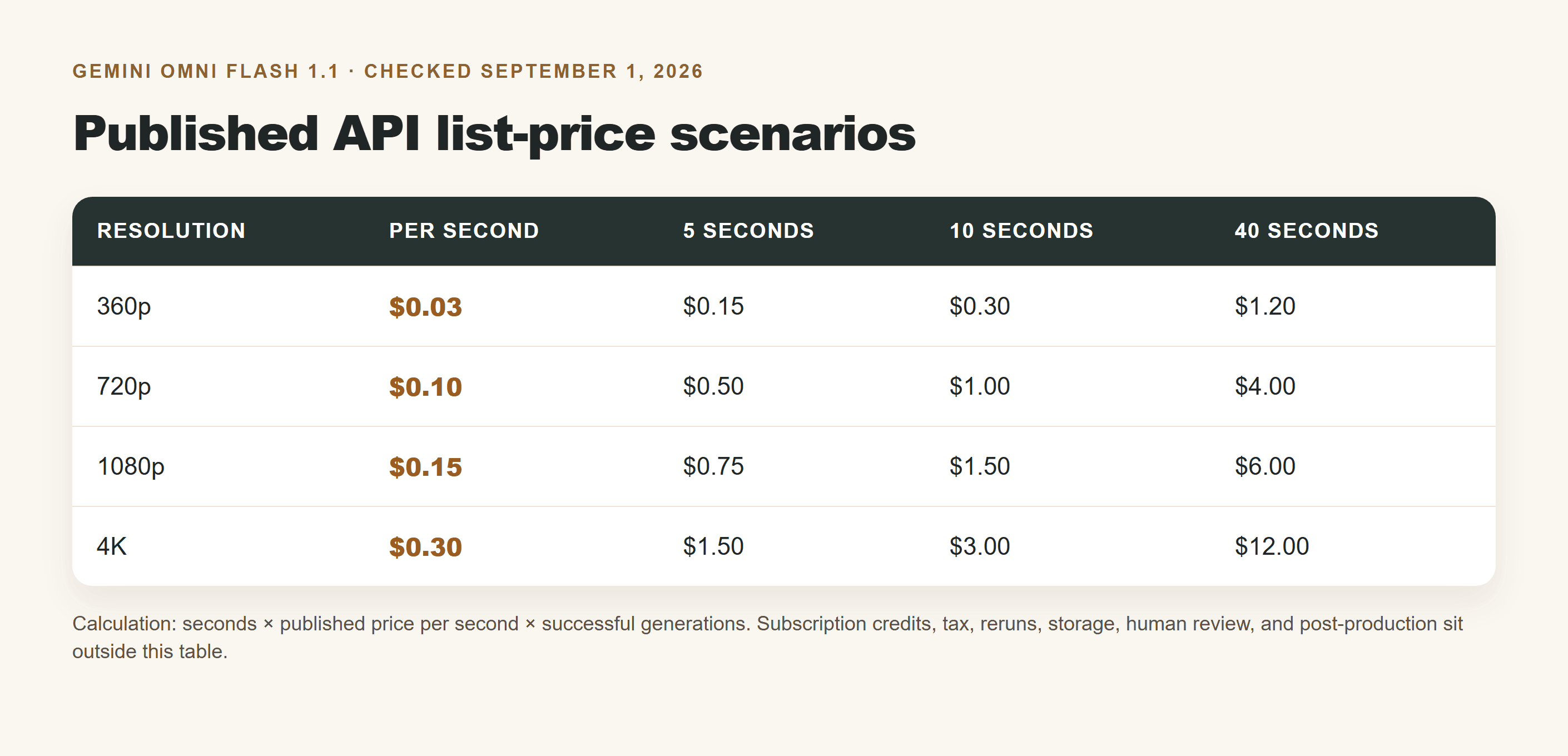
Gemini Omni Flash 1.1 定價情境表(5、10 和 40 秒)
以瀏覽器渲染的情境表,使用 Google 發佈的 API 列表價格數字,查核日期為 2026 年 9 月 1 日。
| 情境 | 最低可用測試 | 建議最終版 | 最大的隱藏變數 |
|---|---|---|---|
| 咖啡館發布,5 秒 | $0.15(360p) | $1.50(4K) | 構圖重試 |
| 耳機揭曉,10 秒 | $0.30(360p) | $3.00(4K) | 端點一致性 |
| 漂浮圖書館,40 秒 | $1.20(360p) | $12.00(4K) | 跨 4 個延伸段的連續性 |
這些是已發佈的 API 列表價格範例,並非最終發票金額的承諾。請僅使用允許的參考素材,在商業發布前查閱目前條款與地區可用性,並保留 AI 生成記錄。
當你需要獨立工作空間來支援 Gemini Omni Flash 1.1 定價決策時,請在 Atlas Cloud 上探索目前的影像與影片模型目錄。
常見問題
Gemini Omni Flash 1.1 每秒費用是多少?
已發佈的 API 列表價格為 360p $0.03、720p $0.10、1080p $0.15、4K $0.30。
一部 5 秒的 Gemini Omni Flash 1.1 影片費用是多少?
重跑之前為 360p $0.15、720p $0.50、1080p $0.75 或 4K $1.50。
在 4K 最終版之前使用 360p 值得嗎?
當構圖、動作或攝影機運鏡尚未確定時,值得。五秒 360p 測試為 $0.15;相同 4K 輸出的已發佈列表價格為 $1.50。
場景延伸是否表示 Gemini Omni Flash 1.1 一次生成 40 秒?
不是。Google 說明是以 10 秒為單位累積,最多 40 秒。
Google Flow 點數與 Gemini API 定價是同一件事嗎?
不是。API 定價是每輸出秒的計算;Flow 使用隨方案和地區而異的訂閱點數。
Gemini Omni Flash 1.1 能否在延伸段之間保持角色一致性?
它可以使用先前的影片內容進行延伸,但在每個接受的段落中都要審查身分、道具、動作連續性與文字。





