

復古卡通很少因為提示詞需要更多懷舊詞彙而崩壞。它會崩壞,是因為藍綠色外套變成藍色、墨線變得有光澤,而且一個餐館動作變成不相關的鏡頭切換。Kling 4 Flash for retro cartoon videos 最有效的方式,是在要求動作之前先鎖定影像。
Kling 4.0 Flash 是一條有限的搶先體驗途徑,並非普遍可用的正式生產端點。其公布的限制為 3 至 20 秒、720p 與 8-bit SDR。若要讓反覆出現的角色保持穩定,請製作一個已核准的第一幀,然後一次只讓一個明確的節拍動起來。如果你的帳號尚未啟用 Flash,同樣的流程今天就能在 Atlas Cloud 上,以實際可用的 Kling V3.0 Turbo 圖生影片途徑執行。
重點摘要
- 使用圖生影片來鎖定服裝、色盤、線條處理與輪廓。
- 產生 3 個獨立的短鏡頭,而不是把整段迷你故事硬塞進一次生成。
- 將 Flash 存取權、完整 Kling 4.0 存取權,以及實際可用的 Atlas 工作流程視為不同狀態。
- 在每個基礎幀中保持角色設定聖經不變。
Kling 4 Flash 現在能製作復古卡通影片嗎?
可以,如果你的帳號具備有限的 Flash 推送資格。Kling 表示,Kling 4.0 Flash 於 9 月 28 日針對有限使用者群開放搶先體驗,其列出的功能包括圖生影片與文生影片。官方發布說明列出 Flash 為 3 至 20 秒、720p 與 8-bit SDR。這使它成為測試短式風格化鏡頭的合理選擇,而不是保證能進行 4K 或多關鍵幀工作流程的理由。(Kling 官方發布,2026 年 9 月)
| 途徑 | 目前狀態 | 此處用途 | 重要限制 |
|---|---|---|---|
| Kling 4.0 Flash | 有限搶先體驗 | 若你的帳號可使用,則用於短式風格化測試 | 3 至 20 秒、720p、8-bit SDR |
| 完整 Kling 4.0 | 另行公布 | 確認存取權後的後續製作選項 | 不要將其控制項視為 Flash 功能 |
| Atlas Cloud 上的 Kling V3.0 Turbo I2V | 實際可用備援 | 下方的影像優先教學 | 每批次前確認實際設定與價格 |
Kling 4 Flash 存取權、解析度與片段長度
開啟你的 Kling 建立頁面,並在據此規劃前確認 Flash 是可用的模型。完整 Kling 4.0 版本是另一種存取狀態。除非有實際的 Atlas 模型頁面存在,否則不應將 Flash 描述為 Atlas Cloud 模型。
就本文的 3 鏡頭測試而言,實用的備援是 Atlas Cloud:建立靜態影像、核准它,然後分別為每個鏡頭加入動畫。如此一來,重拍只會限於單一鏡頭。
為什麼 Kling 4 Flash 復古卡通影片需要先有影像
文生影片可以創造出吸引人的細節,也可能創造出讓系列無法使用的細節。圖生影片在動作開始前,先給模型一份視覺合約。
在已核准的畫面中鎖定這 4 個錨點:
| 視覺錨點 | 為何重要 | 在提示詞中的位置 |
|---|---|---|
| Mara 的輪廓 | 她的短鮑伯頭、外套、鞋子與成人比例能辨識出她 | 角色身分 |
| 風格語法 | 墨線輪廓、賽璐珞色彩與半色調可防止風格變得有光澤 | 視覺年代與線條處理 |
| 世界錨點 | 卡座、雨窗、鈴、杯子與霓虹燈確立故事所在 | 固定地點與道具 |
| 攝影語法 | 具名取景可避免非預期的蒙太奇 | 動作提示詞,逐一節拍 |
Kling 的提示詞指南將影片指導圍繞主體、動作、場景、攝影機與燈光來架構。就此使用情境而言,將風格與角色細節放在第一幀,然後使用動作提示詞在指導動作的同時保留它們。(Kling 提示詞指南,2026 年)
Kling 4 Flash 復古卡通提示詞:建立角色設定聖經
對每個基礎幀提示詞使用這個精簡公式:
[character identity] + [visual era and line treatment] + [limited color palette] + [fixed location] + [one prop] + [no-text constraints]
角色設定聖經保持逐字不變。鏡頭之間只有場面調度改變。這種紀律比在每個提示詞中加入一批新的復古形容詞更重要。
用一個角色製作 3 個 Kling 4 Flash 復古卡通鏡頭
使用原創迷你故事「Mara 的霓虹餐館外送」。產生 3 個獨立的片段。目前的 Atlas Cloud Turbo 文件提供 5 秒與 10 秒的長度選項,因此這個 3 節拍備援版本請使用 10 秒。每個片段都有自己的對應基礎幀,因此某個效果不佳的版本不會迫使你全部重新開始。
步驟 1:產生可重複使用的第一幀
在 GPT Image 2 Text-to-Image 中建立 2 到 4 個候選影像。選擇高品質、16:9,以及實際表單提供的最高解析度。只核准 Mara 的珊瑚紅髮夾、藍綠色外套、珊瑚紅袖章、黃色包包、鈴、咖啡杯與雨窗全都清晰可見的畫面。
plaintext1Create a wide 16:9 hand-drawn retro cartoon keyframe for an original animated short. The visual language is late-1980s Saturday-morning cel animation: uneven dark navy ink outlines, flat cel shading, restrained halftone print texture, tiny paint-registration imperfections, and a limited palette of teal, coral red, butter yellow, midnight blue, and warm cream. 2 3Main character: Mara, an original adult bicycle courier in her twenties, short black bob haircut with a single coral hair clip, oversized teal bomber jacket with a coral-red patch on the left sleeve, cream T-shirt, dark navy trousers, white high-top sneakers, and a small yellow messenger bag. Keep Mara’s face, clothing colors, proportions, and hair silhouette clear and repeatable. 4 5Scene: Mara sits alone in a warm retro roadside diner booth at night. A rain-streaked window fills the left side. A tiny red tabletop service bell, a steaming cream coffee cup, and a folded yellow delivery map sit on the table. Outside the window, a teal-and-coral neon diner sign reflects on wet pavement. Compose Mara on the right third of frame, with the bell and cup readable in the foreground. Hand-painted background details, no photorealism, no 3D rendering, no gradients, no glossy modern CGI, no words, no logo, no subtitles, no watermark.
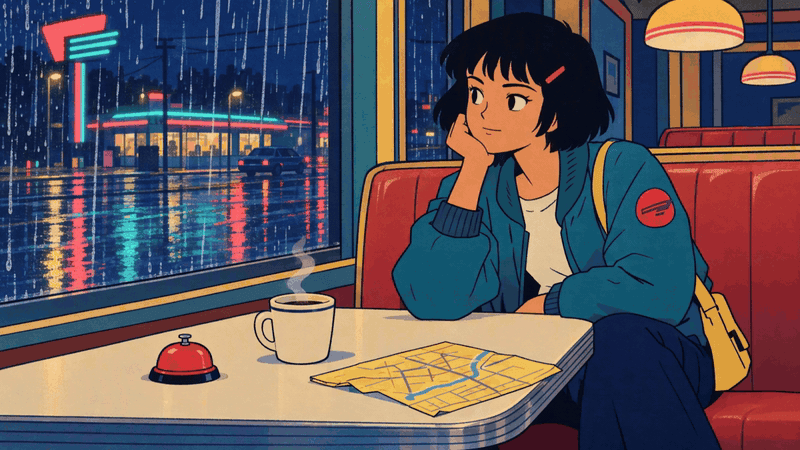
Mara 已核准的餐館關鍵幀,包含雨窗、紅色鈴、咖啡杯與黃色地圖
基礎幀 1:餐館道具、雨窗與 Mara 的藍綠色外套在動畫前確立了整體外觀。
鏡頭 1:鈴與雨
將已核准的畫面上傳至 Kling V3.0 Turbo Image-to-Video。設定為 16:9、10 秒、1080p,並為這個無聲 GIF 範例關閉音訊。動作有因有果:Mara 注意到雨勢,按下鈴,然後伸手拿地圖。
plaintext1Use the supplied image as the exact visual source and preserve Mara’s face, short black bob, coral hair clip, teal bomber jacket, coral sleeve patch, yellow messenger bag, diner booth, red bell, cream coffee cup, rain-streaked window, limited teal-coral-cream palette, hand-inked outlines, flat cel shading, and halftone texture. 2 3Create a 10-second retro-cartoon sequence with three deliberate beats: 40 to 3 seconds: wide shot, Mara notices rain intensifying outside and presses the small red bell once; steam curls from the coffee. 53 to 7 seconds: medium side shot, Mara turns her head toward the window; the neon reflection shimmers across the wet glass. 67 to 10 seconds: close three-quarter shot, Mara gives a determined half-smile and reaches for the yellow delivery map. 7 8Keep the action smooth and readable. Preserve the hand-drawn 1980s cel-animation look. No extra characters, no costume changes, no text, no captions, no logos, no morphing, no sudden camera jumps, no photorealism.
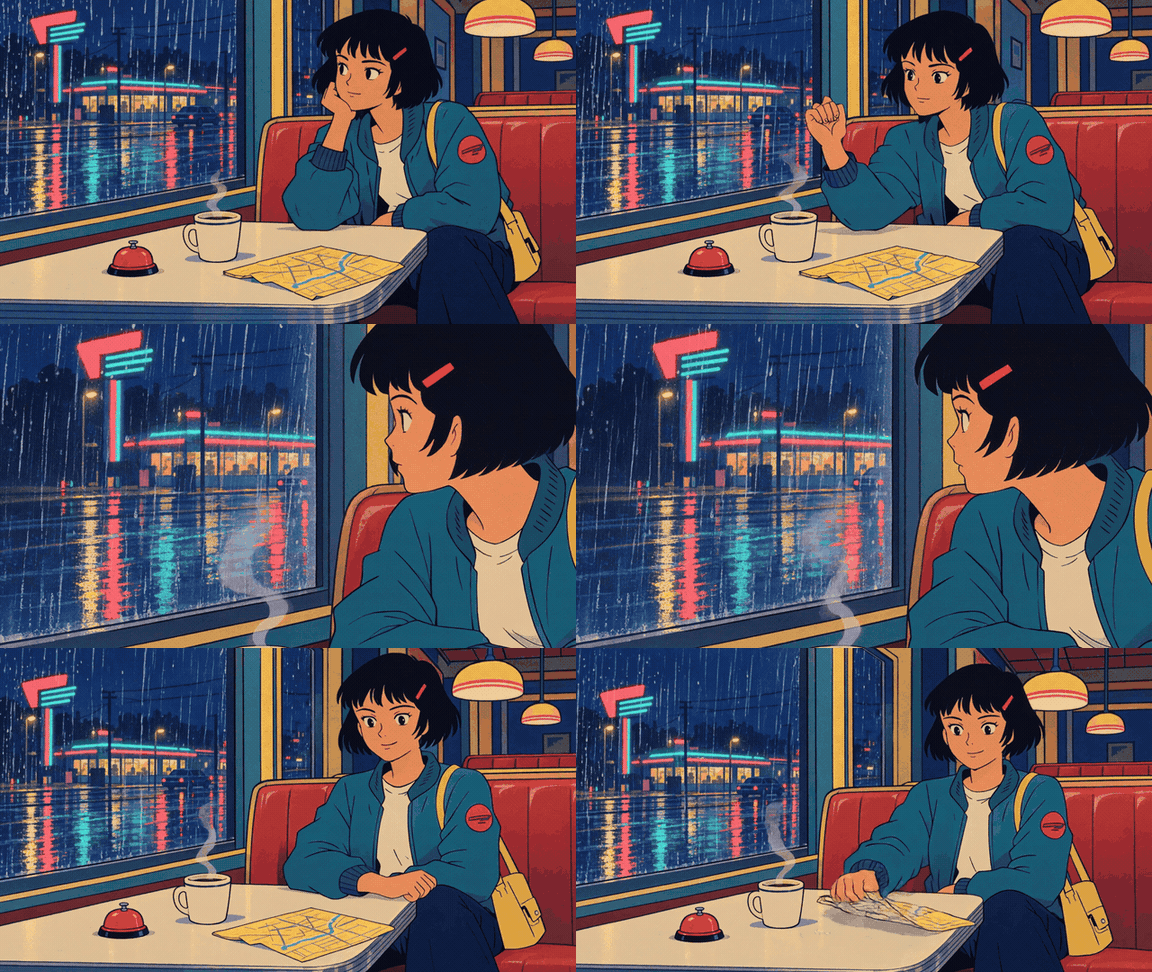
Mara 在餐館桌邊,轉向雨窗並伸手拿地圖
結果 1:Mara 從雨窗轉向桌面並伸手拿地圖。鈴仍保持可見,但完成後的片段並未清楚顯示按下鈴的動作。
鏡頭 2:窗上倒影
使用完整角色設定聖經製作一個新的對應基礎幀。只改變場面調度:Mara 站在餐館門口,拿著黃色地圖與包包背帶,藍綠色速克達在外面的濕地上等候。
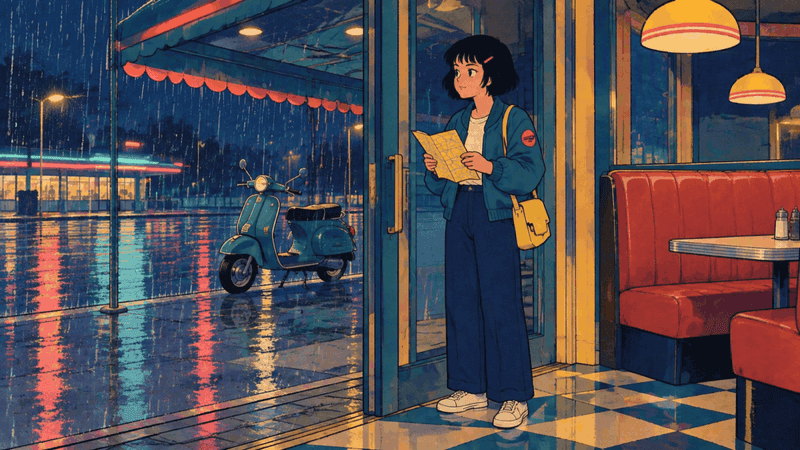
Mara 站在餐館門口,手拿地圖,外面停著藍綠色速克達
基礎幀 2:同一件外套、袖章、包包與雨天色盤延續到新的場面調度中。
plaintext1Use the supplied image as the exact first frame. Preserve Mara’s short black bob, coral hair clip, teal jacket, coral sleeve patch, yellow bag, yellow map, diner doorway, teal scooter, wet pavement, retro hand-inked linework, flat cel shading, halftone texture, and limited teal-coral-cream palette. 2 3Create a 10-second sequence: 40 to 3 seconds: medium interior shot, Mara folds the map once and looks through the rain-streaked door glass. 53 to 7 seconds: exterior medium-wide shot, Mara steps out under the diner awning and places the folded map into her yellow bag. 67 to 10 seconds: low side shot, Mara swings one leg onto the teal scooter; rain ripples in a shallow puddle and neon reflections move across it. 7 8Keep Mara’s design stable. Make every action physically connected. No new characters, no text, no captions, no logos, no style change, no abrupt montage, no photorealism.
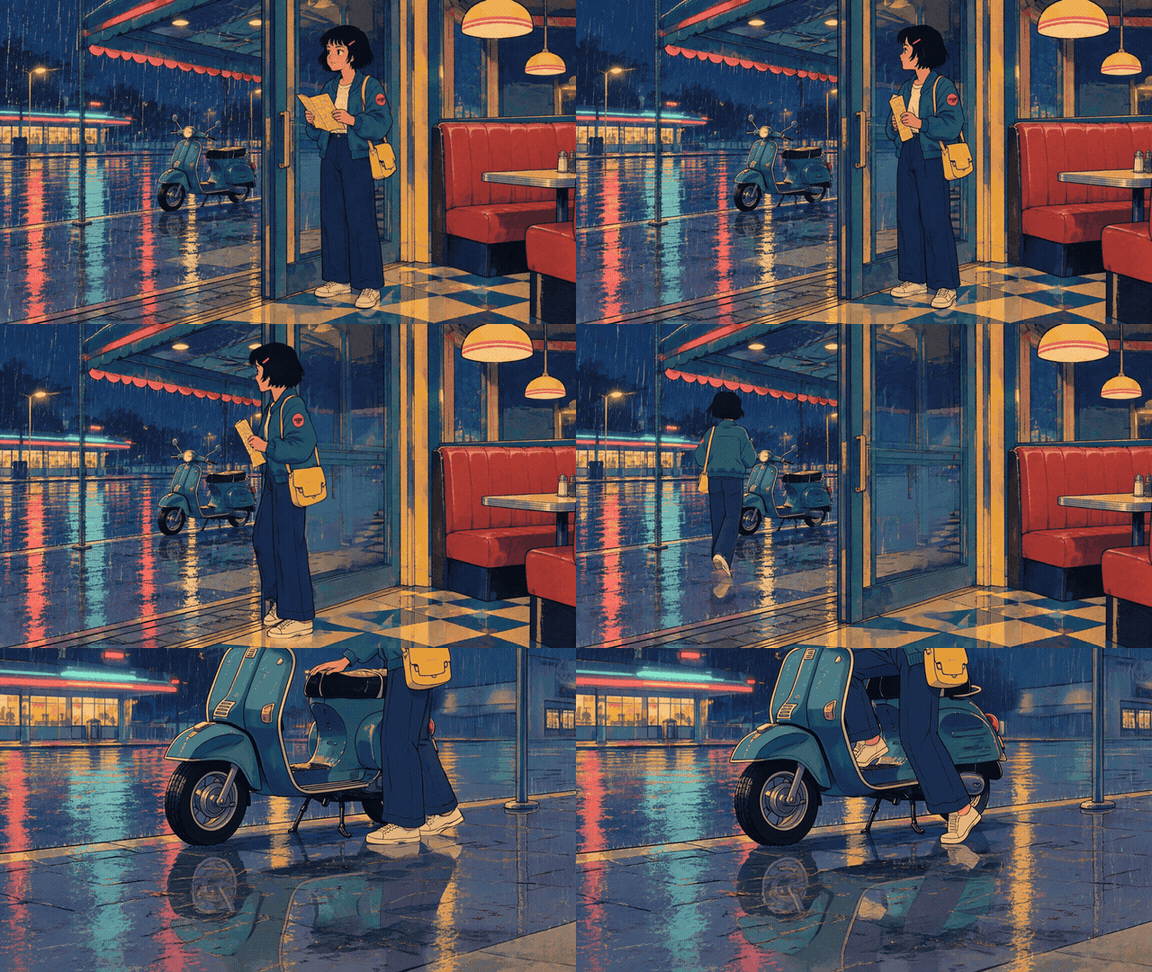
Mara 離開餐館,在雨中跨上她的藍綠色速克達
結果 2:Mara 走到速克達旁並跨上車。動作清楚可讀;但要求的地圖摺疊動作在完成後的片段中並未清楚可見。
鏡頭 3:速克達離去
產生第三個對應基礎幀。讓 Mara 在餐館外的藍綠色速克達上維持不變,地圖塞進包包裡,路邊附近有一張紙收據。在右側構圖出橫向空間。
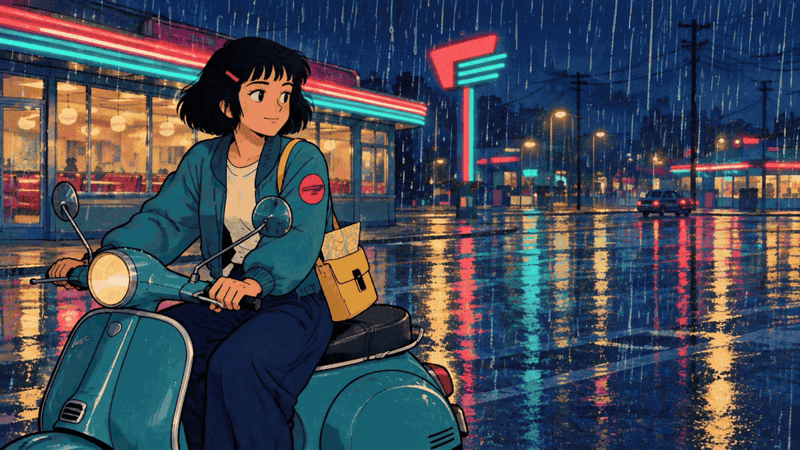
Mara 在雨中的霓虹餐館外騎著藍綠色速克達
基礎幀 3:速克達與更寬的濕街道為離去鏡頭提供移動空間。
plaintext1Use the supplied image as the exact first frame and preserve Mara, her teal jacket, coral patch, yellow bag, teal scooter, diner architecture, neon palette, wet pavement, hand-inked outlines, cel shading, and halftone texture. 2 3Create a 10-second retro-cartoon departure: 40 to 3 seconds: medium-wide shot, Mara starts the scooter and its headlight softly illuminates rain droplets. 53 to 7 seconds: side-tracking shot, Mara rides smoothly from left to right past the diner; the paper receipt lifts, circles once, and falls behind her. 67 to 10 seconds: wider rear three-quarter shot, the scooter turns gently down the rain-glossed street while the diner neon remains visible in the background. 7 8Keep the same character proportions and style from beginning to end. No extra riders, no text, no captions, no logos, no sudden camera jump, no morphing, no photorealism.
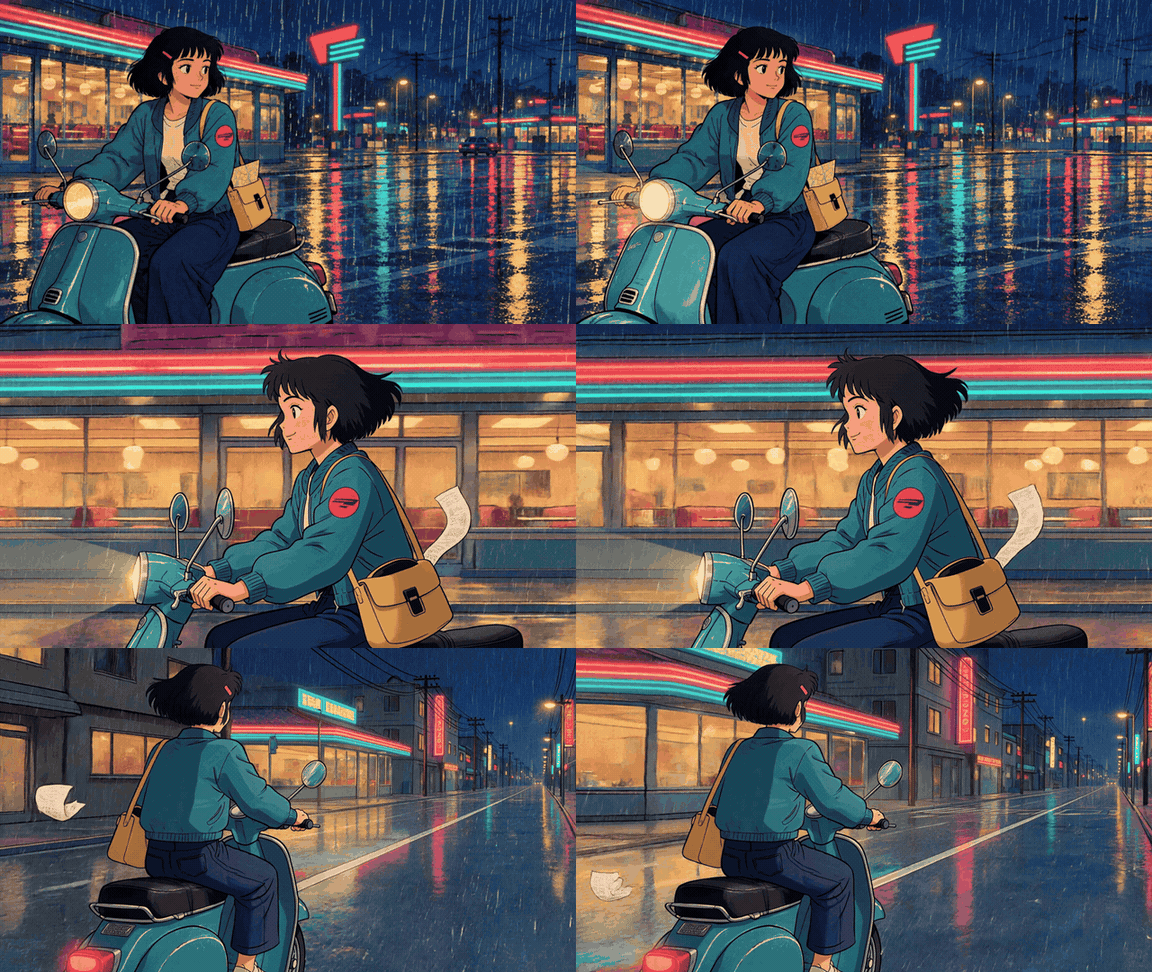
Mara 騎著藍綠色速克達離開餐館,一張收據在雨中揚起
結果 3:Mara 騎車經過餐館,沿著濕街道離去,一張紙收據在她身旁揚起。她的藍綠色外套、珊瑚紅袖章與黃色包包仍可辨識。
Kling 4 Flash 與實際可用的 Atlas 備援比較
使用符合任務的途徑,而不是模型排名競賽。
| 需求 | 建議途徑 |
|---|---|
| 已確認的 Flash 存取權與快速的 720p 風格化測試 | 在 Flash 中重複使用相同的已核准基礎幀與 3 鏡頭提示詞 |
| 今日即可重現的工作流程 | GPT Image 2 基礎幀加上 Kling V3.0 Turbo Image-to-Video |
| 更強的首尾轉場控制 | 在投入前確認有提供首/末幀控制的實際可用途徑 |
| 4K 交付成品 | 確認模型專屬設定;Flash 並非預設的 4K 假設 |
實際可用的 Atlas 途徑很實用,因為你可以在同一個工作區中建立第一幀與 Kling 片段,同時進行迭代。它是此工作流程的備援,而不是在 Atlas 上代管的 Kling 4 Flash。
Kling 4 Flash 價格與 10 秒預算快照
截至 2026 年 10 月,Atlas Cloud 的模型目錄列出 Kling V3.0 Turbo Image-to-Video 為每秒 $0.095,顯示為每秒 $0.112 的 15% 折扣。因此,依該列示價格,10 秒測試為 $0.95。將此視為規劃快照:在進行生產批次前,確認實際模型頁面、解析度、長度與價格。(Atlas Cloud 模型,2026 年 10 月)
修正 Kling 4 Flash 復古卡通影片問題
角色在鏡頭之間改變
當地點允許時,重複使用已核准的基礎影像。若為新地點,請重複完整的角色設定聖經。不要將「短黑鮑伯頭、珊瑚紅髮夾、藍綠色外套、珊瑚紅袖章、黃色包包」縮減成「同一個女孩」,並期望模型能保留它。
Kling 4 Flash 加入隨機切換或風格轉變
明確列出 3 個節拍,為每個節拍指定取景,並移除互相衝突的攝影語言。「單一連續鏡頭」、「快速蒙太奇」與「多角度」不應共用同一個提示詞。將賽璐珞陰影、墨線粗細、半色調紋理與色盤保留放入基礎幀與影片提示詞中。
動作看起來像緩慢變焦
給 Mara 一個有可見效果的肢體任務:按鈴、摺地圖、跨上速克達、騎車經過餐館。加入一個環境反應,例如蒸氣、雨滴漣漪或收據盤旋。這會將動作變成一個短篇故事,而不是攝影機漂移。
Kling 4 Flash 值得用於復古卡通影片嗎?
當你已經有存取權,並需要在其公布限制內製作短式風格化片段時,Kling 4 Flash 值得測試。可重複的優勢來自影像優先的分鏡腳本與鎖定的角色設定聖經。你現在可以用實際可用的 Atlas 備援驗證該流程,然後在確認 Flash 存取權後,執行相同的 kling 4 flash for retro cartoon videos 鏡頭計畫。
常見問題
Kling 4 Flash 已經開放給所有人使用了嗎?
沒有。Kling 將 Flash 描述為有限的搶先體驗推送。在客戶工作流程中承諾使用前,請先確認你自己帳號中的模型選擇器。
Kling 4 Flash 能從一張影像製作復古卡通影片嗎?
其官方發布列出支援圖生影片。對反覆出現的復古角色而言,精心設計的第一幀是更安全的途徑,因為它能明確固定服裝、色盤、線條與場景。
對一致卡通角色而言,最適合的 Kling 4 Flash 提示詞是什麼?
在每個基礎幀中使用完整角色設定聖經,然後使用帶有 3 個計時節拍的簡短動作提示詞。保留相同的具名服裝、道具、場景、墨線處理、色盤與攝影取景。
復古動畫應該使用文生影片還是圖生影片?
當連貫性重要時,使用圖生影片。文生影片可以協助探索想法,但它會讓模型在角色設計與風格方面做出更多決定。
為什麼我的 Kling 卡通影片會加入隨機切換或改變角色服裝?
提示詞可能留下太多開放空間,或給出互相矛盾的攝影機指導。提供已核准的第一幀,只描述預期的動作,並為每個節拍指定取景。
如果我沒有 Kling 4 Flash 存取權,今天可以使用什麼?
使用相同的影像優先流程,搭配實際可用的圖生影片模型。此處顯示的實用途徑是使用 GPT Image 2 製作關鍵幀,並使用 Kling V3.0 Turbo Image-to-Video 製作每個 10 秒鏡頭。





