一個場景看起來可能很有電影感,但未必符合需求。廚師的手離開麵條、唱片箱多出幾張封面,或健行者突然轉錯方向。此時,MAI Image 2.6 image editing 就成了受控制的製作問題,而不是單純好不好看的問題。
最安全的工作流程很簡單:只做一項獨立變更,列出所有必須保留的細節,然後在相同尺寸下,將編輯結果與來源影像並排比較。目標不是證明生成的人物是真的,而是建立一個連貫的虛構場景,同時保留需求中要求的動作、物件關係與光線邏輯。
Microsoft 將這一系列模型定位為可從文字、影像、網頁情境與視覺參考進行受控制生成與編輯的產品。其 2026 年 9 月的發布說明指出,旗艦版與 Flash 皆支援多重參考編輯與動態長寬比。請將這些功能視為創作控制,而不是畫素級完美保留的承諾(Microsoft 發布公告)。
重點
- 區分
CHANGE ONLY與PRESERVE EXACTLY。- 使用 Flash 建立來源場景;使用 Edit 取得受控制的結果。
- 在批准前檢查姿勢、物件數量、接觸點、方向與光線。
本指南所需的六張影像
本文使用六張影像,組成三組來源與結果的配對。每組都承載不同的證據,因此沒有任何一張是裝飾性或重複裁切。
| 配對 | 來源影像證明 | 編輯影像證明 | 比對需求 |
|---|---|---|---|
| 1. 麵攤 | 廚師、麵條、碗與攤台構成一個可信的動作 | 相同的動作在從白天到燈籠夜市的變換後依然存在 | 相同成人、手部位置、麵條束、碗、相機角度 |
| 2. 唱片攤 | 購物者、唱片箱與一張選中的封面之間有明確關係 | 相同的互動在天氣與光線變換後依然存在 | 相同成人、封面、箱子順序、手部接觸、相機角度 |
| 3. 山路 | 健行者、背包與步道方向清楚可辨 | 相同的行走動作在季節與天氣變換後依然存在 | 相同成人、行進方向、背包、登山杖、步道視角 |
為什麼 MAI Image 2.6 Image Editing 有用,以及為什麼初次嘗試會失敗
有用的轉變在於「可審查來源」的場景編輯:把虛構動作從白天移到燈籠點亮的夜晚、在不改變互動的前提下更改天氣、或在保持人物行進方向的同時調整戶外場景。MAI Image 2.6 是為了可控生成與編輯而打造,而 Flash 則是探索性場景建立時更快的途徑(Microsoft 模型總覽)。
大多數初次嘗試失敗的原因很常見。一個提示詞可能要求在單次執行中同時替換背景、改變光線、調整姿勢、添加道具、修正解剖結構;或者它只說「保持一切不變」,卻沒有列出審核者實際看得見的項目。
每次編輯前使用一份「保留清單」:
| 場景 | 精確保留 | 審核時檢查 | 重新執行時機 |
|---|---|---|---|
| 麵攤 | 廚師、雙手、麵條束、碗、攤台高度 | 手與麵條的接觸、碗的數量 | 手、麵條或碗出現意外變化 |
| 唱片攤 | 購物者、選中的封面、箱子順序、手部放置 | 封面的方向、手指是否仍在同一個箱子上 | 箱子、封面或手出現重複或移位 |
| 山路 | 健行者、背包、登山杖、跨步方向、步道視角 | 行進方向與地面的接觸 | 健行者轉身或裝備形狀改變 |
MAI Image 2.6 Image Editing 工作流程:Flash 來源、受控制編輯
使用 MAI Image 2.6 Flash Text-to-Image 建立虛構的來源場景。接著將該來源影像上傳到 MAI Image 2.6 Edit,並要求一項受控制的環境變更。每一組內保持長寬比不變。不要猜測內部模型 ID 或價格。產生前,請在 Atlas Cloud 模型瀏覽器 確認實際模型標籤、支援的長寬比與執行成本。
| 工作 | 實際頁面上顯示的模型 | 輸入 | QA 重點 |
|---|---|---|---|
| 來源場景 | MAI Image 2.6 Flash Text-to-Image | 僅文字提示 | 清楚的動作、完整主體、連貫的物件與場景 |
| 受控制結果 | MAI Image 2.6 Edit | 一個選取的來源加上保留提示 | 只發生要求的環境變更 |
| 重試 | 相同的來源與模型 | 較短的提示、單一且更狹窄的變更 | 修復特定失敗,絕不疊加修補 |
案例 1:在更換市場光線時,保持製麵動作不變
先產生白天的來源影像,然後將它作為燈籠市集編輯的唯一參考影像。結果應該像是同一個瞬間換了呈現情境,而不是新的廚師或不同的食譜。
提示 1:麵攤來源
plaintext1Create a documentary food-and-street photograph of one adult chef stretching one continuous bundle of hand-pulled noodles over a worn stainless-steel counter at a small daylight market stall. Both hands are visible and actively holding the same noodle bundle. Place exactly three plain ceramic noodle bowls on the counter: two empty bowls at the left and one bowl at the right. Steam rises naturally from a large pot behind the counter. Morning daylight enters from the left through a striped awning, with warm cream, muted red, and charcoal color balance, realistic flour dust, worn wood, and metal texture. Use a 35mm lens, eye-level viewpoint, horizontal 16:9 composition. No logos, readable text, watermarks, extra people, extra hands, duplicate bowls, or broken noodles.
提示 2:燈籠市集編輯
上傳提示 1 所選出的結果。使用 MAI Image 2.6 Edit,16:9。
plaintext1Use the uploaded image as the source of truth. CHANGE ONLY: transform the surrounding daylight market into an early-evening lantern market, with warm paper-lantern light from above and a faint cool-blue ambient sky beyond the stall. PRESERVE EXACTLY: the same adult chef, both hand positions, the single continuous noodle bundle, exactly three ceramic bowls in the same positions, the counter height, pot position, camera angle, and framing. Keep realistic hand-to-noodle contact and physically coherent shadows. Do not add text, logos, watermarks, extra people, extra hands, extra bowls, different food, broken noodles, or a new camera viewpoint.
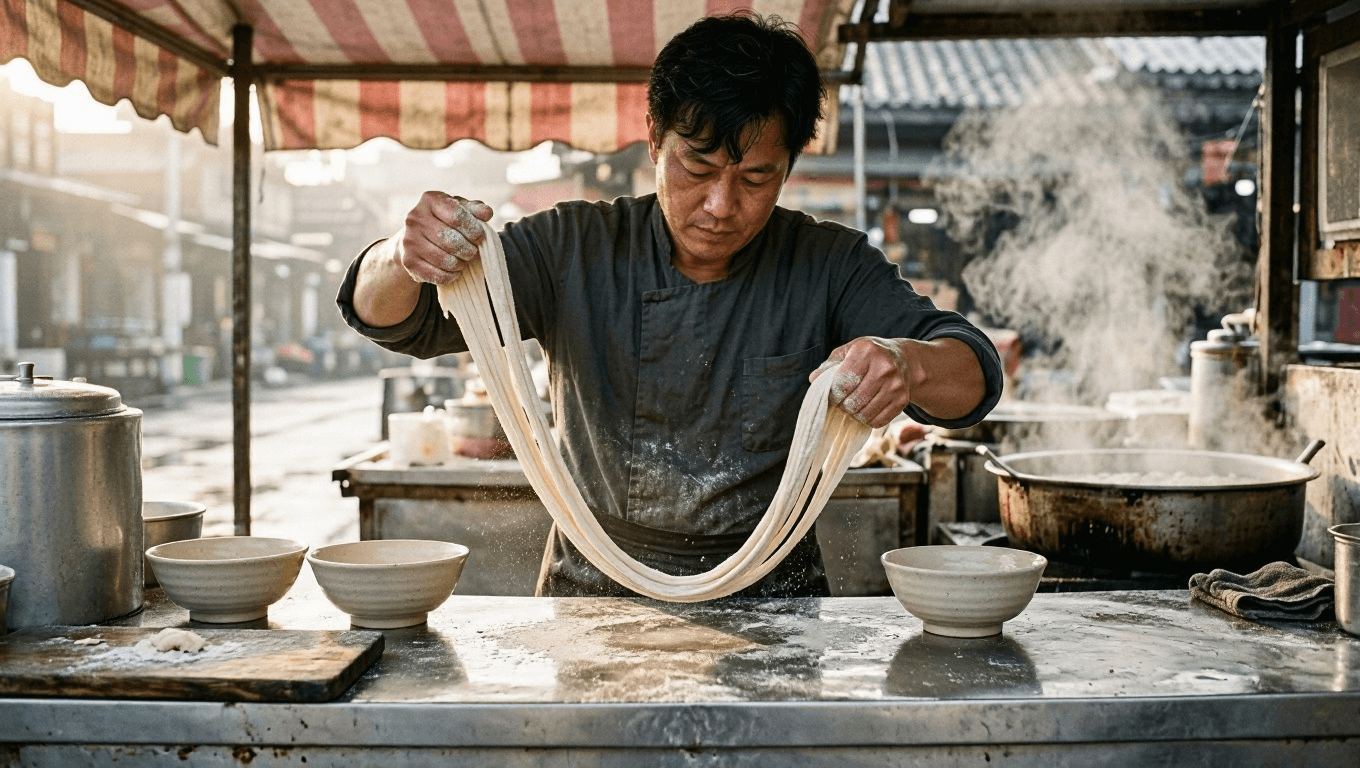
MAI Image 2.6 image editing 的來源場景:一位成年廚師在白天市場攤位拉麵條
來源證據:一位成年廚師、雙手握在同一束麵條上、三個碗,以及清晰的攤台關係。
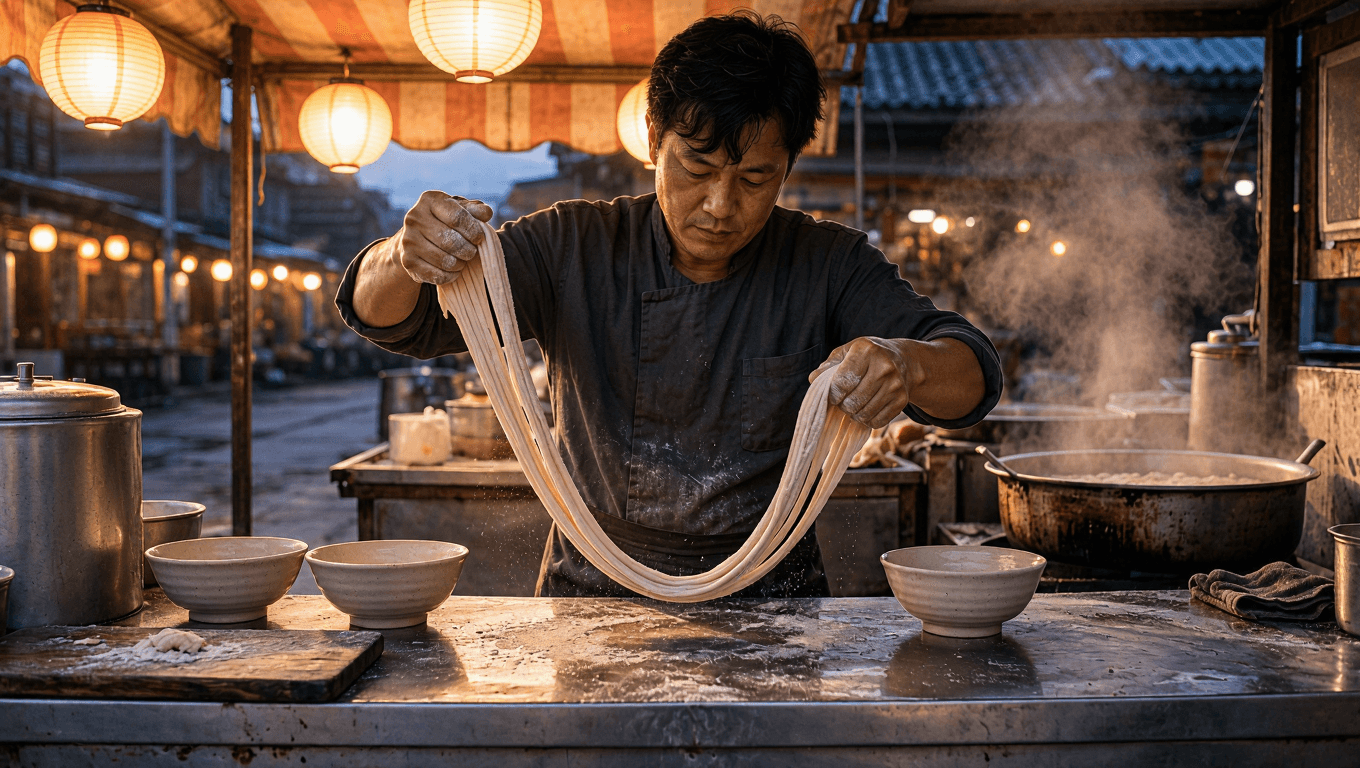
受控制的 MAI Image 2.6 Edit 結果:在燈籠點亮的夜市中,相同的製麵動作
編輯證據:市場光線改變,而廚師、動作、碗與相機關係仍可檢查。
案例 2:在更改天氣時,保持唱片攤互動不變
第二組測試密切的人與物件關係。選中的唱片封面、握住它的手,以及箱子排列方式,是保留清單的項目。變更的只有天氣與光線。
提示 3:唱片攤來源
plaintext1Create a documentary flea-market photograph of one adult woman browsing vinyl records at an outdoor stall on an overcast morning. She holds one selected cobalt-blue record sleeve in her right hand and uses her left hand to flip through records in the nearest of exactly three wooden record crates. Arrange the three crates in a shallow row across the lower half of the frame. Include a striped canvas canopy, a few weathered paper price tags with no readable text, and distant market tables softly out of focus. Soft diffused daylight, restrained navy, mustard, and weathered wood palette, tactile cardboard sleeves and fabric texture, 50mm lens, horizontal 16:9 composition. No logos, readable text, watermarks, extra people, duplicate hands, duplicate record sleeves, or additional crates.
提示 4:唱片攤天氣編輯
上傳提示 3 所選出的結果。使用 MAI Image 2.6 Edit,16:9。
plaintext1Use the uploaded image as the source of truth. CHANGE ONLY: replace the overcast morning light with warm late-afternoon sunlight, adding soft directional shadows and a subtle dry golden glow to the market canopy. PRESERVE EXACTLY: the same adult woman, the cobalt-blue record sleeve in her right hand, her left-hand contact with the nearest crate, exactly three wooden record crates in the same order, the sleeve orientation, camera angle, and framing. Do not add text, logos, watermarks, extra people, duplicate hands, duplicate sleeves, extra crates, altered clothing, or a new pose.
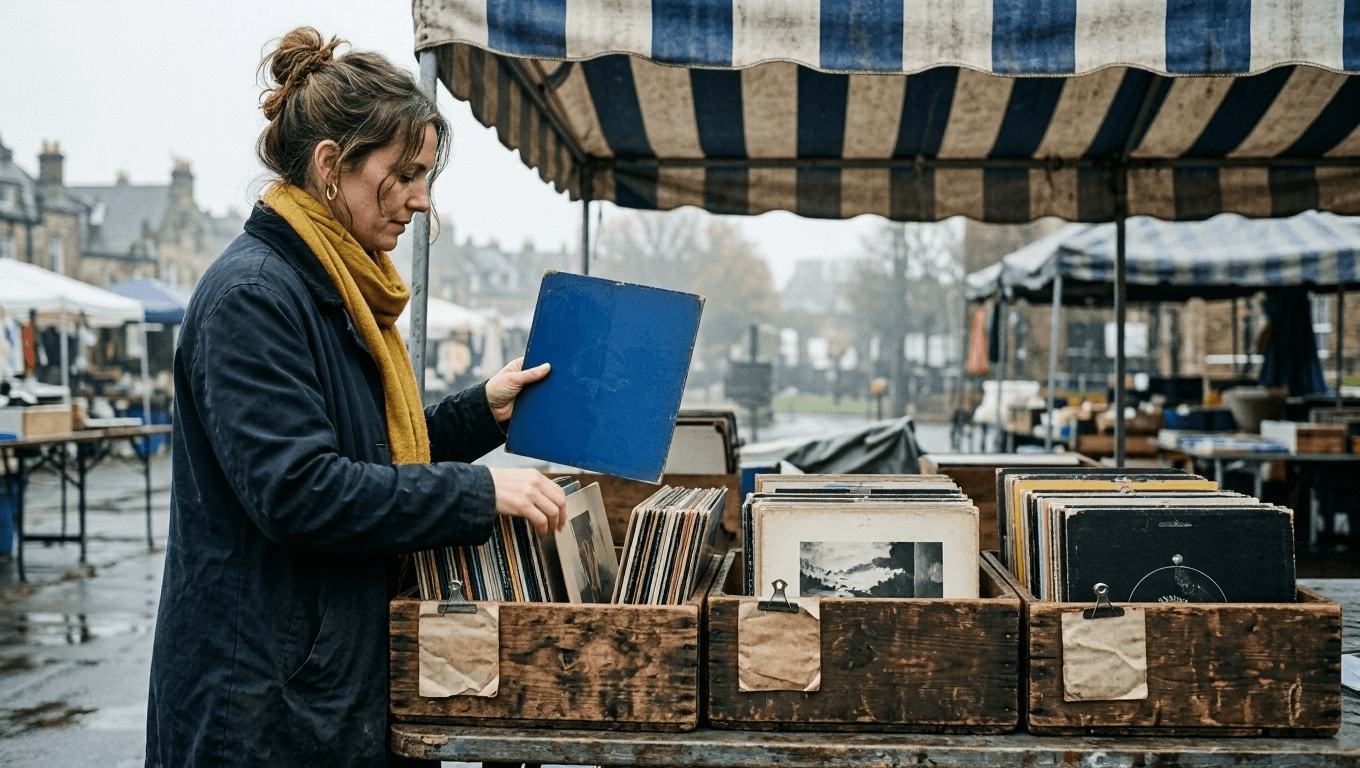
MAI Image 2.6 image editing 的來源場景:一位成年人在陰天的跳蚤市場瀏覽黑膠唱片
來源證據:一位成年人、一張選中的藍色唱片封面、三個木製箱子,以及穩定的手部接觸。
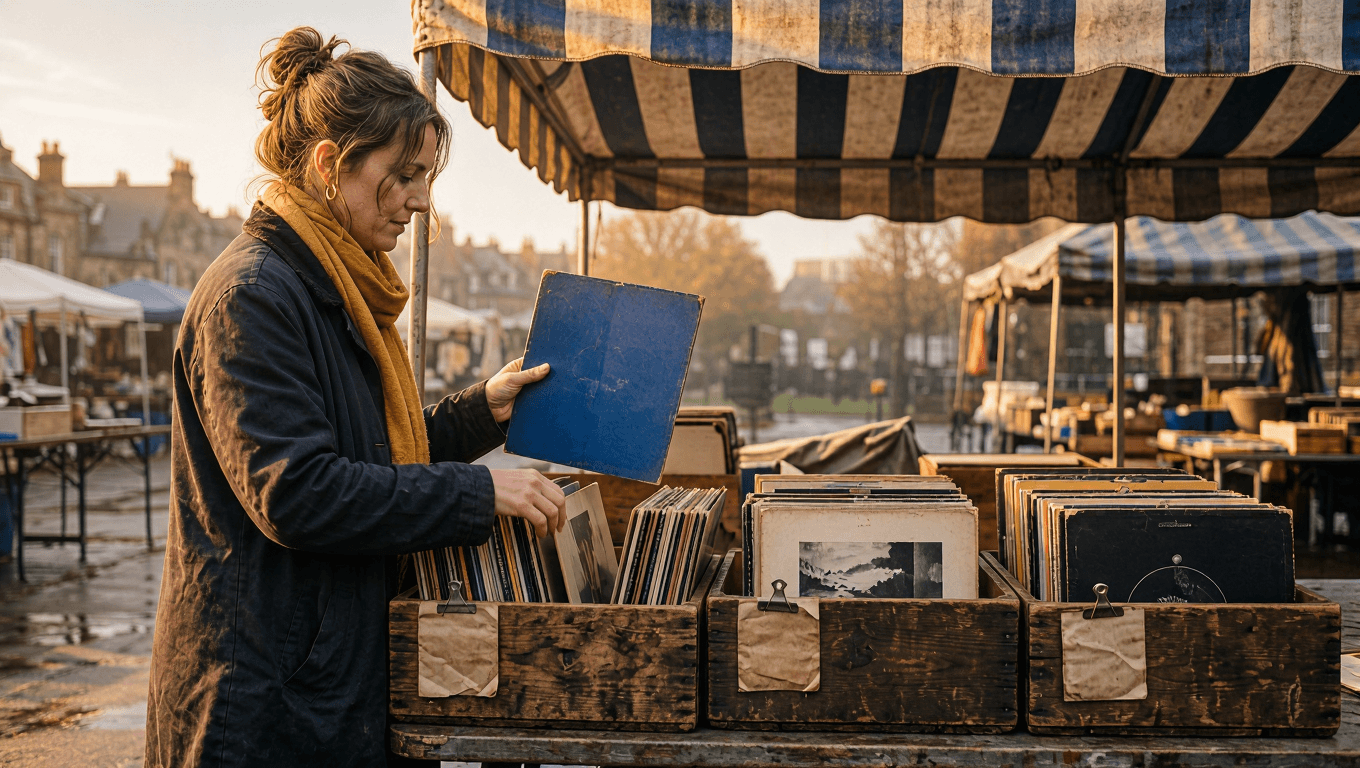
受控制的 MAI Image 2.6 Edit 結果:在溫暖的午後光線下,相同的黑膠唱片互動
編輯證據:只有天氣與光線改變。購買者、選中的封面、箱子與手部接觸維持不變。
案例 3:在更改季節時,保持健行者的行進方向不變
最後一組測試較寬廣的場景。健行者的背包、登山杖、行走方向與步道視角構成清楚的檢查清單。編輯可以把夏末的來源場景變成初秋場景,但不能把這次行走變成新的構圖。
提示 5:山區健行者來源
plaintext1Create a cinematic outdoor photograph of one adult hiker walking away from the camera along a late-summer mountain trail toward a distant ridge. The hiker wears a forest-green backpack and holds exactly two trekking poles, one in each hand, with a natural forward walking stride. A narrow trail leads from the lower foreground toward the ridge through tall green grass and sparse alpine pines. Late-afternoon sun enters from the left, creating clear but natural shadows and warm highlights on the grass. Use leading lines from the trail, a small out-of-focus rock in the foreground, restrained green, slate blue, and warm earth tones, 35mm lens, horizontal 16:9 composition. No logos, readable text, watermarks, extra people, duplicate poles, altered backpack shape, or a hiker facing the camera.
提示 6:山區健行者季節編輯
上傳提示 5 所選出的結果。使用 MAI Image 2.6 Edit,16:9。
plaintext1Use the uploaded image as the source of truth. CHANGE ONLY: transform the late-summer mountain trail into early autumn, with muted gold grass, scattered amber leaves, a lightly clouded sky, and cooler clean air. PRESERVE EXACTLY: the same adult hiker walking away from the camera, the forest-green backpack, exactly two trekking poles with the same hand contact, the stride direction, trail perspective, ridge position, camera angle, and framing. Keep grounded foot contact and coherent natural shadows. Do not add text, logos, watermarks, extra people, duplicate poles, different gear, a new route, heavy fog, snow, or a hiker facing the camera.
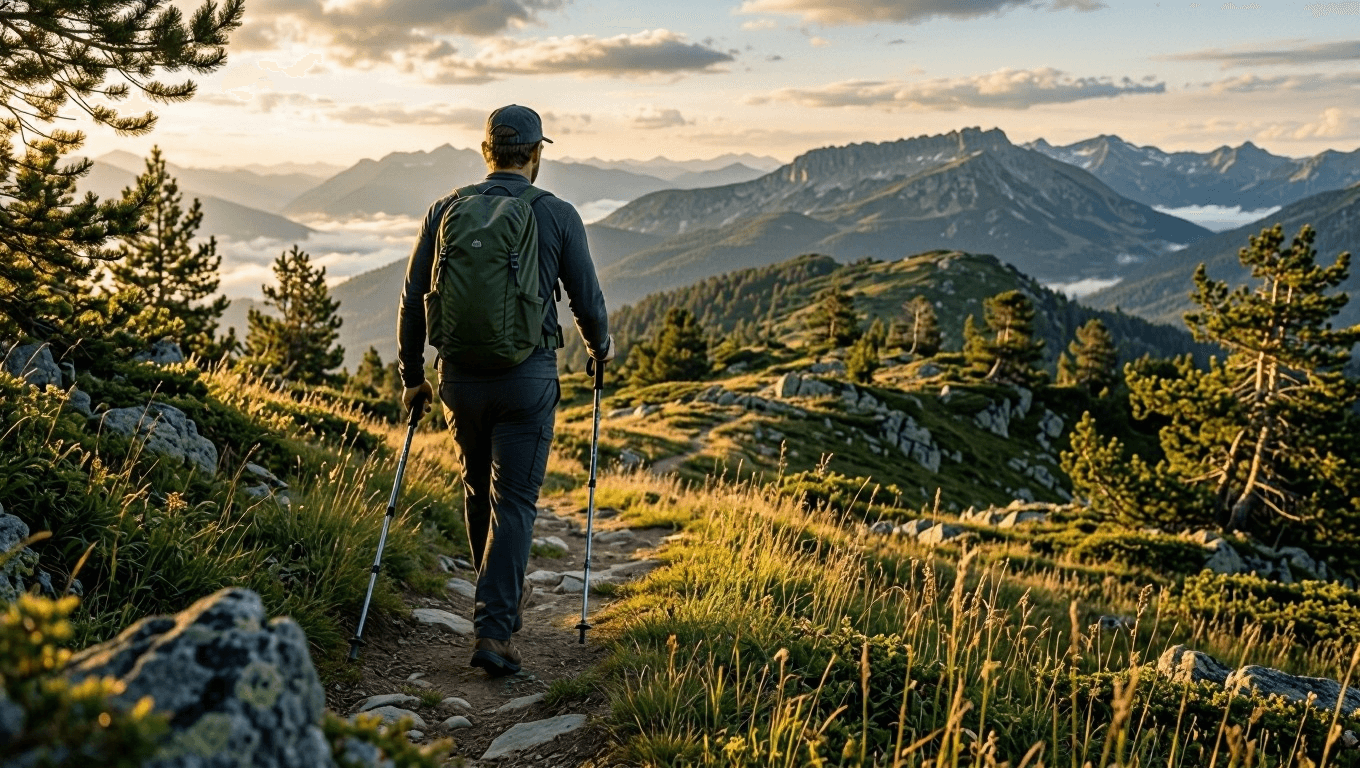
MAI Image 2.6 image editing 的來源場景:一位成年健行者沿著夏末的山間步道行走
來源證據:一位成年人背對相機行走、一個森林綠背包、兩支登山杖,以及一條通往山脊的步道。
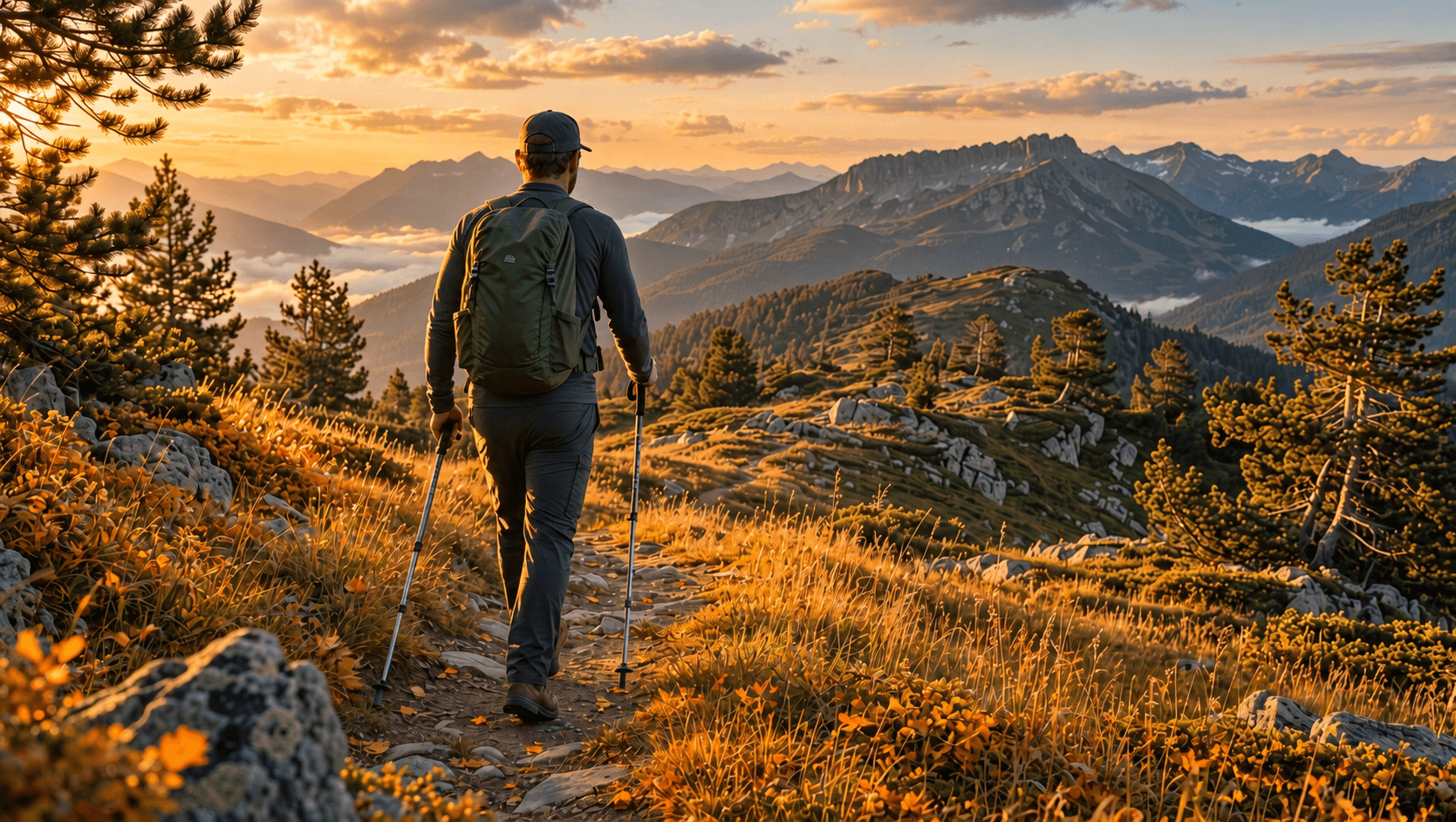
受控制的 MAI Image 2.6 Edit 結果:相同的健行者與路線轉變為初秋的山間步道
編輯證據:季節改變,但健行者、裝備、行進方向與步道視角維持不變。
受控制的 MAI Image 2.6 Image Editing 變化應用
一旦保留清單運作順暢,每次變化就只做一項變更:
- 只改變已核准動作場景周圍的光線與天氣。
- 在保持人物、物件關係與相機視角的同時,只改變場景素材。
- 若是二到五張參考影像,請將每張影像依其角色標示,例如
person、action、scene或style reference。不要只依賴上傳順序。
plaintext1CHANGE ONLY: [one isolated environmental change]. 2 3PRESERVE EXACTLY: [adult subject], [action], [contact points], [object count], [direction], [camera relationship]. 4 5DO NOT: [three to five scene-specific failure modes].
MAI Image 2.6 Image Editing 的 QA 與法律界限
批准前,請將來源與結果並排比較。只有當要求的編輯可見,且保留清單仍然成立時,場景才算通過。
| 通過條件 | 失敗情況 | 下一步動作 |
|---|---|---|
| 動作保留 | 手不再接觸預期的物件 | 從來源重新執行,並在 PRESERVE EXACTLY 中註明手部接觸 |
| 物件數量保留 | 出現多餘的碗、唱片封面、登山杖或人物 | 縮小提示範圍,並列出明確數量 |
| 方向保留 | 人物面向或移動到錯誤方向 | 重新陳述方向與相機關係,然後重跑 |
| 光線合理 | 陰影與所述光源衝突 | 只更改光線指令 |
| 場景保持虛構 | 輸出暗示真實人物、事件或當前地點的主張 | 移除該主張,並將影像標示為概念 |
只能上傳你擁有或獲得編輯許可的素材。不要將生成的場景呈現為真實人物身分、當前事件、真實地點、安全主張或背書的證據。參考來源、肖像授權、商標與發布主張仍須經人工核准。
常見問題
MAI Image 2.6 適合影像編輯,還是只能用於文字生圖?
它兩者都支援。實際的測試在於,來源動作與保留清單中列出的特定細節,能否在受控制的執行與人工審核後依然存在。
如何在 MAI Image 2.6 Edit 中保持動作一致?
上傳選定的來源,說明年齡主體(成人)、動作、每個接觸點、必須保留的物件,以及相機關係。只要求一項變更。在本指南中,手放在麵條上、手指在唱片封面上、登山杖在山徑上,都是獨立的檢查項目。
MAI Image 2.6 可以用多少張參考影像進行編輯?
Microsoft 表示該模型系列支援多影像參考編輯。請為每張參考影像標示角色,並在採用多參考工作流程前先測試實際頁面。
我應該使用 MAI Image 2.6 Edit 還是 MAI Image 2.6 Flash Edit?
當你需要快速取得虛構來源場景時,從 Flash 開始。當選定的來源需要一項可審查的環境變更時,使用 Edit。請確認實際模型頁面,因為可用性、控制項與價格可能變動。
我可以在不經人工檢查的情況下發布 AI 編輯的場景嗎?
不行。MAI Image 2.6 image editing 可以加速受控制的場景工作流程,但人必須比較來源與結果,特別是解剖結構、物件數量、行進方向、光線,以及任何發布主張。


