一個有用的影像編輯不會從頭開始。它將一個可信的瞬間帶入新的情境,同時讓人物、動作與鏡頭關係保持可辨識。咖啡館窗邊的女子、修剪香草的園丁,以及山徑上的健行者,各自為這份指南提供了一個來源場景,以及一項刻意受限的修改。
實務規則很簡單:先確立場景,列出不可改變的元素,然後只要求一類變更。光線與時間可以改變,天氣可以改變。但主體不應悄悄變成另一個人、多出新道具,或在畫面中移動到其他位置。
重點摘要
- 將來源影像視為人物、姿態、服裝與構圖的參考。
- 一次只改變一個類別:時間、天氣或氛圍。
- 在讚嘆新光線之前,先檢查主體與動作。
- 將虛構場景明確標示為創意概念,而非人物、地點或事件的真實紀錄。
為什麼 MAI Image 2.6 場景編輯需要保留清單
MAI-Image-2.6 及其 Flash 變體支援影像編輯,Microsoft 將該系列描述為公開預覽版。官方文件列出了文字轉影像與影像編輯工作流程,而發布公告則將參考編輯與彈性構圖列為該系列的功能(Microsoft Foundry 文件、Microsoft AI 發布公告)。
當需求有明確邊界時,這項能力最為實用。像「讓它更有電影感」這類模糊要求,等於邀請模型重畫一切。受控的要求則先指定作為基準的細節,再指出唯一要改變的差異。針對人物場景編輯,保留清單通常涵蓋:
| 保留 | 變更 | 執行後檢視 |
|---|---|---|
| 人物、臉部、髮型、服裝、動作、鏡頭角度 | 時間、天氣或色溫 | 姿態、手部、道具、構圖與場景連續性 |
| 地點佈局、主要物件與地平線 | 光線方向與氛圍 | 是否出現任何新物件或新人物 |
| 主體在畫面中的位置 | 僅背景條件 | 結果是否仍支援附近的文字內容 |
請使用目前的 MAI Image 2.6 模型頁面,在執行工作當天確認有效的編輯路徑與接受的輸入設定。以下範例均為虛構的視覺概念,並非任何真實地點、人物、天氣狀況或事件的證據。
MAI Image 2.6 場景編輯工作流程:三個相互關聯的案例
下方的每一對範例都從來源場景開始,以一個受限編輯結束。這系列視覺具有共同的紀實攝影感,但每個案例測試不同的連續性類型:時間、天氣與暖光。
步驟 1:確立咖啡館早晨場景
第一個來源固定了女子、她的炭灰色針織衫、筆記本、陶瓷杯、桌子與窗邊的鏡頭角度。這些是必須在編輯中保留下來的細節。
MAI Image 2.6 場景編輯的來源場景:雨晨咖啡館窗邊的女子
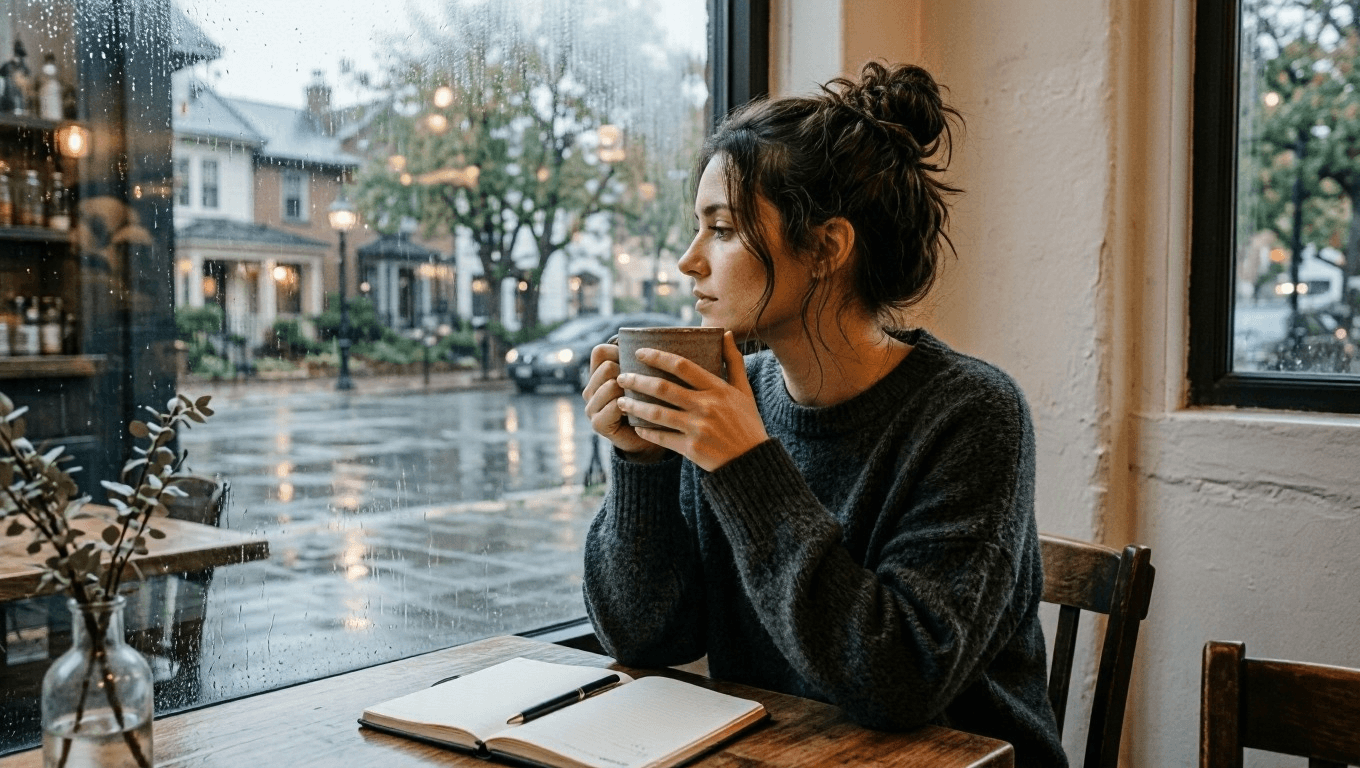
來源場景:一個虛構的安靜咖啡館片刻,氛圍改變之前。
使用此來源提示詞建立新場景:
plaintext1Create a cinematic editorial photograph of one young adult woman sitting alone beside a large window in a quiet neighborhood coffee shop at early morning. She wears a soft charcoal knit sweater, has a notebook open on the table, and holds a ceramic cup with both hands while looking out toward the rain-washed street. Warm wood tables, pale plaster walls, subtle reflections in the window, natural skin texture, soft overcast daylight, realistic documentary photography, vertical 4:5 composition. No readable text, logos, watermark, extra people, distorted hands, or duplicate objects.
步驟 2:只改變咖啡館的時間
上傳已核准的早晨影像。保持女子、服裝、杯子、筆記本、桌子位置與鏡頭角度不變。唯一的修改是從灰濛濛的早晨轉為藍調時分的傍晚,加上更暖的室內燈光與窗外駛過的電車。
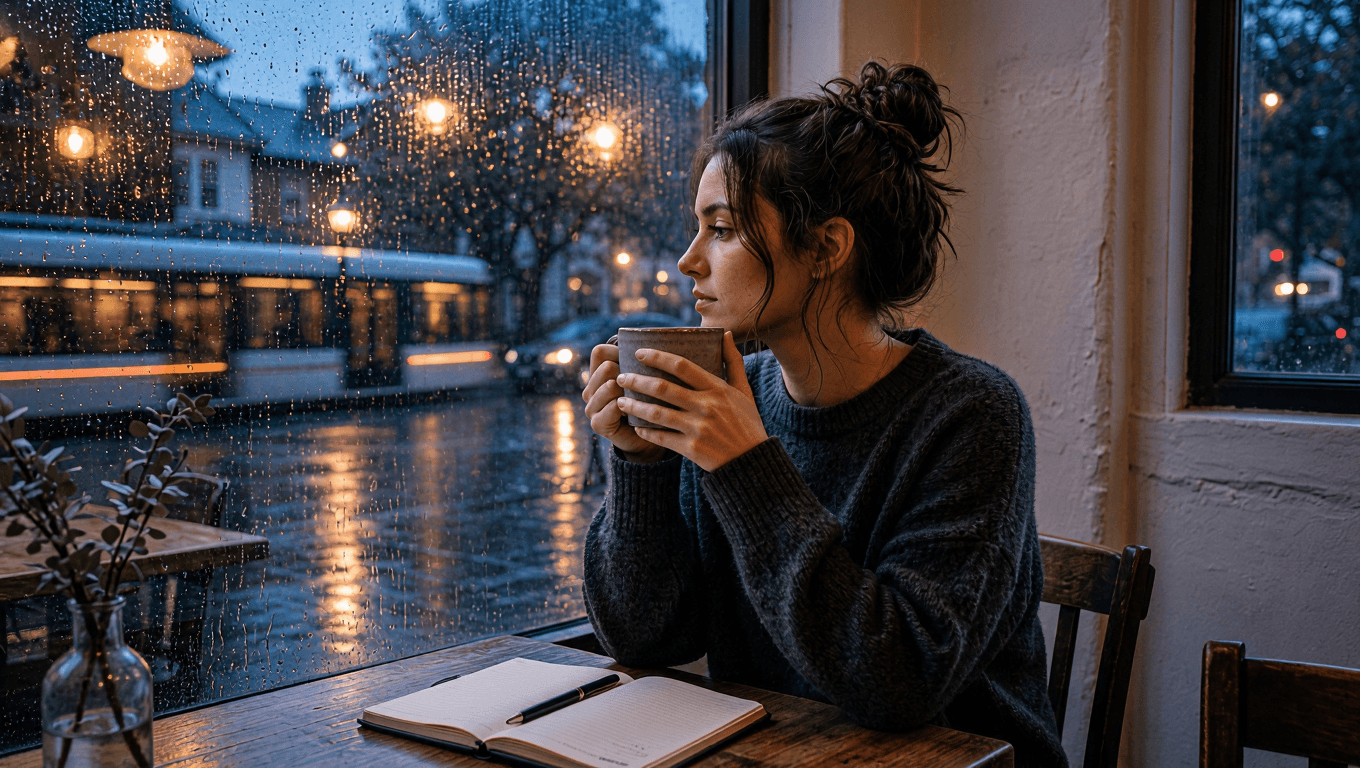 受控場景編輯:同一位女子在藍調時分的咖啡館,帶有雨光映照的街道反射
受控編輯:同一個窗邊片刻,如今帶入雨光藍調時分。
plaintext1Use the uploaded image as the source of truth. Preserve the same adult woman, face, hairstyle, charcoal knit sweater, notebook, ceramic cup, seated posture, camera angle, and table position. Change only the setting and light: transform the same coffee shop into a calm blue-hour evening scene with warm pendant lights, rain droplets glowing on the window, and a softly blurred passing tram outside. Keep the woman looking toward the window. Cinematic realistic photography, vertical 4:5 composition. No text, logos, watermark, extra people, changed clothing, changed facial features, distorted hands, or duplicated objects.
步驟 3:確立屋頂花園工作場景
下一個來源重點在於動作,而非肖像。園丁的跪姿、橄欖色襯衫、手套、剪刀、高架植槽與迷迭香,構成保留清單。如此一來,就能在不失去進行中工作的前提下,評斷天氣編輯的效果。
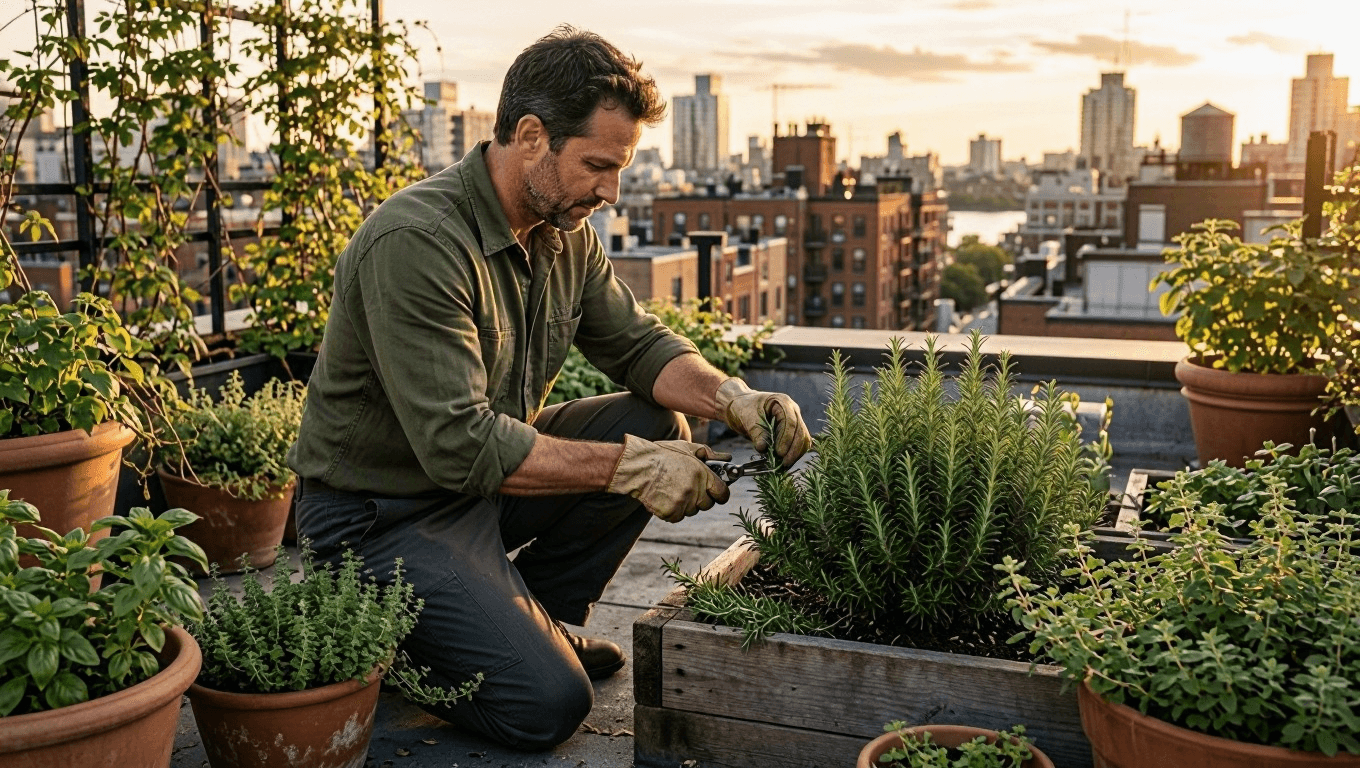 MAI Image 2.6 場景編輯的來源場景:午後近傍晚時分,園丁在屋頂修剪迷迭香
來源場景:晴朗午後光線下的一項虛構屋頂花園工作。
plaintext1Create a natural editorial photograph of one adult man tending herbs in a small urban rooftop garden during late afternoon. He wears an olive work shirt with rolled sleeves, dark trousers, and worn gardening gloves. He kneels beside raised wooden planters, carefully trimming rosemary with small shears. Surround him with terracotta pots, climbing vines, distant apartment rooftops, and gentle warm sunlight. Realistic fabric texture, natural skin, documentary 50mm photography, vertical 4:5 composition. No logos, readable labels, watermark, extra people, duplicate tools, distorted hands, or extra limbs.
步驟 4:讓同一個花園處於雨後片刻
上傳屋頂來源,而非描述一個新花園。動作保持完全相同;雨、濕潤的葉片與更柔和的光線是唯一預期的差異。在核准氛圍前,檢查剪刀、手部、襯衫、植槽與城市佈局。
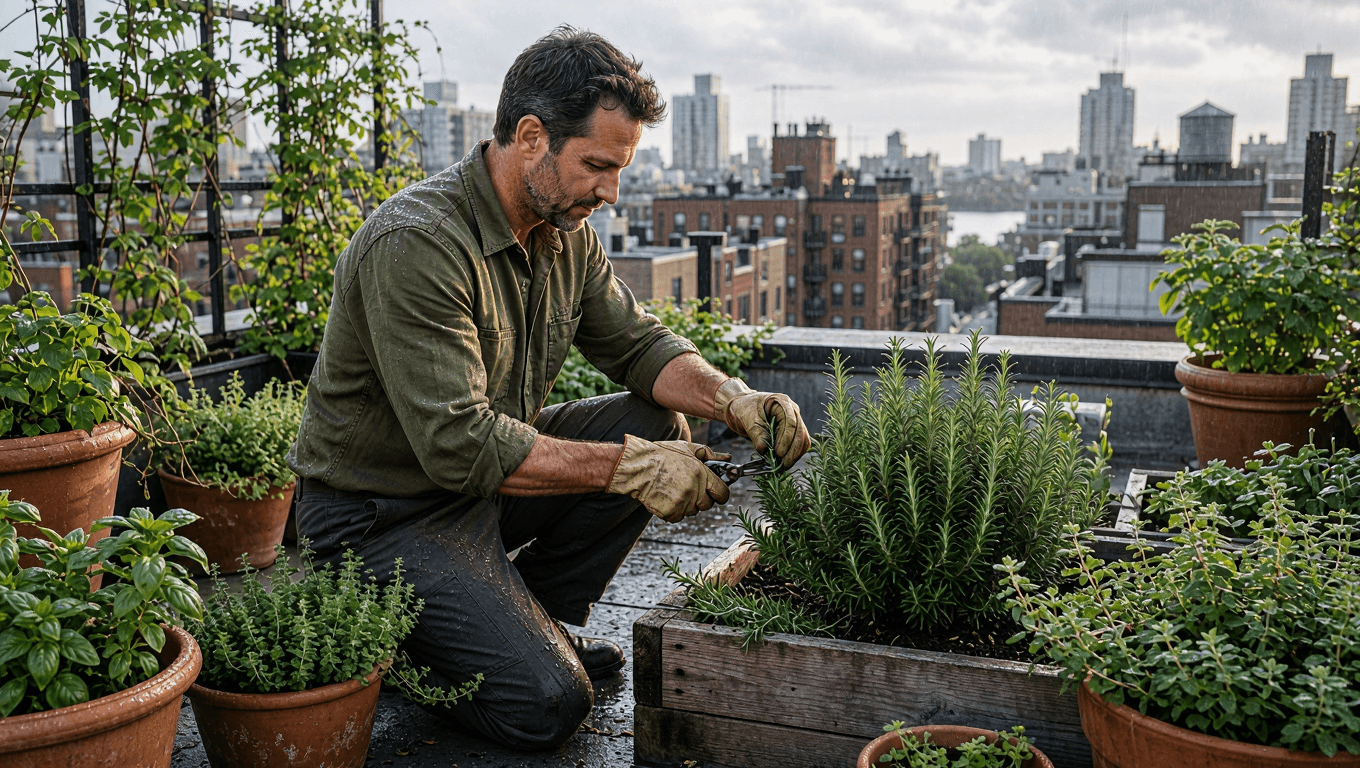 受控場景編輯:同一位園丁在雨後的屋頂花園修剪迷迭香
受控編輯:天氣改變,而園丁、任務與屋頂幾何形狀保持連續。
plaintext1Use the uploaded image as the source of truth. Preserve the same adult man, olive work shirt, trousers, gloves, gardening shears, kneeling posture, rooftop-garden layout, raised wooden planters, and camera angle. Change only the weather and atmosphere: make it just after a light spring rain, with wet leaves, small water droplets on the rosemary, softened cloudy daylight, and a faint city haze beyond the rooftops. Keep the action of trimming herbs unchanged. Realistic editorial documentary photography, vertical 4:5 composition. No text, logos, watermark, extra people, changed clothing, extra tools, distorted hands, or altered pose.
步驟 5:確立山徑早晨場景
最後一個來源,連續性由路線與移動來承載。鏽紅色防風外套、綠色背包、登山杖、行走方向、山徑與山巒構圖,都必須在改變光線前保持穩定。
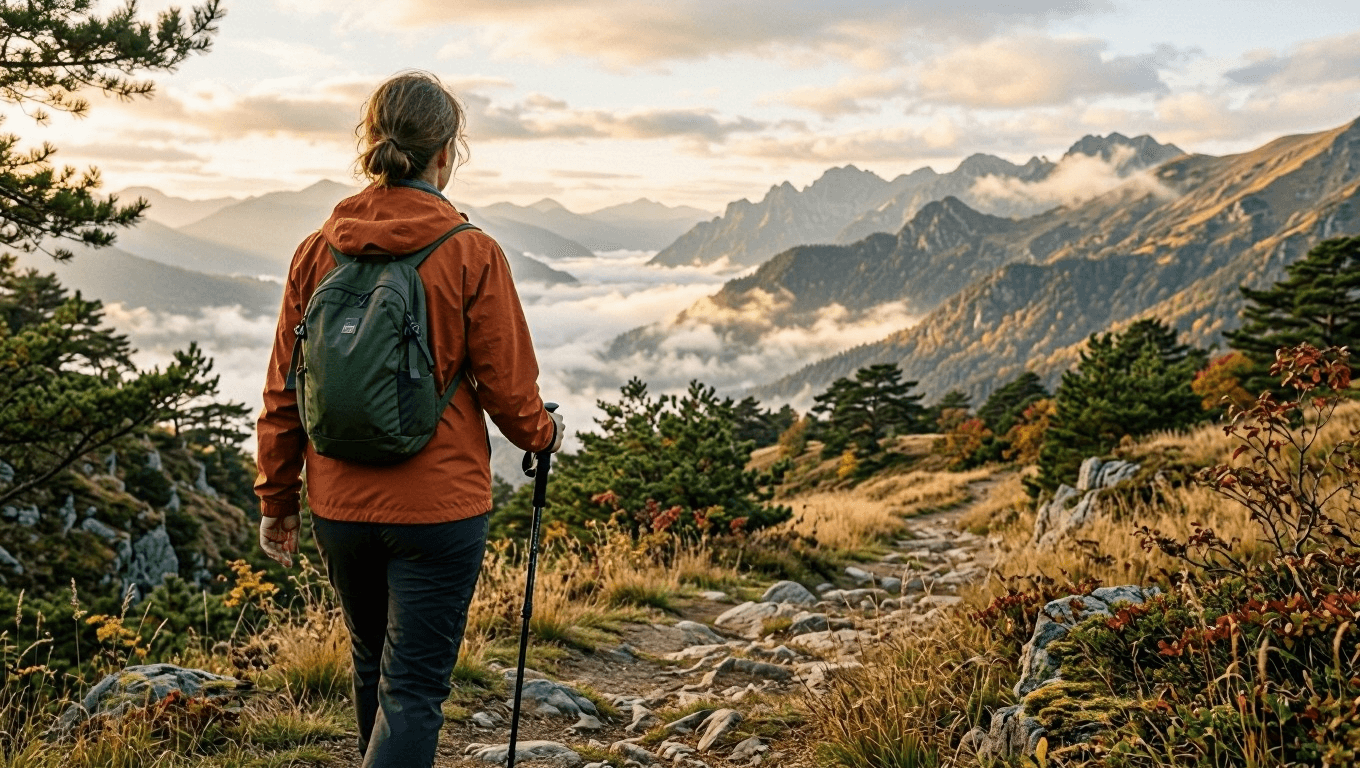 MAI Image 2.6 場景編輯的來源場景:初秋晨光中走在山徑上的女子
來源場景:柔和晨光中的一趟虛構初秋山徑步行。
plaintext1Create a cinematic travel photograph of one adult woman walking alone along a narrow mountain trail in early autumn. She wears a rust-colored windbreaker, dark hiking trousers, and a small forest-green backpack. Seen from behind at a natural walking pace, she carries one trekking pole in her right hand. Golden grass, low pine trees, layered mountain ridges, and gentle morning mist fill the landscape. Natural light, realistic outdoor texture, documentary 35mm photography, vertical 4:5 composition. No logos, text, watermark, extra hikers, duplicate trekking poles, distorted limbs, or unrealistic terrain.
步驟 6:將早晨光線轉為金色日落
上傳山徑來源,並保持路線完整。編輯不應移動健行者、更換她的裝備,或在山徑上增加另一群人。它只改變太陽角度、色溫、地平線與陰影。
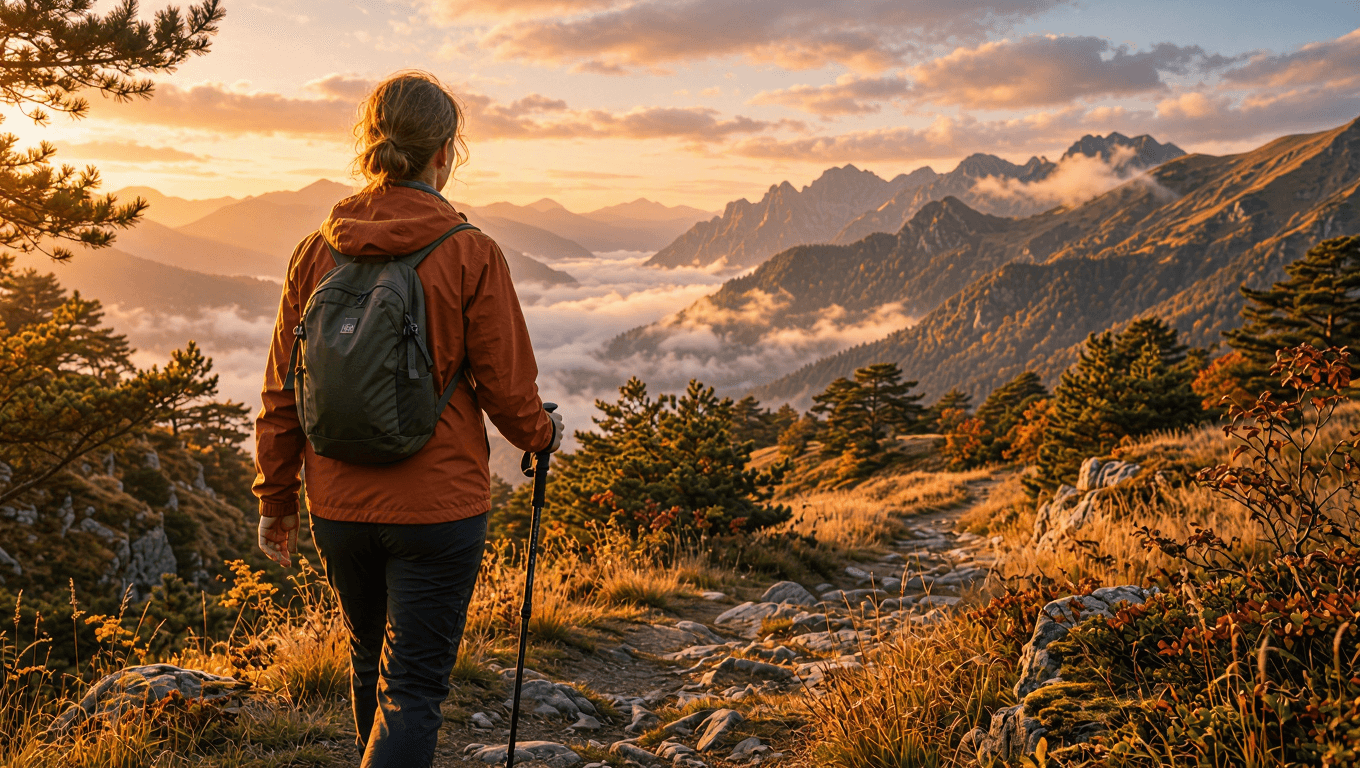 受控場景編輯:同一位健行者與山徑,覆蓋溫暖的金色日落
受控編輯:同樣的路線與健行者,以金色日落光線取代早晨氛圍。
plaintext1Use the uploaded image as the source of truth. Preserve the same adult woman, rust-colored windbreaker, dark hiking trousers, forest-green backpack, trekking pole, walking posture, trail, camera angle, and mountain composition. Change only the lighting and atmosphere: turn the early-autumn morning into a warm golden sunset, with amber rim light on the jacket and grass, long soft shadows across the trail, and a glowing peach-colored horizon behind the mountain ridges. Keep the subject walking in the same direction. Cinematic realistic travel photography, vertical 4:5 composition. No text, logos, watermark, extra hikers, changed clothing, altered backpack, duplicate limbs, or distorted terrain.
常見問題
MAI Image 2.6 場景編輯有什麼用途?
當創意團隊想在保留人物、動作或構圖的同時,測試一個經過修改的條件時,它就很有用。咖啡館、花園與山徑的範例,說明了如何以穩定的來源為基準,檢視時間、天氣或光線的修改。
我應該生成新場景還是編輯既有場景?
當你還在決定人物、地點、動作與構圖時,請建立新場景。當這些基礎已獲核准,且只需要變動一個創意變數時,請使用編輯。
如何避免編輯改變人物?
上傳已核准的來源,將人物、服裝、姿態、道具與鏡頭角度列為保留要求,然後指定一類變更。請檢視實際輸出,而非將提示詞視為保證。
生成的場景能作為真實地點或事件的紀錄嗎?
不行。請將其視為創意概念。不要將生成的人物、天氣、地點、事件或旅遊條件,當作事實證據呈現。
如需模型可用性與目前控制選項,請使用 Atlas Cloud 上的 MAI Image 2.6 頁面,並在正式使用前確認所選路徑。





