

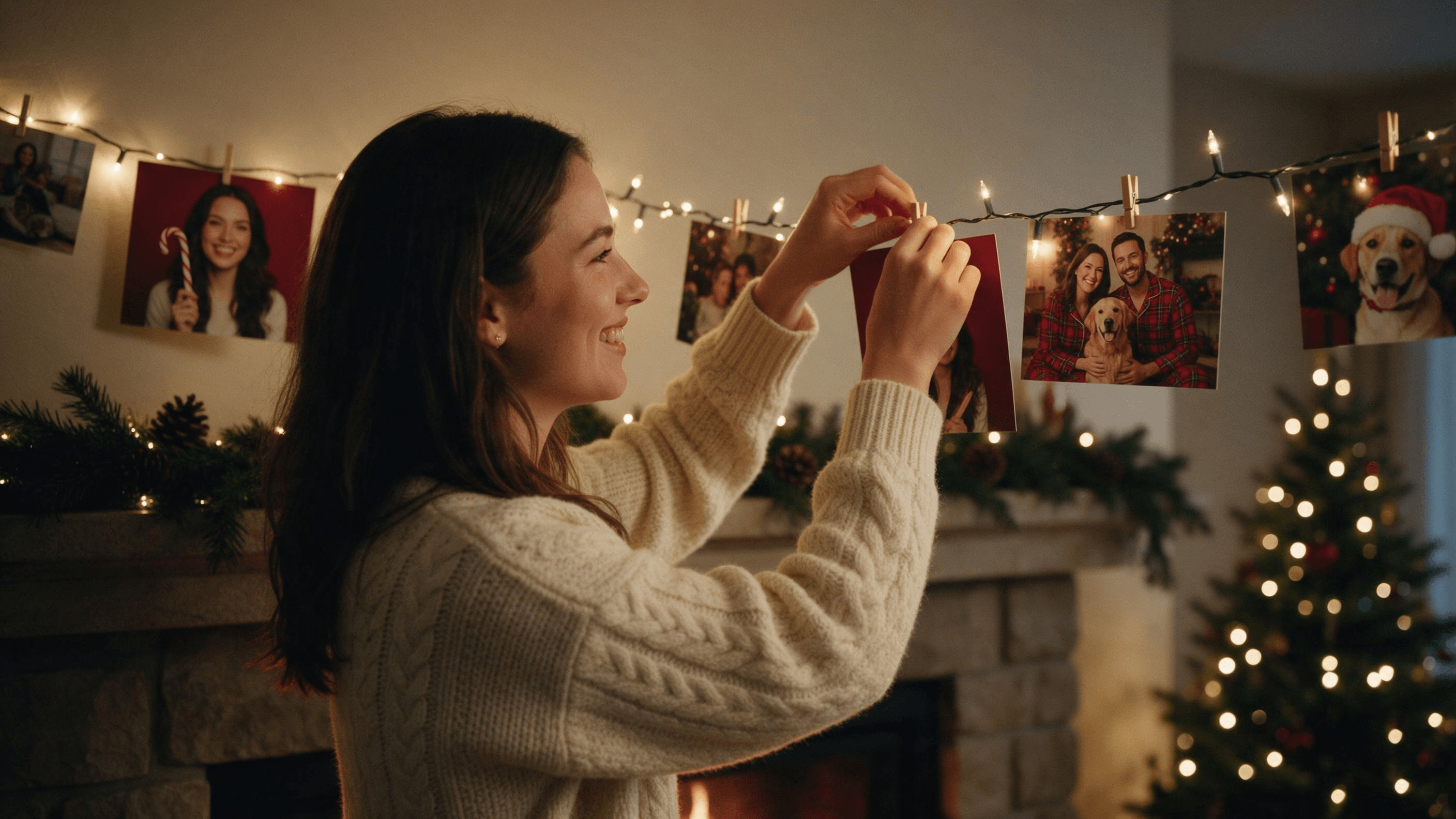
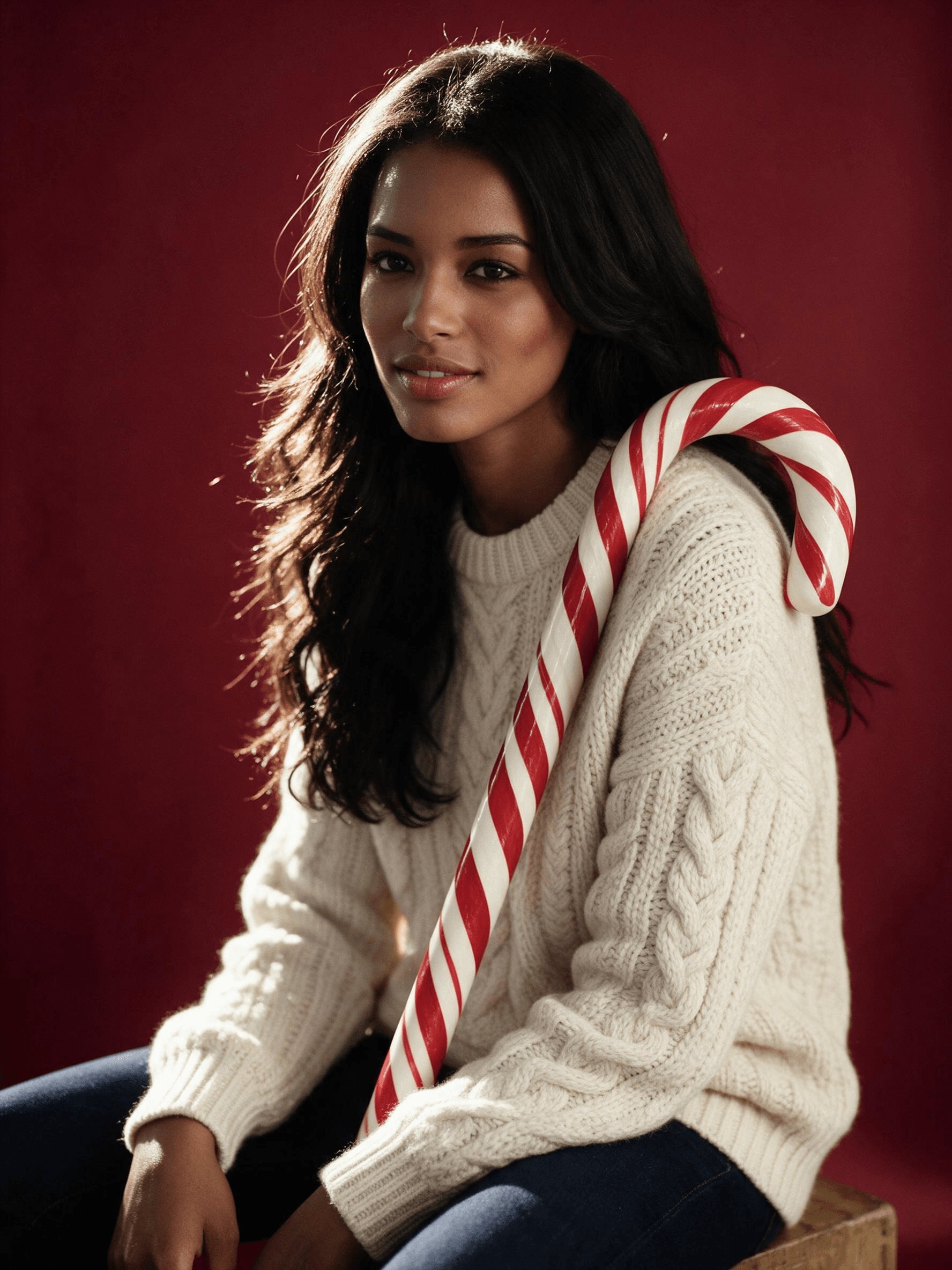
去年12月,同一张照片不断出现在群聊里:一位朋友身处亮面红色影棚,抱着一根几乎和自己一样高的拐杖糖,打光宛如杂志封面。那就是 AI 圣诞照片潮流,而配方始于一张普通的手机随手拍。
本指南介绍人们如何在 ChatGPT 和 Gemini 中制作这类照片、如何让 AI 圣诞照片依然像你本人,以及如何把家人(狗也算)各自独立的照片合成到一张贺卡中。下文每处编辑都来自我们在真实人像上的实际运行,并附有确切的提示词。首先,说说这股潮流究竟是什么。
关键要点
- AI 圣诞照片潮流在 2025 年 12 月风行一时,以 ChatGPT 制作的拐杖糖影棚肖像为主,同月也有 Gemini 版本的相关内容。
- 配方就是一张清晰的照片加上一段影棚风格提示词,再加一句说明哪些不能改,从而保住你的脸。
- Atlas Cloud 的 AI 图像编辑器 中的 Seedream 5.0 Pro 会重新设计整个圣诞场景,同时保留你的脸。
- 每位家庭成员(狗也算)各自独立的照片,可以在一次编辑中合成到一个圣诞贺卡场景里。
- 免费的 ChatGPT 和 Gemini 方案都能应付这股潮流,但两者都没有公布固定的每日图像数量。
什么是 AI 圣诞照片潮流?
它是一张以自拍为素材制作的影棚风格节日肖像。经典版本会用拐杖糖、棒棒糖、小彩灯、圣诞球和雪环绕你,配上明亮的节日灯光,看起来就像花钱拍的写真。
The Tab 在 2025 年 12 月 22 日发布的一篇解读文章中,向读者介绍了 ChatGPT 里的拐杖糖版本。其提示词以 "Create an ultra-realistic 8K Christmas portrait using a 55mm lens." 开头。
Gemini 用户也有自己的清单:《The Bridge Chronicle》在 12 月 11 日发布了用于节日照片的 Nano Banana 提示词,而在平安夜,Zee News 和 NewsX 都为这两款应用推出了提示词指南,其中 NewsX 的指南围绕家庭照片展开。
在这些道具背后,这些 AI 圣诞照片的配方其实很简单。输入一张清晰的照片,提示词描绘出详细的场景,再有一句告诉模型哪些属于你的部分不要改动。
如何在 Atlas Cloud 上制作 AI 圣诞照片潮流
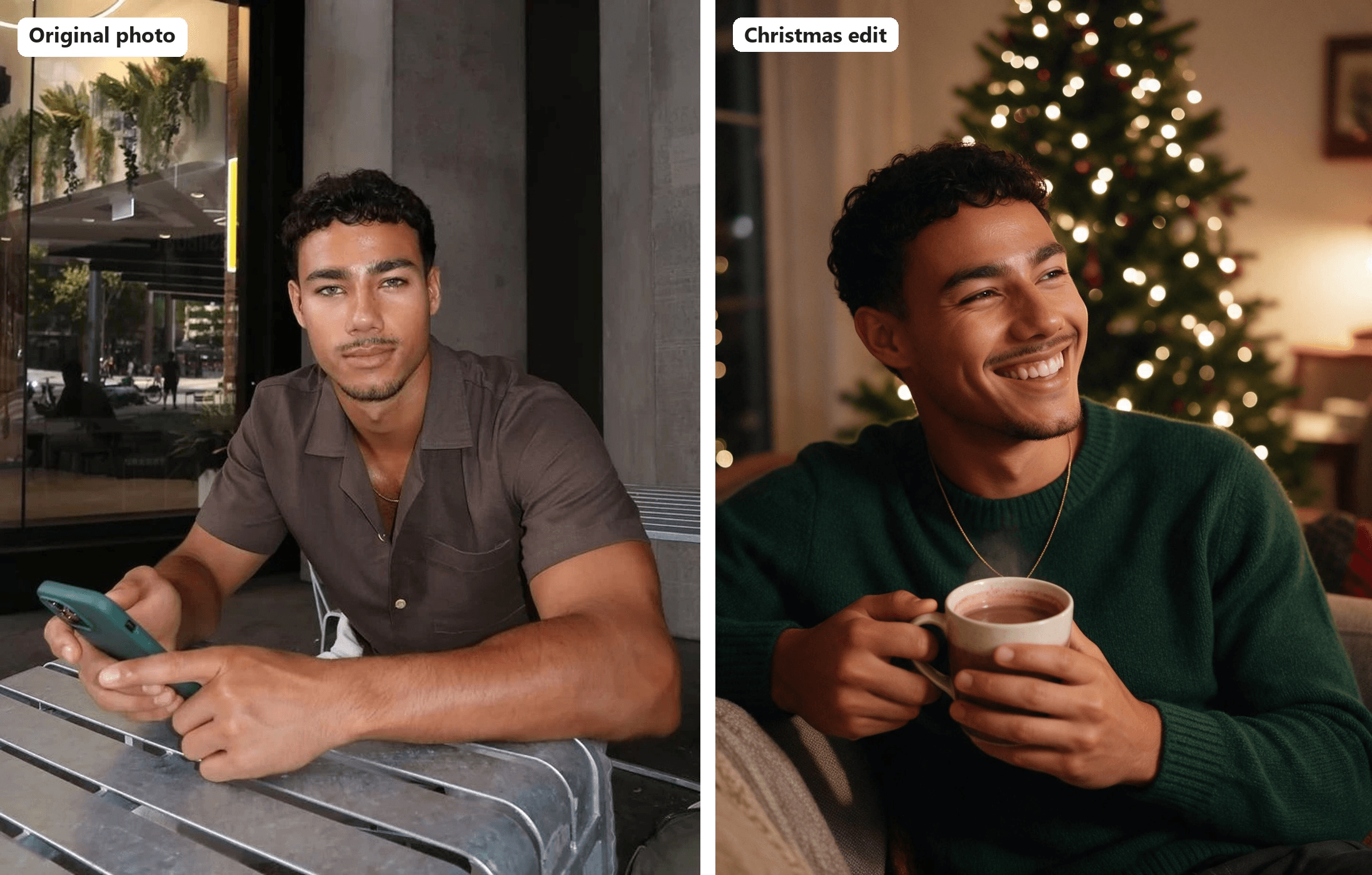
最难的部分是脸。一套服装穿在一个已经不像你的人身上,也可能很好看。Atlas Cloud 运行的是字节跳动 Seedream 5.0 Pro,这是一款编辑模型,会在保留你面部特征的同时重建整个场景。这使图像工作区变成一个 AI 圣诞照片生成器,只需要一张照片和一段话。下面是一张从咖啡馆餐桌移到圣诞夜晚的人像。
五步就能完成:
- 打开 Image Edit 标签页。
- 从模型列表中选择 Seedream v5.0 Pro。
- 在 Reference 下上传你的照片。
- 编写提示词:先写要保留的部分,再写新场景。
- 点击 Run。
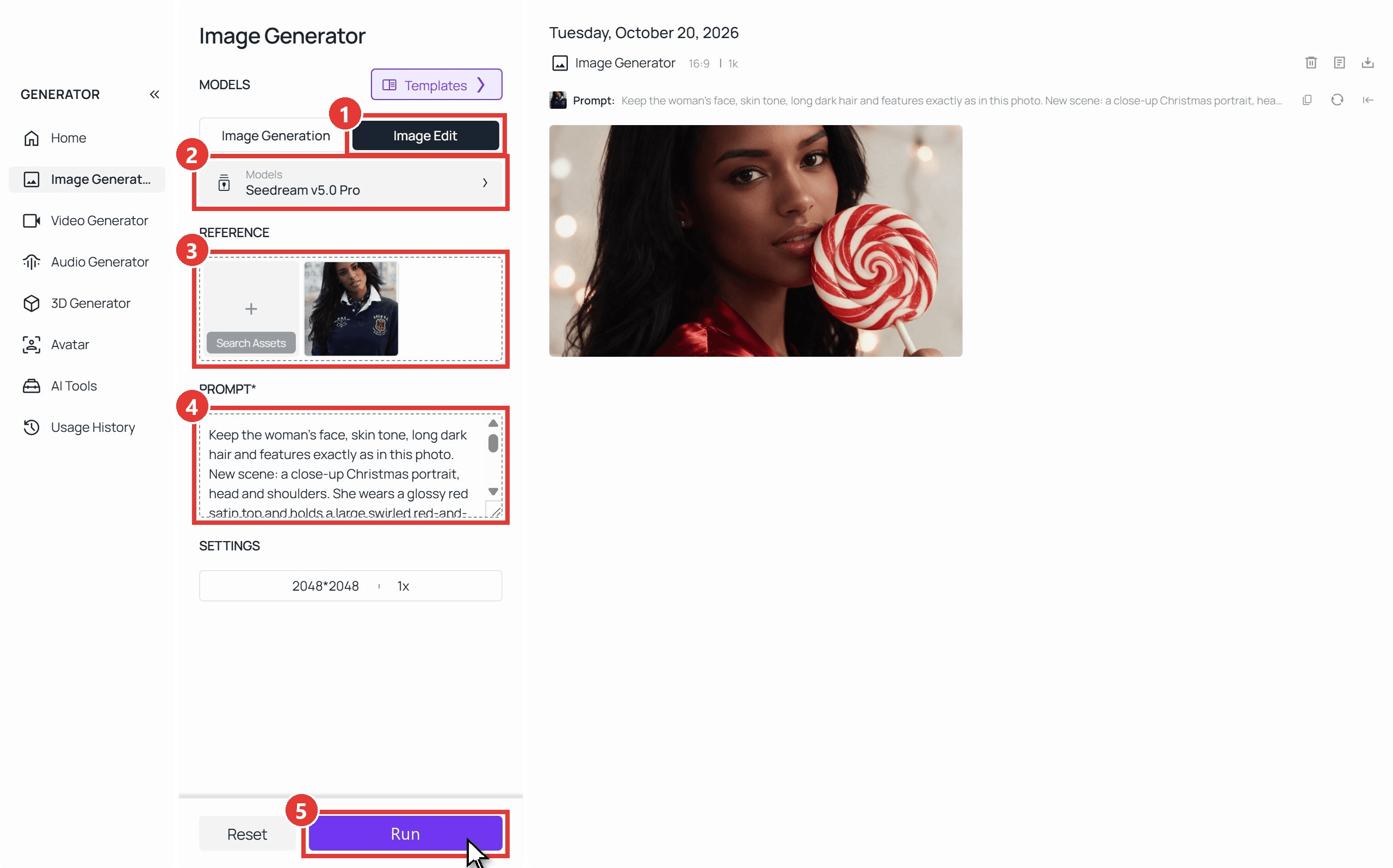
我们的每次编辑耗时一到四分钟,工作区默认输出 2048×2048。
把一张自拍变成拐杖糖肖像
棒棒糖特写是不错的第一次尝试,因为它只需要你的头部和肩部。下面是上面截图中使用的提示词:
plaintext1Keep the woman's face, skin tone, long dark hair and features exactly as in this photo. New scene: a close-up Christmas portrait, head and shoulders. She wears a glossy red satin top and holds a large swirled red-and-white lollipop beside her cheek. Warm string lights melt into round bokeh behind her.
第一句起了大部分作用。在描述任何新内容之前,先列出模型必须保留的特征,并且不要把衣着列进去,否则旧衣服也会跟着出现。
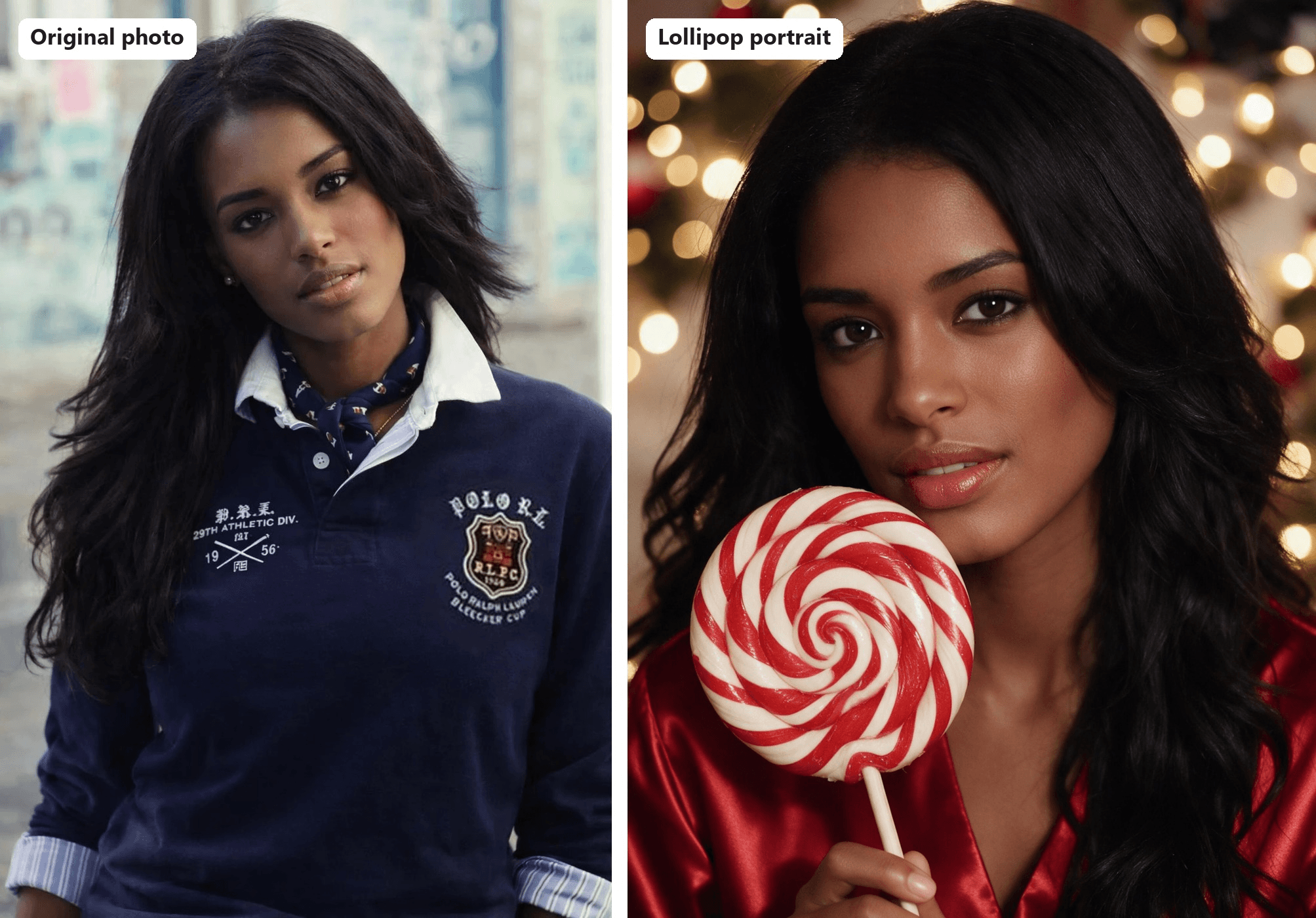
选一张清晰、光线均匀、脸部没有遮挡的照片。墨镜或挡在下巴前的手机都会让模型靠猜。如果你想得到自己的新角度,而不是节日场景,我们关于制作 AI 本人照片 的指南有更详细的介绍。
把各自独立的照片合成一张 AI 全家福圣诞照
没人非得站在同一个房间里。Seedream v5.0 Pro Edit playground 一次请求最多可以接收 10 张参考图,所以我们给了它三张:一位在咖啡馆的男子、一位在城市街道上的女子,以及一只在草地上的金毛寻回犬。
提示词为每张照片编号并说明人数;下面的问题排查表解释了这两点为何都很重要。
plaintext1Exactly three subjects: the man from image 1, the woman from image 2 and the golden retriever from image 3, one of each, no extra people. Combine them into one family Christmas card photo. Keep the man's face exactly as in image 1 and the woman's face and long dark hair exactly as in image 2; do not blend their features. The couple sits close together on a thick rug in front of a stone fireplace with knitted stockings on the mantel and a lit Christmas tree to the right. Both wear matching red plaid flannel pajamas. The golden retriever lies across their laps wearing a small red bow. She laughs while he looks at the dog. Warm firelight from the left, soft fill from the tree lights, 35mm lens at eye level, natural skin texture and light film grain. Horizontal framing.
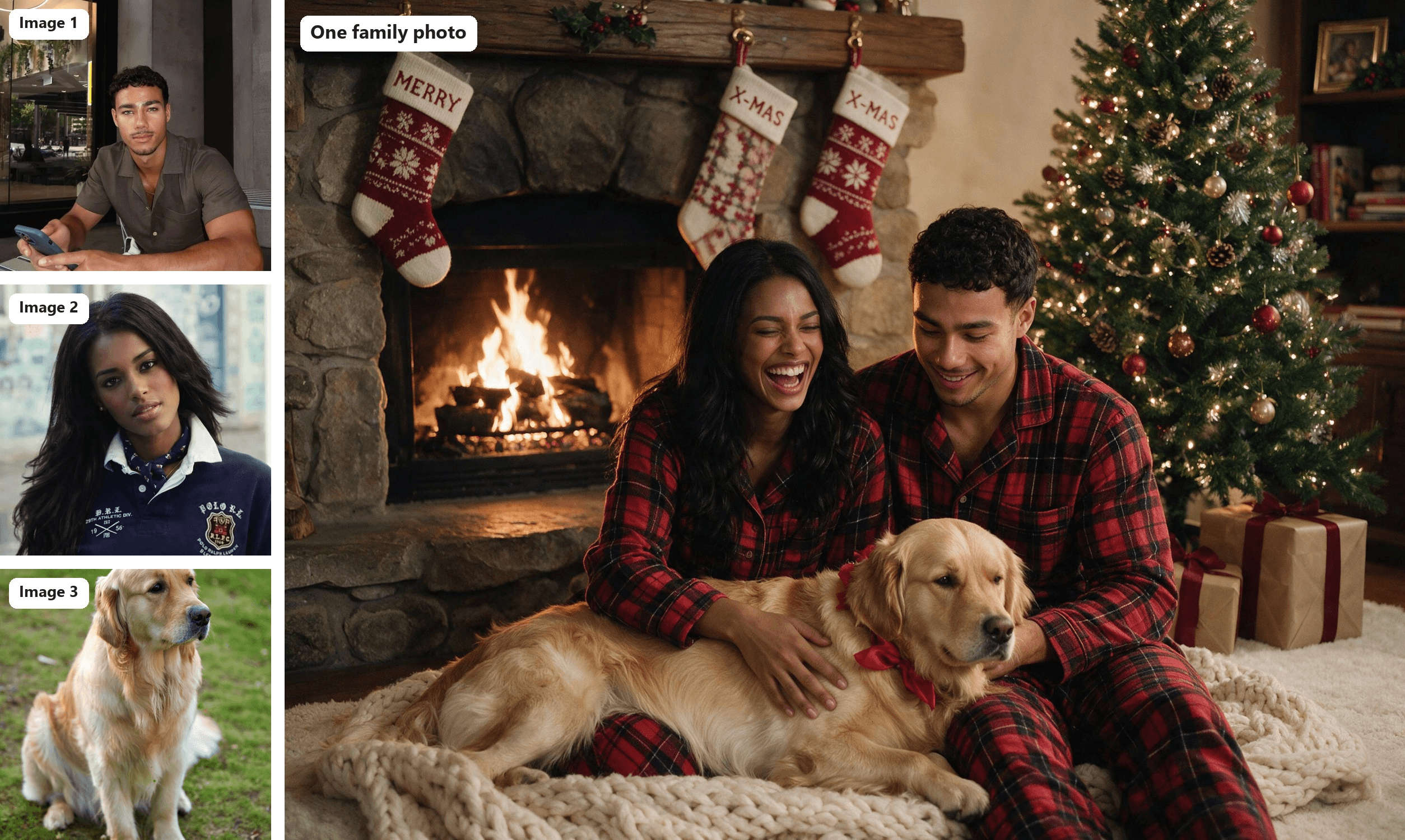
狗的照片(图 3):Pexels 的 Barnabas Davoti
一次编辑,2368×1776,可直接用于贺卡。我们用狗代替了孩子的角色;FAQ 部分会说明上传儿童照片前需要检查什么。
如何制作 ChatGPT 圣诞照片(以及 Gemini 版本)
人们是怎么在手机上制作 AI 圣诞照片的?大多是在 ChatGPT 或 Gemini 里,也就是他们已经装了的应用。
在 ChatGPT 中: 上传一张自拍,粘贴像 The Tab 那样的拐杖糖提示词,然后要求生成竖版图像。定价页面把免费方案列为 "Limited image creation",OpenAI 的免费层 FAQ 表示图像生成有自己的使用限额,但没有给出具体数字。我们在 ChatGPT 图像限额测试中实测了免费账户能走多远。
在 Gemini 中: 同样的步骤在 Gemini 应用里也能用,该应用默认运行 Nano Banana 2。Google 的帮助页面称,没有 AI 方案时下载为 1K,有方案时为 2K,使用限额每 5 小时刷新一次,直到达到每周上限。
| ChatGPT | Gemini 应用 | Atlas Cloud | |
|---|---|---|---|
| 图像模型 | ChatGPT 内置图像工具 | Nano Banana 2(付费方案为 Nano Banana Pro 重做版) | Seedream 5.0 Pro |
| 免费方案,官方说法 | "Limited image creation" | "Standard limits",每 5 小时刷新 | 按图像付费 |
| 最适合 | 用一张自拍快速做出拐杖糖肖像 | 在手机上快速生成各种变体 | 在一组照片中保持一致的脸,以及用各自独立的照片合成合影 |
可以照抄的 AI 圣诞照片潮流提示词
我们在同样的两张人像和一只狗上运行了六条提示词。保留第一句,把自己的细节替换进去。它们是纯英文,没有特定模型的语法,因此也可以当作 ChatGPT 圣诞照片提示词使用。
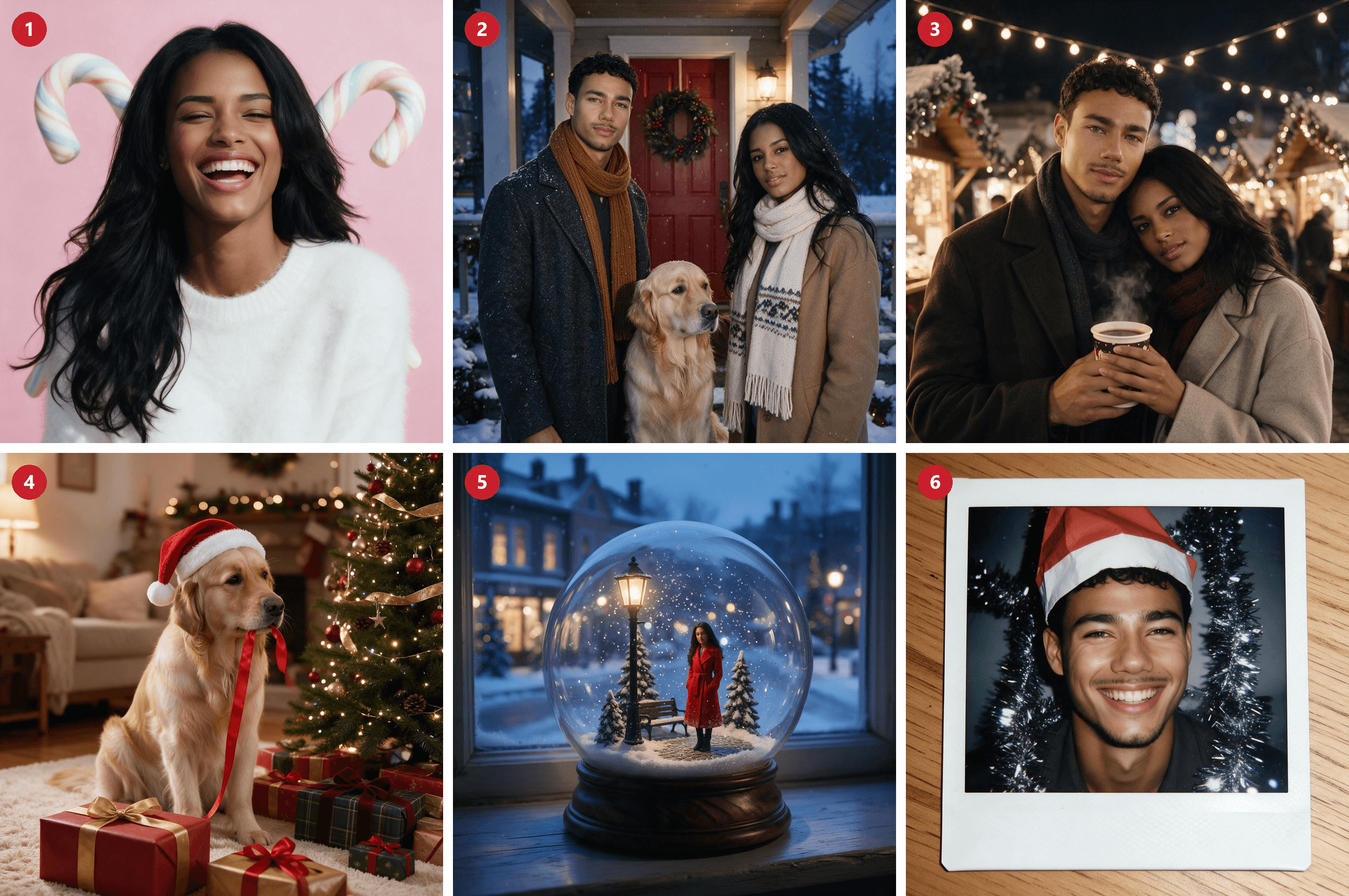
{width="100%"}
1. 粉彩拐杖糖肖像
plaintext1Keep the woman's face, skin tone and long dark hair exactly as in this photo. Christmas studio portrait on a pale pink seamless backdrop, two oversized pastel candy canes crossed behind her, white fluffy sweater, laughing with her eyes half closed. Soft window-style key light, natural skin texture, light film grain, square framing.
2. 雪中门廊全家福
plaintext1Exactly three subjects: the man from image 1, the woman from image 2 and the golden retriever from image 3. One person each, no extra people. They stand on a snowy front porch with a pine wreath on the red door, the dog sitting between them. Keep each face exactly as in its own photo. Wool coats and scarves, light snow falling, blue-hour dusk with warm porch light. 35mm lens, natural grain, square framing.
3. 圣诞集市情侣
plaintext1The man from image 1 and the woman from image 2 as a couple at a Christmas market at night, sharing a paper cup of mulled wine under strings of warm bulbs, wooden stalls blurred behind them. Keep both faces exactly as in their photos. Wool coats, her head on his shoulder. Available light, 50mm lens, natural grain, square framing.
4. 戴圣诞帽的宠物
plaintext1Keep this golden retriever's face, coat color and markings exactly as in the photo. The dog sits beside a decorated Christmas tree wearing a small red Santa hat, a pile of wrapped gifts in front, one ribbon in its mouth. Warm living-room light, tree lights as soft bokeh, eye-level 50mm lens, natural fur detail, square framing.
5. 雪花球迷你版
plaintext1Shrink the woman from this photo into a tiny figure inside a glass snow globe, keeping her face and long dark hair recognizable. She wears a red coat and stands on a miniature snowy street with a lamp post, snowflakes swirling in the glass. The globe sits on a wooden windowsill at dusk with soft blue light outside. Macro product-photo look, square framing.
6. 拍立得快照
plaintext1Keep the man's face, curly hair and beard exactly as in this photo. Turn it into a 2000s instant-camera Christmas snapshot: direct on-camera flash, a silver tinsel garland behind him, a paper Santa hat tilted on his head, a big grin. Show the whole picture as a white-bordered instant print lying on a wooden table. Square framing.
为什么你的 AI 圣诞照片不像你
当结果不理想时,无论你用什么应用,先检查提示词和原照片,再考虑其他因素。以下是常见的罪魁祸首以及修正它的那一句话。
| 问题 | 可能原因 | 修正方法 |
|---|---|---|
| 脸看起来像别人 | 提示词从未要求保留 | 开头写 "Keep her face, skin tone and hair exactly as in the photo" |
| 两张脸混在一起 | 模型分不清谁是谁 | 给照片编号("the man from image 1")并加上 "do not blend their features" |
| 出现多余的人 | 提示词里没有说明人数 | 加上 "Exactly three subjects, one of each, no extra people" |
| 你的手机或旧衣服留了下来 | 模型会照搬它看到的东西 | 描述新衣服,并加上 "no phone" |
| 衬衫上的 logo 又出现了 | 同样的照搬习惯 | 说明新衣服,并加上 "no logos" |
| 拿拐杖糖的手指很奇怪 | 手拿道具很难画好 | 让道具搭在肩上,或描述一个简单的握持动作 |
若想让皮肤看起来不像是喷枪磨过,我们的 Seedream 人像指南 会更深入地讲光线和质感用词。
常见问题
AI 圣诞照片潮流是免费的吗?
在限额内,是的。这两款免费应用都能制作这类照片(它们的上限见上文),但一旦全家人都想试一遍,免费的 AI 圣诞照片生成器很快就会用完额度。
在 Atlas Cloud 上,Seedream v5.0 Pro 的一次编辑在 1.5K 尺寸下费用为 $0.036,在 2K 尺寸(如 2368×1776)下为 $0.072,另加每张额外参考图 $0.0024。以上价格包含了模型页面截至 2026 年 10 月 20 日显示的 20% 折扣;标价分别为 $0.045 和 $0.09。
把孩子照片上传到 AI 照片编辑器安全吗?
先检查数据设置。OpenAI 表示,除非你关闭 "Improve the model for everyone",否则它可能会使用你来自 Free、Plus 和 Pro 账户的内容来训练模型。Google 的 Gemini 隐私中心 称部分对话会由人工审核员阅读,活动记录默认保留 18 个月。FBI 的互联网犯罪中心也呼吁在发布儿童图像时要谨慎。用宠物代替会更容易。
我需要在 Instagram 或 TikTok 上标注 AI 圣诞照片吗?
在 TikTok 上,如果结果看起来很真实,就需要:其社区准则要求创作者对展示逼真场景或人物的 AI 生成内容加注标签。Meta 的标签政策规定,对于照片级真实的视频和真实音频,披露是强制性的。对于静态图像,Instagram 和 Facebook 在检测到文件中存在 AI 信号时会添加 "AI info" 标签。
Stories 或打印贺卡用的 AI 圣诞照片应该多大尺寸?
Meta 为 Stories 推荐 9:16 的 1080×1920 像素。Shutterfly 建议以 300 DPI 打印,对于 5×7 贺卡就是 1500×2100 像素。Seedream 5.0 Pro 的 1584×2816 预设可覆盖 Stories,而 1776×2368 的竖版尺寸为裁剪 5×7 贺卡留有余地。
结论
拐杖糖从来都不是难的部分。这股潮流归结起来就是:一张清晰的照片、一段说明要保留什么的提示词,以及一个尊重这一点的模型。做到这些,同一套配方就能从单人棒棒糖特写,延伸到用三个不同地方拍的照片做成的家庭贺卡。
如果去年的尝试给了你一张陌生人的脸,那就从今年的“脸部说明句”开始,给每张照片编号,并数清主体数量。这就是加入 AI 圣诞照片潮流、同时还能在结果中认出自己所需要的一切。





