


《iCarly》里的 Carly 大步走过泛光灯照亮的草坪,说唱着 YoungBoy 的段落,身后一辆四轮摩托翘起前轮。切到蓝光工作室,再到一片金色草地,Sam 在那里拍特写。她们俩从未出现在那个片场。这段视频在 TikTok 上有 280 万次播放,其最高赞评论获超 7.7 万次点赞,说举摄像机的一定是 Freddy。
这就是 Bandit AI 趋势:AI 逐镜头重铸了 Juice WRLD 和 YoungBoy Never Broke Again 2019 年的《Bandit》MV。一波教程帖子承诺提供免费的 CapCut 模板。我们拆解了那些模板,追溯了趋势的最初帖子,并用两只小猫重建了这段视频。以下是真正有效的方法。
关键要点
- Bandit AI 趋势逐镜头重铸了 2019 年 Juice WRLD 和 YoungBoy 的 MV,换上了新面孔。
- 2026 年 11 月 19 日发布的 iCarly 版本使其成为趋势,在 TikTok 上获得 280 万次播放。
- 我们检查的大多数“如何制作”教程背后的 CapCut 模板没有列出 AI 功能,因此无法换脸。
- 两张照片、趋势片段和逐镜头提示词,在 Atlas Cloud 视频生成器 中用 Kling Video 4.0 重建。
- 在 TikTok 内使用趋势声音发布,并打开 AI 生成标签。
什么是 Bandit AI 趋势?
趋势片段借用同样的 15 秒:YoungBoy 在官方 MV 中的段落,1:48 到 2:03,从泛光灯草坪到蓝光工作室特写。镜头运动、剪辑和场景保持不变。只有两位说唱歌手变了。
这首歌于 2019 年 10 月 4 日发行,MV 由 Cole Bennett 为 Lyrical Lemonade 执导。这是 Juice WRLD 生前作为主艺人发行的最后一首单曲,其官方视频在 YouTube 上的观看次数已超过 5.25 亿次。
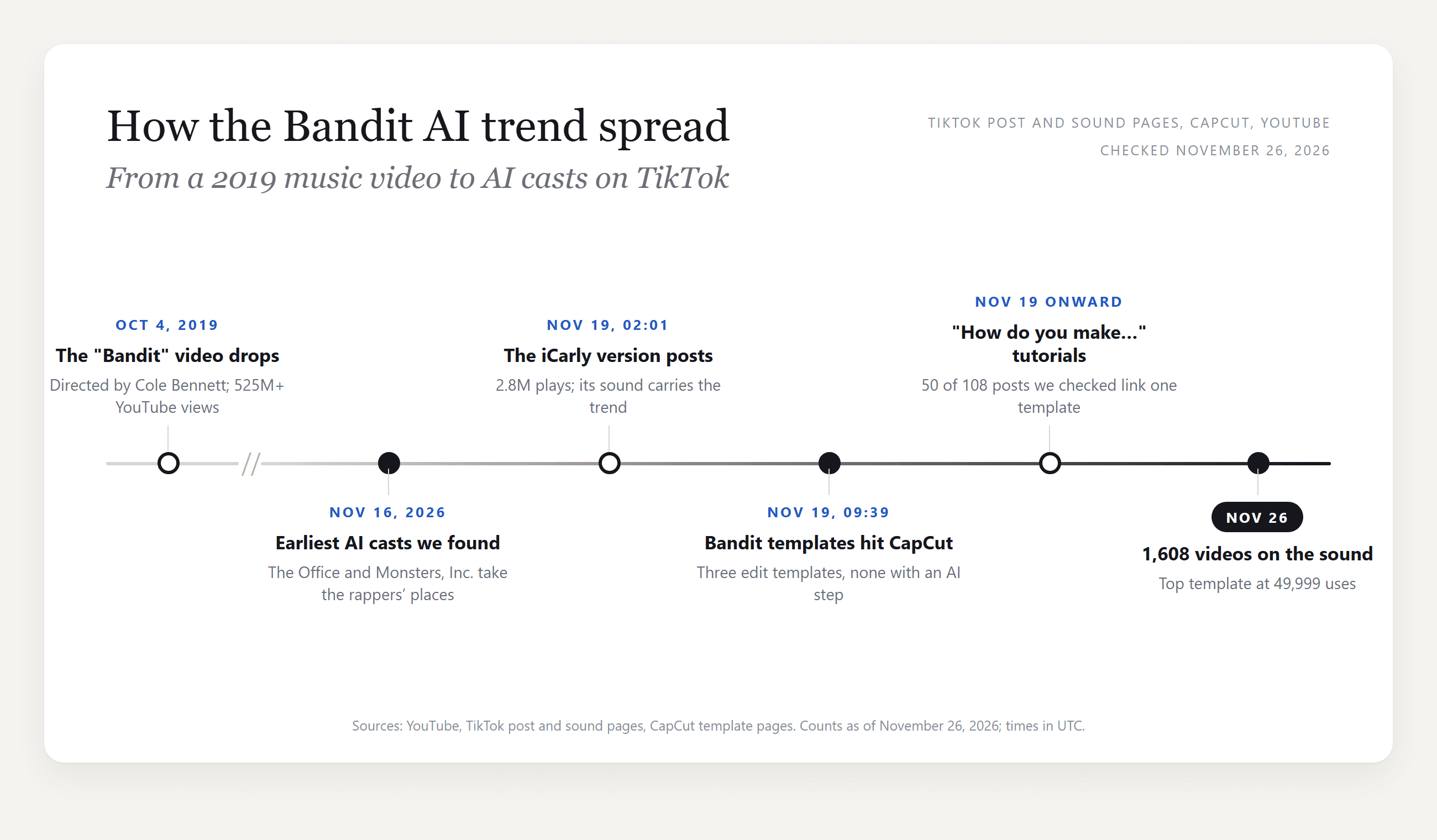
我们找到的最早的 AI 版本于 2026 年 11 月 16 日发布。一位 TikTok 创作者将《The Office》中的 Michael Scott 和 Dwight Schrute 放在两位说唱歌手的位置上,另一位使用了《Monsters, Inc.》中的 Boo 和 Sulley。三天后,@novarunee 发布了 iCarly 版本,这个版本传播开来。其原始声音现在出现在 1,608 个视频中。
iCarly Bandit、The Office 和爆火的演员阵容
笑点在于,这些演员是你最不可能想象出现在 YoungBoy 草坪上的人。以下是我们打开的最热门帖子背后的版本,播放量截至 2026 年 11 月 26 日:
| 演员阵容 | 谁取代谁 | 首次出现 | 播放量(最高帖子) |
|---|---|---|---|
| iCarly:Carly and Sam | 两人都取代 YoungBoy 的镜头;Juice WRLD 保持不变 | 11月19日 | 280万 |
| Despicable Me:Agnes and a pink fairy | 两位说唱歌手都被替换,每个场景变成 3D 动画 | 11月22日 | 54.07万 |
| Monsters, Inc.:Boo and Sulley | 两位说唱歌手都被替换,每个场景变成 3D 动画 | 11月16日 | 8.31万 |
| The Office:Michael Scott and Dwight Schrute | 两位说唱歌手都被替换 | 11月16日 | 6.25万 |
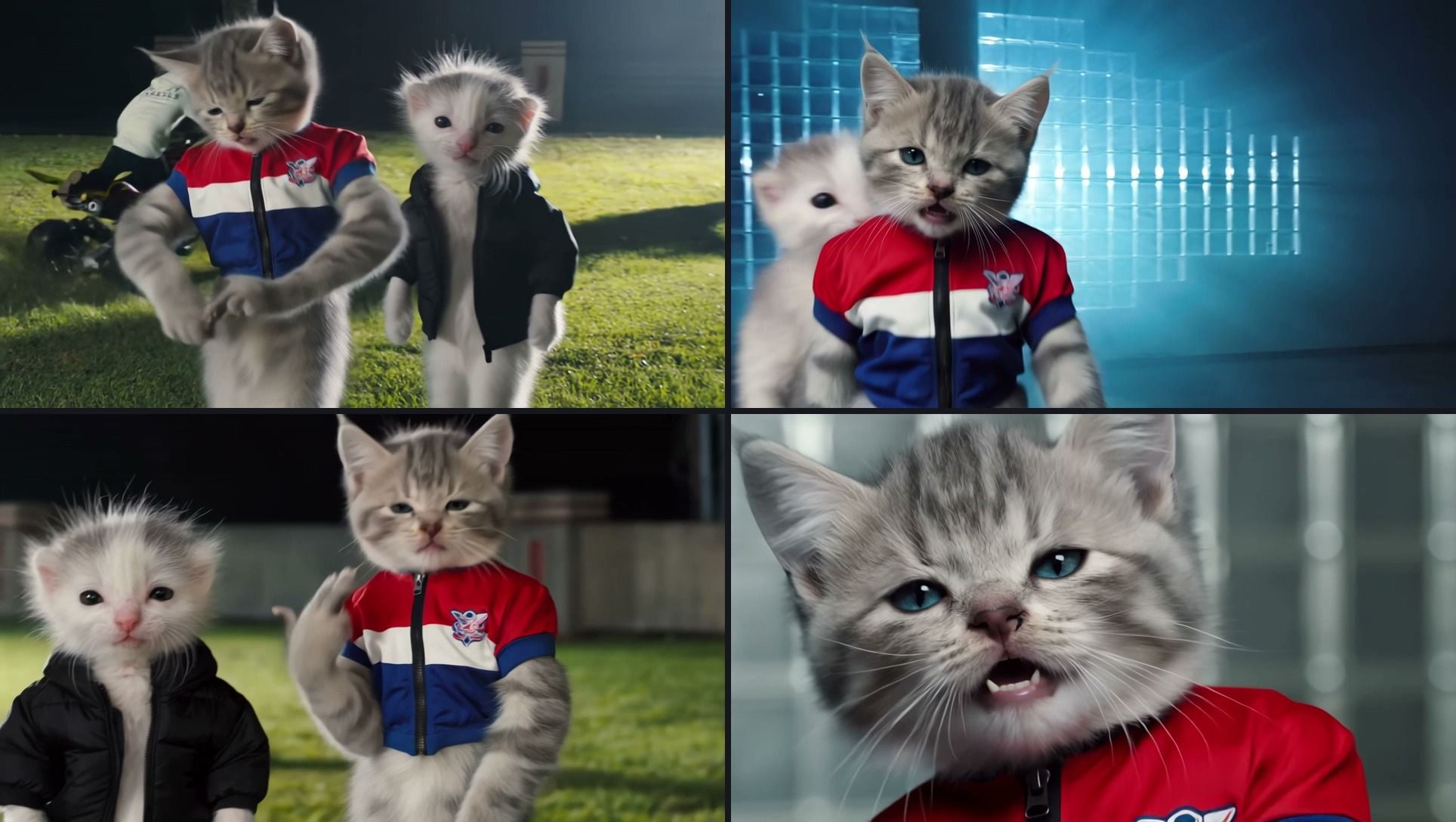
卡通演员阵容将整个视频拉入自己的风格。我们在下面反其道而行之,选用了两只真实的小猫,以它们的高度拍摄。
如何用两张照片制作 Bandit AI 趋势
两张照片和趋势的 15 秒片段就够了。片段带来了每个场景、剪辑和镜头运动,一张照片占据主说唱歌手的位置,另一张占据搭档的位置,而镜头列表告诉模型谁在哪里。以下是我们用 Atlas Cloud 的运行,以一只灰色虎斑小猫为主角,一只白色小猫为搭档:
音频:Juice WRLD 和 YoungBoy Never Broke Again 的《Bandit》原始 15 秒,在生成后叠加到片段上。
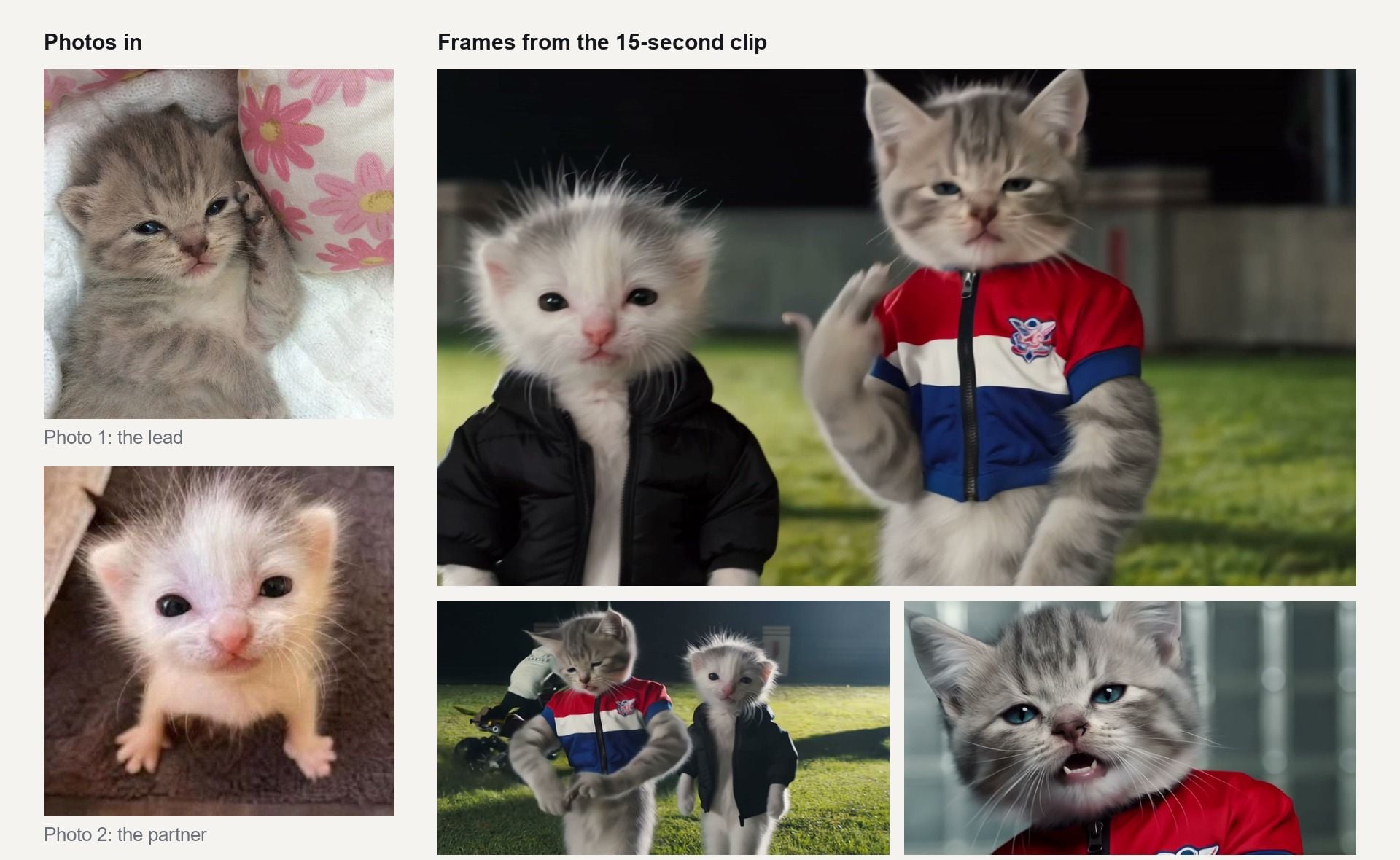
模型是 Kling Video 4.0 的视频编辑模式。它保留你上传片段的场景、剪辑和镜头运动,并替换照片中的主体。一切都在 视频生成器 的 Video Edit 选项卡中运行。
在我们的运行中,两只小猫从第一个镜头到最后一个镜头都保持了它们的斑纹,虎斑猫的嘴巴在工作室特写中动了起来,金色素描镜头变成了两只小猫的轮廓。
方法 1:在 Atlas Cloud 视频生成器中为两位说唱歌手选角
按照截图上的数字操作:
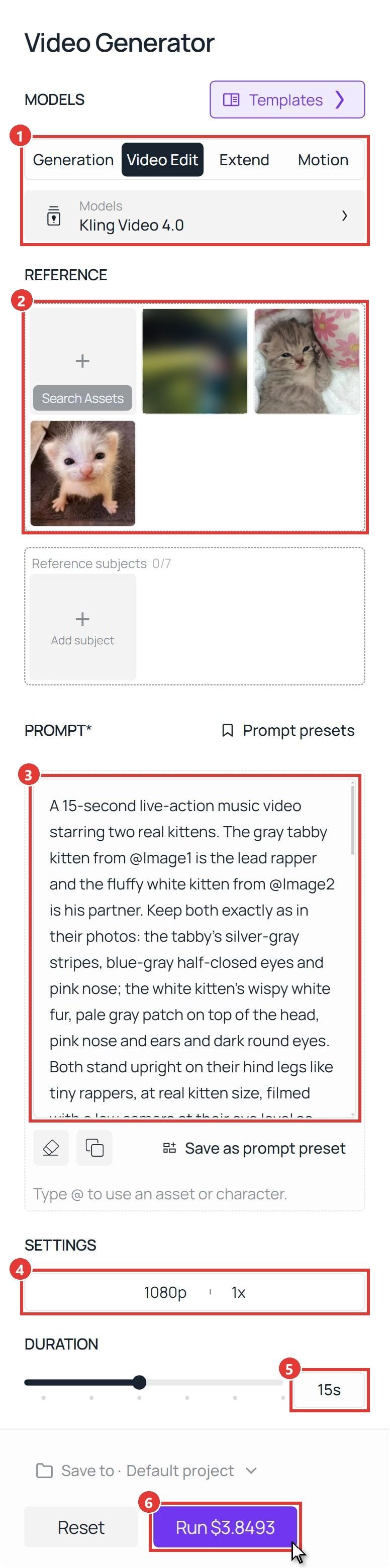
- 模型: 打开 Video Edit,选择 Kling Video 4.0。
- 要编辑的视频: 先上传片段(官方视频 1:48 到 2:03,静音),然后上传主角照片,再上传搭档照片。上传顺序使照片成为 @Image1 和 @Image2,Reference subjects 可以留空。Jingle Bell Brazil 舞蹈指南 以相同方式标记照片。
- 提示词: 粘贴下面的提示词。如果标签仍是纯文本,在框中输入 @ 并选择文件。
- 分辨率: 首次尝试用 720p,最终稿用 1080p。输出保持片段的 16:9 画幅。
- 时长: 设置为 15 秒。
- 运行。 片段会出现在右侧面板中。
plaintext1A 15-second live-action music video starring two real kittens. The gray tabby kitten from @Image1 is the lead rapper and the fluffy white kitten from @Image2 is his partner. Keep both exactly as in their photos: the tabby's silver-gray stripes, blue-gray half-closed eyes and pink nose; the white kitten's wispy white fur, pale gray patch on top of the head, pink nose and ears and dark round eyes. Both stand upright on their hind legs like tiny rappers, at real kitten size, filmed with a low camera at their eye level so they fill the frame. The lead wears a tiny red, white and blue racing jacket (a tiny white racing jacket in shots 6 and 7); the partner wears a tiny open black puffer jacket. No humans appear except one distant quad bike rider whose face is never shown. 2 3Shot 1 (0-1.9s): a night lawn under a bright floodlight, wide low shot. The lead struts toward the camera, waving his front paws like he is rapping; the partner waddles behind him on the right; quad bikes parked in the background. 4Shot 2 (1.9-4.4s): hard cut to a dark studio with glowing blue glass-block light panels and haze. The lead raps to the camera in a medium shot as the camera slowly pushes in, mouth opening and closing; near the end the partner pokes his head in over the lead's shoulder. 5Shot 3 (4.4-5.4s): hard cut to a warm gold-brown backdrop. The two kittens stand side by side, then turn into gold hand-drawn line sketches. 6Shot 4 (5.4-7.3s): hard cut to the night lawn. A rider in a helmet pops a wheelie on a green quad bike far from the camera. 7Shot 5 (7.3-9.7s): hard cut to a low concrete wall at night. The lead raps to the camera and waves one front paw; the partner sits on the left, looking cool. 8Shot 6 (9.7-12.3s): hard cut to a field of tall golden grass at kitten height. The lead raps in the white racing jacket as the camera moves in. 9Shot 7 (12.3-15s): hard cut back to the blue studio, a close-up of the lead's face rapping straight into the lens, whiskers twitching. 10 11Photorealistic, real fur texture, cinematic music video lighting, shallow depth of field. No text, no captions, no logos, no watermark.
视频编辑模式只替换提示词指定的内容,因此背景中的四轮摩托骑手保持片段中的原样。
想用自己和朋友来选角?使用这个版本,配上你们的两张照片:
plaintext1A 15-second live-action music video starring two friends. The person from @Image1 is the lead rapper and the person from @Image2 is the partner. Keep each face, hairstyle, skin tone and age exactly as in their photo, also with the mouth open. The lead wears a red, white and blue racing jacket over a white T-shirt (a white racing jacket in shots 6 and 7); the partner wears an open black puffer jacket over a black T-shirt. No other people appear except one distant quad bike rider whose face is never shown. 2 3Shot 1 (0-1.9s): a night lawn under a bright floodlight, wide shot. The lead walks toward the camera rapping with big hand gestures; the partner follows on the right; quad bikes parked in the background. 4Shot 2 (1.9-4.4s): hard cut to a dark studio with glowing blue glass-block light panels and haze. The lead raps to the camera in a medium shot as the camera slowly pushes in; near the end the partner leans in over the lead's shoulder. 5Shot 3 (4.4-5.4s): hard cut to a warm gold-brown backdrop. The two stand side by side, then turn into gold hand-drawn line sketches. 6Shot 4 (5.4-7.3s): hard cut to the night lawn. A rider in a helmet pops a wheelie on a green quad bike far from the camera. 7Shot 5 (7.3-9.7s): hard cut to a low concrete wall at night. The lead raps to the camera and waves one hand; the partner stands on the left. 8Shot 6 (9.7-12.3s): hard cut to a field of tall golden grass. The lead raps in the white racing jacket as the camera moves in. 9Shot 7 (12.3-15s): hard cut back to the blue studio, a close-up of the lead rapping straight into the lens. 10 11Photorealistic, cinematic music video lighting, shallow depth of field. No text, no captions, no logos, no watermark.
方法 2:通过 Kling Video 4.0 API 运行相同的提示词
想为群聊中的每对朋友制作一个版本?API 接受相同的片段、相同的两张照片和相同的提示词。
步骤 1:创建 API 密钥。 在控制台中,打开 Settings,在 API Keys 下创建密钥。
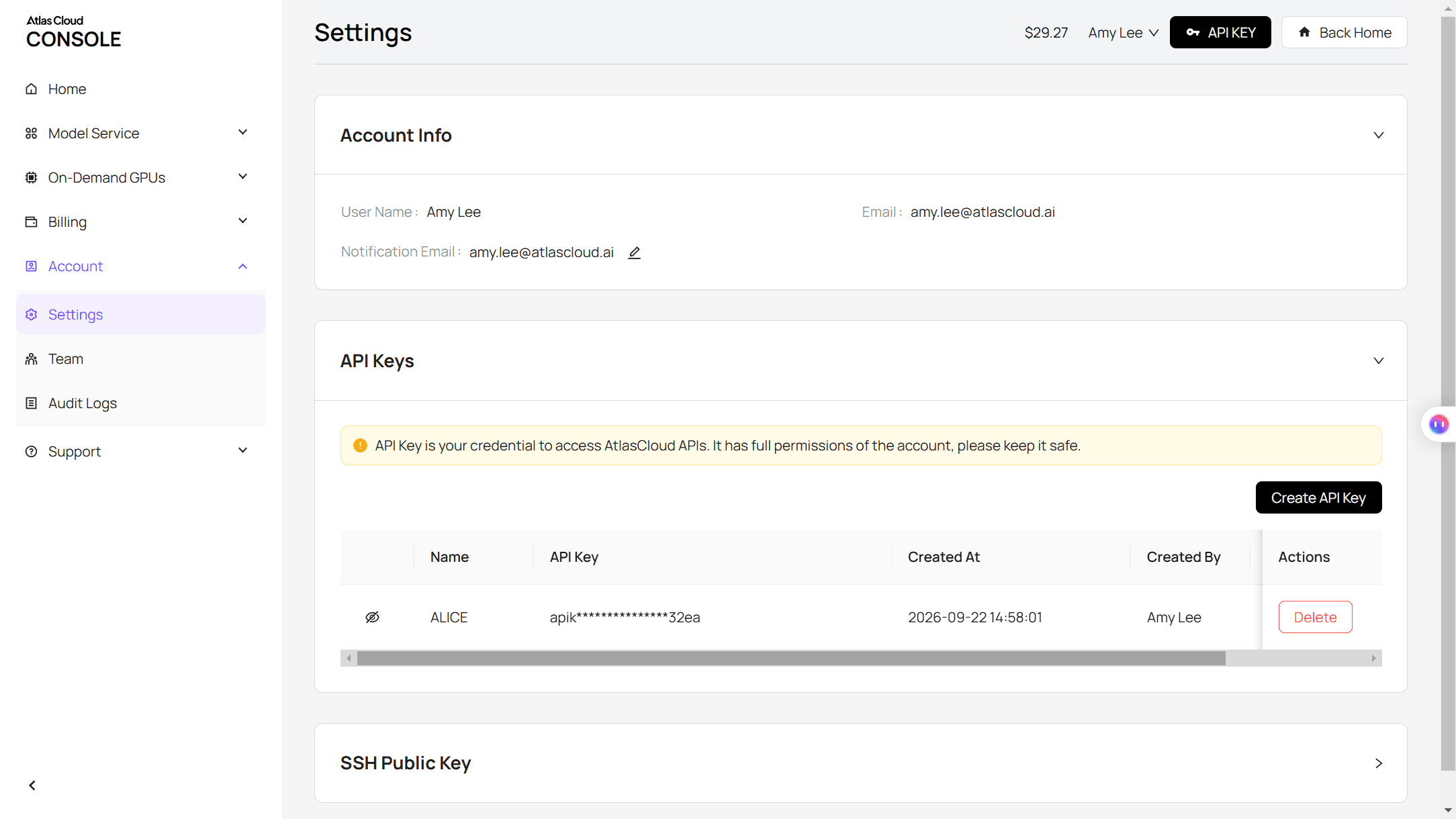
步骤 2:检查请求格式。 API 文档 涵盖身份验证,Kling Video 4.0 视频编辑模型页面上的 API 选项卡列出了每个字段。
步骤 3:发送请求并轮询。 片段放入 video,两张照片放入 reference_images,全部作为公共 URL。在 API 提示词中,将标签写为 @video_1、@image_1 和 @image_2:
plaintext1curl -X POST https://api.atlascloud.ai/api/v1/model/generateVideo \ 2 -H "Authorization: Bearer $ATLASCLOUD_API_KEY" \ 3 -H "Content-Type: application/json" \ 4 -d '{ 5 "model": "kwaivgi/kling-v4.0/video-edit", 6 "prompt": "<paste the Bandit prompt here, tagged @image_1 and @image_2>", 7 "video": "https://your-cdn.com/bandit-clip.mp4", 8 "reference_images": [ 9 "https://your-cdn.com/lead.jpg", 10 "https://your-cdn.com/partner.jpg" 11 ], 12 "resolution": "1080p", 13 "duration": 15 14 }'
轮询返回的预测 ID,直到状态显示 completed,然后从 outputs 数组中下载片段:
plaintext1curl https://api.atlascloud.ai/api/v1/model/prediction/<prediction_id> \ 2 -H "Authorization: Bearer $ATLASCLOUD_API_KEY"
端点和密钥在 Atlas Cloud 上的每个视频模型中保持不变。尝试另一个模型只需更改模型字符串。
Bandit CapCut 模板:它到底做什么
搜索 Bandit CapCut 模板,你会看到标题为“如何制作 Bandit YB 和 Juice WRLD AI 趋势?”的帖子。它们以别人的 AI 片段开场,通常是 iCarly 那个,然后拍摄手机点击进入 CapCut 模板的过程。在我们检查的 108 个 Bandit 帖子中,有 50 个链接到同一个模板:Beyond726 的“trend”。
| 模板 | 创作者 | 11月26日使用量 | 槽位和时长 | 预览显示内容 | 列出的 AI 功能 |
|---|---|---|---|---|---|
| trend | Beyond726 | 49,999 | 1 个槽位,42.7 秒 | 原始 MV,未更改 | 否 |
| Noiain'tcrazyyb | Iris735 | 2,518 | 4 个槽位,13.2 秒 | iCarly AI 片段,转发 | 否 |
| Video | NiNi9540 | 1,021 | 3 个槽位,21.5 秒 | The Office AI 片段,转发 | 否 |
CapCut 模板页面列出了模板所基于的编辑功能。我们检查的单照片 AI 模板列出了 AI 绘画功能:另一个 11 月趋势背后的 WWE SmackDown 模板有,Snowman 模板也有。Beyond726 模板列出了剪辑、滤镜和文字模板,没有其他。
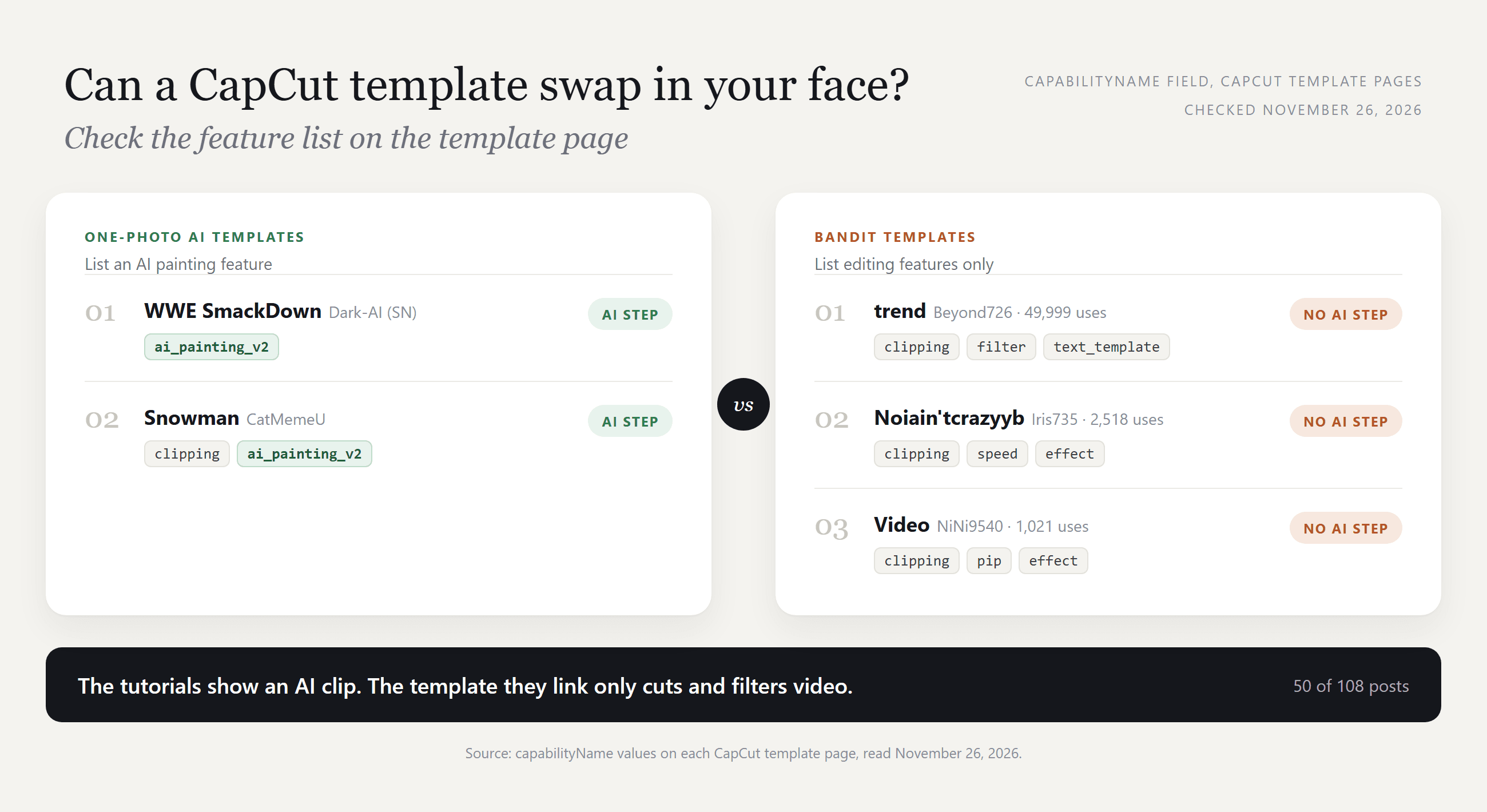
由于没有列出 AI 功能,这三个模板都无法将你的脸放入让它们走红的片段中。许多教程帖子带有 #capcutpioneer,这是 CapCut Pioneer 创作者计划的标签。
发布前关于 Bandit YB 和 Juice WRLD AI 趋势的提示
上传前请检查这些:
| 检查项 | 为什么重要 |
|---|---|
| 每张照片一个主体,面部朝向镜头 | 每张照片填充一个角色,工作室特写将面部置于正中央 |
| 主角第一,搭档第二 | 上传顺序决定谁穿赛车夹克 |
| 照片中嘴巴可见 | 主角在大多数镜头中说唱,因此遮住的嘴巴会让模型猜测 |
| 在 TikTok 内添加声音 | 模型返回自己的 AI 音频,而非歌曲,iCarly 帖子中趋势的原始声音在 TikTok 的声音库中 |
| 打开 AI 生成标签 | 该片段重新演绎了真实的 MV,因此观众应该知道它是 AI |
你更想围绕自己的角色制作原创曲目?从 如何制作 AI 音乐视频 开始。
常见问题
Bandit AI 趋势中使用的是什么歌曲?
Juice WRLD 和 YoungBoy Never Broke Again 2019 年的《Bandit》。许多帖子使用 iCarly 帖子的原始声音,因此上传时在 TikTok 中选择该声音,你的片段就会加入相同的推送流。
iCarly Bandit 视频是真的吗?
不是。它是对官方 MV 的 AI 编辑,创作者在 TikTok 上将帖子标记为 AI 生成。许多评论者仍然配合,好像它是真的一样,这就是为什么发布自己的内容时清晰的 AI 标签很重要。
我可以用一张照片制作 Bandit AI 趋势吗?
可以。iCarly 原版只重铸了 YoungBoy 的镜头。用一张照片时,从提示词中删除 @Image2,并将搭档描述为原创角色,有自己的脸和相同的黑色夹克。这样既保持了双人构图,又不复制真实艺人的脸。
我可以把我的宠物放入 Bandit AI 趋势吗?
可以。我们的主角和搭档是两只小猫。在上传照片的同时,在提示词中描述每只宠物的毛发和斑纹,并要求它们穿着小夹克直立,像原版一样说唱。对于真人,使用你自己的照片或同意的朋友的照片,绝不要使用名人或陌生人的。
在 Atlas Cloud 上制作 15 秒 Bandit AI 视频需要多少钱?
使用 15 秒片段和两张照片,15 秒 720p 运行费用约为 $2.57,是 $3.67 标价的 30% 折扣;1080p 费用约为 $3.85,标价为 $5.50,截至 2026 年 11 月 26 日。片段本身的秒数计入价格,因此将其修剪到你需要的 15 秒。折扣会变化,运行按钮会在生成前显示确切价格。
结论
趋势靠对比运行:情景喜剧演员、卡通小孩或一对小猫在 YoungBoy 自己的草坪上说唱他的段落。镜头在每个帖子中保持不变,这正是逐镜头提示词可以重建它们的原因。
要自己制作 Bandit AI 趋势,跳过只重新剪辑原版的模板。选择两张清晰的照片,与 15 秒片段一起上传,粘贴镜头列表,并在发布前在 TikTok 中添加趋势声音。







