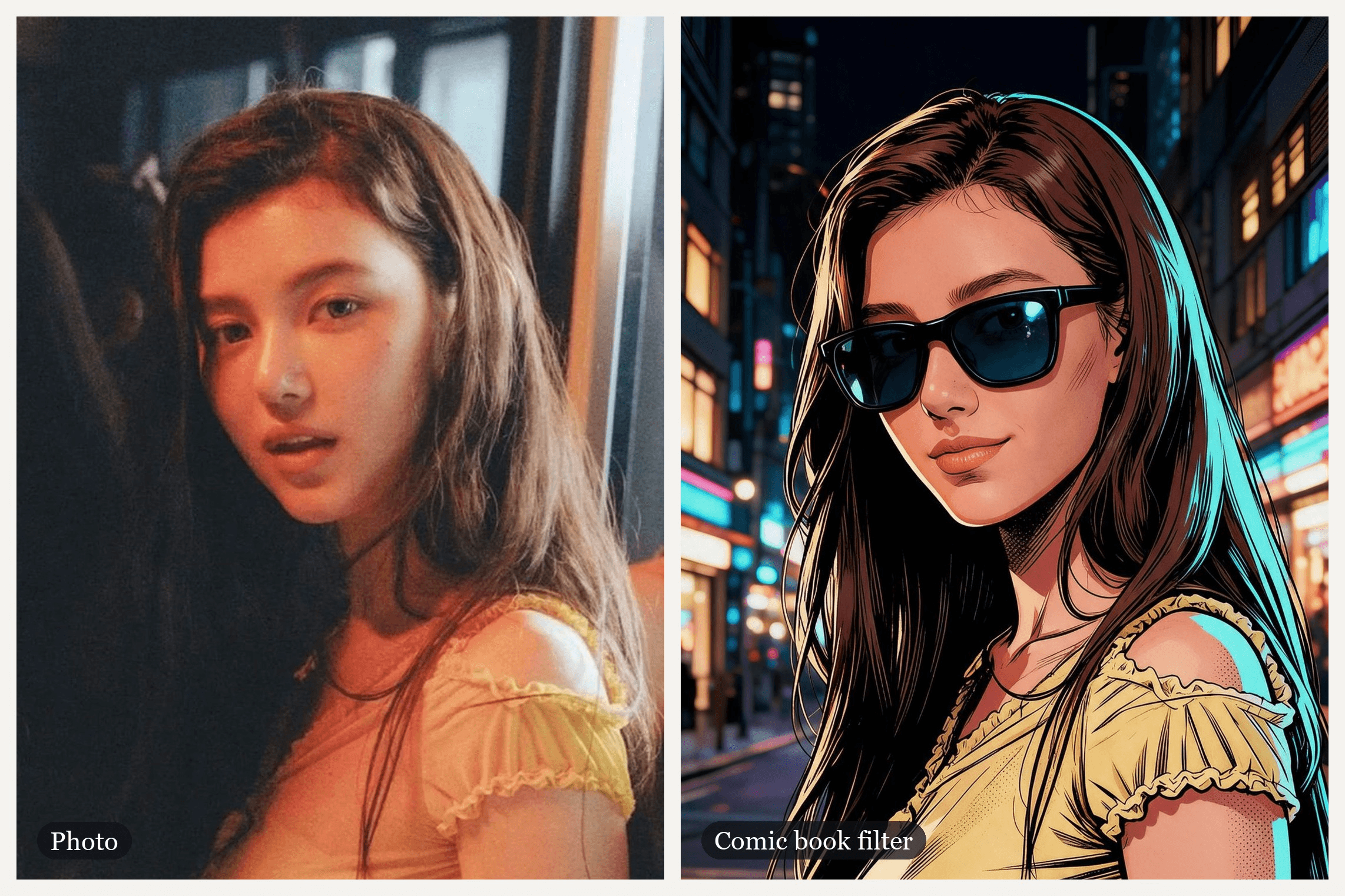
一张温暖柔和的照片,女孩站在昏暗的窗边。相机闪光灯亮起,画面像书页一样被撕开,她以墨线和纯色平涂的形象回归,出现在霓虹街道上,戴上墨镜。这种前后对比效果正是人们追逐漫画滤镜时想要的样子,尽管自2021年以来这个名字已经属于好几种不同的效果。
TikTok有自己的AI特效,CapCut有一个使用量超过千万的模板,而人们记忆中的iPhone版本可能已经不在原来的位置了。本指南将理清它们各自是什么,然后展示如何用一张照片在Atlas Cloud上制作完整的变装揭示效果,包括墨镜。
核心要点
- 「漫画滤镜」涵盖多种效果:TikTok的AI特效叫AI Comic,我们找到的最大的CapCut模板是MARVEL COMIC。
- MARVEL COMIC在2026年11月10日显示有10,579,918次使用,是我们检查过的所有漫画模板中使用量最多的。
- 在Atlas Cloud视频生成器中,Seedream v5.0 Pro Edit将一张照片变成漫画静帧,Seedance 2.5将两者变成动态揭示效果。
- 在提示词中指定漫画风格并列出需要保留的特征;同一张脸可以变成漫威、日漫、韩漫或复古半调风格。
- 经典漫画效果是过滤你已有的像素,而AI漫画滤镜则是将你重新绘制成一个角色。
TikTok和CapCut上的漫画滤镜是什么?
漫画滤镜并非只有一种。这个短语是一个长盛不衰的搜索词,每个应用都用自己的特效来回应,而答案每隔几年就会变化。
在TikTok上,它最初并没有AI。2021年初,一波#comicpanel帖子使用了一种将人物框在漫画分镜里的特效。到2023年3月,创作者们开始在帖子标题中标注AI「Comic Book Style」滤镜,而在2025年3月,一种韩漫风格的AI Korean Comic特效开始流行。
我们找到的最新一个是AI Comic。TikTok用这个特效名称标注使用它的帖子,@alexa.creations的教程发布于2025年4月7日,截至2026年11月10日已有超过83万次观看。
CapCut则用模板来回应。我们找到的最大的漫画模板是niacreated制作的MARVEL COMIC,创建于2023年12月21日,其CapCut页面在2026年11月10日显示有10,579,918次使用。它时长6.7秒:你的自拍、一次快速的故障闪光,然后是你以漫威风格插画形象出现,带有粗犷轮廓线,身后是城市背景。
我们找到的最新的漫画模板是2025年10月5日的fantasy comic,有35,185次使用,将一张日漫风格肖像剪裁成一整页分镜。
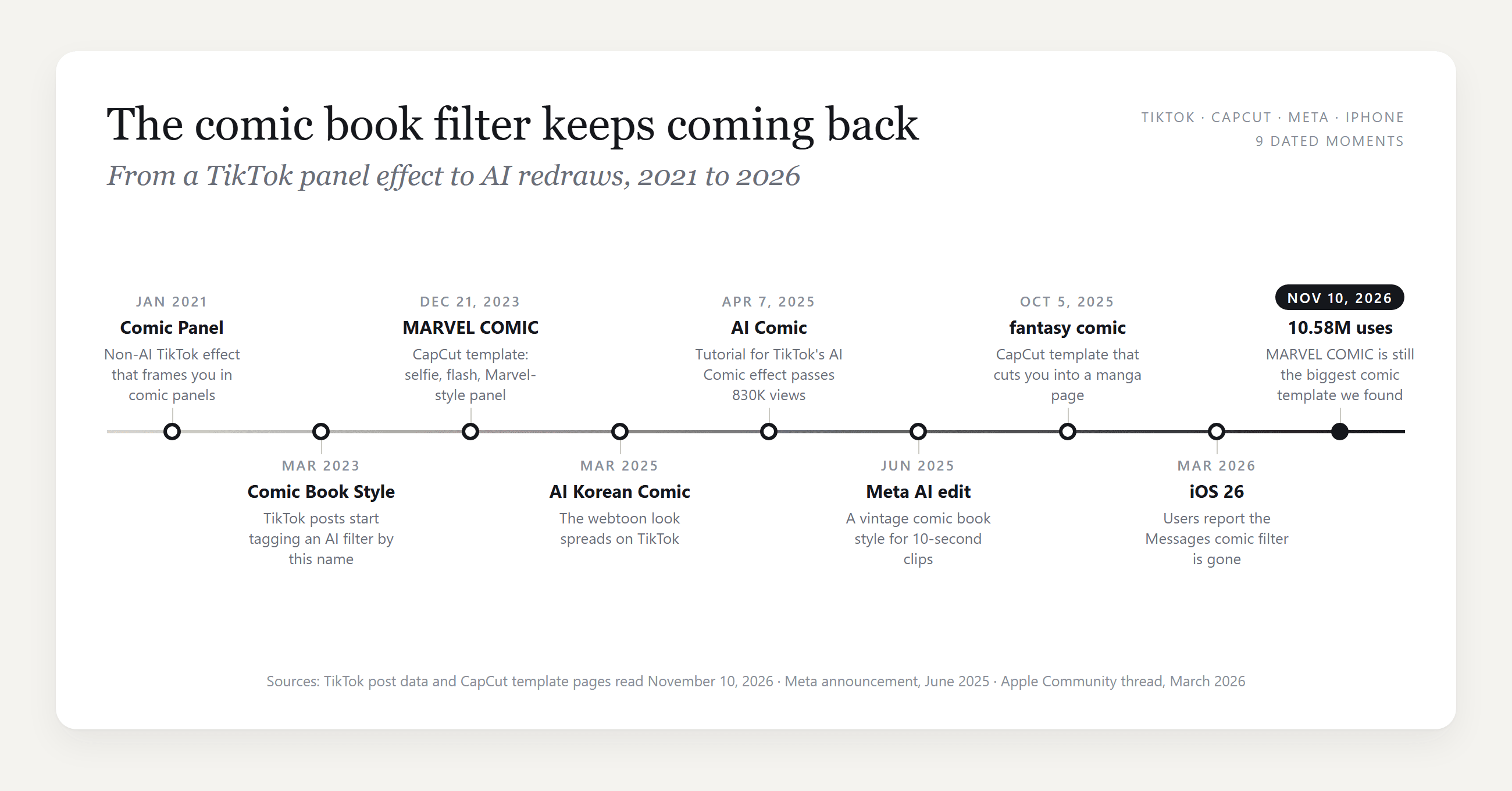
iPhone、Instagram和Snapchat上的漫画滤镜应用选项
除了TikTok和CapCut,还有三个应用回应这个搜索,每个的工作方式都不同。
| 应用 | 名称 | 位置 | 对你的照片做什么 |
|---|---|---|---|
| iPhone | Comic Book滤镜 | Messages对话内的相机,不是照片应用 | 相机滤镜;见下方说明 |
| Instagram的Edits应用和Meta AI应用 | 50多个视频提示词中的一种复古漫画风格 | Edits、Meta AI应用和Meta.AI中的AI视频编辑 | 对10秒视频片段进行生成式重绘 |
| Snapchat | Comic Book镜头 | Snapchat相机中的镜头搜索 | 在相机视图上叠加的实时镜头 |
iPhone那一行需要提醒一下。在2026年3月的一篇Apple社区帖子中,一位使用iOS 26的用户报告说漫画滤镜随更新从Messages相机中消失了。数十人标记了同样的问题,没有回复提供恢复的方法。
Meta的版本是为视频打造的。该公司在2025年6月宣布了AI视频编辑功能登陆Edits和Meta AI应用,其中包括一个将你重新想象为「复古漫画插画」的提示词。它适用于10秒的视频片段,发布时限时免费。
如何用一张照片制作漫画滤镜视频
CapCut的MARVEL COMIC停在静态画面上,但视频可以让画面继续动起来。在Atlas Cloud上,这项工作由两个模型分担:Seedream v5.0 Pro Edit将你的照片重绘为漫画分镜,Seedance 2.5生成从照片过渡到分镜的视频片段,并带有自己的音效。视频片段在AI视频生成器中合成,静帧则在旁边的图像生成器中制作。
前三秒她是一张照片:眨眼、歪头。一道白色闪光和一次页面撕裂将她变成墨线画,她对着镜头眨眼。然后她从画面下方举起一副折叠的墨镜,手腕一抖将其弹开,滑戴上脸,再用一根手指推上去。这段视频由两个Seedance 2.5片段剪辑而成,一个用于揭示效果,一个用于墨镜动作。
方法一:先制作漫画静帧,再在视频生成器中制作揭示效果
从静帧开始,因为视频需要它作为最后一帧。打开生成器的Image Edit标签,在Models下选择Seedream v5.0 Pro并上传你的照片。胸部以上的构图、面部清晰的效果最好,因为视频的两端共享这个取景。粘贴下面的提示词,将尺寸设为1584*2816以获得9:16的结果,然后点击Run。
plaintext1Turn this photo into a single panel of a modern American comic book, drawn and inked by hand, not a photo filter. The same young woman: same face shape, same eyes, eyebrows, nose and lips, the same small beauty mark on her cheek, lips slightly parted, the same calm look straight into the viewer. Same long straight dark brown hair falling over her shoulder. Same pose and framing as the photo: her body turned toward the right side of the frame with her shoulder to the viewer, head turned back to look into the lens, framed from the chest up, vertical 9:16. She wears an opaque pale yellow cotton top with small ruffled cap sleeves. Style: bold black ink outlines with varied line weight, flat cel-shaded colors, crosshatching and Ben-Day halftone dots in the shadows, a warm key light from the left and a cyan rim light on her hair, saturated colors. Behind her, a comic-drawn city street at night with lit windows and neon glow, simplified and slightly out of focus, no people. Natural adult proportions. Only one person. No text, no letters, no speech bubbles, no sound effect words, no logos, no superhero costume, not any existing comic character, no watermark.
对于墨镜结尾,我们对那张漫画静帧又运行了一次编辑。它要求模型完全保持分镜原样,添加带有深蓝色镜片的黑色方框墨镜,并将她的嘴唇闭成一丝浅笑。
现在制作视频片段。按照截图中的编号控件操作:
- 切换到 Video Generation 标签。
- 打开 Models 并选择 Seedance 2.5。
- 上传你的原始照片,裁剪为9:16,作为 First Frame。
- 上传漫画静帧作为 Last Frame。
- 将下面的揭示提示词粘贴到 Prompt 中。
- 在 Settings 下,选择1080p,将 Duration 设为10秒,并保持 Audio 开启。无需选择宽高比,因为视频片段会跟随第一帧的形状。
- 点击 Run。
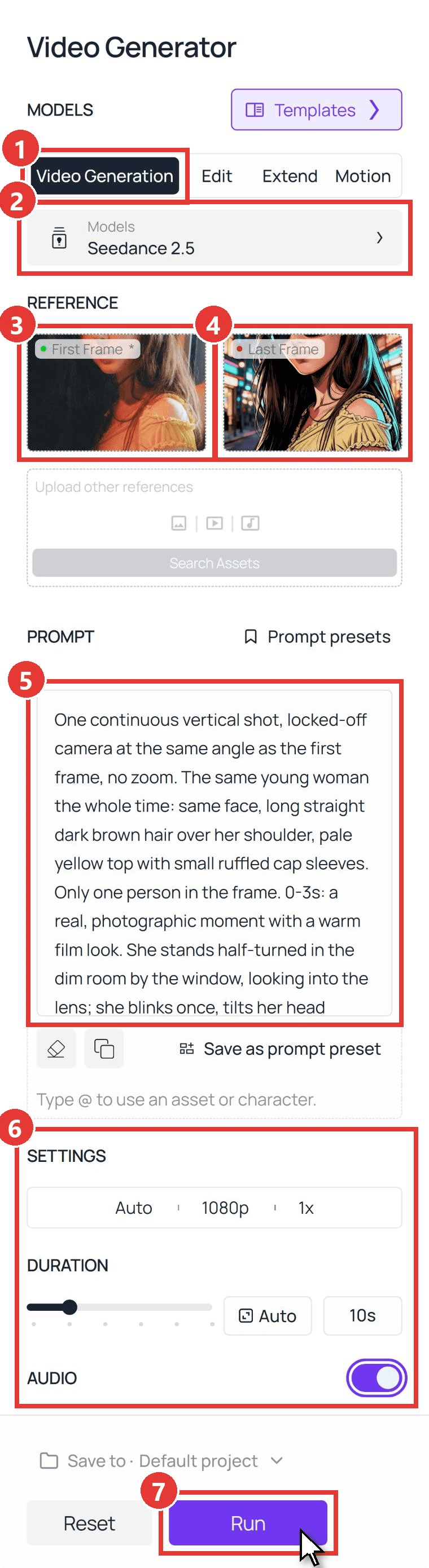
第一个片段使用了这个提示词,我们保留了它前六秒半的内容,一直到闪光和眨眼:
plaintext1One continuous vertical shot, locked-off camera at the same angle as the first frame, no zoom. The same young woman the whole time: same face, long straight dark brown hair over her shoulder, pale yellow top with small ruffled cap sleeves. Only one person in the frame. 0-3s: a real, photographic moment with a warm film look. She stands half-turned in the dim room by the window, looking into the lens; she blinks once, tilts her head slightly and her lips part as if about to say something. The dark out-of-focus shapes at the edges of the frame stay still. 3-4s: a bright white camera flash fills the whole frame; as it fades, thick black ink lines sweep across the frame from left to right, and everything they pass turns into a comic book drawing: bold black outlines, flat cel-shaded color, halftone dots in the shadows, and the room behind her becomes a comic-drawn city street at night. 4-5s: she is now a comic book illustration and keeps moving as a drawing; she looks straight into the lens and slowly raises one eyebrow. 5-8s: one hand rises from below the bottom edge of the frame holding a pair of folded black sunglasses with dark blue mirrored lenses, drawn in the same comic style; with a quick flick of the wrist the sunglasses snap open, and in one smooth move she slides them onto her face, then pushes them up the bridge of her nose with one fingertip. Her hand never covers her mouth, and she puts the sunglasses on only once. 8-9s: her hand drops back down below the bottom edge of the frame; behind the dark lenses she tilts her chin up slightly, her lips close and one corner of her mouth curls into a cool, barely-there smirk, not a smile; the lenses catch small cyan and pink reflections of the neon street, strands of her drawn hair swaying. 9-10s: she settles into the exact pose of the last frame, sunglasses on. She keeps the sunglasses on until the end, the sunglasses keep the same shape the whole time, and she stays a comic illustration until the end and never turns back into a photo. No text, no letters, no speech bubbles, no sound effect words, no logos. Sound: a camera shutter click at 3 seconds, a quick page flip, one punchy comic impact hit, the crisp click of the sunglasses snapping open at about 6 seconds, then soft city night ambience, no music, no voice.
第二个片段保留了相同的两帧和设置,让墨镜成为全场的焦点。我们在两个片段中她的姿势相匹配的时刻进行剪辑,使用四分之一秒的交叉淡化,并修剪了结尾的静帧停留。
plaintext1One continuous vertical shot, locked-off camera, no zoom, the same framing as the first frame the whole time. The same young woman as a comic book illustration: bold black ink outlines, flat cel-shaded color, halftone dots, cyan rim light on her long straight dark brown hair, pale yellow top with small ruffled cap sleeves, a comic-drawn neon city street at night behind her. Only one person in the frame. At the start she is not wearing sunglasses. 0-1.2s: keeping her cool half smile and looking into the lens, she raises one hand from below the bottom edge of the frame; in her hand is a pair of folded black sunglasses with dark blue lenses, drawn in the same comic style. 1.2-2.2s: her hand and the sunglasses are clearly visible in front of her chest; with a quick flick of the wrist the sunglasses snap open. 2.2-3.5s: she lifts them with both hands and slides them onto her face, the arms going over her ears behind her hair, and for a moment she looks at the lens over the top of the frames. 3.5-4.5s: she pushes the sunglasses up the bridge of her nose with her index finger. 4.5-5.3s: her hands drop back down below the bottom edge of the frame; behind the dark lenses she tilts her chin up slightly, lips closed, one corner of her mouth curling into a cool smirk; the lenses catch small cyan and pink reflections of the neon street. 5.3-6s: she settles into the exact pose of the last frame. The sunglasses only ever move with her hands: they never appear, vanish or jump onto her face by themselves, and they keep the same shape the whole time. She stays a comic illustration the whole time. No text, no letters, no speech bubbles, no logos. Sound: soft city night ambience, a crisp click as the sunglasses snap open at about 1.7 seconds, one short whoosh as they slide on, no music, no voice.
时间轴行承担了大部分工作。「0-3s: a real, photographic moment」让「之前」的状态清晰可读,而三秒处的闪光为切换提供了隐藏点。这跟80年代复古滤镜背后的首尾帧设置相同,只是指向漫画分镜而不是某个年代。
方法二:通过API运行漫画滤镜
一批肖像照,或者你自己应用内的漫画按钮,需要的是两次调用而不是两个标签页。
步骤1:在Atlas Cloud控制台的Settings页面创建并复制API密钥。
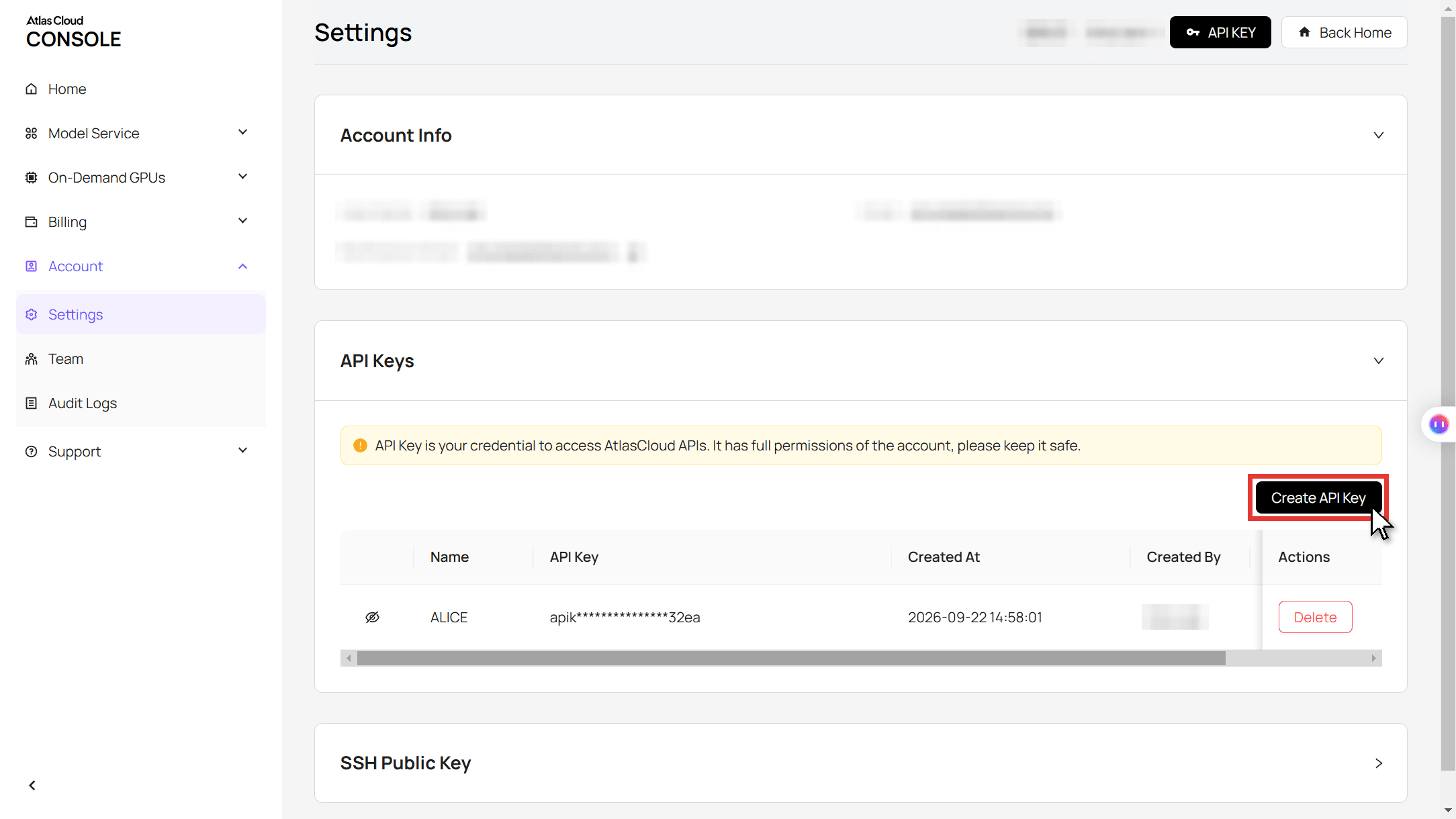
步骤2:在Atlas Cloud API文档中查看请求格式。
步骤3:先制作静帧,再制作视频片段,然后轮询每个文件。 图像调用接收你的照片URL和漫画提示词:
plaintext1curl -X POST https://api.atlascloud.ai/api/v1/model/generateImage \ 2 -H "Authorization: Bearer $ATLASCLOUD_API_KEY" \ 3 -H "Content-Type: application/json" \ 4 -d '{ 5 "model": "bytedance/seedream-v5.0-pro/edit", 6 "prompt": "Turn this photo into a single panel of a modern American comic book, drawn and inked by hand. Keep the same young woman: same face, eyes, nose, lips and beauty mark, same long dark brown hair, same pose and chest-up framing. Bold black ink outlines, flat cel-shaded color, Ben-Day halftone dots in the shadows, a cyan rim light on her hair, a comic-drawn neon city street behind her with no people. Only one person. No text, no speech bubbles, no logos, not any existing comic character.", 7 "images": ["https://your-cdn.com/selfie.jpg"], 8 "size": "1584*2816", 9 "output_format": "jpeg" 10 }'
视频调用将原图作为image,返回的漫画静帧作为last_image:
plaintext1curl -X POST https://api.atlascloud.ai/api/v1/model/generateVideo \ 2 -H "Authorization: Bearer $ATLASCLOUD_API_KEY" \ 3 -H "Content-Type: application/json" \ 4 -d '{ 5 "model": "bytedance/seedance-2.5/image-to-video", 6 "prompt": "One continuous vertical shot, locked-off camera. The same young woman the whole time. 0-3s: a real photographic moment, she blinks and tilts her head. 3-4s: a white camera flash, then ink lines sweep across and everything turns into a comic book drawing on a neon city street. 4-10s: she stays a comic illustration, raises one eyebrow and settles into the exact pose of the last frame. No text, no speech bubbles. Sound: a shutter click at 3 seconds, a page flip, one comic impact hit, soft city ambience, no music.", 7 "image": "https://your-cdn.com/selfie.jpg", 8 "last_image": "https://your-cdn.com/selfie-comic.jpg", 9 "duration": 10, 10 "resolution": "1080p", 11 "generate_audio": true 12 }'
plaintext1curl https://api.atlascloud.ai/api/v1/model/prediction/<prediction_id> \ 2 -H "Authorization: Bearer $ATLASCLOUD_API_KEY"
相同的两个端点和相同的密钥可以运行Atlas Cloud上的其他图像和视频模型。要在不同模型上尝试漫画效果,只需更改模型字符串,其余保持不变。
漫画滤镜风格:漫威、日漫、韩漫和复古半调
替换提示词的风格块,同一张脸就会落入不同的漫画传统。下面四张分镜都来自同一张照片,各运行一次,开头使用相同的保留面部句子。其中任何一张都可以作为揭示效果的最后一帧。
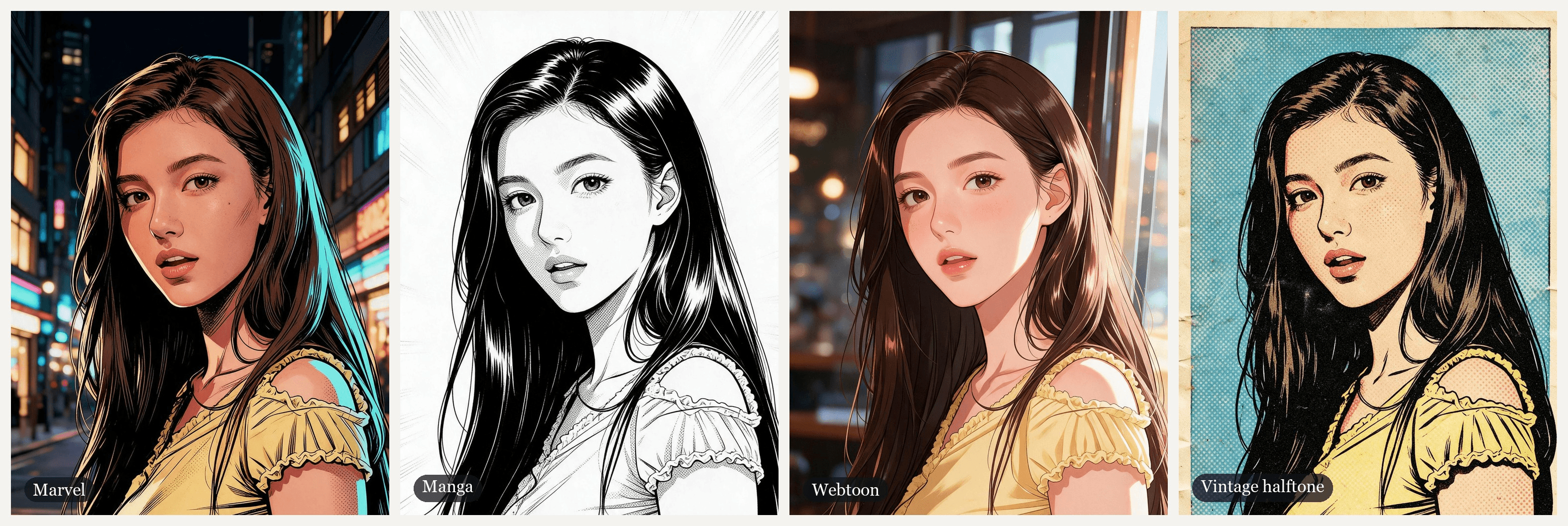
| 风格 | 最接近的应用版本 | 设定外观的提示词 |
|---|---|---|
| 漫威 | CapCut的MARVEL COMIC | 粗犷的黑色墨线轮廓、纯色赛璐珞平涂、阴影中的Ben-Day圆点、青色轮廓光 |
| 日漫 | CapCut的fantasy comic | G笔墨水、灰色网点纸、速度线、仅黑、白、灰 |
| 韩漫 | TikTok的AI Korean Comic | 纤细的线稿、柔和的渐变、光泽的头发和嘴唇、黄金时刻光线 |
| 复古半调 | Meta的复古漫画风格 | 1960年代新闻纸、四色印刷调色板、大Ben-Day圆点、套印错位、泛黄的纸张 |
有两行句子值得复制到任何风格中。「No text, no speech bubbles」让分镜不出现你未要求的文字。「Not any existing comic character」防止模型把你打扮成超级英雄,这也能让你远离他人的角色版权问题。
日漫滤镜:黑白网点纸版本
日漫滤镜是这里唯一去掉颜色的风格,这对提示词的改变比你想象的要多。
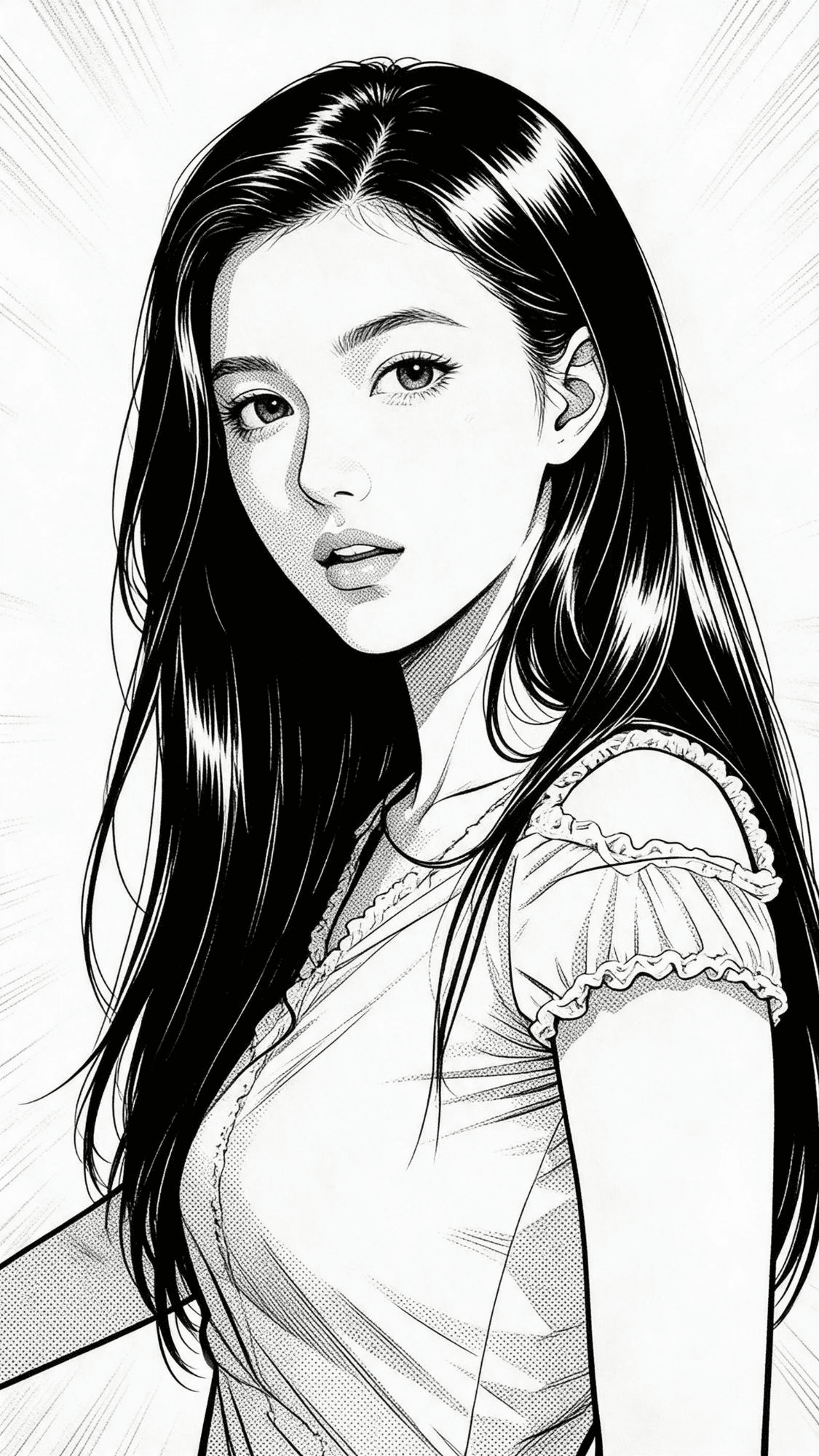
plaintext1Turn this photo into a single black-and-white Japanese manga panel, drawn with a G-pen and screentone, not a photo filter. The same young woman: same face shape, eyes, eyebrows, nose and lips, lips slightly parted, the same calm look straight into the viewer, same long straight dark hair over her shoulder, same pose and framing, framed from the chest up, vertical 9:16. She wears an opaque light-colored top with small ruffled cap sleeves. Style: clean crisp black ink lines, solid black hair with white shine highlights, grey dot screentone for shading, white background with soft radiating speed lines. Pure black, white and grey only, no color. Natural adult proportions, not chibi. Only one person. No text, no letters, no speech bubbles, no sound effect words, no logos, no watermark.
「Pure black, white and grey only」阻止颜色重新渗入。「Not chibi」保持成人比例而不是大头卡通。速度线代替背景,让面部保持焦点。提示词还要求带有白色高光的纯黑头发,就像日漫画家给深色头发上墨的方式,这样她的深棕色头发就会变回黑色。
漫画效果与AI漫画滤镜:你的照片会发生什么变化
搜索漫画滤镜时,Google的相关搜索中包含「no AI」。这是一个真实的分野,下面的两张分镜在同一张照片上展示了这一点。
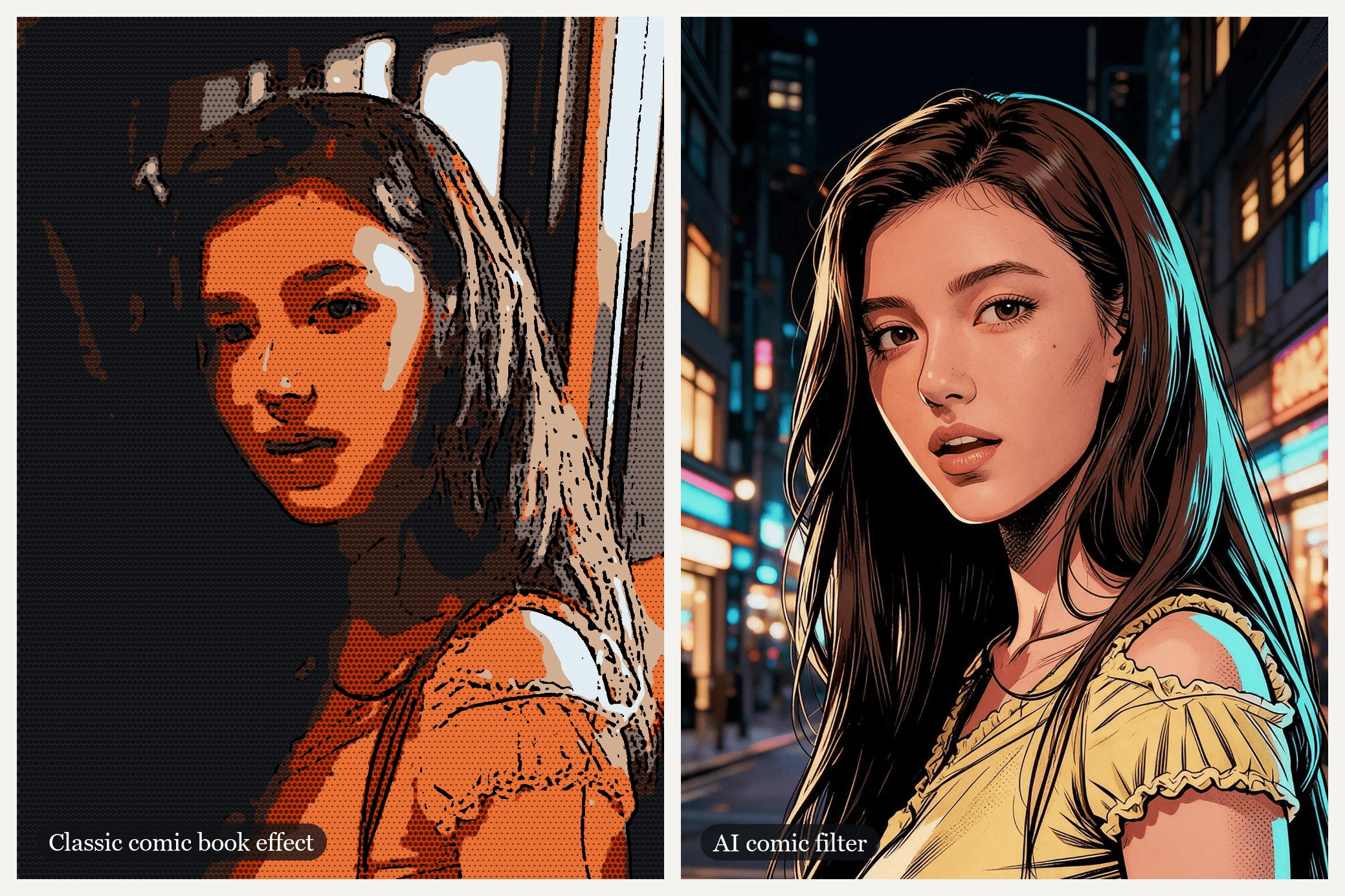
左边的分镜没有使用AI。我们将照片的颜色压平成七种色调,用黑色描边,并在较暗区域打印网点。右边的分镜是使用上面漫威提示词的Seedream v5.0 Pro Edit结果。
| 经典漫画效果 | AI漫画滤镜 | |
|---|---|---|
| 像素会发生什么 | 保留并过滤为更少的颜色、描边和圆点 | 以你指定的风格重新绘制 |
| 面部 | 每个特征都保持原样,包括模糊和颗粒 | 重绘为干净的线稿,保留你列出的特征 |
| 背景 | 同一个房间,经过色调分离处理 | 可以变成新场景,比如霓虹街道 |
| 速度 | 几秒,通常在设备上完成 | 每张图像运行一次模型 |
| 最适合 | 快速漫画照片滤镜或无AI外观 | 你的角色版本,或视频的最后一帧 |
根据你想保留的内容来选择。如果照片本身很重要(房间、时刻、模糊),经典效果会保持原样。如果你想看起来像是属于漫画中的人物,重绘能以一种描边无法做到的方式带你到达那里。
常见问题
TikTok上有漫画滤镜吗?
有。我们找到的最新特效叫AI Comic:在TikTok特效中搜索这个名字,或者点击使用过它的帖子的特效标签。TikTok上的许多漫画帖子其实是CapCut模板,那些是从帖子的CapCut链接打开,而不是从特效栏打开。
CapCut上的漫画滤镜叫什么?
在我们检查过的漫画模板中,niacreated的MARVEL COMIC使用量最多,它是一个自拍到漫威风格的揭示效果。想要日漫风格的话,alexandrite的fantasy comic将你的照片变成一页分镜。最简单的进入方式是使用该模板的TikTok帖子,因为它的CapCut链接会直接打开模板。
iPhone上可以对已有照片应用漫画滤镜吗?
用我们能找到的内置工具不行。漫画滤镜原本在Messages相机中,iOS 26用户报告说它已经不在了。对于已在你相册中的照片,将其上传到Seedream v5.0 Pro Edit并搭配上面的某个风格提示词,然后将结果保存回照片应用。
有免费的漫画滤镜吗?
对于经典效果,有的:很多浏览器工具可以免费将照片色调分离并添加圆点,而iPhone滤镜在还能用时也是免费的。Atlas Cloud上的AI重绘按次收费,Run按钮会在你确认之前显示价格。
有视频漫画滤镜吗?
有,三种途径。上面介绍的Meta AI视频编辑可以处理短视频片段。上面的双片段方法可以用一张照片制作漫画视频。要重塑你已经拍摄的素材,请参阅如何将视频变成卡通或动漫。
在Atlas Cloud上制作漫画滤镜视频要花多少钱?
截至2026年11月10日,在模型页面上显示的20%折扣之后,本文使用的2K尺寸的Seedream v5.0 Pro Edit静帧为$0.072,1.5K为$0.036。带音频的10秒Seedance 2.5首尾帧片段在720p下估计为$3.04,1080p下为$5.98。本指南中双静帧、双片段的版本在1080p下约为$12.10,所以先在720p下确定提示词是值得的。
结语
漫画滤镜曾经是一个分镜特效、一个AI风格标签、一个使用量过千万的模板,以及一个现在可能已经消失的iPhone相机技巧。在所有这些名字之下,有两种技术:一种过滤你像素的经典效果,和一种将你重绘为角色的AI滤镜。
如果你想让画面动起来,从一张清晰的胸部以上照片和Seedream v5.0 Pro Edit中的漫威提示词开始,然后将照片和分镜作为首帧和末帧交给Seedance 2.5。再添加一个片段作为像墨镜这样的收尾节拍,你的漫画滤镜就能在揭示之后继续下去,而模板则会停止。


