

AI 万圣节照片最难的部分往往是人像本身。你想要一张烛光肖像,却得到一个陌生人的脸、多出一只手,或者一套把你想保留的每个特征都遮住的服装。这些 万圣节 AI 照片提示词 为你提供 12 个可直接复制的创意,涵盖肖像、宠物、派对场景和照片修复,并明确说明当主体需要保持可辨认时如何使用参考照片。复制适合你照片的提示词,替换方括号中的细节,并在第一次结果后一次只改一项。
要点
- 当图片必须展示特定人物或宠物时,请使用清晰的参考照片;当你想要一个虚构场景时,只使用文本。
- 说明主体、环境、服装或道具、光源、相机取景,以及必须保持不变的细节。
- 从下方 ChatGPT、Gemini 或 Atlas Cloud 的某个提示词开始,然后只修改一个问题,而不是重写整个场景。
- 在分享生成的照片前,检查人脸、手、宠物解剖结构以及任何可见文字。
选择正确的起始照片
如果你想制作自己的万圣节版本,请从一张光线良好、脸部可见的照片开始。源图像能为生成器提供具体可保留的内容。要求改变服装、环境或光线,同时指定面部结构、肤色、发型和其他显著特征应保持可辨认。这是对模型的请求,而不是保证。在把它作为你的肖像发布前,先查看输出结果。
对于合影,请上传包含所有应出现人物的照片。说明准确人数并指出每个人的位置。如果工具改变或增加了一张脸,就只修改那一处细节。提示词无法可靠地还原源图中脸部被遮挡的人。
如果你想创造一条虚构的闹鬼街道或万圣节静物,就跳过上传。文生图让你能自由指定整个画面。只有在你需要特定人物、宠物、物体或构图时,才使用照片参考。这种区分也能避免一个常见错误:要求纯文本提示词保留模型从未见过的脸。
| 你的目标 | 最佳输入 | 首先应指定什么 |
|---|---|---|
| 制作自己的万圣节肖像 | 一张清晰的肖像 | 哪些面部特征和姿势必须保持可辨认 |
| 将合影变成派对场景 | 一张全组人的照片 | 准确人数和每个人的位置 |
| 给你的宠物穿上服装 | 一张清晰的宠物照片 | 物种、毛色斑纹,以及安全、合理的服装细节 |
| 从零开始创造一个场景 | 文本提示词 | 主体、环境、光线、取景和氛围 |
用于个人照片的 ChatGPT 万圣节照片提示词
ChatGPT Images 可以按照书面指令编辑上传的照片。然后,你可以描述对结果的进一步修改。官方 OpenAI 图像指南 记录了上传并编辑流程以及后续编辑。这里的提示词每张图只聚焦一项可见修改,以便检查请求。
1. 烛光档案管理员肖像
上传一张一位成年人的清晰肖像。这是一张适合想要有氛围感服装、但不遮住脸部的人的万圣节肖像。
plaintext1Edit the uploaded photo into a believable Halloween portrait. Keep this person's recognizable facial structure, skin tone, hairstyle, age appearance, and expression. Dress them as a midnight archivist in a dark velvet jacket with a small antique key on a chain. Place them among tall library shelves, with one warm desk lamp and cool blue light from a distant window. Frame the photo from the waist up at eye level, like a 35 mm editorial photograph. Keep both hands natural and visible. No mask, face paint, writing, logo, or extra people.
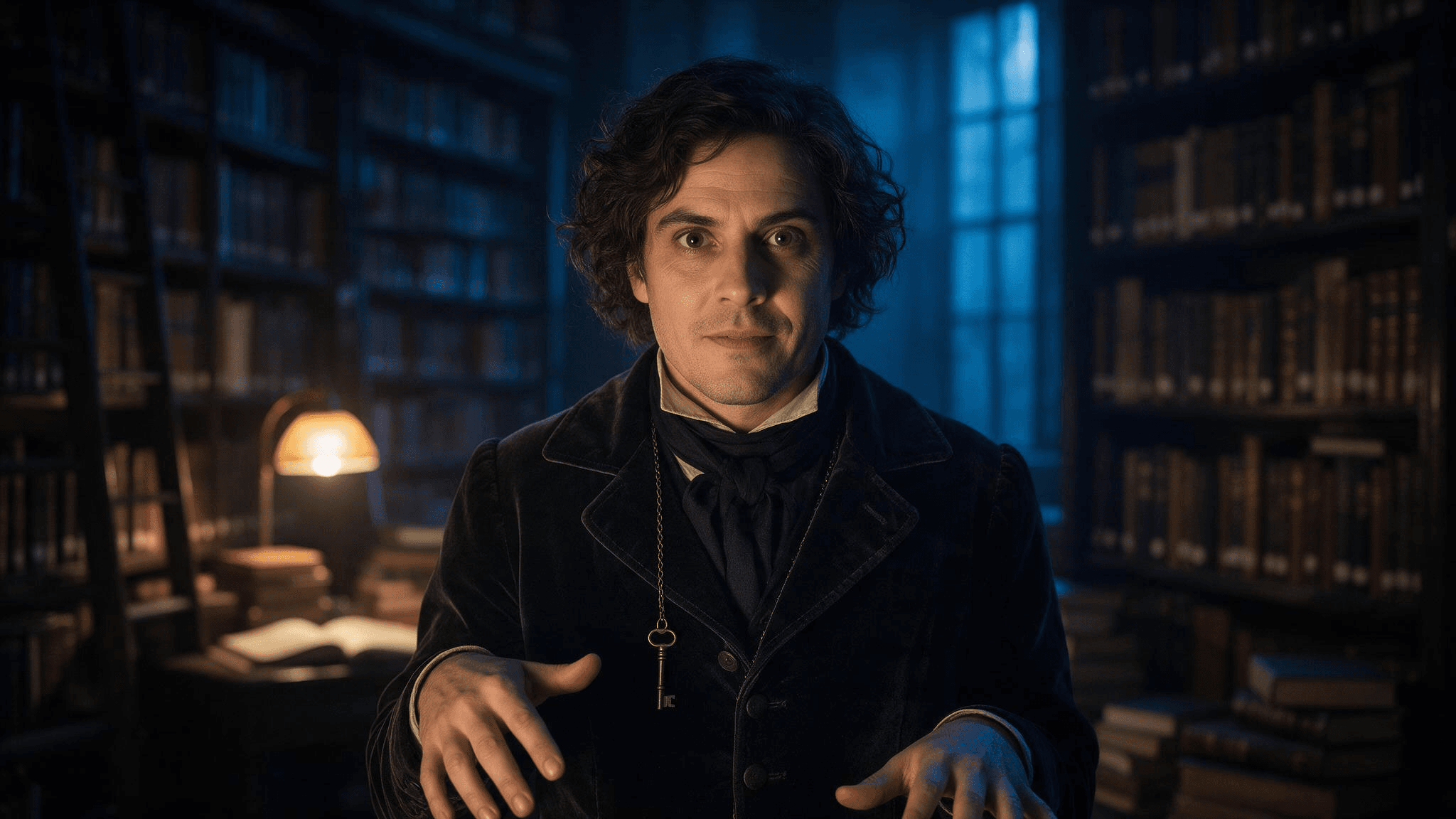 档案管理员简述的示例结果。在将修改作为你自己的照片分享前,请将其脸部与你上传的肖像进行对比。
如果第一张图改变了脸部,发送一条简短后续修改:Keep the lighting and jacket. Restore the eyes, nose, mouth, and hair from my uploaded photo; do not alter my face. 窄范围编辑比另一个完整场景请求更容易判断。
2. 朋友们抵达派对
使用一张包含完整群体的照片,而不是分开的裁剪头像。有趣的部分是共同瞬间,而不是一组互不相关的服装肖像。
plaintext1Turn the uploaded group photo into a candid Halloween party arrival. Preserve the exact [number] people, their relative positions, recognizable faces, skin tones, hairstyles, and body proportions. Give each person a distinct, simple costume accessory: [person at left: detail], [person in center: detail], [person at right: detail]. Put them on a townhouse stoop with carved pumpkins and warm porch light at blue hour. Keep the camera height, natural expressions, and friendly group spacing from the source. Do not add or remove anyone. No masks over faces, duplicate limbs, text, or logos.
粘贴前填写每个方括号。如果有四位朋友,就命名四个位置。否则模型必须猜测哪条指令属于谁。
3. 让你的宠物成为小小守夜人
给宠物一个轻便配饰,而不是要求模型把它的身体变成人类角色。脸和毛色才是让照片感觉像你的宠物的关键。
plaintext1Edit this photo of my [dog/cat] into a playful Halloween pet portrait. Preserve the pet's face, breed or body type, coat colors, distinctive markings, and natural four-legged anatomy. Add a lightweight navy cape and a small felt moon on the collar; leave the ears, eyes, and paws unobstructed. Place the pet beside a pumpkin on a familiar-looking porch. Use gentle evening light and an eye-level camera angle. Keep the result photographic, with no human hands, extra paws, lettering, or brand marks.
4. 修复一个细节而不丢失照片
在使用前三个提示词中的任何一个之后,如果场景效果不错但有一个元素不对,就使用这条修复指令。用实际问题替换方括号。
plaintext1Keep the current image's composition, subject, costume, color, and lighting. Change only [the specific incorrect detail]. Match the corrected area to the surrounding photo. Preserve the person's or pet's identity from the uploaded reference. Do not introduce new objects, people, or text.
精确描述错误:remove the extra finger on the hand holding the lantern 比 make it better 给编辑器的工作更小。检查修订后的图像是否在请求区域之外发生了变化。
带有清晰参考的 Gemini AI 万圣节照片提示词
Gemini 可以根据书面提示词创建图像,并使用上传的图像作为参考或编辑输入,如 Gemini Apps 帮助 所述。一条有用的 Gemini AI 万圣节照片提示词 会说明哪些部分来自上传内容,哪些部分是虚构的。这四个提示词涵盖与 ChatGPT 组不同的场景,因此请根据你已有的照片来选择,而不是根据某个工具总是表现更好的说法。
5. 日落后南瓜地的肖像
plaintext1Using my uploaded portrait as the identity reference, create a waist-up photograph of the same adult at a pumpkin patch just after sunset. Keep the face shape, skin tone, hair, and visible freckles or other distinctive features recognizable. Replace the background with rows of pumpkins, a distant wooden fence, and a few warm lanterns. Dress the subject in a practical dark coat and a subtle crescent-moon brooch. Natural blue-hour sky, warm lantern light on the face, moderate depth of field, eye-level camera. Do not change the person's age appearance or add face paint, text, or other people.
6. 用同一个人进行服装测试
这条提示词用于在制作服装前评估一套服装创意。使用一张能展示足够身体和衣物的照片,让工具理解预期取景。
plaintext1Use my uploaded full-length photo as the reference for the same person. Show a realistic Halloween costume concept: a vintage stargazer wearing a midnight-blue coat, brass star map accessories, and a narrow belt of small paper constellations. Keep the same face, skin tone, hairstyle, body proportions, and standing pose. Show the full outfit against a simple neutral wall in soft studio light so the clothing is easy to inspect. The costume must look wearable, with practical seams and no floating objects. No mask, face paint, text, logo, or extra people.
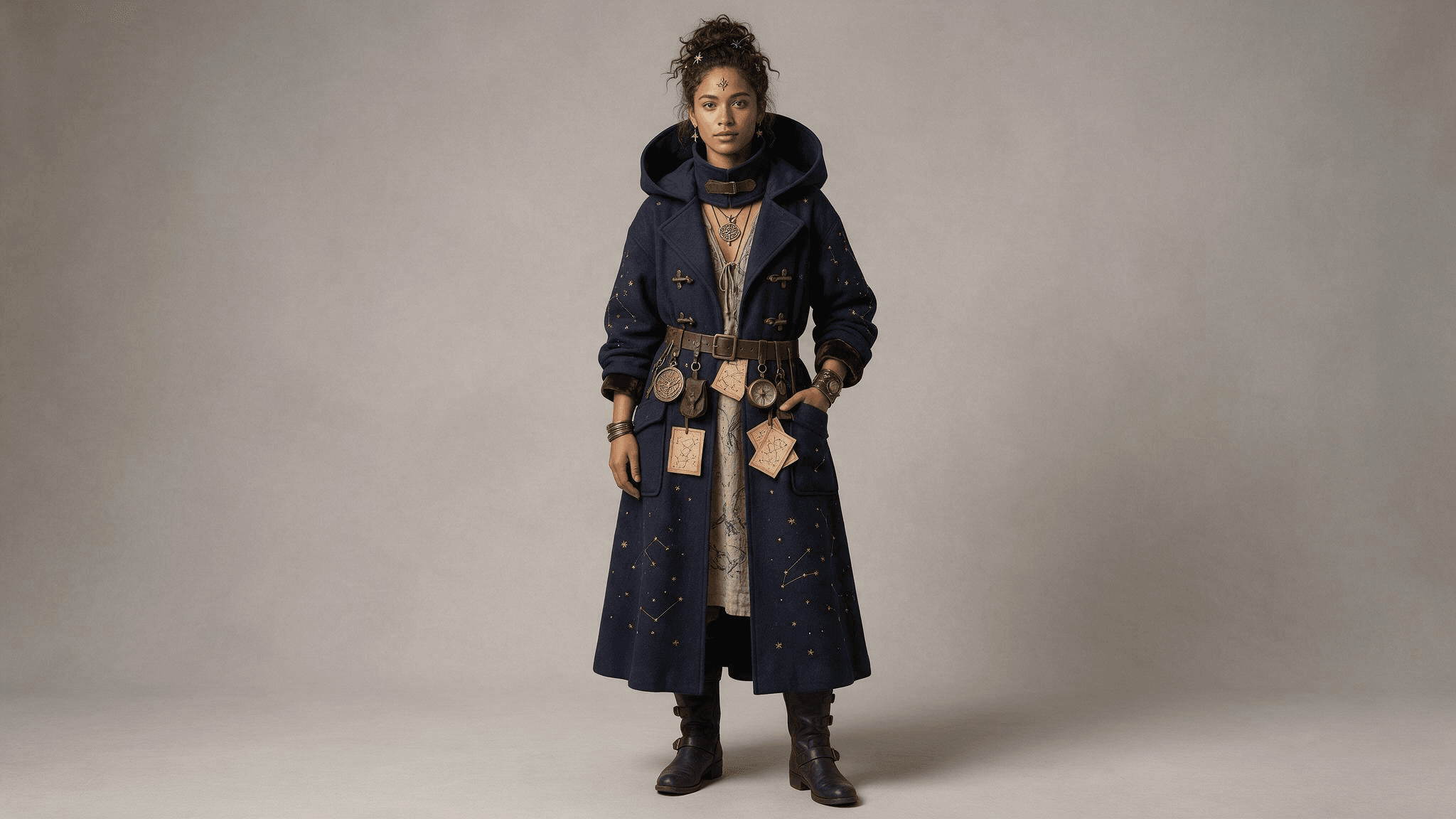 全身结果让外套、腰带和配饰易于检查。将脸部和比例与你上传的照片进行对比。
7. 更换环境的家庭照片
plaintext1Use the uploaded family photo as the reference. Preserve the exact [number] people and their positions, recognizable faces, approximate ages, skin tones, and natural proportions. Change only the setting and small accessories: put the family on an autumn front porch with pumpkins, paper bats, and warm window light. Add one simple costume accessory to each person as follows: [list each person by position and accessory]. Keep the original camera perspective and friendly expressions. No new faces, missing people, masks, unreadable signs, or extra hands.
分别检查每一张脸。一张图中人越多,就越需要将输出结果与源图进行对比,而不是只判断整体氛围。
8. 带第二视觉参考的宠物肖像
如果你有想要配饰的照片,请将其与宠物照片一起上传,并说明每张图片的用途。Google 指出,Gemini 可以基于多张上传的图像工作;可用性和结果可能因账户和模型而异。
plaintext1Use image 1 only for my pet's identity and image 2 only for the shape and color of the small costume accessory. Create a realistic Halloween photo of the same pet sitting beside a pumpkin indoors. Preserve the pet's face, coat pattern, size, and natural anatomy from image 1. Adapt the accessory from image 2 so it fits comfortably and does not cover the eyes, ears, nose, or mouth. Warm lamp light, eye-level camera, uncluttered background. Do not copy any people or background from image 2. No text, extra limbs, or human-like paws.
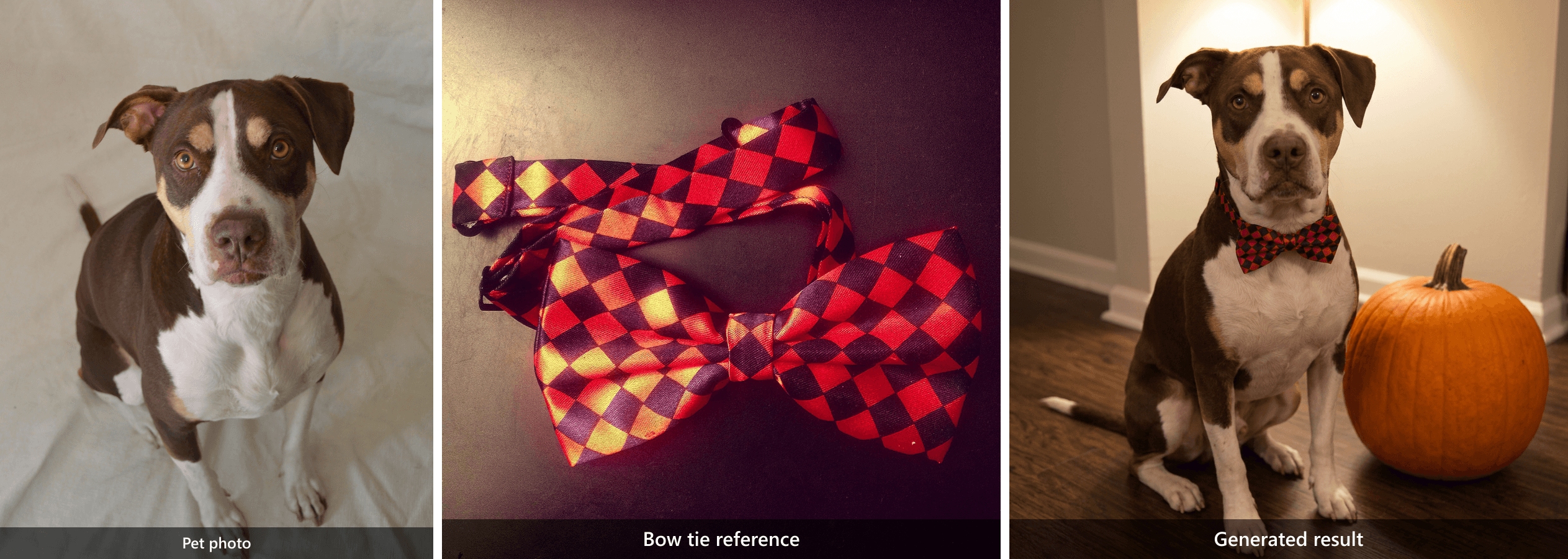 两个不同的输入导向一个结果:狗来自 宠物照片,而红黑图案来自 领结参考图.
从空白画布创建新的万圣节照片
这些提示词不需要上传个人照片。当你想要一个虚构的万圣节场景、虚构肖像,或用于帖子的季节性图像时,它们就能派上用场。它们还展示了如何编写 万圣节 AI 提示词,而不依赖电影角色或像 make it spooky 这样含糊的指令。
9. 午夜图书馆管理员
plaintext1Create a photorealistic editorial portrait of a fictional adult midnight library keeper caught opening an old book between tall wooden shelves. A dark velvet jacket and one antique key on a chain; both hands turn a single page naturally. Shelf edges lead the eye toward the subject, with a blurred book spine in the near foreground. One warm desk lamp lights the face while cool blue dusk enters through a high window. Waist-up composition at eye level, 35 mm lens feel, natural skin texture, worn wood grain, restrained film grain, warm amber and blue-gray color palette. No mask, face paint, extra fingers, floating objects, writing, logo, or watermark.
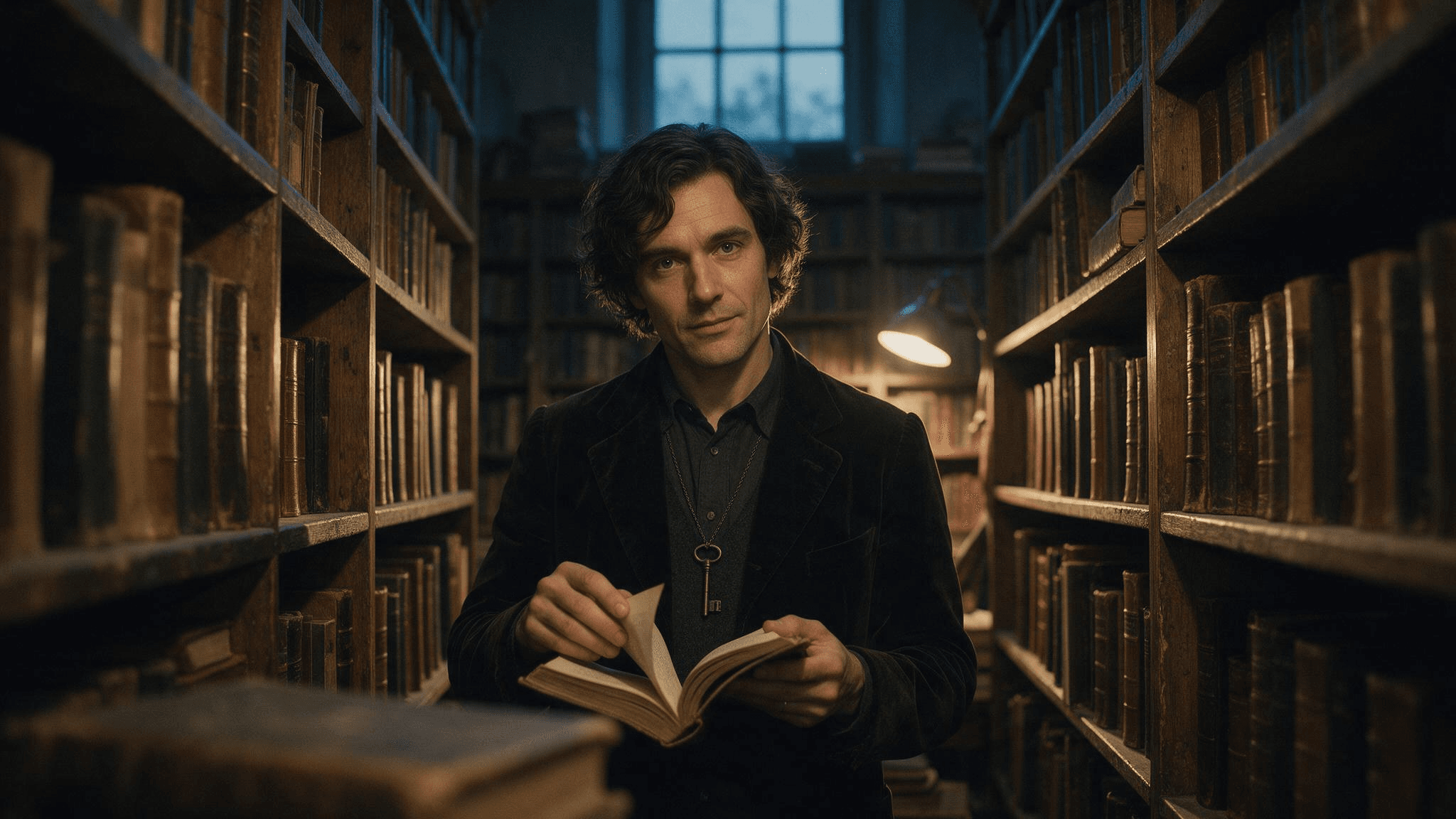 纯文本结果:虚构管理员、打开的书、古董钥匙、书架,以及冷暖对比光线都出现在同一画面中。
10. 打烊后的面包店
plaintext1Create a photorealistic editorial still life inside a small neighborhood bakery after closing on Halloween. Three decorated pumpkin pastries sit on a worn wooden counter, one just broken open with a thin curl of steam rising, beside a folded linen cloth and a brass bell. The counter edge leads toward the pastries; a blurred flour-dusted tray sits in the near foreground. Through the window, cool blue dusk and a few softly blurred porch lanterns are visible. A warm pendant lamp lights the pastries from above. Frame at counter height with a 35 mm lens feel, natural food texture, restrained film grain, warm amber and blue-gray color palette. No people, floating decorations, readable signs, logos, labels, or watermark.
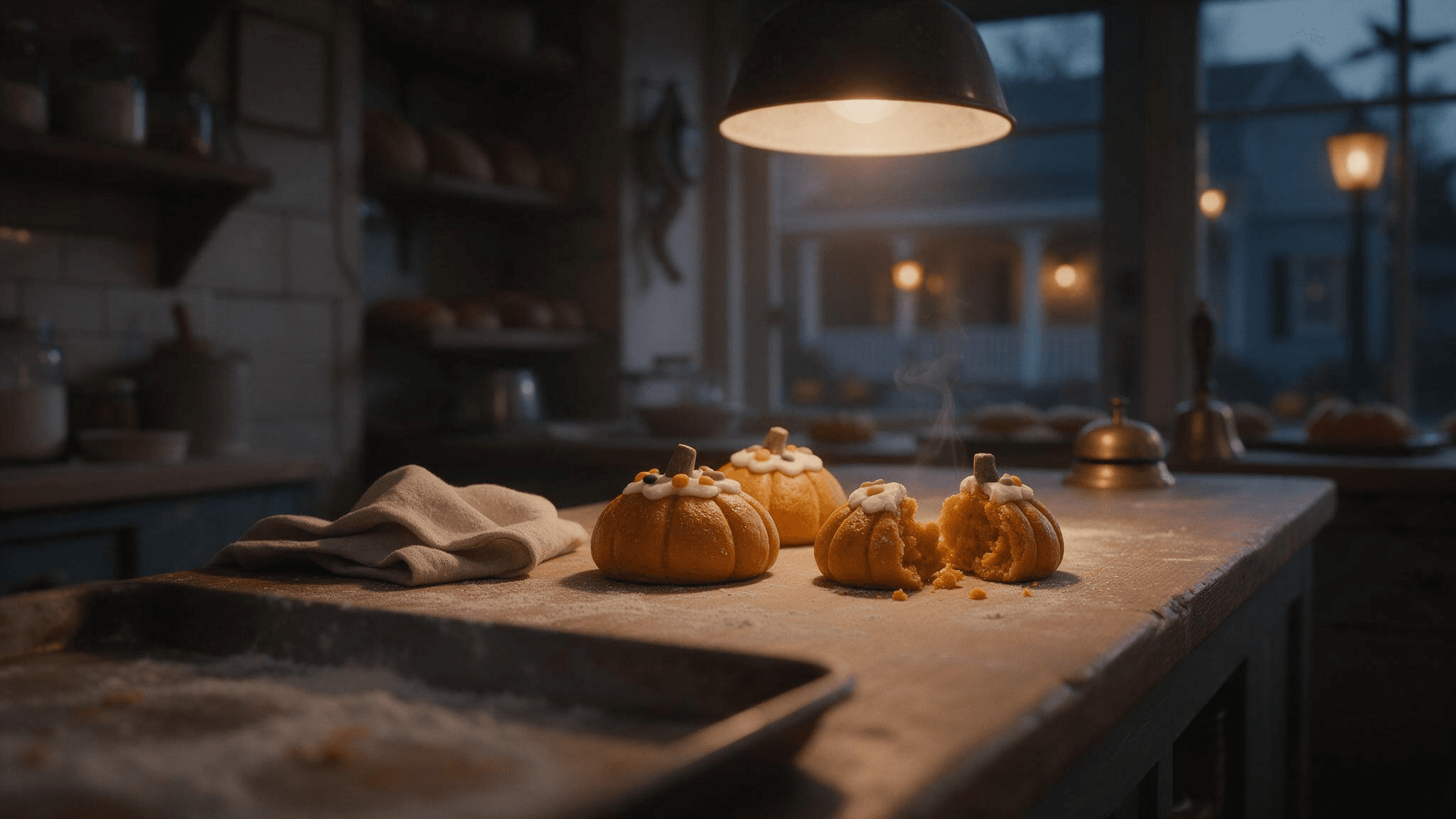 静态图像结果:柜台、三个糕点、打开的糕点、温暖吊灯和蓝色黄昏,展示了环境细节如何塑造画面。
同一个面包店创意也可以作为短动态示例。在这里,手先摆放糕点,然后视野向窗户展开,比静态图像的缓慢缩放给观众更多信息。
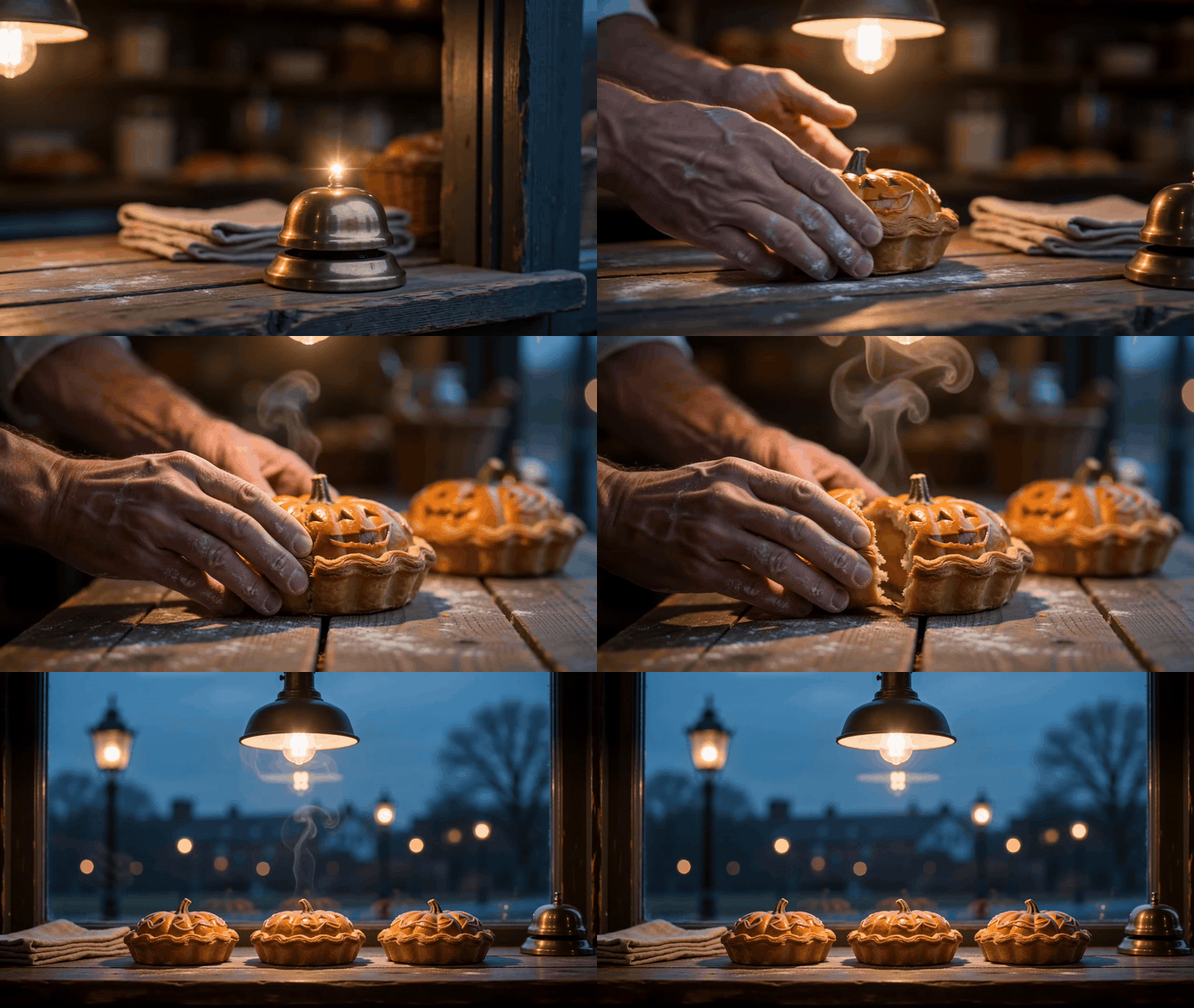
面包店提示词的动态变体,展示糕点摆放和更宽的柜台视角.
11. 街区最后一栋房子
plaintext1Create a photorealistic Halloween exterior of one old but welcoming townhouse at blue hour. A short stone path leads from the lower foreground to a front porch with exactly three carved pumpkins, a glowing window, and a few handmade paper bats. One damp leaf skitters across the path as a gust catches it, with other leaves settled along the edge. Photograph from across the street at eye level with a 35 mm lens feel, using the path as a leading line and a softly blurred fence post in the near foreground. Cool blue dusk balances warm light from the porch and window; restrained film grain and realistic architectural proportions. No people, cars, lettering, billboards, floating objects, or watermark.
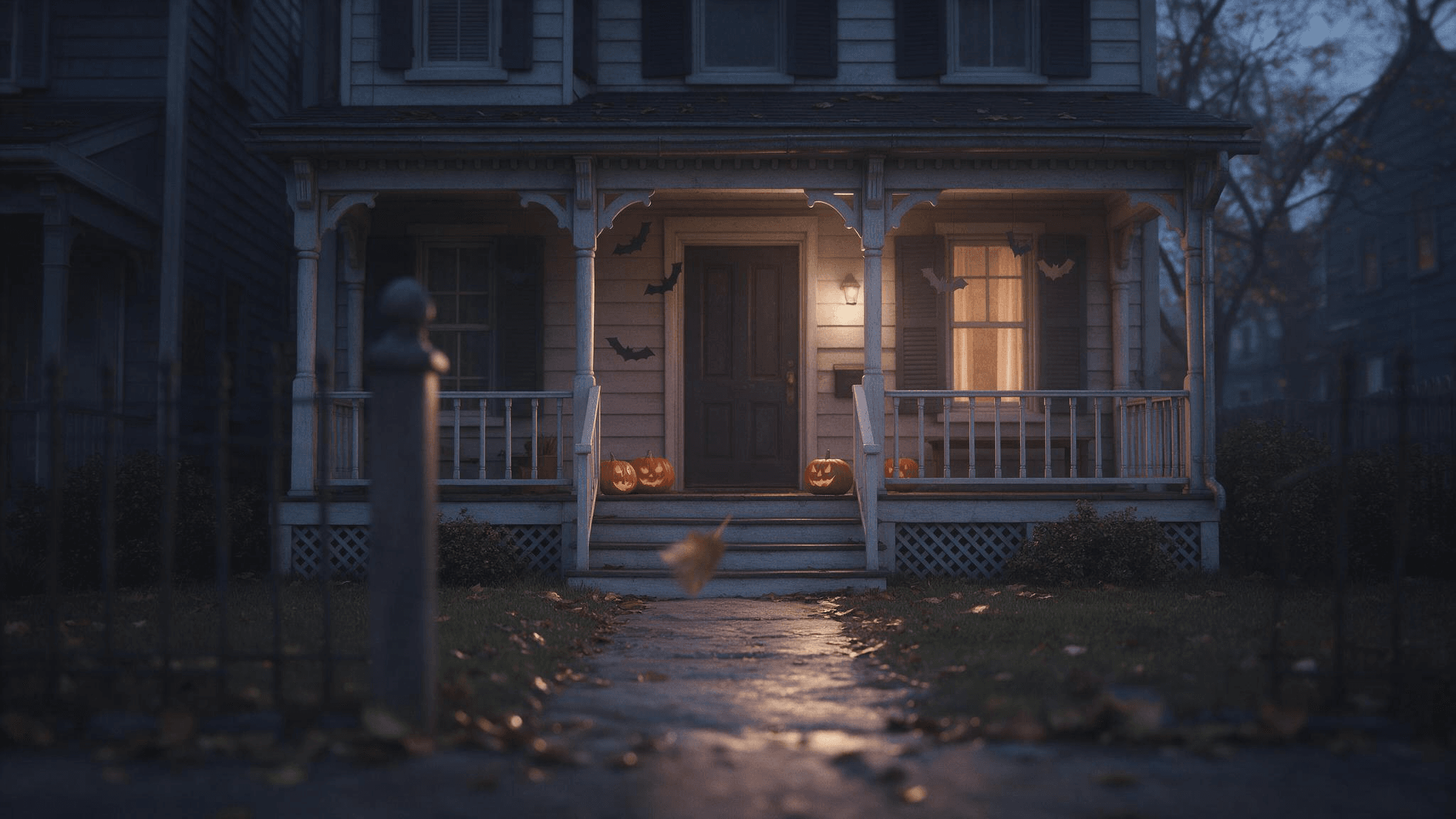 结果捕捉了门廊灯光和通向门口的小路。它似乎包含了超过要求的三个南瓜,因此在使用生成图像前请检查物体数量。
12. 被雨浸湿的派对邀请函背景
plaintext1Create a photorealistic editorial photo of a rain-darkened cobblestone lane leading to a small Halloween gathering. Warm light spills from an open doorway at the far end; a few pumpkins and autumn leaves sit along the walls. Keep the upper third dark and visually quiet so I can add invitation text later in a separate editor. Eye-level 35 mm lens feel, realistic wet reflections, cool blue-gray shadows and warm amber practical lights, restrained film grain. No people close to camera, generated letters, logos, or watermark.
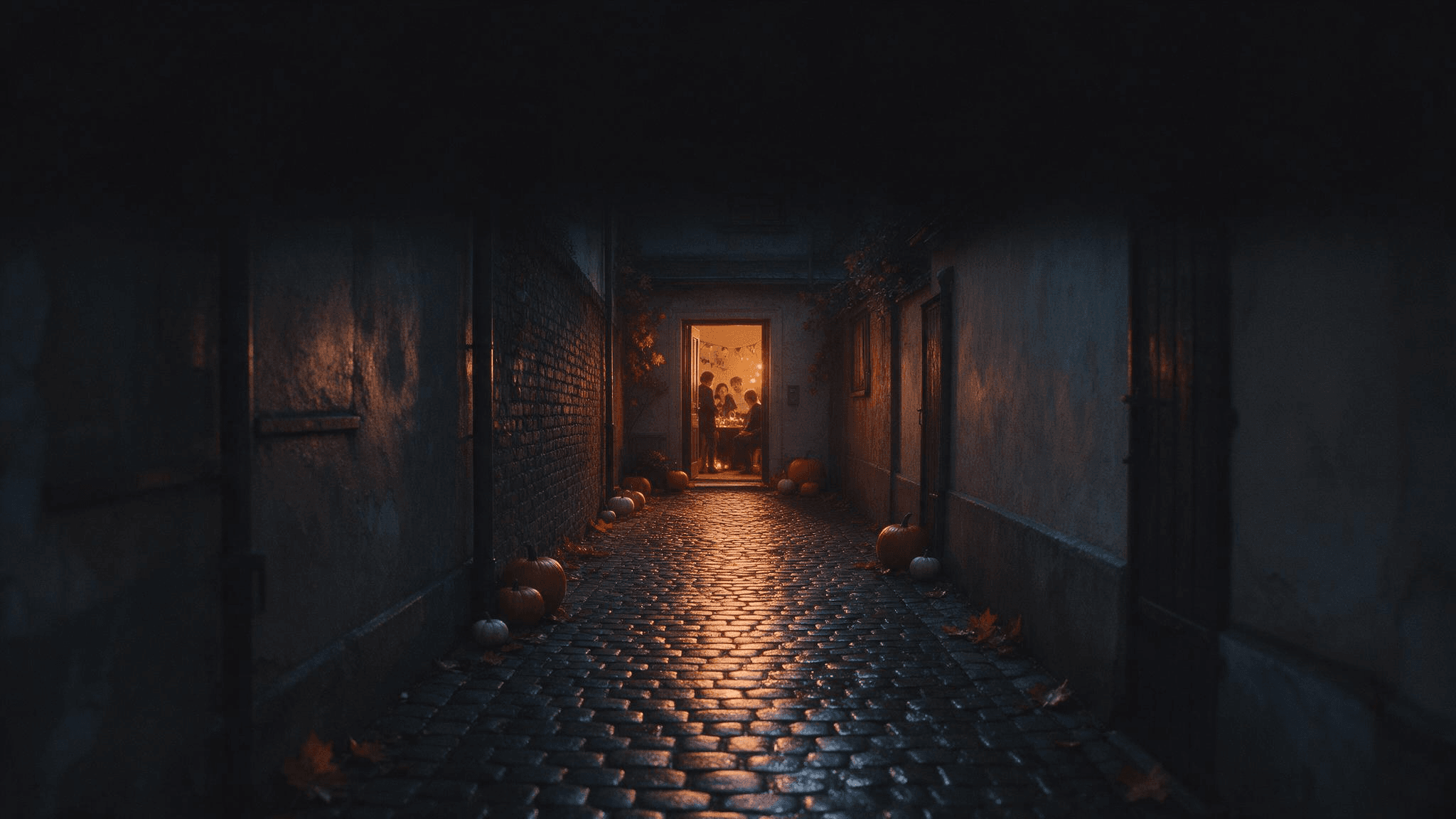 上方深色空间保持空白,以便稍后在单独的编辑器中添加邀请函文字。
稍后在文本编辑器中添加你的活动详情。图像提示词要求的是留白空间,而不是可能拼错或难以修改的 AI 渲染文字。
让每条提示词发挥更大作用
最可复用的万圣节照片提示词是一份简洁的创意简报。用一句话写主体和动作,一句写环境,一句写光线和相机,一句写你绝不希望丢失的细节。对于上传内容,最后一句应说明身份和人数。对于文生图,最后一句应说明构图和不希望出现的添加物。
用可见的说明替换笼统的形容词。Spooky 可能意味着雾、恐怖妆容、黑暗房间或鬼魂。Cool blue dusk outside the window and a warm lamp on the face 明确告诉模型氛围来自哪里。当你指定天鹅绒外套、黄铜钥匙和木制书架时,Vintage 会变得更清晰。
谨慎使用排除项。一长串 no 子句可能会挤占主要创意。优先处理会破坏这张特定照片的错误:肖像中被遮挡的脸、合影中多出的人、宠物身上被改变的斑纹,或邀请函背景上的文字。之后检查图像;否定指令并不是验证步骤。
当第一次结果接近时,只改变一个变量。试试 keep everything else; move the lantern to the left of the subject 或 retain the same face; make the background less crowded。如果主体本身就错了,回到源照片并明确说明保留请求。如果源照片模糊,请先使用更清晰的输入,再在其上叠加更多提示词子句。
Google 的 万圣节图像示例 展示了照片如何为幽灵肖像或季节性场景提供锚点。这个创意原则可以通用:说明哪些部分从输入中保留,哪些部分模型可以重新创作。这比复制一条光线、姿势和源图都与你不匹配的冗长热门提示词更有用。
在 Atlas Cloud 的 Image Generator 中尝试这些提示词
如果你想为同一份简报探索不同的托管图像模型,请从 Atlas Cloud 开始,并打开 AI Image Generator。该页面支持文生图、参考引导生成和基于提示词的编辑。其模型选择器让你可以用适合所需结果的图像模型尝试简报。上面的四个虚构场景提示词可直接用于文生图;个人照片提示词需要能接受上传图像的工作流。
粘贴一条提示词,选择模型和宽高比,并以完整尺寸检查结果。对于肖像,查看眼睛、手和服装边缘。对于场景,检查请求的物体数量,以及光线是否确实来自所描述的光源。如果提示词生成了强主体但取景较弱,请保留主体描述,只修改相机句子。这样能让下一次结果与第一次可比。
不要将虚构的脸当作真人经改造的照片来展示。如果你需要可辨认的人,请提供你有权使用的照片,并将其与输出结果进行对比。避免未经许可上传他人的肖像,尤其是在你打算发布结果时。
常见问题
这些万圣节 AI 照片提示词需要自拍吗?
只有那些要保留特定人物的提示词才需要该人物的照片。清晰的肖像通常比重度滤镜的自拍效果更好,因为脸部更容易看清。提示词 9 到 12 仅通过文本创建虚构场景。
为什么 AI 万圣节肖像会改变我的脸?
提示词可能同时要求精致服装、新角度、戏剧性光线和保留身份。从清晰的源照片开始,保持脸部可见,并在第一次编辑中减少改动。检查结果,而不是假定身份指令成功。
我可以在 ChatGPT、Gemini 和 Atlas Cloud 中使用同一条提示词吗?
场景描述可以通用,但输入工作流很重要。一条写着 use my uploaded photo 的指令需要具备图像能力的编辑或参考模式。空白画布场景可以用于文生图。工具控制和模型行为各不相同,因此请利用第一次输出进行小范围、具体的修改。
改善效果不佳结果的最快方法是什么?
找出最重要的单个错误。如果主体错了,改进参考图或主体句子。如果氛围错了,说明实际光源和一天中的时间。如果构图错了,说明相机高度、取景,以及主体在画面中的位置。保留已经有效的部分。
从这些 万圣节 AI 照片提示词 中选择一条与你今天能提供的图像相匹配的提示词。一张清晰的源照片或一个描述精准的场景,会比一长串恐怖形容词更有效。





