森林小径正常运作,角色已走到场景中途,而阳光对当前氛围来说太亮了。如何实时更改 Genie 4 世界中的天气有一个直截了当的答案:一旦获得访问权限,让 Genie 4 更改一个天气条件,同时说明你希望保留的场景细节。Google 已展示在运行中的模拟里进行自然语言天气编辑,但截至 2026 年 10 月 28 日,Genie 4 仍面向受信任测试者的研究预览。
以下提示词是审慎的测试模板,而非来自公开实操环节的已验证命令。
关键要点
- Google 确认,Genie 4 可以在模拟持续演进时,通过自然语言提示词更改天气。
- 一次只测试一种天气更改,并说明要保留的地标、角色、布局和镜头方向。
- 将此处的提示词视为起点。公开访问权限和可重复的编辑行为尚未确立。
- 每次编辑后检查场景是否漂移;Google 将物体恒常性和长期一致性列为活跃研究领域。
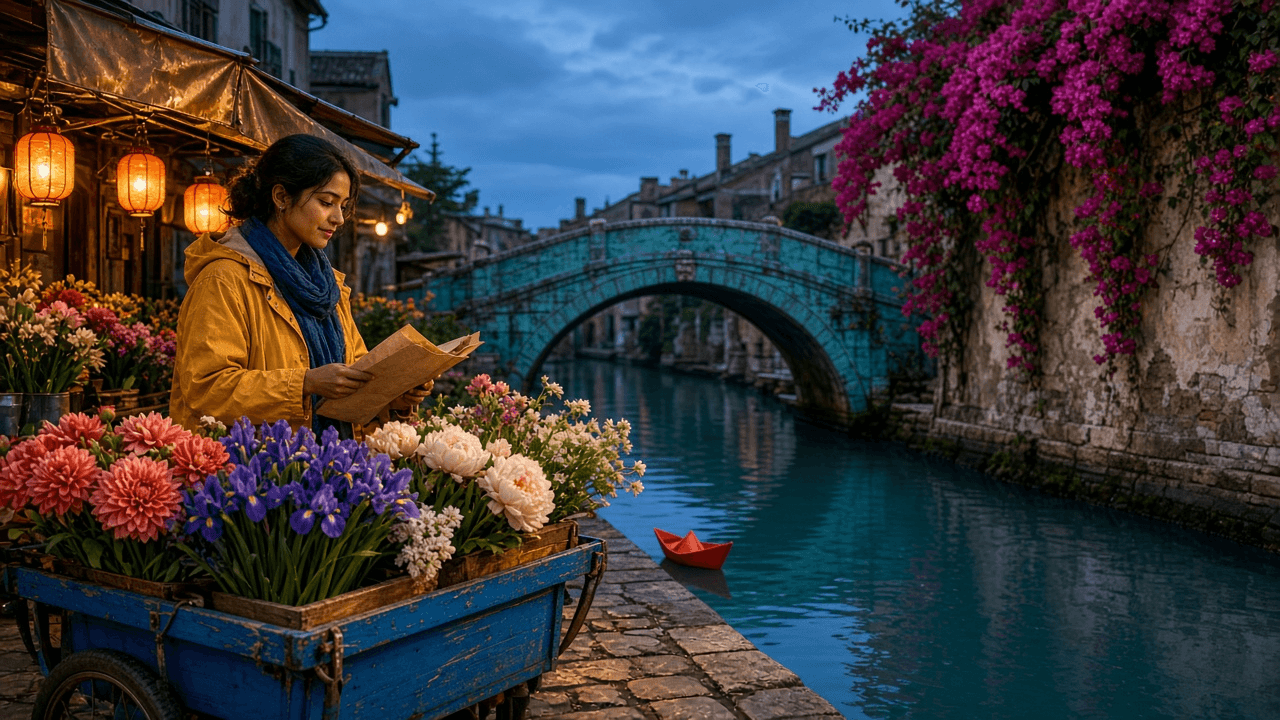
绿松石色桥梁、花车、运河和红色纸船为下面的天气序列确立了视觉锚点。
你能实时更改 Genie 4 世界中的天气吗?
是的,根据 Google DeepMind 的公告。Genie 4 允许用户用文本引导一个持续演进的模拟,包括更改天气、移动摄像机或添加人物或物体。Google 表示,Gemini 会将指令适配到周围场景,而世界会在输入之间继续推进。
这与生成一个单独的天气视频或在录制后应用滤镜不同:所展示的交互会编辑一个正在运行的模拟世界。
边界很重要。公告描述了实时交互的录制,但本文并非独立 Genie 4 测试的报告。Google 表示,截至发布时它已启动面向受信任测试者的研究预览。它计划通过 Project Genie 向消费者扩展访问权限,并通过 Gemini API 和 Google AI Studio 向早期访问合作伙伴扩展访问权限。
目前有等候名单,但公司在所引用的更新中尚未宣布广泛可用。(Google DeepMind,2026 年 10 月 27 日,Genie 4 公告。)
Google 确认: 世界内自然语言编辑可包括天气、摄像机移动以及新增人物或物体。模拟会在输入之间继续。
公开使用中仍有待验证: 确切的提示界面、是否每个世界都支持每种天气类型、编辑后地标持续存在的频率,以及天气指令是否会按请求改变环境音。
如何在不重建场景的情况下更改天气
将天气编辑视为一次小型连续性测试。你的目标是观察某个环境属性是否发生变化,同时可识别的场景锚点是否保留。这种测试设计有助于你发现移动了什么;它并不保证 Genie 4 会锁定这些细节。
从一个可审计的场景开始
选择一个紧凑、带有少量可见锚点的环境:一条小径、一棵独特的树、一栋建筑和一个角色,比一条挤满相似物体的街道更容易比较。让摄像机对准一个可识别的地标。如果摄像机已在移动,且实际界面允许,在发出编辑指令前暂停或固定到一个视图。
这是测量选择,不是 Google 的要求。简单场景能给你更清晰的基线。如果指令后树消失了或小径弯曲了,你会比在模糊不清的景观中更容易识别出连续性变化。
一次只更改一个天气变量
第一次尝试时,请求小雨。不要同时从白天切换到夜晚、移到新的摄像机角度、添加一个人并改变季节。这些请求会让人难以判断是哪条指令导致了场景变化。
使用包含四部分的提示词:
- 动作: 说明应更改什么天气,例如“将当前天气改为小雨”。
- 强度或特征: 保持具体,例如小雨、轻柔降雪或薄雾。
- 保留: 说明现有地标、角色、物体位置和布局。
- 延续: 要求场景继续自然推进。
像“让森林变得电影感且暴风雨般”这样的请求,会把氛围、光照和天气捆绑在一起。更可控的版本会说“将当前天气改为小雨”,并列出应保留的内容。即使模型并不遵守每条保留指令,第二种形式也让测试更易读。
在添加另一次编辑前先检查
比较提示词前后的场景。先记录变化,再决定是否细化天气。如果角色或摄像机移动了,在要求更大雨势前先记录这一点。否则,第二条指令可能让第一次编辑是否保持变得不清楚。
建议的循环是:一个场景 → 一次天气更改 → 检查保留元素 → 记录漂移 → 决定是否重试。 这是为获得访问权限的读者提出的测试 SOP,而不是已确认的 Genie 4 界面步骤序列。
可复制的雨、雪、雾和风提示词
这些模板旨在隔离单一变化,并明确保留标准。它们尚未在公开 Genie 4 会话中测试,因此请将措辞视为起点,并遵循你获得访问权限的环境中所显示的控制方式。
Google 现有的 Project Genie 提示词指南建议描述环境,并使用简洁、直接的语言。该指南适用于 Project Genie 的世界创建流程;它作为撰写提示词的上下文很有用,但并未记录 Genie 4 天气编辑界面。(Google,Project Genie 提示词撰写技巧。)
| 天气更改 | 提示词模板 | 保留 | 编辑后检查 |
|---|---|---|---|
| 小雨 | Change the current weather to light rain. Keep the same forest path, trees, character, object positions, and camera direction. Let the scene continue naturally. | 小径、树木、角色、物体、镜头方向 | 雨是否出现,同时同一条小径和地标仍然可识别? |
| 更大雨势 | Make the rain heavier and add visible wet reflections on the path. Preserve the existing environment, character, object positions, and camera direction. | 环境、角色、物体位置、摄像机 | 雨势是否变化,小径或构图是否也变化? |
| 轻柔降雪 | Change the current weather to gentle snowfall. Keep the same buildings, trees, character, and spatial layout. Do not add new objects. | 建筑、树木、角色、布局 | 降雪是否开始,而没有新增结构或换成不同场景? |
| 薄雾 | Add a light layer of morning fog between the existing trees. Keep nearby objects visible and preserve the current camera direction and scene layout. | 附近可见度、树木、摄像机、布局 | 雾是否足够有限,以便比较原地标? |
| 稳定风 | Add a steady breeze that moves the existing grass and tree branches. Keep the current weather, scene layout, and camera direction unchanged. | 现有天气、布局、摄像机 | 现有植物是否移动,而其他场景元素保持不动? |
避免在同一测试中添加“让它变美”、一天中时间变化、新的摄像机运动和角色动作。这些之后可能是有用的创意方向。在连续性检查期间,它们会增加变量,却不会让天气结果更容易判断。
案例研究:一个花市,五种天气状态
想象一个蓝调时刻的河畔花市:一座绿松石色石桥横跨狭窄运河;藏红花色灯笼在铜色遮阳篷下发光;洋红色三角梅从右侧墙壁倾泻而下;一辆钴蓝色花车位于前景;一只红色纸船漂浮在左侧码头旁。一位身穿藏红花色外套、围着靛蓝色围巾的花贩正在收摊。这五个锚点让天气编辑有可见之物可保留。
下面的序列是示意性天气故事板,而非捕获的 Genie 4 会话。拥有 Genie 4 访问权限的测试者可尝试这些简短天气指令,并记录同一个世界是否持续存在。这些片段展示了五种预期视觉状态;它们并不确立 Genie 4 实际如何表现。
每个片段运行 10 秒,并回到同一个河畔花市。随着天气变化,比较桥梁、遮阳篷、三角梅、花车、红色纸船和花贩的服装。干燥、小雨和大雨镜头确立了递进。在强风镜头中,围巾和罩布比降雨角度更清楚地显示出阵风。最后的彩虹揭示结合了多项变化以服务叙事,因此它不是单变量连续性测试。
开场场景简述:
plaintext1Photoreal cinematic establishing frame of a compact riverside flower market at blue hour, horizontal 16:9. A turquoise stone footbridge arches over a narrow canal in the middle distance. Warm saffron lanterns hang beneath weathered copper awnings on the left; saturated magenta bougainvillea cascades down a plaster wall on the right. A cobalt-blue flower cart filled with coral dahlias, violet irises, and cream peonies occupies the near foreground. One red paper boat floats beside the left quay. A young adult flower seller with expressive dark eyes wears a saffron raincoat and indigo scarf and folds a sheet of wrapping paper at her cart. Dry cobblestones, calm teal water, no rain, no fog, no wind. Rich but natural color separation, textured stone, believable flowers and skin, 35 mm lens, waist-height three-quarter view looking toward the bridge, soft lantern light against the cool evening sky. Keep every landmark clearly visible. No lettering, logos, duplicated people, or floating objects.
-
视觉 1,鲜明的干燥基线。 它准确确立后续镜头必须保留的内容。Genie 4 测试指令:
Keep this market scene progressing under the current dry weather; do not change the weather yet.场景方向:plaintext1Ten-second continuous shot from the supplied first frame, warm and lively before any storm. The flower seller folds a cream paper sleeve around coral dahlias, notices the red paper boat drifting beside the left quay, and breaks into a curious smile. She turns her shoulders, leans over the cobalt cart, and gently catches a loose violet iris before it falls; her hands and the bouquet move with believable weight. Begin at waist height in a wide three-quarter view of the turquoise bridge, copper awnings, magenta bougainvillea, cart, and boat. Glide sideways along the stall to reveal the dry amber-lit cobblestones and glassy teal canal, then return to the original bridge-facing axis. Saffron lanterns flicker against a clear cobalt-blue evening sky; the flowers and wall retain saturated but natural color. Absolutely no rain, wet pavement, fog, or wind. No cuts, extra people, duplicated objects, dialogue, text, or zoom-only motion.
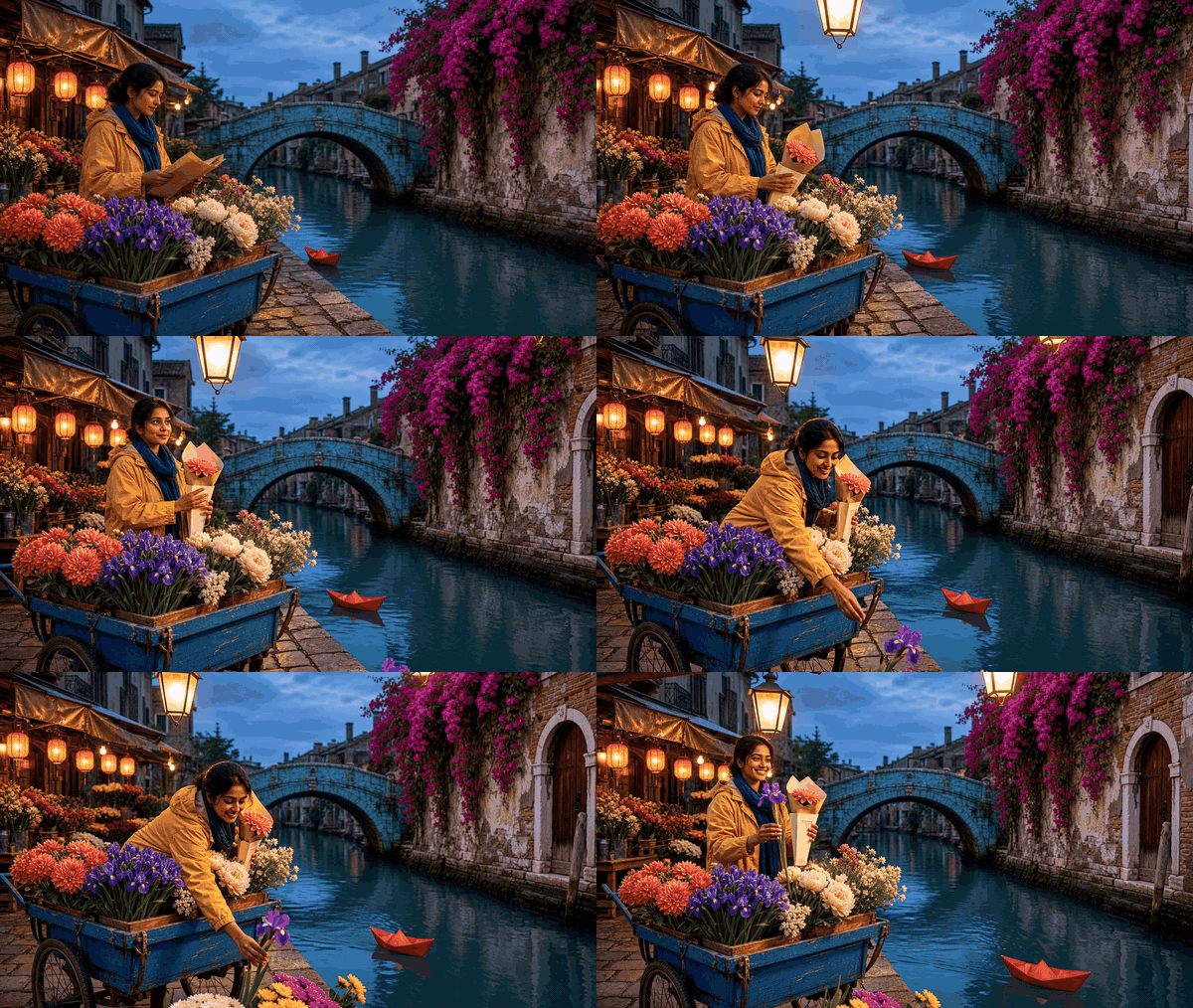
干燥花市基线:在天气变化前,桥梁、花车和纸船保持可见。
-
视觉 2,第一场可见的雨。 小雨、溅水涟漪和斑驳湿石必须清楚无误,同时花市仍比视觉 3 的倾盆大雨清晰得多。Genie 4 测试指令:
Change only the weather to light rain. Keep this flower market, seller, landmarks, object positions, and bridge-facing camera direction recognizable.场景方向:plaintext1Ten-second continuous continuation from the same first-frame market, visibly changing from dry weather to a clear but gentle shower. At second two, distinct silver raindrops cross every amber lantern beam; by second five, numerous small splash rings cover the teal canal and patchy dark wet areas spread over roughly half of the cobblestones. A few soft amber reflection halos appear in those patches, but there are no streams, broad puddles, or opaque rain curtains. Keep the air clear enough to read the distant turquoise bridge and the magenta bougainvillea. The seller's curious smile turns to delighted surprise: she looks up, feels a drop on her palm, raises an eyebrow, then swiftly lifts the wrapped bouquet beneath the copper awning and pulls the narrow canvas cover halfway over the cart. Follow her hand from a low cart-level angle, tilt up to show the light shower against the lanterns, and return to the bridge-facing view. Her saffron coat gains visible but scattered damp specks. No heavy rain, strong wind, lightning, new stalls, extra people, cuts, dialogue, text, or zoom-only motion.
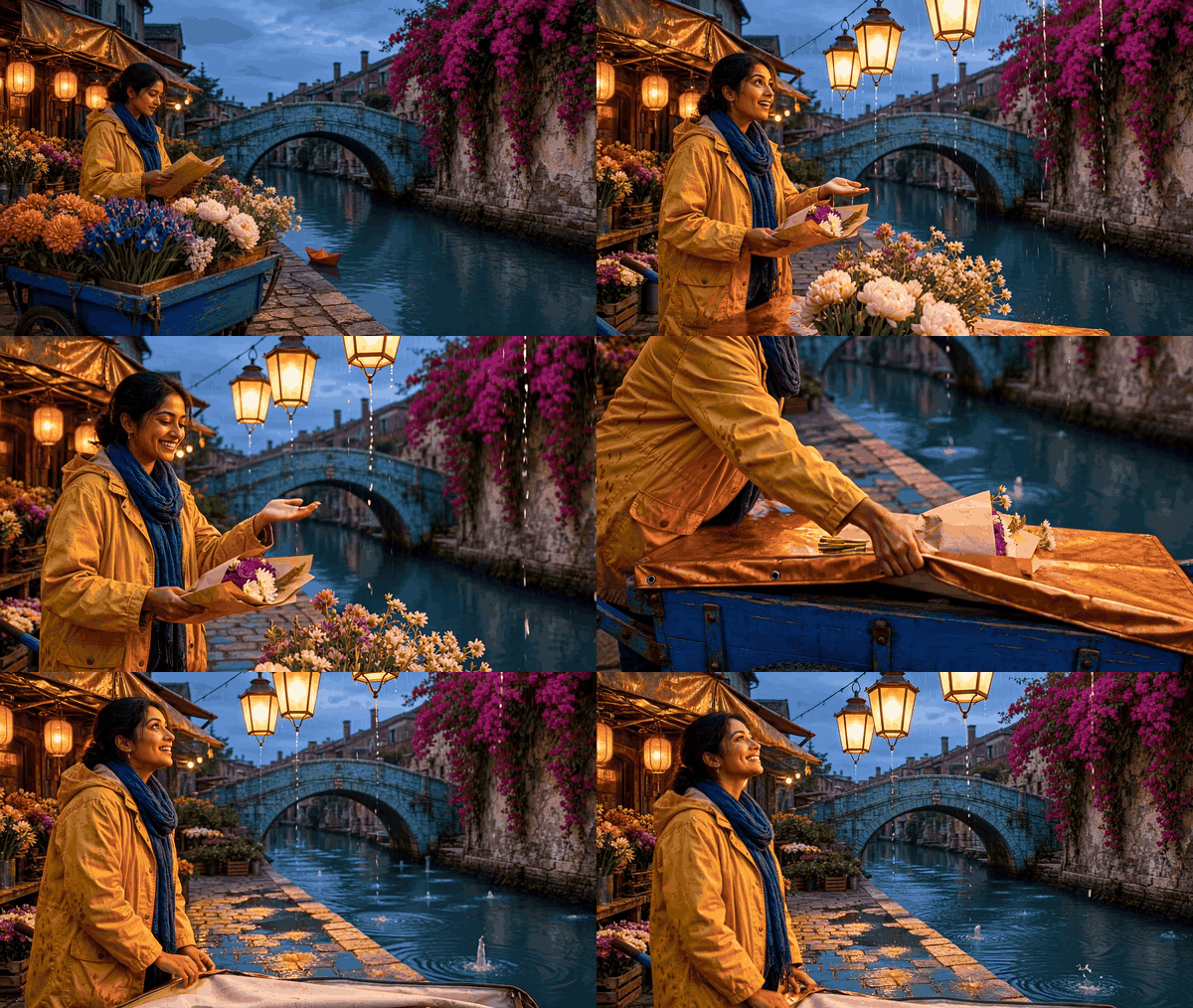
同一花市开始下起小雨;出现小水花,而桥梁仍然清晰。
-
视觉 3,垂直倾盆大雨。 与视觉 2 的主要对比是密集的雨幕、完全湿石反射和急迫的遮蔽动作,且几乎没有风。Genie 4 测试指令:
Increase the existing rain to a steady downpour. Keep the market layout, seller, bridge, flower cart, paper boat, and camera axis recognizable.场景方向:plaintext1Ten-second continuous continuation in the identical flower market, now a decisive jump from drizzle to a dense, nearly vertical downpour. Heavy rain forms visible silver curtains in front of the saffron lanterns; water streams from both copper awnings; broad puddles join along the same cobblestone seams and stretch amber, cobalt, and magenta reflections across the ground. The teal canal breaks into dense overlapping ripples, while the turquoise bridge remains recognizable through the rain. The seller's delighted expression turns to focused concern. She pulls the canvas cover fully over the coral dahlias and violet irises, presses its edge down with both palms, then ducks beneath the awning and looks back toward the red paper boat. Begin with a wide bridge-facing shot so the weather change is obvious, arc smoothly to a lower three-quarter angle past the glowing puddles, and settle with the bridge, cart, wall, and boat still in frame. Rain falls mostly straight down: no strong wind yet, no lightning, no new scenery, no extra people, no cuts, dialogue, captions, or zoom-only motion.
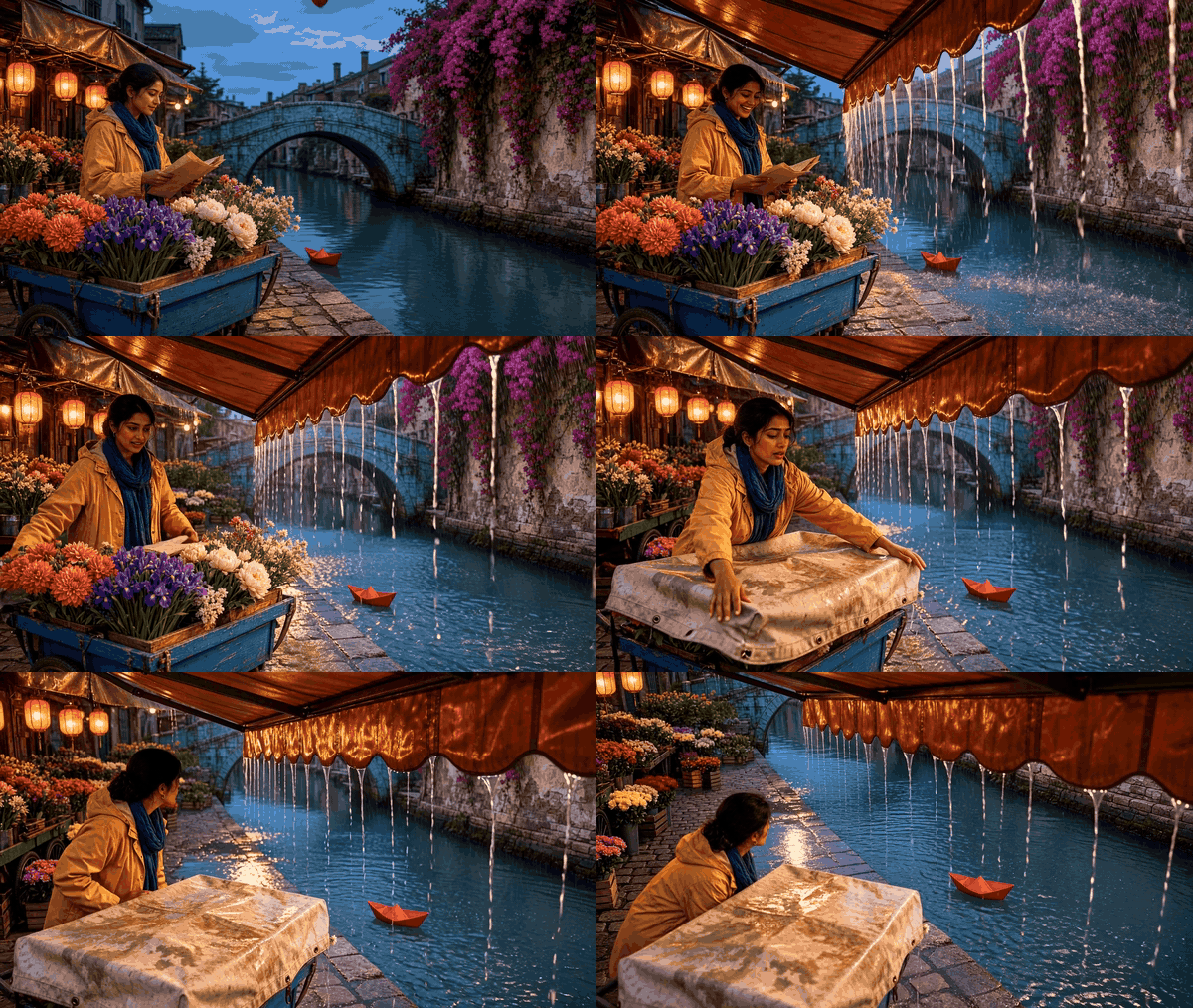
雨势增强,花贩遮住花朵,水在鹅卵石上积聚。
-
视觉 4,雨中起风。 围巾和帆布罩对阵风反应强烈,同时降雨继续。雨略微倾斜,不过风对织物的影响是与视觉 3 最明显的区别。Genie 4 创意指令:
Bring in a strong crosswind as the heavy rain eases to a moderate shower. Blow the falling rain diagonally across the whole market while preserving its landmarks.场景方向:plaintext1Ten-second continuous continuation from Visual 3's heavy-rain final frame. During seconds zero to two, the rain still falls almost vertically over the entire flower market, with the turquoise bridge visible beyond it. During seconds three to six, a strong crosswind rises from the left canal toward the right-hand bougainvillea wall. The downpour eases into a moderate shower as the gust turns the falling rain into clearly separated diagonal streaks, slanting about 40 degrees across the sky, in front of the bridge, around the flower cart, and over the canal. The rain must visibly travel through the whole open scene; do not portray it mainly as water pouring off the copper awnings. Keep enough space between streaks to see their direction and the saturated teal, magenta, cobalt, and amber background. The awnings flex, bougainvillea and flower heads bend rightward, and the seller's indigo scarf whips in the same direction. She widens her eyes at the sudden gust, plants one foot, grips the cobalt cart with one hand, and catches the lifting canvas cover with the other. The red paper boat spins but remains near the left quay. Start wide on the bridge axis, move to a low side angle as she braces the cart, then return to a wide view with every landmark visible. Smooth physical motion; no opaque wall of rain, no waterfall from the awning, no lightning, destroyed stalls, extra people, cuts, dialogue, text, or zoom-only movement.
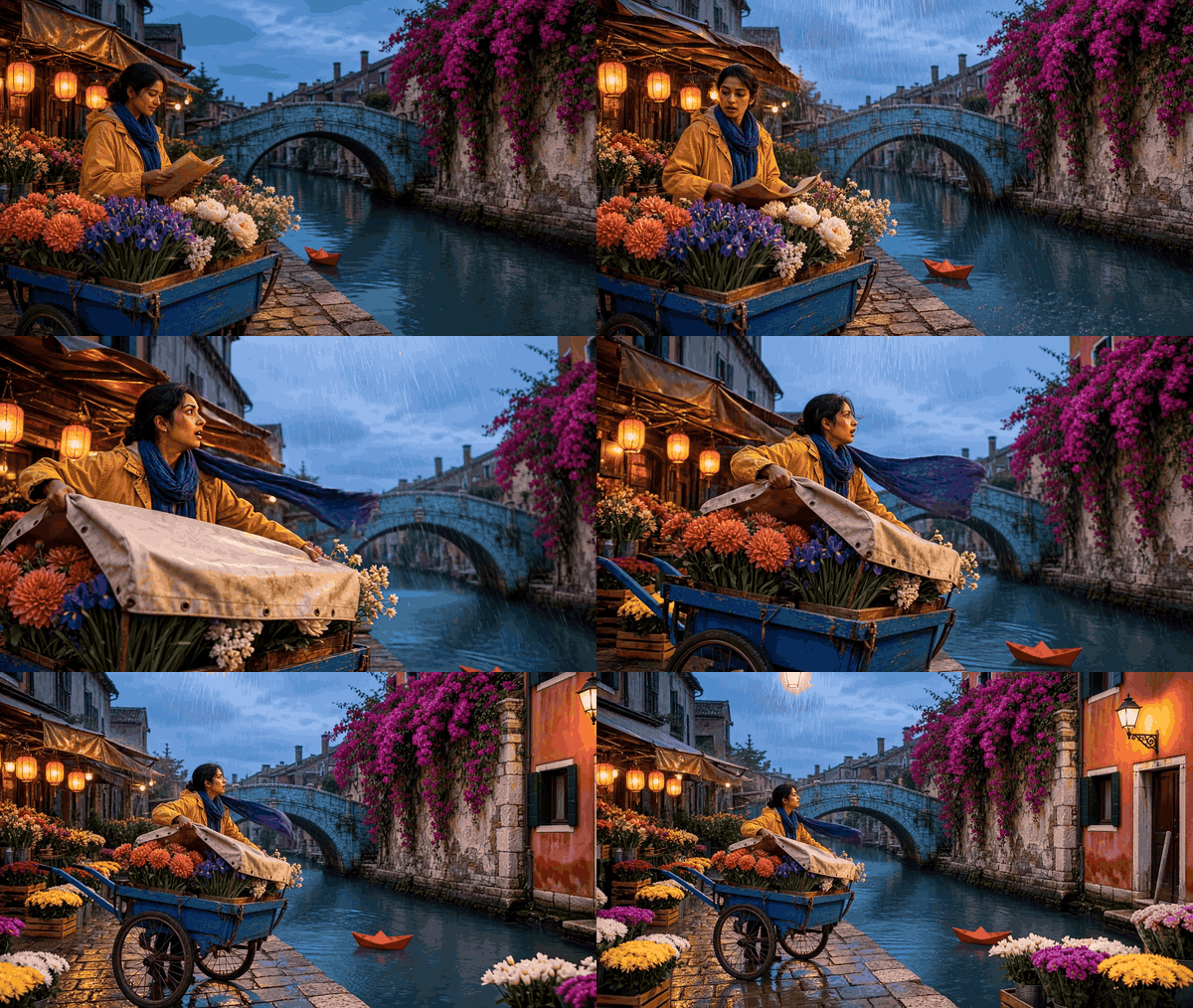
一阵风掀起罩布,把花贩的围巾吹向一侧,雨继续落在运河上。
-
视觉 5,暴风雨后的彩虹。 这是创意回报:雨停了,光线回归,彩虹出现在同一个潮湿花市上方。Genie 4 创意指令:
Let the rain stop, calm the wind, part the clouds, and reveal a natural rainbow above the existing bridge. Keep the market and seller recognizable.场景方向:plaintext1Ten-second continuous continuation from the wind-driven moderate rain, ending in an unmistakable post-storm reveal. During seconds one to four, the diagonal rain weakens to a few falling drops and the canvas cover settles as the strong wind calms. During seconds five to seven, a break opens in the blue-hour clouds and a low shaft of warm late-evening sunlight touches the turquoise bridge and the still-wet cobblestones. By the final seconds, one believable, complete rainbow arcs above the bridge against darker retreating clouds; its colors are visible yet natural, not a neon painted stripe. Keep the copper awnings dripping, the canal rippling, puddles reflecting saffron lanterns, and the cobalt cart and magenta bougainvillea in their original places. The seller cautiously lifts her head, her tense face opens into a genuine relieved smile, and she raises one rescued coral-dahlia bouquet toward the light while the red paper boat remains beside the left quay. Begin close enough to read her expression, then move laterally outward into a wide bridge-facing composition that reveals the rainbow and all scene anchors. No instant dry pavement, no new buildings or people, no double rainbow, no season jump, no cuts, dialogue, text, or zoom-only motion.
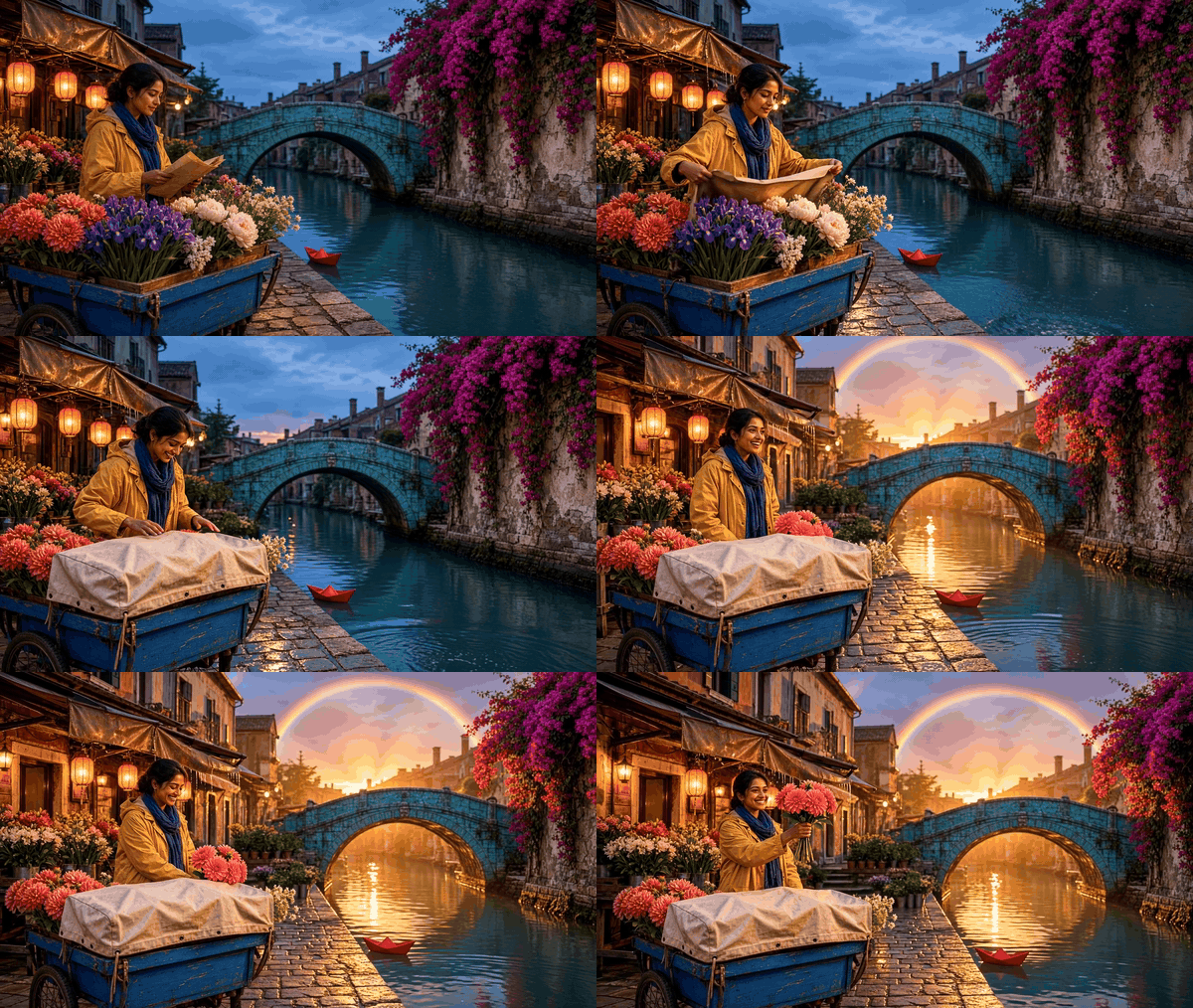
雨后,湿润的石头映出暖光,一道彩虹出现在桥梁上方。
五个预期状态是干燥而明亮;第一场小雨;密集垂直倾盆大雨;雨中带有围巾和罩布上的强风提示;然后是无雨的湿石和彩虹。桥梁、花车、墙壁、花贩和纸船应在五个状态中都保持可识别。如果示意片段改变了这些锚点,请记录不匹配,而不是将其视为成功的连续性测试。片段 4 和 5 为叙事结合了变化,在任何实际 Genie 4 测试中都必须如此标注。
如何判断 Genie 4 天气编辑是否成功
视觉上令人信服的结果,如果悄悄替换了小径、角色或摄像机视图,仍可能是一次糟糕的连续性编辑。使用简短审计,而不是含糊的“看起来对”判断。
官方公告称,模型可以让模拟连贯地持续演进,但也警告细节和物体恒常性可能会漂移。你自己的记录应将预期变化与你要求保留的一切区分开。
每次提示后,检查以下项目:
- 目标天气: 你能在场景中识别出所请求的雨、雪、雾或风吗?
- 地标: 同样的建筑、树木、小径和其他锚点是否仍出现?
- 角色和物体: 它们是否可识别,并且大致处于相同位置?
- 摄像机: 视角是否仍朝向同一方向,还是已经偏移?
- 其他变化: 一天中时间、季节、光照或场景布局是否在你未请求的情况下发生变化?
- 声音: 如果场景有音频,它是否改变?记录你听到的内容,但不要假设文本天气编辑能保证某种特定声音。
Genie 4 被描述为可生成原生音频,包括环境音。公告并未承诺每个降雨提示都会添加雨滴、雷声或任何特定混音。将音频视为单独观察,而不是视觉天气指令奏效的证明。
保留最小运行日志:
| 字段 | 记录内容 |
|---|---|
| 访问途径 | 你测试的产品入口点和日期 |
| 基线 | 编辑前的场景锚点和摄像机方向 |
| 提示词 | 提交的准确文本 |
| 预期变化 | 单一天气变量 |
| 已保留 | 哪些锚点、物体和视角仍可识别 |
| 漂移 | 对身份、位置、布局、光照或声音的任何未请求变化 |
| 重试 | 你是重复同一提示词还是更改了某个短语 |
这样的记录会让后续比较比一堆没有基线的“成功”示例更有用。不要从少量个人运行中计算成功率,也不要把不同起始场景的结果当作受控测试来比较。
天气变化后还可能发生什么漂移?
Google 表示,Genie 4 可以在短会话中保持连贯环境,而视觉细节和物体恒常性可能随时间变化。公告强调,较长会话、多次复杂编辑以及在场景中移动,是漂移可能出现的情况。
它还列出空间准确性、复杂物理交互、可读文本、实时音频准确性和长期一致性为活跃研究领域。(Google DeepMind,2026 年 10 月 27 日。)
这一警告改变了你应如何使用这些提示词。将它们视为探索艺术方向、制作氛围原型或测试场景是否响应指令的方式。不要假设湿路会在长序列中保持在同一位置,也不要假设角色在反复编辑后仍保留确切位置和外观。如果场景对制作很重要,请在真正产品提供受支持方式时保存或捕获有用状态,并在最终制作所用工具中验证关键细节。
模拟的暴雨也不是天气预报,或经过验证的降雨物理模型。Genie 4 创建一个交互式世界。它的视觉或音频响应可以帮助你想象一个场景,但它并不确立现实世界的降水、排水、能见度或安全条件。
你现在可以试用 Genie 4 吗?
截至 2026 年 10 月 28 日,Google 将 Genie 4 描述为面向受信任测试者的研究预览。公告称,通过 Project Genie 向消费者提供访问权限,以及为 Gemini API 和 Google AI Studio 合作伙伴提供早期访问,是接下来的计划步骤。
它并未表示每个 Google AI Ultra 订阅者都已能使用 Genie 4,因此请查看当前官方公告和 Project Genie 等候名单 以获取最新状态,而不要依赖假设的推出日期。
如果你想在等待时准备艺术方向参考,Atlas Cloud 提供用于规划视觉状态的创意工具。上面的花市序列可以帮助团队在世界模型测试前比较干燥、下雨和暴风雨后的外观。它不会编辑正在运行的 Genie 4 场景,本文也不声称 Genie 4 接受这些图像或片段作为输入。
当获得访问权限时,从一个简单场景中的一次简短天气编辑开始。保存准确提示词,并在添加另一条指令前比较相同地标。这样就能让如何实时更改 Genie 4 世界中的天气成为一个可测试的问题,而不是对发布演示的假设。
常见问题
你能在不重启 Genie 4 世界的情况下更改天气吗?
Google 的演示将天气变化描述为模拟持续演进时的实时引导。某个会话是否需要重启,取决于实际访问界面以及世界如何响应;公开公告并未记录每个控制方式或边缘情况。
Genie 4 中下雨的最佳提示词是什么?
从一个更改和明确的保留标准开始:“将当前天气改为小雨。保持同一条小径、树木、角色、物体位置和镜头方向。”这是测试模板,不是已验证的最佳表现提示词。
天气变化后,Genie 4 能保留同一个角色和摄像机吗?
你可以要求它同时保留两者,但提示词不是保证。Google 表示物体恒常性和长期一致性仍是活跃研究领域,因此每次编辑后比较角色和视角。
Genie 4 现在对所有人可用吗?
不。在 2026 年 10 月 27 日的更新中,Google 描述了一个面向受信任测试者的研究预览,并表示更广泛的消费者和开发者访问将随后推出。请查看官方等候名单以了解变化。
我可以用 Genie 4 模拟现实世界天气吗?
用它来探索交互式场景,而不是作为预报或经过验证的天气物理系统。生成的暴风雨并不确立真实降水,也不预测真实地点的条件。


