一次有用的图像编辑不是从头开始。它把一个可信的瞬间带入一种新状态,同时让人物、动作和机位关系保持可辨识。咖啡店窗前的女子、修剪香草的园丁和山间小径上的徒步者,各自为本指南提供了一个源场景和一个刻意限定的修订方向。
实践规则很简单:先确立场景,列出不能改变的内容,然后只要求一种类别的变化。光线和时间可以变,天气可以变。主体不应悄悄变成另一个人、多出一个道具,或者在画面中移到别的位置。
关键要点
- 将源图像视为人物、姿态、服装和构图的参考基准。
- 每次只改变一个类别:时段、天气或氛围。
- 在欣赏新光线之前,先检查主体和动作。
- 将虚构场景明确标注为创意概念,而非人物、地点或事件的记录。
为什么 MAI Image 2.6 场景编辑需要保留清单
MAI-Image-2.6 及其 Flash 变体支持图像编辑,微软将该系列描述为处于公共预览阶段。官方文档列出了文生图和图像编辑工作流,而发布公告则将参考编辑和灵活取景描述为该系列的一部分(Microsoft Foundry 文档、Microsoft AI 发布公告)。
当需求说明有边界时,这种能力最有价值。诸如“让这个更有电影感”这样模糊的请求,会引导模型重绘一切。而一个受控的请求会先确定基准细节,然后指明唯一意图的差异。对于人物在场景中的编辑,保留清单通常包含:
| 保留 | 更改 | 运行后检查 |
|---|---|---|
| 人物、面部、头发、服装、动作、机位角度 | 时段、天气或色温 | 姿态、手部、道具、构图和场景连续性 |
| 场所布局、主要物体和地平线 | 光线方向和氛围 | 是否出现任何新物体或人物 |
| 主体在画面中的位置 | 仅背景条件 | 结果是否仍然支持相邻的文案 |
请使用当前的 MAI Image 2.6 模型页面,在运行任务当天确认有效的编辑路由和可接受的输入设置。以下示例均为虚构的视觉概念,不构成真实地点、人物、天气状况或事件的证据。
MAI Image 2.6 场景编辑工作流:三个关联案例
下面每一对都从一个源场景开始,以一个受限的修订结束。这组视觉画面具有共同的纪实摄影感,但每个案例测试不同类型的连续性:时段、天气和暖光。
步骤 1:确立咖啡店晨间场景
第一个源场景固定了女子、她的炭灰色针织毛衣、笔记本、陶瓷杯、桌子和窗边的机位角度。这些都是编辑后必须保留的细节。
MAI Image 2.6 场景编辑的源场景:下雨的早晨,咖啡店窗前的女子
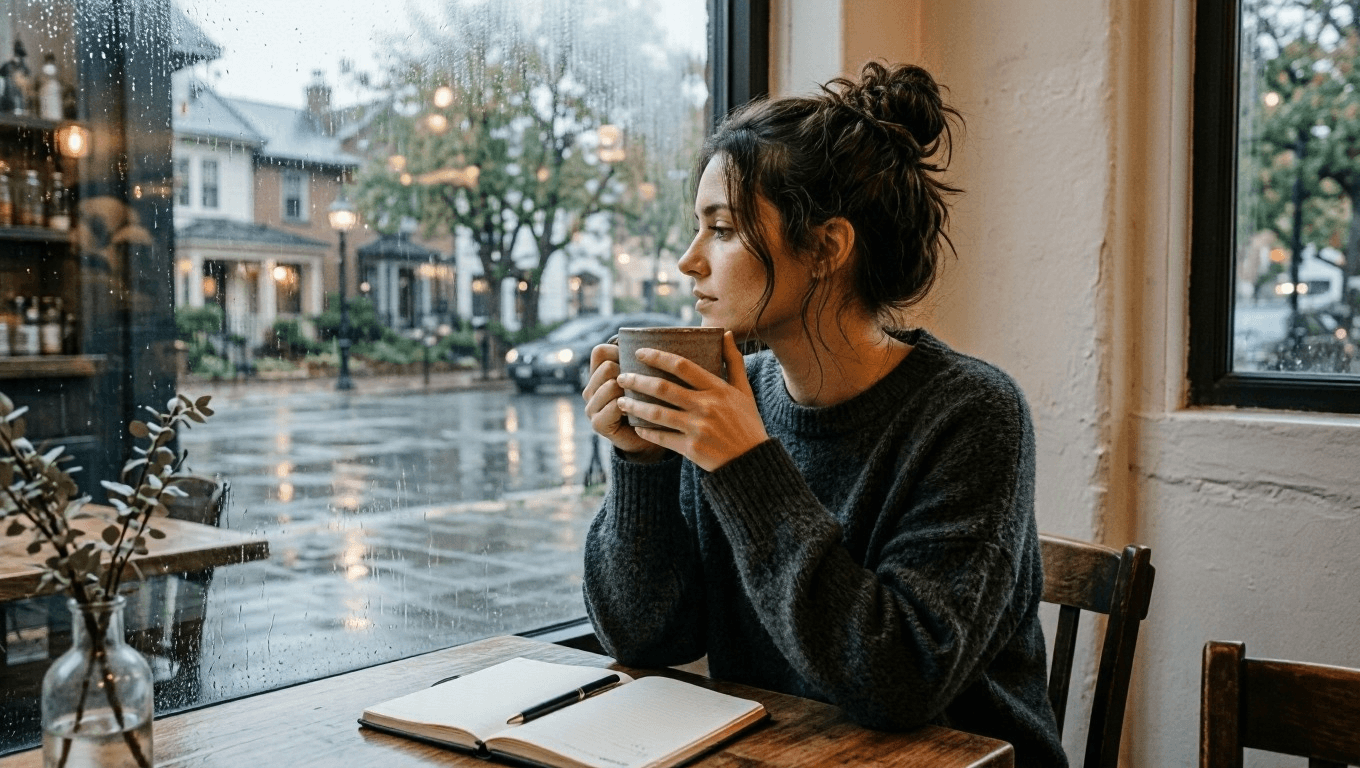
源场景:氛围改变之前,一个虚构的安静咖啡店瞬间。
使用此源提示词来创建新场景:
plaintext1Create a cinematic editorial photograph of one young adult woman sitting alone beside a large window in a quiet neighborhood coffee shop at early morning. She wears a soft charcoal knit sweater, has a notebook open on the table, and holds a ceramic cup with both hands while looking out toward the rain-washed street. Warm wood tables, pale plaster walls, subtle reflections in the window, natural skin texture, soft overcast daylight, realistic documentary photography, vertical 4:5 composition. No readable text, logos, watermark, extra people, distorted hands, or duplicate objects.
步骤 2:只改变咖啡店的时段
上传已批准的晨间图像。保持女子、服装、杯子、笔记本、桌子和相机角度不变。唯一的修订是从灰蒙蒙的早晨变为蓝调时刻的傍晚,室内灯光更暖,窗外有驶过的电车。
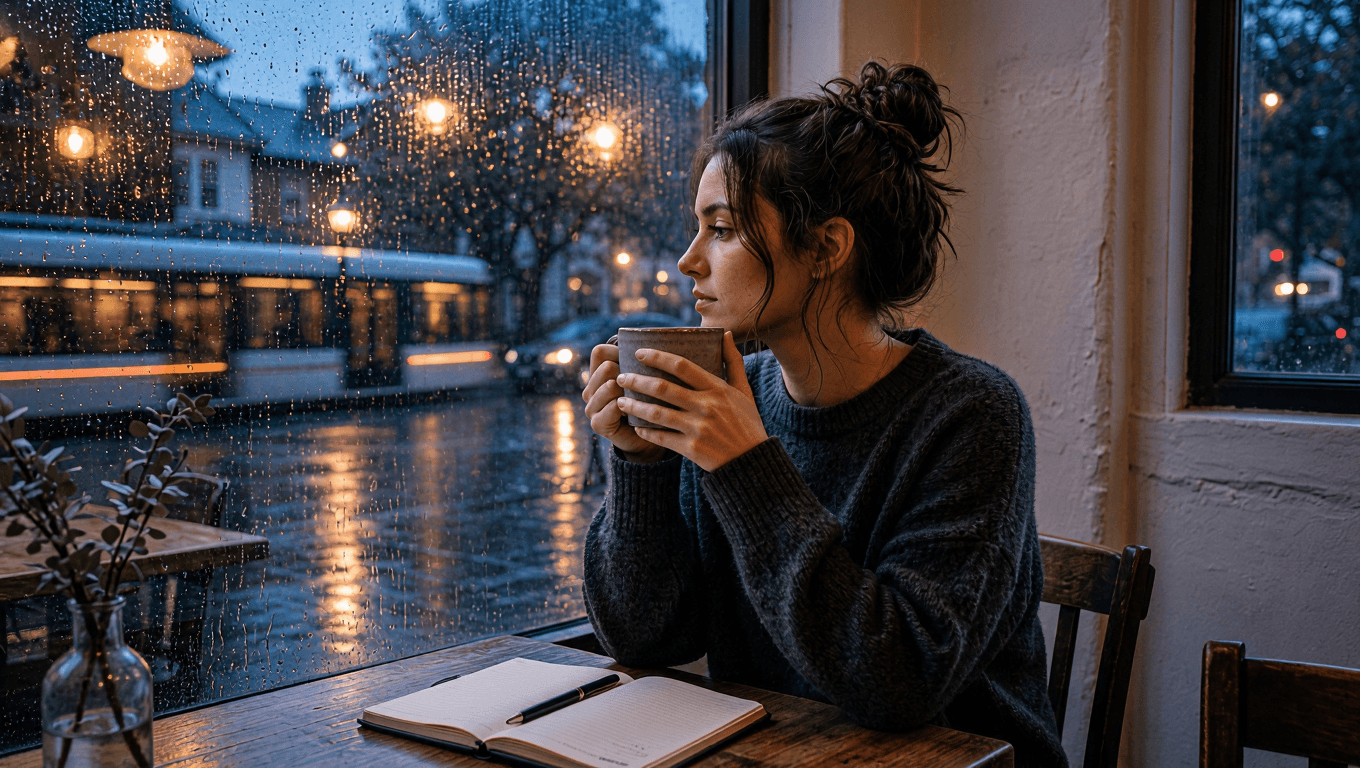 受控场景编辑:同一名女子在蓝调时刻的咖啡店中,窗外是雨夜街景的反光
受控编辑:同一个窗边瞬间,现在被带入雨夜蓝调时刻。
plaintext1Use the uploaded image as the source of truth. Preserve the same adult woman, face, hairstyle, charcoal knit sweater, notebook, ceramic cup, seated posture, camera angle, and table position. Change only the setting and light: transform the same coffee shop into a calm blue-hour evening scene with warm pendant lights, rain droplets glowing on the window, and a softly blurred passing tram outside. Keep the woman looking toward the window. Cinematic realistic photography, vertical 4:5 composition. No text, logos, watermark, extra people, changed clothing, changed facial features, distorted hands, or duplicated objects.
步骤 3:确立屋顶花园工作场景
下一个源场景关乎动作而非肖像。园丁的跪姿、橄榄色衬衫、手套、园艺剪、抬高的花槽和迷迭香构成保留清单。这让人可以在不丢失正在进行的工作的前提下,评判一次天气编辑的效果。
MAI Image 2.6 场景编辑的源场景:傍晚时分,园丁在屋顶修剪迷迭香
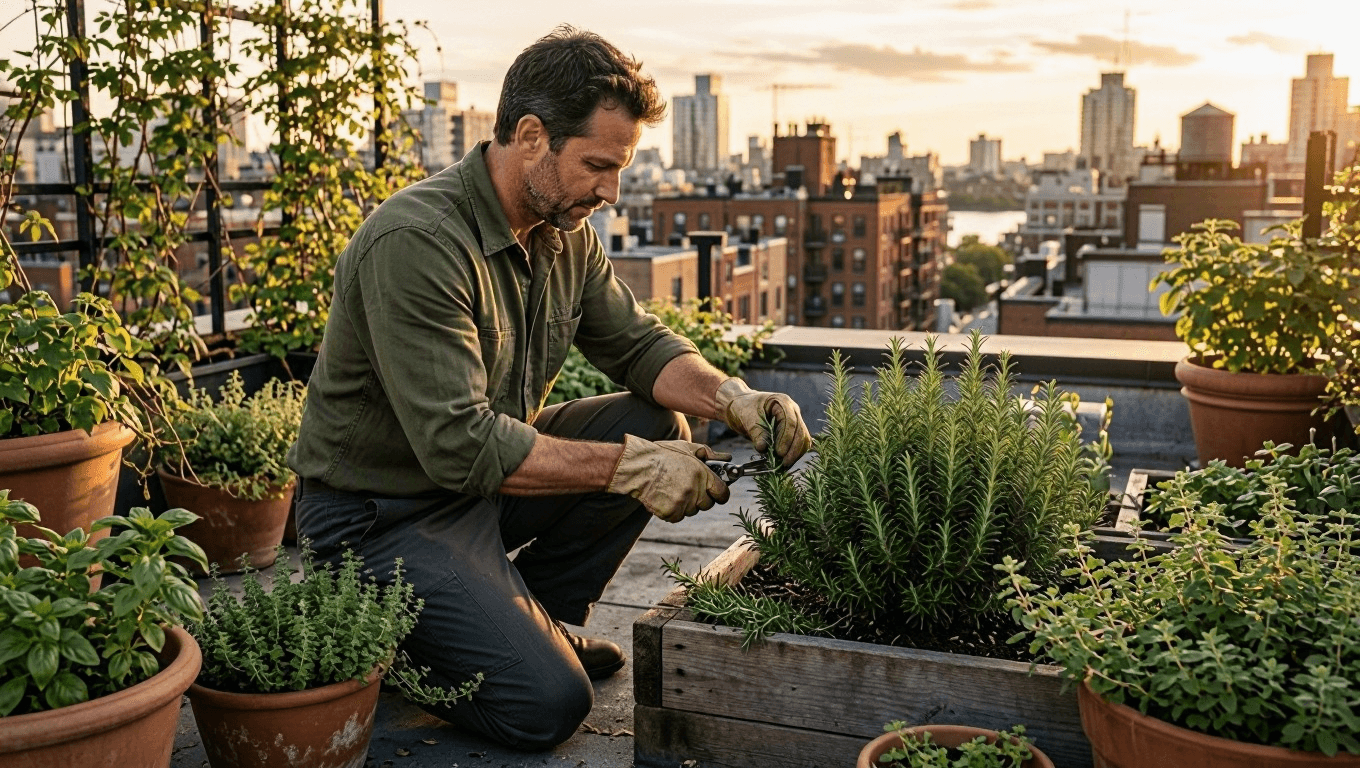
源场景:清澈的傍晚光线下,一个虚构的屋顶花园劳作场景。
使用此源提示词来创建新场景:
plaintext1Create a natural editorial photograph of one adult man tending herbs in a small urban rooftop garden during late afternoon. He wears an olive work shirt with rolled sleeves, dark trousers, and worn gardening gloves. He kneels beside raised wooden planters, carefully trimming rosemary with small shears. Surround him with terracotta pots, climbing vines, distant apartment rooftops, and gentle warm sunlight. Realistic fabric texture, natural skin, documentary 50mm photography, vertical 4:5 composition. No logos, readable labels, watermark, extra people, duplicate tools, distorted hands, or extra limbs.
步骤 4:让同一座花园变成雨后初歇
上传屋顶源场景,而不是描述一座新花园。动作完全保持不变;雨、湿润的叶子和更柔和的光线是仅有的预期差异。在确认氛围之前,检查园艺剪、手部、衬衫、花槽和城市布局。
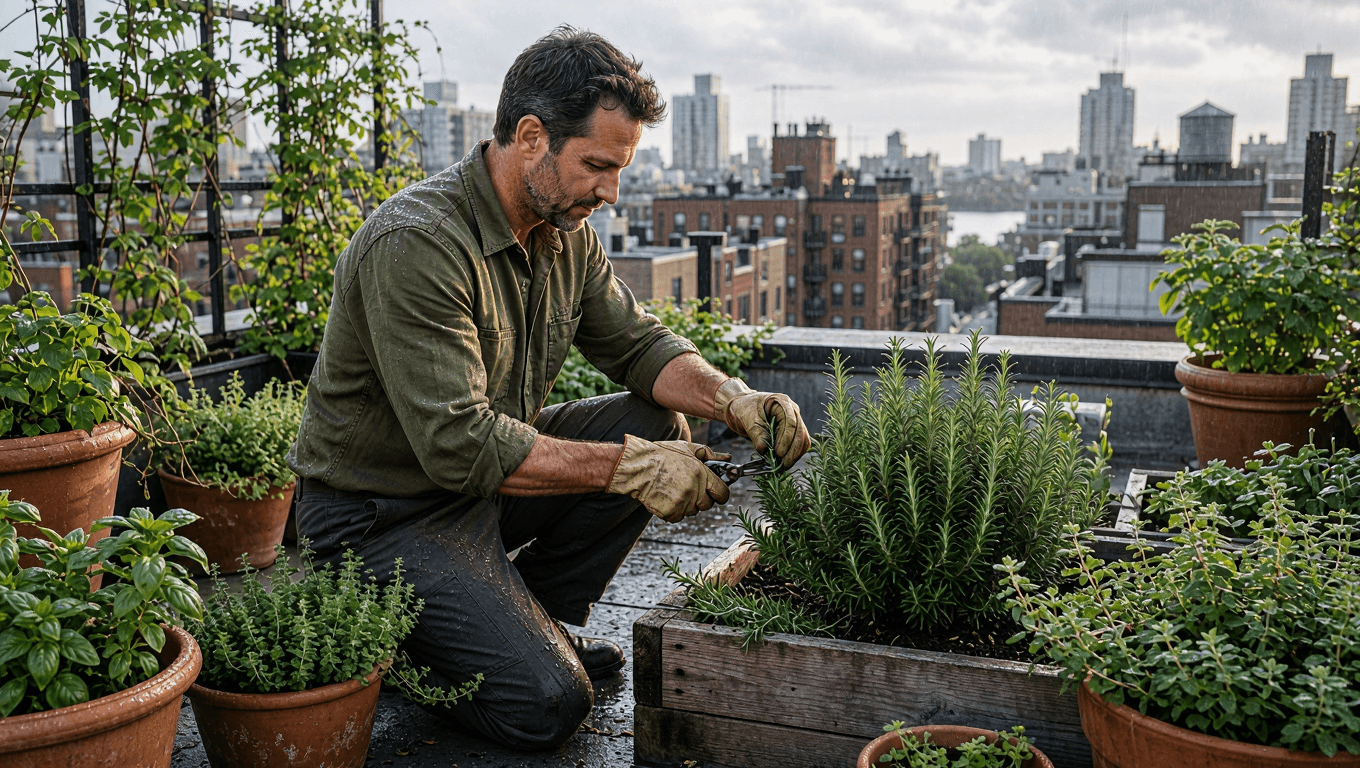 受控场景编辑:雨后,同一名园丁在屋顶花园修剪迷迭香
受控编辑:天气变化,而园丁、劳作和屋顶几何结构保持连贯。
plaintext1Use the uploaded image as the source of truth. Preserve the same adult man, olive work shirt, trousers, gloves, gardening shears, kneeling posture, rooftop-garden layout, raised wooden planters, and camera angle. Change only the weather and atmosphere: make it just after a light spring rain, with wet leaves, small water droplets on the rosemary, softened cloudy daylight, and a faint city haze beyond the rooftops. Keep the action of trimming herbs unchanged. Realistic editorial documentary photography, vertical 4:5 composition. No text, logos, watermark, extra people, changed clothing, extra tools, distorted hands, or altered pose.
步骤 5:确立山间小径晨间场景
对于最后一个源场景,连续性由路线和动作承载。锈红色风衣、绿色背包、登山杖、行走方向、小径和山脉构图都需要在光线改变前保持稳定。
MAI Image 2.6 场景编辑的源场景:初秋晨光中,女子走在山间小径上
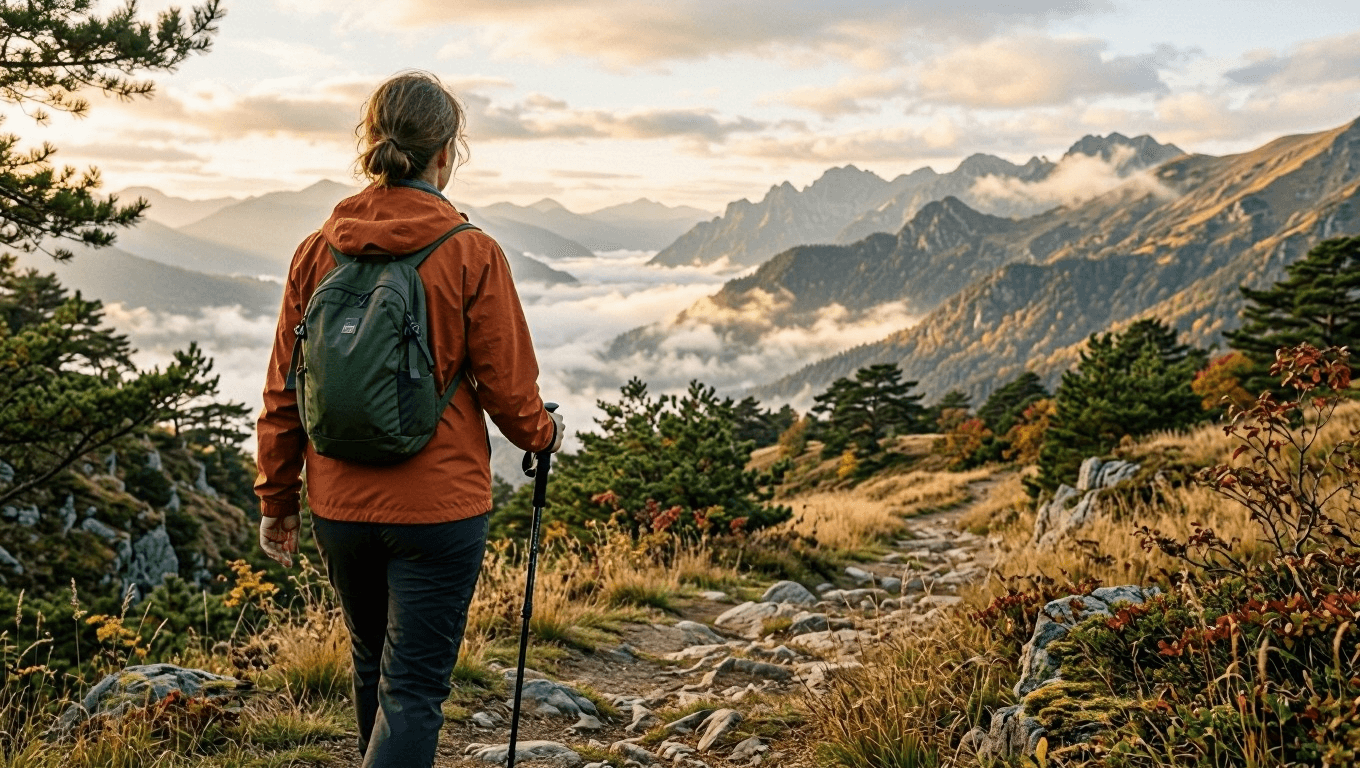
源场景:柔和晨光中,一次虚构的初秋山间徒步。
使用此源提示词来创建新场景:
plaintext1Create a cinematic travel photograph of one adult woman walking alone along a narrow mountain trail in early autumn. She wears a rust-colored windbreaker, dark hiking trousers, and a small forest-green backpack. Seen from behind at a natural walking pace, she carries one trekking pole in her right hand. Golden grass, low pine trees, layered mountain ridges, and gentle morning mist fill the landscape. Natural light, realistic outdoor texture, documentary 35mm photography, vertical 4:5 composition. No logos, text, watermark, extra hikers, duplicate trekking poles, distorted limbs, or unrealistic terrain.
步骤 6:将晨光变成金色日落
上传山景源场景并保持路线不变。编辑不应移动徒步者、替换她的装备,或在路上凭空添加另一群人。它只改变太阳角度、色温、地平线和阴影。
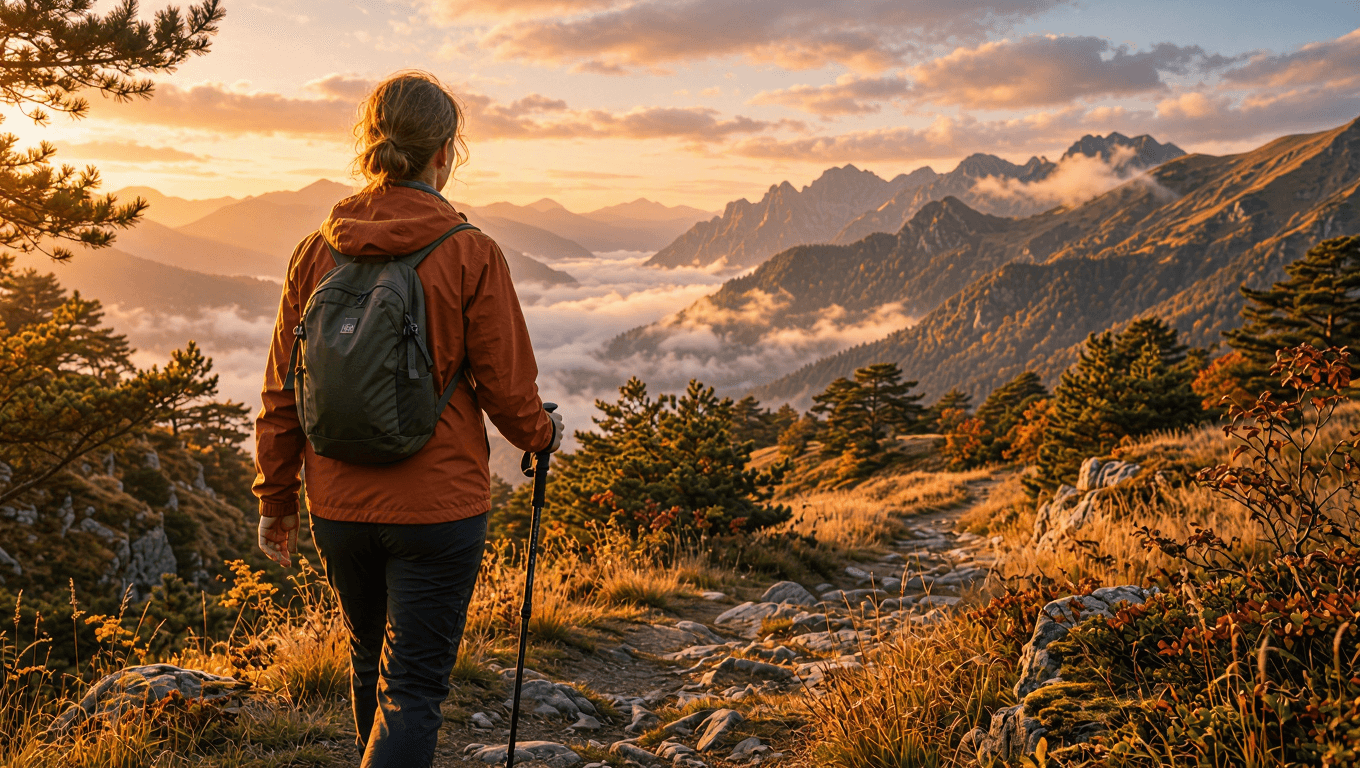 受控场景编辑:温暖的金色日落下的同一名徒步者和同一条山间小径
受控编辑:同一条路线和同一名徒步者,金色日落光线取代了清晨氛围。
plaintext1Use the uploaded image as the source of truth. Preserve the same adult woman, rust-colored windbreaker, dark hiking trousers, forest-green backpack, trekking pole, walking posture, trail, camera angle, and mountain composition. Change only the lighting and atmosphere: turn the early-autumn morning into a warm golden sunset, with amber rim light on the jacket and grass, long soft shadows across the trail, and a glowing peach-colored horizon behind the mountain ridges. Keep the subject walking in the same direction. Cinematic realistic travel photography, vertical 4:5 composition. No text, logos, watermark, extra hikers, changed clothing, altered backpack, duplicate limbs, or distorted terrain.
常见问题
MAI Image 2.6 场景编辑有什么用途?
当创意团队希望在测试一个修订条件的同时保留人物、动作或构图时,它很有用。咖啡店、花园和山景示例展示了如何对照稳定的源场景来评审时段、天气或光线方面的修订。
我应该生成新场景还是编辑现有场景?
当你仍在确定人物、地点、动作和取景时,请生成新场景。当这些基础已经获批、只需要变动一个创作变量时,请使用编辑。
如何防止编辑改变人物?
上传已批准的源图像,将人物、服装、姿态、道具和机位角度列为保留要求,然后指定一种变化类别。审查实际输出,而不是把提示词当作保证。
生成的场景能否记录真实地点或事件?
不能。应将其视为创意概念。不要将生成的人物、天气、地点、事件或旅行状况当作事实证据。
关于模型可用性和当前控制项,请访问 Atlas Cloud 上的 MAI Image 2.6 页面,并在正式使用前确认所选路由。





