


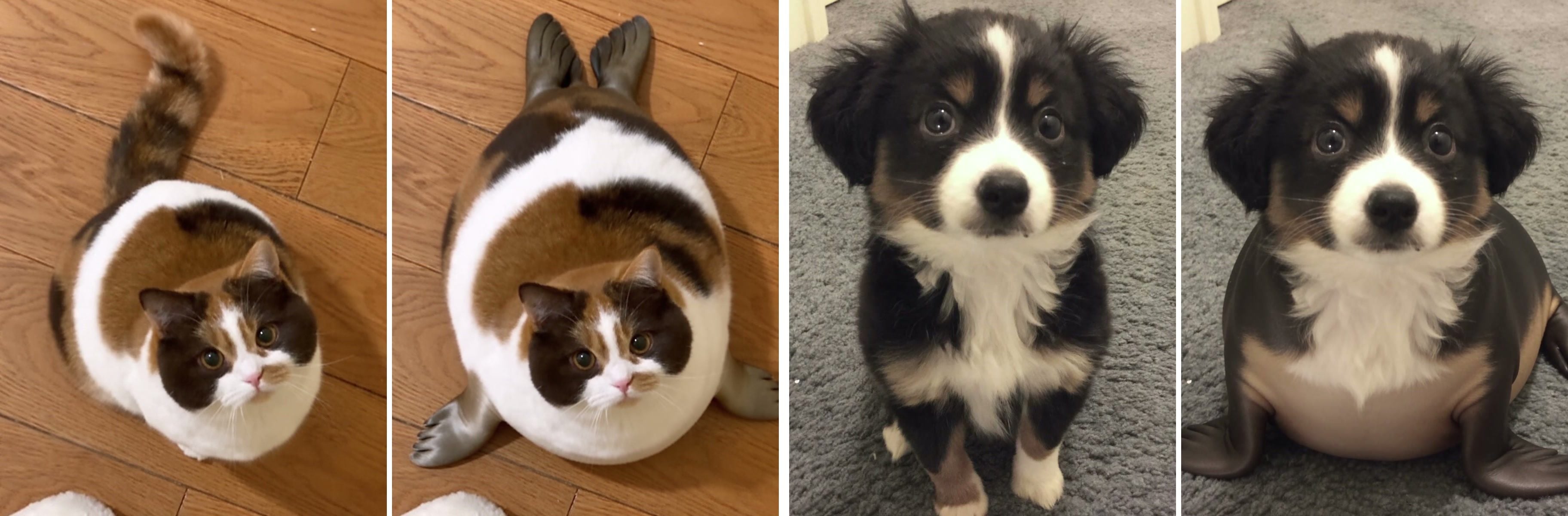
你的猫坐在地板上,抬头看着你。一道细线扫过屏幕,在线的另一侧,坐着一只圆滚滚、光溜溜的海豹。同样的脸,同样的斑块,同样那副审视的眼神。完全没有腿。
这就是海豹滤镜,自 2026 年 6 月起,它一直是 TikTok 和 Instagram 上经久不衰的宠物梗。它来自一个 CapCut AI 模板,对猫和狗都适用,乍一看几乎能以假乱真,让人以为是真实的宠物视频。下文将介绍:这个梗从何而来,你的信息流里用的是哪个模板,以及如何用一张照片制作属于你自己的版本——用不用 CapCut 都行。
要点速览
- 海豹滤镜是一个 CapCut AI 模板,能把一张宠物的静态照片变成胖海豹亮相。
- 两个模板掀起了两波热潮:6 月的 10 秒版本和 10 月起的 8 秒划线版本。
- 你可以在Atlas Cloud 视频生成器中用 Seedance 2.5,凭一张照片重现这个亮相效果。
- 海豹的身体会复制你宠物的毛色,所以三花猫或三色小狗会保留自己的斑纹。
- 我们追溯到的 Instagram 海豹滤镜 Reels 都是在应用外制作,然后作为普通视频上传的。
什么是海豹滤镜趋势?
海豹滤镜趋势是一个前后对比的玩笑。一张真实的宠物照片先停留两秒,然后宠物变成一只圆润的海豹,保留自己的头和毛色。文案写着"试试海豹滤镜",外加一个表情符号,片段在任何人来得及眨眼之前就结束了。
它并非一蹴而就,而是分两波到来,每一波都对应一个不同的 CapCut 模板。
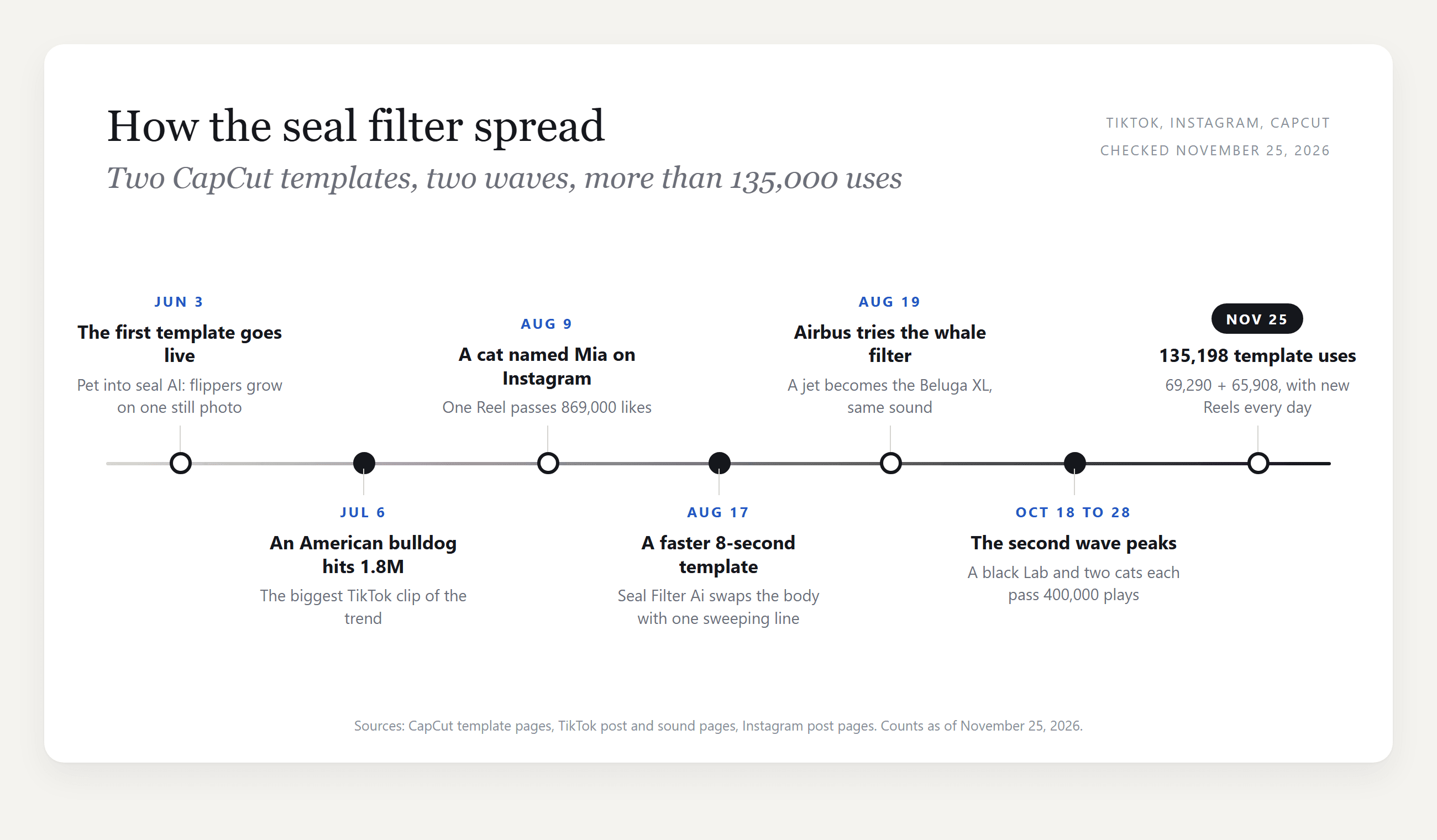
第一波始于 2026 年 6 月 3 日,当时模板"Pet into seal AI 🦭"上线,一个模板账号在几分钟内就发布了一段狗狗演示。它最火的片段出现在 7 月 6 日:一只美国斗牛犬,配文"oh my boy!",在 TikTok 上获得了超过 180 万次观看。在 Instagram 上,一只名叫 Mia 的毛茸茸黑白猫在 8 月 9 日也接受了同样的处理,那条 Reel 获得了 869,560 个赞。
品牌也注意到了。Airbus 在 8 月 19 日发布了"Trying the whale filter",把它的一架喷气机变成了鲸鱼形状的 Beluga XL 货机,配上同样的音效。
第二波主要使用一个更新的 8 秒模板。它在 10 月初兴起,最大的片段出现在 10 月 18 日至 28 日之间,当时一只黑色拉布拉多和两只猫各自获得了约 40 万到 50 万次观看。不过 6 月的模板从未消失:用它制作的一只黑猫在 10 月 24 日获得了 130 万次观看。而且它仍在持续:11 月 22 日发布的一条虎斑猫 Reel,到 11 月 25 日已获得 20,000 个赞。
如何用一张宠物照片制作海豹滤镜视频
你不需要 CapCut 或那个模板。整个亮相效果就是一次图像转视频的任务:把你的照片作为首帧,再加上一段描述划线、身体替换和最终姿态的提示词。以下是用 Seedance 2.5 生成的效果:
模型会保留房间、相机角度和宠物的脸,只重绘线后面的部分。我们 afterward 把趋势音效叠加到片段上,并将节拍点对齐到线扫过中间的时刻。本来就有点圆的宠物效果最搞笑。
方法一:在 Atlas Cloud 视频生成器中制作
登录后,Atlas Cloud 可在浏览器中运行 Seedance 2.5。打开视频生成器,按照截图上的序号操作:
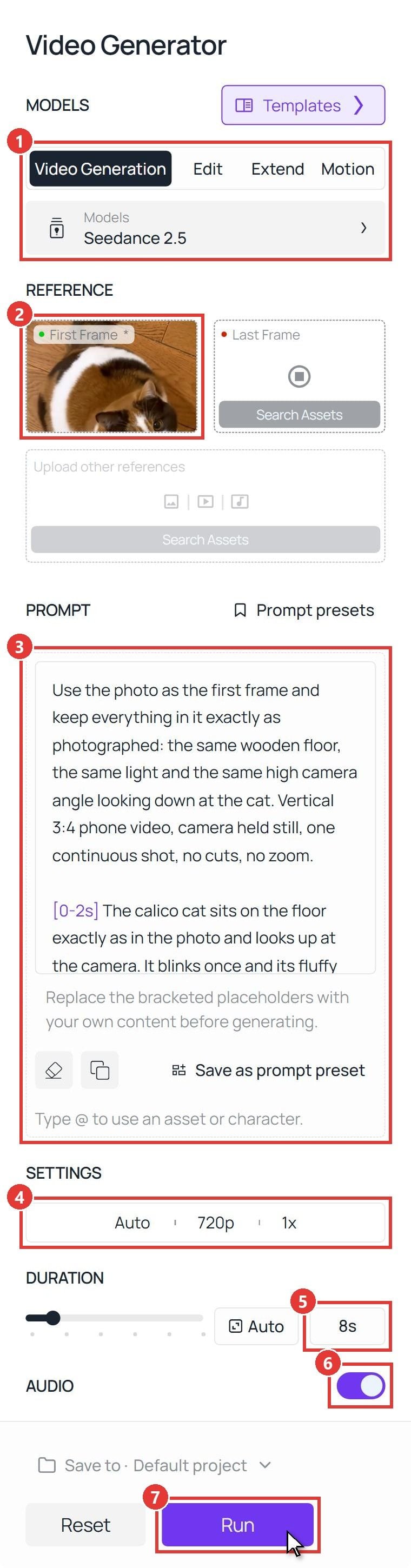
- 模型: 打开 Video Generation,保持 Seedance 2.5。
- 首帧: 在此上传你的宠物照片。将末帧留空。
- 提示词: 粘贴下方的提示词。
- 设置: 照片放入首帧槽位后,比例会跟随照片,所以先裁剪照片。选择 720p 和一个输出。
- 时长: 输入 8。
- 音频: 保持开启。
- Run。 片段会出现在右侧面板中。
上方那只三花猫的提示词:
plaintext1Use the photo as the first frame and keep everything in it exactly as photographed: the same wooden floor, the same light and the same high camera angle looking down at the cat. Vertical 3:4 phone video, camera held still, one continuous shot, no cuts, no zoom. 2 3[0-2s] The calico cat sits on the floor exactly as in the photo and looks up at the camera. It blinks once and its fluffy tail sways a little. 4[2-4s] A thin, soft white vertical line slides across the frame from the left edge to the right edge, like a screen wipe. Behind the line the cat has already changed: everything below its head is now a plump, round seal body with no legs and no paws, two short front flippers resting on the floor and a seal's back flippers where the tail was. Ahead of the line the cat is still a normal cat. 5[4-8s] The cat is now a chubby seal that keeps its own head: the same face, round amber eyes, pink nose, dark brown ear patches, white muzzle and whiskers. The seal body keeps the cat's calico coat in short, sleek seal fur: white with large orange and dark brown patches in the same places as in the photo. It lies on the wooden floor, looks up at the camera, blinks slowly and wiggles its round body once. 6 7Photorealistic home video in soft daylight, not a cartoon, not CGI. Exactly one animal with one head. No cat legs, paws or tail on the seal body, no people, no hands, no water. 8Audio: quiet room tone, a soft whoosh while the line passes and one small happy chirp at the end. No music, no voice. 9No text, no captions, no logos, no watermark.
要用于你自己的宠物,请修改 [4-8s] 段落:眼睛颜色、耳朵形状、毛色以及斑块的位置。这些细节决定了海豹是否看起来仍像你的宠物。就挑选照片本身而言,与任何单张照片宠物片段相同的规则都适用;我们的 AI 狗狗视频指南涵盖了这些规则。"Trying the seal filter"文案 afterward 在任何编辑器中添加,这样字母能保持清晰。
方法二:通过 Seedance 2.5 API 发送海豹滤镜提示词
在运营宠物账号,或者要为日托中心的每只狗都做一只海豹?API 用同一张照片和同一段提示词即可。
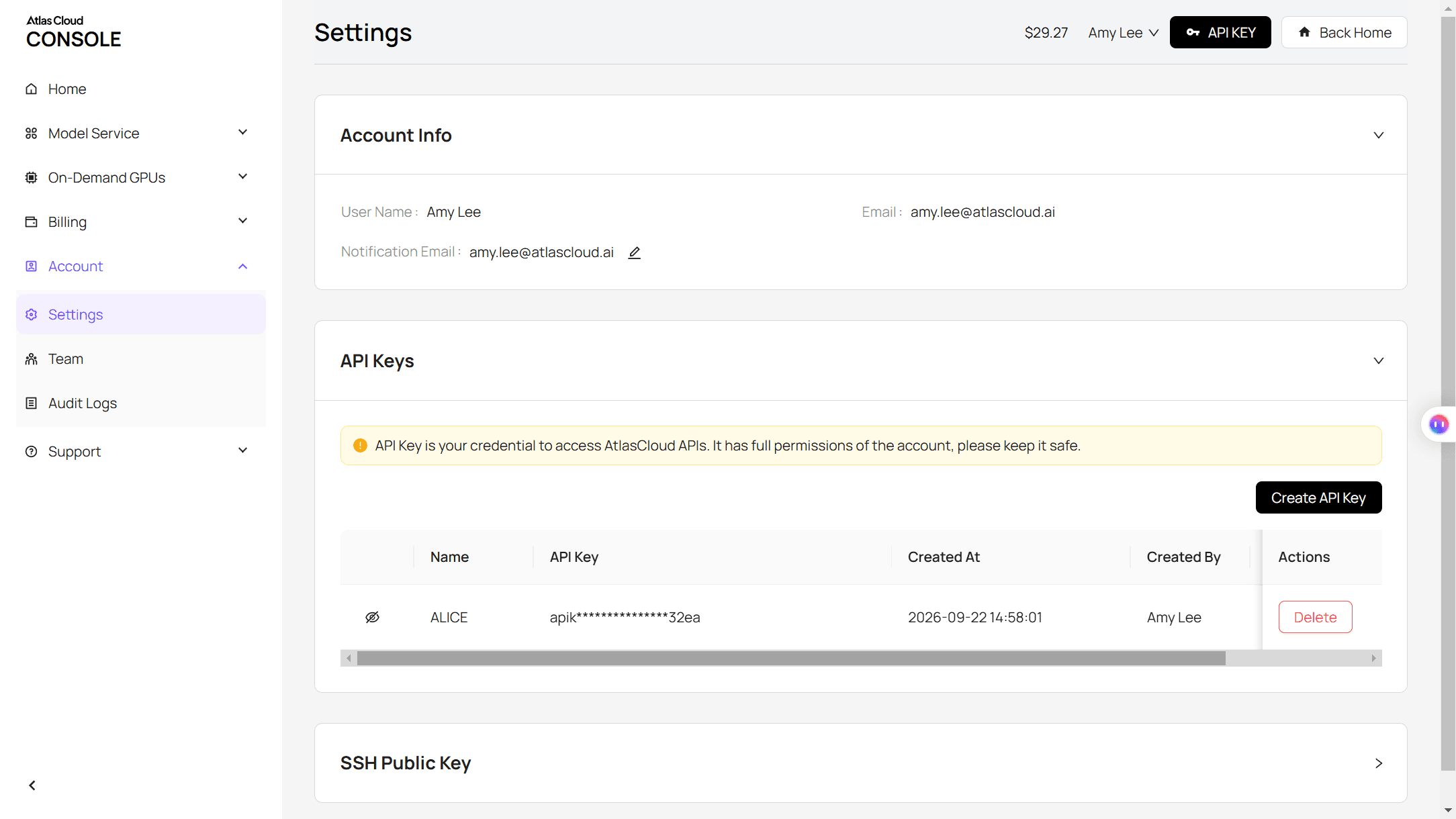
第 1 步:创建 API 密钥。 在控制台中打开 Settings,在 API Keys 下创建一个密钥。
第 2 步:检查请求格式。 Atlas Cloud 文档涵盖了身份验证,Seedance 2.5 图像转视频模型页面上的 API 标签页列出了每个字段。这段片段需要的字段:
| 字段 | 海豹滤镜的取值 | 原因 |
|---|---|---|
| image | 你宠物照片的公开 URL | 成为首帧 |
| duration | 8 | 匹配趋势片段的长度 |
| resolution | 720p | 手机屏幕足够用 |
| generate_audio | true | 添加呼啸声和最后的啾声或吠声 |
片段会跟随你照片的形状,所以上传前先裁剪成 9:16。
第 3 步:发送请求并轮询。
plaintext1curl -X POST https://api.atlascloud.ai/api/v1/model/generateVideo \ 2 -H "Authorization: Bearer $ATLASCLOUD_API_KEY" \ 3 -H "Content-Type: application/json" \ 4 -d '{ 5 "model": "bytedance/seedance-2.5/image-to-video", 6 "prompt": "<paste the seal filter prompt here>", 7 "image": "https://your-cdn.com/your-pet.jpg", 8 "resolution": "720p", 9 "duration": 8, 10 "generate_audio": true 11 }'
轮询返回的 prediction ID,直到状态显示 completed,然后从 outputs 数组中下载片段:
plaintext1curl https://api.atlascloud.ai/api/v1/model/prediction/<prediction_id> \ 2 -H "Authorization: Bearer $ATLASCLOUD_API_KEY"
端点和密钥在 Atlas Cloud 上的每个视频模型中都是一样的。要尝试另一个模型,只需更改 model 字符串。
你的信息流里是哪个海豹滤镜 CapCut 模板?
我们在 TikTok 上追溯到的几乎每条海豹滤镜片段背后都藏着两个模板。你可以在前三秒内区分它们:一个是在画面中扫过一条线,另一个是在原地长出鳍肢。
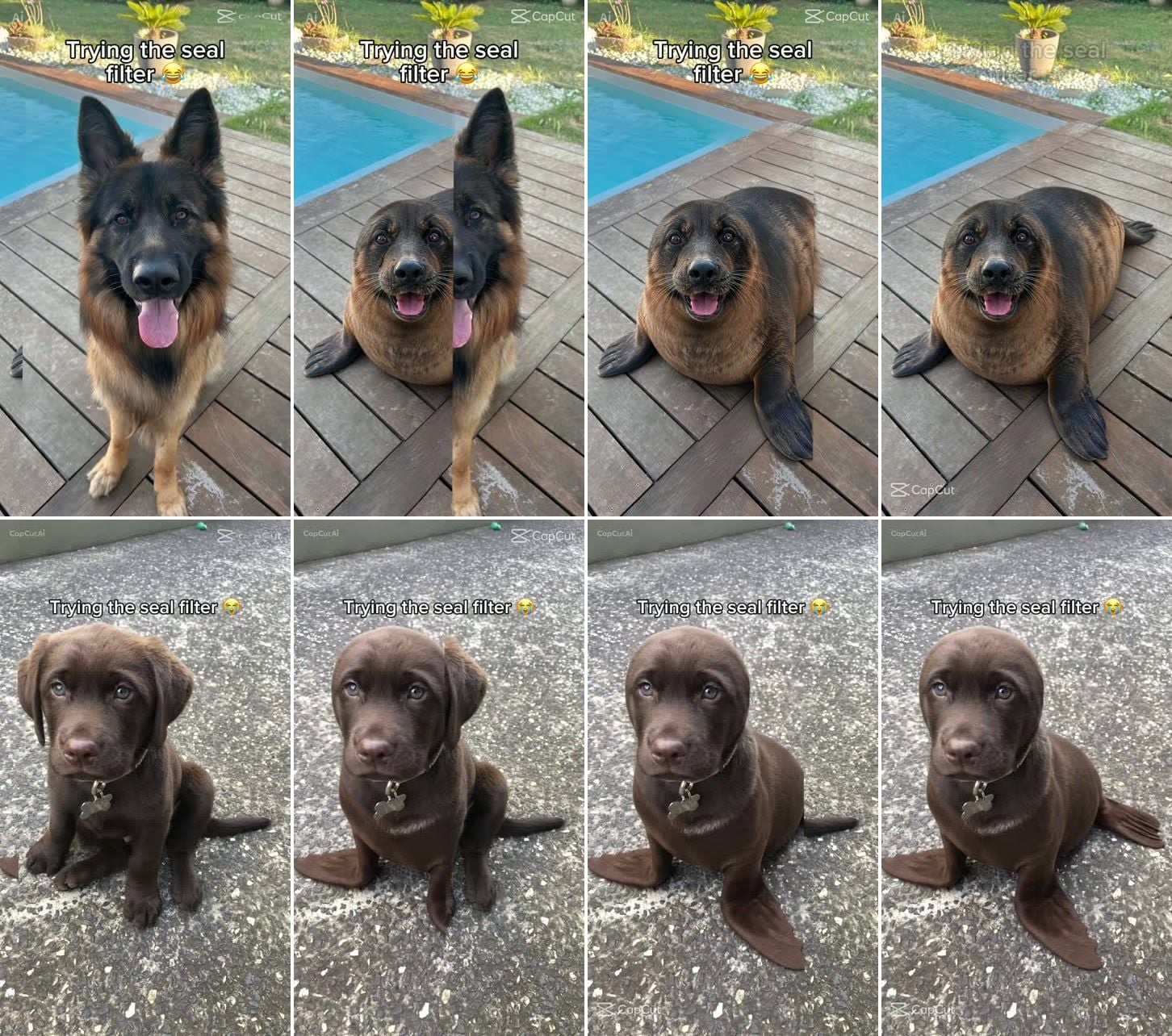
预览帧来自 CapCut 模板 "Seal Filter Ai"(JDCapcut,上)和 "Pet into seal AI 🦭"(JYoung101,下)
| Pet into seal AI 🦭 | Seal Filter Ai | |
|---|---|---|
| 创作者 | JYoung101 | JDCapcut |
| 上线时间 | 2026 年 6 月 3 日 | 2026 年 8 月 17 日 |
| 使用次数(2026 年 11 月 25 日) | 69,290 | 65,908 |
| 时长 | 10 秒 | 8.3 秒 |
| 文案 | 顶部一行 | 两行,居中 |
| 海豹如何出现 | 鳍肢在静止的宠物身上长出 | 一条垂直线从左到右扫过,替换整个身体 |
| 峰值 | 6 月至 9 月,仍在使用 | 10 月至今 |
两个模板使用同一首欢快的曲目,长度裁剪不同。较新的是 Seal Filter Ai 模板,我们追溯到的 11 月 Instagram Reel 就是用它制作的。它的划线亮相也正是上方提示词重建的效果,因为在小小的屏幕上,硬切换比缓慢生长看起来更快。
第三个模板,Duy Zeros 的 "Pet into seal AI",沿用 6 月的格式(10 秒,同样的曲目),约有 21,000 次使用。带鲸鱼、飞机或完整海豹脸的海豹片段,通常是恶搞或单独的剪辑。
猫海豹滤镜与狗海豹滤镜版本
猫海豹滤镜和狗海豹滤镜需要不同的提示词细节。猫的尾巴会变成后鳍肢。狗则带来下垂的耳朵、口鼻部 and 面部斑纹,这三样都必须在替换后保留下来。
猫海豹滤镜:保留斑块和胡须
猫是比较容易的情况。很多猫本来就呈"面包"姿势坐着,所以海豹身体几乎不改变轮廓,笑点就落在脸上。我们测试中的三花猫就是个好例子:提示词点明了毛色并要求斑块保持原位,海豹就把它们保留在照片中原有的位置。
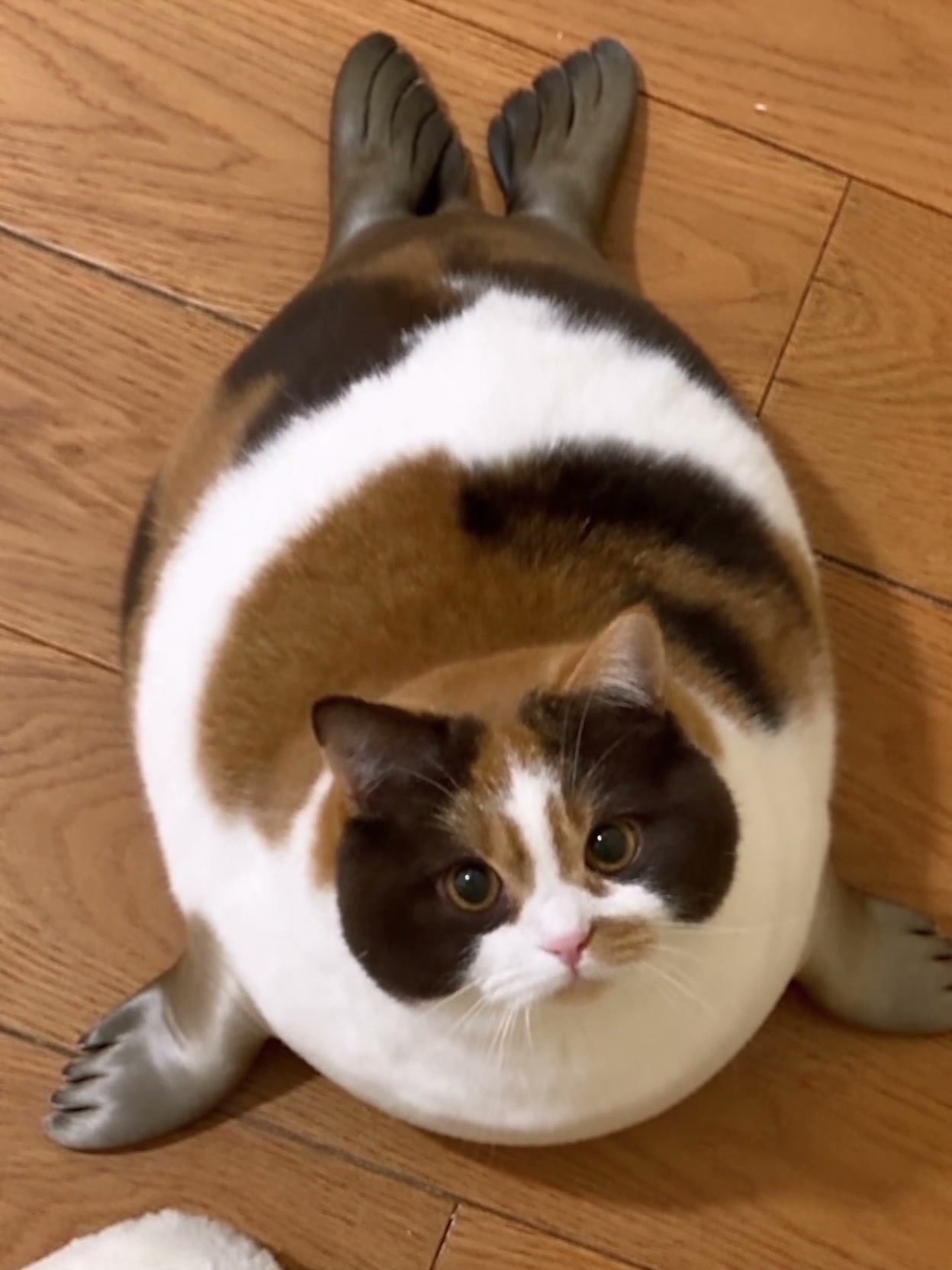
如果可能,从上方拍摄。我们的三花猫照片是俯拍的,这样能显示整个身体,并在两侧留出地板,容纳更宽的海豹形状。
狗海豹滤镜:下垂的耳朵和白色围兜
狗需要多一条指令:把斑纹映射到新身体上。三色毛 coat 有白色鼻梁条纹、棕褐色眉毛和白色围兜,海豹应把这三样都保留在相同位置。我们的小狗是坐姿正对镜头拍摄的,所以提示词把它的前腿变成鳍肢,并把毛茸茸的围兜保留在胸前。
狗版本的提示词:
plaintext1Use the photo as the first frame and keep everything in it exactly as photographed: the same grey carpet, the same indoor light and the same slightly high camera angle looking down at the puppy. Square phone video, camera held still, one continuous shot, no cuts, no zoom. 2 3[0-2s] The puppy sits on the carpet exactly as in the photo, looking up at the camera with big round eyes. It blinks once and tilts its head a little. 4[2-4s] A thin, soft white vertical line slides across the frame from the left edge to the right edge, like a screen wipe. Behind the line the puppy has already changed: everything below its head is now a plump, round seal body with no legs and no paws, two short front flippers resting on the carpet where the front legs were and a seal's back flippers behind it. Ahead of the line the puppy is still a normal puppy. 5[4-8s] The puppy is now a chubby seal that keeps its own head: the same fluffy floppy black ears, white blaze down the forehead, tan eyebrow spots, dark brown eyes, black nose and white muzzle. The seal body keeps the tricolor coat in short, sleek seal fur: black sides, a fluffy white bib on the chest and tan patches where the legs were. It rests on the carpet, looks up at the camera, blinks slowly and wiggles its round body once. 6 7Photorealistic home video in soft indoor light, not a cartoon, not CGI. Exactly one animal with one head. No dog legs, paws or tail on the seal body, no people, no hands, no water. 8Audio: quiet room tone, a soft whoosh while the line passes and one short happy bark at the end. No music, no voice. 9No text, no captions, no logos, no watermark.
斑点和有花斑的毛色很适合这个梗,因为港湾海豹也带斑点。如果你想让整只宠物膨胀起来,而不是替换身体,那是另一个趋势;我们的 AI 胖脸滤镜指南涵盖了它。
如何在 Instagram 和 TikTok 上发布海豹滤镜
我们检查的七条 Instagram 海豹滤镜 Reels,没有一条是用 Instagram 特效制作的。每一条都带有 CapCut 模板的曲目或创作者自己的剪辑,这意味着片段是在 Instagram 之外制作后上传的。TikTok 也一样,帖子会链接回 CapCut 模板。
所以最后一步在你发布的应用中完成:
| 步骤 | TikTok | Instagram Reels |
|---|---|---|
| 屏幕文案 | 用文字工具添加 "Trying the seal filter",放在画面上三分之一处 | 相同,用 Reels 文字工具 |
| 趋势音效 | 打开任意海豹滤镜帖子,点击音效,然后点 Use this sound | 点击海豹滤镜 Reel 上的音频名称,然后点 Use audio |
| 你自己的音效 | 保留生成的呼啸声和吠声,或静音后添加音乐 | 相同 |
| AI 标签 | 在 More options 中开启 AI-generated content | 在 Advanced settings 中开启 AI 标签 |
| 文字说明 | 写出你宠物的名字和笑点,加上 #sealfilter | 相同,#sealfilter 和 #seal |
开启 AI 标签。片段看起来足够真实,可能被误认为是真宠物,而两个平台都要求创作者为逼真的 AI 视频打标签。这还能帮你省去满满一评论区问"这只海豹在哪儿能领养"的麻烦。
常见问题
海豹滤镜是真实的还是 AI?
是 AI。CapCut 模板取一张静态照片并生成海豹身体,划线效果掩盖了图像变化的瞬间。TikTok 将许多海豹滤镜帖子标记为 AI 生成,不过并非所有都带有标签。
Instagram 上有海豹滤镜吗?
我们没有发现它背后有内置的 Instagram 特效。我们检查的海豹滤镜 Reels 都是在 CapCut 或视频生成器中制作,然后作为普通视频上传的。要制作一条,先生成片段,再作为 Reel 发布,并在 Instagram 的编辑器中添加文案和音效。
为什么我在 CapCut 里找不到海豹滤镜模板?
CapCut 模板并非在每个地区都可用,搜索结果也经常变化。最快的进入方式是通过一条 TikTok 海豹滤镜帖子:点击它的 "CapCut · Try this template" 链接。如果那也不行,上文的图像转视频方法无需 CapCut 就能给出相同的亮相效果。
它能用在兔子或其他宠物上吗?
我们测试了一只猫和一只狗,但提示词中没有任何内容专门针对其中一种。它只要求模型保留头部并重绘其下方的部分,所以兔子和豚鼠的照片也可以走同样的步骤。使用只有一只动物、头部和身体清晰的照片,并在提示词中写明动物及其毛色。
在 Atlas Cloud 上制作一条海豹滤镜视频要多少钱?
截至 2026 年 11 月 25 日,一段 720p 的 8 秒 Seedance 2.5 片段约花费 $2.42,相当于标价 $3.02 的八折。最终费用按实际用量结算,所以可能略有不同。同样的 8 秒升到 1080p 约需 $5.98。
结语
这个趋势看起来像魔法,但配方很简单:一张宠物静止坐着的清晰照片,一条扫过画面的线,以及一个保留宠物脸和毛色的海豹身体。CapCut 把它打包成模板;图像转视频模型中的一段提示词能给你相同的亮相效果,还让你自由选择房间、姿势和音效。
挑一张你的猫或狗最圆的照片,替换成它的毛色,然后运行。当你的粉丝需要再看一眼才能确定视频里的宠物不是真的时,海豹滤镜就到了最佳状态。







