


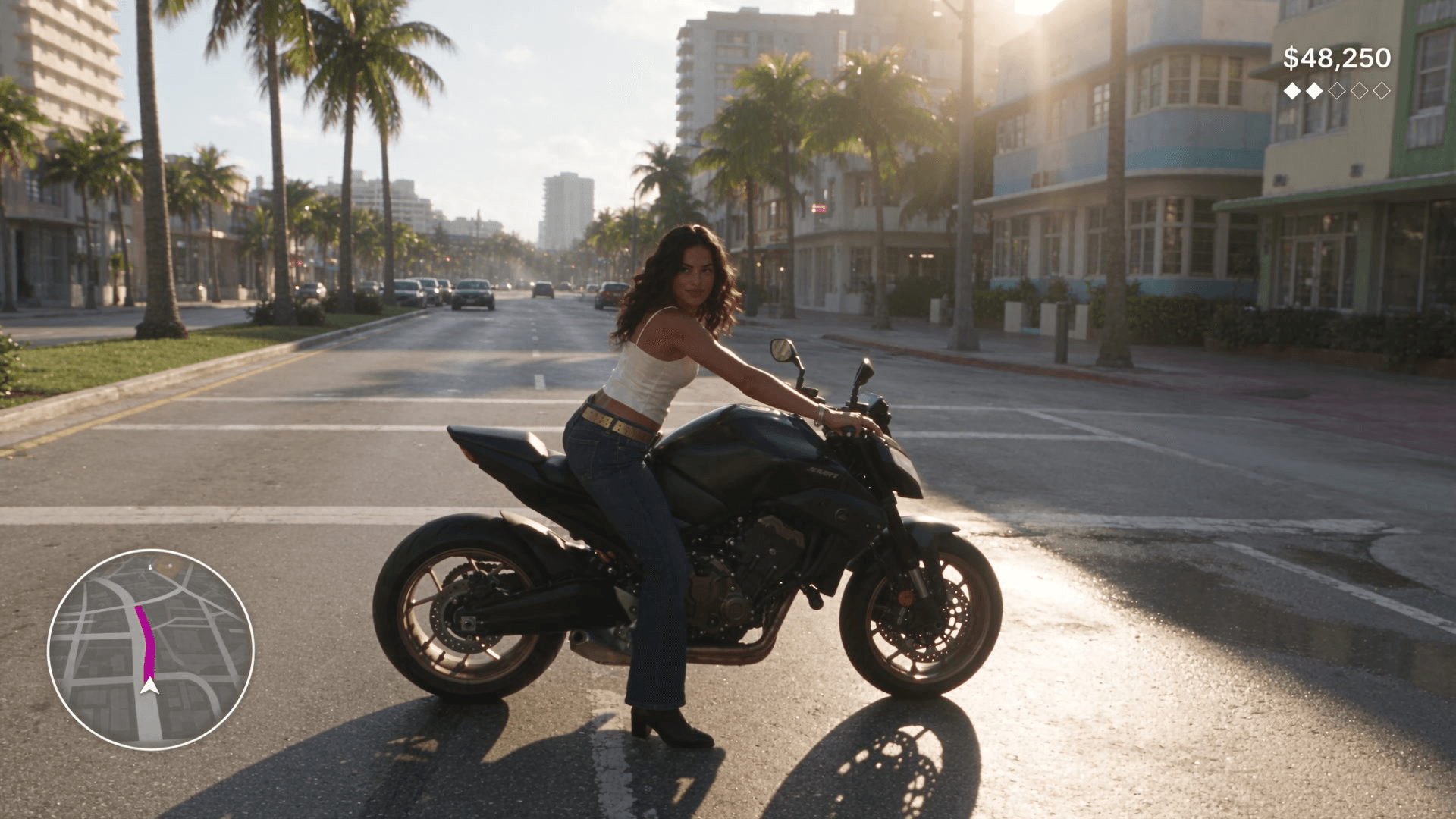
Rockstar 已将 GTA VI 定于 2026 年 11 月 19 日发售,而发售周满是粉丝视频。其中许多看起来像预告片:缓慢的无人机镜头、日落、标题卡。看起来像有人握着控制器的要少得多。本指南就讲这种更难实现的效果:一段看起来像真实游戏画面的 Seedance 2.5 GTA 6 风格片段。
我们用一个原创角色制作了三段 10 秒片段:一场摩托车追逐、一次水上摩托疾驰,以及一段雨中霓虹街道的漫步。在这全部三十秒里,小地图始终待在自己的角落,金额计数也没有变过一位数字。下面就是这些提示词、它们背后的参考图、设置,以及我们一路修复的错误。
关键要点
- 当追逐镜头始终锁定在玩家身后时,Seedance 2.5 GTA 6 风格片段看起来就像游戏画面。
- 将 HUD 以精确文字和位置绘制进首帧,视频就会复制它。
- 在生成任何视频之前,先制作一张人脸照片、一张全身设定图和一张首帧。
- 从 Seedance 2.5 图生视频试验场开始,使用 1080p、10 秒并开启音频。
- 将霓虹招牌描述为形状,并给玩家一个原创外观和名字。
是什么让 Seedance 2.5 GTA 6 视频看起来像真实游戏画面?
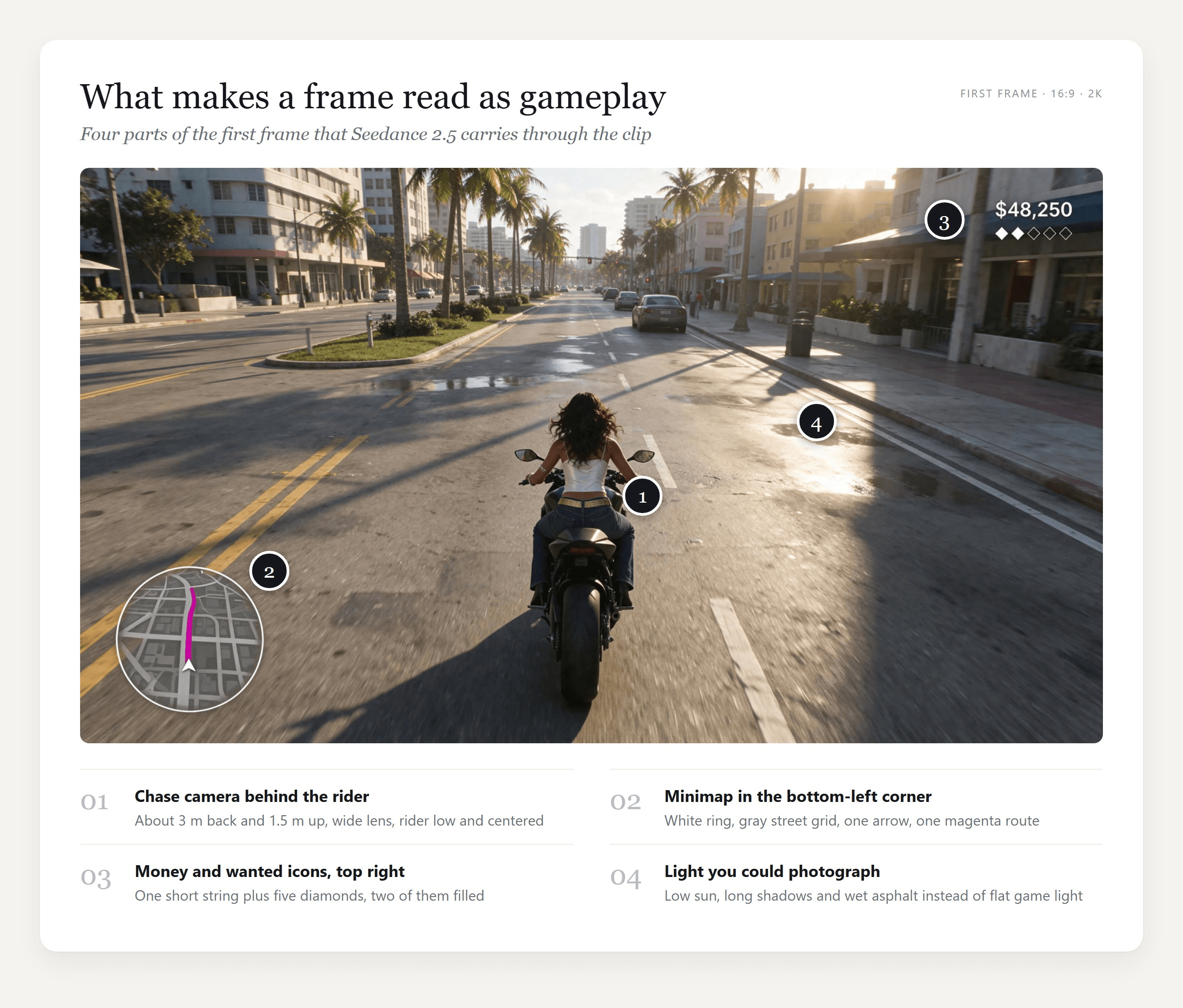
预告片可以随时剪切。游戏画面不能。整段片段中,镜头都处在玩家身后、距离大致不变;HUD 像粘在屏幕上一样,而世界在它下方移动;动作按玩家按下按键的顺序发生。观众从数千小时的游玩中熟悉了这套语法,所以只要任何一部分出错,他们就能看出伪造。
第四个信号是光线。低垂的太阳、潮湿的街道和硬阴影读起来像当前世代游戏,而平淡的正午光则像更早世代。
我们测试了没有起始图片时会发生什么。两个纯文本提示词,一个以“GTA 6 gameplay footage”开头,另一个以“open-world crime game footage”开头,生成结果都像上一代主机:平淡的正午光、更简单的纹理,以及一个方形雷达——而我们只要求了圆形小地图。
那个泛化的提示词甚至还在雷达下方加了一条三色状态栏。单靠文字时,模型似乎会用它最熟悉的开放世界画面来填补空白。
所以外观在视频开始前就决定了。写实首帧定下图形,你自己设计的 HUD 则让片段不会借用别人的界面。
如何用 Seedance 2.5 制作 GTA 6 AI 视频
在 Atlas Cloud 上,整个过程就是同一账户里的两个模型:图像编辑模型构建首帧,Seedance 2.5 再为它加上声音并动画化。本指南会产出三段片段。
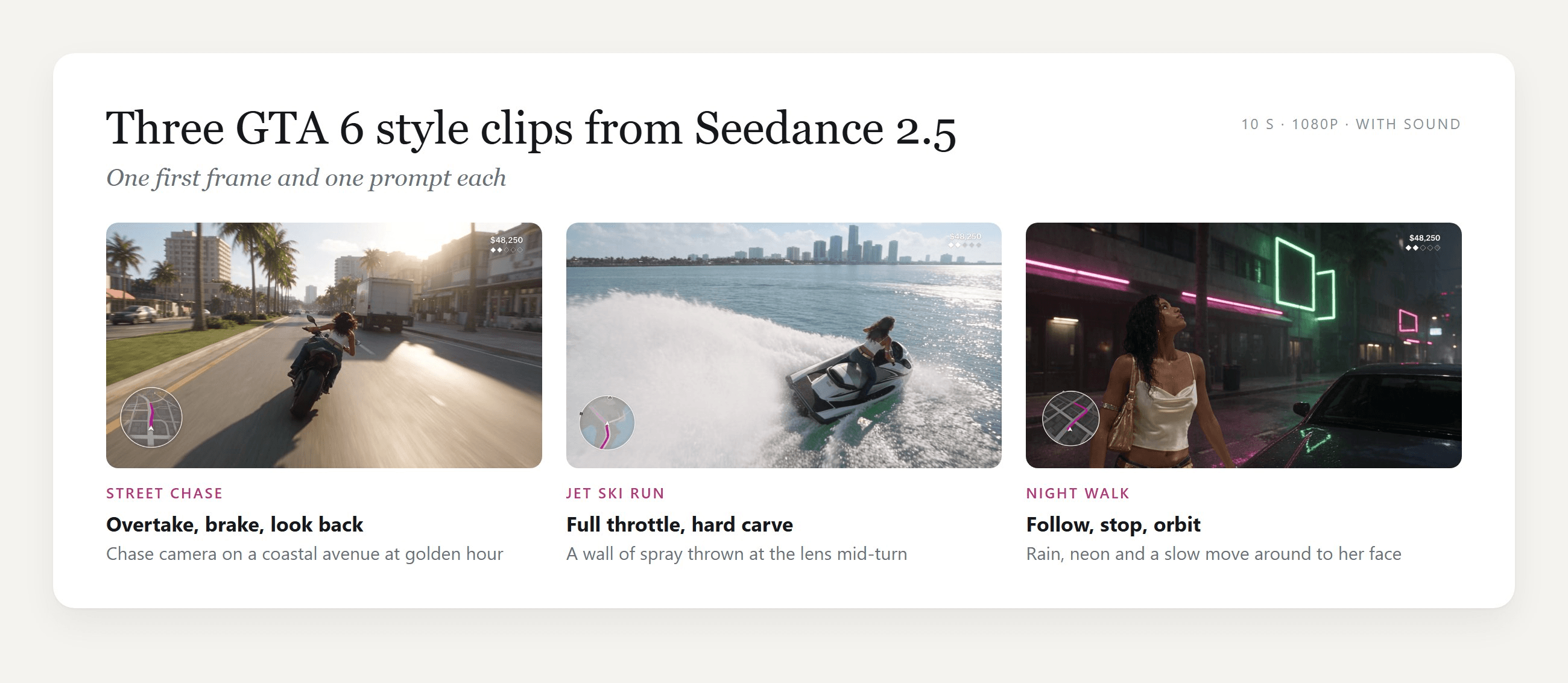
Seedance 2.5 从那张精确首帧开始生成视频,在我们三段片段中,它都保留了你画在那里的内容,从服装一直到 HUD 文字。这就是为什么图生视频模式比文生视频更适合游戏画面:你决定相机高度、角色和界面,模型只需要让它们动起来。
方法 1:在 Seedance 2.5 试验场中生成片段
登录,然后打开 Seedance 2.5 图生视频试验场。按照截图中的编号控件操作:
- 用下一节中的某段视频提示词替换 Prompt 里的示例文本。
- 移除 Image 下的示例图片,并上传你的首帧。将 Last Image 留空。
- 在 Duration 框中输入 10。
- 将 Resolution 设为 1080p。
- 保持 Generate Audio 开启。
- 按下 Run。

在这个页面上,Aspect Ratio 只提供 Auto,因为片段会跟随图像:16:9 首帧会给你 16:9 片段。
方法 2:通过 API 调用 Seedance 2.5
为发售日剪辑批量生成十个追逐变体,用代码比在浏览器标签页里更快。
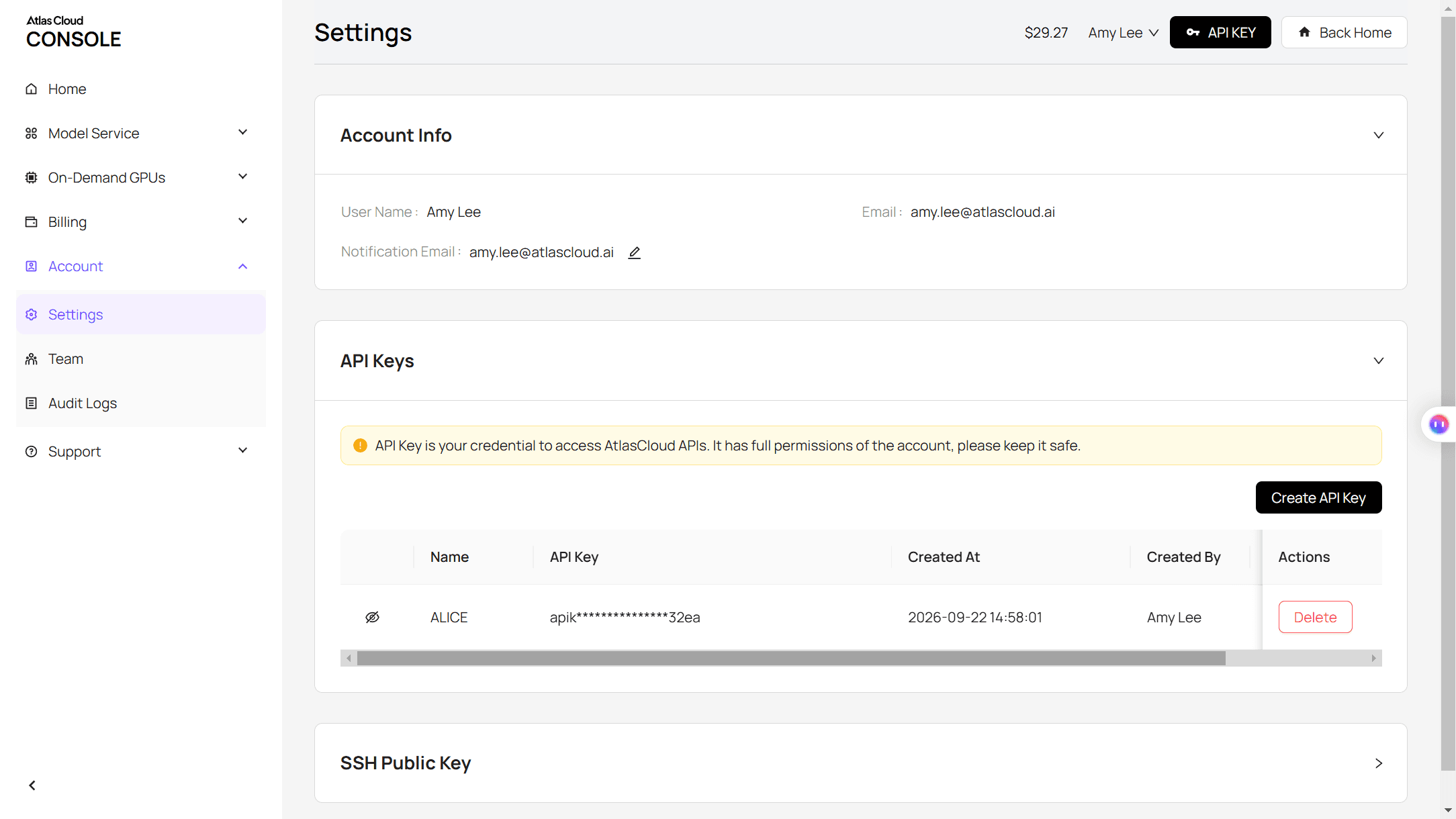
第 1 步:创建并复制 API 密钥,在 Atlas Cloud 控制台的 Settings 页面中。
第 2 步:查看请求格式,见 Atlas Cloud API 文档。
第 3 步:先构建首帧,再构建片段,并为每个结果轮询。 图像调用会把你的面部照片和全身设定图作为两个参考:
plaintext1curl -X POST https://api.atlascloud.ai/api/v1/model/generateImage \ 2 -H "Authorization: Bearer $ATLASCLOUD_API_KEY" \ 3 -H "Content-Type: application/json" \ 4 -d '{ 5 "model": "bytedance/seedream-v5.5/edit", 6 "prompt": "Photorealistic frame of third-person open-world video game footage. The young woman from the reference images, seen from behind and slightly above, rides a matte black sport motorcycle down a coastal city avenue at golden hour. A flat game HUD in clean white sans-serif: a circular minimap in the bottom-left corner, the text "$48,250" with five small diamonds in the top-right corner. No other text, no logos.", 7 "reference_images": ["https://your-cdn.com/face.jpg", "https://your-cdn.com/full-body.jpg"], 8 "size": "2816*1584", 9 "output_format": "jpeg" 10 }'
视频调用会把返回的帧作为图像:
plaintext1curl -X POST https://api.atlascloud.ai/api/v1/model/generateVideo \ 2 -H "Authorization: Bearer $ATLASCLOUD_API_KEY" \ 3 -H "Content-Type: application/json" \ 4 -d '{ 5 "model": "bytedance/seedance-2.5/image-to-video", 6 "prompt": "Third-person open-world video game footage, one continuous take, no cuts. [0-3s] She accelerates down the avenue and swerves left past a slow sedan. [3-7s] She leans right and overtakes a delivery van. [7-10s] She brakes hard, the bike stops sideways and she looks back toward the camera. The chase camera stays locked behind her. The HUD stays exactly as in the first frame.", 7 "image": "https://your-cdn.com/frame-moto.jpg", 8 "duration": 10, 9 "resolution": "1080p", 10 "generate_audio": true 11 }'
plaintext1curl https://api.atlascloud.ai/api/v1/model/prediction/<prediction_id> \ 2 -H "Authorization: Bearer $ATLASCLOUD_API_KEY"
Atlas Cloud 上的其他图像和视频模型使用同一个密钥和同样两个端点。要在同一首帧上试用另一个视频模型,只需更改模型字符串,其余保持不变。
游戏画面用的 GTA 风格 AI 提示词公式
我们的视频提示词遵循同一种结构。每一部分都回答一个模型本来会替你回答的问题。
| 部分 | 我们的写法 | 它避免的问题 |
|---|---|---|
| 画面类型 | “第三人称开放世界电子游戏画面,一镜到底,无剪辑” | 预告片式剪切和电影化特写 |
| 定时节拍 | “[0-3s] … [3-7s] … [7-10s] …”,每个时段一个动作 | 动作顺序错乱或根本没出现 |
| 相机锁定 | “追逐镜头锁定在身后约 3 米处……绝不移动到她的前方,也绝不变成特写” | 相机漂移成电影镜头 |
| 身体规则 | “她全程迈出真实步伐;绝不滑行、漂浮或变形” | 角色在地面上滑动 |
| HUD 锁定 | “HUD 平贴在屏幕上、保持在相同角落,文字“$48,250”与首帧完全一致” | 数字在片段中途自行改写 |
| 声音 | 引擎、轮胎、水、雨,“无音乐、无对白” | 配乐与你的剪辑打架 |
| 排除项 | “无新文字、无标志” | 招牌和贴花凭空出现 |
定时节拍起的作用最大。Seedance 2.5 接受这样的方括号时间戳,而把十秒拆成三个节拍,能让每个动作有足够时间完成。
三个可复制的提示词:街头追逐、水上摩托和夜间漫步
下面每个提示词都在各自的首帧上运行,1080p、10 秒、开启音频。
街头追逐。 她绕过一辆轿车,超过一辆箱式货车,然后急刹横停,撑住一只靴子并回头。镜头最后摇到她的侧面来拍最终姿势。
plaintext1Third-person open-world video game footage, one continuous take, no cuts. [0-3s] The young woman on the matte black motorcycle accelerates down the avenue and swerves left past a slow sedan, her long dark hair whipping behind her. [3-7s] She leans right and overtakes a delivery van, palm trees and pastel buildings streaming past on both sides, the minimap rotating slightly as she changes lanes. [7-10s] She brakes hard, the rear wheel slides a quarter turn and the bike stops sideways across the lane; she plants her left boot on the road, turns her head and looks back over her shoulder toward the camera. The chase camera stays locked about 3 meters behind and slightly above her for the whole clip, following with a small lag and a light shake at speed; it never cuts away, never moves in front of her and never becomes a close-up. The HUD stays flat on the screen in the same corners and the text "$48,250" stays exactly as in the first frame. Realistic game physics, the bike's wheels turn and the suspension dips under braking. Sound: engine roar rising and falling, wind, a tire screech at the stop, distant city traffic. No music, no voices, no new text, no logos.
水上摩托。 四秒直线冲向天际线,然后一个急右转把一堵水花甩向镜头,随后相机又回到她身后。
plaintext1Third-person open-world video game footage, one continuous take, no cuts. [0-4s] The young woman on the jet ski speeds straight across the bay toward the skyline, the hull slapping over small waves, spray fanning out behind her, her long dark hair streaming back. [4-7s] She rides up the face of a rolling swell and the jet ski lifts clear of the water for a moment, then lands with a heavy splash and keeps going straight. [7-10s] She carves a hard right turn that throws a wall of water toward the camera, then straightens up, standing tall on the footwells as the bridge slides across the background. The two speedboats stay small and far away near the skyline the whole time; she never comes near or touches any boat. The chase camera stays locked about 4 meters behind and slightly above her for the whole clip, following with a small lag and bobbing gently with the water; it never cuts away, never moves in front of her and never becomes a close-up. A few water drops land on the lens during the turn and run off. The HUD stays flat on the screen in the same corners and the text "$48,250" stays exactly as in the first frame. Sound: jet ski engine whine, water slapping the hull, a big splash on landing, wind and gulls. No music, no voices, no new text, no logos.
夜间漫步。 相机从她肩后跟随,她走向一辆停着的汽车,然后绕到她前方,而她将湿发往后拨,抬头看向雨中。
plaintext1Third-person open-world video game footage, one continuous take, no cuts. [0-4s] The young woman walks down the wet street with an even, unhurried stride, her right hand on the strap of her gold shoulder bag, each boot heel clicking and splashing in the shallow puddles; the camera follows 2 meters behind her right shoulder. [4-7s] She stops beside the parked dark sedan and rests her left hand on its roof; the camera slowly orbits around her right side until it faces her. [7-10s] She sweeps her wet hair back over her shoulder with her left hand, tilts her chin up slightly and looks past the camera, rain beading on her bare shoulders, neon reflections sliding across the car roof. She takes real steps the whole way; she never glides, floats or morphs. Her outfit stays the same throughout: white satin cropped camisole, low-rise bootcut jeans, wide gold studded belt. The street stays empty, no other people appear. The neon stays abstract: pink horizontal tubes and hollow green rectangle frames, never letters. The HUD stays flat on the screen in the same corners and the text "$48,250" stays exactly as in the first frame. Sound: steady rain, heel steps in water, a low electric hum from the neon, a distant siren. No music, no voices, no new text, no logos.
参考图:先锁定角色和 HUD
上面每段片段都从更早的三张图开始。只有一张人脸照片会让模型对身体和衣服有太多自由,而一旦相机开始移动,这些细节就可能变化。全身设定图能一次把它们定下来,首帧随后再把那个确切的人放进场景。
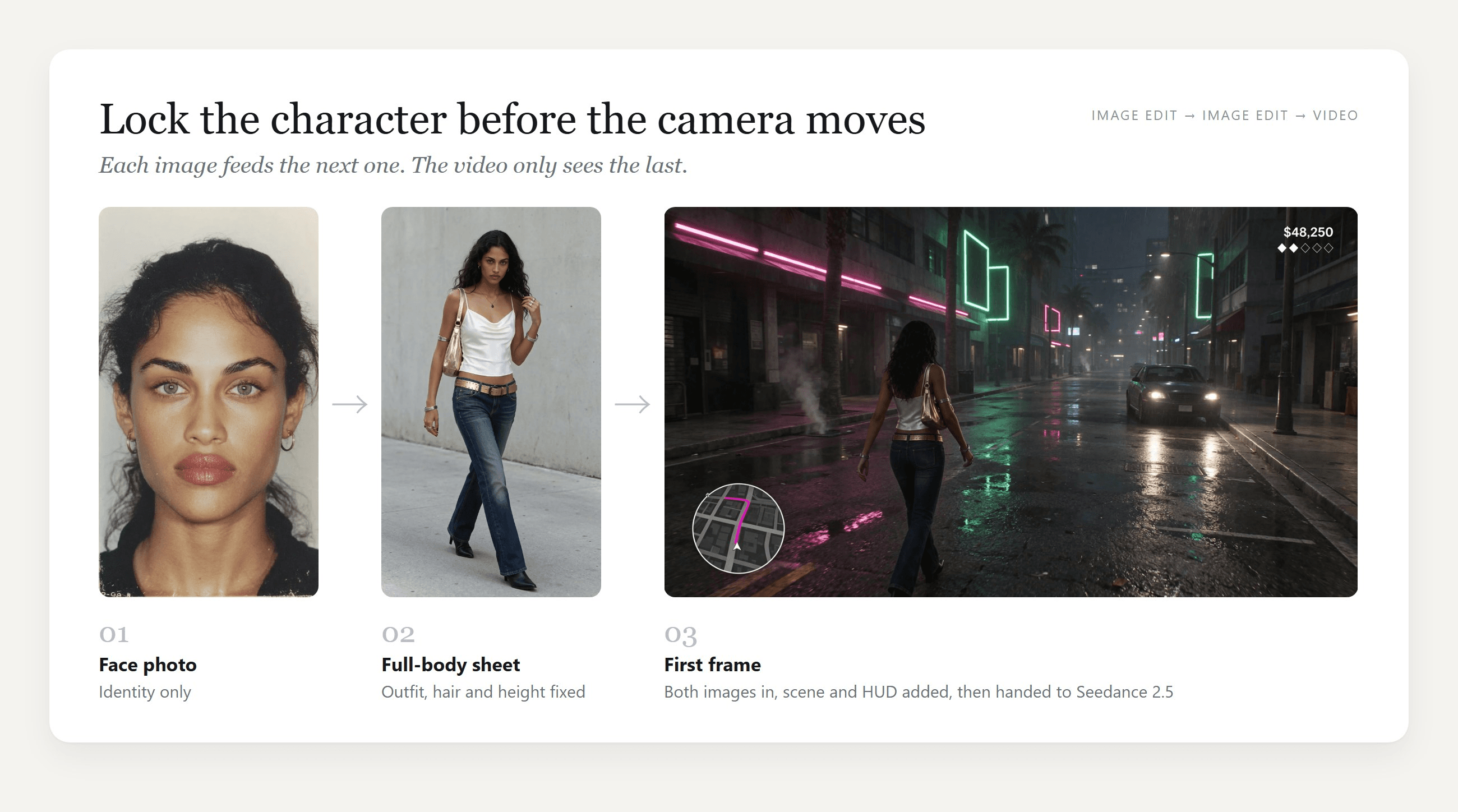
我们用 Atlas Cloud 的 Image Edit 选项卡中的 Seedream v5.5 制作了这两张静帧,任何接受两个参考的图像模型都能做到同样的事。全身设定图要求模特比例、腰部高度的相机以及一套具体服装:白色缎面荡领吊带背心、低腰微喇牛仔裤、金色铆钉腰带和黑色高跟靴。逐项命名能让后续图像有精确可复制的东西。
每张首帧随后都同时使用人脸和全身设定图。两个习惯让它们奏效:
- 把 HUD 画进图像,并保持它很小。 我们只需要一个金额字符串和五个图标,就能读起来像游戏。
- 从背后或过肩展示玩家。 这就是游戏画面的取景方式,也为结尾一次刻意的露脸留出空间。
下面是街头追逐的完整首帧提示词,上传时带两张参考图:
plaintext1Photorealistic frame of third-person open-world video game footage. The young woman from the reference images, seen from behind and slightly above, rides a matte black sport motorcycle down the center lane of a wide coastal city avenue, leaning slightly to the left. Same outfit as the full-body reference: white satin cowl-neck cropped camisole, low-rise dark-wash bootcut jeans, wide gold studded belt, black heeled ankle boots, silver bangles, no bag; her long dark curly hair is loose and blown back by the wind. The chase camera sits 3 meters behind her and 1.5 meters above the road, wide lens; she is centered in the lower middle of the frame and the road runs straight to the horizon. Late afternoon sun low on the right, long shadows, wet patches on the asphalt reflecting the sky, palm trees on the median, pastel mid-rise buildings, a few plain unbranded cars far ahead. A flat game HUD is drawn on top of the picture in clean white sans-serif: in the bottom-left corner a circular minimap with a thin white ring, gray street grid, a white arrow in the center and a magenta route line; in the top-right corner the text "$48,250" with a row of five small diamond icons under it, the first two filled white and the other three only outlined. No other text anywhere, no logos, no brand names, blank license plates, no lettering on signs or buildings.
如果你想把自己的自拍变成 GTA 加载画面海报,我们的 GTA 滤镜指南 会一步步讲这种插画风效果。
GTA 6 游戏画面 AI 片段的 Seedance 2.5 设置
这些是所有三段片段背后的设置,以及每项的理由。
| 设置 | 我们使用的 | 原因 |
|---|---|---|
| 模式 | 图生视频,仅首帧 | 首帧固定角色、图形和 HUD |
| 宽高比 | 16:9,由首帧决定 | 图生视频会保持你上传图像的宽高比 |
| 分辨率 | 1080p | Seedance 2.5 原生渲染 480p、720p 和 1080p;SR 和 ESR 选项会在其上增加放大或增强处理 |
| 时长 | 10 秒 | 足够容纳三个定时节拍。一次生成可运行 4 到 30 秒 |
| 音频 | 开启 | 引擎、水和雨声会与动作同步到达 |
| 草稿 | 可选 480p 预览 | 在提交 1080p 渲染前低成本检查运动 |
对于你还不确定的想法,草稿选项值得一看。它会渲染一个 480p 预览并返回草稿 ID,等你喜欢这段运动后,再由单独的 draft-complete 端点以 1080p 完成。
为什么 GTA 6 AI 预告片片段会出错,以及各自的修复方法
失败的 GTA 风格片段往往会破坏同样的几条游戏规则。这段发布到 YouTube 的水上摩托追逐在 42 秒里展示了其中几条:骑手撞进一艘游艇,骑上游艇船体,一艘警船也撞了,而计划中的跳跃从未发生。下面是每个问题的成因,以及修复它的那句话。
| 出错情况 | 通常由什么导致 | 应该改写的行 |
|---|---|---|
| 招牌填满虚构字母 | 只写“无文字”会让模型自行决定招牌显示什么 | 描述霓虹是什么,比如粉色横管和空心绿色矩形 |
| 金额计数变化或乱码 | HUD 太长,或提示词从不提到它 | 一个短字符串,并在视频提示词中加上“与首帧完全一致” |
| 图标增殖或消失 | 数量只是暗示而没有写明 | 加一句数量检查:“正好五颗钻石,前两颗为实心” |
| 相机游走进电影镜头 | 没有给出距离或位置 | “锁定在身后约 3 米处……绝不移动到她的前方” |
| 玩家滑行而不是走路 | 走路被默认,却从未描述 | “她全程迈出真实步伐;绝不滑行、漂浮或变形” |
| 车辆相撞或场景漂移 | 玩家附近有太多移动物体 | 让其他车辆远离,并给每个节拍一个动作 |
| 片段看起来旧一个主机世代 | 纯文本提示词,没有首帧 | 从带有你自己 HUD 的写实首帧开始 |
| 出现官方标志或角色 | 要求真实游戏的品牌 | 原创角色、自创 HUD,以及没有字标 |
如果 HUD 在 10 秒片段中仍然移动,把时长缩短到 5 秒再生成一次。秒数越少,叠加层变化的空间就越小。
常见问题
我可以在 Seedance 2.5 提示词中写“GTA 6”吗?
在我们的测试中,以“GTA 6 gameplay footage”开头的提示词能正常生成,也没有显示官方标志或文字。但它看起来也比上面的片段更旧,仿佛这个名字把模型拉向了上一代画面。描述相机、光线和你自己的 HUD,会比这个名字更接近 GTA 6 的外观。
如果你发布结果,请标注为 AI 制作的粉丝内容,并不要使用 Rockstar 的标志和角色。
在 Atlas Cloud 上,一段 10 秒 GTA 6 风格片段要多少钱?
截至 2026 年 11 月 17 日,在应用 20% 折扣后,一段带音频的 10 秒 Seedance 2.5 图生视频片段,1080p 为 $5.98(标价 $7.47),720p 为 $3.04。5 秒 1080p 片段为 $3.00,10 秒 480p 草稿为 $1.40。每张来自 Seedream v5.5 Edit 的首帧,16:9 2K 加两张参考图,约为 $0.04。价格会变化,所以大批量生成前请查看模型页面。
一段 Seedance 2.5 片段能运行多久?
一次图生视频生成可运行 4 到 30 秒不等。我们坚持用 10 秒,因为三个定时节拍能舒适容纳,而且 HUD 在整段片段中保持稳定。对于更长序列,可以从共享同一角色和 HUD 的首帧生成多段短片,再把它们剪在一起。
我能把自己放进 GTA 6 风格 AI 视频吗?
可以。用你自己的面部照片作为第一个参考,再据它制作一张全身设定图,然后用两者构建首帧,完全像参考图部分那样。背面和过肩视角能让你保持可辨认,而不需要让模型连续十秒维持你的脸。只使用你自己或已同意者的照片。
同一套工作流能制作 TikTok 的竖屏 9:16 片段吗?
可以。Seedance 2.5 图生视频会遵循首帧的宽高比,所以 9:16 首帧会给你 9:16 片段。把小地图和金额计数向内移,以免应用的按钮和字幕遮住它们,并记住竖屏画面在玩家两侧显示的道路更少。
结论
游戏画面的真实感更多来自规则,而不是渲染能力。把相机锁定在玩家身后,把小型 HUD 画进首帧,把动作写成定时节拍,并明确写出必须保持不变的东西。Seedance 2.5 在我们三段片段中都守住了这些规则,而光线和纹理来自你交给它的写实首帧。
从一张首帧和街头追逐提示词开始,然后换上你自己的角色、车辆和城市。GTA VI 将于 11 月 19 日到来,而一段你自己的 Seedance 2.5 GTA 6 风格片段,可以在游戏解锁前就准备好。




