


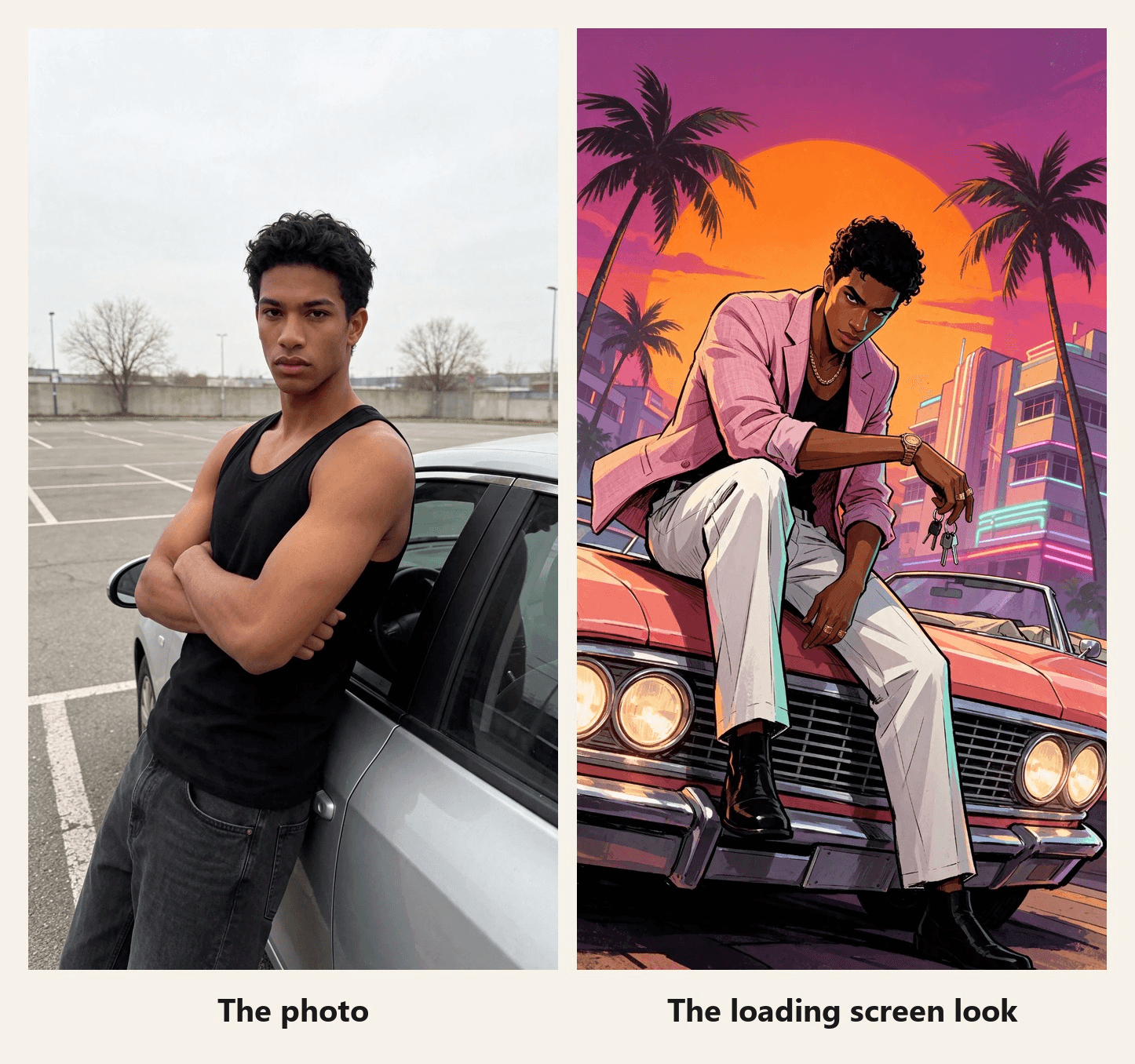
A guy in a black tank top leans on a silver sedan in a gray parking lot. A glowing line climbs the frame like a loading bar, and everything under it turns to sunset: a pink blazer, a coral convertible, palm trees. That swap is the GTA filter people are posting this week, days before GTA 6 launches on November 19, 2026.
The version behind those posts is a CapCut template, and it stops on a still poster. This guide names that template and shows its numbers. Then it builds a version where the character keeps moving, from one photo on Atlas Cloud.
Key Takeaways
- The GTA filter posted on TikTok this week is a CapCut template called GTA 6 Screen AI, made by a creator and not by Rockstar.
- Its CapCut page showed 155,763useson November 16, 2026, three days before GTA 6 launches.
- The template ends on a still poster, while the Atlas Cloud video generator keeps your character moving after the reveal.
- A GTA style AI prompt names four things: your own features, a low camera angle, a pose with attitude and inked, flat color.
- Leave the game's logo and characters out of your version, and call it fan-made.
What Is the GTA Filter Trend on TikTok?
One clarification first. Search for a GTA 6 filter and part of what comes back is fans arguing about the hazy look of the game's launch trailer. This guide covers the other meaning: the effect that turns your photo into loading-screen art.
That effect is a CapCut template. Open one of the loading screen posts under #gtafilter, tap its CapCut template link, and you land on GTA 6 Screen AI by JDCapcut. The preview runs a mirror selfie under the caption "Your GTA 6 loading screen", wipes the frame from the bottom up, and leaves an illustrated version of the same person leaning on a car at sunset.
| GTA 6 Screen AI | What we found on November 16, 2026 |
|---|---|
| Creator | JDCapcut |
| Created | August 27, 2026 |
| Uses | 155,763 |
| Length and shape | About 8 seconds, 9:16 |
| Clip slots | 2 |
| How it ends | A still illustration with the game's logo laid over it |
The template is months old, but the wave is new. Of the posts we opened under #gtafilter, #gta6filter and #gta6aifilter, nearly all were dated November 10 to 16, the week before launch.
The "Goodbye GTA V" Video: The Other GTA 6 Filter Trend
A second format rides the same hashtags, and it is a short film more than a filter. In a clip posted November 14, a boy meets the three leads of GTA V on a pier in 2013, then comes back as a grown man in 2026 to hug them goodbye. It runs 30 seconds and had passed 360,000 views by November 16.
CapCut has a template built on the same idea, GTA5 to GTA6 2 by ArtemisCC. In its preview a young man hugs the three leads of GTA V on a beach, then turns up on a neon street next to the two leads of GTA VI.
| GTA5 to GTA6 2 | What we found on November 16, 2026 |
|---|---|
| Creator | ArtemisCC |
| Created | November 14, 2026 |
| Uses | 1,776 |
| Length | 13 seconds |
| What is on screen | You, next to the games' own characters |
That last row matters. The goodbye format depends on Rockstar's characters and both templates stamp the game's logo on the result. The version below uses neither.
How to Make a GTA Loading Screen AI Video From One Photo
The template's poster stays still. On Atlas Cloud you can let it: an image model redraws your photo as the loading screen, and Seedance 2.5 generates the clip that travels from the photo to the art, with its own sound.
Both steps live in one workspace, and the clip comes together in the AI video generator.
For two seconds it is an ordinary phone video. The line rises, and below it he is already wearing the pink blazer. Then the drawing keeps going: he pushes off the door, walks over to the convertible, the headlights click on and he settles on the hood with the sun behind his head. The sound is generated too: the prompt asks for a synth that rises with the line, boot steps and the clunk of the headlights.
For this cut we laid a song over that sound and timed three moments to its beat: the end of the wipe, the headlights and the final pose. Two stretches run a few percent slower to land on time, and the frame pushes in slightly on each hit.
Method 1: Build the Reveal in the Video Generator
Start with the still, because the video needs it as its last frame. Open the image generator, switch to the Image Edit tab and choose Seedream v5.5 under Models. Upload your photo, choose the 9:16 size at 2K (1584*2816), paste the prompt below and press Run. Any casual photo works. Ours began as a studio headshot, so one extra edit put him in a parking lot first.
plaintext1Redraw this photo as a hand-painted GTA loading screen illustration, not a photo filter. Keep only his identity from the photo: the same young man, same face shape, same eyes, thick eyebrows, nose and full lips, same warm brown skin, same short curly black hair. Change everything else. Camera: a dramatic low-angle shot from near the ground with a wide lens and a slight tilt, looking up at him. Pose: he sits on the hood of the car with one boot planted on the chrome front bumper, leaning forward with one forearm resting on his raised knee, the other hand hanging loose with a set of car keys dangling from one finger; his head is tilted down a little, eyes locked on the viewer from under his brows, jaw set, a faint smirk. He is tall and lean with long legs. Outfit: a pastel pink linen blazer with the sleeves pushed up, worn over the black tank top, white pleated trousers, black leather boots, a gold chain, a chunky gold watch and two gold rings. Car: a 1980s coral pink convertible with a wide chrome grille and glowing round headlights, filling the lower part of the frame. Background: the huge orange sun sits directly behind his head and shoulders like a halo, a magenta and violet sky, tall palm trees bending in the wind, pastel art deco hotels with glowing neon tubes far behind. His blazer and the palm fronds blow in the wind. Lighting: a strong orange rim light around his whole silhouette, deep violet shadows, teal fill light on one side of his face. Style: thick black ink outlines with varied weight, flat cel-shaded color with sharp graphic shadow shapes, high contrast, saturated palette, bold poster composition. Natural adult proportions. Vertical 9:16, full figure with the car. Only one person, no other people, no other cars. No weapons. No text, no letters, no neon words, no signs with writing, no game logo, no title, no license plate characters, no watermark.
Now the clip. Follow the numbered controls in the screenshot:
- Switch to the Video Generation tab.
- Open Models and choose Seedance 2.5.
- Upload your photo, cropped to 9:16, as the First Frame.
- Upload the loading screen still as the Last Frame.
- Paste the reveal prompt below into Prompt.
- Under Settings, pick 1080p, set Duration to 10 seconds and keep Audio on. The ratio stays on Auto and follows the first frame.
- Press Run.
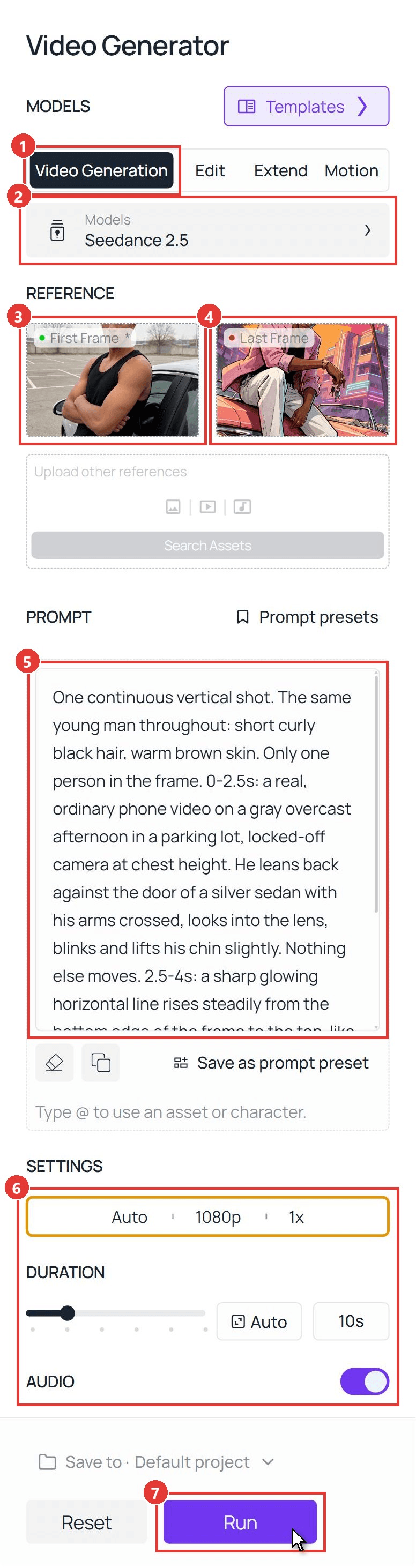
plaintext1One continuous vertical shot. The same young man throughout: short curly black hair, warm brown skin. Only one person in the frame. 0-2.5s: a real, ordinary phone video on a gray overcast afternoon in a parking lot, locked-off camera at chest height. He leans back against the door of a silver sedan with his arms crossed, looks into the lens, blinks and lifts his chin slightly. Nothing else moves. 2.5-4s: a sharp glowing horizontal line rises steadily from the bottom edge of the frame to the top, like a loading bar wiping upward. Everything the line has passed becomes a hand-painted game loading-screen illustration with thick black outlines and flat cel-shaded color: the silver sedan is now a coral pink 1980s convertible, the gray lot is a sunset boulevard with palm trees and neon-lit pastel hotels, and he now wears a pastel pink linen blazer with pushed-up sleeves over a black tank top, white trousers, black boots, a gold chain and a gold watch. Above the line the real gray parking lot remains until the line passes it. 4-8.5s: the whole frame is now the illustration. He pushes off the car door and spins a set of car keys once around his finger. He turns his body to face the direction he is going and walks four clear steps along the side of the car to its front, his legs and boots visibly stepping one after the other, his arms swinging naturally. The car stays parked in the same spot the whole time: it never rotates, slides or changes shape, and the camera is what moves, gliding forward with him and sinking down to a low angle in front of the chrome grille, looking up at him. He walks the whole way; he never glides, floats or morphs from one place to another. At the front of the car he turns to face the lens, the round headlights switch on with a warm glow, and he hops up to sit on the hood, plants one boot on the chrome front bumper and leans forward with his forearm on his raised knee, the keys dangling from his finger. Palm fronds and his blazer blow in the wind, and the huge orange sun slides into place directly behind his head. 8.5-10s: he tilts his head down a little, locks eyes with the lens with a faint smirk and holds the exact pose of the last frame. He stays an illustration until the end and never turns back into a photo. No other people, no other cars, no weapons. No text, no letters, no logos, no title card, no user interface. Sound: quiet parking-lot ambience for the first 2.5 seconds, a rising synth whoosh as the line travels up, keys jingling, four boot steps on asphalt, the clunk of headlights switching on, then warm evening ambience with distant surf and a soft 1980s synth bass pulse, no voice.
Two parts of that prompt carry the clip. The timed lines give the real footage its own two seconds, so the before stays readable. The walking lines spell out steps, legs and a camera that moves around a parked car, which is what gets him from the door to the hood on foot. It is the same first-and-last-frame setup as our comic book filter reveal, with a wipe where that one used a flash.
Method 2: Run the GTA AI Filter Through the API
A launch-week photo booth, or a GTA AI filter button inside your own app, needs two calls instead of two tabs.
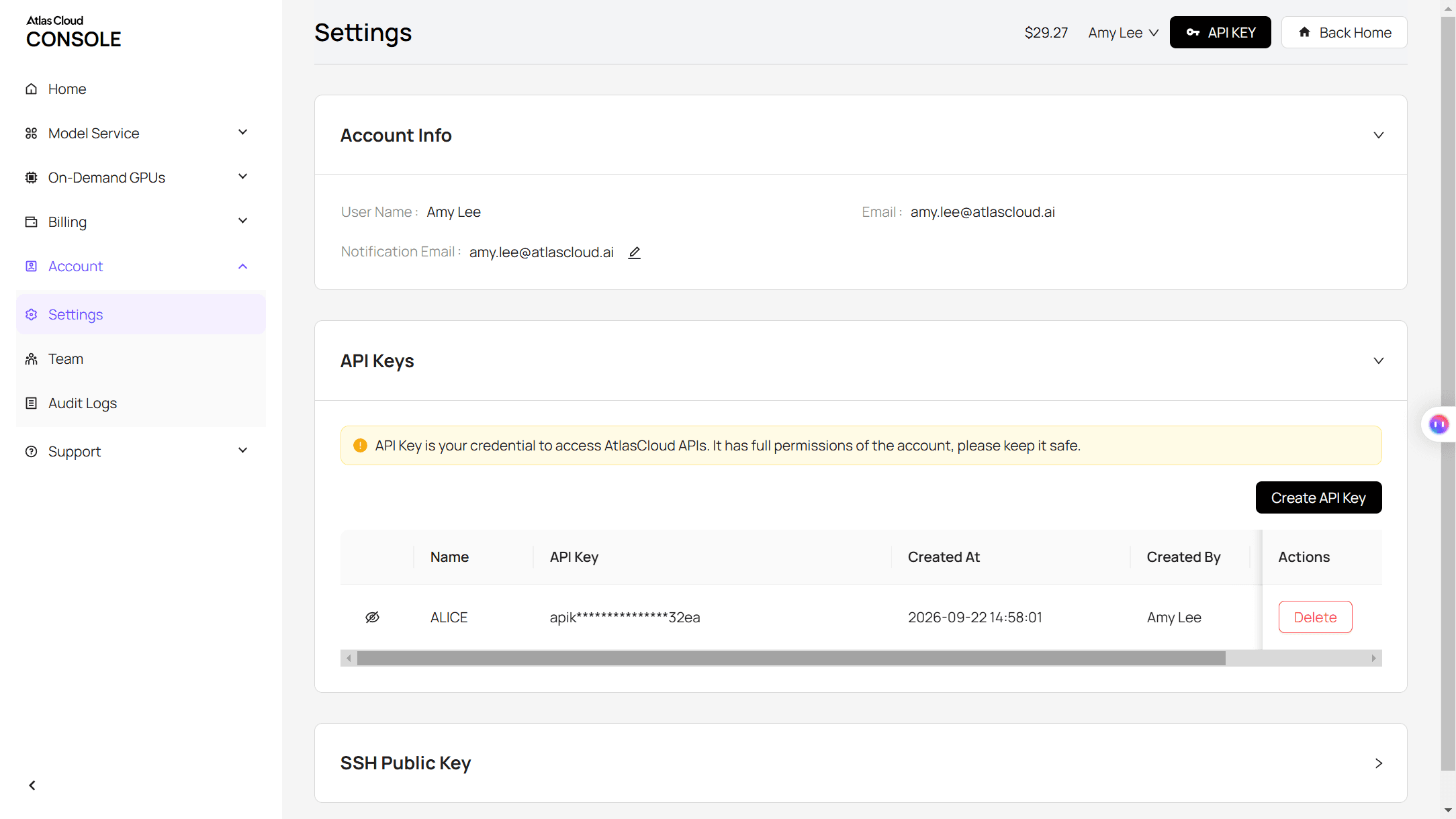
Step 1: Create and copy an API key in the Settings page of the Atlas Cloud console.
Step 2: Check the request format in the Atlas Cloud API docs.
Step 3: Make the still, then the clip, and poll for each file. The image call takes your photo URL and the loading screen prompt:
plaintext1curl -X POST https://api.atlascloud.ai/api/v1/model/generateImage \ 2 -H "Authorization: Bearer $ATLASCLOUD_API_KEY" \ 3 -H "Content-Type: application/json" \ 4 -d '{ 5 "model": "bytedance/seedream-v5.5/edit", 6 "prompt": "Redraw this photo as a hand-painted GTA loading screen illustration. Keep only his identity: same face, skin tone and short curly black hair. Low-angle wide shot looking up at him as he sits on the hood of a coral pink 1980s convertible, one boot on the chrome bumper, forearm on his knee. Pastel pink linen blazer, white trousers, gold chain. A huge orange sun behind his head, palm trees, neon-lit art deco hotels. Thick black ink outlines, flat cel-shaded color, strong orange rim light. Only one person. No text, no game logo, no weapons.", 7 "reference_images": ["https://your-cdn.com/photo.jpg"], 8 "size": "1584*2816", 9 "output_format": "jpeg" 10 }'
The video call takes the original as image and the returned still as last_image:
plaintext1curl -X POST https://api.atlascloud.ai/api/v1/model/generateVideo \ 2 -H "Authorization: Bearer $ATLASCLOUD_API_KEY" \ 3 -H "Content-Type: application/json" \ 4 -d '{ 5 "model": "bytedance/seedance-2.5/image-to-video", 6 "prompt": "One continuous vertical shot. The same young man throughout. 0-2.5s: a real phone video in a gray parking lot, he leans on a silver sedan with his arms crossed. 2.5-4s: a glowing horizontal line wipes up the frame and everything it passes becomes a hand-painted game loading-screen illustration at sunset. 4-8.5s: he walks four clear steps to the front of the pink convertible while the camera sinks to a low angle, the headlights switch on and he sits on the hood. 8.5-10s: he holds the exact pose of the last frame. No text, no logos. Sound: a rising synth whoosh, boot steps, the clunk of headlights, evening ambience, no voice.", 7 "image": "https://your-cdn.com/photo.jpg", 8 "last_image": "https://your-cdn.com/photo-loading-screen.jpg", 9 "duration": 10, 10 "resolution": "1080p", 11 "generate_audio": true 12 }'
plaintext1curl https://api.atlascloud.ai/api/v1/model/prediction/<prediction_id> \ 2 -H "Authorization: Bearer $ATLASCLOUD_API_KEY"
The same two endpoints and the same key run the other image and video models on Atlas Cloud. To try the look on a different model, change the model string and keep the rest.
GTA Style AI Prompt: What to Write for the Loading Screen Look
Our first stills looked polite. We had asked the model to keep the pose from the photo, and a man standing with his arms crossed at eye level is a passport photo with palm trees. Loading-screen art leans on angle and attitude, so the prompt that worked keeps one thing from the photo and changes the rest.
| Part of the prompt | What ours says | What it does |
|---|---|---|
| Identity | Keep only his identity: face shape, eyes, eyebrows, skin, hair. Change everything else. | Frees the pose and the scene while the face stays his |
| Camera | Low-angle shot from near the ground, wide lens, slight tilt | Makes him tower over the frame the way cover art does |
| Pose and outfit | Sitting on the hood, one boot on the bumper, keys on one finger; pink linen blazer, gold watch | Gives the character a story before anything moves |
| Light and ink | The sun behind his head like a halo, orange rim light; thick ink outlines, flat cel-shaded color | Sets the poster look and separates him from the sky |
Close with a list of what to leave out. The lines that ban text, a game logo and a title keep the frame clean, and the no-weapons line keeps the tone light.
Three Looks: Sunset Boulevard, Night Neon and Beach Daylight
Swap the scene block and the same face lands in a different part of the map. All three panels came from the same parking lot photo with the same identity sentence up front.
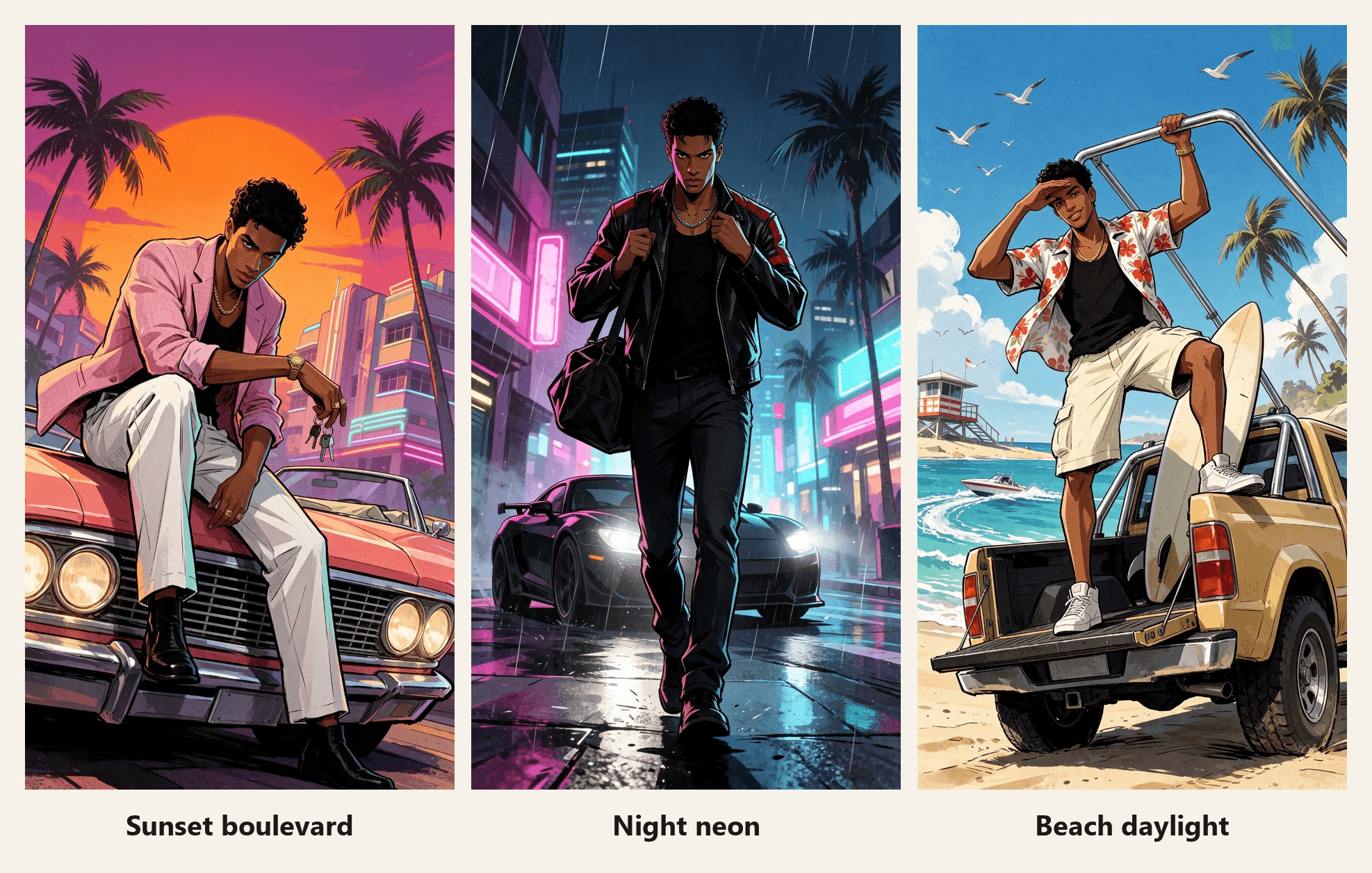
| Look | Pose | Outfit and ride | Light |
|---|---|---|---|
| Sunset boulevard | Sitting on the hood, leaning forward | Pink linen blazer, coral 1980s convertible | Orange sun behind his head, violet shadows |
| Night neon | Walking toward the camera in mid-stride | Black leather racing jacket, matte black coupe | Headlights behind him, magenta and cyan on his face |
| Beach daylight | Standing on a truck tailgate, shading his eyes | Hibiscus print shirt, lifted beach truck | Hard midday sun, crisp shadows |
Neon street scenes invite lettering. The night prompt adds one line asking for plain glowing tubes and blank panels with no characters on them, and the signs come back clean.
GTA Filter App or CapCut Template: Which One Fits?
There are three ways to get the look, and they suit different goals.
| CapCut template | Browser photo filter | Prompt route on Atlas Cloud | |
|---|---|---|---|
| What you get | An 8-second wipe that ends on a still | Typically a still image | A still in any scene, then a 10-second clip with sound |
| Scene and pose | Fixed by the template | Chosen from preset styles | Written by you |
| Game logo | Laid over the result | Depends on the tool | Left out by the prompt |
| Best for | Joining the trend quickly | A new profile picture | A reveal where the character keeps moving |
If you only want to post the trend tonight, the template is the short road. If you want your own car, your own outfit and a character who walks, write the prompt. For a different art style with the same reveal idea, our Pixar style AI video guide covers the 3D look.
Frequently Asked Questions
Where do I find the GTA filter on TikTok?
Search #gtafilter or #gta6filter, open a post that shows the loading screen reveal and tap the CapCut template link on it. That opens GTA 6 Screen AI in CapCut. CapCut templates can be limited by region: this one showed as unavailable to use from our location when we checked on November 16, 2026.
Is the GTA filter made by Rockstar?
No. GTA 6 Screen AI is a creator template by JDCapcut, and nothing on its CapCut page ties it to Rockstar. Treat anything you make with it, or with the prompts above, as fan art.
Can I put the GTA 6 logo on my video?
The logo and the characters belong to the game's publisher, so we left them out and suggest you do the same. A sunset, a convertible and inked outlines already read as GTA-style. Add a caption that says fan-made if the post could be mistaken for official material.
Does a ChatGPT GTA prompt give the same result?
The structure carries over: identity first, then camera, pose, outfit, light and a list of what to leave out. We ran ours in Seedream v5.5 and did not test ChatGPT for this guide, so expect to adjust the wording for another image model.
When does GTA 6 come out?
November 19, 2026, according to Rockstar Games, whose announcement is linked at the top of this guide.
How much does a GTA loading screen video cost on Atlas Cloud?
As of November 16, 2026, after the 20% discount applied when we checked, a Seedream v5.5 Edit still at 1584*2816 is $0.0344. A 10-second Seedance 2.5 first-and-last-frame clip with audio is estimated at $3.04 at 720p and $5.98 at 1080p. One base photo, one loading screen still and one 1080p take come to about $6.05, so settle the prompt at 720p first.
Conclusion
The GTA filter of launch week is one CapCut template with a six-figure use count: a photo, a wipe and a poster. Next to it runs a goodbye video built on the games' own characters. Both are quick to post, and both stop where the drawing could start moving.
To take it further, write a loading screen prompt that keeps your face and changes the angle, the pose and the light. Hand Seedance 2.5 your photo as the first frame and that still as the last, and your GTA filter keeps going after the wipe, all the way to the hood of the car.




