让AI生成摘要
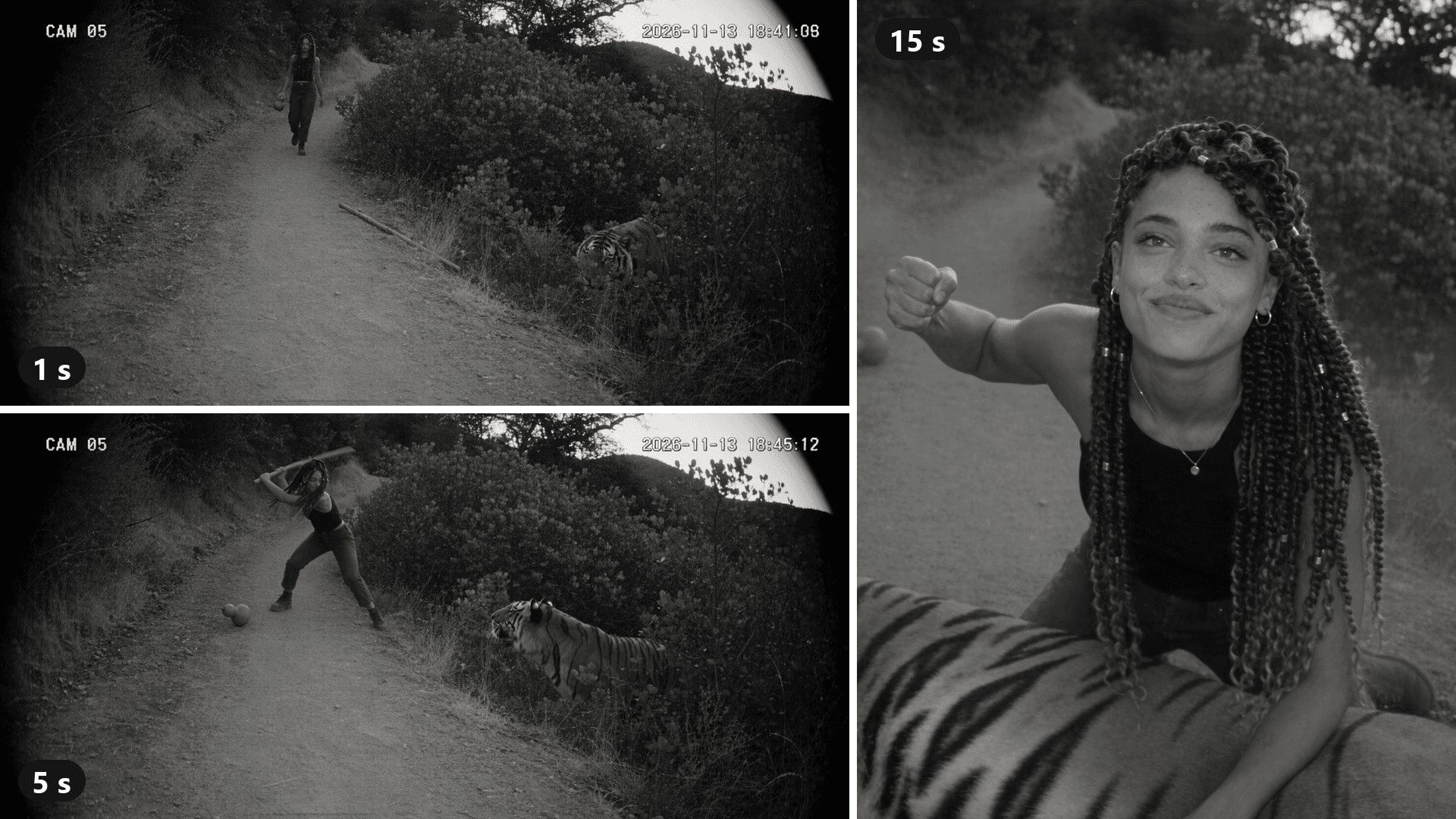
颗粒感监控画面。一名女子走在森林小路上,手里晃着一个葫芦。在她右侧的灌木丛中,一只老虎抬起头。十五秒后,她跪在老虎背上,气喘吁吁,直直地抬头看向镜头。
这就是 AI 打虎 所做的:一个伪造的 CCTV 片段,用你的脸重新讲述一个中国经典传说。它在不到一周内从中国视频网站传到 TikTok。本指南追溯其背后的模板,然后用一段你可以复制的提示词,从一张照片重建这个场景。上面的片段是我们自己的运行结果。
关键要点
- AI 打虎把《水浒传》中武松打虎的故事重述为颗粒感黑白监控录像,由你主演。
- 它于 2026 年 11 月初在中国视频网站出现,并通过一个 CapCut 模板传到 TikTok。
- 那个标题仅为 “AI trend” 的一图 CapCut 模板在头五天内超过 47,000 次使用。
- 在 Atlas Cloud 上,一张照片加上一个带时间安排的单机位提示词,就能在 AI 视频生成器 中制作该片段。
- 使用你自己的脸,或一位同意的朋友,让打斗不见血,并将帖子标注为 AI。
什么是 AI 打虎趋势?
一张照片输入,输出的是一段黑白“监控摄像头”片段:你走在森林小路上,一只老虎从灌木丛中跳出,然后你赢了。常见版本时长 10 秒,角落里像真实画面一样有 “CAM 05”。
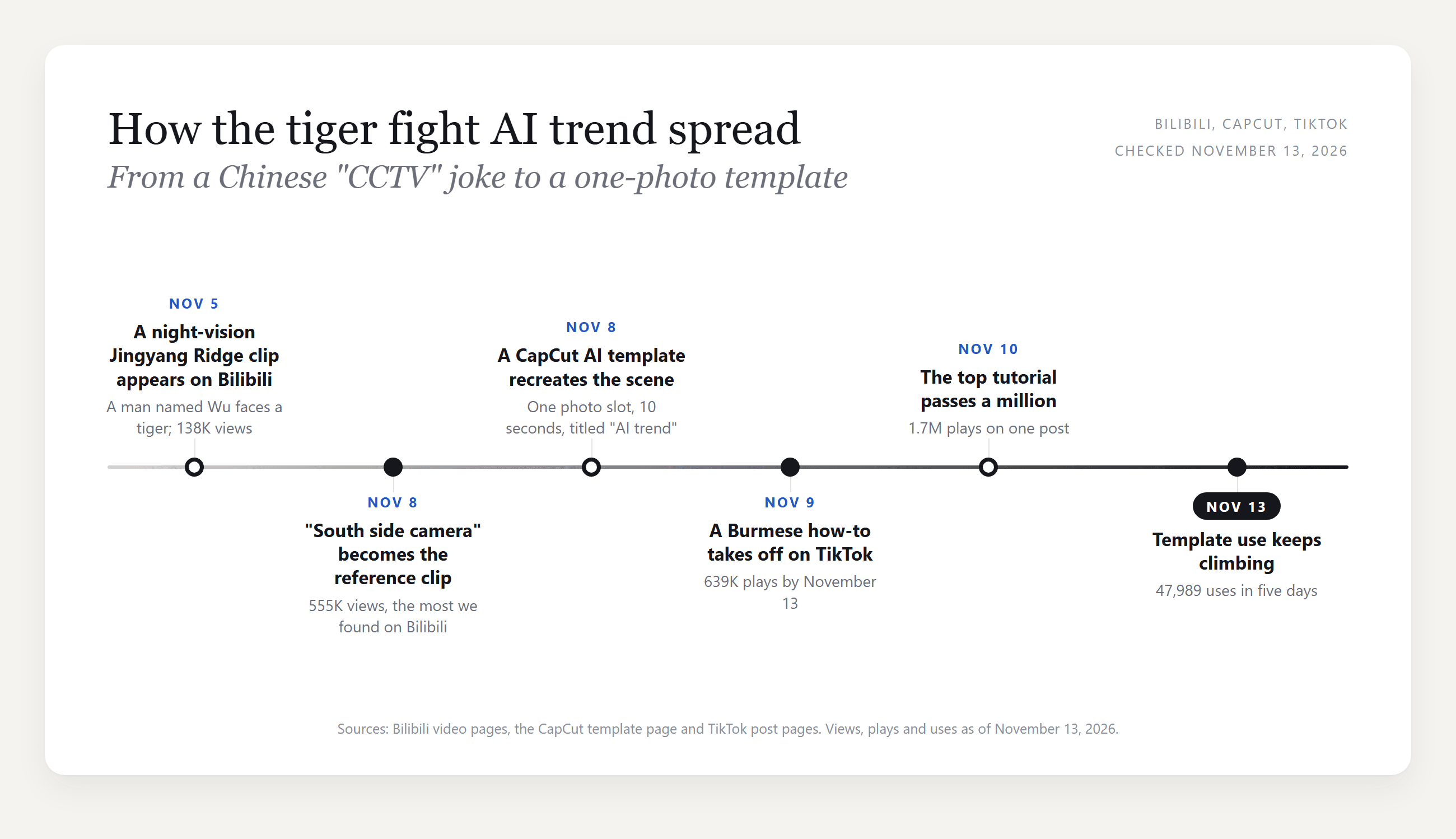
它传播得很快。我们找到的最早片段于 11 月 5 日发布在 Bilibili 上。三天后,一个“景阳冈南侧摄像头”版本发布在 Bilibili,并确立了 CapCut 模板后来复制的视觉效果。到 11 月 13 日,它已有约 555,000 次观看。
当天,那个场景的 CapCut AI 模板也出现了。11 月 9 日,TikTok 上带缅甸语字幕的教程帖开始使用它,而 11 月 10 日的一个 TikTok 教程 超过了 170 万次播放。
武松与老虎:CCTV 打虎从何而来
这个故事出自《水浒传》,中国四大名著之一。武松在景阳冈下的酒馆喝酒,无视关于吃人老虎的警告,在黄昏时过冈。他的哨棒在打斗中折断,于是他赤手空拳结束了战斗。
这就是为什么 CCTV 打虎的主角带着酒葫芦,并抓起一根棍子。
这种镜头构图来自一个更广泛的玩笑。中国创作者已经开始发布著名传说的 AI“监控录像”,而 36Kr 在 11 月 12 日报道称,这股浪潮始于一段伪造的鸿门宴录像。
Bilibili 片段和 CapCut 模板以不同长度讲述同一个故事:
| Bilibili “南侧摄像头”片段 | CapCut “AI trend”模板 | 我们的 Atlas Cloud 版本 | |
|---|---|---|---|
| 摄像头 | 3 个,硬切 | 2 个,一次切换 | 1 个,一镜到底 |
| 时长 | 29 秒 | 10 秒 | 15 秒 |
| 主角 | 武松穿着长袍,头发束起 | 你的照片,替代黑衣女子 | 你的照片,服装由你描述 |
| 打斗 | 走近、棍击、扭打、按住 | 走近和扑跃,然后按住 | 走近、扑跃、翻滚、按住、抬头看向镜头 |
模板去掉了中间的扭打。我们反其道而行:一台固定摄像头,从不切换,看起来更像真实画面。
如何用一张照片制作 AI 打虎视频
在 Atlas Cloud 上,一张照片和一次运行就生成了下面的 AI 老虎视频。
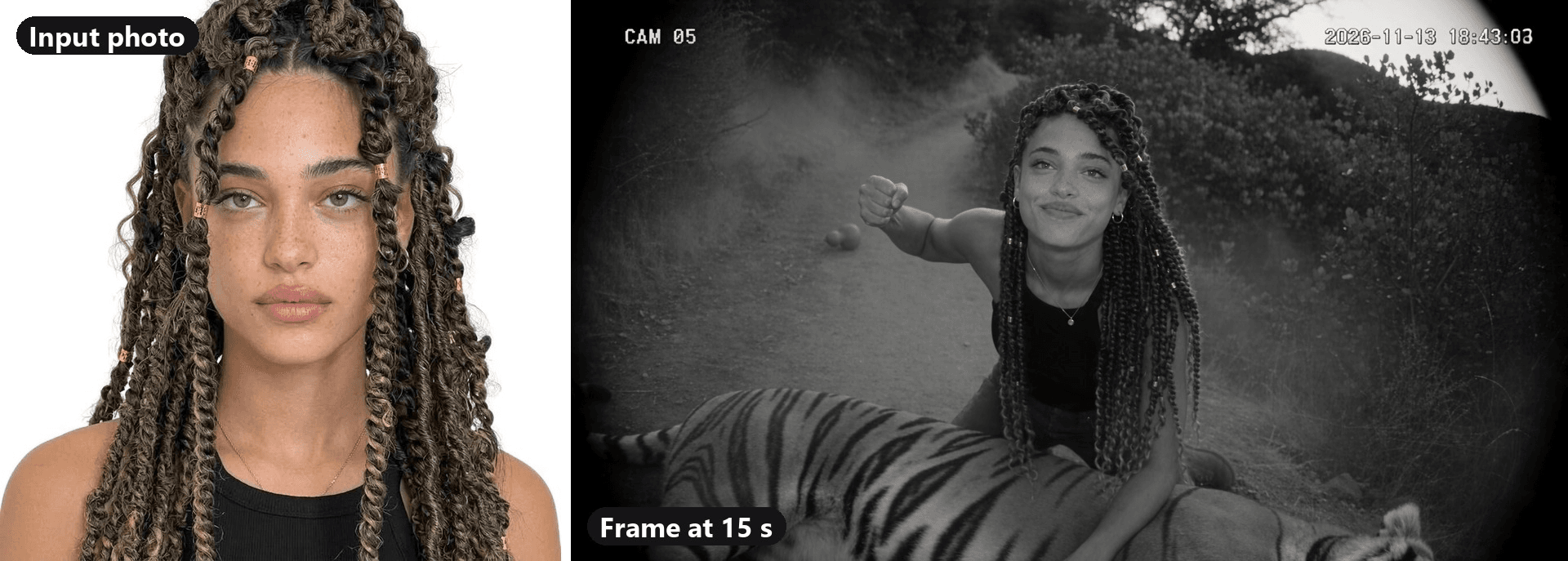
模型是 Seedance 2.5。它从一张半身头像照片开始工作:到最后一帧,她的脸、发辫和金色发环都与照片一致,而工装裤和靴子直接来自提示词。脚步声、低吼声和翻滚的重响也出自同一次运行。
选择一张面部朝向镜头的清晰照片。纯色上衣在黑白画面中效果很好,肩膀以下的任何内容都可以来自提示词。
一切都在 视频生成器 的“视频生成”标签页中完成。
方法 1:在 Atlas Cloud 视频生成器中制作 CCTV 打虎
按截图中的数字操作:
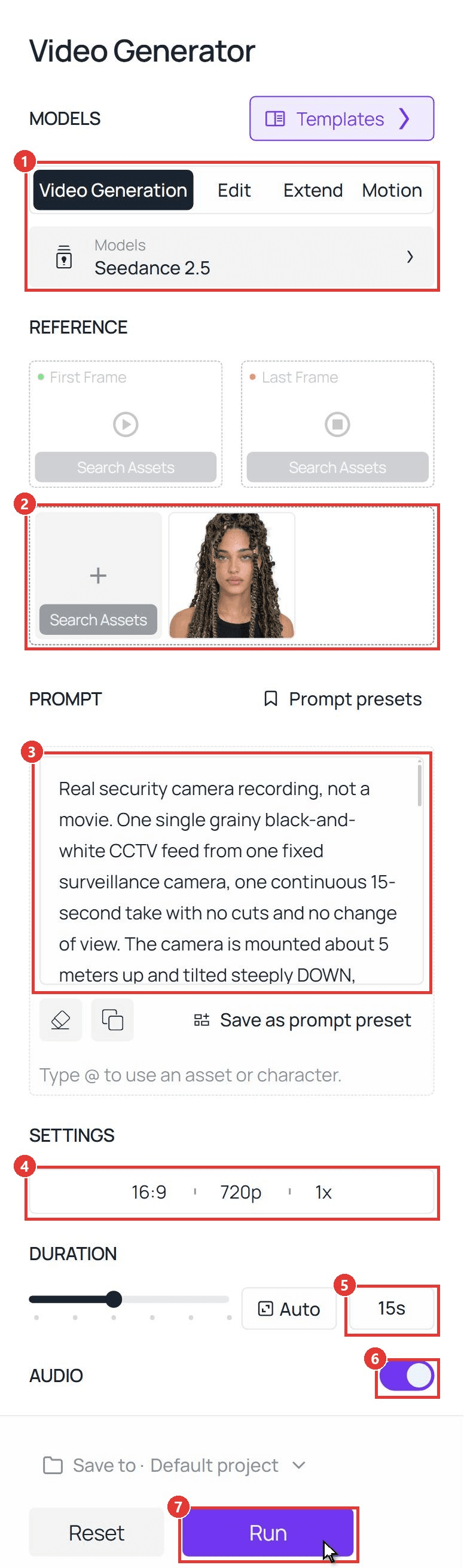
- 模型: 打开视频生成,保留 Seedance 2.5。
- 参考: 在“上传其他参考图”下上传你的照片。将首帧和尾帧留空。
- 提示词: 粘贴下面的提示词。@Image1 指向你刚才上传的照片。
- 设置: 选择 16:9 和 720p,输出一个。720p 成本更低;上面的片段是以 1080p 渲染的。
- 时长: 输入 15。
- 音频: 保持开启。
- 运行。 片段会出现在右侧面板中。
plaintext1Real security camera recording, not a movie. One single grainy black-and-white CCTV feed from one fixed surveillance camera, one continuous 15-second take with no cuts and no change of view. The camera is mounted about 5 meters up and tilted steeply DOWN, about 50 degrees below the horizon, onto a dirt path through a dense mountain forest at dusk: a top-down security view. NO sky and NO horizon anywhere in the frame; the ground, the path and the bushes fill the whole picture from the top edge to the bottom edge. Everyone is seen from above: we look down on the tops of their heads and shoulders, and their shadows fall on the ground. The path enters at the top of the frame and runs down toward the bottom of the frame. Wide-angle lens with barrel distortion and dark corners, deep focus, flat dull exposure, low resolution, video noise and compression blocks. The view is locked for the whole video: no pan, no zoom, no tracking, no shake, no cuts, no second camera, no close-ups, no eye-level view, no low camera, no landscape view, no shallow depth of field, no cinematic lighting. We only see what this camera sees: the camera itself, its housing, mounts, poles and cables never appear anywhere in the frame. 16:9. 2Small white text in the top left corner: "CAM 05". Small white running timestamp in the top right corner, starting at "2026-11-13 18:42:07" and counting forward second by second. No other text. 3 4The hero = the young woman in @Image1. Copy her face exactly: face shape, light eyes, thick dark eyebrows, nose, full lips, skin tone and the freckles across her nose and cheeks. Copy her hair exactly: long, waist-length twisted braids in dark brown with honey-blonde highlights, with small gold cuffs on some of the braids; the braids swing with every move. She is tall and slim with an athletic build. She wears the black ribbed tank top and the thin gold necklace from @Image1, plus dark cargo trousers and black lace-up boots. Use @Image1 only for who she is and what she wears; the white background never appears. The same woman in every frame. 5 6The action, in one unbroken shot: 7[0-3s] She walks up the path from the top of the frame toward the camera, small in the frame and seen from above, relaxed, swinging a round gourd bottle in one hand. A large tiger lies low inside the dense bushes on the right side of the path; only its head shows through the leaves. 8[3-5s] The tiger lifts its head. She stops, startled, drops the gourd, which rolls on the path, and snatches up a long wooden stick lying at the edge of the path. 9[5-7s] The tiger leaps out of the bushes at her. She swings the stick; the tiger dodges and the stick flies out of her hands. 10[7-11s] She grabs the tiger by the thick fur of its neck with both hands. They tumble over once on the dirt in a cloud of dust, rolling closer to the camera, and she ends up on top of the tiger in the lower half of the frame. 11[11-13s] Still in the same fixed view, now nearer to the camera and seen from above: the tiger lies flat on its side, beaten and still, breathing. She kneels on its back, presses its neck down with one hand and raises her other fist high. [13-15s] Then she pushes a braid out of her face, tilts her head back and stares straight up into the camera lens. She holds that direct eye contact with the camera until the very last frame, out of breath, with a small, cool half-smile: her whole face is clearly visible, seen from above, looking right at us. 12 13Anatomy: exactly one person and one tiger in the frame. She is one woman with one head, two arms, two hands with five fingers each. The tiger has one head, four legs, one tail and normal stripes. Bodies never merge, stretch or melt during the leap and the tumble. 14Safety: no blood, no wounds, no bites, no claws in skin. The tiger is only pinned down and is not hurt; nobody is hurt. 15Sound: thin and slightly muffled like a cheap security camera microphone: forest birds, footsteps on gravel, the gourd hitting the ground, a low tiger growl and one roar at the leap, the whoosh of the stick, a heavy thud and scuffling in the dust, her hard breathing, a faint electrical hum. No music, no dialogue, no narration. 16No subtitles, no captions, no logos, no watermark, no color.
要让它变成你的,只重写主角段落(脸、头发、服装),并在需要时把“她”改成“他”。保留摄像头段落和时间安排。如果要在同一个片段里放两个人,我们的 I Love The Smiths 指南 展示了如何共用一个参考照片。
方法 2:通过 Seedance 2.5 API 发送相同提示词
要给群聊里的每个朋友都做一个?API 接受同一张照片和同一个提示词。
步骤 1:创建 API 密钥。 在控制台中,打开“设置”,然后在 API Keys 下创建一个密钥。

步骤 2:检查请求格式。 Atlas Cloud 文档涵盖了身份验证,而 Seedance 2.5 参考图生视频模型页面上的 API 标签页列出了每个字段。
步骤 3:发送请求并轮询。 照片作为公开 URL 放入 reference_images 数组中:
plaintext1curl -X POST https://api.atlascloud.ai/api/v1/model/generateVideo \ 2 -H "Authorization: Bearer $ATLASCLOUD_API_KEY" \ 3 -H "Content-Type: application/json" \ 4 -d '{ 5 "model": "bytedance/seedance-2.5/reference-to-video", 6 "prompt": "<paste the CCTV tiger prompt here>", 7 "reference_images": ["https://your-cdn.com/your-photo.jpg"], 8 "ratio": "16:9", 9 "resolution": "720p", 10 "duration": 15, 11 "generate_audio": true 12 }'
轮询返回的 prediction ID,直到状态显示 completed,然后从 outputs 数组中下载片段:
plaintext1curl https://api.atlascloud.ai/api/v1/model/prediction/<prediction_id> \ 2 -H "Authorization: Bearer $ATLASCLOUD_API_KEY"
端点和密钥在 Atlas Cloud 上的每个视频模型中保持不变。要尝试另一个,只需更改模型字符串。
哪个 AI 打虎模板才是正版?
我们在 TikTok 上打开了 86 条近期趋势帖子,来自四个标签和一个声音页面。其中 53 条链接到同一个 CapCut 模板,而它的标题不透露任何信息。
| 路径 | 你上传 | 你得到 | 截至 2026 年 11 月 13 日检查 |
|---|---|---|---|
| CapCut 模板 “AI trend”(作者 GG-Bond) | 1 张照片 | 10 秒,16:9,景阳冈摄像头标签 | 47,989 次使用;创建于 11 月 8 日 |
| CapCut 模板 “AI”(第二位创作者) | 1 张照片 | 14 秒,16:9,深褐色调,无摄像头标签 | 1,281 次使用;创建于 11 月 9 日 |
| Atlas Cloud 视频生成器(本指南) | 1 张照片和一个提示词 | 此处为 15 秒,场景设置和服装由你编写 | 上面展示的运行结果 |
无论是 “AI trend” 标题还是模板描述都没有提到老虎,所以在 CapCut 内搜索 “tiger” 不太可能找到它。进入的方式是 TikTok 上趋势帖子左下角的模板链接。
模板快捷,但场景固定。提示词让你可以移动打斗、把葫芦换成咖啡杯,或让时长超过 10 秒。
正确做出监控摄像头效果
只有当片段看起来像真实的摄像头录像时,这个笑点才能成立。五个细节承担了大部分效果,每一个都是提示词中的一行。
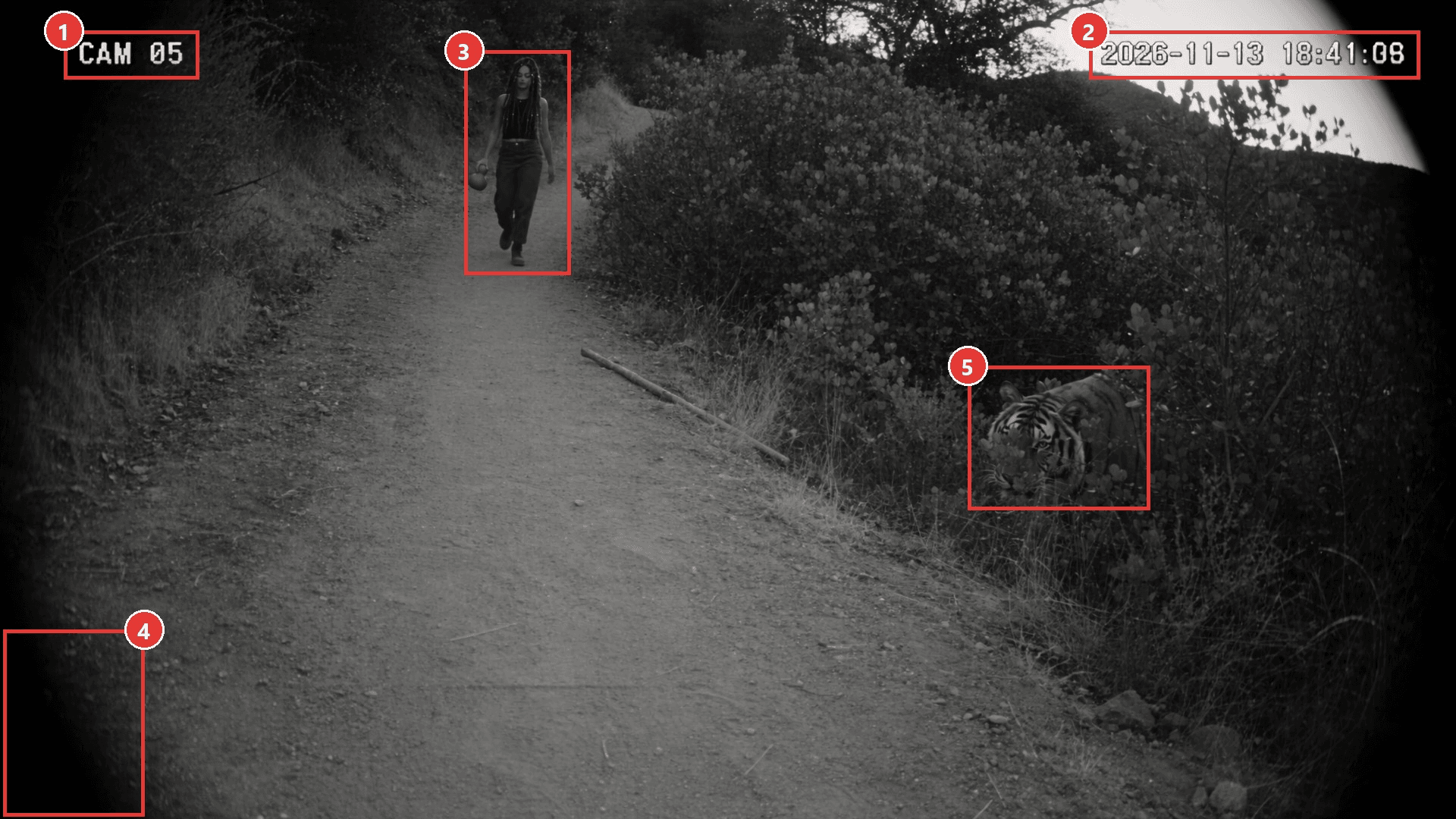
| # | 哪些细节让它成立 | 实现它的提示词行 |
|---|---|---|
| 1 | 摄像头标签 | 左上角的小号白色文字:“CAM 05” |
| 2 | 走动的时钟 | 一秒一秒向前计数的时间戳 |
| 3 | 俯视视角 | 向下倾斜约 50 度,画面中没有天空和地平线 |
| 4 | 廉价镜头 | 桶形畸变、暗角、低分辨率、压缩块 |
| 5 | 缓慢揭示 | 起初只有老虎的头从树叶间露出 |
有两行比看起来更重要。“没有天空、没有地平线”让摄像头朝向地面,所以要连同高度一起给出。“我们只看到这个摄像头所看到的”让摄像头本身不出现在画面中。还有,跳过音乐:单薄、闷闷的声音是监控效果的一半。
CCTV 滤镜还是 AI 视频:哪一个能做出打虎?
CCTV 滤镜或监控摄像头滤镜应用会重新修饰你已有的素材。适合走廊恶作剧,但它无法把老虎放到小路上。
| CCTV 滤镜应用 | AI CCTV 视频(本指南) | |
|---|---|---|
| 你的起点 | 你拍摄的一段视频 | 一张照片 |
| 老虎 | 不可能 | 随场景一起生成 |
| 摄像头角度 | 你拿手机的位置 | 写入提示词 |
| 最适合 | 让真实素材看起来像监控录像 | 从头制作整场打虎 |
伪造监控录像:让打虎保持玩笑性质
让片段有趣的外观也可能让它显得可信。2025 年 11 月,Alt News 和 The Quint 揭穿了一段 AI 制作的“CCTV”片段,内容是在印度马哈拉施特拉邦一只老虎拖走一名男子,该片段曾作为真实内容传播。The Quint 报道称,警方已对一名传播该内容的用户立案。
葫芦会让任何知道这个故事的人看出这是个玩笑。大多数粉丝不会知道,所以发帖时要考虑到这一点:
| 做 | 不要做 |
|---|---|
| 打开平台的 AI 标签 | 把它配文成真实录像或新闻片段 |
| 使用你自己的脸,或一位同意的朋友 | 使用名人、陌生人或儿童 |
| 让打斗不见血,老虎只是被按住 | 添加伤口让它看起来更粗粝 |
| 在配文中点名趋势或武松 | 标记真实地点,仿佛它发生在那儿 |
TikTok 和 Instagram 上的标注开关在我们的 he is nonchalant 指南 中有介绍。
常见问题
CCTV 打虎视频是真的吗?
不是。这些趋势片段是 AI 生成的,监控摄像头的效果是玩笑的一部分。没有人拍摄老虎:主角来自上传的照片,而老虎、小路和摄像头来自模板或提示词。
我可以加上趋势中的 phonk 音乐吗?
可以,在发布步骤添加。我们检查过的最大的趋势帖子使用了 TikTok 声音库中的 phonk 曲目。我们的提示词只要求摄像头麦克风声音,所以从应用的声音库中添加音乐,并保留下面的脚步声和低吼声。
我的狗或猫可以代替打虎吗?
可以。上传你宠物的照片,并围绕它重写主角段落:品种、毛发、四条腿、爪子。把棍子换成跳跃,把跪姿换成站在老虎背上。我们的 AI 猫跳舞指南 展示了如何固定毛发和斑纹,让宠物保持不变。
在 Atlas Cloud 上,一个 15 秒的 AI 打虎视频要多少钱?
截至 2026 年 11 月 13 日,720p 下带音频的 15 秒片段约为 $4.52,比 $5.65 的原价低 20%。在 1080p 下,也就是我们片段的清晰度,约为 $8.90,原价为 $11.12。折扣限时,运行按钮会在生成前显示准确价格。
我可以做成彩色或 9:16 吗?
提示词控制两者。要彩色,删除 “black-and-white” 和 “no color”,但保留颗粒和暗角。要竖屏,在设置中选择 9:16,并在提示词中把 “16:9” 改成 “9:16”。我们运行的是这里展示的 16:9 黑白版本。
结论
这个趋势是一个流传数百年的故事,外加一台监控摄像头。葫芦、棍子和角落里的标签在老虎跳出之前就告诉人们这是个玩笑。
要制作你自己的 AI 打虎片段,一张清晰的照片和上面的提示词就够了。让摄像头保持高角度,让打斗保持干净,并在发布前打开 AI 标签。