GNC79F8VVYw
Wan 2.7とは?
Wan 2.7 動画生成モデルがAtlas Cloudで利用可能になりました!
- Wan 2.7とは? Wan 2.7はAlibabaがリリースした動画生成モデルで、ドキュメントを編集するような感覚で動画制作が可能です!
- 主な特徴: 自然言語を使って、プロット、カメラワーク、キャラクターを精密にコントロールできます。プロの脚本でトレーニングされており、「物語の核心」に基づいた鮮明なシーンを作成します。
- 価格: USD0.1/秒
- 動画の長さ: 2〜15秒
- 入力タイプ: テキスト、画像、動画、音声
- 解像度: 720p、1080p
- アスペクト比: 16:9, 9:16, 1:1, 4:3, 3:4
ユースケース1:精密で便利な動画編集
1. 要素の編集
新しい要素の追加、オブジェクトの置き換え、色の調整が可能です。
さらに、以下のことも行えます:
• 要素の削除
• オブジェクトの移動
• キャラクターのアクション変更
パワフルかつ柔軟。あなたの創造的な世界を完全にコントロールしましょう!
5Bt7BVNg_Ik
2. シーンの変換
映像を手描きスタイルに変換したり、特定のテクスチャを追加したりできます。
さらに、以下のことも行えます:
• 時間帯や季節の変更
• トーンやフィルターの調整
• アートスタイルの適用
• ダイナミックなエフェクトの追加
想像力に合わせてビジュアルスタイルを自由自在に操り、ひらめきを瞬時に現実のものへ!
65vV0iVrBik
3. 多彩な編集ニーズ
Wan 2.7は幅広い編集ニーズにも対応します!
画質の向上(例:「白黒映像に色を追加」)、視覚理解タスク(例:「フレーム内の被写体をセグメント化」)、さらには撮影スタイルの調整(例:「フォーカスを変更して背景をぼかす」)までサポートします。
その他の機能:
• 明瞭度の向上(例:「ぼやけた映像を鮮明にする」)
• 動画の安定化(例:「カメラの揺れを抑える」)
• 被写界深度エフェクトの追加(例:「前景を強調し背景をぼかす」)
• 劣化した映像の修復(例:「古い動画の傷を修復する」)
あなたの作品を、より柔軟でプロフェッショナルな仕上がりに!
hAXYEXN1bOo
ユースケース2:インテリジェントでシームレスな映像制作
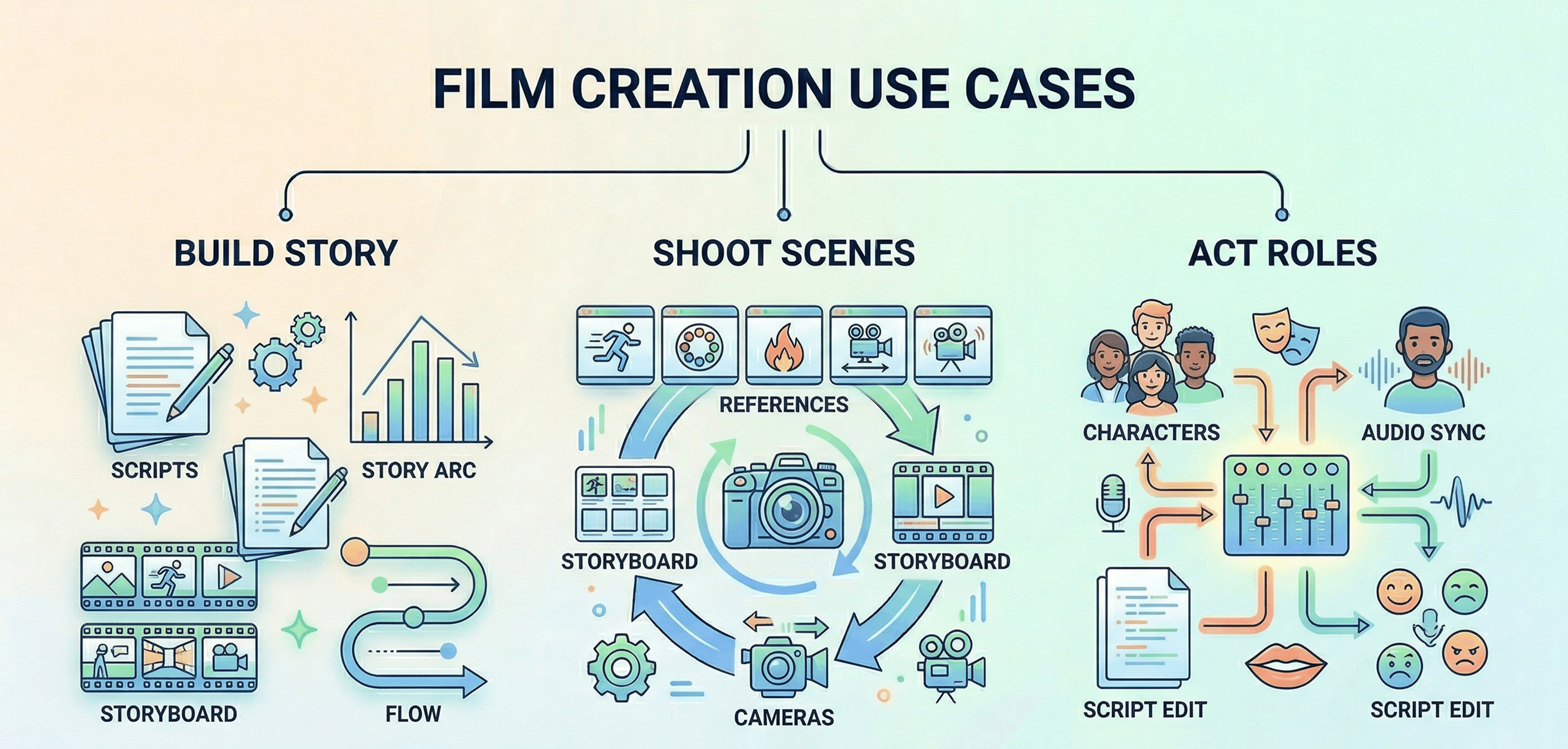
1. ストーリーの構築:インテリジェントなプロット設計 + ストーリー継続
インテリジェントなプロット設計
Wan 2.7は膨大な数のプロ脚本を学習しており、ドラマ構成のルールを習得しています。明確なストーリー展開や、クリエイティブなカメラワークを盛り込んだ詳細な絵コンテ脚本を生成し、インスピレーションを即座に素晴らしいストーリーへと昇華させます。
ストーリー継続
Wan 2.7は動画の継続性と終了フレームの制御に最適化されており、動画のダイナミクスを自然な流れでシームレスに延長します。
FfpLbIFouB0
2. シーンの撮影:アクションとスタイルの参照 + マルチフレーム絵コンテ + カメラトランジションとアングル調整
アクションとスタイルの参照
アクション、カメラワーク、特殊効果など、ダイナミックな動画コンセプトを素早く再現し、参照ベースの効率的な制作を実現します!
マルチフレーム参照
Wan 2.7はマルチフレームの絵コンテ参照に最適化されており、プロットの展開を正確に追跡可能です。
カメラトランジションとアングル調整
アングル、ショットサイズ、焦点距離などのカメラ設定を自在に調整できます。ドリー、ズーム、パン、チルトといった滑らかな動きに対応しています。ヒッチコックズームや手持ちカメラのような高度なテクニックも難なくこなします。
mWMAAo1UeSA
3. キャラクターの演技:脚本の調整 + キャラクター制御 + 音声と映像の同期
脚本の調整
キャラクターのセリフ修正をサポートし、感情、口の動き、新しいセリフを自動的にマッチングさせつつ、声のトーンを維持します。
キャラクター制御
最大5人のメインキャラクターをアップロードでき、マルチカメラ環境でも一貫した特徴を維持します。40種類以上の詳細な表情に対応しています。
音声と映像の同期
各キャラクターにユニークな声を設定でき、より正確なセリフ生成と鮮明なボイスパフォーマンスを実現します。
df-jzL0V53s
なぜAtlas CloudでWan 2.7を使うべきなのか?
Atlas Cloudとは?
テキスト、画像、動画など300以上のトップクラスのAIモデルに一括アクセスできる、AIをシンプルにするプラットフォームです。
ターゲット層
• 簡単で手頃な価格でAIを利用したい開発者。 • 複数の領域でAIを必要とするプロジェクトを担当するチーム。 • 重要な業務に信頼できるAIを必要とする企業。 • ComfyUI や n8n などのツールを利用するユーザー。
選ばれる理由
• 1つのAPIで全て利用可能—鍵は1つだけ。 • 明確な料金体系、追加費用なしの低コスト。 • エンタープライズ仕様:安定性、セキュリティ、専門家によるサポート。 • 既存のツールと連携可能。 • データの安全性とコンプライアンスを遵守。
競合比較
• Fal.ai:Atlasはより多くのモデルと優れた価格設定を提供。 • Wavespeed:Atlasはより安価で、エンタープライズサポートも込み。 • Kie.ai:Atlasは料金がより明確で、選択肢も豊富。 • Replicate:ライブラリが小さく、コストも高め。 • その他(OpenAI等):Atlasはすべてを1つのシンプルなプラットフォームに統合。
Atlas CloudでWan 2.7を使用する方法
Atlas Cloudなら、複数のモデルを並行して試用可能。まずはPlaygroundでテストし、その後単一のAPIで呼び出せます。
方法1:Atlas Cloud Playgroundで直接使用する
方法2:API経由でアクセスする
ステップ1:APIキーを取得する
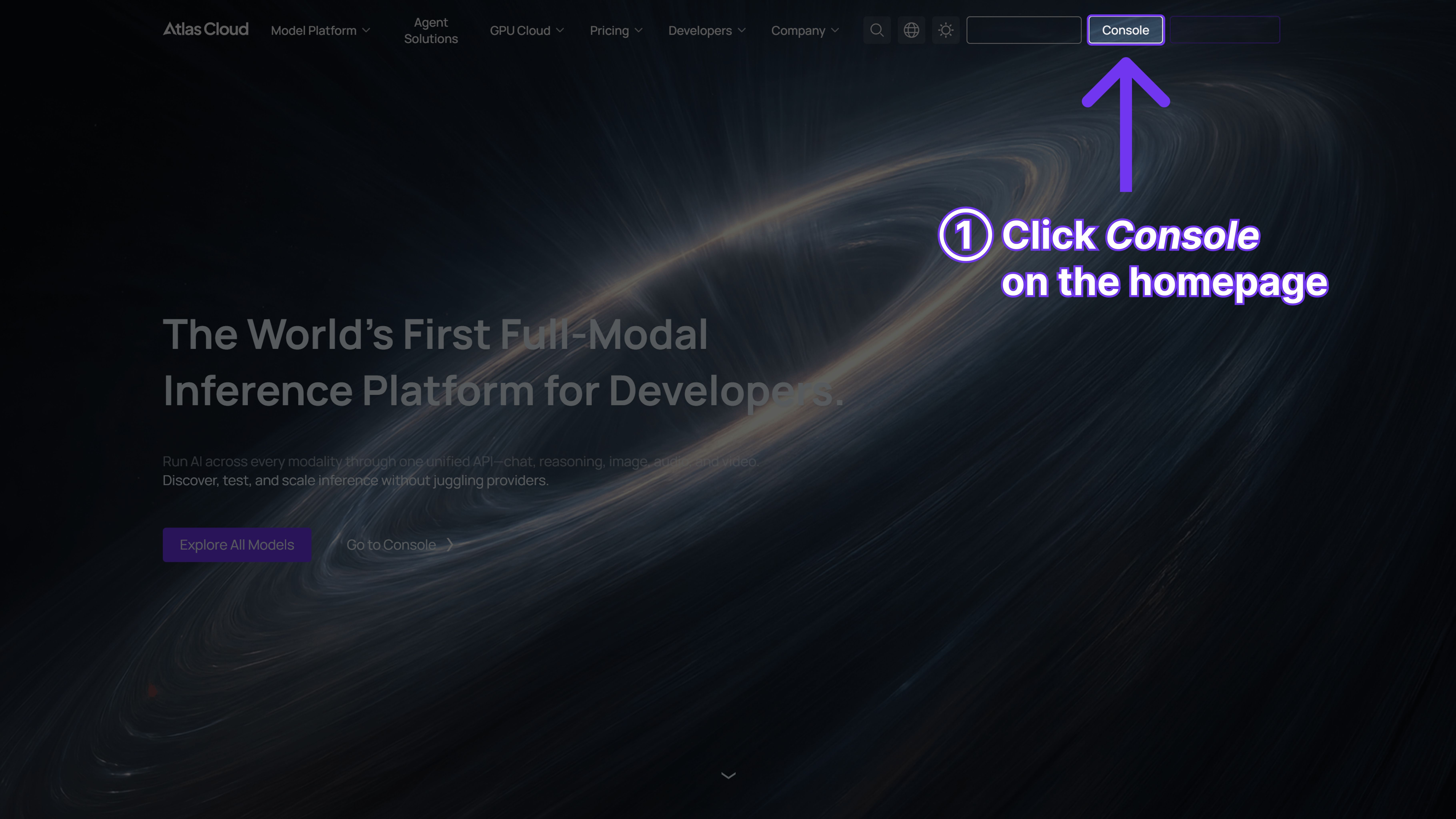
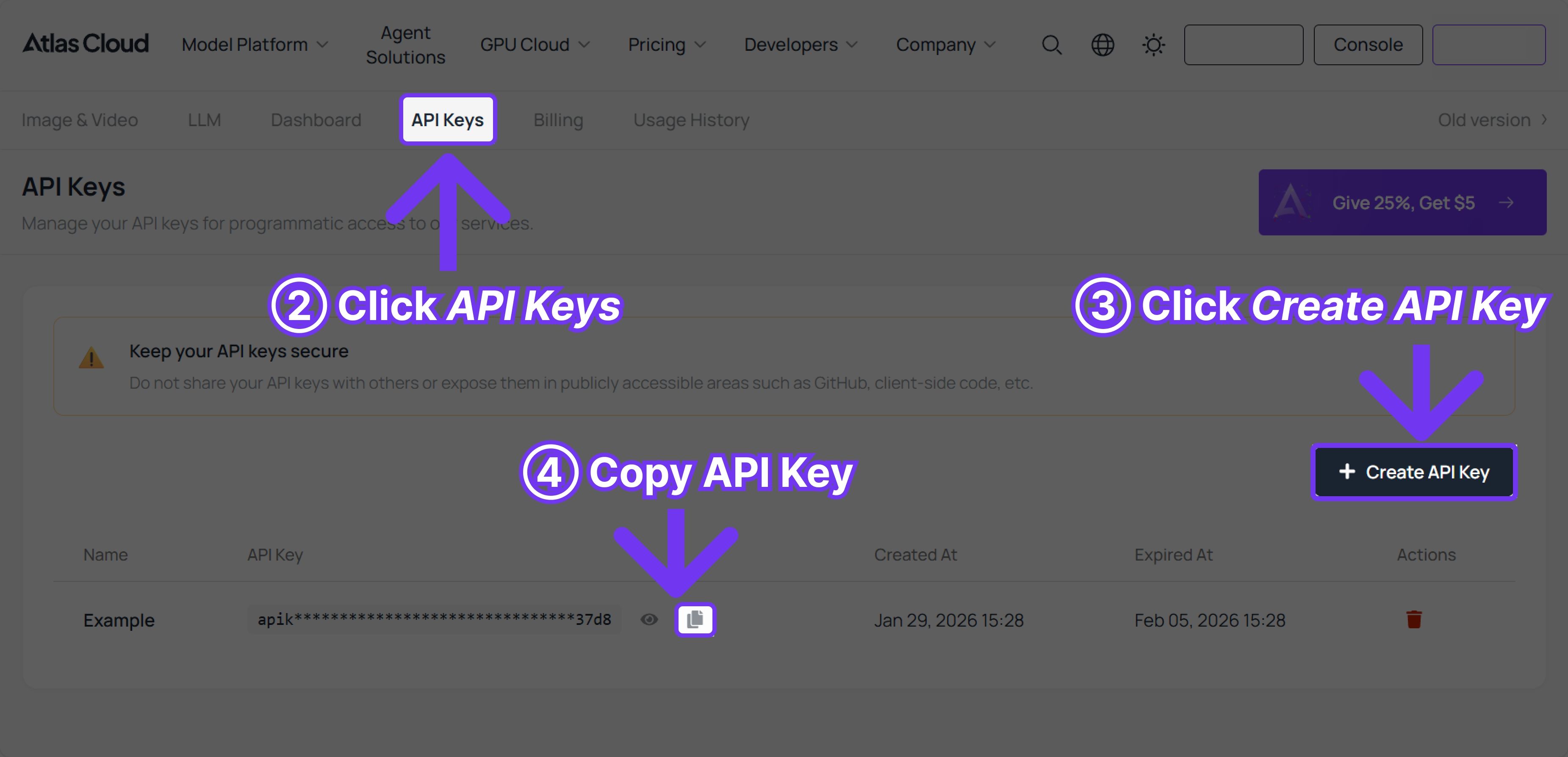
コンソールからAPIキーを作成し、コピーしておきます。
ステップ2:APIドキュメントを確認する
エンドポイント、リクエストパラメータ、認証方法については、APIドキュメントをご覧ください。
ステップ3:最初のリクエストを送る(Pythonの例)
例:Wan 2.7 (テキストから動画)を使用して動画を生成する
FAQ
Q:リップシンクに自分の音声を使えますか?
はい!WAVまたはMP3ファイル(2〜30秒、最大15MB)をアップロードしてください。音声がない場合でも、モデルが背景音楽を作成してくれます。
Q:同じキャラクターを複数の動画で使用するには?
wan-2.7-r2vモデルにお任せください。1〜5枚の参考画像または動画をアップロードし、プロンプト内で「Image 1」や「Video 1」と指定するだけです。
Q:動画の長さはどれくらいまで生成できますか?
t2v(テキストから動画)とi2v(画像から動画)は2〜15秒、v2v(動画から動画)は2〜10秒です。
Q:カメラアングルはどのように制御しますか?
タイムスタンプ付きのカジュアルな記述で指示できます:「ショット1 [0-3秒] ワイドアングル。ショット2 [3-6秒] クローズアップ。」
Q:動画の特定の部分を調整できますか?
もちろんです。wan-2.7-video editを使用し、「車を消して」、「空を夕焼けにして」のように指示を出すだけです。
Q:無料トライアルはありますか?
はい、新しいAtlas Cloudアカウントには、試用目的でUSD1分が付与されます。







