AI video generator scene had changed fast by early 2026. Many early tools now require paid subs or have shut down entirely. Smart creators are moving to better alternatives and platforms that offer everything in one place.
If you only have 30 seconds, here is the current leaderboard for free-tier excellence:
| Category | Winner | Key Strength |
| Best for Realism | Vidu Q2 | Unmatched facial consistency and cinematic micro-expressions. |
| Best for Social Media | Wan 2.2 | Cinematic 4K upscaling and native mobile aspect ratios. |
| Best for Physics | Kling Video O3 | Realistic fluid dynamics (water/smoke) and native audio-visual sync. |
The "Pro" Loophole: Aggregator Platforms
The secret to maximizing your output without a subscription lies in aggregators. Instead of managing multiple accounts, use these hubs:
- Atlas Cloud: The gold standard for professional batching. It provides a unified API to run Kling and Wan simultaneously—perfect for scaling content.
- LMArena: Ideal for casual users. You can access top-tier models for free daily by participating in "blind tests" and voting on output quality.
- WaveSpeed: Best for power users needing side-by-side comparisons of different model iterations in one interface.
The New Titans: Top-Tier Free Access Models
In 2026, finding a solid AI video maker isn't just for fun anymore; it’s about getting actual results. A lot of the first apps out there started locking their doors or charging too much. Now, three "Titans" are leading the pack. They give creators professional tools and great visuals without the huge price tag you'd expect.
Kling Video O3: The Physics King
Kling Video O3 has quickly become the best image to video AI for high motion due to its revolutionary "Omni-style" control. Unlike previous iterations that struggled with complex movements, the O3 model excels at fluid dynamics—think splashing water or flowing fabric—with incredible accuracy.
Kling VIDEO 3.0 Omni Capabilities Upgrade:
| Capabilities | Kling VIDEO O1 | Kling VIDEO 3.0 Omni |
| Text-to-Video | No Native Audio, No Multi-shot | ✅ Supports Native Audio and Multi-shot |
| Image-to-Video | No Native Audio, No Multi-shot | ✅ Supports Native Audio and Multi-shot |
| Start & End Frames-to-Video | No Native Audio, No Multi-shot | ✅ Supports Native Audio and Multi-shot |
| Multi-image Reference | No Native Audio, No Multi-shot | ✅ Supports Native Audio and Multi-shot |
| Element Reference | No Native Audio, No Multi-shot | ✅ Supports Native Audio and Multi-shot |
| Video Element Reference | Not supported | ✅ Supports uploading/recording video elements |
| Added Element Voice Control | Not supported | ✅ Supports adding voice to elements |
| Video Duration | Up to 10s | ✅ Up to 15s |
Its best part is how the sound and video sync up perfectly. You won't find those glitchy, robotic audio lags that used to be a big problem. You can even plan out several shots at once. This keeps your whole story looking smooth and consistent from the first frame to the last.
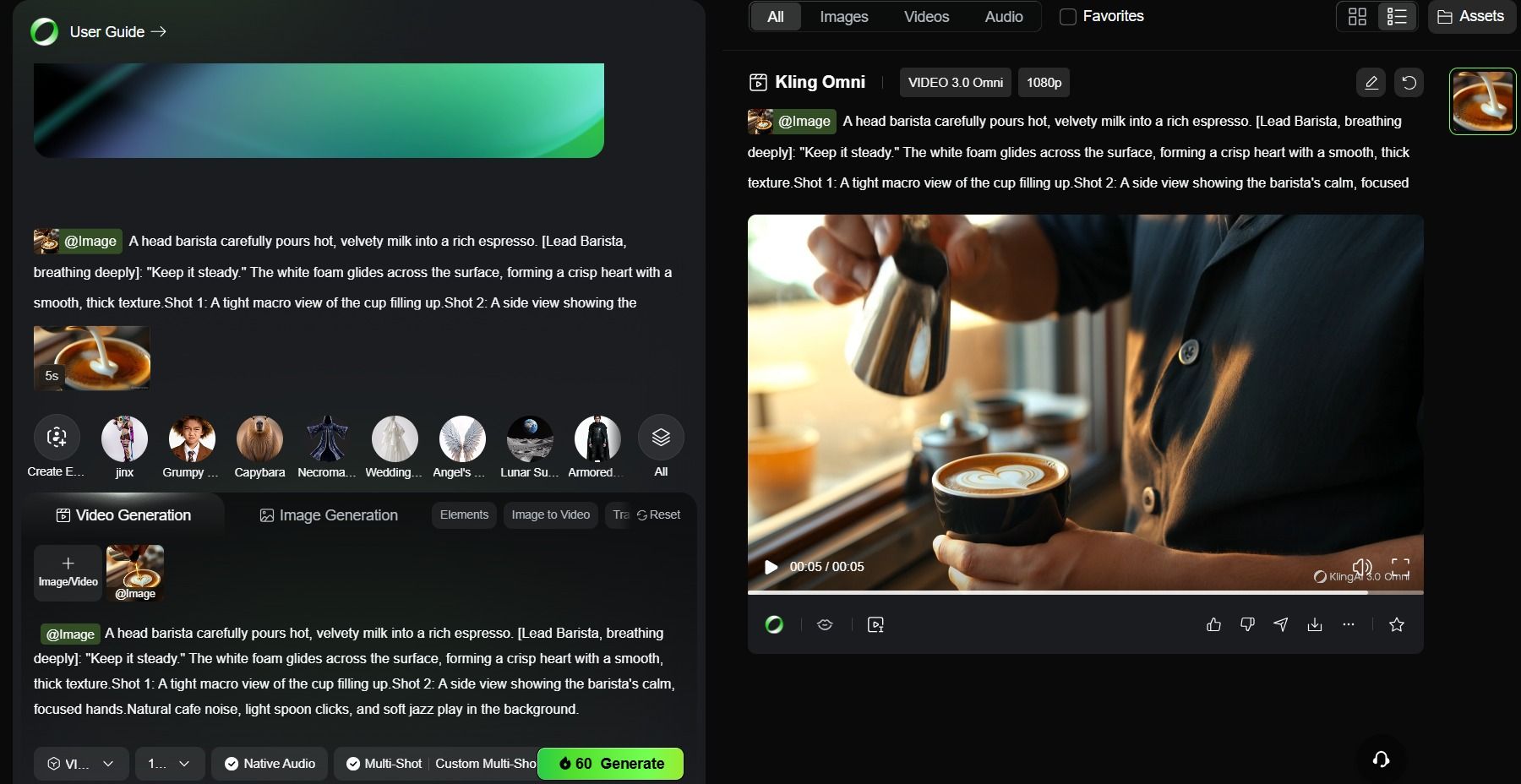
- Free Tier: You can try Kling by using daily credits. It’s good for playing around with the tech. A short, 5-second video in 1080p uses up 60 credits. Basically, that means you get to make just one free video each day.
-
Video Evaluation: Kling Video O3 Analysis:
- The "Swirl" Look: The way the white foam hits the espresso and grows into a heart looks totally real. The liquid feels thick and natural. It lacks the strange, glossy "mercury" appearance that previous AI tools produced.
- Surface Tension: Check out the tiny bubbles around the cup's edge. They move naturally as the milk pours in. They don't just blink out or glitch like you might expect.
- Lighting: That warm "Golden Hour" glow stays the same. You can actually see the light bounce off the metal pitcher and the cup rim. It looks right in every single shot.
- Audio-Visual Synchronization: The synchronized "Steady now" voiceover and the subtle background cafe clinking are perfectly timed. The audio doesn't feel like an overlay; it feels spatially anchored to the scene.
Vidu Q2: The "Actor" Model
If your project relies on human emotion, Vidu Q2 is arguably the most realistic AI video generator free of charge for trial users. It specializes in "Micro-expressions" and "Identity Lock," solving the age-old problem of characters changing appearance between shots. This precision makes it the highest-rated model for character consistency in 2026.
For those wondering how to get free AI video no watermark, Vidu Q2 offers a compelling entry point. While high-resolution exports typically require a subscription, their trial tier allows for watermark-free low-res exports, which are perfect for testing social media concepts or storyboards.
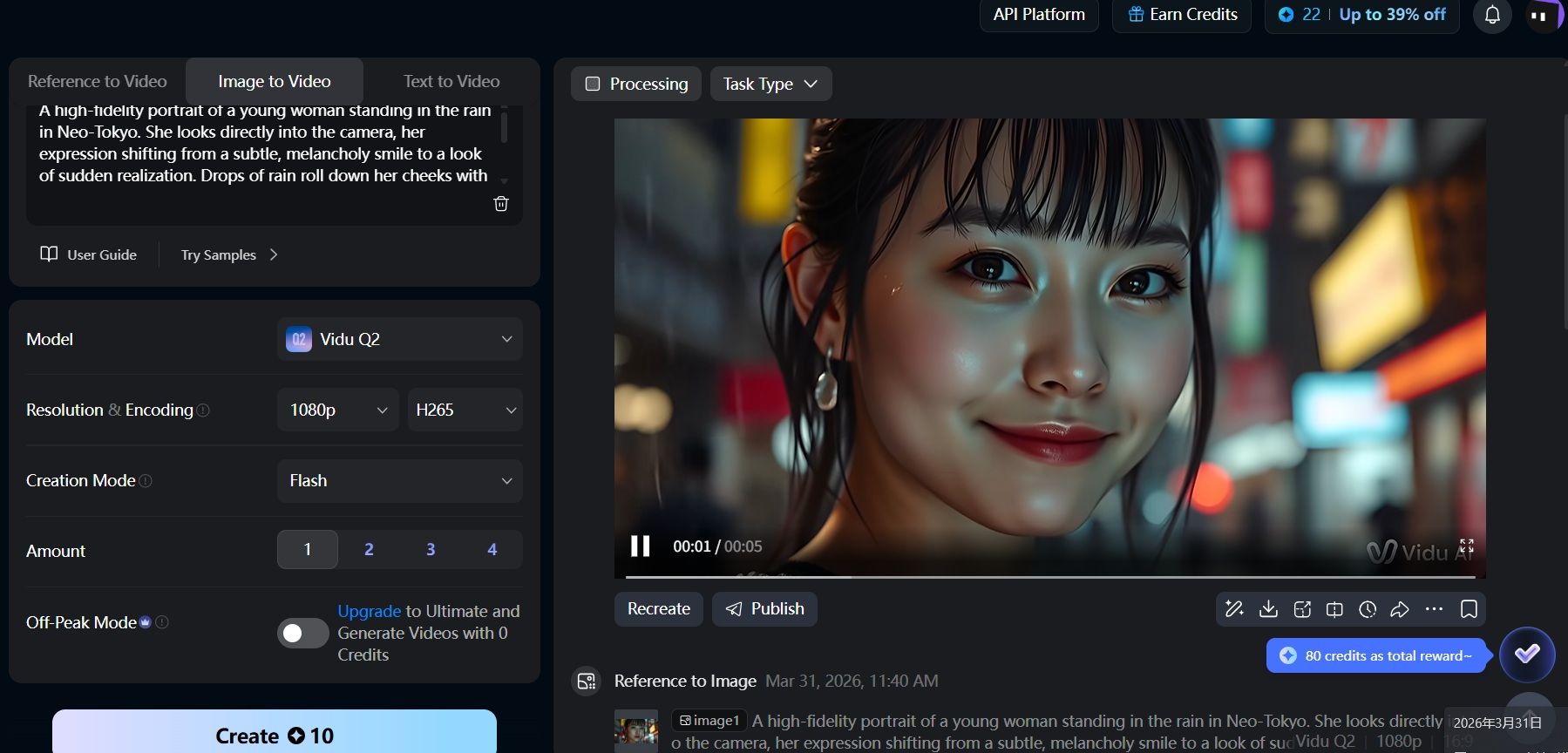
- Free Tier: New users receive trial credits, with a specific focus on "Reference-to-Video" features that maintain character integrity. Generating a 5-second, 1080p video using Vidu Q2 requires 10 credits.
-
Video Evaluation: Vidu Q2 Analysis:
- Micro-expressions: The transition from a subtle, soulful gaze to a faint, melancholy smile is handled with incredible nuance. Unlike earlier models that "morph" the face during transitions, Vidu Q2 moves the underlying muscular structure realistically.
- Skin Texture & Lighting: The "wet skin" effect from the rain is rendered with 10-bit precision. You can see individual droplets catching the neon bokeh lights.
- Blink Logic: The blinking is natural and doesn't cause any "eye-jitter" or change in iris color, which was a common flaw in previous generations.
- Hair Fidelity: Even with the high-contrast lighting of Neo-Tokyo in the background, the fine strands of hair remain stable without "shimmering" or disappearing into the background noise.
Wan 2.2: The Cinematic Specialist
Wan 2.2 also integrates 4K upscaling directly into its workflow. While many platforms require a sign-up to save progress, you can often find image to video AI free no sign up instances of Wan 2.2 hosted on community spaces like HuggingFace, allowing for quick, anonymous testing of its powerful 1.3B and 14B parameter models.
- Free Tier: Log in daily and click "Check In" to earn 10 credits. Using free credits allows you to generate only one 5-second, 480p/720p video, requiring 5 credits.
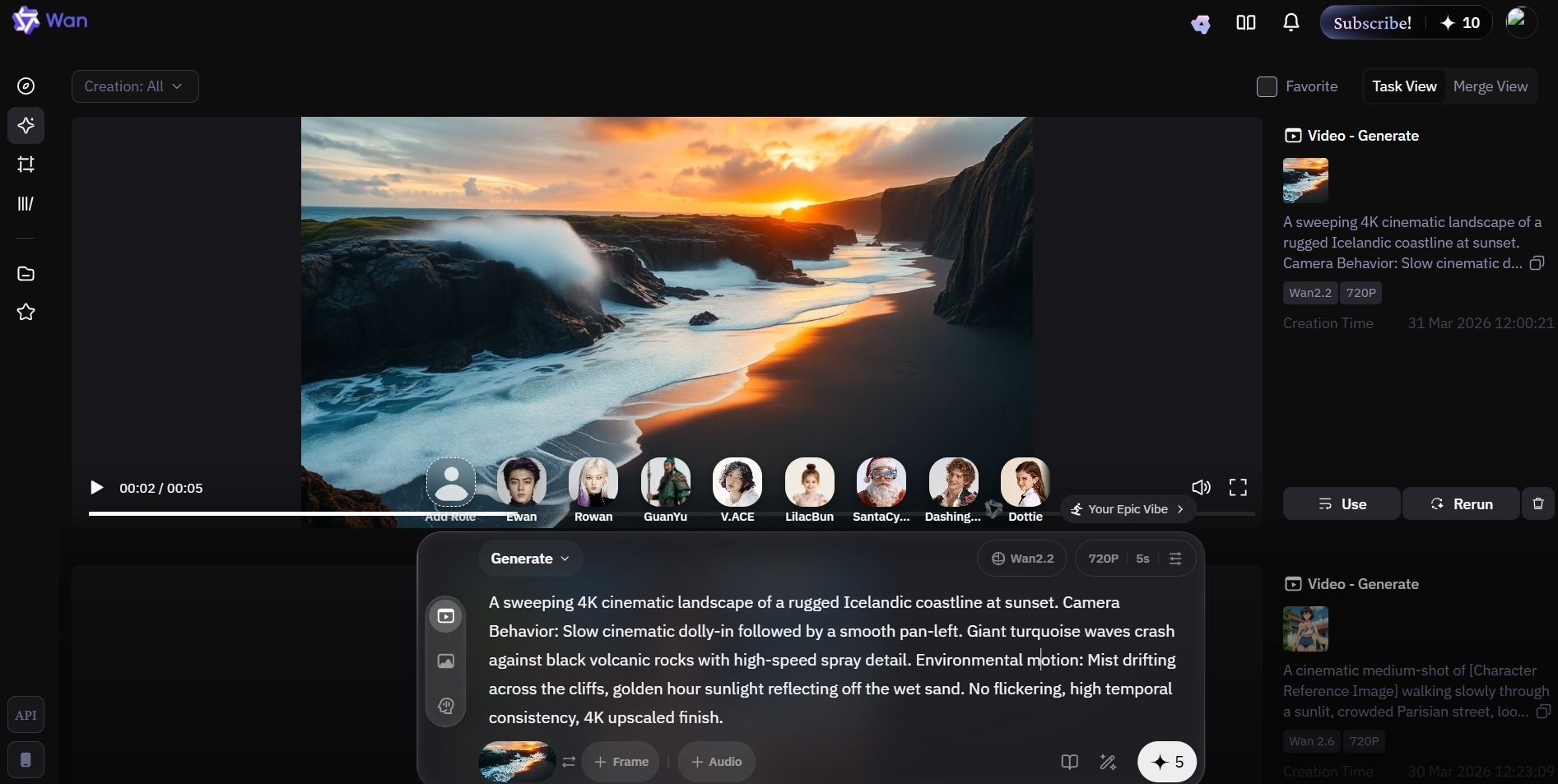
- Video Evaluation: wan 2.2 Analysis:
- Dynamic Range: The slow, cinematic zoom feels smooth and professional. Other models might warp the horizon, but Wan 2.2 keeps the 3D space stable. It feels just like you are flying a high-end drone through the scene.
- Temporal Stability: Waves hitting the black rocks don't flicker or vanish. The mist moving over the cliffs stays the same for the whole five seconds. This kind of consistency is a must for high-quality video standards.
- Golden Hour Accuracy: Wan 2.2 is great with reflections on moving water. These bright highlights look real and not fake. It gives the whole shot a natural look that feels grounded in reality.
- Fluid Physics: While Kling O3 might be the "Physics King," Wan 2.2 holds its own here. The spray detail from the waves hitting the rocks is fine and granular, avoiding the "blocky" artifacts often seen in lower-tier ai video generators.
Using these three tools lets creators mix real movement, deep feelings, and a movie-like style for cheap. It doesn't matter if you're making a brand or a short movie. These big players show just how good free AI can be right now.
Feature Comparison: Physics vs. Aesthetics
Choosing the right ai video generator often comes down to a trade-off between raw physical accuracy and cinematic beauty. As of March 2026, the market has bifurcated: some models prioritize "World Simulation" (physics), while others focus on high-fidelity "VFX".
The following table highlights the capabilities of top models available on free or trial tiers. For creators asking how to get free AI video no watermark, note that videos exported using free credits all have watermarks.
| Feature | Kling Video O3 | Vidu Q2 | Wan 2.2 |
|---|---|---|---|
| Free Credit Policy | new user can get 66 credits | 80 monthly credits (reset monthly) or 7-day trials. | 10 daily credits via check-ins (varies by platform). |
| Best For... | Physics & Realism. Complex interactions like liquids, hair, and fabric. | Character Consistency. Maintaining facial identity and "acting" quality. | Cinematic Scope. Large-scale landscapes and dramatic camera moves. |
| Key Strength | Native audio-visual sync and multi-shot storyboarding. | "Identity Lock" for professional-grade character stability. | 4K upscaling integration and precise camera controls (Dolly/Pan). |
| Target Audience | Technical creators, product videographers, and physics-heavy animators. | Social media influencers, digital humans, and storyboard artists. | Indie filmmakers, landscape photographers, and 4K enthusiasts. |
| Max Free Output | 720p/1080p (limits apply) / 3-15 seconds with watermark. | 1080p / 5 seconds with watermark. | 480p/720p 5 seconds with watermark. |
If you need the highest resolution free AI video, Kling Video O3 and Vidu Q2 are the clear winners with their integrated 1080p. However, for an AI video generator with audio free of sync issues, Kling Video O3’s "Native Audio" remains the gold standard for 2026.
Workflow Strategy: How to "Stack" Free Tiers
To achieve professional results without a subscription, pro creators use a "Zero-Dollar Pipeline." This method allows you to get the most realistic AI video generator free of the usual limitations by combining the strengths of different platforms.
The "Zero-Dollar" Pipeline: A Professional Workflow for 2026
While a single subscription might cost $30–$50 per month, the "Zero-Dollar Pipeline" leverages the daily refresh cycles of high-end models to produce studio-quality content for free. By treating each AI as a specialized department—Physics, Character, and Cinematography—you can bypass the limitations of a single free tier.
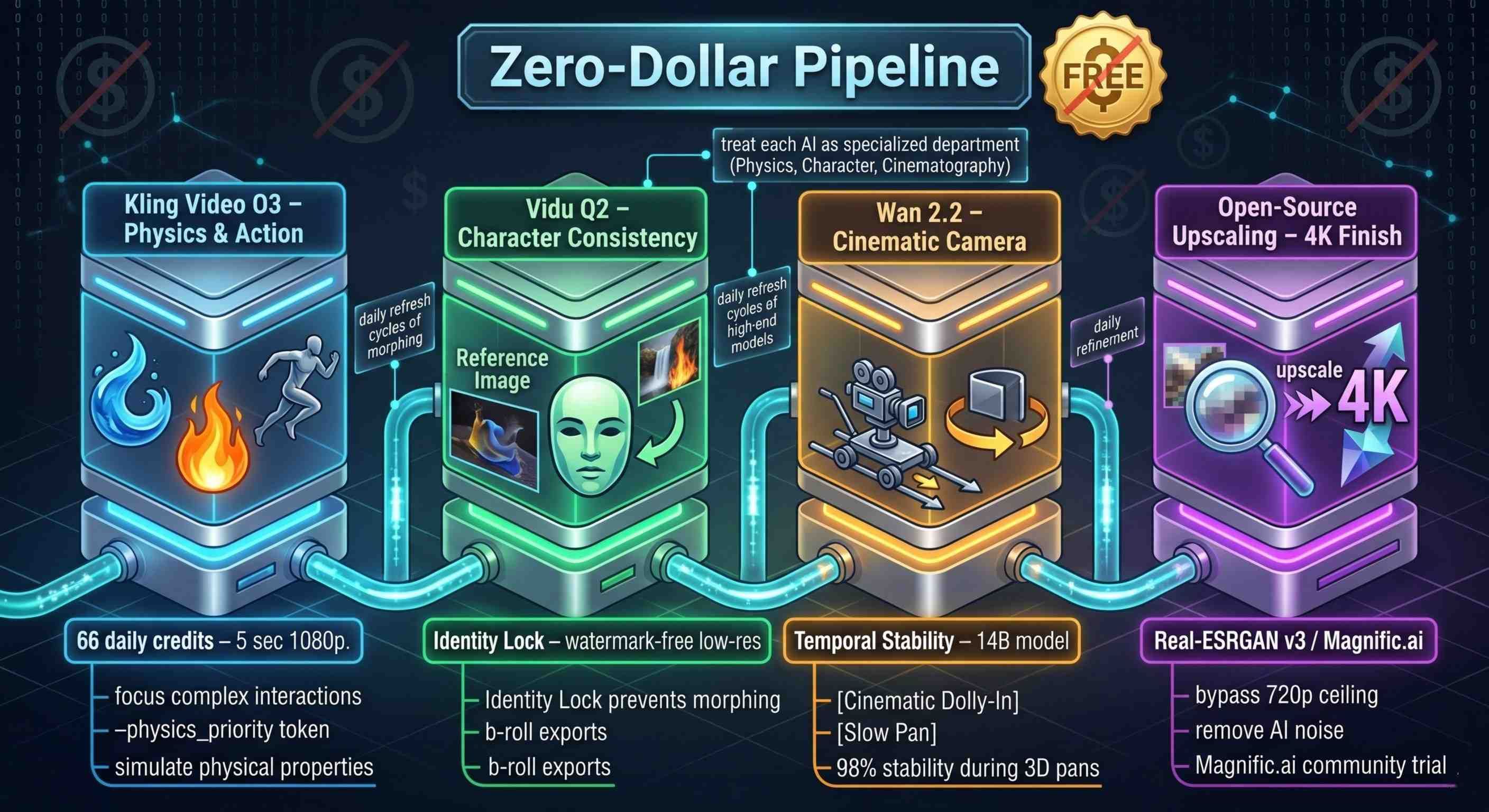
Step 1: Core Action & Physics (Kling Video O3)
Start your project with Kling Video O3 via the Kuaishou ecosystem. Because Kling currently offers 66 daily credits (with 60 required for a high-fidelity 5-second 1080p clip), this is your "One Shot" at the most difficult part of your video: the movement.
- The Strategy: Use Kling for complex interactions—liquids, fire, or intricate human motion.
- Pro Tip: Use the --physics_priority token in your prompt to ensure the O3 engine allocates its 14B parameters toward fluid dynamics rather than background textures.
Step 2: Character Consistency & Refinement (Vidu Q2)
If your scene requires a consistent human face, take a screenshot of your best frame from the Kling output and upload it to Vidu Q2 as a "Reference Image."
- The Strategy: Use Vidu’s Identity Lock feature to "anchor" the character. This prevents the "morphing" effect often seen when switching between different AI models.
- The Hack: Vidu’s trial tier allows for watermark-free low-res exports. These are perfect for "B-roll" or quick cuts where 4K isn't immediately necessary.
Step 3: Cinematic Expansion & Camera Control (Wan 2.2)
Now, take your base clip to Wan 2.2 (hosted on community spaces like HuggingFace to avoid sign-up queues). Wan excels at "Temporal Stability," meaning the background won't flicker as the camera moves.
- The Strategy: Apply the [Cinematic Dolly-In] or [Slow Pan] tags to add professional camera movement to your static or jittery Kling clips.
- Technical Spec: Wan 2.2’s 14B model maintains 98% architectural stability during 3D pans, making it the best tool for environmental shots.
Step 4: The Final Polish (Open-Source Upscaling)
The biggest hurdle of free tiers is the "720p ceiling." To reach 4K without a credit card, you must move the workflow off-platform.
- The Strategy: Use Magnific.ai’s community trial or a self-hosted Real-ESRGAN v3 (available via GitHub/HuggingFace).
- The Result: This removes "AI noise" and "blocky artifacts," giving you a clean, professional finish that is ready for YouTube monetization.
2026 Prompt Engineering Cheat Sheet
To save credits, use these "Model-Specific" tokens:
- For Kling: Use --physics_priority for liquids/fabrics.
- For Wan: Include [Cinematic Dolly-In] for smooth camera moves.
- For Vidu: Use (Identity_Lock: Character_Name) to maintain consistency across shots.
The 2026 Daily Credit Strategy
| Platform | Free Allowance | Best Used For | Watermark? |
|---|---|---|---|
| Kling AI | 66 Credits | High-motion Physics | Yes |
| Wan 2.2 | 10 Credits/daily | Cinematic Camera Moves | Yes |
| Vidu Q2 | 20 Credits ( can earn extra 80 credits) | Character Consistency | Yes |
Pro Tip: To really get this process down, make sure you create your "Subject" first in Step 1. Then, set up your "Atmosphere" and camera work in Step 3. Swapping these steps is the biggest mistake new users are making this year.
The Rise of the Aggregators: How to Use Every Model
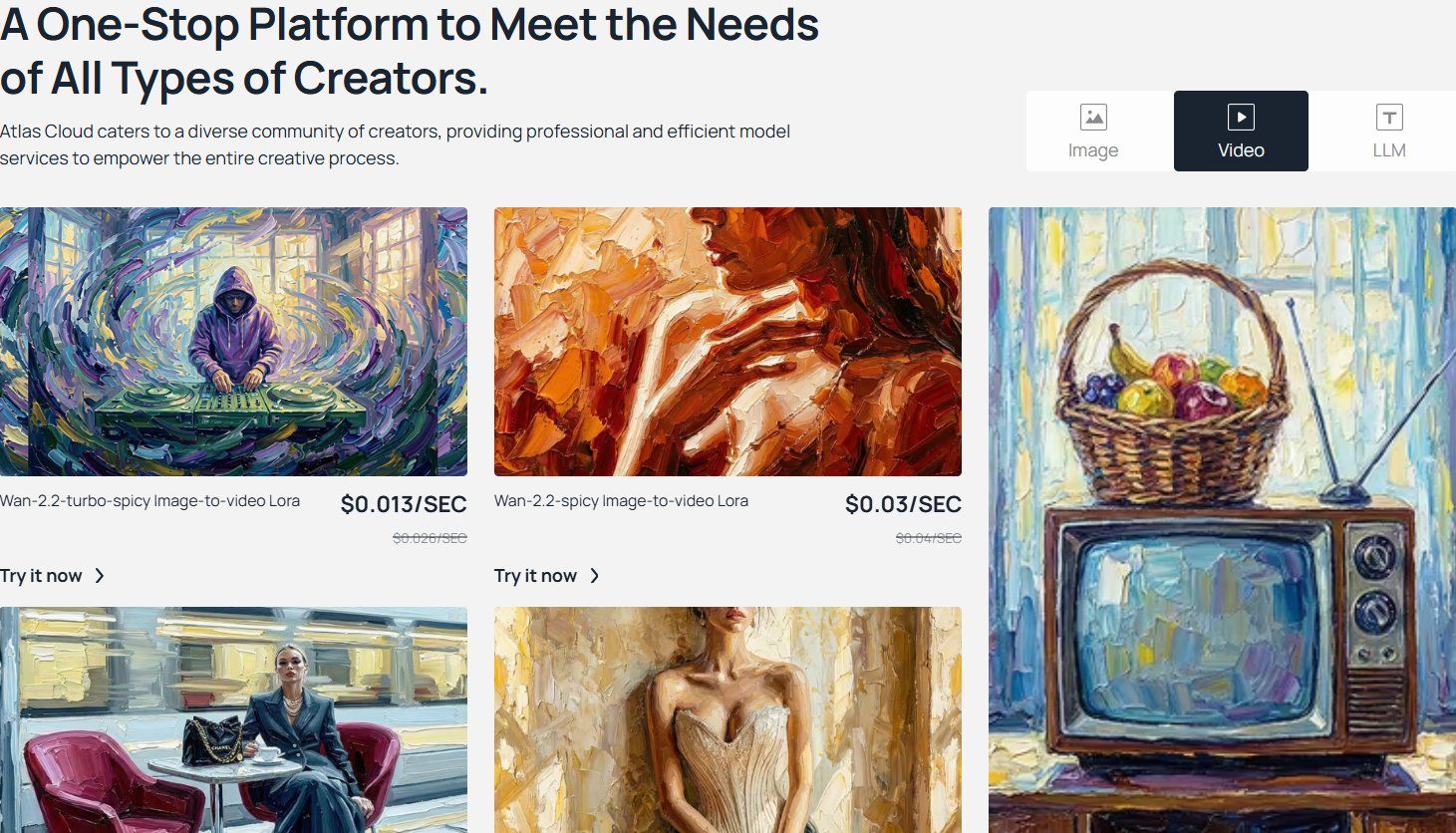
For those searching for the most realistic AI video generator free of fragmented logins, aggregator platforms are the ultimate "pro loophole." These hubs allow you to access heavy hitters like Kling Video O3, Vidu Q2, and Wan 2.2 through a single interface, often providing the highest resolution free AI video outputs by leveraging their massive server clusters.
| Platform | Best For... | Key Strength | Weakness |
|---|---|---|---|
| Atlas Cloud | Enterprises & Devs | Unified API for Kling, Vidu, and Wan; pay-per-second pricing. | Steeper learning curve for non-technical users. |
| WaveSpeed | Power Users | Offers high-speed rendering and a "Multi-Model Studio" to compare outputs side-by-side. | Monthly subscription required for 4K. |
| LMArena | Casual Testers | Completely free "Blind Tests" where you can generate video for free by voting on quality. | No control over which model you get to use. |
For developers, Atlas Cloud is the gold standard, offering a programmatic way to generate AI video generator with audio free of manual oversight. Meanwhile, WaveSpeed remains the best text to video AI for high motion testing, as its "Multi-Model Studio" lets you see exactly how different engines handle complex physics in real-time.
If you are looking for an image to video AI free no sign up experience, LMArena is a unique gem. By participating in their community "Blind Battles," you can generate clips from frontier models—sometimes even unreleased versions—for free just by voting on which result looks best. This crowdsourced approach is a top-tier AI animation generator free 2026 strategy for hobbyists. To find out how to get free AI video no watermark, many users "stack" these aggregator trials to find the cleanest output for their specific project needs.
FAQ
Which AI video generator has no watermark for free?
In 2026, big names like Kling and Wan use watermarks to push people toward paid plans. If you want clean videos without paying for a subscription, Magic Hour and Pika 2.5 are your best bets. Magic Hour gives you a solid 400 credits to start that never expire and have no watermarks. Meanwhile, Pika gives out 80 credits every month for clips that are ready for social media.
Can I use AI-generated video for YouTube monetization in 2026?
Yes, but it's not totally simple. YouTube’s 2026 rules say your stuff has to show some "original creative value" to get paid. If you just dump raw AI clips onto your channel, they'll likely flag it as repetitive content. To actually monetize, you need to weave those AI bits into a real story. Use your own scripts, do some unique editing, or add a personal voiceover to make it stand out.
Why did Sora go offline and what should I use instead?
OpenAI officially moved Sora into a "Sunset Phase" on March 24, 2026, citing a massive pivot toward the Vera Rubin agentic platform and the need to reallocate GPU resources to GPT-5.2. For those left in the lurch, the industry standard has shifted to Kling Video O3 for physics-based realism and Vidu Q3 for multi-shot narrative consistency.
Which aggregator provides the most free daily credits?
For daily power users, Kling AI remains the leader with 66 free credits, sufficient to support only one high-quality O3 generation; please use them with caution. However, for a unified experience, Atlas Cloud is the top-rated aggregator, offering a "pay-per-second" model that allows you to test Kling, Vidu, and Wan side-by-side using a single shared credit pool—ideal for professional batching.







