A developer at a bright home workstation with two monitors, plugin install logs scrolling in a terminal on the left screen and a grid of plugin cards refreshing on the right
Seven plugins, one provider block, and a profile you actually understand. That is the whole setup.
On August 13, 2026, DeepSeek open-sourced its agent harness. It hit roughly 50,000 GitHub stars in about twelve hours and around 92,000 by hour 28 (Justin3go, August 2026). Four days later the repo sits at 144.4k stars and 14.7k forks (GitHub, August 2026).
Your timeline is now wall-to-wall dsh-* repos. Themes, voice input, Pomodoro timers, a whale arcade game for when the agent is thinking. The curated community list is past 1,100 entries.
Then you look at your API usage page.
This is not another plugin directory. It is the seven pieces that make dsh something you can leave running for a whole afternoon, plus one configuration layer that almost nobody puts on their plugin list, even though it decides whether the other six stay affordable.
Key takeaways
dshis MIT-licensed and explicitly a developer preview. The README's own words: "THERE WILL BE COMPATIBILITY-BREAKING CHANGES."- "Everything is a plugin" includes the model layer itself. That is the most underrated consequence of the architecture.
- Plugin count is not plugin quality. One reviewer found 41 compatible integrations against 219 flagged for attention, and all 5 third-party tools they tried failed outright.
- Learn what a profile is before you install anything, or you will install into one profile, run another, and wonder why nothing appeared.
dshis a heavy context consumer by design, and DeepSeek's own API now bills by time of day. Your provider config is a load-bearing part of the setup.
Two cost meter panels side by side for a single 47.6K-input turn, the first-party API at its peak rate next to a fixed-rate endpoint, each showing input, output and the per-turn total
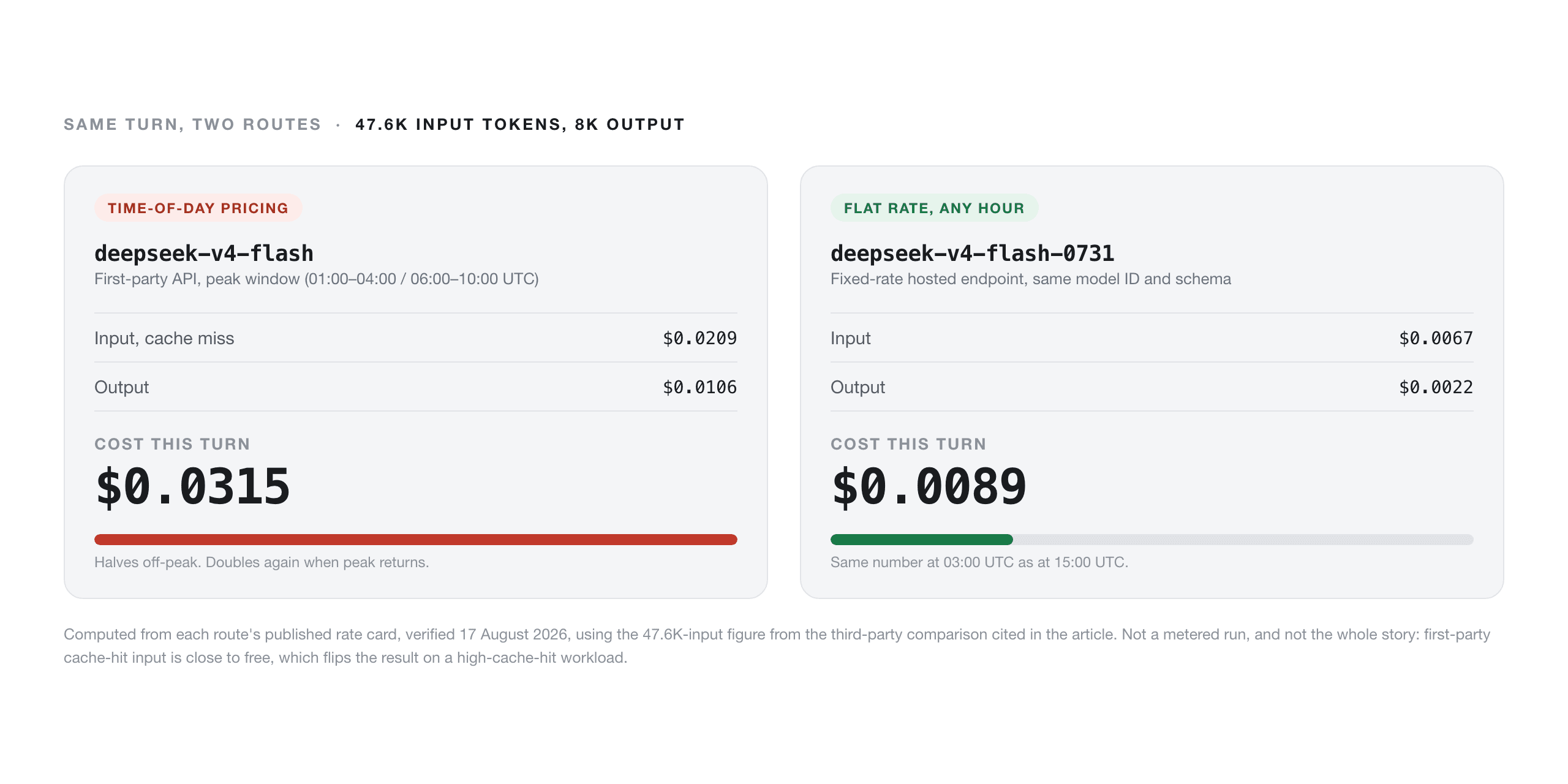
The payoff of this whole setup: one turn of agent work, priced two ways, in a panel you can actually read. Figures computed from each route's published rate card as of August 17, 2026, not from a metered run.
Why DeepSeek Harness Plugins Exploded, and Why Most of Them Break
The growth is real and the fragility is also real. Over 2,000 plugin submissions landed within two days of launch (Justin3go, August 2026), and the community list now counts more than 1,100 installable plugins across fourteen categories.
What makes this different from a normal extension API is how deep the seam goes. DeepSeek's design principle covers "models, tools, skills, sessions, sandboxes, filesystems, loops, orchestration, and UI components" that can be "mixed, matched, replaced, and extended" (The Register, August 2026). The harness is built on the Cordis kernel, a plugin registers what it does through an apply(ctx) function that cleans up when unloaded, and the agent loop itself is swappable. So is the model provider.
Armin Ronacher, quoted in the same piece, put the appeal well: "I don't think the DeepSeek Harness is perfect but this is for sure the first time I have been looking at something new in the space and felt quite inspired to revisit some of our choices."
Now the cold water. The official compatibility list showed 41 compatible integrations against 219 flagged as needing attention, and in hands-on testing "all 5 third-party tools it tried failed outright" (Justin3go, August 2026). The harness README does not hide this either. It is a developer preview, "iterating rapidly," with breaking changes promised in capital letters.
So the sane strategy is not "install thirty plugins." It is to install a small number that solve real operational problems, in an order where each one makes the next one safer.
How DeepSeek Harness Plugins Fit Together: Profiles, Bundles, and the Model Layer
Three concepts explain almost every "it installed but nothing happened" post you will read.
Profiles. A profile is a named, self-contained composition of plugins and config. dsh ships templates that auto-initialize on first use, including web (what dsh web starts) and headless, with dsh-base, dsh-web-app and dsh-headless available as bundle sources. Plugins install into a profile. Install into the wrong one and the plugin is genuinely there, just not in the thing you are running.
Bundles. Every installable plugin declares a dsh.bundle manifest. That manifest is what makes it discoverable by the plugin command and by the community list, which only accepts entries installable via dsh plugin add.
The model layer. Under llm-pi-ai, providers are just config. Here is the shape straight from the docs:
yaml1llm-pi-ai: 2 providers: 3 my-gateway: 4 apiKeyEnv: GATEWAY_API_KEY 5 api: openai-completions 6 baseURL: https://gateway.example/v1 7 models: 8 - id: legacy-chat 9 - id: vision-preview 10 input: [text, image] 11
That is the whole mechanism. Set api: openai-completions plus a baseURL and you are pointed at anything that speaks the OpenAI Chat Completions protocol. Keys live separately in $DSH_HOME/.credentials.yaml and stay write-only, so settings.yaml holds a reference and never the literal secret.
The DeepSeek Harness Plugins Layer Nobody Puts on Their List
Scroll any plugin directory and you will find themes, panels, memory systems, notification bridges. What you will not find near the top is the provider block, because it is not a plugin you install. It is nine lines of YAML you write once.
It matters because of arithmetic. dsh records everything the model sees in an append-only session log, injects context aggressively, and schedules subagents. That design has a token cost. In one preliminary comparison on the same model, Pi's uncached input measured around 4.5K tokens against roughly 47.6K for dsh, "a difference of an order of magnitude." The reviewer flagged confounding factors and noted dsh was in preview, and separately confirmed a real bug where dsh reads both CLAUDE.md and AGENTS.md and doubles the system prompt when their contents match (Justin3go, August 2026). Treat that as one person's early measurement, not a settled fact. The direction of travel, though, is not in dispute.
Meanwhile DeepSeek's first-party API now prices by time of day. Peak windows are 01:00-04:00 and 06:00-10:00 UTC, and off-peak rates run at half of peak (DeepSeek API docs, August 2026). Both deepseek-v4-flash and deepseek-v4-pro carry 1M context and 384K max output.
So the model layer is where a plugin stack either stays sustainable or does not. For reference, here is what the same DeepSeek model IDs cost on a fixed-rate hosted endpoint. Atlas Cloud is one, listed here because it serves DeepSeek's own model IDs at flat rates, which makes it directly comparable to the first-party numbers rather than an apples-to-oranges swap.
Table 1. DeepSeek model IDs and published rates per 1M tokens, verified August 17, 2026
| Model ID | Route | Input | Output | Context | Max output |
|---|---|---|---|---|---|
| deepseek-v4-flash | Official, off-peak | $0.22 miss / $0.007 hit | $0.66 | 1M | 384K |
| deepseek-v4-flash | Official, peak | $0.44 miss / $0.014 hit | $1.32 | 1M | 384K |
| deepseek-ai/deepseek-v4-flash-0731 | Hosted, flat | $0.14 | $0.28 | 1,048,576 | 393,216 |
| deepseek-v4-pro | Official, off-peak | $0.66 miss / $0.022 hit | $1.98 | 1M | 384K |
| deepseek-v4-pro | Official, peak | $1.32 miss / $0.044 hit | $3.96 | 1M | 384K |
| deepseek-ai/deepseek-v4-pro | Hosted, flat | $1.68 | $3.38 | 1,048,576 | 393,216 |
| deepseek-ai/deepseek-v3.2 | Hosted, flat | $0.26 | $0.38 | 163,840 | 163,840 |
Read that table honestly, because it does not say one thing. Flash is cheaper flat than at either official tier. Pro's flat input rate is above the official peak cache-miss rate. And official cache-hit input is close to free, so a workload with high cache hit rates can be cheapest on the first-party API. What a fixed-rate endpoint actually buys you is predictability: the same number at 03:00 UTC as at 15:00 UTC, no first-party account throttling, and identical model IDs so switching back is one line.
The DeepSeek Harness Plugins Stack, Step by Step
Eight steps, in this order for a reason. Each one either makes the next step possible or makes it safer.
Table 2. The seven-piece stack, self-contained
| # | Plugin | Problem it solves | Install |
|---|---|---|---|
| 1 | dshmarket | Graphical plugin market inside Settings, so you stop using the terminal | dsh plugin --profile web add dshmarket |
| 2 | dsh-find-plugin | Lets the agent search the plugin ecosystem for you | dsh plugin --profile web add dsh-find-plugin |
| 3 | dsh-poison-guard | Pre-install supply-chain scan of plugin source | npm install -g dsh-poison-guard |
| 4 | dsh-plugin-doctor | Manifest, build, pack and install health checks | dsh plugin --profile web add github:zoahdev/dsh-plugin-doctor |
| 5 | dsh-cost-meter | Per-session and daily cost, budget percentage, history dashboard | dsh plugin --profile web add github:Han-1413141/dsh-cost-meter |
| 6 | dsh-tier-router | Strong model plans, cheap model implements | dsh plugin --profile web add github:BruceLanLan/dsh-tier-router |
| 7 | dsh-context | Shows what your context window is actually made of | dsh plugin --profile web add github:bowenliang123/dsh-context |
A note on install specs before you start. dsh plugin --profile <name> <args> forwards its arguments to pnpm inside that profile's directory, so anything pnpm can resolve works: an npm package name, a github:owner/repo spec, or a link:/absolute/path for a plugin you are developing. That matters in practice. I checked the registry, and dsh-cost-meter and dsh-tier-router are not published to npm, so the GitHub spec is the only route for those two.
Step 1. Install dsh and start the web profile.
bash1npx @deepseek-ai/dsh web 2
The command prints the server URL. If you would rather build from source:
bash1git clone https://github.com/deepseek-ai/deepseek-harness.git 2cd deepseek-harness 3pnpm install 4pnpm run build 5pnpm dsh web 6
Then in the browser: Settings, Models, paste your API key, save. Choose a workspace, point it at a project directory, and start a session.
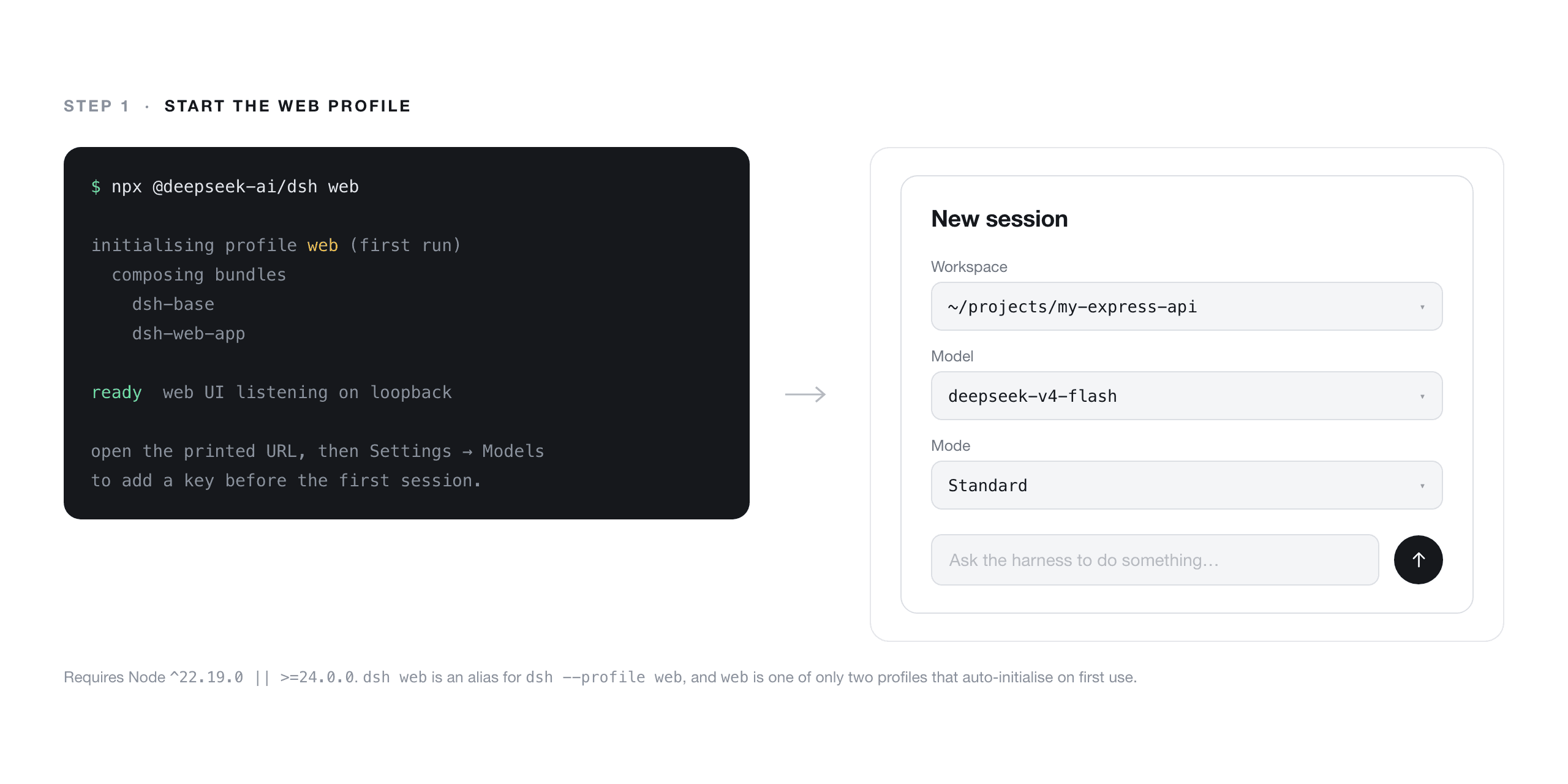
DeepSeek Harness web UI on first launch, showing the new session screen with the workspace picker
Step 1 done: dsh web running locally with a workspace selected.
Step 2. Understand your profile before you install anything.
This is the step people skip, and it causes most of the "plugin installed but does not show up" confusion. Inspect the composed configuration tree without booting it:
bash1dsh --profile web --dump-config 2
There is also --dump-default-config if you want a baseline to diff against. What you are looking for is whether the bundle you just installed actually appears in the composed tree for the profile you are launching. If it does not, you installed into a different profile.
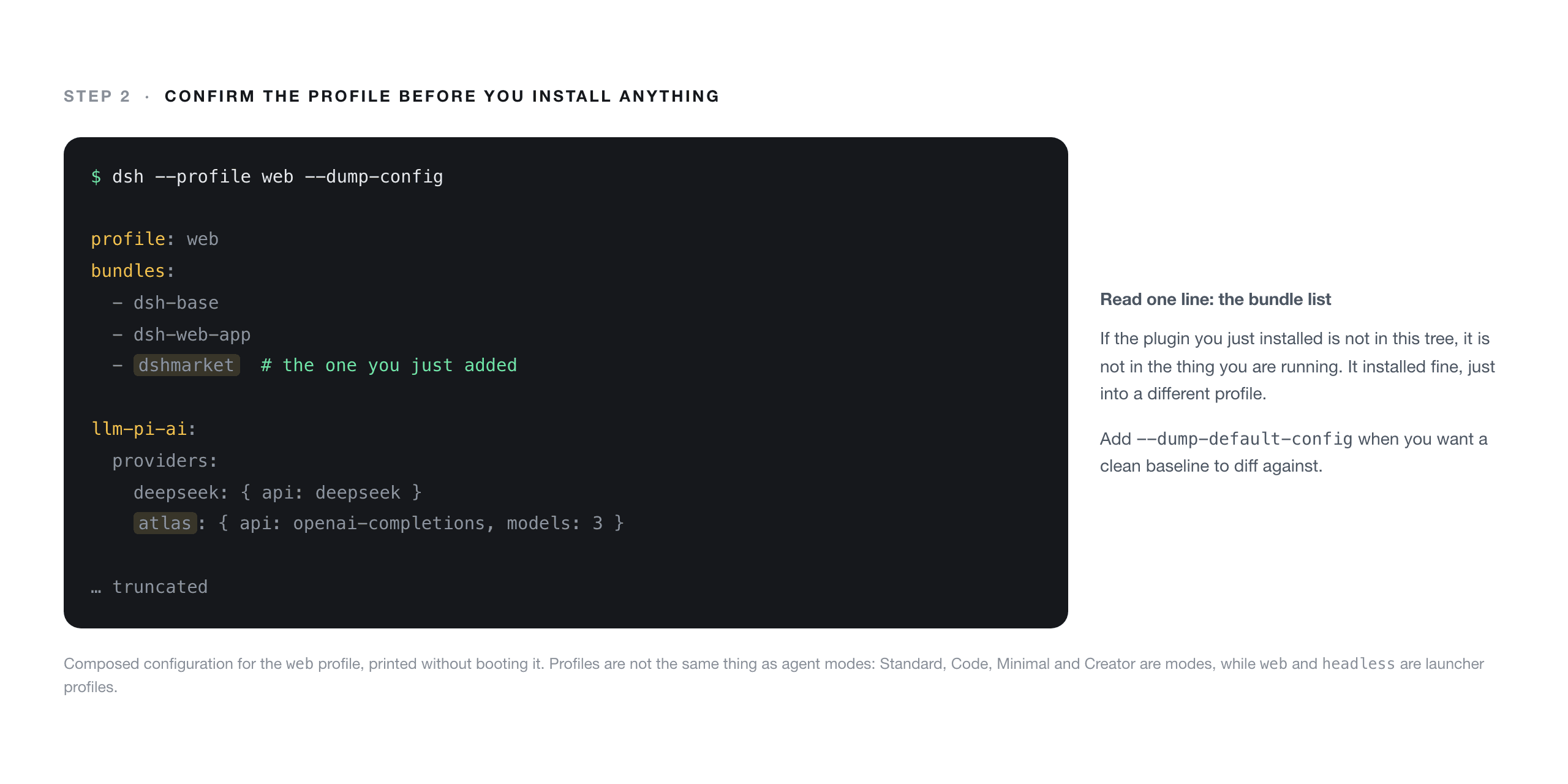
Terminal output of dsh --dump-config, with the composed plugin bundle list for the web profile visible
--dump-config is the answer to almost every "my plugin is missing" question.
Step 3. Install the market before the plugins.
bash1dsh plugin --profile web add dshmarket 2
This puts a searchable plugin browser inside Settings with one-click install and upgrade, plus a themes tab. After this, most of your installing happens in the UI rather than the terminal. If you would rather delegate the searching entirely:
bash1dsh plugin --profile web add dsh-find-plugin 2
That one lets your agent go find plugins for you, which is a slightly absurd and very useful thing.
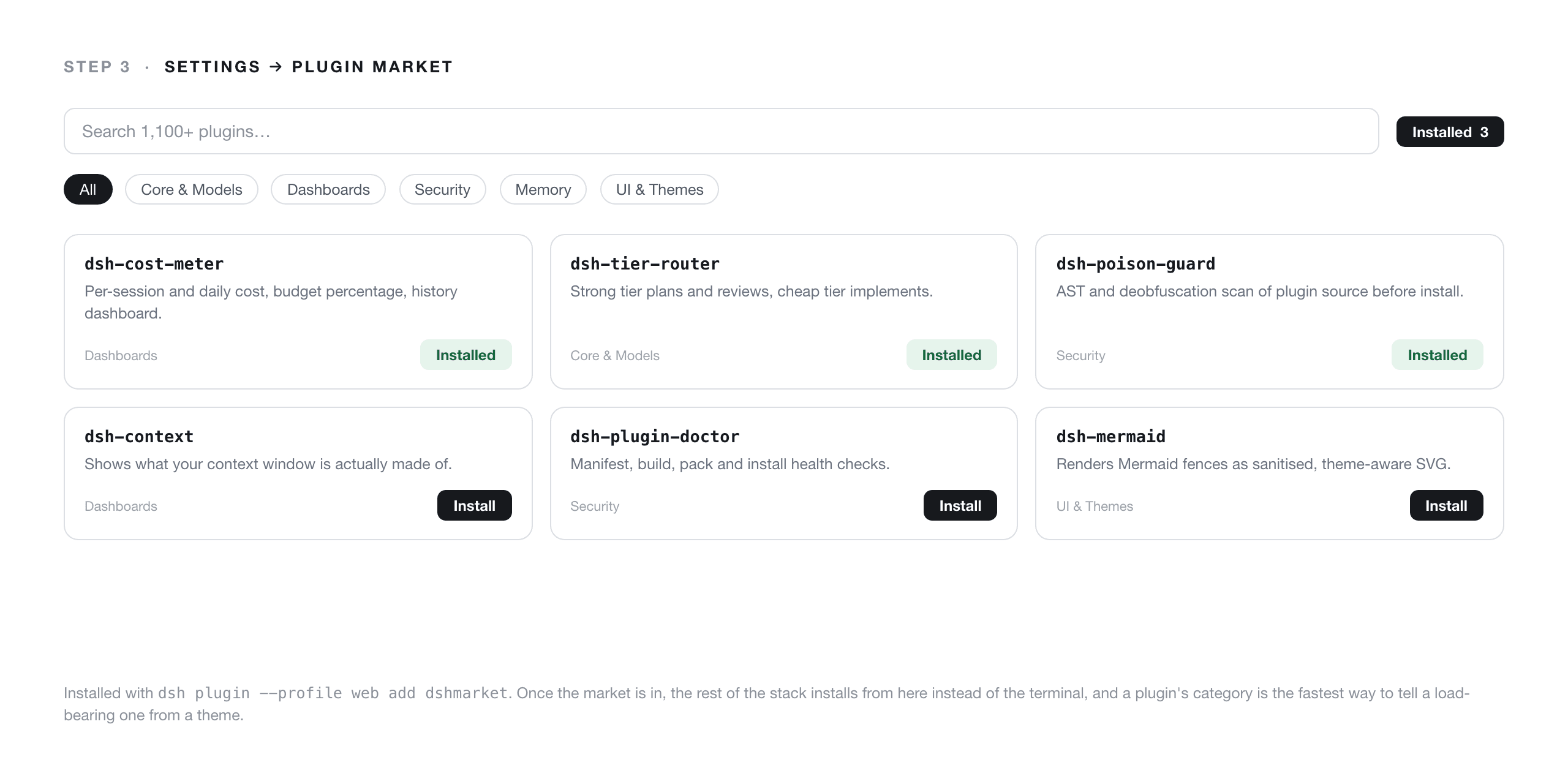
The dsh-market plugin browser inside DeepSeek Harness Settings, showing searchable plugin cards with install buttons and category filters
The market panel in Settings, which is where the rest of your installs will happen.
Step 4. Install the scanner before the third-party code.
The community list carries the warning in a box at the top, and it deserves quoting: "Installing a plugin runs third-party code on your machine with your own permissions, it can read your files, use your credentials, and reach the network. Tool approvals don't sandbox plugin code" (awesome-dsh-plugin, August 2026).
So scan first:
bash1npm install -g dsh-poison-guard 2dsh-poison-guard scan ./some-plugin 3dsh-poison-guard scan ./some-plugin --json 4
It runs three layers: AST analysis via NodeSecure JS-X-Ray for dynamic imports, obfuscation, eval / Function / vm usage, exfiltration and unsafe shell commands; a deobfuscation decoder that unpacks atob(), Buffer.from() base64 and hex, String.fromCharCode() and escape sequences before rescanning; and regex heuristics for literal strings and install-time scripts like postinstall and prepare. Exit code is 0 for clean and 1 when there are findings, so it drops straight into CI. It can also live inside a profile:
bash1dsh plugin --profile web add dsh-poison-guard 2
Pair it with dsh-plugin-doctor, which checks manifest, patch, entry, build, pack and install, detects profile host-shadowing, and runs a poison preflight of its own.
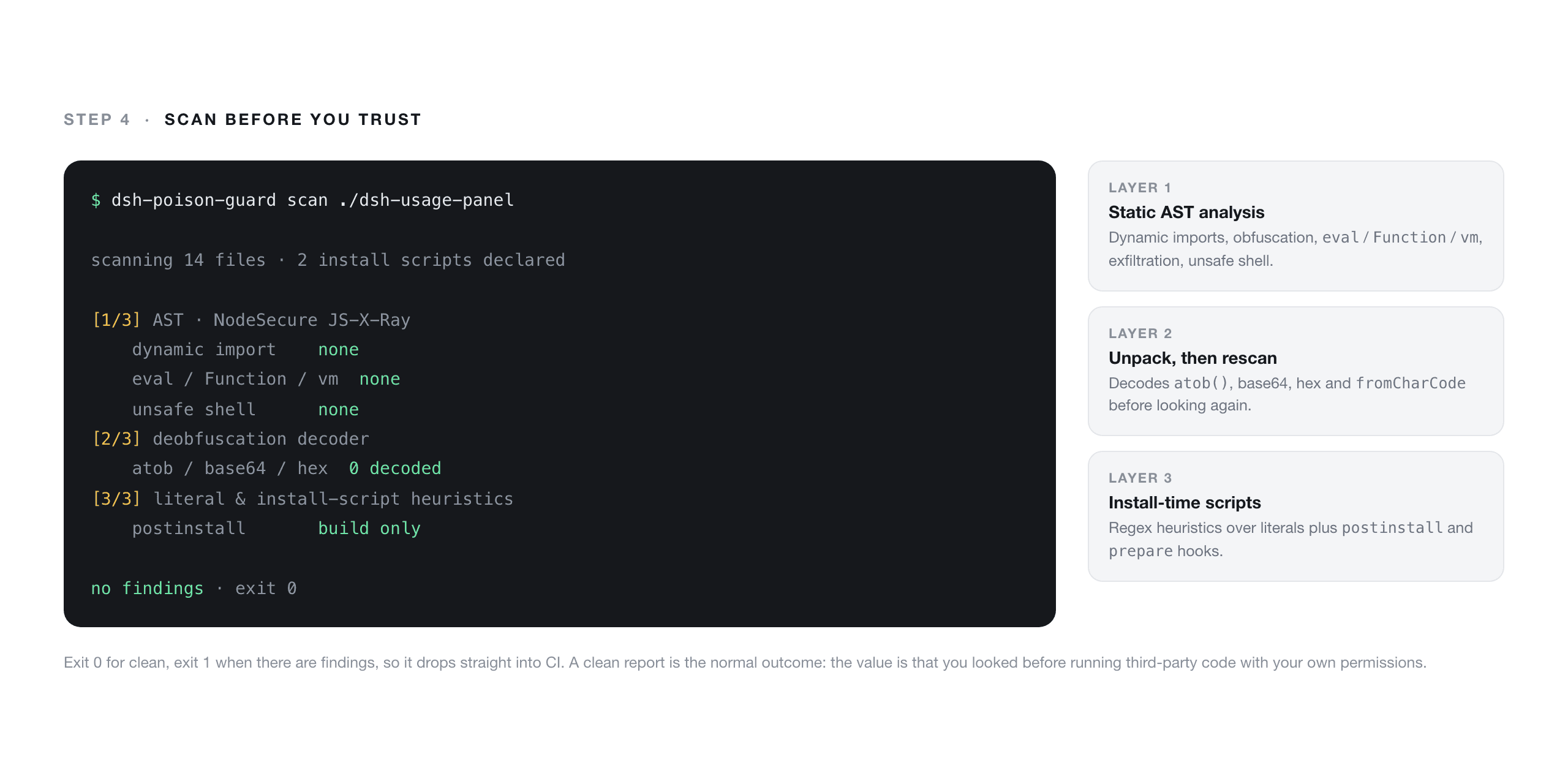
dsh-poison-guard scan report in the terminal, listing findings by layer for a community plugin
A pre-install scan on a random community plugin. The point is not that it always finds something, it is that you looked.
Step 5. Point the model layer wherever you want.
This is the layer from the previous section, now as an actual edit. Open $DSH_HOME/settings.yaml:
yaml1llm-pi-ai: 2 providers: 3 atlas: 4 apiKeyEnv: ATLASCLOUD_API_KEY 5 api: openai-completions 6 baseURL: https://api.atlascloud.ai/v1 7 models: 8 - id: deepseek-ai/deepseek-v4-flash-0731 9 - id: deepseek-ai/deepseek-v4-pro 10 - id: deepseek-ai/deepseek-v3.2 11
bash1export ATLASCLOUD_API_KEY=sk-... 2
The provider block accepts any OpenAI-compatible endpoint: your own gateway, a local vLLM server, or a hosted service. The example above uses a hosted DeepSeek endpoint because its model IDs and request schema match the first-party API, so switching back is a one-line baseURL change with the rest of your config untouched.
If you prefer clicking, the web UI has a custom provider form. It wants a provider ID (lowercase, permanent), a display name, a base URL, an API protocol, an API key credential, and at least one model. After saving you get a redacted descriptor back, never the literal secret.
One practical gotcha. The UI's "Fetch available models" button calls the endpoint's GET /models, and endpoints without that route need model IDs typed in manually. I checked this endpoint directly: it answers on /v1/models and returns all three DeepSeek IDs above, but its JSON envelope is not byte-identical to OpenAI's list shape. So if the fetch comes back empty, do not assume the provider is broken. Type the three IDs in exactly as written above, which is a fully supported path.
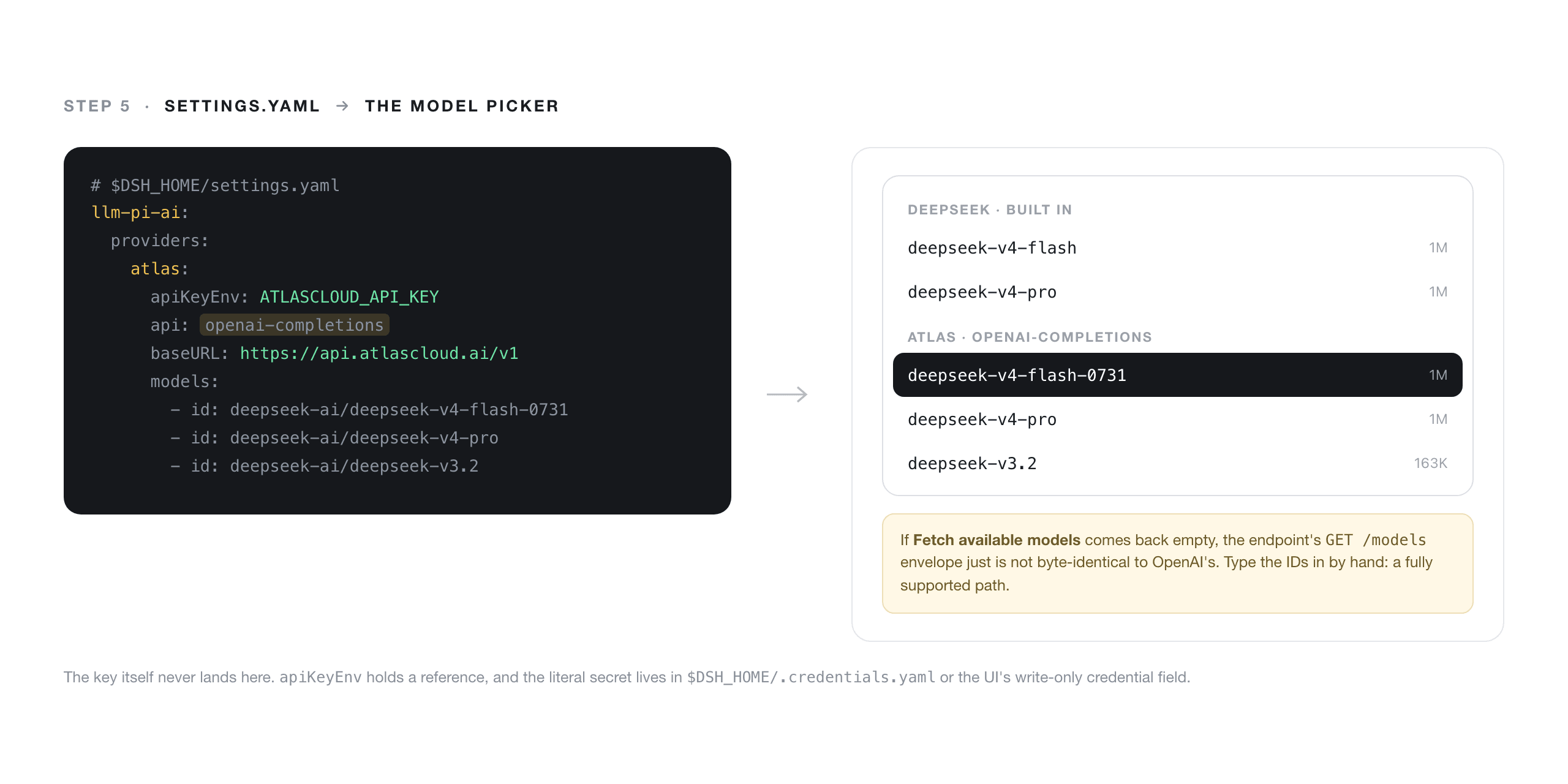
DeepSeek Harness model picker with the custom provider expanded, showing the three DeepSeek model IDs loaded from the settings.yaml provider block
Step 5 done: the custom provider's DeepSeek models selectable next to the built-in ones.
Step 6. Make the bill visible.
bash1dsh plugin --profile web add github:Han-1413141/dsh-cost-meter 2
You get per-session and daily cost, a budget with usage percentage, official balance, and a history dashboard. The critical detail no directory page will tell you: it has a one-click sync of official prices including the peak and off-peak tiers. If you are running through your own provider, set your actual rates, otherwise the panel is doing correct arithmetic on someone else's price list.
If you want token shape rather than dollars, the dsh-token-usage variants give heatmaps and per-model breakdowns, and dsh-context shows the composition of the context window itself: per-request history, compression and injection events, and per-message token stats. That last one is how you find out whether your 47K input tokens are project files, session history, or the same instructions loaded twice.
Step 7. Split planning from doing.
bash1dsh plugin --profile web add github:BruceLanLan/dsh-tier-router 2
Two-tier routing: a strong tier plans, advises and reviews, a cheap tier implements. It is plan-mode aware, has an escalation guard for high-impact actions, auto-escalates on failure, and tiers subagents too. Concretely, bind the planner to V4 Pro and the executor to V4 Flash. Given the rate gap in Table 1, this is the single most effective lever against the harness's context appetite, more effective than any prompt trimming you will do by hand.
Step 8. Run something real and check the receipts.
Paste this into a session pointed at an Express project:
text1Add request-scoped structured logging to this Express app: create a middleware that 2attaches a UUID request id to every request, log method, path, status and duration as 3JSON, propagate the request id into all existing logger calls, and add unit tests for 4the middleware. Do not change any route handler signatures. Show me a plan before editing. 5
It is deliberately mid-sized: multi-file, has a test requirement, has a constraint the agent can violate, and asks for a plan first so you can watch the router hand off between tiers. When the turns finish, read the cost meter panel and note input, output and cached tokens along with elapsed time. Then switch the provider in the model picker and run it again on the same commit. That second run is the whole reason you installed steps 5 through 7.
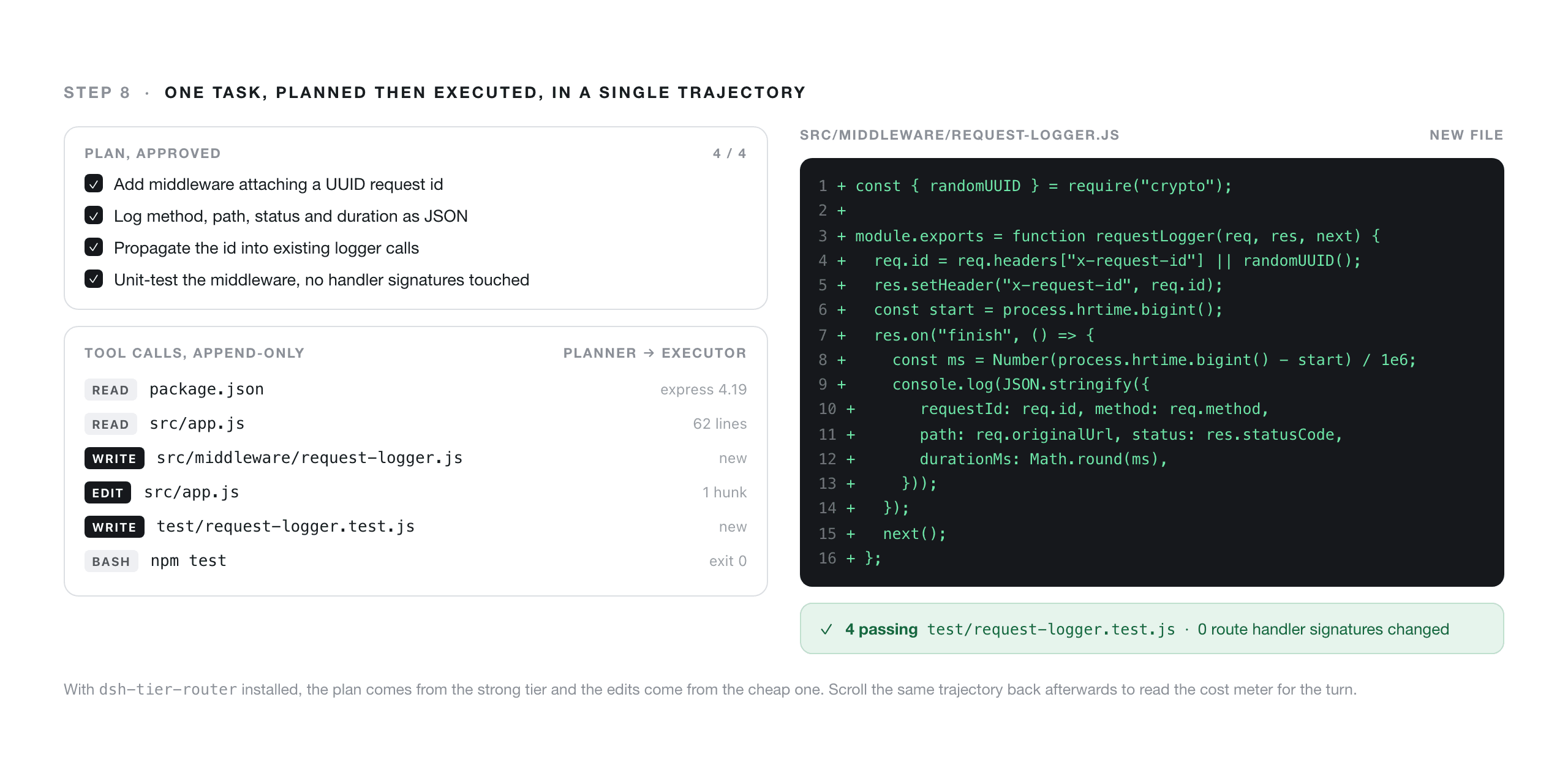
DeepSeek Harness session complete, showing the plan, the tool call trajectory for the middleware edit, and the passing unit tests
Step 8 done: plan, edits, and tests in one append-only trajectory you can scroll back through.
DeepSeek Harness Plugins for Different Roles
The seven-piece stack is the floor. What you add on top depends on what you actually do, and the community list's fourteen categories map fairly cleanly onto roles.
- Research and writing.
xiehuan123/dsh-deepreaddoes five reading modes with claim-evidence-data reports and Mermaid or XMind mindmaps, plus a budget preflight. Pair it withbowenliang123/dsh-contextfor visibility andflymysql/dsh-memoryfor a cross-session vault. - Frontend and design.
AKS1st/dsh-mermaidrenders Mermaid fences as sanitized SVG that follows your theme.omdsh-dev/dsh-genuirenders interactive components inline in replies, including charts, forms and 3D scenes, with an event loop back to the model. - Team and audit.
dfycaly98931680/dsh-trajectory-governancerebuilds flat session logs into branch trees and flags loop deadlock, invalid retry and goal drift with cost attribution.DamonKoy/dsh-secret-redactormasks API keys, tokens, JWTs and private keys in tool results before the model sees them, andJohnXu22786/secret-guardblocks reads and writes of.envand key material outright. - Terminal people.
kouyichi/dsh-tui-appis a full Ink-based terminal chat client with tool cards, a jobs panel, trajectory replay and multi-session tabs.s3yf1337/dsh-desktopwraps the web surface in a native Tauri window. - Local models.
NOirBRight/dsh-llm-ollamais a native Ollama chat adapter with model discovery, so the provider trick from Step 5 works for models on your own machine too. - Resilience.
aokamoaki/dsh-startup-guardpreflights plugin composition, smoke-tests hostapply()and quarantines crash-causing bundles so one broken plugin cannot brick startup. On a preview-stage harness, that is less paranoid than it sounds.
What a DeepSeek Harness Plugins Stack Costs to Run
Let me be precise about what follows. These are calculations from published rate cards, not from a run I metered. The token volume is borrowed from the third-party measurement cited earlier, and the output figure is an assumption I am stating out loud.
Take one turn with 47.6K uncached input tokens (the dsh figure from that preliminary comparison) and assume 8K output tokens.
Table 3. One 47.6K-in, 8K-out turn, computed from published rates
| Route | Input cost | Output cost | Turn total |
|---|---|---|---|
| deepseek-v4-flash, official off-peak | $0.0105 | $0.0053 | $0.0157 |
| deepseek-v4-flash, official peak | $0.0209 | $0.0106 | $0.0315 |
| deepseek-v4-flash-0731, hosted flat | $0.0067 | $0.0022 | $0.0089 |
| deepseek-v4-pro, official off-peak | $0.0314 | $0.0158 | $0.0473 |
| deepseek-v4-pro, official peak | $0.0628 | $0.0317 | $0.0945 |
| deepseek-v4-pro, hosted flat | $0.0800 | $0.0270 | $0.1070 |
Three things in that table are worth more than the totals.
First, Flash flat beats Flash at either official tier, and the gap on output against peak is roughly 4.7x. Second, Pro flat is more expensive on input than official peak cache-miss, so a Pro-heavy workload is not automatically better off leaving the first-party API. Third, and most important: if that 47.6K input were a cache hit instead of a miss, official pricing would charge somewhere between $0.0003 and $0.0007 for it depending on the hour. Essentially free. A workload with genuinely high cache hit rates can be cheapest on DeepSeek's own API, full stop. Any post telling you a hosted endpoint is universally cheaper has not read its own rate card.
There is also a timezone wrinkle nobody mentions. Peak is 01:00-04:00 and 06:00-10:00 UTC, which is 09:00-12:00 and 14:00-18:00 in Beijing, the Chinese working day. A San Francisco developer's nine-to-five falls entirely in off-peak. A Berlin developer's morning falls squarely in peak. Where you sit changes which column of Table 3 describes your actual month.
Three levers genuinely move the number, in order of effect: tier routing so the expensive model only plans, batching tool calls so each turn carries fewer round trips of context, and opening dsh-context to find out what is filling the window. Start with the third one. That duplicate CLAUDE.md and AGENTS.md bug doubled a system prompt for real users, and no amount of clever routing fixes a problem you cannot see.
Before You Install: Trust and Licensing
Plugin code runs in your Node process, with your permissions, and tool approvals do not sandbox it. That is not hypothetical. The harness reads your repository and your credential files by design, and a plugin lives inside the same boundary. The community list's own criteria are explicit that a listing "isn't a security review" and proves nothing beyond that the plugin installs and does what its one-line description says.
Practical posture: scan with dsh-poison-guard before installing, prefer plugins whose source you can skim in one sitting, and try unfamiliar ones somewhere that does not hold your production keys.
On licensing, dsh itself is MIT. Individual plugins are not. They are separate repositories with their own licenses, and a permissive core says nothing about the extension you just pulled from a GitHub spec. If you are installing into anything commercial, read each one.
Frequently Asked Questions About DeepSeek Harness Plugins
How do I install a DeepSeek Harness plugin?
Run dsh plugin --profile <name> add <spec>. The command forwards to pnpm inside that profile's directory, so valid specs include an npm package name, github:owner/repo (optionally with #ref), and link:/absolute/path for local development. The --profile value must match the profile you actually launch. Plugins with a host-side component need the process restarted, not just the page reloaded.
My DeepSeek Harness plugin installed but does not show up. Why?
Four causes, in order of likelihood. You installed into a different profile than the one you launched. The browser is serving a cached UI and needs a hard refresh. The plugin touches the Node host and needs the process restarted. Or the bundle never made it into the composed config, which dsh --profile <name> --dump-config will tell you in one command.
Can I use DeepSeek Harness with a non-DeepSeek model or a third-party endpoint?
Yes, and it is a config change rather than a plugin. Under llm-pi-ai, add a provider with api: openai-completions and your baseURL, list at least one model ID, and reference a key through apiKeyEnv or $DSH_HOME/.credentials.yaml. For models on your own machine, dsh-llm-ollama provides a native Ollama adapter with model discovery.
Are DeepSeek Harness plugins safe to install?
Treat them like any npm dependency with filesystem and network access, because that is what they are. Plugin code runs in your Node process with your permissions and tool approvals do not sandbox it. Scan before installing with dsh-poison-guard, validate manifests and builds with dsh-plugin-doctor, and use a secret redactor or guard plugin so credential-shaped strings never reach the model.
Is DeepSeek Harness ready for daily coding work?
Honestly, not yet for most people. It is a developer preview whose README promises compatibility-breaking changes, third-party plugin compatibility is currently poor, and its context consumption is high. It is a strong fit if you are building agent infrastructure, need an auditable execution trajectory, or want to swap the agent loop itself. For everyday shipping, keep your existing tool and watch this one.
Why is DeepSeek Harness using so many tokens?
Partly by design, partly by bug. The design cost is real: an append-only log of everything the model sees, aggressive context injection, and subagent scheduling. The bug side is fixable, and one confirmed case had dsh reading both CLAUDE.md and AGENTS.md and doubling the system prompt when their contents matched. Mitigate with tier routing, fewer and fatter tool calls, and dsh-context to see the actual composition.





