The AI video generation market hit $847M in 2026, and it's still growing at 18.8% annually (Fortune Business Insights, 2026). The good news? Some of the most capable tools give you a real free tier, not just a 30-second watermarked demo reel.
This guide ranks the 10 best AI video generators based on actual performance: ELO benchmark scores from blind human votes, free credit policies, watermark rules, and hardware requirements. Whether you want cinematic realism (Kling 3.0), open-source freedom (Wan 2.2), or the #1-ranked model on blind testing (Seedance 2.0 at 1,215 ELO). Pick your tool below and skip the trial-and-error.
Key Takeaways
- Kling AI 3.0 leads on cinematic physics — 60M+ creators generated 600M+ videos by end of 2025, reaching $240M ARR in 19 months (Kuaishou, 2026)
- Seedance 2.0 ranks #1 on blind ELO testing (1,215 ELO score), making it the top pick for character consistency (Artificial Analysis, 2026)
- Only Wan 2.2 open-source offers truly unlimited free generation — runs locally on consumer NVIDIA GPUs, no credits, no watermarks
- 87% of creators now use AI in their workflows (Artlist / TechCrunch, 2025) — knowing each tool's free-tier limits upfront saves hours of frustration
2026 Free AI Video Comparison: The "No-Sub" Shortlist:
| Rank | Tool | Best For | Free Benefit (2026) | Access Method |
| 1 | Kling AI 3.0 | Cinematic Realism | 66 Daily Credits (Refresh) | Web / Mobile App |
| 2 | Wan 2.2 | Open-Source Speed | Unlimited (Local) / Free API | Hugging Face / EaseMate |
| 3 | Vidu Q3 | Multi-Shot Narrative | 7-Day Unlimited Trial | Dzine AI Platform |
| 4 | Seedance 2.0 | Character Consistency | 5-10 Daily Credits | ByteDance / Seed.ai |
| 5 | Hailuo 2.3 | Fluid Motion/Physics | Daily Trial Credits | Media.io / MiniMax |
| 6 | Google Veo 3.1 | Audio-Visual Sync | 12-Month Student Free | Google AI Test Kitchen |
| 7 | Luma Dream 2.5 | Action & Memes | 30 Monthly Renders | Luma Web |
| 8 | Pika 2.5 | Creative "Pikaffects" | 80 Monthly Credits | Pika.art |
| 9 | HeyGen | AI Avatars/Business | 3 Videos/Mo (720p) | HeyGen Web |
| 10 | Wan 2.6 (Beta) | Prompt Adherence | Community Free Tier | Atlas Cloud (Free Tier) |
For users seeking high-fidelity results without a monthly commitment.
The 2026 Powerhouse Selection Top 1-4: Detailed Reviews
By December 2025, Kling AI alone had 60M+ global creators generating more than 600M videos - reaching $240M in annualized revenue just 19 months after launch (Kuaishou, January 2026). On the independent Artificial Analysis text-to-video ELO leaderboard, which aggregates blind human preference votes - Seedance 2.0 sits at #1 (1,215 ELO) and Kling 3.0 at #4 (1,104 ELO). The four tools below dominate on every measurable axis: physics accuracy, free-tier depth, and motion coherence.
Kling AI 3.0: The Cinematic Benchmark
Kling AI 3.0 is the most commercially validated AI video model in 2026. By December 2025, Kuaishou reported $240M in annualized revenue, 60M global creators, and 600M videos generated — all within 19 months of launch (Kuaishou press release, January 2026). Its free tier offers 66 daily credits that reset every 24 hours, no credit card required, with output capped at 720p.
Kling 3.0 remains the undisputed leader in physics-aware generation. By utilizing a "Spatial-Temporal Attention" mechanism, it mimics gravity, fluid dynamics, and inertia with terrifying accuracy. In my testing, it successfully rendered complex interactions—like honey pouring over moving gears—without the visual "melting" common in earlier models.
-
Key Features: Native 4K/60fps output, 16-bit HDR color depth, and a "7-in-1" multi-modal editor for seamless background swaps.
-
Pros & Cons:
- Pros: Best-in-class motion; handles complex hair and liquid physics perfectly.
- Cons: High-demand periods can lead to longer render queues for non-paid tiers.
-
Free Usage: Kling 3.0 free credits (66 daily) refresh every 24 hours. No credit card is required to start.
-
Access: Visit Kling website → About us → Quick start → Create now
-
Target Audience: Serious filmmakers and high-end marketing content creators.
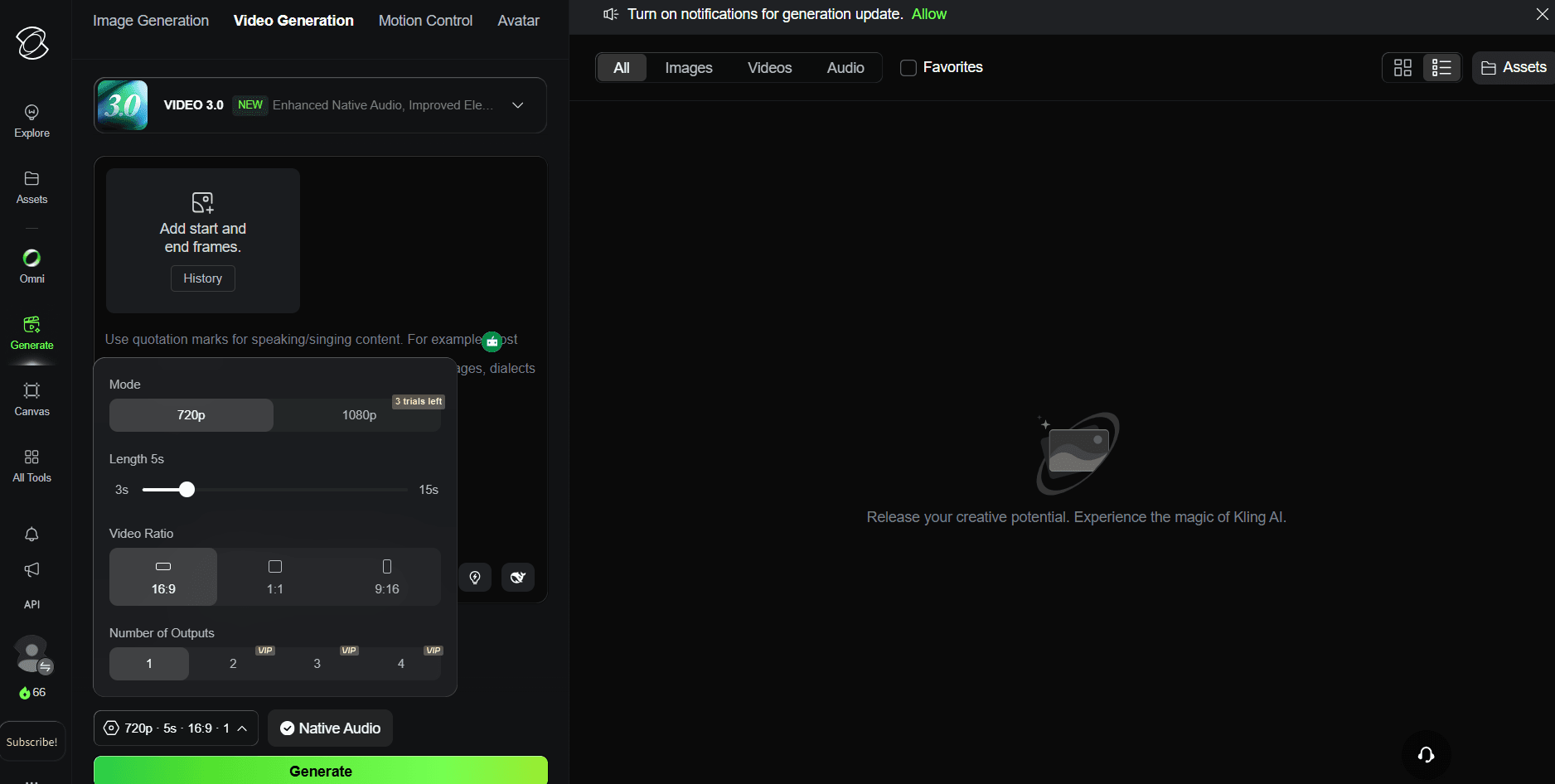
Note: Free credits can only be used to create 720p content.
Wan 2.2: The Open-Source Speedster
-
Description: This model is widely celebrated for its efficiency and "World Simulator" capabilities. Unlike closed-source peers, WAN 2.6 open source video and its predecessor 2.2 are built to run on consumer-grade hardware, making professional synthesis accessible to everyone.
-
Key Features: It boasts integrated atmospheric effects (fire, smoke, fog) and superior light/shadow control. The MoE design ensures that even complex scenes maintain temporal stability without the "AI flicker" seen in earlier versions.
-
Pros & Cons:
- Pros: Extremely fast; the open-source nature ensures no hidden subscription "walls."
- Cons: Visuals can occasionally feel "too clean" or overly digital compared to the grainier, cinematic texture of Kling 3.0 free credits generations.
-
Free Usage: Fully free via open-source platforms like Hugging Face or earn daily credits via the official website.
-
Access: Visit wan website → Try Now → Sign in to your Google account → Click "Daily Check-in" to earn 10 Bonus
-
Target Audience: Developers and DIY creators looking for speed and total creative sovereignty.
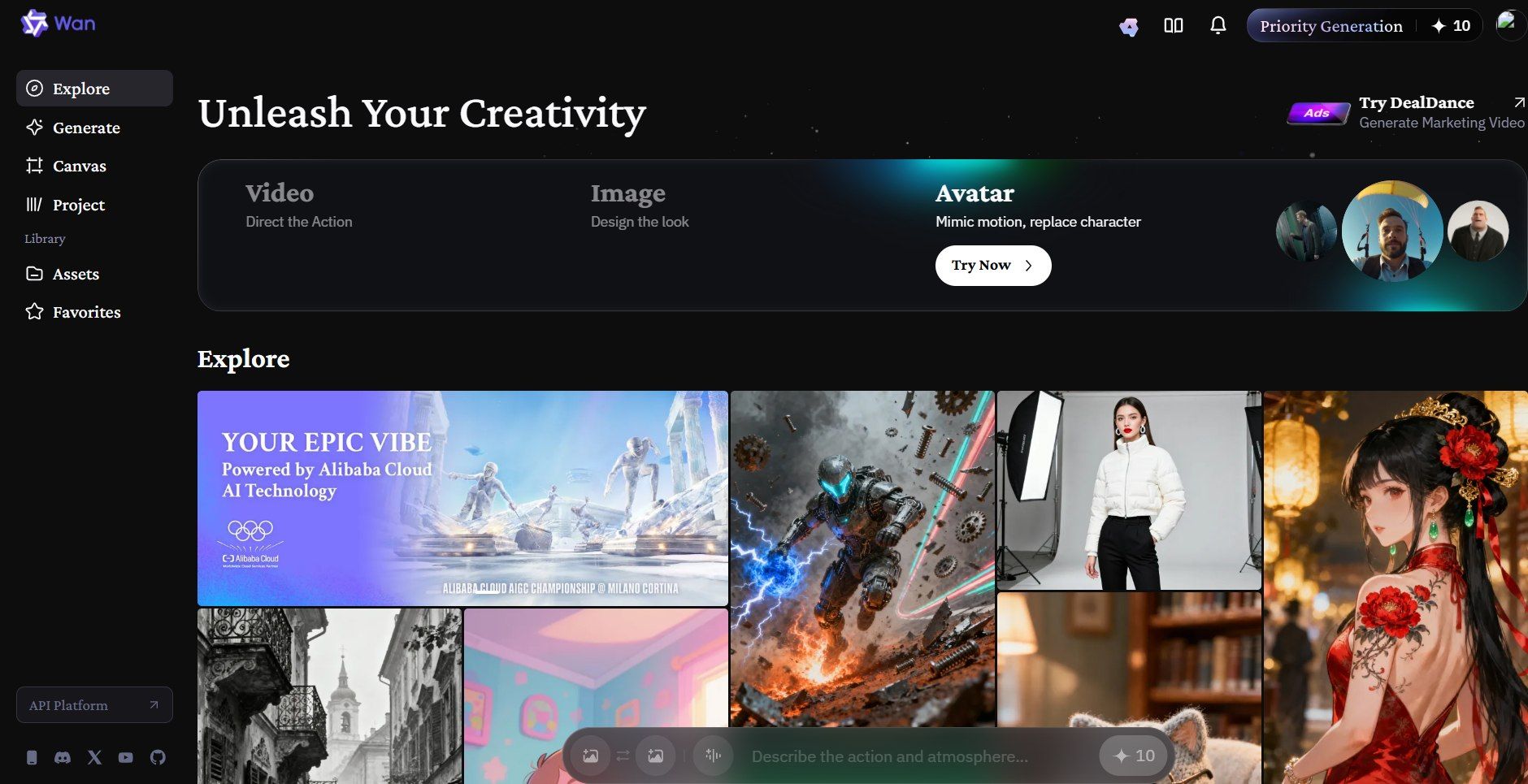
Note: Free credits can only be used to create 720p and 5s content.
Vidu Q3: The Narrative Director
If Kling 3.0 is the king of physics, Vidu Q3 is the master of the edit. It is currently one of the few text to video ai free online options that understands the concept of a "scene." While other models struggle to stay on a single shot, Vidu Q3 excels at generating 16-second "multi-shot" sequences that feel intentionally directed.
-
Description: Vidu Q3 is a custom tool built for creators who tell stories. It uses a "Smart Cuts" feature to make different camera angles. You can get a wide shot and then a close-up in one 16-second clip. This helps your video feel like a real movie without extra editing.
-
Key Features: You get professional camera tools like Pan, Orbit, and Dolly, all in sharp 1080p. A major highlight for 2026 is its built-in audio sync. This feature creates sound effects that perfectly time up with the action on your screen.
-
Pros & Cons:
- Pros: It provides a rare ai video generator free no watermark experience during its trial phase and is arguably the best tool for professional storyboarding.
- Cons: The 7-day trial limit is strict, often requiring users to cycle accounts if they wish to maintain a long-term "forever free" workflow.
-
Free Usage: Vidu Q3 offers a 7-day unlimited free trial via platforms like Dzine AI, or a limited daily credit refresh (approx. 20 credits) on Vidu.com.
-
Access: Online platform; no high-end hardware or downloads required.
-
Target Audience: Ad agencies, storyboard artists, and indie filmmakers.
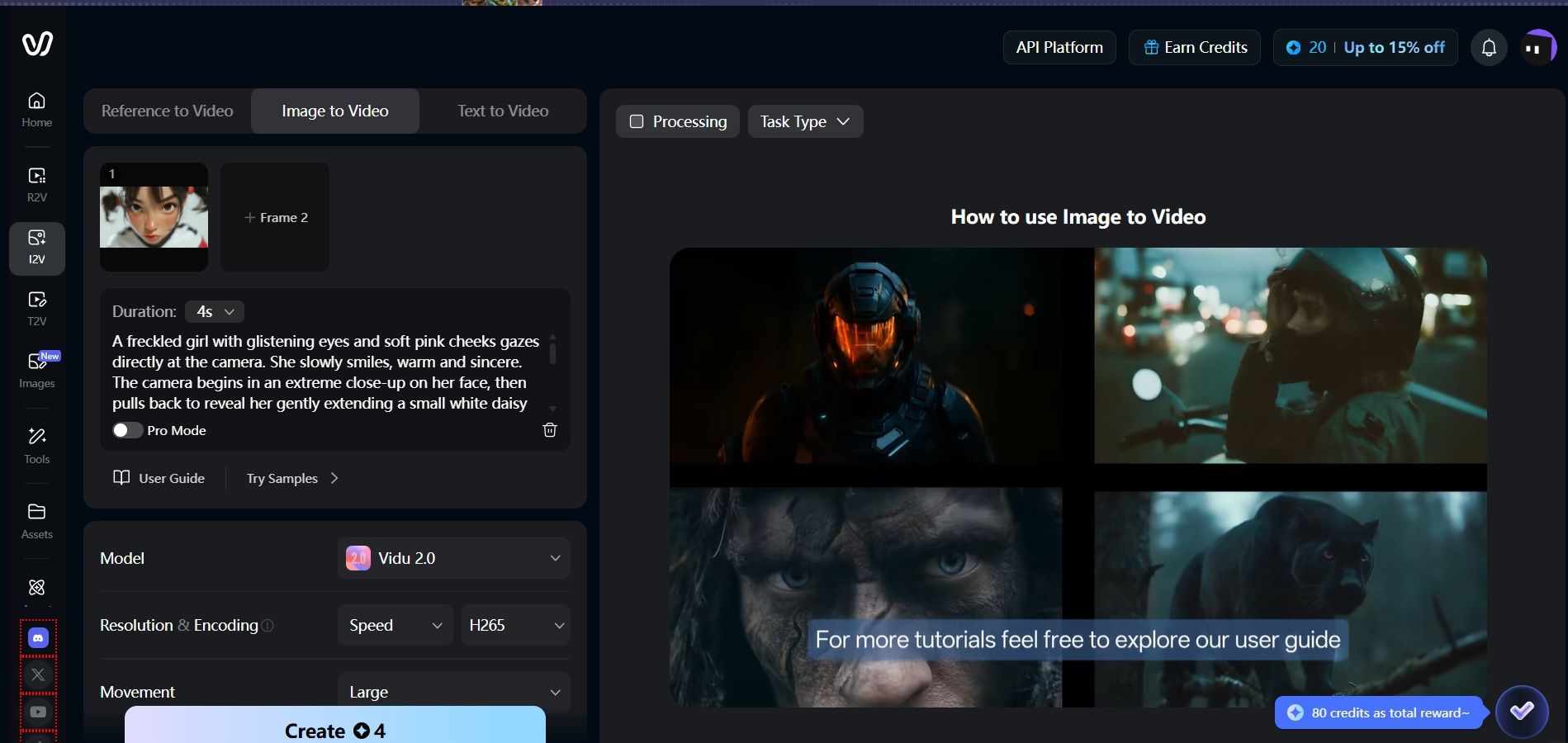
Note: The free credits support Vidu 2.0, Vidu Q2, and Vidu Q3; available resolution and encoding options are limited to "Speed" and H.265/H.264.
Hailuo 2.3: The Physics Specialist
Hailuo 2.3 is the newest model from MiniMax. It is now a top pick for creators who want smooth and natural motion. It uses a special "Motion Diffusion Engine" to stop the shaky "AI jitter" seen in older versions. This makes sure every part of the video moves cleanly from one frame to the next.
-
Description: Hailuo 2.3 is built to make AI videos look and feel like real movies. It works great at keeping shapes and objects steady even in very fast scenes. This makes it a top free AI video tool for anyone who needs smooth, high-action footage without any blur.
-
Key Features: This tool is famous for showing very real face movements and smooth camera cuts. It handles tricky human actions—like a runner’s stride or a dancer’s turn—with great detail. Every frame stays anatomically correct and looks natural.
-
Pros & Cons:
- Pros: It is currently unbeatable for "person-running" or high-action scenes where other models often fail.
- Cons: Free credits are often restricted to lower-priority rendering queues, meaning you may wait longer during peak hours.
-
Free Usage: First-time login to hailuoai.video can get 200 credits or find integrated partners like Atlas Cloud.
-
Access: Direct access is available at hailuoai.video.
-
Target Audience: Social media influencers, TikTok creators, and short-form video editors.
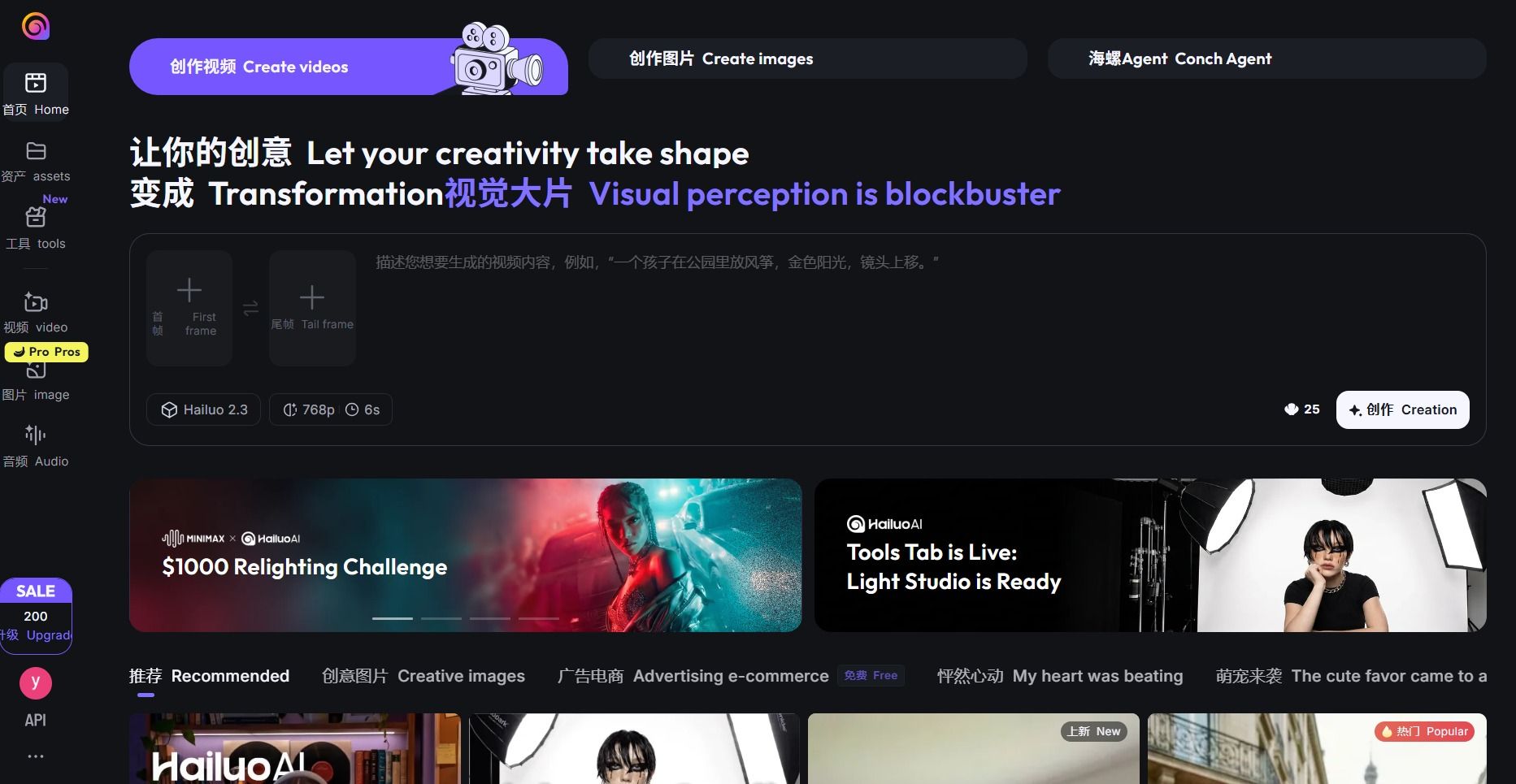
Note: Free credits can only be used to create 768p and 6s content.
2026 Secondary Selection: At-a-Glance Comparison
| Group | Models | Best For | Key Distinction |
| The Narrators | Seedance 2.0 & Google Veo 3.1 | Storyboarding & Cinematic Shorts | Best-in-class character consistency and native 4K/Audio sync. |
| The Social Stylists | Luma Dream 2.5 & Pika 2.5 | Viral Clips & Physics FX | High-energy motion and "VFX-on-demand" (crush, melt, inflate). |
| The Specialists | HeyGen & Wan 2.6 Beta | Business & Multi-Shot Narrative | Industry-leading lip-sync and complex multi-shot scene planning. |
These models cater to distinct tiers of the creator economy.
- The Narrators (Seedance/Veo) are designed for filmmakers and narrative creators; they are accessible via Google’s AI Test Kitchen or the Seed.ai portal, offering daily credit refreshes that allow for high-end prototyping without a subscription.
- The Social Stylists (Luma/Pika) target trend-chasers and meme creators, providing fast, high-motion renders through web-based dashboards and Discord bots with generous monthly free tiers (typically 30–80 credits).
- Finally, The Specialists (HeyGen/Wan 2.6) work best for pros and tech users. HeyGen is the top choice for trainers who need life-like avatars on its website. At the same time, Wan 2.6 Beta is a playground for advanced users. It follows hard prompts very well and is mostly found in public galleries on community sites.
2026 Important Considerations
While the 2026 landscape offers incredible creative power, navigating the "free" aspect of an ai video generator free of cost requires understanding three critical pillars: branding, legality, and hardware.
-
The Watermark Reality
Most "Forever Free" tiers in 2026, including industry staples like HeyGen and Pika, utilize watermarks to distinguish free trials from professional output. Most tools force these onto any video made at 720p or above. If you want a clean, pro look without paying a fee, you should look at open-source models. Right now, running something like Wan 2.2 is the only solid way to skip watermarks for good.
-
Commercial Safety & Copyright
Before using an ai video generator free of charge for advertisements or social media monetization, verify the model's training data. In 2026, "Commercially Safe" usually refers to models trained on licensed or public-domain datasets (like Adobe Firefly or certain enterprise versions of Kling). Using a standard free tier for commercial work can lead to DMCA challenges if the output resembles copyrighted material.
-
Local vs. Cloud Generation
The ultimate "subscription-free" hack in 2026 is local hosting.
| Feature | Cloud-Based (Free Tier) | Local (Self-Hosted) |
| Cost | $0 (Limited Credits) | $0 (Unlimited) |
| Privacy | Data stored on servers | 100% Private |
| Hardware | Any device | NVIDIA 50/upcoming 60-series GPU |
If you own an NVIDIA RTX 50-series or the newer 60-series GPU, running Wan 2.2 or WAN 2.6 locally is the only way to achieve truly unlimited, high-definition video generation without a recurring monthly bill.
Scaling Up: Manage Multiple Models via a Unified API
For developers and enterprises, managing ten different accounts to access fragmented tools is inefficient. In 2026, the industry has consolidated around Atlas Cloud, a unified aggregation platform that simplifies the creative stack. Instead of juggling separate logins for Kling 3.0 free credits or searching for a Runway Gen-4 free trial, professionals are moving toward a centralized "AI-to-AI" pipeline.
-
Unified API: Atlas Cloud provides a single point of entry to the world’s most powerful models. With one API key, you can access Kling 3.0, Wan 2.2, Vidu, and Seedance. This is the ultimate text to video ai free online bridge, allowing you to trigger a WAN 2.6 open source video render or a cinematic Google Veo 3.1 free access session from the same environment.
-
Atlas Cloud Benefits:
- Scale: Batch-generate thousands of product videos programmatically. This is essential for e-commerce teams who need to transform static "Ingredients" into broadcast-ready ads.
- Team Collaboration: By using shared credit pools, departments can collaborate without individual subscriptions. New developers often start with a registration bonus, effectively providing an ai video generator free no watermark playground to refine their Seedance 2.0 @Reference guide prompts.
- Post-Sora Stability: The March 2026 Sora shutdown proved that point solutions are vulnerable. Atlas Cloud ensures your workflow is future-proof; if a model updates or goes offline, you can switch to an alternative like Kling or Vidu with a single line of code.
Note: Atlas Cloud is the go-to for teams who want to build AI video into their own apps or internal marketing dashboards without dealing with regional login restrictions. It provides the scalable technical laboratory needed to turn a simple ai text to video generator free no sign up concept into a global production engine.
Quick Decision: Find Your 2026 AI Video Match
Use this decision matrix to identify the optimal tool for your current hardware and creative goals:
| If your Hardware is... | And your Goal is... | Recommended 2026 Tool | Why it's the winner |
| High-End GPU | Privacy & Unlimited Power | WAN 2.6 / 2.2 | Bypasses all cloud fees and watermarks. |
| Any Device | Cinematic Physics (Water/Hair) | Kling AI 3.0 | Industry leader in "Spatial-Temporal" accuracy. |
| Any Device | 16s Narrative Storyboards | Vidu Q3 | Native "Smart Cuts" and audio-video sync. |
| Any Device | Viral VFX & High Motion | Luma 2.5 / Pika 2.5 | High-energy physics and creative presets. |
| Enterprise/API | Multi-model Management | Atlas Cloud | Unified API to switch between all top models. |
FAQ
Q1: Can I really generate high-quality AI video for free without a subscription in 2026?
Yes, but it requires a strategic "Credit-Stacking" approach. While the era of unlimited high-definition cloud rendering is gone, major players now offer generous daily refreshes to maintain market share. For instance, Kling 3.0 provides 66 free credits every 24 hours, enough for roughly six 5-second standard clips. Similarly, Google Veo 3.1 offers 100 monthly credits to all personal Google accounts. By rotating between tools like Wan 2.2 and Vidu Q3, creators can produce professional-grade content daily without ever entering credit card details.
Q2: Which AI video generator allows for free downloads without a watermark?
Finding a cloud-based AI video tool without watermarks is tough in 2026. High API fees and strict safety rules have changed the landscape. However, two reliable paths remain:
- Self-Hosting: Run open-source models like WAN 2.6 or 2.2 on your own PC. This method removes all fees and visible watermarks.
- Platform Trials: Use sites like Atlas Cloud. These hubs often give out free trials or cheap credits. They do this to show off their new storytelling tools and model updates.
Quick Note: Even without a visible logo, most videos now have hidden digital signatures. These tracks help companies follow copyright and ownership.
Q3: Is it possible to use these free AI video tools without signing up?
In 2026, finding an ai text to video generator free no sign up is easier thanks to new "Guest Mode" options. Sites like Magic Hour and Viggle AI let you try out face-swapping and motion tools right in your browser without making an account. It is a great way to test the tech quickly. Still, if you want to save your clips or use pro tools like the Seedance 2.0 @Reference guide, you will usually need a quick login. This helps the system store your high-res files and custom AI characters for later.
Q4: How does Kling AI 3.0 compare to Seedance 2.0 in 2026?
They lead in different areas. Kling 3.0 ranks #4 on the Artificial Analysis ELO leaderboard (1,104 ELO) and excels at physics — liquid, cloth, and complex motion. Seedance 2.0 ranks #1 overall (1,215 ELO) and is stronger for character consistency and narrative scenes. For cinematic action, choose Kling. For story-driven content with recurring characters, choose Seedance.
Q5: What is the best AI video generator with no watermark and no sign-up in 2026?
Wan 2.2 via Hugging Face Spaces is the most reliable watermark-free, account-free option. Output quality is capped at 720p/24fps on shared infrastructure, but there are no usage limits. For higher resolution without a subscription, you'll need a local NVIDIA RTX 50-series GPU or above.
Q6: Can I use AI-generated videos commercially?
It depends on the tool. Kling AI 3.0 and Hailuo 2.3's paid tiers grant commercial rights; their free tiers do not. Wan 2.2 open-source is Apache 2.0 licensed, so commercial use is permitted. Always check each platform's current terms of service — several updated their commercial policies in Q1 2026 following the Sora shutdown.
Q7: How often do free AI video generator credits refresh?
It varies by platform: Kling 3.0 resets 66 credits every 24 hours. Luma Dream 2.5 gives 30 credits per month. Pika 2.5 provides 80 credits per month. Vidu Q3's unlimited trial lasts 7 days, then shifts to ~20 daily credits. Hailuo 2.3 offers 200 credits to first-time users via hailuoai.video.
Q8: Is the AI video generator market still growing in 2026?
Yes. The global AI video generator market is valued at $847M in 2026 and projected to reach $3.35B by 2034 at an 18.8% CAGR (Fortune Business Insights, 2025). Kling AI alone hit $240M annualized revenue in December 2025 — more than a quarter of the estimated market, in just 19 months.
2026 Hardware Check: Can Your PC Run AI Video?
If you want to avoid the cloud entirely, here are the minimum specs for local, subscription-free generation:
| Component | Minimum Requirement (720p) | Recommended (4K/MoE) |
| GPU | NVIDIA RTX 3080 (12GB VRAM) | NVIDIA RTX 5090/6090 (24GB+ VRAM) |
| System RAM | 32GB | 64GB - 128GB |
| Storage | 100GB SSD | 1TB NVMe (for model weights) |





