Your profile photo is a cropped holiday snap and you know it. Recruiters see it before they read a word you wrote, which is why the search for a free AI headshot generator is such a well-served query, and why every tool in the category now leads with the word free.
The word covers a range of about twenty to one. One generator hands you twenty-one downloadable headshots in a week without an account. Another hands you exactly one file and shows the rest at a resolution too low to use. Three of the seven services we checked advertise a free tier and publish no number anywhere on the page.
So we read the vendors' own pages on August 3, 2026, counted what each free tier actually releases, ranked six of them on that count rather than on their headlines, and put one selfie through the ones that let us in without an account.
Key Takeaways
- Magic Hour leads on raw volume: "You get 3 free headshots per day — no account needed," with the widget itself showing a "3 images left today" counter and a stated policy of "No watermark ... for all users, including free users with no sign up."
- GoStudio publishes the clearest free arithmetic: "10 free credits on signup, enough for 2 professional headshots in any of the 20 styles," no card, no waitlist, 4K held back for paid packs.
- MyEdit gives signed-in accounts "3 Credits per day" and promises watermark-free HD downloads, but never publishes how many credits one headshot consumes.
- Botdog's first headshot needs no login, then "keep your headshot plus 5 free every week" after sign-in, across 36 profession styles.
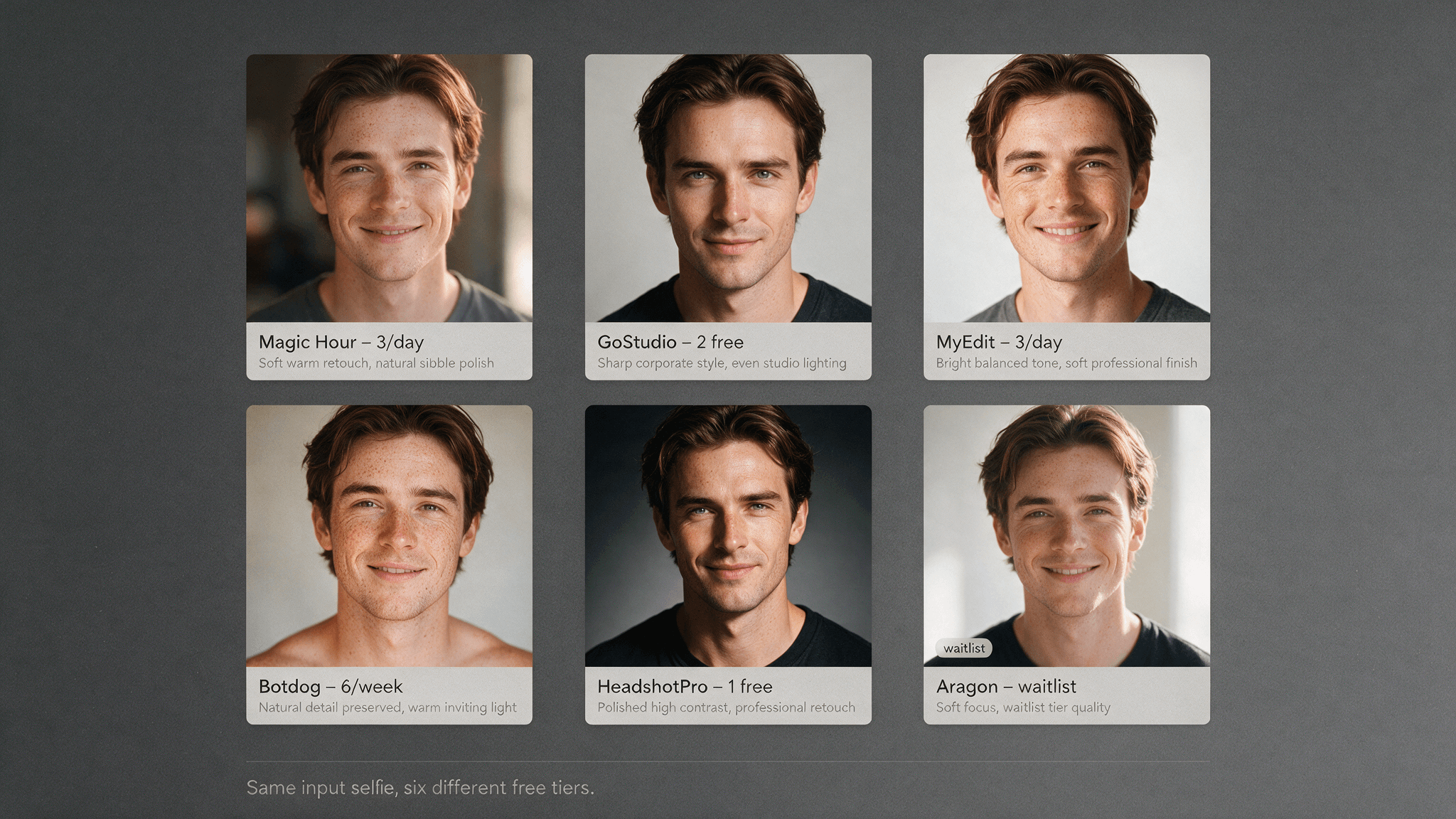
- We ran one selfie through both no-login tools. Both delivered a watermark-free office headshot, Botdog at 1024 × 1024 in under a minute with freckles and blush intact, Magic Hour at 832 × 1248 after about 90 seconds on the free queue, with the skin visibly retouched.
- The same selfie through the metered route billed $0.04, finished in about eight seconds, and returned 1024 × 1024 with the freckles left alone, because the prompt said to leave them alone. It also restyled the hair symmetrically, which no instruction asked for.
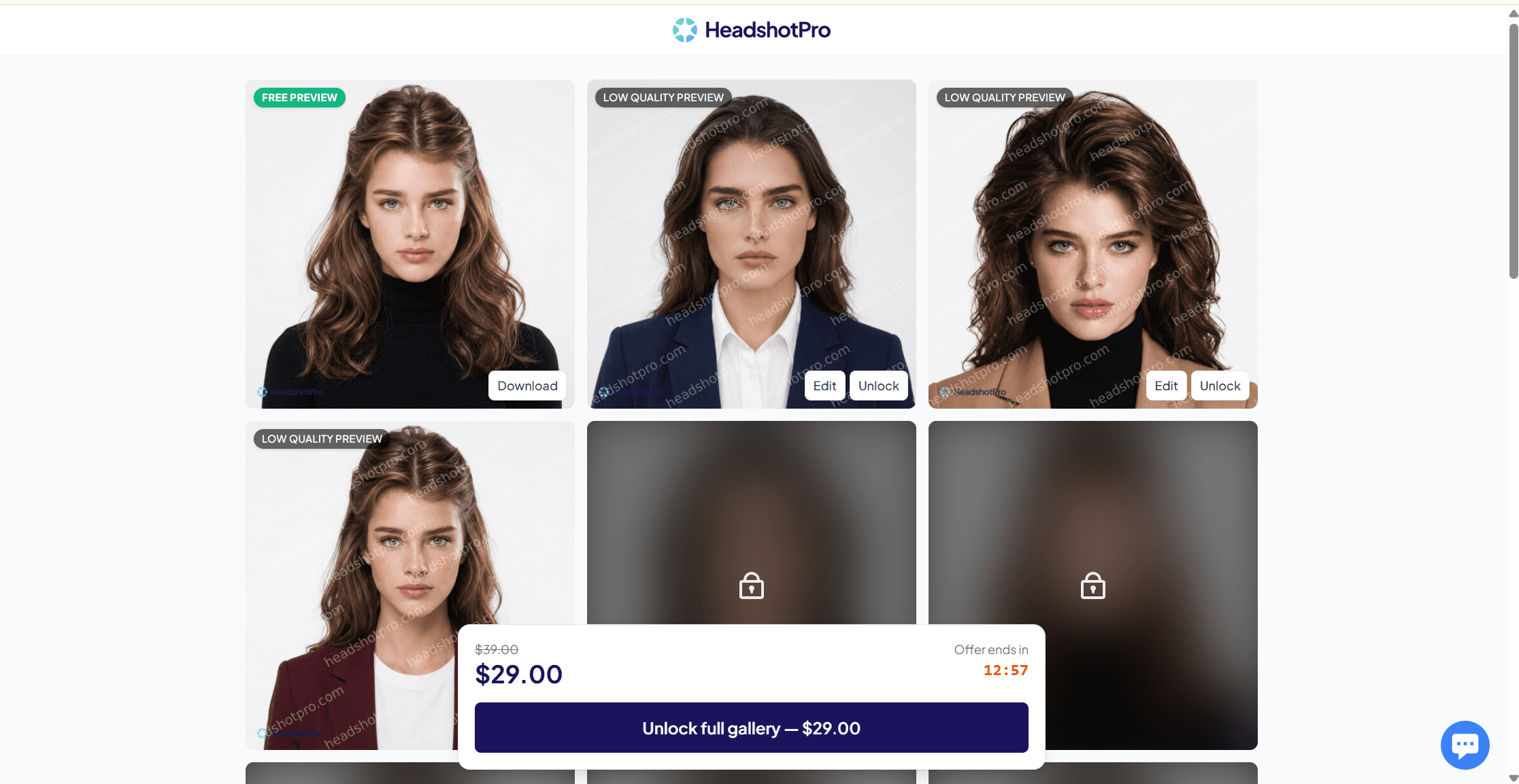
- HeadshotPro is the most honest paywall in the group: free trial keeps exactly one HD headshot, styles pre-selected, square only, with the unlock at $29 on a first-view offer or $39 by default.
- Aragon's free lane is a demo of a paid pipeline. It wants "at least 6 selfies from different angles" and warns that free generations "may go on a waitlist during high demand."
- Free stops being free in the fine print rather than at a paywall: Magic Hour restricts commercial use to paid plans and keeps files for one day, GoStudio gates free credits behind undisclosed behavioural checks, HeadshotPro downgrades everything you did not pay for.
- The metered floor underneath all of this: Nano Banana 2 Lite Edit on Atlas Cloud quoted a flat $0.04 per 1k image on August 3, 2026, with a Developer variant of the same endpoint at $0.028, and it stamps every output with C2PA credentials plus a SynthID watermark.
How We Ranked the Best Free AI Headshot Generators
The ranking rests on one question with a checkable answer: how many usable files does the free tier release before it asks for money? Everything else feeds in as a modifier. An account requirement costs a tool a place, a published watermark policy earns one back, an unstated resolution counts against, and a tool demanding six selfies before it will start ranks below one that works from a single frame.
Where a page states no number, that is what we report. Guessing at an undisclosed allowance would be the same mistake the marketing pages make.
| Rank | Tool | Free output, week one | Account | Watermark statement | Photos in |
|---|---|---|---|---|---|
| 1 | Magic Hour | 3 per day, 21 in a week | none | no watermark, stated for free users | 1 |
| 2 | GoStudio | 2 headshots from 10 signup credits | required | "No Watermark" | 1 |
| 3 | MyEdit | 3 credits per day, headshot cost unpublished | required | "downloads have no watermark" | 1 |
| 4 | Botdog | 1, then 5 per week signed in | optional for the first | not stated | 1 |
| 5 | HeadshotPro | 1 HD file, rest as previews | none | not stated | 1 |
| 6 | Aragon | daily limit plus possible waitlist | required | not stated | at least 6 |
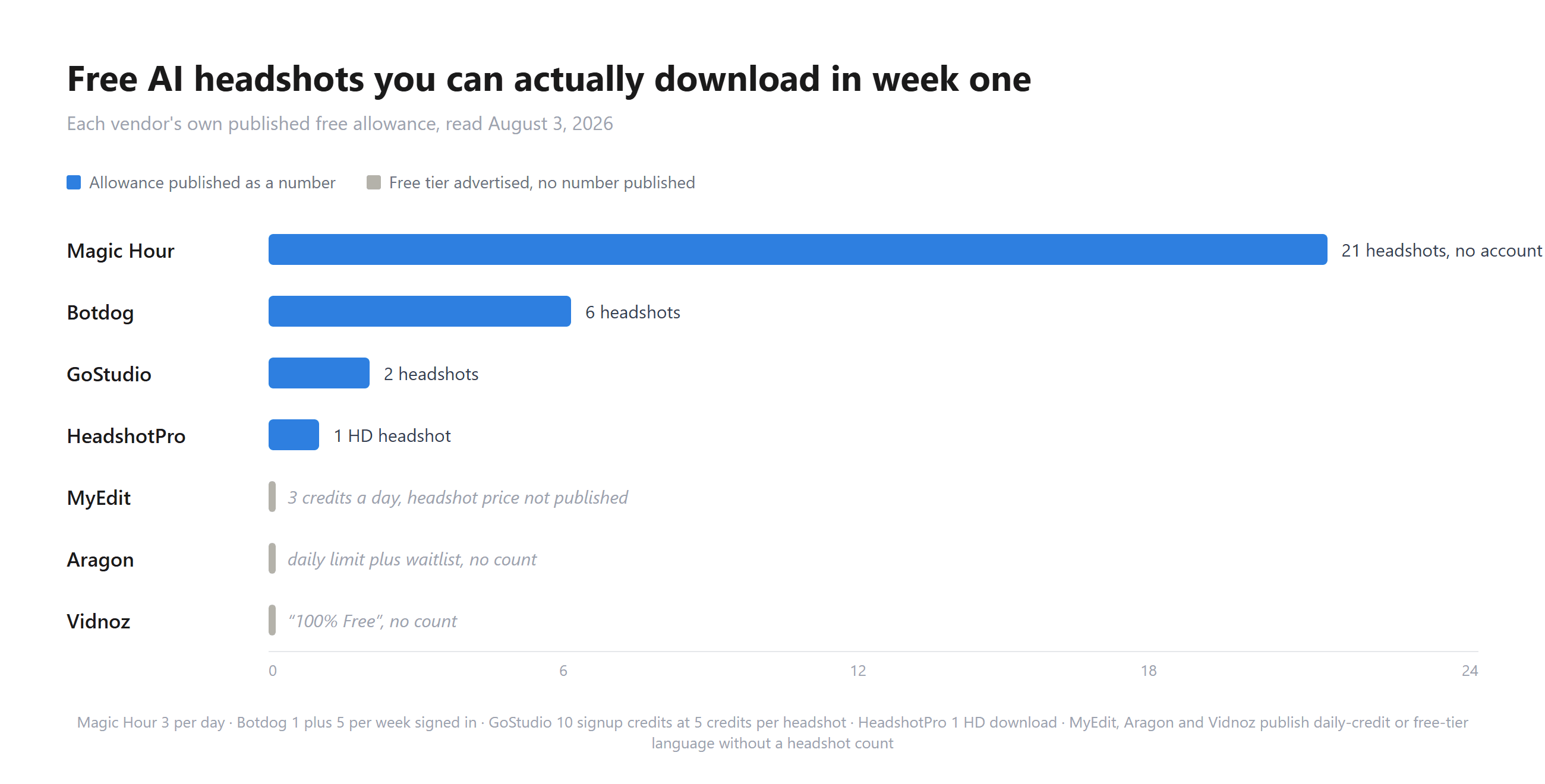
Counted from each vendor's own free-tier page, August 3, 2026.
Vidnoz sits in that chart without a rank for a reason. Its LinkedIn headshot page promises "100% Free Without Hidden Fee for HD Results" and a photo "free, no traps, and no watermark," delivering two angles from one upload across "over 8 styles." No allowance appears anywhere on it. The "60 Free Credits Every Day" banner on the same page belongs to the avatar product rather than the headshot tool, so reading it as a headshot quota would be a mistake.
The Six Free AI Headshot Generators, Reviewed One by One
Magic Hour is the least demanding tool in the group. No account, no card, nothing to install, one photo, and a counter in the widget that told us "3 images left today" before we had identified ourselves in any way. The FAQ backs it in writing: "AI headshot generator works in your browser with no account, no sign up, and no download." Uploads accept an unusually long format list including HEIC, AVIF, JP2 and TIFF. Ownership language is blunt: "The images you generate ... belong to you and you only. We do not store your output images or input images." Two things it does not publish are output resolution and the styles behind its Professional selector; our test run below came back at 832 × 1248. Its developer page prices the same job at "From $0.047 / image," while the sample API response in that panel returns credits_charged: 50, so the free browser tool and the paid endpoint keep separate books.
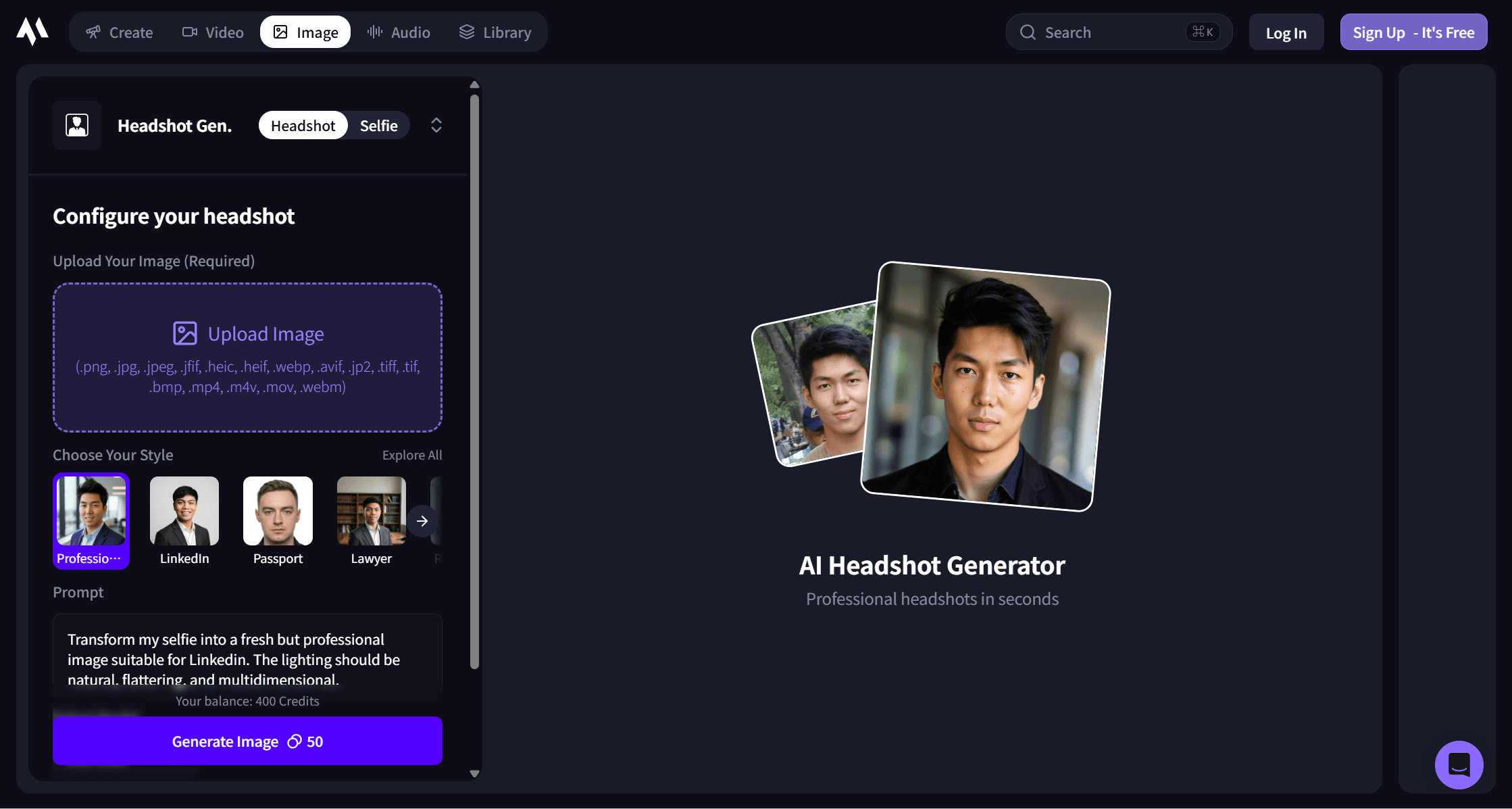
GoStudio publishes the arithmetic everyone else leaves out. Its FAQ states the whole free tier in one sentence: "You get 10 free credits on signup, enough for 2 professional headshots in any of the 20 styles, no credit card needed. Each style is full quality, with no watermark and no waitlist." Five credits per headshot, then, and the styles are named rather than implied: LinkedIn, CEO/Executive, Realtor, Actor, Lawyer, Doctor, Nurse, Therapist, Startup Founder, Resume/CV, Keynote Speaker, Hijab Headshot, Dating Profile, and more. Uploads take PNG, JPG, WEBP or HEIC up to 10MB. Input handling is stated plainly: "Your photo is processed to generate your headshot and then discarded. It is not stored, shared, sold, or used for AI training." The page credits "Google's latest AI" for the generation without naming a model, and 4K output belongs to the paid packs.
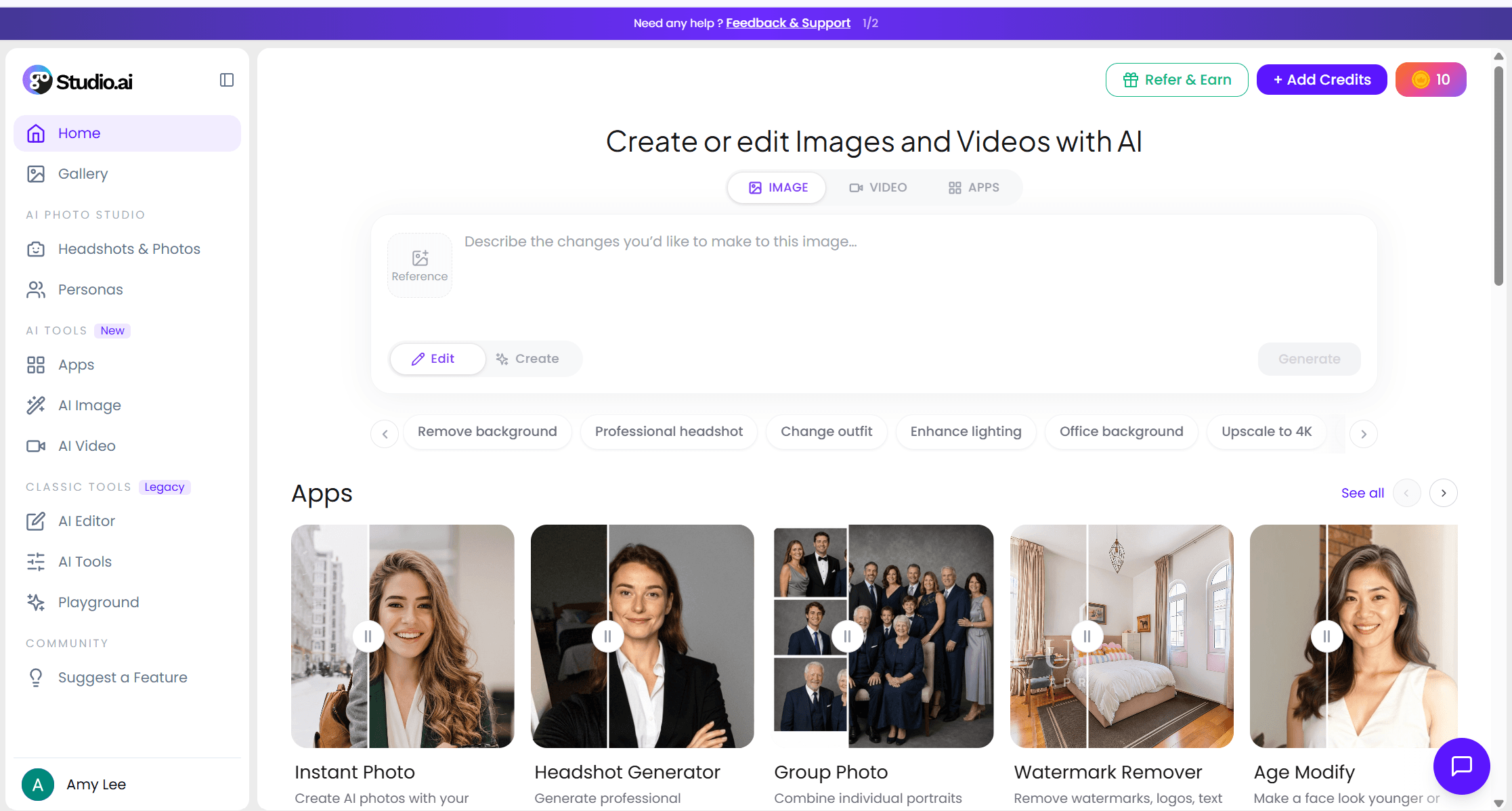
MyEdit, CyberLink's browser suite, runs on a daily allowance that accrues. The pricing comparison lists "3 Credits per day" for the free tier, identical to what paying subscribers get on top of their monthly bonus, and marks AI Headshot as "Paid with Credits." Downloads come in HD with no watermark once you are signed in, uploads reach 50MB across JPG, PNG, GIF, WebP and BMP, and one batch covers "up to 8 headshot styles." What the pages never state is the credit price of a single headshot, which is the number that decides whether three daily credits mean three headshots or a third of one. Subscriptions start at $7 a month for Creator Pro with 500 bonus credits, $9 for Studio Pro with 800.
Botdog aims squarely at LinkedIn and refills weekly. The first headshot needs nothing: "Your first headshot is free — no signup." Signing in changes the offer to "keep your headshot plus 5 free every week," which is the only recurring weekly allowance in this comparison. It carries the largest style library of the free tools at 36 profession styles, accepts JPG, PNG and HEIC up to roughly 20MB, and returns square head-and-shoulders framing. Neither a watermark policy nor an output resolution appears on the page, and no paid price does either; the run we put through it below came back a clean 1024 × 1024 with no watermark.
HeadshotPro is a paid product with a sample attached, and it says so in a spec table rather than hiding it. Cost to start is $0, sign-up is "None," credit card is "None," and the free trial's line for HD headshots you keep reads "1," a 1024 × 1024 square per the same spec row, with styles pre-selected and a first preview in 5 to 10 minutes. Everything else you generate stays a preview. The unlock is $29 on a first-view offer or $39 by default, which turns those previews into "49+" keepable HD files, adds 40 photo credits, opens landscape output and thousands of styles, and carries a money-back guarantee.
Aragon belongs on the list because it ranks for the query, and it needs the clearest warning label. It works from a set rather than a frame: "at least 6 selfies from different angles," varied rather than near-duplicate, solo, recent, unfiltered, in natural light. Results arrive in minutes rather than seconds. The free lane exists with a published caveat, that free generations are limited per day and "may go on a waitlist during high demand," and the waitlist itself "may be paused or delayed depending on demand." Paid packs run $35, $45 and $75 for 40, 60 and 100 photos under a 20% promotion, which is $0.75 to $0.88 a photo. If you want the six-angle approach, this is the tool; if you want a file in the next two minutes, it is the wrong door.
Claims are one thing; renders are another. So we fed the same file to the two tools that ask for nothing before generating, Magic Hour and Botdog, on August 3, 2026, and to the metered endpoint covered in the next section. The input was a deliberately awkward one, an in-car phone selfie with the face turned away from the lens, an arm raised into the hair and hard sun across one cheek.
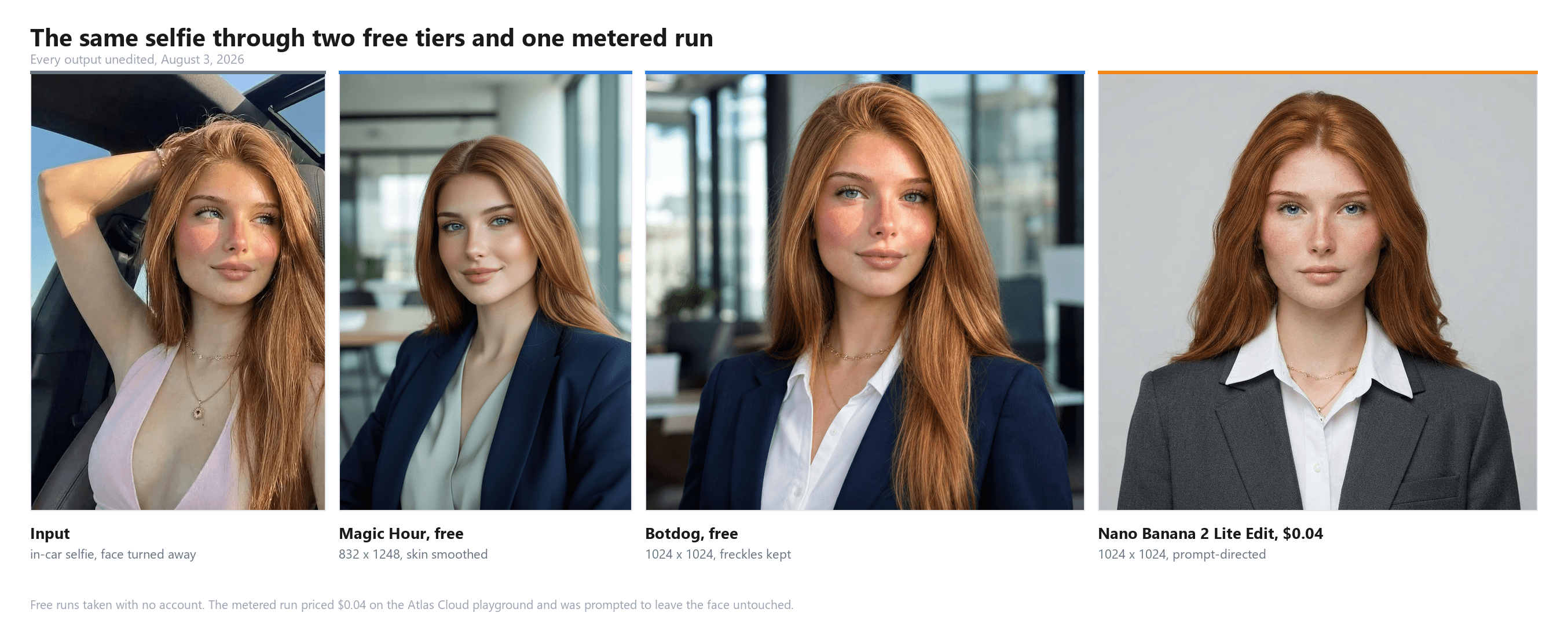
One run per route, same input file, August 3, 2026. Outputs unedited.
Both free tools passed the mechanical part. Each brought the pose frontal, invented a navy blazer, and set an office behind her, and neither output carries a watermark. Botdog's finished in well under a minute, a touch over its stated 30 seconds, and came back 1024 × 1024, square as promised; Magic Hour's banner said about 20 seconds, took closer to 90 on the free queue, and returned an 832 × 1248 portrait, which answers the resolution question its pages leave open.
The difference that matters is in the skin. Botdog kept the flush across the cheeks, the freckling, even the necklace. Magic Hour returned a cleaner, smoother face with most of those marks polished away, recognisably similar and noticeably idealised. One run each is not a verdict, and the drift still ran in exactly one direction, away from the face in the input. One more observation from the run itself: after the render, Magic Hour's widget swapped in a "Get Full Access" panel advertising 400 signup credits, higher resolution and queue-skipping, though the download button worked without any of it.
Metered AI Headshots on Atlas Cloud From $0.04 a Run
Every tier above is an allowance someone else set. Atlas Cloud sells the layer underneath the allowance, image models billed per run with the price printed on the button before you press it. Registration asks for no card. For turning one selfie into a headshot, the cheapest relevant endpoint belongs to Google's Nano Banana 2 family, and the specific one is Nano Banana 2 Lite Edit, which the model page describes as accepting up to 14 reference images plus a written instruction and returning the edit at 1k with sub-two-second latency.
Its pricing section is one sentence long: "Pricing is a simple flat fee per generated 1k image. There is a single SKU and the total scales linearly with the number of images returned." The playground quoted $0.04 per run on August 3, 2026, about 250 runs per $10.
| Endpoint on Atlas Cloud | Resolution | Price per image, Aug 3, 2026 |
|---|---|---|
| Nano Banana 2 Lite Edit | 1k only | $0.04 flat |
| Nano Banana 2 Lite Edit Developer | 1k only | $0.028, marked 30% off $0.04 |
| Nano Banana 2 Edit | 1k / 2k / 4k | $0.08 / $0.12 / $0.16 |
| Nano Banana 2 Edit Developer | 1k / 2k / 4k | from $0.04, marked 50% off |
| Nano Banana Pro Edit | premium tier | from $0.14 |
Two notes on that table. The Developer variants carry the discounts, and the model pages do not spell out what separates a Developer endpoint from the standard one beyond the price, so treat the undiscounted figure as the durable one. And the Nano Banana 2 Edit page contradicts its own price table in its tips section, where it claims 2K costs the same as 1K; the table on the same page says $0.12 against $0.08, and the table is what the run button charged.
The Lite tier's own limitations note is worth reading before you commit a face to it: "this model may struggle with small faces, accurate spelling, and very fine details." A head-and-shoulders portrait puts the face across most of the frame, which is the friendly case, though a full-body shot cropped down afterwards is not.
One property none of the free pages we read mentions appears on this model page in plain text: "Edited images include C2PA content credentials and an imperceptible SynthID watermark by default, so outputs can be identified as AI-generated." Every file this endpoint returns arrives pre-labelled as AI-made. None of the six free tools states whether it signs its outputs at all, so what metadata travels with a free headshot is unknowable from the marketing.
Method 1: One Selfie Into a Headshot in the Playground
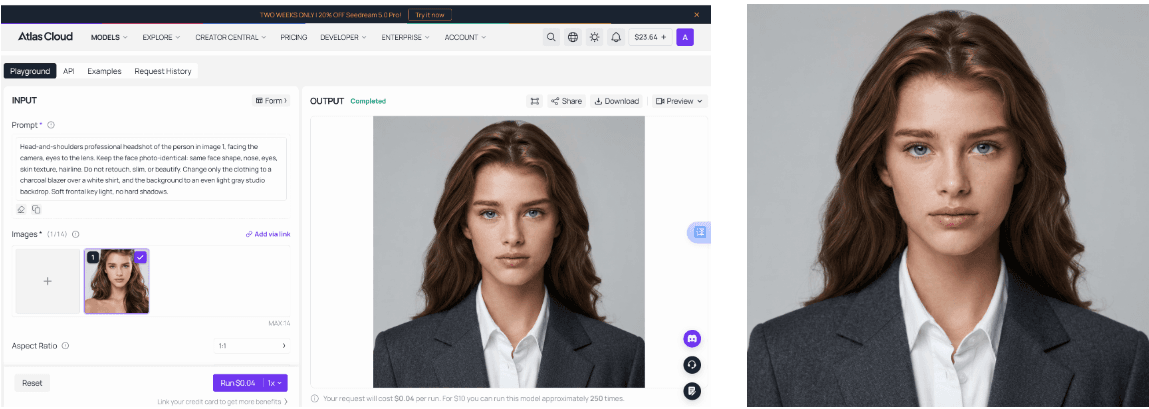
Log in, open the Lite Edit playground, drop a single selfie into the image slot, set aspect ratio to 1:1, and describe the result. The form exposes aspect ratio, thinking level and resolution, nothing else to configure. A workable instruction names the pose, locks the identity, then specifies wardrobe and background:
plaintext1Head-and-shoulders professional headshot of the person in image 1, facing the camera, eyes to the lens. Keep the face photo-identical: same face shape, nose, eyes, skin texture, hairline. Do not retouch, slim, or beautify. Change only the clothing to a charcoal blazer over a white shirt, and the background to an even light gray studio backdrop. Soft frontal key light, no hard shadows.
The instruction to leave the face alone earns its place. Beautification is the failure mode nobody asks for: a face that returns slimmer, smoother or a decade younger is a photo of somebody adjacent to you, which defeats the point of having a photo.
That is the run in the fourth panel of the comparison above. It finished in about eight seconds, billed the $0.04 the button quoted, and returned 1024 × 1024 on a plain light gray backdrop rather than the invented office both free tools reached for. The freckling and the flush survived, which is what the prompt asked for, and the necklace came through. What the prompt did not manage is the hair: the input has it swept across one shoulder, and the output moved it into a symmetrical fall on both sides. A charcoal blazer over a white shirt arrived as specified, and the framing is tighter and flatter than the free tools' results, closer to a passport photo than a lifestyle portrait. Whether that reads as professional or clinical is a taste call, and it is a taste call you can rewrite for another four cents.
Method 2: A Headshot Set of Your Own Through the Atlas Cloud API
A paid pack's real product is volume. Volume is a loop.
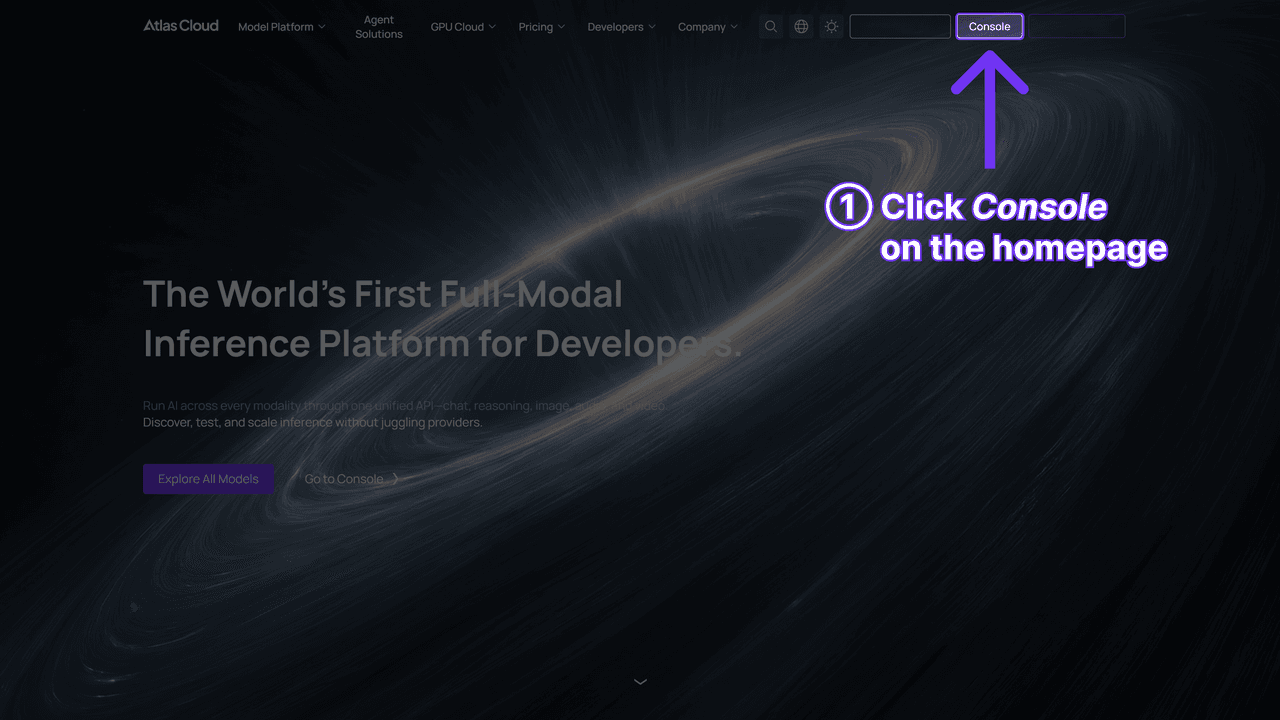
Step 1: Create an API key in the Atlas Cloud console and copy it. Keep it server-side.
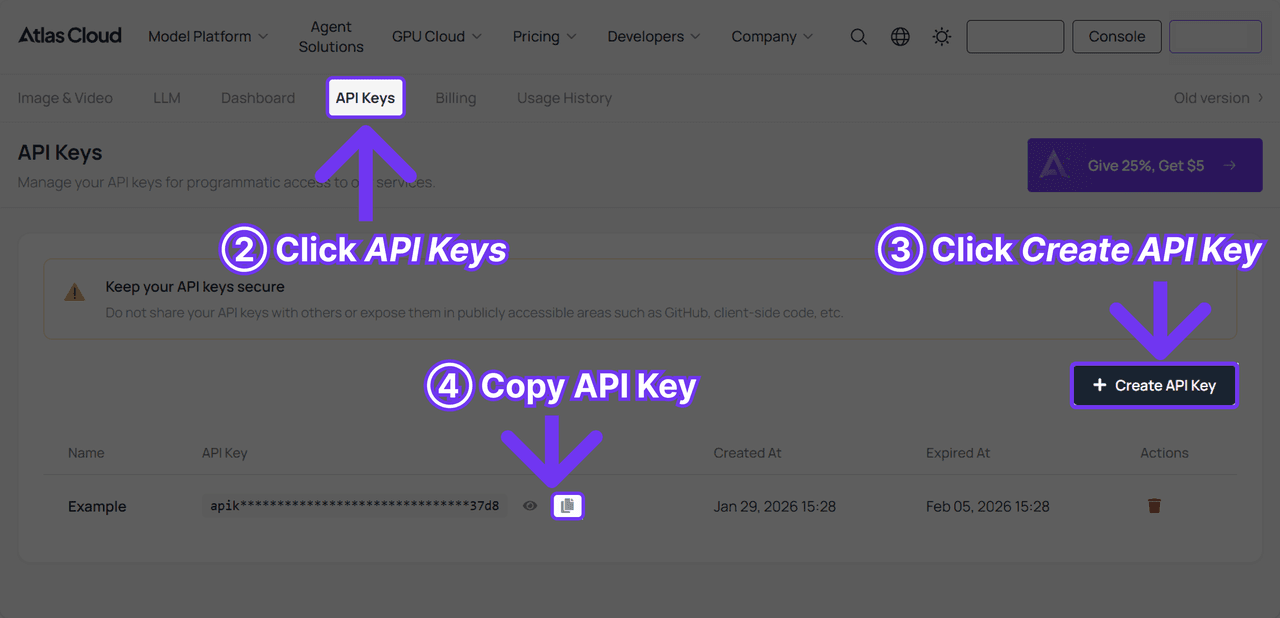
Step 2: Read the API docs for authentication and the shared image endpoint's parameters.
Step 3: Send the first request. Submission is asynchronous and hands back a prediction ID.
plaintext1curl -X POST https://api.atlascloud.ai/api/v1/model/generateImage \ 2 -H "Content-Type: application/json" \ 3 -H "Authorization: Bearer $ATLASCLOUD_API_KEY" \ 4 -d '{ 5 "model": "google/nano-banana-2-lite/edit", 6 "prompt": "Head-and-shoulders professional headshot of the person in image 1, facing the camera. Keep the face identical, no retouching. Charcoal blazer over a white shirt, even light gray studio backdrop, soft frontal key light.", 7 "images": ["https://your-cdn.com/selfie.jpg"], 8 "aspect_ratio": "1:1" 9 }'
plaintext1curl -s https://api.atlascloud.ai/api/v1/model/prediction/<PREDICTION_ID> \ 2 -H "Authorization: Bearer $ATLASCLOUD_API_KEY"
When the status reads completed, the output URL sits in the payload. Rewrite one wardrobe clause per call and forty variants, matching the credit count HeadshotPro's unlock hands over, come to $1.60 at the quoted rate against its $29. The same key and the same two calls reach every other image model on the platform, so trading up to a 4K tier later is an edit to the model string.
Where Free AI Headshot Tiers Quietly Stop Being Free
Nothing in this category ends at a paywall you can see. It ends in a clause.
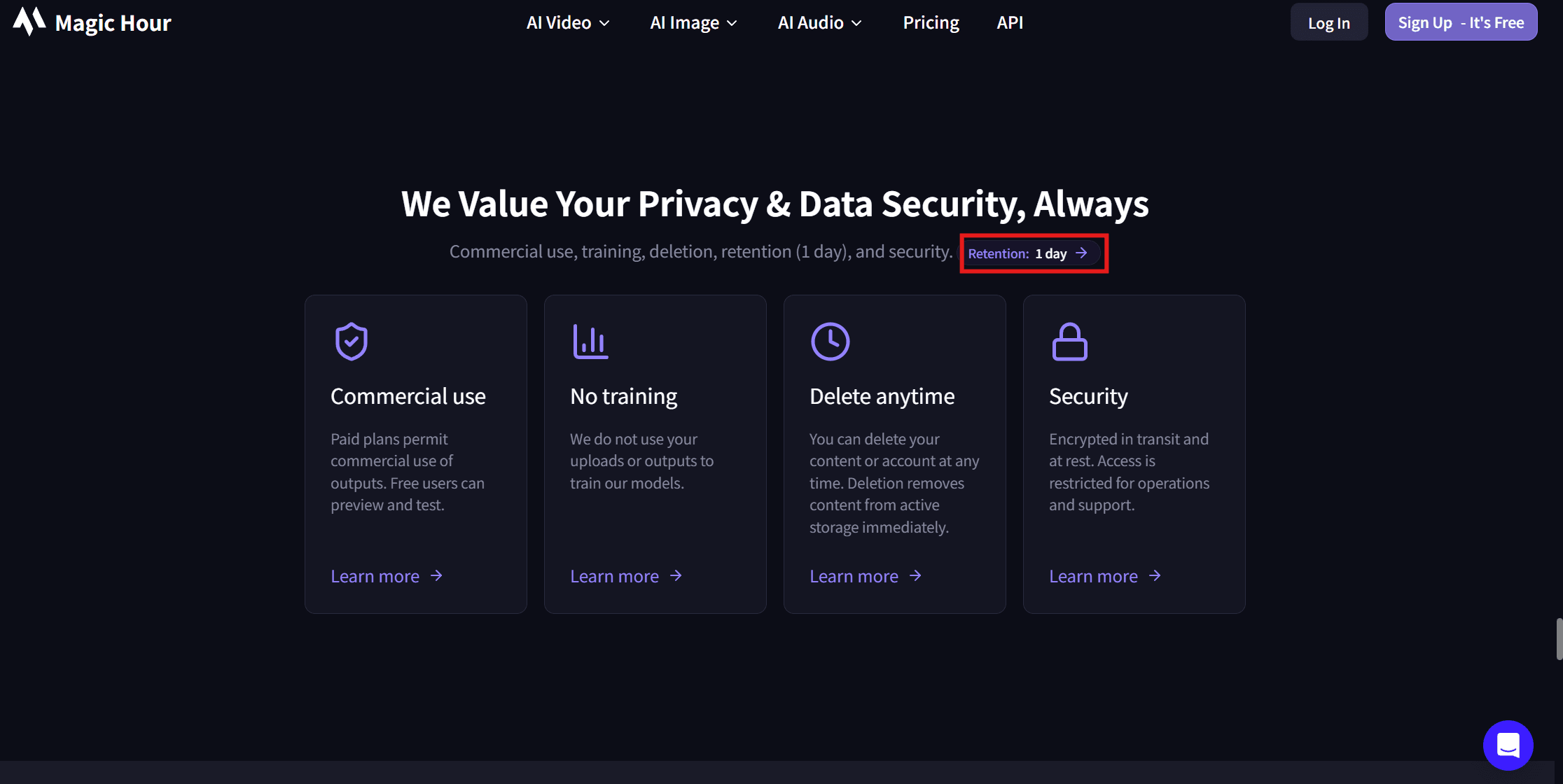
Magic Hour's privacy panel holds the sharpest one. Retention is listed as "1 day," and on rights it reads: "Paid plans permit commercial use of outputs. Free users can preview and test." Twenty-one free headshots a week, then, come with a licence that does not clearly cover a consultant putting one on an invoice or a profile that sells services. The FAQ's ownership sentence and the licence panel pull in different directions, and the licence panel is the specific one.
GoStudio's gate sits before generation rather than after. Free credits "go to eligible new accounts," decided by "automated behavioral checks, powered by a third-party trust system," and the page is candid that the criteria stay unpublished: "We don't share the exact criteria publicly, because doing so would defeat the purpose." Anyone flagged by mistake is invited to email support, and the page says credits get issued manually if the case checks out. The reason given for the gate is abuse of an earlier open offer, which is believable and still means the 2 in the table above is conditional.
HeadshotPro's mechanism is the plainest of the six. You generate a set, you see the set, you keep one file, and the rest stay previews until $29 changes their status. Nothing about that is hidden, and it is the only tool here that lays its own free-tier limits out in a spec column.
MyEdit's missing number carries a similar effect. Three credits a day accumulate, so patience substitutes for payment, but with the per-headshot credit cost unpublished you cannot tell in advance whether tomorrow is enough or next week is.
| Tool | What it charges after the free tier | Per headshot |
|---|---|---|
| Magic Hour | developer pricing "From $0.047 / image"; consumer plan prices not on the tool page | $0.047 |
| GoStudio | credit packs at $0.049, $0.043 and $0.038 per credit for 80, 160 and 500 monthly credits, 5 credits per headshot | $0.19 to $0.245 |
| MyEdit | Creator Pro $7 a month with 500 bonus credits, Studio Pro $9 with 800 | not derivable, credit cost unpublished |
| Botdog | no price published on the tool page | not published |
| HeadshotPro | $29 first-view offer or $39 default, adds 40 photo credits | $0.73 to $0.98 |
| Aragon | packs at $35, $45, $75 for 40, 60, 100 photos under a 20% promotion; list $44, $56, $94 | $0.75 to $0.88 |
| Nano Banana 2 Lite Edit on Atlas Cloud | $0.04 per 1k image, flat, no pack or tier | $0.04, or $0.028 on the Developer variant |
Two readings of that spread. The prepaid credit shops land between nineteen and twenty-five cents once you do the credit arithmetic they leave to you, and the two headshot specialists cost roughly three to four times that per file, selling an album plus a guarantee instead of a single render. The metered endpoint costs less than any of them per attempt, and it hands you no styles, no menu, no curated fallback when a description misses. Our run bore that out in both directions: the instruction to preserve the skin was obeyed, and nothing in the tool stopped it from restyling the hair on its own.
What a Second Free AI Headshot Attempt Costs
The allowances at the top of this article describe a good day. The number that actually decides whether a free tier works for you is what a retry costs, because a first render can miss in ways the input photo gives no warning of.
Magic Hour makes the most generous promise in the group, in its own FAQ: "Simply click regenerate or upload another photo and create another headshot for free! You can keep creating headshots until you're fully satisfied with your output." On the same page sits the counter that told us "3 images left today." Both sentences can be true, and only one of them is a limit.
| Tool | What a second attempt costs |
|---|---|
| Magic Hour | one of the day's three, whatever the "keep creating" wording suggests |
| Botdog | a "Generate more" click, drawing on the weekly five once the first free render is spent |
| GoStudio | 5 credits, half the signup grant, so the free tier is two attempts rather than two keepers |
| MyEdit | at least another day's accrual, and unpriceable while the per-headshot credit cost stays unpublished |
| HeadshotPro | nothing, and it changes nothing: extra renders stay previews until the unlock |
| Aragon | another slot in the daily free limit, plus the waitlist when demand is high |
| Nano Banana 2 Lite Edit | $0.04, quoted on the button before you press it |
Read the ranking through that column and it shifts. Magic Hour's lead is really a retry budget, three swings a day at no cost, which suits a job where you cannot say in advance what a good result looks like. GoStudio's two full-quality files are two swings, not two picks from a set. HeadshotPro is a different transaction entirely, since generating more costs nothing and gets you nothing.
Which puts the weight back on the photo you feed in, and every vendor publishes what it wants there. Magic Hour asks for "an image that has a clear shot of your face with no obstructions" that should "resemble you, be high resolution, and not include multiple people." GoStudio and Botdog both ask for one clear front-facing selfie, GoStudio adding that "A well-lit photo gives the best results." Aragon's list is the longest, and the one condition it states that others do not is solo framing, since "Group shots confuse the AI."
Our own input broke much of that guidance deliberately and still produced usable results from both free tools, which puts those lists somewhere between a preference and a rule. One condition does look load-bearing, and it is the one most of those pages state in some form: the face has to be large and sharp enough to read. Detail that was never in the frame does not come back, no matter how many retries the tier allows.
Frequently Asked Questions
What is the best free AI headshot generator right now?
By published free output, Magic Hour: three headshots a day, no account, no card, no watermark, and a counter in the widget that confirms the allowance before you upload. In our single-run test its output was also the most retouched, so check the result against your actual face before it goes up. GoStudio wins on choice instead, with two full-quality headshots across 20 named styles on signup credits and no waitlist, and Botdog held likeness best on the run we gave it. If your free attempts need to accumulate rather than arrive at once, MyEdit's three daily credits do that, with the caveat that the headshot's credit price is unpublished.
Can you get a free AI headshot with no watermark?
Yes, and three tools put it in writing. Magic Hour states "No watermark on AI headshot generator photos for all users, including free users with no sign up." GoStudio lists "No Watermark" beside its 10 free credits. MyEdit says downloads have no watermark for signed-in users. Botdog and HeadshotPro make no watermark statement on the pages we read; in our own runs, both the Magic Hour and Botdog free outputs came back clean.
Do free AI headshot generators require an account or a credit card?
Magic Hour and HeadshotPro run without either, and Botdog's first headshot does too. GoStudio, MyEdit and Aragon want an account, none of them a card. Only Aragon's free lane can make you wait, since its own page warns that free generations may enter a waitlist when demand is high.
How many photos do free AI headshot generators need?
Five of the six work from a single front-facing selfie. Aragon is the exception, asking for at least six selfies from different angles, solo, recent, unfiltered, and not near-duplicates of each other. More angles give a generator more of your face to work from, which is the argument for the burden; it also means no result in the next thirty seconds.
Will a free AI headshot still look like you?
That varies by tool, and no page tells you in advance. In our test both free tools produced a professional-looking portrait from the same selfie, but one erased most of the freckles and softened the skin while the other left both alone. Neither disclosed the choice. Since a free tier gives you one or two attempts rather than an album, the practical move is to compare the output against the input at full size and look for the marks that make the face yours, before the file goes anywhere.
Do free AI headshot tiers allow commercial use?
Read each one, because they differ. Magic Hour's own panel restricts commercial use to paid plans and describes free users as able to "preview and test." GoStudio calls its free outputs full quality with no watermark and does not restrict them by tier on the page we read. Aragon's paid FAQ states outputs are yours to use as you like. Where a tool says nothing, treat a paid invoice or a client deliverable as an open question rather than a settled permission.
What does an AI headshot cost once the free credits run out?
Between four cents and about a dollar, depending on what you are buying. Prepaid credit shops land at $0.19 to $0.245 per headshot once you convert their credits, the two headshot specialists charge $0.73 to $0.98 through unlocks and packs, and a metered edit call on Atlas Cloud quoted $0.04 flat per 1k image on August 3, 2026, with a Developer variant at $0.028. The specialists' premium buys an album and a guarantee behind it; the metered rate buys one attempt whose price you saw first.
Conclusion
Ranked on files released rather than adjectives used, the order is not close at the top. Magic Hour hands over twenty-one usable headshots a week with no account, and hedges that generosity with a licence limited to preview and test. GoStudio hands over two, tells you the credit arithmetic, and screens who qualifies. Below those two the free tier thins into a sample of a paid product, with Botdog's weekly five as the one allowance that keeps refilling, and Aragon's queue as the one that can stall.
What none of them can give you is certainty on the first try, which is why the retry column matters more than the headline allowance, and why a metered route at four cents a run is worth keeping in reserve. Read the licence clause on whichever free tier you settle on, and check the output against your own face at full size, before the file starts representing you.





