You know the frame. Vincent Vega walks into Mia Wallace's apartment, hears a voice on the intercom, and does that slow bewildered look around an empty room. The internet has been pasting that man into every awkward situation since 2015.
I wanted my face in it. Not a sticker slapped over his head. Actually in it, grain and all, like the frame was shot that way in 1994.
The first attempt took ninety seconds and looked genuinely good. The fourth one broke. The sixth one never happened, because the counter had run out for the day.
This is the whole thing: the exact workflow, the exact prompt, what the free tier really gives you, and the two routes I now use when I want twenty variations instead of five.
Key takeaways
- Higgsfield face swap needs two images and zero prompting: a base frame and a face. It is genuinely the fastest path to a first result.
- The free tier is capped at 5 image swaps per day, and video swaps sit behind a paid plan.
- A prompt-controlled edit model gives you the thing a one-click swapper cannot: control over expression, grain, and what stays untouched.
- Atlas Cloud's free AI face swap tool keeps the one-click simplicity without the counter: free per its own FAQ, with no usage cap and no watermark.
- Iconic memes only work if the joke survives the swap. Keep the pose, the props, and the lighting. Change the face and nothing else.
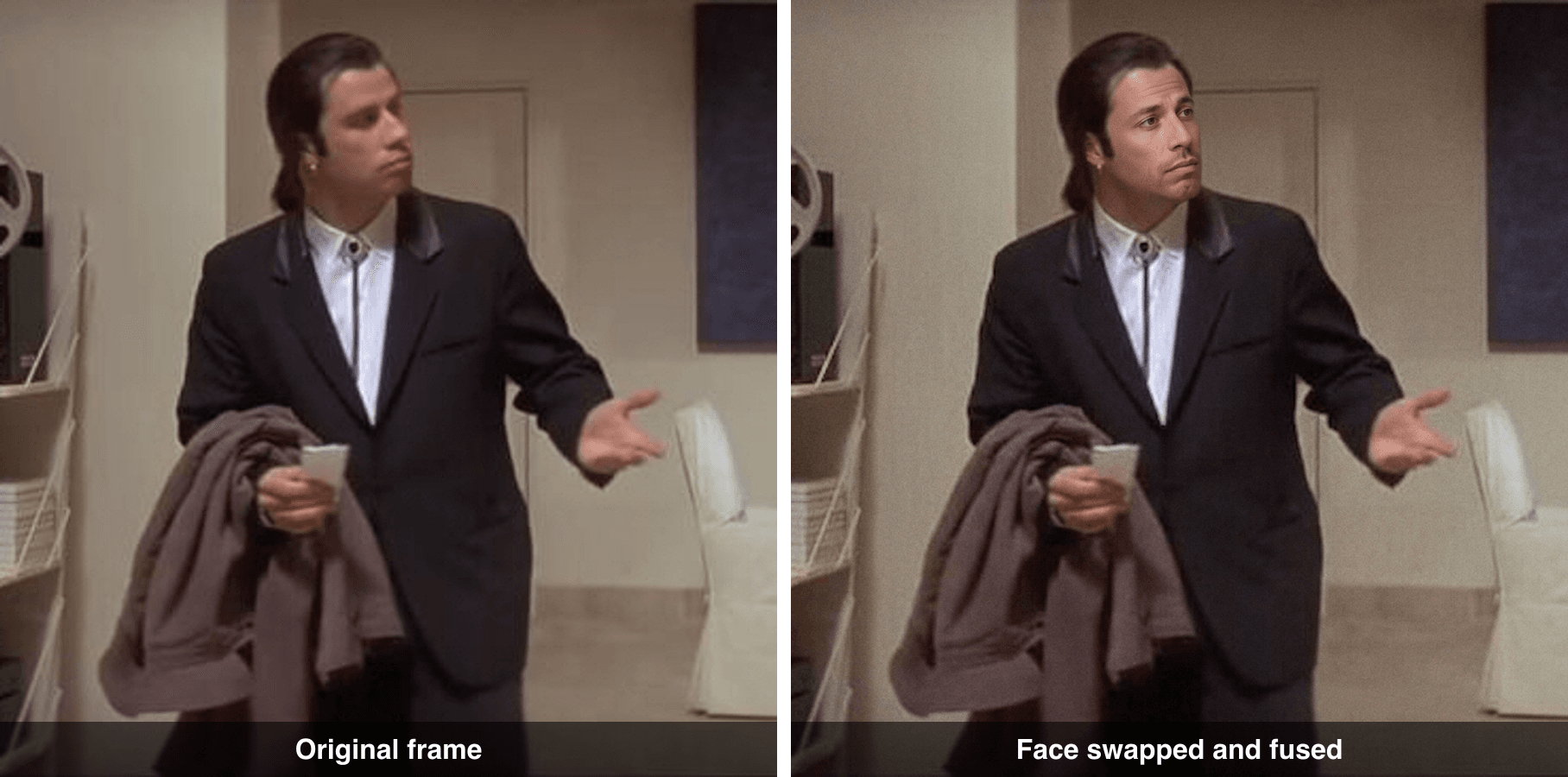
Before and after: the original Confused Travolta frame from Pulp Fiction on the left, and the same frame with an ordinary man's face fused in on the right, film grain and lighting intact
That is the target. Same suit, same coat over the arm, same paper cup, same lost shrug. Different guy entirely.
Why the Higgsfield Face Swap Hype Is Real, and Why Your First Swap Still Looks Pasted On
Face swapping used to mean training a model on a thousand photos of one person and waiting overnight. Higgsfield's pitch is that two images are enough, and that the output arrives in roughly 30 seconds to 2 minutes depending on your plan and the queue (Higgsfield, July 2026).
That part is true, and it is why the tool spread so fast.
The part nobody warns you about is what happens after the novelty. You run one swap, it looks great, you post it. Then you try a harder frame and the output goes plastic. The skin is too smooth. The edges of the jaw have that faint halo. The face is technically correct and the image is dead.
A dim apartment at night, movie stills pinned to a corkboard, a laptop open on the desk showing a face swap job halfway through rendering
Three things kill a swap, and only one of them is the model's fault.
The base frame fights you. Confused Travolta is a compressed screengrab from a 1994 film. It is grainy, softly lit, and about 366 pixels wide in its most-shared form. Any swap that comes back sharper than the rest of the image reads as fake instantly, even to people who could not tell you why.
The joke gets swapped out with the face. This is the big one. The frame is funny because of the shrug, the coat draped over the arm, and the completely empty stare. If your new face looks confident, or amused, or is looking at the camera, you have made a picture of a man in a suit. The meme is gone.
One face per run. Higgsfield states plainly that the tool "does not support swapping multiple faces within a single operation" (Higgsfield, July 2026). Pick single-subject frames. The Last Supper is not your first project.
Confused Travolta is a good demo precisely because it is hard. Small face, heavy grain, and the entire gag riding on one blank expression. If a workflow survives this frame, it survives most things.
The Full Higgsfield Face Swap Workflow, Mapped Out Before You Touch Anything
Here is the honest shape of the job. It is four steps, and two of them are just gathering inputs.
- Get the original meme frame at the best resolution you can find.
- Get one clean, front-facing source face.
- Run the swap.
- Run it again, differently, when step 3 gives you something you cannot fix.
Steps 1 and 2 are the same no matter which tool you use. Step 3 is where the routes split.
The one-click route is Higgsfield's face swap app. Upload, upload, generate. No prompt, no mask, no settings to get wrong. It is genuinely the right tool for your first swap and for anyone who does not want to think about it.
The prompt-controlled route is an image edit model you drive with words. Slower to describe, but you get to say keep the film grain, keep the shrug, give him a lost expression, and do not sharpen the face. That is the difference between a swap that works and a swap you keep.
I run the second route on Atlas Cloud, mostly because the models I need for a job like this live in the same browser tab and take the same API key. Generate the source face with one model, fuse it with another, restyle the result with a third, no account juggling in between. The same platform keeps a shelf of free AI tools next to the metered models, and one of them is a free face swap that hands back Higgsfield's one-click simplicity minus the daily counter. It gets its own section after Step 4.
| Route | What you do | Control you get | Best for |
|---|---|---|---|
| Higgsfield face swap app | Upload base + face, hit the button | None. It decides. | Your first swap, quick reaction images |
| Atlas free AI face swap | Upload base + face, nudge two sliders | Blend strength and edge feathering | Retrying as often as you like, no daily counter |
| GPT Image 2 (text-to-image) | Describe the source face you need | Full control over the face you feed in | When you do not want to use a real photo |
| Nano Banana 2 Edit | Write a fusion prompt with 2 reference images | Expression, grain, edges, what stays untouched | Memes, film stills, anything with texture |
| Seedream 5.0 Pro Edit | Restyle the finished swap | Poster-grade detail and color | Turning a meme into something printable |
The tutorial below runs the full chain end to end on one image. Follow it with your own selfie and you will land in the same place.
Step 1: Grab the Meme the Higgsfield Face Swap Will Live In
Do not generate a lookalike. An AI recreation of a famous frame is uncanny in a way people notice within half a second, and the entire joke depends on recognition.
Get the real thing. Imgflip's template pages and Know Your Meme both host direct image links. Confused Travolta originated as a reaction GIF posted to Imgur in November 2012 and did not properly take off until a 2015 green-screen cutout made it remixable (Know Your Meme, July 2026).
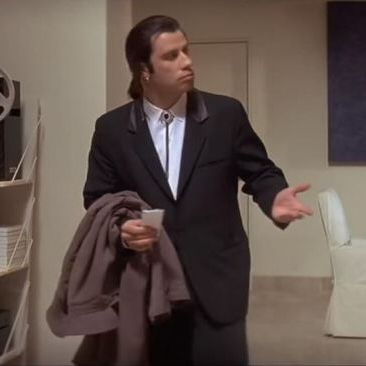
The original Confused Travolta frame from Pulp Fiction, Vincent Vega mid-shrug in Mia Wallace's apartment
Yes, it is small. That is fine and it is actually the point. The grain and the softness are load-bearing. A crisp 4K remaster of this frame would not read as the meme at all.
Save it somewhere you can find it. This file gets uploaded twice: once to Higgsfield, once to the edit model.
Step 2: Build the Source Face Your Face Swap Higgsfield Run Needs
You can use a selfie. Front-facing, evenly lit, no sunglasses, no hat, eyes visible. Higgsfield's own guidance is to use "clear, well-lit photos where the face is visible."
If you would rather not put your real face into a demo, generate a stand-in. That is what I did here, using GPT Image 2. Paste this exactly:
plaintext1A clean front-facing headshot of an ordinary man in his early thirties, 2short dark hair, light stubble, neutral relaxed expression, plain light 3grey studio background, even soft lighting, sharp focus on the eyes, 4shot on a 50mm lens, natural skin texture, no glasses, no hat, 5photorealistic
Settings: on the GPT Image 2 playground, set Quality to high and size to 1:1. Square framing keeps the whole head in shot with no crop, which is exactly what a swap model wants.
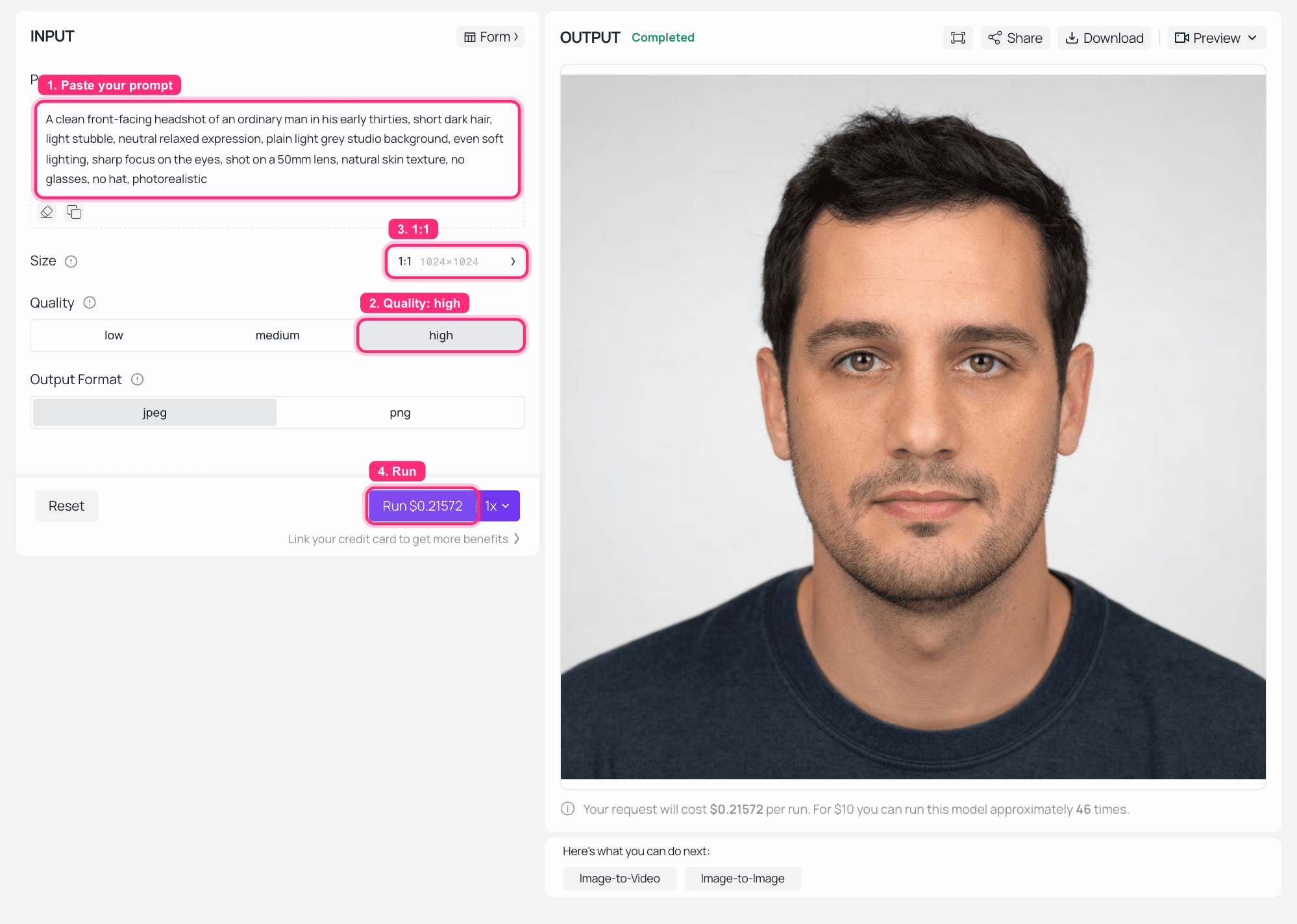
GPT Image 2 playground on Atlas Cloud with the headshot prompt filled in, quality set to high, and the finished front-facing portrait in the output panel
Download it. This is your face reference for both routes.
One rule that saves you a retry: whatever face you feed in should be neutral. Not smiling, not posing. The swap model will map the meme's expression onto it, and a big grin in the source photo fights that every time.
Step 3: Run the Higgsfield AI Face Swap, Including the Higgsfield Video Face Swap Path
Log into Higgsfield and open Face Swap under Apps, or from the Create Image section of the dashboard.
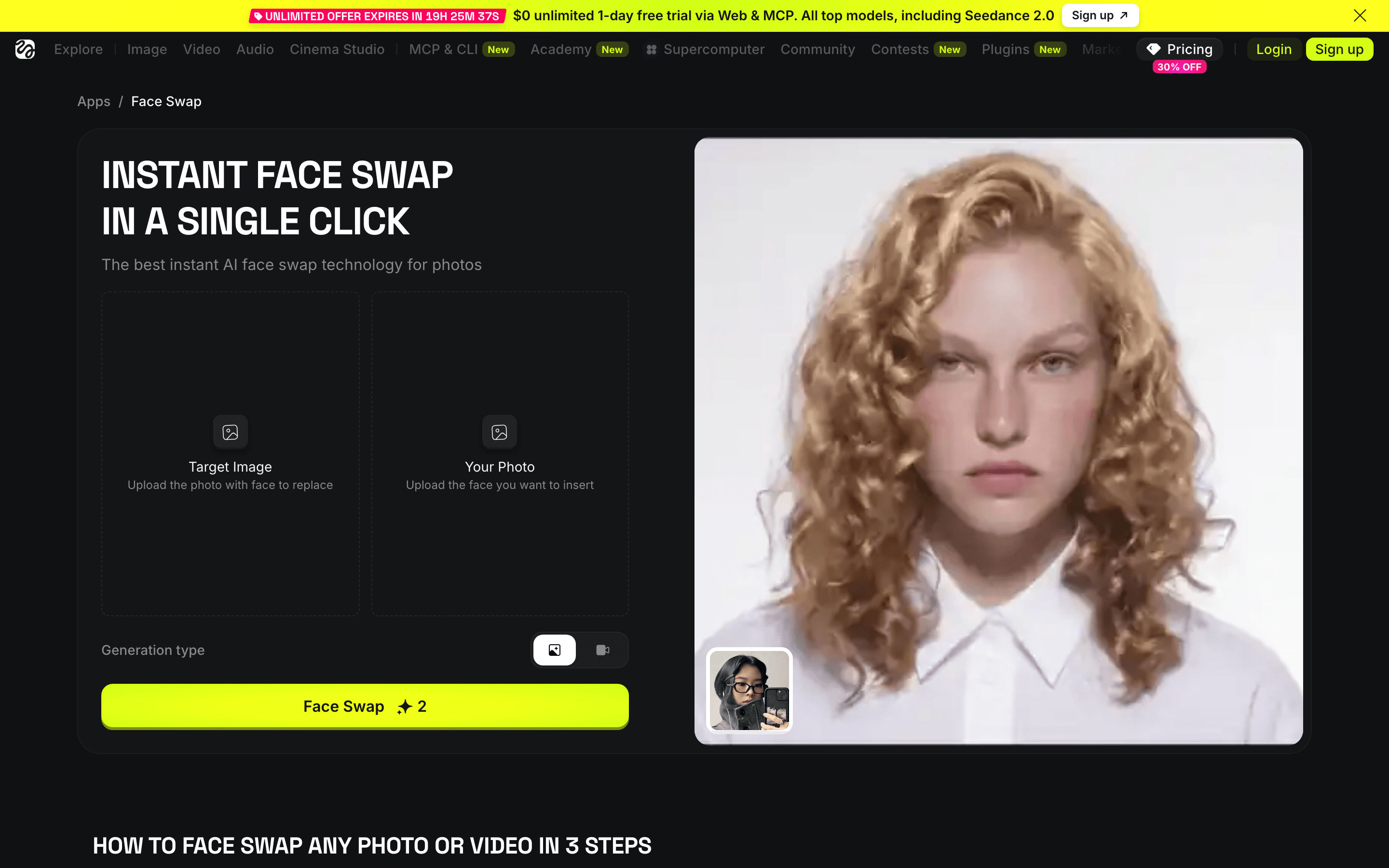
The Higgsfield face swap app page showing the Target Image and Your Photo upload slots, the Generation type toggle and the Face Swap button
The whole interface is two upload boxes, one toggle, and a button (Higgsfield, July 2026):
- Target Image. Their label for the base. Drop the Travolta frame here. It defines pose, lighting direction, and framing, so it is the one that decides what the final picture looks like.
- Your Photo. The face you want inserted. Your selfie or the portrait from Step 2. This slot only contributes identity.
- Generation type. A small photo/video toggle sitting right above the button. Leave it on photo.
- Hit Face Swap. No prompt field, no mask, nothing to tune. Expect 30 seconds to 2 minutes.
Order matters, and the labels are the only thing stopping you getting it backwards. Put the Travolta frame in Your Photo and you get Travolta's face on a studio headshot, which is a different and much less funny picture.
On the higgsfield video face swap path, you flip that Generation type toggle to video. Same two uploads, except the base is a clip and the model processes it frame by frame. Two things to know before you plan around it: video swaps are a paid-plan feature, and the app separately offers an animation export that takes your finished still into a video model rather than swapping an existing clip. Those are two different buttons doing two different jobs.
The button itself tells you the real cost. It reads "Face Swap ✦ 2", meaning each run spends 2 credits, and the free daily allowance works out to 5 image face swaps per day. Outputs made with free credits carry a watermark, and a watermarked generation cannot be cleaned up after the fact. You regenerate it under a paid plan or you live with it.
Five is more than it sounds like for one good image, and much less than it sounds like the moment you start iterating. My first Travolta attempt was solid. My second was too sharp. My third lost the shrug. By the fourth I was making decisions based on how many I had left, which is a bad way to make anything.
Step 4: The Prompt-Controlled Swap for When Higgsfield AI Face Swap Video Free Runs Out
This is the route I actually use now, and it exists for one reason: a one-click swapper cannot be told what to preserve.
Open the Nano Banana 2 Edit playground and load two reference images, in this order:
- Image 1: the Travolta frame from Step 1
- Image 2: the source face from Step 2
Then paste this prompt exactly. Every clause in it is doing work:
plaintext1Replace John Travolta's face in Image 1 with the person's face from 2Image 2, fully fused into the meme. The face must stay recognizably 3HUMAN and look like the same person: keep their own human eyes, 4eyebrows, nose and mouth. Give them the meme's expression in human 5form: the same lost, mildly confused look, eyebrows slightly raised, 6lips softly pressed, head turned to the side, eyes searching an empty 7room. Blend the edges of the face softly into the long dark hair and 8the shirt collar, and match the meme's grainy low-resolution 1990s 9film-still texture, lighting, colors and composition exactly. Keep the 10long dark hair, the black suit, the coat draped over the arm, the paper 11cup, the shrugging open hand, the apartment background and the film 12grain completely unchanged. It must look like the original Confused 13Travolta meme that always had this human face. No hard edges, no 14sticker look, do not sharpen or beautify the image.
Settings: resolution 1K. Go higher and the model starts cleaning up grain you specifically asked it to keep. This is the rare case where the lower setting is the correct one.
One quirk worth knowing before you run it. The model renders to whatever Aspect Ratio the form is set to, and on a 16:9 default it will happily extend the room to the left and right rather than crop your subject. You get more apartment than the original frame had. If you want the exact meme framing, either set the ratio to match your base or crop the output afterwards.
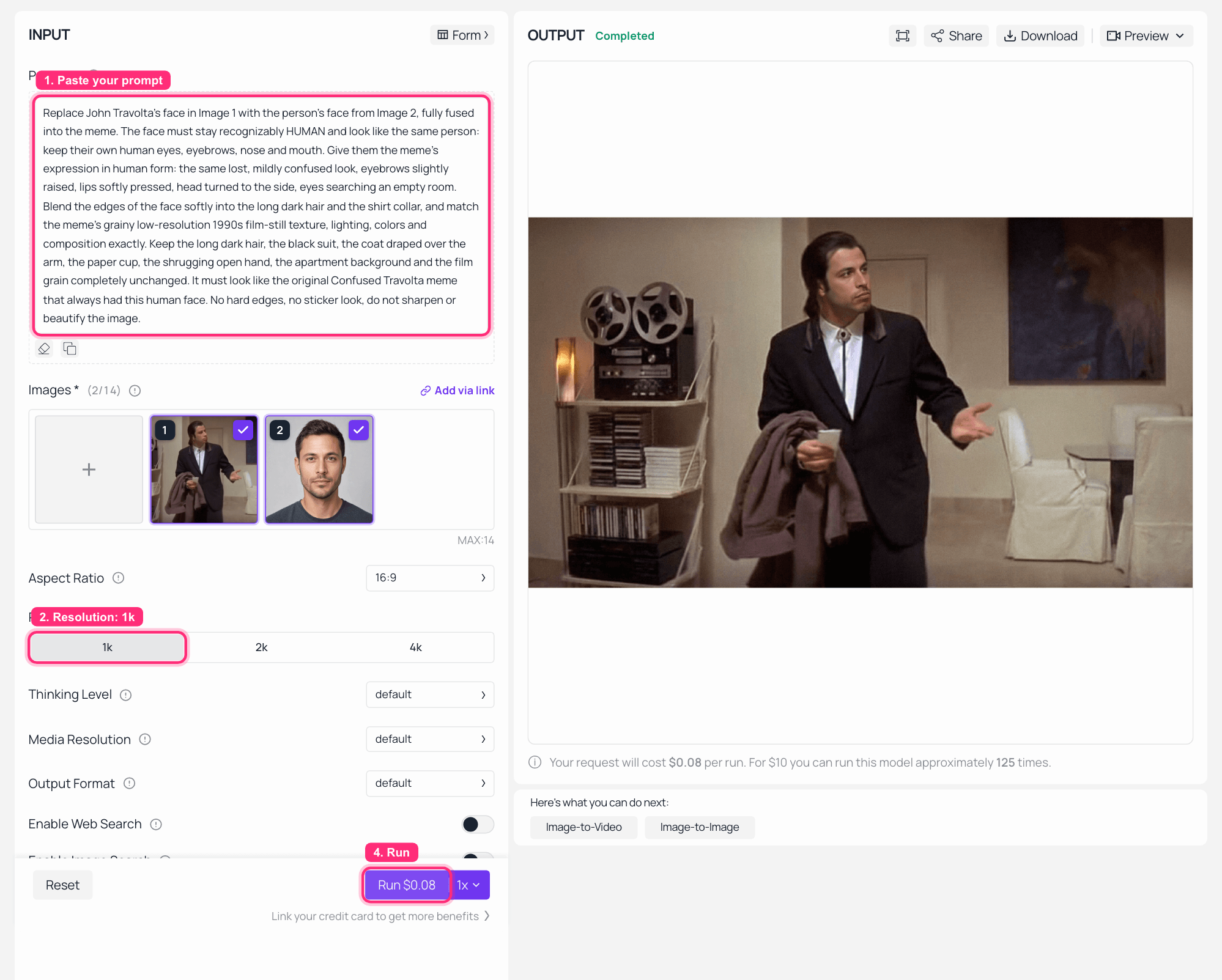
Nano Banana 2 Edit on Atlas Cloud with the Travolta frame and the portrait loaded as references, the fusion prompt filled in, and the fused meme rendered in the output panel
Look at what the prompt is protecting. The coat. The cup. The open hand. The grain. Those five words are the meme. The face is the only variable, and the expression clause is what stops the model from giving your guy a confident stare and killing the joke.
If the output comes back too clean, add keep the JPEG compression artifacts and run it again. If the face looks pasted, strengthen the blending clause. You are debugging with sentences instead of hoping.
Same prompt shape, different meme. Swap the base image for the Stonks template, change the preserved elements, and you get this in one run:
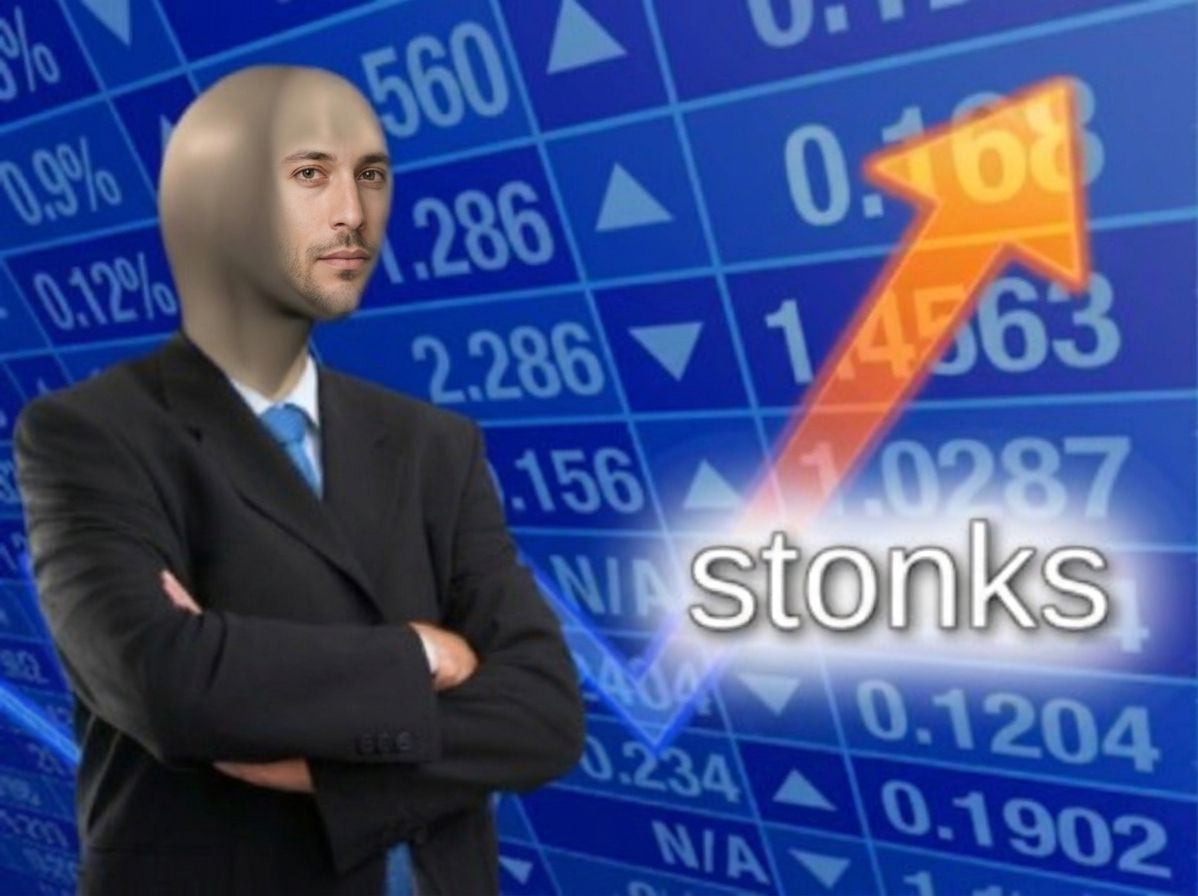
The Stonks meme with an ordinary man's face fused onto Meme Man's smooth bald head, grey suit and rising stock chart untouched
Nothing about the prompt changed except the nouns. That is the whole advantage.
I run the second route on Atlas Cloud, mostly because the models I need for a job like this live in the same browser tab and take the same API key. Generate the source face with one model, fuse it with another, restyle the result with a third, no account juggling in between. The same platform keeps a shelf of free AI tools next to the metered models, and one of them is a free face swap that hands back Higgsfield's one-click simplicity minus the daily counter. It gets its own section after Step 4.
The Free Route: A One-Click Face Swap Without the Daily Counter
Everything that makes Higgsfield's app pleasant in Step 3, the two uploads, the single button, the total absence of decisions, comes with the counter attached. Atlas Cloud's free AI face swap tool is the same interaction with the meter removed. Its own FAQ answers the money question with a plain yes: free, no usage cap, and no watermark on the output.
The flow will feel familiar after Step 3:
- Open the free AI face swap page.
- Drop the Travolta frame from Step 1 into the target slot. Same rule as before: the target decides what the final picture looks like.
- Drop your selfie or the Step 2 portrait into the face slot. This one only contributes identity.
- Swap. The tool maps 468 facial points and a result lands in about eight seconds.
Instead of a prompt you get two sliders, Blend and Feather, and they exist for exactly the failure this article keeps circling back to: the pasted-on look. Blend sets how strongly the new face takes. Feather sets how softly its edges melt into the pixels around them, and on a grainy 366-pixel frame like this one, widening it is what stops the jawline from reading as a sticker edge.
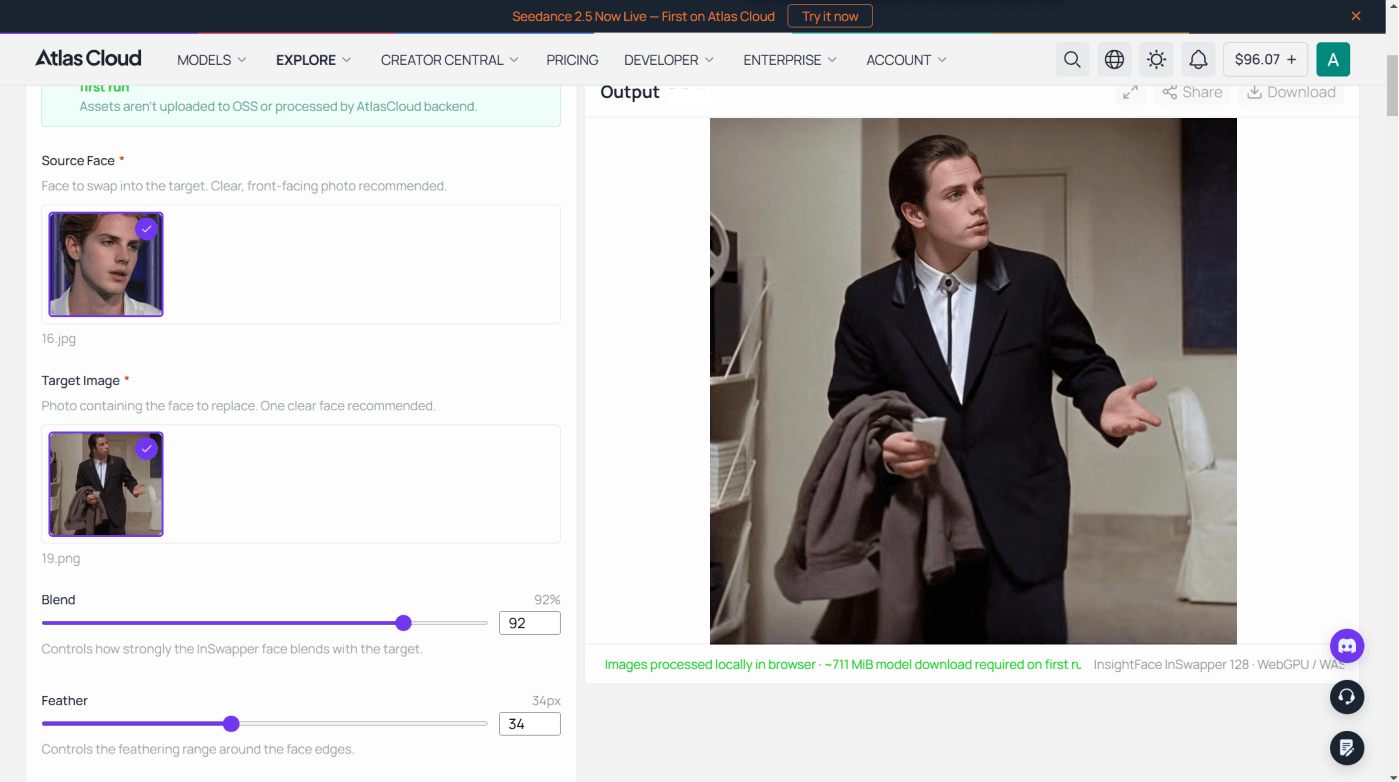
Where it sits between the other two routes is worth stating plainly. Unlike Step 4's fusion, it does not re-render the frame: it replaces the face region and leaves every other pixel of the meme untouched, so the coat, the cup and the grain cannot drift. What you give up is the sentence-level control. There is no way to ask it to keep the JPEG artifacts or to dial in a lost expression, so when a swap needs debugging with words, Step 4 is still the tool. The other boundaries: one face at a time with no batch upload, results download as a PNG at the size of your target photo up to 1280 pixels on the longest side (irrelevant for a 366-pixel meme, relevant if you plan to print), and the first visit downloads about 711 MiB of model files before the first swap runs.
What the Higgsfield Face Swap Actually Costs You
Not money. Attempts.
A one-click swapper is a slot machine with a daily pull limit. When it works, it is the fastest thing in the world. When it does not, you have no lever to pull except uploading a different photo and hoping. Every retry burns one of five. Free outputs come out watermarked, and video is gated behind a subscription you commit to monthly whether you make two clips or two hundred.
That model is fine if face swapping is something you do occasionally. It is genuinely painful if you are making a set: ten variations for a thread, four formats for a campaign, one meme per day for a month.
The pay-per-image route inverts it. On Atlas Cloud there is no subscription and no daily counter. You are charged per generation, so a retry costs you a retry and nothing else. No watermark on anything. And because GPT Image 2, Nano Banana 2 and the rest sit behind one key, the whole chain from source face to finished swap happens without leaving the tab.
One last thing worth saying plainly. Putting your own face into a film still for a laugh is fine. Putting someone else's face into something they would not consent to is not, and no tool's terms of service will save you from that. Swap yourself, swap your friends who said yes, and leave it there.
Frequently Asked Questions
Is the Higgsfield face swap free?
There is a free tier that allows 5 image face swaps per day, and outputs generated with free credits carry a watermark. Video face swaps require a paid plan (Higgsfield, July 2026). The daily counter resets roughly 24 hours after your first swap of the cycle.
Can the Higgsfield face swap handle more than one face in a photo?
No. Higgsfield states the tool is "optimized to process one high-fidelity swap at a time" and does not support swapping multiple faces in a single operation. For group photos you either run separate passes or use a prompt-driven edit model that you can point at one person at a time.
Why does my Higgsfield AI face swap look pasted on?
Almost always a texture mismatch. The swapped face comes back sharper and smoother than the base image, so your eye reads it as a separate layer even if the shape is perfect. Old film stills and compressed meme JPEGs are the worst offenders. A prompt-controlled edit lets you explicitly ask for the base image's grain and compression to be matched, which a one-click swapper has no way to do.
What is the best source photo for a face swap higgsfield run?
Front-facing, evenly lit, eyes clearly visible, neutral expression, no sunglasses or hats. Neutral matters more than people expect: the model maps the base image's expression onto your face, and a strong smile in the source fights that and produces a slightly wrong mouth.
Is there a higgsfield ai face swap video free option?
Not on the free tier. Image swaps are the free allowance; video sits behind a paid plan. If you want motion without a subscription, the practical path is to finish the still swap first, then run that image through an image-to-video model on a pay-per-generation platform, which keeps the identity locked and only animates what you ask it to.
Does a face swap work on animated or drawn characters?
Yes, and often better than on photos, because there is less texture to match. The same fusion prompt applies: name what stays (the linework, the flat colors, the background), name the expression you want, and keep the face human rather than letting the model blend it into the character's features.





