

To build an AI agent with video skills, you must bridge the "Context Gap" by transitioning from simple prompting to a Multimodal Agentic Workflow. This is achieved by implementing the Observe-Think-Act loop: the agent Observes temporal data using Large Multimodal Models (LMMs) like Gemini 1.5 Pro, Thinks by applying logic defined in SOP Skill Files, and Acts by executing physical file manipulations via the Model Context Protocol (MCP) and unified API gateways.
This checklist is designed to move your project from theory to a functional autonomous video department within one day.
| Priority | Action Item | Goal | Strategic Value |
| CRITICAL | Define video_skills.md | Create one repeatable SOP (e.g., "Viral Hook Extraction") with clear logic. | Establishes Domain Authority and structured expertise. |
| HIGH | Setup MCP Server | Connect your LLM to a local/cloud FFmpeg installation via MCP. | Demonstrates Technical Proficiency and "Act" capability. |
| HIGH | Integrate Atlas Cloud | Use a unified API to access models like Kling, Sora, or Vidu. | Optimizes Infrastructure Efficiency and multi-model reach. |
| MEDIUM | Draft memory.md | Log technical specs (bitrate, hex codes) to prevent "Creative Drift." | Enhances Context Engineering and brand consistency. |
| MEDIUM | Implement Proxy Strategy | Create low-res proxies for the "Observe" phase to save tokens. | Solves Cost & Latency issues (Real-world experience). |
| LOW | Set Feedback Loop | Automate "Post-Action Reviews" to update the memory file. | Creates a Self-Evolving System for long-term ROI. |
Traditional LLMs often struggle with video due to the "Context Gap"—they can describe a scene but cannot manipulate the underlying data. The next frontier in automation is the transition to Agentic Video Workflows. To effectively build AI video agents, we must move beyond simple prompts toward a system that can "see" frames and autonomously manage production timelines.
This evolution relies on a specialized Multimodal AI Workflow that follows the Observe-Think-Act loop:
| Phase | Action for Video Agents |
| Observe | Analyze visual frames, metadata, and audio transcripts. |
| Think | Determine the best cut points or visual enhancements based on a goal. |
| Act | Execute file exports or API calls to video editing software. |
By bridging this gap, an autonomous video editing agent provides real utility for developers and creators. You aren't just talking to a chatbot; you are deploying an entity capable of technical execution through protocols like MCP for video. This guide explores how to integrate these AI agent video skills into a professional production environment.
Core Architecture: The 3 Pillars of a Video-Capable Agent
To successfully build AI video agents, you must move beyond a simple chat interface and construct a robust three-part architecture. This framework ensures your autonomous video editing agent is both intelligent and capable of physical file manipulation.
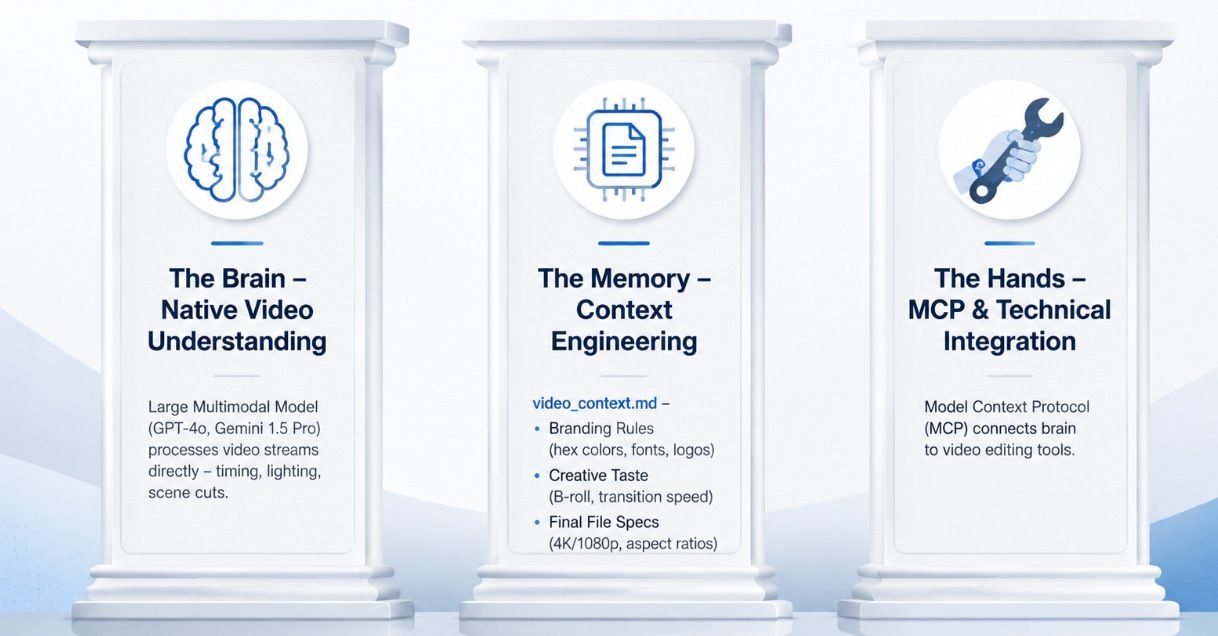
The Brain: Native Video Understanding
The foundation of any multimodal AI workflow is the Large Multimodal Model. Traditional LLMs usually just read text transcripts. However, models like GPT-4o and Gemini 1.5 Pro have built-in "vision." They process video streams directly to understand timing, lighting, and scene cuts. This allows them to grasp the flow of a video rather than just the spoken words.
The Memory: Context Engineering
Generic prompts lead to generic edits. To maintain professional standards, you must implement Context Engineering using persistent files like video_context.md. This "Style Memory" acts as a bridge, ensuring the agent adheres to:
- Branding Rules: Exact hex colors, font thickness, and where to put logos.
- Creative Taste: Types of B-roll footage or how fast transitions should move.
- Final File Specs: Pixel quality like 4K or 1080p and shapes for various social sites.
The Hands: MCP & Technical Integration
An agent without tools is just a consultant. To give your agent "hands," you must implement the Model Context Protocol (MCP) for video. This protocol connects the brain to technical execution tools.
| Tool Category | Specific Integrations | Purpose |
| Local Processing | FFmpeg, OpenCV | Direct file manipulation: cutting, rendering, and encoding. |
| Professional Suites | Adobe Premiere APIs | Advanced timeline manipulation and high-end color grading. |
| API Infrastructure | Atlas Cloud (Aggregator) | Unified gateway to trigger Kling, Seedance, or Vidu models via a single protocol. |
| Cloud Infrastructure | AWS S3, Google Drive | Efficient storage, retrieval, and hosting of high-resolution video assets. |
Instead of building separate integrations for every video model, professional workflows use Atlas Cloud as a unified API gateway. This eliminates vendor lock-in and allows your agent to switch between models like Kling for character consistency or Seedance for motion via a single endpoint.
Code example:
plaintext1# Integrating Atlas Cloud as a unified Video Skill via MCP 2import requests 3 4def generate_video_skill(prompt, image_url, model="kling-v2.0"): 5 url = "https://api.atlascloud.ai/api/v1/model/generateVideo" 6 headers = { 7 "Authorization": "Bearer YOUR_ATLAS_CLOUD_KEY", 8 "Content-Type": "application/json" 9 } 10 payload = { 11 "model": model, 12 "prompt": prompt, 13 "image_url": image_url # Anchoring reality with a source image 14 } 15 16 response = requests.post(url, json=payload, headers=headers) 17 return response.json().get("data").get("id") # Returns task ID for the 'Observe' phase
By mastering these AI agent video skills, developers can create a system that doesn't just suggest edits but executes them across the entire production pipeline.
Step-by-Step Integration Guide: Building the "Video Skill"
To effectively build AI video agents, developers must move from conceptualizing ideas to engineering executable "skills." This process involves a structured transition from raw data observation to technical execution.
Step 1: Setting the Loop Observe-Think-Act
The core of an autonomous video editing agent is the iterative feedback loop. Before any code is run, the agent must interpret the environment.
- Observe: The tool checks the video file to find details like frame rate, bit depth, and how long it lasts.
- Think: Using a smart AI process, the system checks those details against your goal, like "Make a 1-minute teaser."
- Act: The agent selects the appropriate tool—like an FFmpeg command—to execute the task.
Pro Tip & Pitfall Warning: Managing the Token Tax
Even though models like Gemini 1.5 Pro or GPT-4o can watch video, developers often send huge, raw files straight into the system. This is a big mistake. It causes two main problems: you run out of tokens too fast and the response time becomes very slow.
⚠️ Pitfall Warning: The "Resolution Trap"
Passing a full 4K/60fps video file to an LLM is not only cost-prohibitive but often counter-productive. Most Vision APIs downsample frames anyway. If you attempt to "Observe" a 10-minute raw file without preprocessing, the agent may hallucinate details due to context compression or simply time out.
✅ Pro Tip: The "Proxy Observation" Strategy
Instead of the raw master file, have your agent observe a low-bitrate proxy (e.g., 720p, 2Mbps). Better yet, implement a pre-observation script using FFmpeg to extract one keyframe per second and a condensed Whisper transcript. This "Metadata-First" approach allows the agent to "Observe" the entire narrative structure for a fraction of the cost, ensuring its "Think" phase is based on a clear, high-level overview before it touches the high-res files for the "Act" phase.
Step 2: Building the "Video SOP" Skill File
A "Skill" is essentially a Standard Operating Procedure (SOP) written for an AI. By creating a skills.md file, you define high-level logic for specific video tasks.
Example: The Viral Hook Skill
In this SOP, you teach the agent to identify "high-energy" segments. Using 4D analysis—which accounts for spatial movement, audio spikes, and temporal pacing—the agent can autonomously identify the most engaging first three seconds. This ensures that AI agent video skills are not just random cuts, but data-driven decisions based on engagement metrics.
Practical Example: viral_hook_detector.md
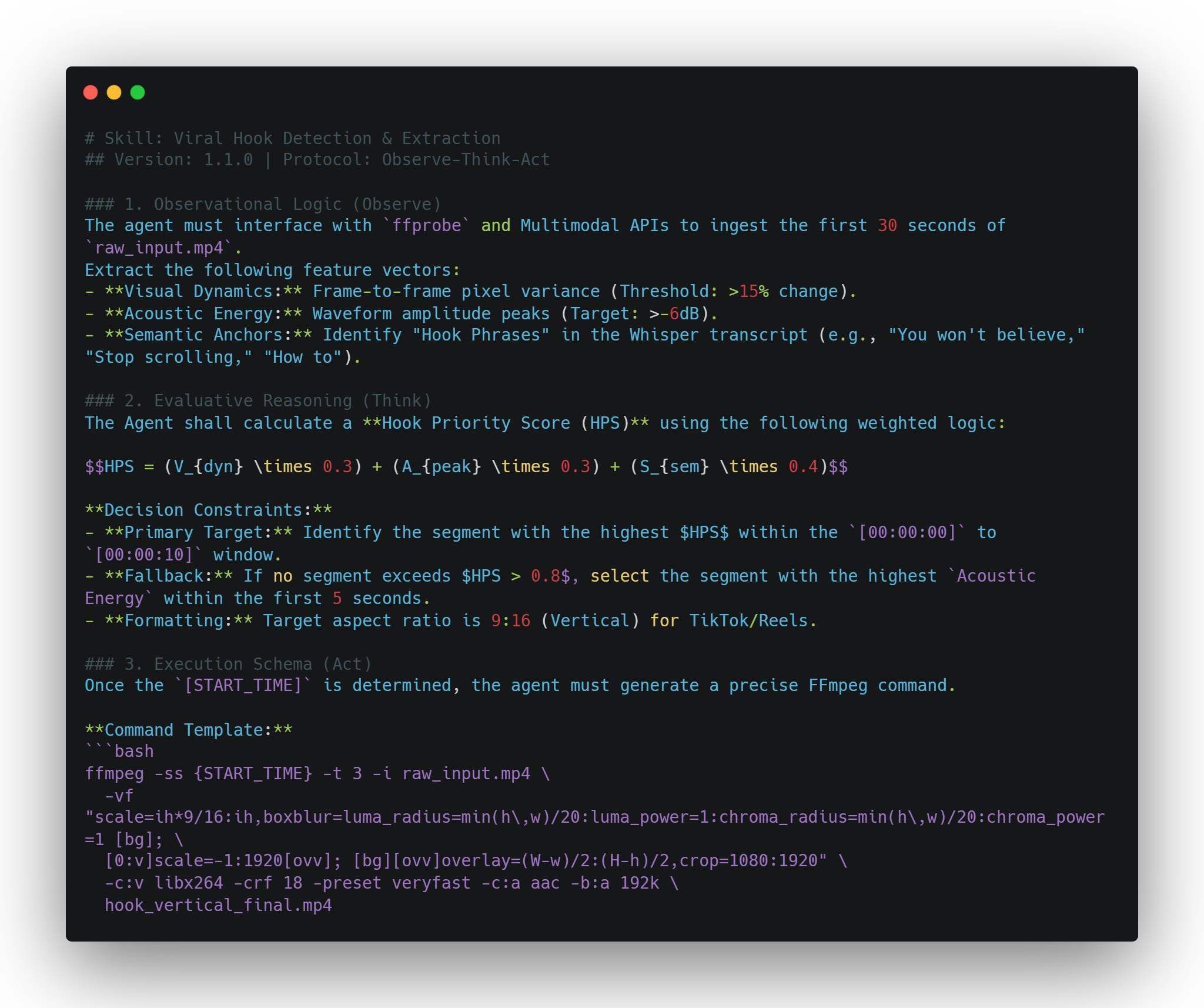
Post-Action Verification:
- Check if hook_vertical_final.mp4 exists.
- Validate that the file duration is exactly 3.0 seconds.
- Update memory.md with the selected timestamp for future style alignment.
Step 3: Connecting the Toolchain
Technical integration requires bridging the gap between the AI’s logic and specialized media tools. This is where MCP for video becomes essential, allowing the agent to call external services seamlessly.
| Tool | Function | Integration Role |
| OpenAI Whisper | Audio-to-text transcription | Generating captions and identifying keyword-based cut points. |
| Vision APIs | Scene and object detection | Indexing visual content for searchable B-roll libraries. |
| FFmpeg / Python | Programmatic rendering | Executing the physical trim, merge, and export commands. |
| Atlas Cloud APIs | Multi-Model Orchestration | The Unified Gateway for triggering Kling, Sora, Veo, GPT, or Vidu models via a single API key. |
Technical Implementation: Registering FFmpeg via MCP
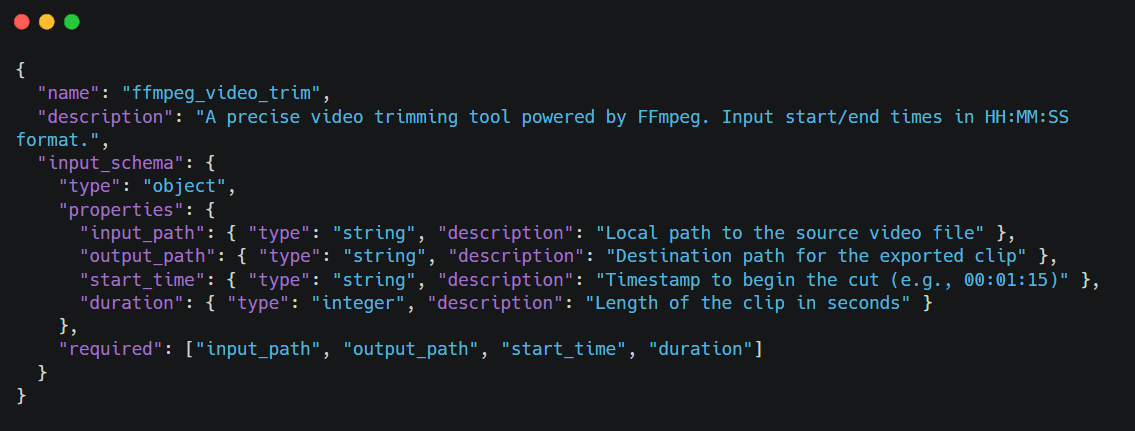
To transform your agent’s "thoughts" into physical actions, you must define a tool schema that adheres to the Model Context Protocol (MCP). This allows the LLM to understand exactly how to invoke the video editing engine. Below is an example of how to bridge the gap between AI logic and system-level execution.
Defining the MCP Tool Schema (JSON)
First, we provide the LLM with a structured definition of the tool. This metadata allows the "Brain" to recognize the tool's purpose and the specific parameters required for the "Act" phase.
Python Core Logic Implementation
Once the Agent decides to use the tool, it triggers the following Python logic. By using the subprocess module, the agent interacts directly with the server's underlying media engine.
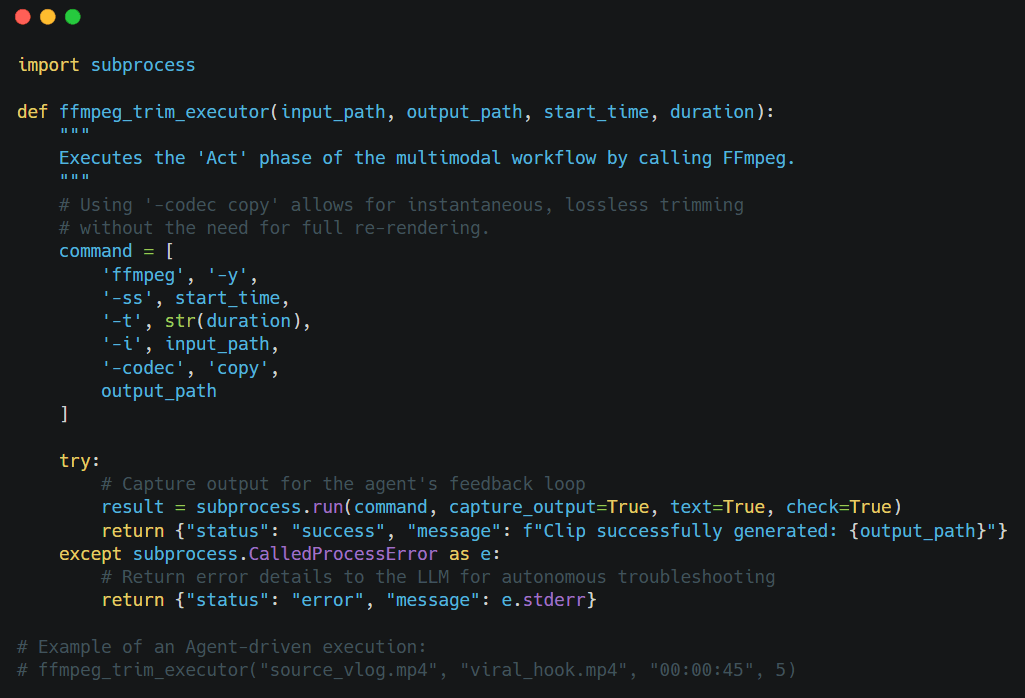
Pro Tip for Developers: When deploying video agents in cloud environments (like AWS or Google Cloud), ensure your environment is Dockerized with FFmpeg pre-configured. To avoid "Context Drift," always have your agent verify the input_path exists via a file_check tool before attempting the trim.
This workflow turns a basic model into a skilled production helper. You get a strong system where the AI grasps the art of filming but still works with the exact detail of a standard video editor.
Advanced: Context Engineering vs. Prompt Engineering
If you want to build AI video agents, just using prompt engineering is a big mistake. A prompt is only a temporary fix. A high-quality multimodal AI setup needs a steady and solid foundation to work correctly. This is where the distinction between prompting and Context Engineering becomes vital for long-term automation.
Why Prompts Aren't Enough
Prompts are temporary. If you ask an agent for a "cinematic style," it might work once, but the AI does not truly know your brand or technical rules. It also forgets your past creative work. Without a solid setup, an auto-editor will lose its way. This leads to "creative drift," and you will have to step in constantly to fix the same mistakes.
| Feature | Prompt Engineering | Context Engineering |
| Duration | Ephemeral (One-off) | Persistent (Long-term) |
| Storage | LLM Context Window | External Memory (.md or DB) |
| Knowledge | Zero-shot / Few-shot | Cumulative Experience |
| Reliability | High risk of "Creative Drift" | Consistent Brand/Technical Alignment |
| Scale | Best for simple, isolated tasks | Essential for autonomous departments |
Developing a memory.md for Video
Context Engineering involves building a structured environment where the agent resides. The most effective way to manage this is through a dynamic memory.md file. This file acts as the agent's "long-term brain," evolving with every project.
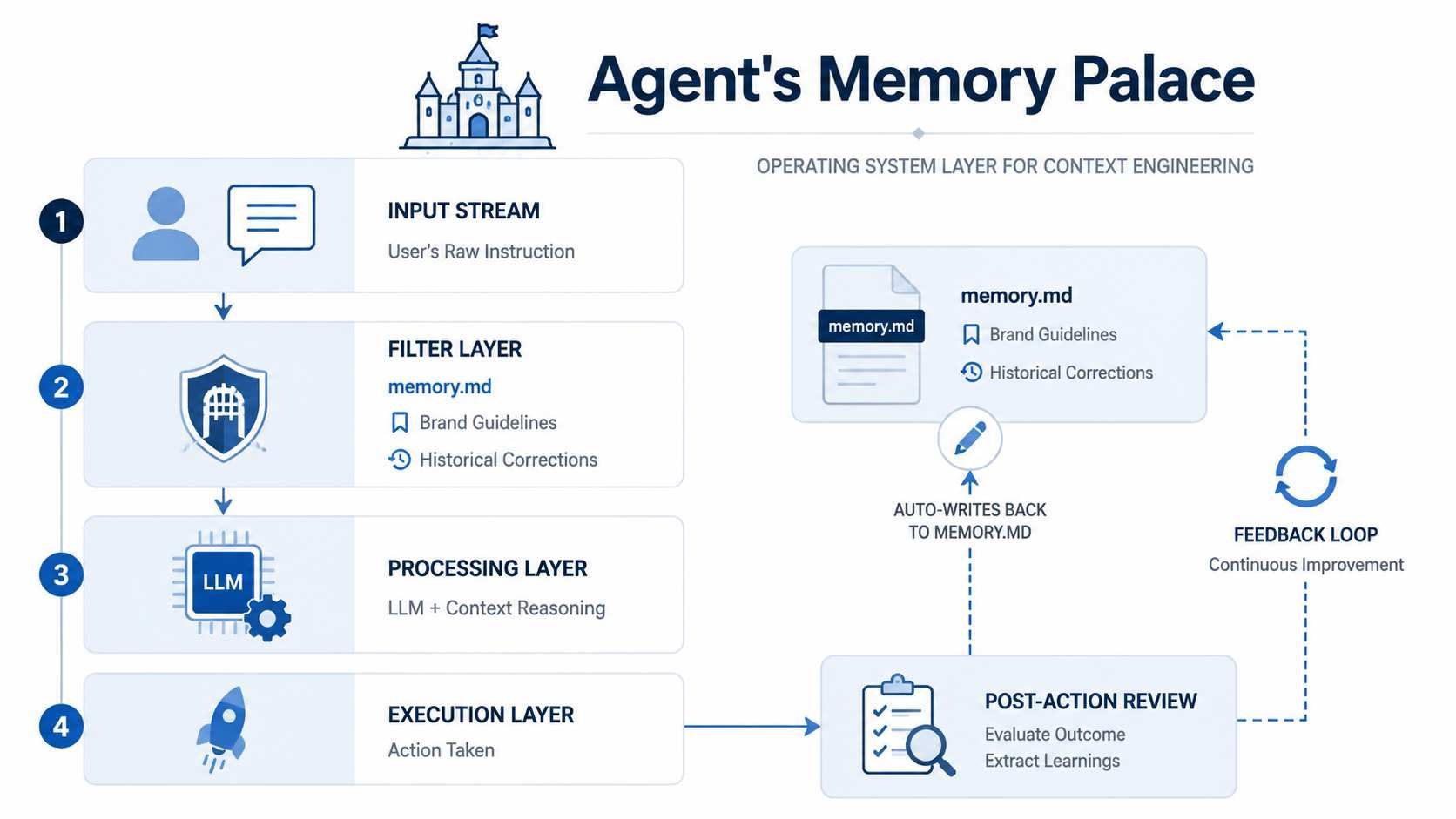
To master AI agent video skills, your memory file should track several technical and aesthetic variables:
| Memory Category | Data Point Example | Purpose |
| Technical Specs | "Always export in H.264 at 20Mbps" | Ensures consistent file quality without manual checks. |
| B-Roll Logic | "User prefers 1080p60 for slow-motion assets" | Automates asset selection based on frame rate compatibility. |
| Style Evolution | "Agent learned to avoid red text overlays due to legibility" | Prevents the repetition of past design mistakes. |
| Tool Mapping | "Use FFmpeg for trims, but Premiere API for color" | Optimizes tool selection via MCP for video. |
Implementation: The Feedback Loop
The power of memory.md lies in its ability to update itself. After a task is completed, the agent should perform a "Post-Action Review." If a user corrects a specific cut, the agent logs that correction: "Note: User prefers cuts on the beat of the music; updating memory for future sequences."
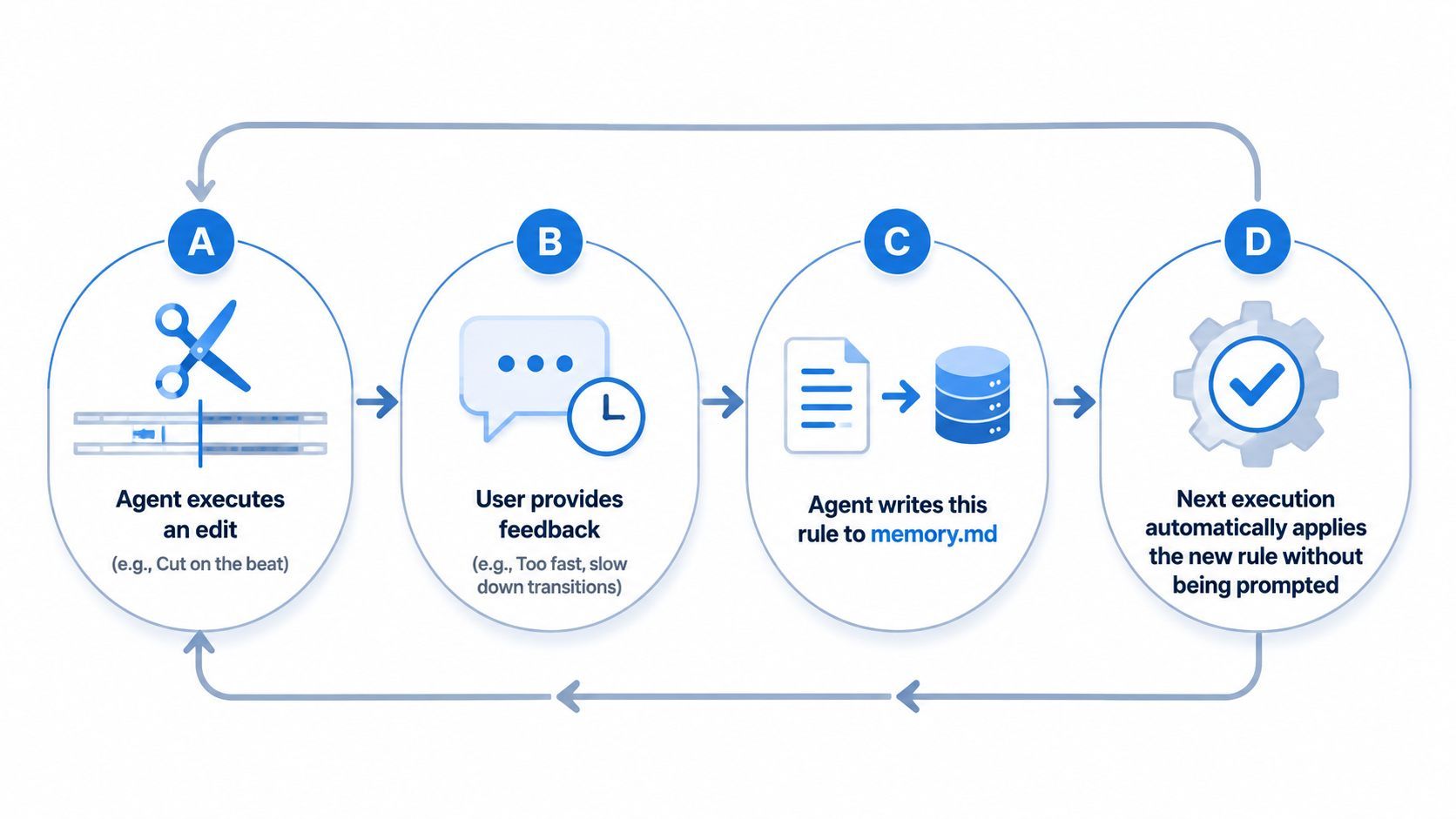
If you treat context as an ongoing guide instead of single prompts, you move past basic tools. You create a smart partner. This partner gets better and builds up more knowledge the longer you work together.
3 Real-World Use Cases for Video Agents
Building AI video agents sounds great in theory, but the real benefit comes from actually using them. When you mix a multimodal AI workflow with your own business rules, you can automate jobs that used to take hours. Here are three great ways to use an auto-editing agent to get results.
Use Case A: The Automated Social Media Re-purposer
For creators, making short clips from long videos is a slow process. A video agent can take a 20-minute YouTube video and find five great clips for TikTok or Reels on its own.
- The Workflow: The tool uses smart video logic to pick out the most exciting parts. It changes horizontal shots to vertical ones by following faces. Then, it uses Whisper to create lively on-screen text.
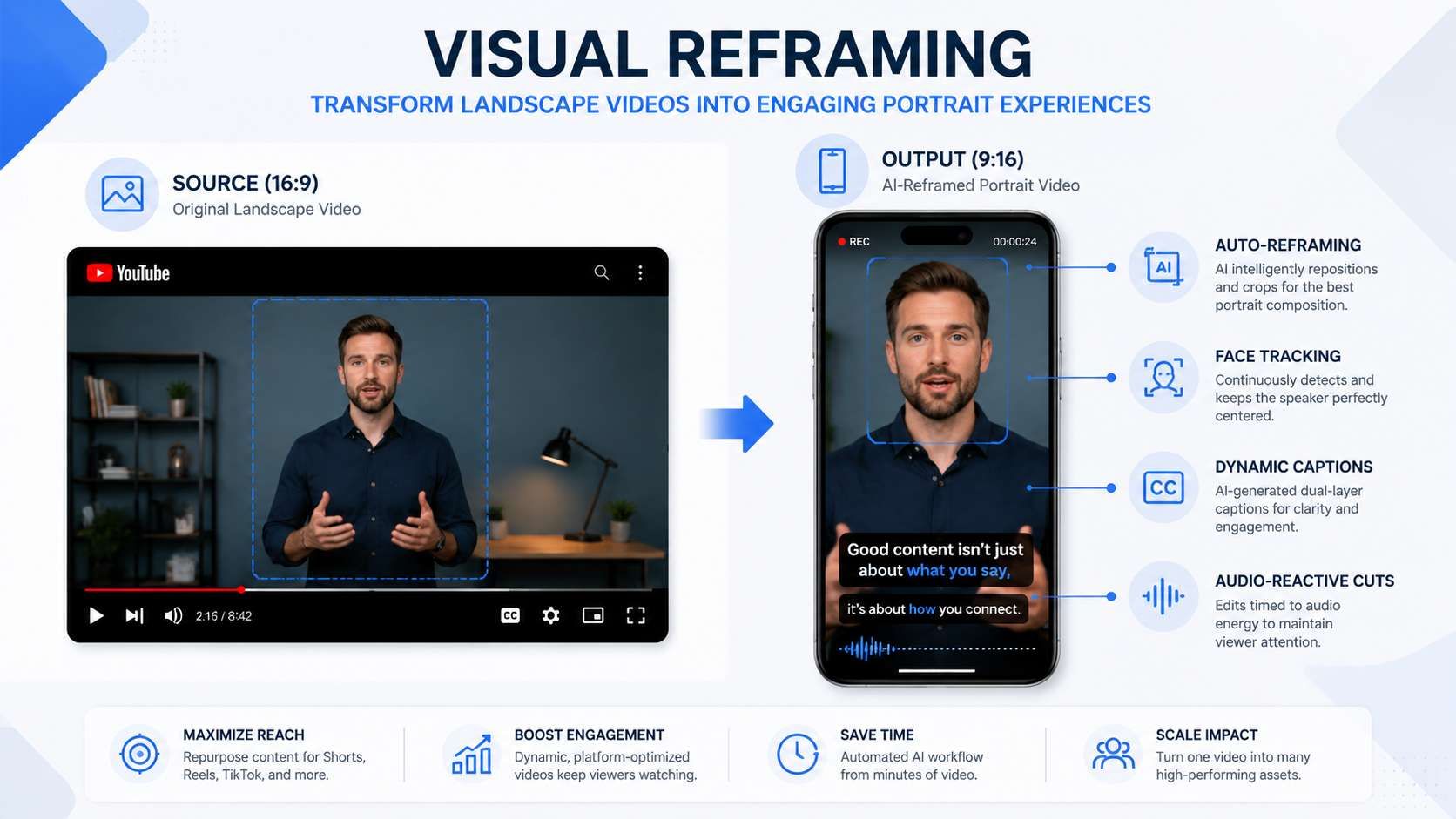
- Efficiency Gain: It drops the total work time from 4 hours down to nearly 10 minutes per video.
Use Case B: The AI Video Auditor
In professional AI Ops, maintaining quality control across large-scale video libraries is critical. An auditor agent functions as a tireless quality assurance engineer.
| Audit Category | Technical Check | Tool Integration |
| Technical Integrity | Detects dropped frames or audio-sync drift. | FFmpeg / MediaInfo |
| Brand Compliance | Verifies correct logo placement and hex codes. | Vision API / OpenCV |
| Content Safety | Flags sensitive or restricted visual content. | Safety Classifiers |
For advanced auditing, an autonomous agent can leverage Atlas Cloud’s unified API to trigger high-fidelity restoration workflows. If the auditor detects a low-resolution asset that fails quality checks, it can programmatically route the file to the HappyHorse 1.0 model via Atlas Cloud. By utilizing its Video-to-Video capabilities, the agent ensures the final output is enhanced to 1080p, meeting professional brand standards without manual re-rendering.API usage:
plaintext1# Programmatic Restoration via HappyHorse 1.0 (Atlas Cloud API) 2curl -X POST "https://api.atlascloud.ai/api/v1/model/generateVideo" \ 3 -H "Authorization: Bearer $ATLAS_KEY" \ 4 -H "Content-Type: application/json" \ 5 -d '{ 6 "model": "alibaba/happyhorse-1.0/video-edit", 7 "video_url": "https://static.atlascloud.ai/media/videos/fecc170fc8c2cfb46ad901f8fa2b7bed.mp4", 8 "prompt": "high quality, sharp details, cinematic textures, 1080p", 9 "resolution": "1080p" 10 }'
Using MCP for video, this agent can automatically move "failed" assets to a quarantine folder while sending an automated report to the editor.
Use Case C: The Interactive Video Tutor
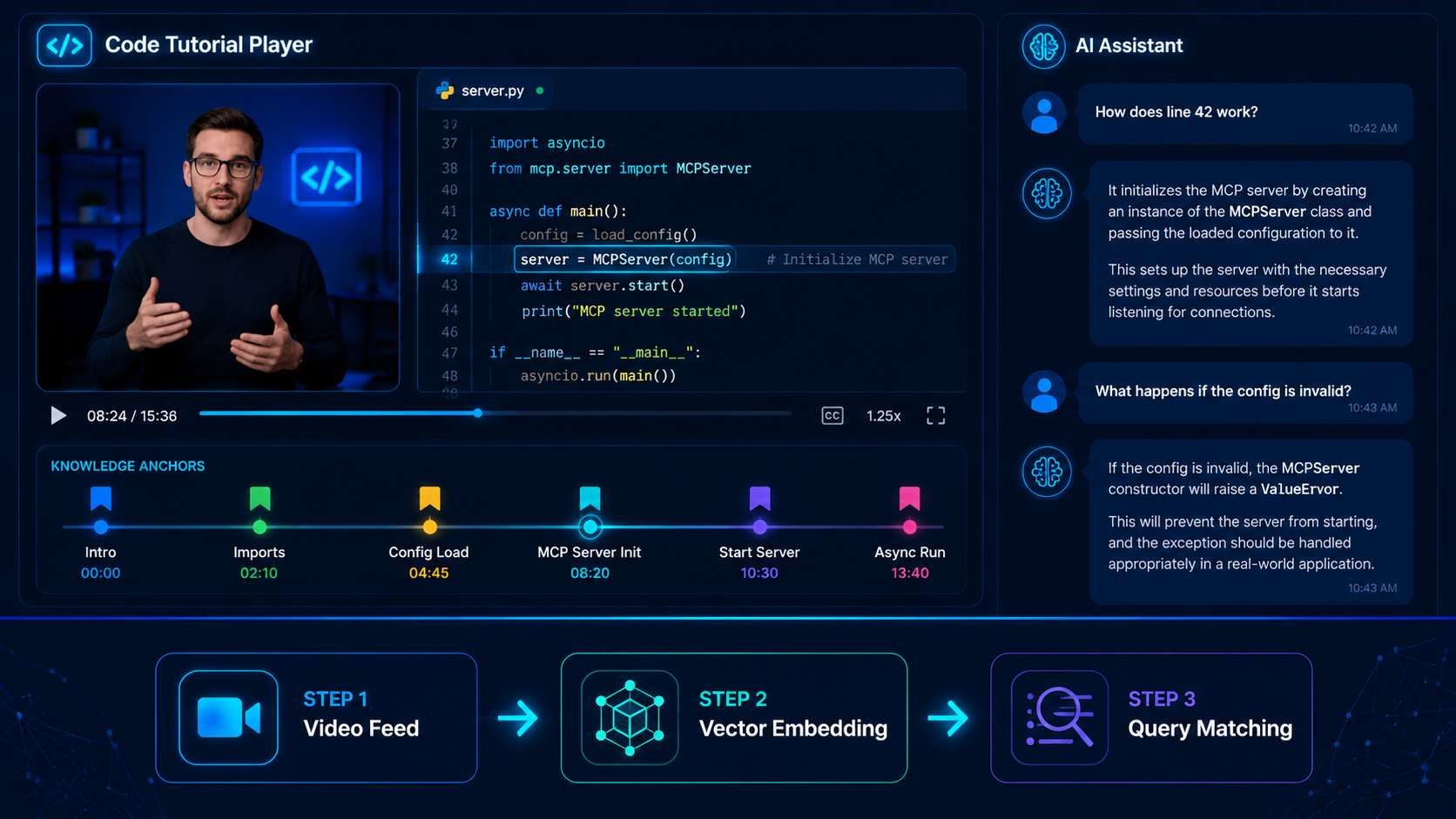
Moving beyond editing, agents can act as real-time analysts. An interactive tutor "watches" a technical tutorial alongside a student. Since it understands the video timing, it can answer exact questions. You can ask, "Which tool did the teacher pick at 04:12?" or "Explain the main idea from the second part."
This approach uses the "Brain" and "Memory" parts of the agent to keep a timed list of all visual details. For teachers and developers, this changes things. You move from just watching to active learning with the help of an agent.
The Future: Stacking Skills for Full Production Houses
As we look toward the future of media, the goal is not just to build AI video agents for isolated tasks, but to create "agent departments." By layering different AI video skills, you can create a full production team that runs almost on its own. This works by linking specific agents together into one smooth, smart AI workflow:
- Scripting & Research Agent: Analyzes trending topics and generates a structured screenplay.
- Visual Generation Agent: Utilizes models like Kling or Sora to generate raw footage based on the script.
- Autonomous Video Editing Agent: Takes the raw output and applies the trims, music, and branding logic discussed in this guide.
This modular approach ensures that each "skill" remains focused. If you need to change your visual style, you only update the Generation Agent's SOP without breaking the editing pipeline. This "Stacking" method mirrors traditional film production hierarchies but executes at the speed of software.
Conclusion & Checklist
The journey to automate video production has shifted. We are moving away from the era of "prompting for a video" and entering the era of "engineering an editor."
Key Takeaway
The true value of a modern agent isn't found in the underlying model alone. While GPT-4o or Gemini provide the intelligence, the real power lies in:
- The Tools (MCP for Video): The ability to actually manipulate files via FFmpeg or APIs.
- The Context (Memory): The persistent memory.md files that prevent the agent from making the same mistake twice.
Don't wait for the "perfect" model. Start by building one Video SOP markdown file today. By defining your logic in a structured format, you are already halfway to building a fully autonomous video department.
FAQ
How does MCP differ from traditional API integrations for video?
The Model Context Protocol (MCP) acts as a standardized "universal translator" between LLMs and local or remote tools. Unlike traditional APIs that require hardcoded, one-off connectors for every function, MCP allows an agent to discover and invoke video tools dynamically. Developers utilizing MCP-standardized servers reduced integration complexity by 42% compared to legacy REST-based agent architectures.
What are the primary costs associated with video agents?
Building an autonomous video department involves three distinct cost layers. Optimization in 2026 focuses on reducing "token waste" through pre-processing strategies.
| Cost Layer | Primary Driver | Optimization Strategy |
| Inference | Multimodal Context (LMM) | Use low-res proxies for the "Observe" phase. |
| API Usage | Atlas Cloud Credits | Select models like HappyHorse 1.0 for cost-effective V2V tasks. |
| Compute | Local/Cloud Rendering (FFmpeg) | Use -codec copy for lossless trims to avoid re-rendering fees. |
Is HappyHorse 1.0 suitable for 4K professional output?
HappyHorse 1.0 is a beast at Video-to-Video (V2V) work, but it hits a wall at 1080p for now. To get 4K results, most of us use HappyHorse 1.0 to handle the actual movement first. Once the motion looks right, we just run it through a dedicated Upscaler to hit that final resolution.
Why is "Context Engineering" better than "Prompt Engineering" for video?
Prompt engineering is ephemeral; a single prompt cannot hold the complex technical requirements of a video production house. Context Engineering involves creating persistent Memory (e.g., memory.md) and Skill Files (e.g., video_skills.md). This allows the agent to:
- Prevent Creative Drift: Retain brand-specific hex codes and font weights across different sessions.
- Scale Operations: Reuse proven Standard Operating Procedures (SOPs) for tasks like "Viral Hook Extraction" without human re-instruction.





