
Kling AI APIの料金を開発者視点で評価する場合、結論から言えば、プロダクションワークロードにおいて競争力のある動画生成あたりのコストを実現しています。しかし、その価値を最大限に引き出せるかどうかは、重要な運用の分かれ道をうまく乗り越えられるかにかかっています。商用APIは、消費者向けのWebアプリケーションとは完全に分離された課金インフラ上で動作しているためです。
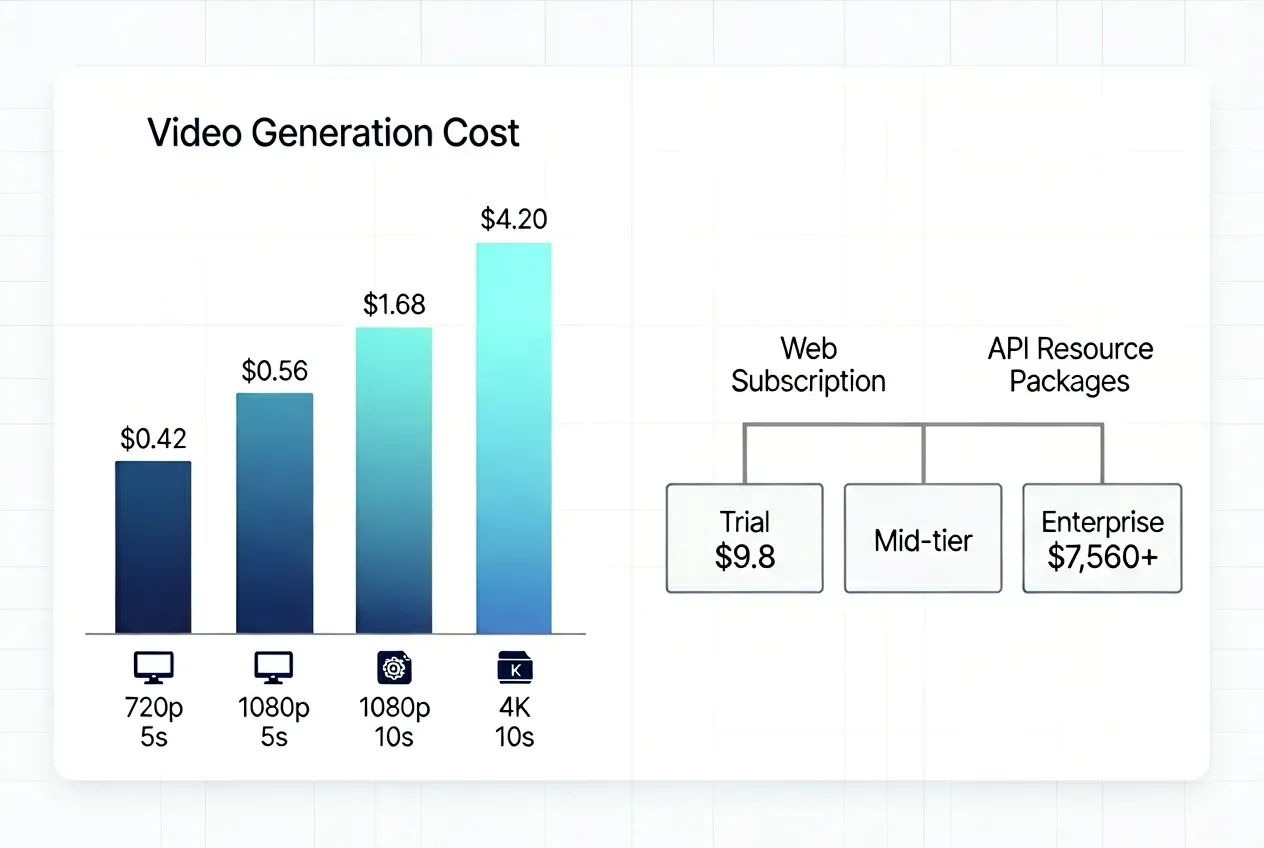
主要なコストベンチマーク(概要):
| 動画タイプ | 概算コスト |
| 標準5秒クリップ(720p, Video 3.0) | ~$0.42 |
| 標準5秒クリップ(1080p, Video 3.0) | ~$0.56 |
| プレミアム10秒クリップ(1080p, ネイティブ音声) | ~$1.68+ |
| ハイエンド10秒 4Kショット | 最大~$4.20 |
Kling AI APIの料金モデルは、Webサブスクリプションとは完全に切り離されたプリペイド式のリソースパッケージに基づいて運用されています。
- トライアル導入: 最低9.8ドルのコミットメント
- ミドルティア制作: 数百ドル規模にスケーリング可能なパッケージ
- エンタープライズボリューム: 60,000リソースユニットで7,560ドル〜
Webサブスクリプション(Standardの月額10ドルからUltraの月額180ドルまで)にはAPIアクセス権は一切含まれていません。逆に、APIクレジットをWeb UIで使用することもできません。製品を構築する開発者は、リソースパッケージシステムを通じて予算を確保する必要があり、Kling AI APIが価値を発揮するのは、主に持続的で予測可能な出力ボリュームがあり、ユニットあたりのコストが大幅に圧縮される環境です。
Kling AI API料金モデルの詳細:プリペイドリソースパッケージの解説
Kling AI APIの料金モデルは、継続的なサブスクリプションを完全に排除しています。代わりに、エンジニアリングチームはKling AI APIプリペイドパッケージ(リソースユニット)を前払いで購入し、生成タスクの実行に応じて消費していきます。毎月の更新や予期せぬ自動請求はありませんが、一点だけ重要な注意点として「有効期限」があります。
プロトタイプからWebテストに移行するチームが陥りやすい落とし穴は、消費者向けのWebメンバーシップ(Standard、Pro、Premier、Ultraプラン)やSpiritユニットがAPIコンソールで利用できると誤解することです。これらは完全に独立した環境であり、Webクレジットは開発者アクセスには一切使用できず、APIユニットをWeb UIに流用することもできません。チームが両方のソリューションを利用する場合、それぞれ個別に予算を割り当てる必要があります。
ユニットの有効性とスケール制限について
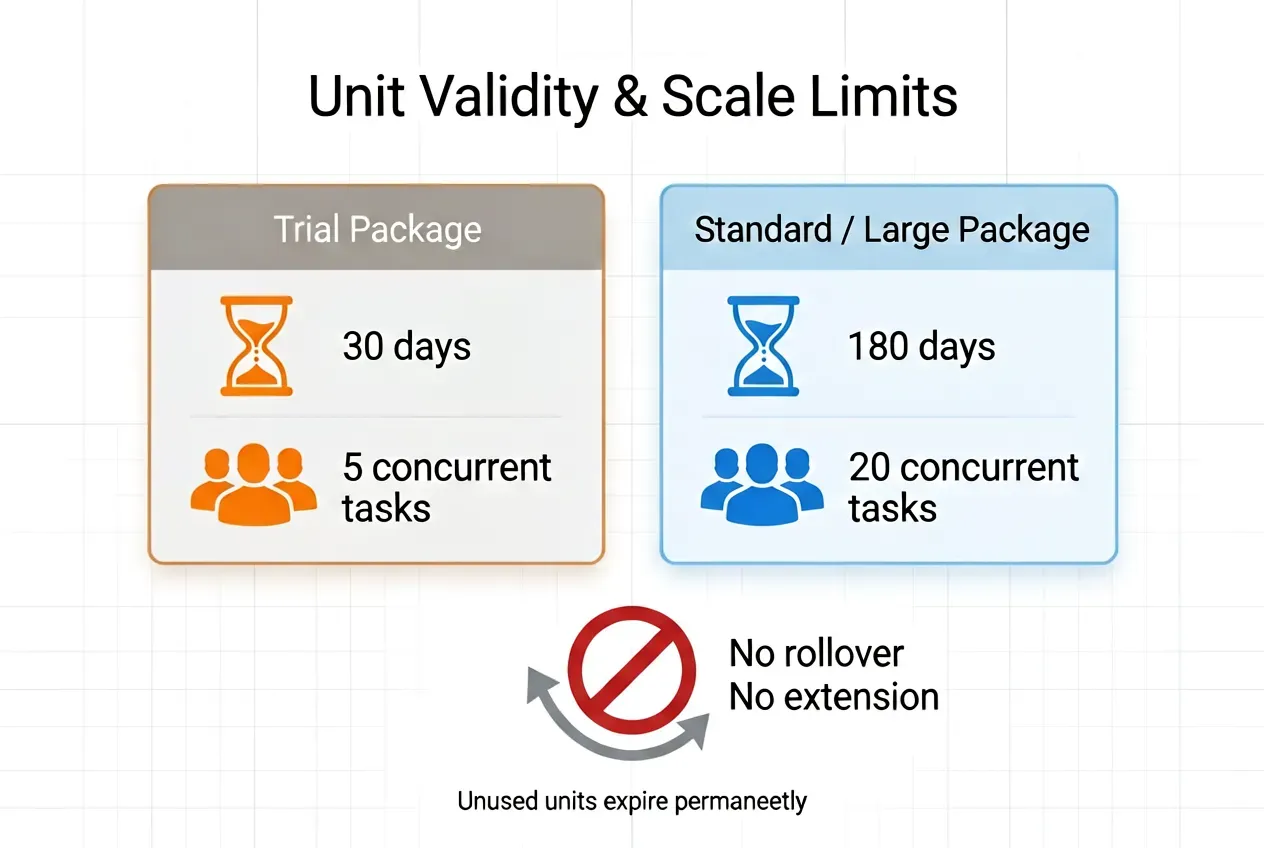
課金の分離に加えて、ユニットの有効期限は厳格かつ交渉不可能です:
- トライアルパッケージ:30日後に失効(同時タスク上限5つ)
- 標準/大規模パッケージ:180日後に失効(同時タスク上限20つ)
- 未使用のAPIリソースユニットは、期限切れ後に繰り越しや延長ができません。
公式パッケージ料金表
現在のKling AI開発者向け料金ページに基づいたデータです:
トライアルパッケージ(有効期限30日、同時タスク5つ)
| パッケージ | 価格 | ユニット | 単価 |
| Trial S | $9.80 | 100ユニット | $0.098/ユニット |
| Trial L | $98 | 1,000ユニット | $0.098/ユニット |
標準パッケージ(有効期限180日、同時タスク20つ)
| パッケージ | 価格 | ユニット | 単価 |
| Package 1 | $700 | 5,000ユニット | $0.14/ユニット |
| Package 2 | $2,100 | 15,000ユニット | $0.14/ユニット |
| Package 3 | $5,670 | 45,000ユニット | $0.126/ユニット |
| Package 4 | $7,560 | 60,000ユニット | ~$0.126/ユニット |
数字を見ると、意図的な価格設定のパラドックスに気づくはずです。トライアルティアは大幅に補助された参入レート($0.098/ユニット)を提供していますが、標準のプロダクションパッケージはより高いベースライン($0.14/ユニット)から始まります。
この逆転した価格設定は、運用上のスケーリング価値を反映しています。補助金付きのトライアルティアは、パイプラインの混雑を防ぐために同時タスクが5つに制限されています。標準ティアへ移行するとユニット単価は上がりますが、20タスクの同時実行能力が解放されます。これは、即時の並列処理を必要とするライブ本番パイプラインにとって不可欠なスループットのアップグレードです。
Kling AI APIの動画1秒あたりのコストは?(マルチモデル料金分析)
Kling APIにおける動画生成の秒単価は固定ではありません。モデル、解像度、モード、ネイティブ音声の有無によって異なります。以下は、生成における実際の計算方法です。
Kling Video 3.0およびVideo-3O (Omni) の料金
エンジニアリングチームが正確な予算を立てられるよう、この統一課金マトリックスはKling-Video-O3とKling-V3の料金を統合しています。基本解像度は同一のリソースユニット消費量ですが、Omniのクロスモーダル入力やV3の特殊なカメラツールセットといった機能固有の能力は、消費量が異なります:
| 解像度 / ティア | 基本機能と適用機能 | モデル可用性 | ユニット / 秒 | コスト / 秒 ($0.14/ユニット時) |
| Standard (720p) | 基本生成(テキスト/動画・音声なし) | V3 & V3-Omni | 0.6 | ~$0.084/秒 |
| 動画入力 / クロスモーダル拡張 | V3-Omniのみ | 0.9 | ~$0.126/秒 | |
| ネイティブ音声統合(音声あり/ボイスなし) | V3 & V3-Omni | 0.8 / 0.9 | ~$0.112 - $0.126 | |
| カメラモーションスイート(標準モーション制御) | Kling-V3のみ | 0.9 | ~$0.126/秒 | |
| Professional (1080p) | 基本生成(テキスト/動画・音声なし) | V3 & V3-Omni | 0.8 | ~$0.112/秒 |
| 動画入力 / クロスモーダル拡張 | V3-Omniのみ | 1.2 | ~$0.168/秒 | |
| ネイティブ音声統合(音声あり/ボイスなし) | V3 & V3-Omni | 1.0 / 1.2 | $0.140 - $0.168 | |
| カメラモーションスイート(プロモーション制御) | Kling-V3のみ | 1.2 | ~$0.168/秒 | |
| 4K Ultra HD | 放送グレード出力(音声あり/なし) | V3 & V3-Omni | 3 | ~$0.420/秒 |
音声消費量についての注記:720pティアでは、V3-Omniのネイティブ音声は0.8ユニット/秒、Kling-V3の音声付き(ボイスなし)は0.9ユニット/秒です。1080pティアでは、V3-Omniは1.0ユニット/秒、Kling-V3は1.2ユニット/秒となります。
4K動画生成料金はプロフェッショナルレートの3倍にスケールし、放送や映画グレードの成果物向けの高価格設定となっています。両方のV3シリーズモデルにおけるKling AIのクリップ長は、単一生成で3〜15秒をネイティブサポートしており、従来のレガシーな上限よりも遥かに長い連続的な生成が可能です。
レガシーモデルの消費量 (V1.5 / V2.1)
旧世代モデルは、最新の秒単位の柔軟性ではなく、ブロック単位(5秒または10秒タスク)の構造化されたワークフローロジックに従います。興味深いことに、標準的なKling-V2-1とKling-V1-5のインフラは同一の基本ユニット要件を共有していますが、ハイエンドのMasterパイプラインは大幅に高いプレミアムが課されます:
| モデル世代 | 製品機能と適用機能 | 出力時間 | リソースユニット消費量 | 概算コスト ($0.14/ユニット時) |
| Kling-V1-5 / Kling-V2-1 | 標準モード(5秒 / 動画拡張) | 5秒 | 2.0ユニット | $0.28 |
| Kling-V1-5 / Kling-V2-1 | 標準モード(10秒) | 10秒 | 4.0ユニット | $0.56 |
| Kling-V1-5 / Kling-V2-1 | プロモード(5秒 / モーションブラシ / 開始・終了フレーム) | 5秒 | 3.5ユニット | $0.49 |
| Kling-V1-5 / Kling-V2-1 | プロモード(10秒 / 終了フレーム制御) | 10秒 | 7.0ユニット | $0.98 |
| Kling-V2-1-Master | マスター制作スイート(5秒 テキスト/画像から動画) | 5秒 | 10.0ユニット | $1.40 |
| Kling-V2-1-Master | マスター制作スイート(10秒 画像から動画) | 10秒 | 20.0ユニット | $2.80 |
注:古いV2.1ノードで高品質な10秒クリップを作成すると7.0ユニット($0.98)しか消費しませんが、ハイエンドのV2.1 Masterブロックに切り替えると、同じ動画の長さをレンダリングするのに20.0ユニット($2.80)もの大量の消費を要します。
V1.5とV2.1の効率に関する技術メモ: Kling-V1-5とKling-V2-1は全く同じクレジットコストシステムを使用しているため、開発者は古いワークフローであってもすべてKling-V2-1を使用すべきです。価格が同じでも機能は同じではなく、V2.1はV1.5に比べてプロンプトへの忠実度、時間的一貫性、より大きなモーションダイナミクスが大幅に向上しています。V1.5は、古いハードコードされたソフトウェア統合との後方互換性のためにのみ利用可能です。
仮想予算:10秒HDクリップの計算
工学またはマーケティング予算のために、公式フレームワーク内の異なる生成ノードで標準的な10秒高解像度アセットが実際にどれくらいのコストがかかるかを算出しました(標準パッケージレートの$0.14/ユニットで計算):
| モデルとワークフローの選択 | 解像度 / 適用機能 | 合計ユニット数 (10秒) | 実際のクリップコスト |
| Kling-V3 / Video-3O Standard | 720p, 基本生成 (音声なし) | 6.0ユニット | $0.84 |
| Kling-V3-Omni Standard | 720p, 動画生成 (音声あり, ボイスなし) | 8.0ユニット | $1.12 |
| Kling-V3 Standard | 720p, テキスト/画像から動画 (音声あり, ボイスなし) | 9.0ユニット | $1.26 |
| Kling-V3 / Video-3O Pro | 1080p, 基本生成 (音声なし) | 8.0ユニット | $1.12 |
| Kling-V3-Omni Pro | 1080p, 動画生成 (音声あり) | 10.0ユニット | $1.40 |
| Kling-V3 Pro | 1080p, テキスト/画像から動画 (音声あり, ボイスなし) | 12.0ユニット | $1.68 |
| Kling-V3 Pro / Omni Pro | 1080p, 高度な入力 (動画入力 or モーション制御) | 12.0ユニット | $1.68 |
| Kling-V3 / Video-3O 4K | 4K Ultra HDモード (シネマ級, 基本スイート) | 30.0ユニット | $4.20 |
| Kling-V2-1 Professional | 1080p レガシー プロブロック (pro x 10s) | 7.0ユニット | $0.98 |
| Kling-V2-1-Master | 1080p レガシー マスターブロック (master x 10s) | 20.0ユニット | $2.80 |
商用SaaS展開の大部分においては、V3-Omni ProまたはKling-V3 Proを音声なしで使用し、10秒あたり約1.12ドルで運用するのが最もクリアなコスト対品質比を実現できます。カメラのダイナミズムが必要な場合は、モーション制御付きのKling-V3 Pro(1.68ドル)に移行することで、データオーバーヘッドを急増させることなく制御とパフォーマンスの最適なバランスが得られます。
スケーリングメトリクス:Kling AI APIと競合他社の比較
紙の上の価格設定が全容を物語ることは稀です。ボリュームディスカウントやサードパーティの集約サービス、モデル間の比較を考慮に入れると、市場におけるKling APIの実際の立ち位置がより鮮明になります。
ボリュームディスカウント:公式パッケージによる単価削減
公式APIのKling AI API料金概要は、ボリュームに対して報奨を与えます。パッケージ階層ごとの単価の変化は以下の通りです:
| パッケージ | 合計ユニット | 価格 | 単価 |
| Trial (100 units) | 100 | $9.80 | $0.10 |
| Standard Package 1 | 5,000 | $700 | $0.14 |
| Standard Package 3 | 45,000 | $5,670 | $0.13 |
| Standard Package 4 | 60,000 | $7,560 | ~$0.126 |
トライアルティアからPackage 3に移行するとユニット単価が10%削減され、最高ボリュームでコミットするチームは大量のプロダクション実行を通じて意味のある節約を実現できます。
サードパーティのアグリゲーター:低い参入障壁とトレードオフ
大規模な前払いブロックをコミットする準備ができていないエンジニアリングチームにとって、サードパーティのAPIアグリゲーターが代替の参入経路となります。厳格なパッケージ要件を使用量に応じた課金に置き換えることで、これらのプラットフォームは180日のユニット失効リスクを回避します。ただし、その柔軟性と引き換えに、レートのプレミアムやローカルなスループットルールが適用されます:
| APIプロバイダー | モデルとティア (画像から動画ワークフロー) | 提示レート (音声なし) | 10秒動画の概算コスト |
| Atlas Cloud | Kling V3.0 Standard (720p) | $0.071 / 秒 | $0.71 |
| Kling V3.0 Professional (1080p) | $0.095 / 秒 | $0.95 | |
| fal.ai | Kling V3.0 Standard (720p) | $0.084 / 秒 | $0.84 |
| Kling V3.0 Professional (1080p) | $0.112 / 秒 | $1.12 | |
| EvoLink | Kling V3.0 Standard (720p) | $0.079 / 秒 | $0.79 |
| Kling V3.0 Professional (1080p) | $0.106 / 秒 | $1.06 | |
| PiAPI | Kling V3.0 Standard (720p) | $0.10 / 秒 | $1 |
| Kling V3.0 Professional (1080p) | $0.15 / 秒 | $1.50 |
これらのサードパーティのエコシステムは前払い資本を完全に取り除きますが、独自の技術的トレードオフをもたらします。Atlas CloudやEvoLinkのようなプラットフォームは継続的なAPIスケーリングに適した非常に予測可能で割引された価格を提供しますが、fal.aiのようにプロフェッショナルティアのレンダリングに対して高いコストプレミアムを課すものもあります。一方、PiAPIは動画あたりの定額コストモデルを採用しており、動的なレンダリング速度の裏側の計算を排除したいチームにとって最適です。
ただし、運用の天井を忘れないでください。これらのサードパーティエンドポイントのいずれも、公式のKling AI API Standardパッケージで解放される20タスクの同時処理パイプラインをネイティブに保証するものではありません。
Kling 3.0 vs. Seedance 2.0:直接的な競合比較
ByteDanceのSeedance 2.0は、Kling 3.0エコシステムに対する最も強力なネイティブのライバルです。Seedance 2.0は、プランごとに異なるポイントコストに基づいて計算します。標準プラン(ポイント単価$0.031)を例にとると、Kling V3とSeedance 2.0で10秒動画を生成する場合のコストを比較できます。
| ベースモデルと生成ティア | 技術設定 (テキスト/画像から動画ワークフロー) | 公式クレジット / ユニット単価 | 秒単価 | 10秒クリップの実際のコスト |
| Kling V3 Standard (720p) | 720p, 基本生成 (音声なし) | 6.0ユニット | ~$0.084 / 秒 | $0.84 |
| Seedance 2.0 Fast (720p) | 720p, 基本生成 (動画入力なし) | 120クレジット | $0.0310 / 秒 | $0.31 |
| Kling V3 Professional (1080p) | 1080p, 基本生成 (音声なし) | 8.0ユニット | ~$0.112 / 秒 | $1.12 |
| Seedance 2.0 (1080p Cinematic) | 1080p, 基本生成 (動画入力なし) | 300クレジット | $0.0310 / 秒 | $0.93 |
ByteDanceのSeedance 2.0は、追加費用なしでネイティブ音声を標準メトリクスに組み込むことで顕著な機能的優位性を持っていますが、その主流の消費者向け料金構造は自動化されたシーケンシングに対して全く異なるコストカーブをもたらします。人気のあるクリエイターサブスクリプションでは、Seedance 2.0は秒あたり0.0310ドルという非常に予測可能な定額運用コストを維持しています。標準的な本番バッチで考慮すると、ハイエンドのシネマティック1080pアセットの生成はSeedance 2.0で0.93ドルとなり、Kling V3 Professional開発者リソースパッケージの1.12ドルと僅差です。
継続的なパイプラインを運用するエンタープライズ開発者にとって、選択の決め手は「柔軟性」か「定額のシンプルさ」です。KlingのAPIは、大規模なマルチタスク同時実行のための粒度の細かいスケーリングと動的な最適化を可能にする一方、Seedance 2.0の直接サブスクリプションは、マイクロ秒単位のインフラ変動を追跡することなく、標準の月間クレジット枠を最大化したいソロクリエイターやポストプロダクションスタジオにとって非常に費用対効果が高いといえます。
最終結論:Kling AI APIは開発者やエンタープライズにとって価値があるか?
Kling AI APIの評価は、秒単価よりも、その生成のリズムがプリペイドコミットメント構造を正当化できるかどうかに大きく依存します。
APIが価値を発揮する場合
エンタープライズ動画生成のROIケースが最も強力なのは:
- 月間数百本のクリップを生成する高ボリュームのSaaS統合(Standardパッケージの単価$0.126-$0.14は代替案に対して競争力がある)
- 180日間のパッケージ期間中に完全にユニットを使い切れる、予測可能で定期的な生成スケジュールを持つ自動マーケティングパイプライン
- この価格帯では数少ない、リファレンス動画、マルチショット・シーケンシング、音声制御アセット生成を必要とする複雑な生成ワークフロー
- 20タスクの同時実行が可能なStandardティアを活用でき、スケールした状態での信頼できるスループットを必要とする制作チーム
見送るべき場合
Kling APIのスケールの制限が最も大きな打撃となるのは、ワークフローが不規則なチームです:
- 月間ボリュームが予測できない小規模チームやインディーズ開発者は、トライアルが30日、標準パッケージが180日で失効し、繰り越しができないため、未使用ユニットを放棄するリスクがある
- プロトタイプフェーズのプロジェクトは、プリペイドブロックを購入する前にペイ・アズ・ユー・ゴー(従量課金)のアグリゲーター(Atlas Cloud, fal.ai)を利用するのが賢明
- 大量のネイティブ音声を必要とするワークフローは、同等の解像度であればSeedance 2.0の音声込みの料金の方が経済的である可能性がある
予算に含めるべき隠れた統合コスト
APIの基本レート以外にも、チームが過小評価しがちなSaaS AI統合コストとしてエンジニアリングのオーバーヘッドが存在します:
| 隠れたコスト | 影響 |
| キュー管理とリトライロジック | 非同期ポーリングとタイムアウト処理のためのエンジニアリング時間 |
| ピーク時の混雑 | 高需要時には待機時間が30分を超える場合がある |
| 再生成レート (生成失敗や使用不可) | 初回成功率70%の場合、実質的なクリップあたりのコストは約1.4倍に跳ね上がる |
| 複数ユーザーのクレジット追跡 | チームメンバー全体での予算可視化にはカスタム使用量ダッシュボードが必要 |
予測可能なワークフローで持続的なスケールを構築する開発者にとって、Kling AI APIは競争力のある秒単価と強力なモーション品質を提供します。それ以外の場合は、コミットする前にトライアルパッケージやサードパーティのアグリゲーターから始めることを強く推奨します。





