If you are looking for a straightforward Kling AI pricing breakdown, here is the quick answer: the subscription cost ranges from $0 to roughly $180 per month. However, because the platform runs on a dynamic credit system, the true cost depends heavily on your video settings.
Here is a quick glance at the current monthly tiers:
| Plan | Monthly Price | Credits/Month | Video Watermark | Commercial Rights | Best For |
| Free | $0 | 66 | Included | Strictly Prohibited | Testing only, no commercial use |
| Standard | ~$6.49 | 660 | Removed | Full Commercial Use | Casual creators |
| Pro | ~$23.99 | ~3,000 | Removed | Full Commercial Use | Regular content creators |
| Premier | ~$59.99 | ~8,000 | Removed | Full Commercial Use | Small studios |
| Ultra | ~$127.99 | ~26,000 | Removed | Full Commercial Use | High-volume production |
For light, non-commercial testing, free is fine. But the kling ai price jumps significantly once you need 1080p, no watermark, or commercial rights.
Understanding the Kling AI Credit System: The Real Cost Per Video
Before you commit to any plan, it helps to understand what you're actually buying, because kling ai pricing isn't a simple "pay once, generate forever" model. If the platform is new to you, our Kling AI guide explains what it does before you settle on a plan.
The Basic Math
A credit (sometimes called a Spirit Unit) is the basic currency for every generation on the platform. The amount each video consumes depends on length, resolution, and which model mode you're using. On the entry-level Standard plan, a basic 5-second video in Standard Mode typically costs around 10 credits, while a 10-second clip in the same mode runs roughly double that, since cost scales fairly linearly with duration for silent, web-tier generations.
This is where the kling ai subscription cost starts to feel different than the headline number suggests. A plan advertising 660 monthly credits sounds generous, but at 10 credits per 5-second clip, that's only about 66 basic videos, and far fewer once you factor in regenerations or longer formats.
The takeaway: kling ai price isn't just about the monthly fee. It's about how far your credit pool actually stretches once real usage begins. Before upgrading, it's worth running a few test generations on the free tier to get a feel for your own consumption rate, since that number varies more than most marketing pages let on.
Dynamic Credit Consumption
The bigger factor in kling ai pricing isn't which plan you're on, it's what settings you choose for each generation.
For instance, generating a standard 5-second 720p clip varies significantly based on the underlying AI pipeline. Running it through the highly optimized VIDEO 2.5 Turbo model costs a modest 15 credits, offering exceptional value. However, if you switch to the advanced Kling VIDEO 3.0 model to unlock enhanced native audio and superior element consistency, that same 5-second video scales up to 45 credits. Moving to longer durations or ultra-high resolutions will scale your costs up proportionally from there, making your model selection the true driver of your monthly credit burn. This is true regardless of whether you're on Standard, Pro, or Ultra; the kling ai price per video stays the same across plans.
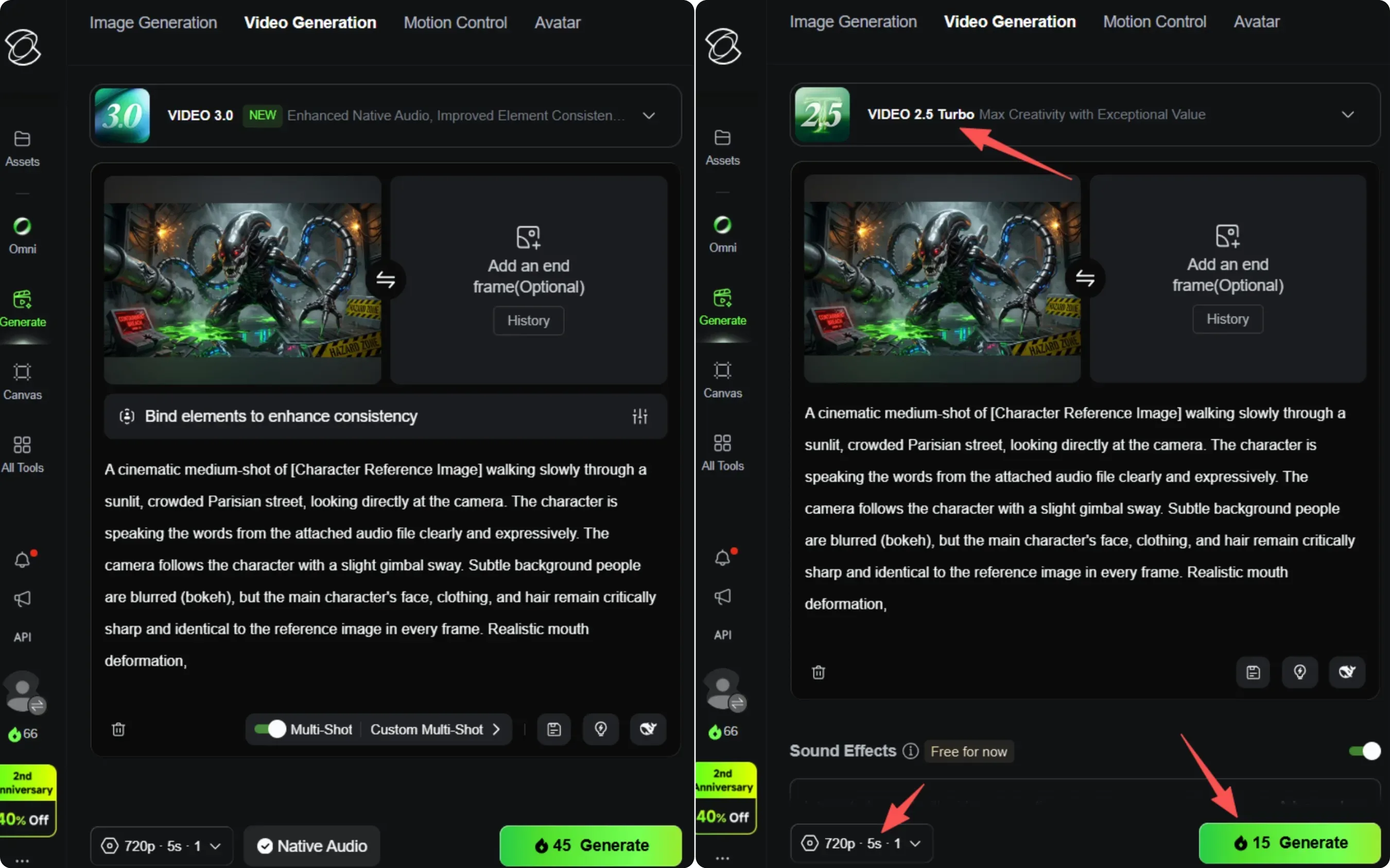
Kling Video 2.5 Turbo to Video 3.0 triples the credit cost for a standard 5s/720p generation
Moving to 1080p, longer durations (10 seconds vs 5), or adding audio all scale costs up proportionally. So when figuring out how much is kling ai for your actual workflow, your settings matter more than your subscription tier. Resolution and clip length are the biggest levers here, and our Kling AI video length limits guide breaks down how duration drives your credit spend.
What Happens When You Run Out of Credits?
A common question around kling ai billing is what actually happens once your balance hits zero mid-project.
If your kling ai credits run out, generation tasks simply fail or get stuck in the queue, they won't complete, and you can't push them through without adding more credits. This becomes especially relevant if you're using professional mode or native audio generation, both of which burn through credits faster than basic video clips.
To keep working, users can purchase add-on credit packs, which range from around $5 for 330 credits up to $200 for larger bulk blocks.
It's also worth understanding the rollover rules:
- Subscription credits: expire at the end of each billing cycle, unused balances don't carry over
- Add-on packs: remain valid for up to 2 years from purchase
So if you tend to have inconsistent usage month to month, topping up with an add-on pack can be more flexible than relying solely on your monthly allotment.
The Full Kling AI Subscription Breakdown: Monthly vs. Annual Plans
Now that you understand how credits get consumed, let's look at what each of the kling ai pricing plans actually offers and where the real value sits.
The Entry Tiers: Free & Standard
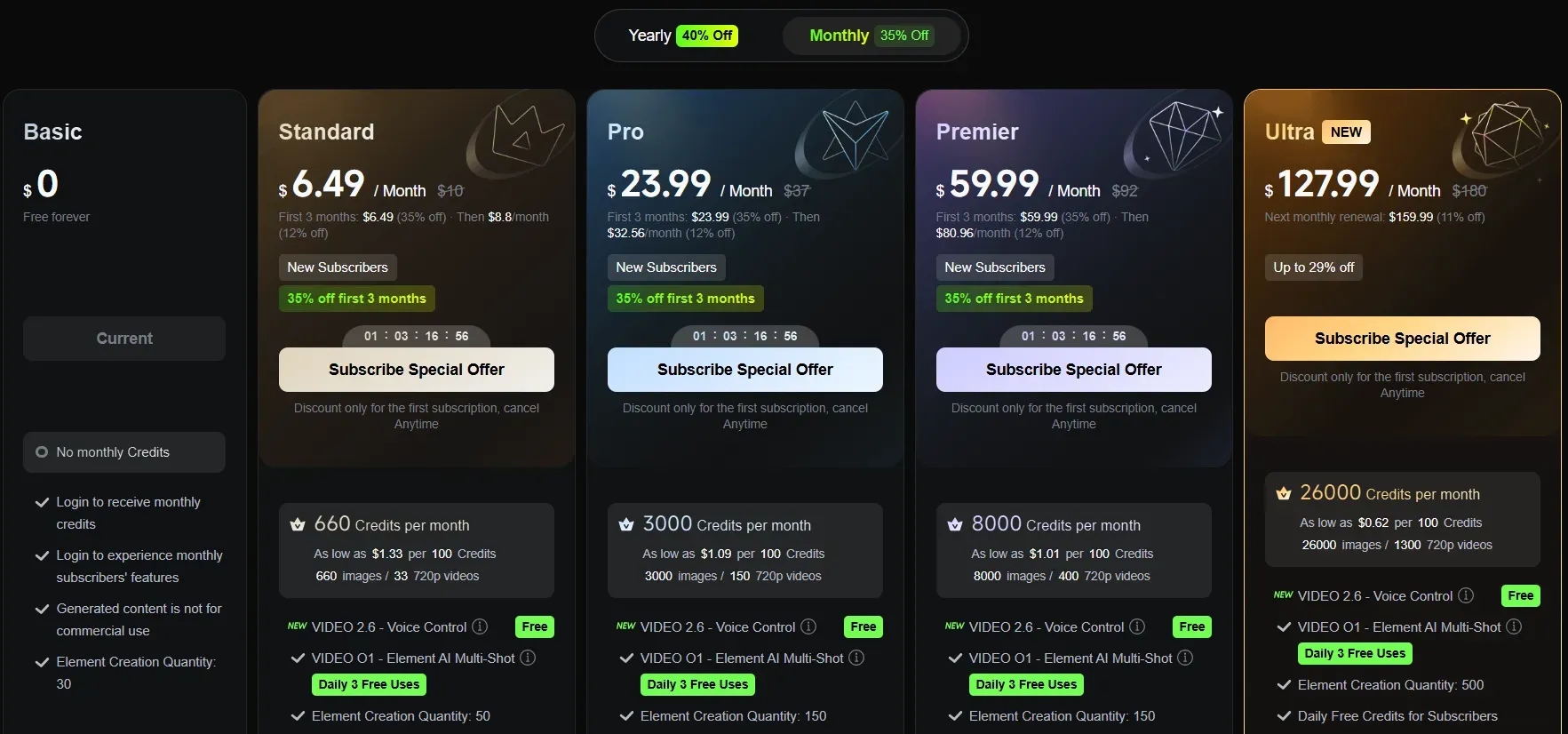
| Feature / Dimension | Basic (Free Tier) | Standard (Paid Plan) |
| Price | $0 / Free forever | $6.49 / Month |
| Monthly Credits | No monthly Credits | 660 Credits per month |
| Estimated Output | Just enough for a single high-quality video | 660 images / 33 720p videos |
| Login Perks | Login to receive monthly credits | Daily Free Credits for Subscribers |
| Commercial Use | Not for commercial use | Generated content is for commercial use |
| Watermark | Standard official watermark included | Brand watermark removal |
| Queue & Speed | Standard queue speeds | Fast-track generation + Queue unlimited tasks |
| Resolution | 720 | 1080p / 4K |
The basic plan provides users with 66 credits per month upon login. These credits do not accumulate and will simply reset at the start of the next month. With this balance being just enough to generate a single high-quality video, it is best suited for casual testing or creators with minimal production needs. Additionally, any content generated under this free tier includes a watermark and is strictly restricted from commercial use.
The standard plan is where things become usable for real projects. For around $10 a month, or about $6.60 a month if you pay for a full year, you get 660 credits every month. More importantly, Standard is the lowest plan that lets you take off watermarks and use your clips for business. That makes it the best starting spot for anyone who wants to make real content instead of just playing around.
The Mid-Tier Sweet Spot: Pro Plan
| Feature / Dimension | Pro Plan Details |
| Price | $23.99 / Month |
| Monthly Credits | 3000 Credits per month |
| Estimated Output | 3000 images / 150 720p videos |
| Element Creation Quantity | 150 (Major upgrade from 50 in the Standard plan) |
| Queue & Speed | Fast-track generation + Queue unlimited tasks |
| Resolution / Watermark | 1080p / 4K; watermark removal |
| Advanced Tools / Commercial Use | Image upscaling + Video extension; Generated content is for commercial use |
When you look at the price per credit, this plan is usually seen as the best deal on the list. Besides getting a lot more credits, the Pro version lets you use Batch Generation to make multiple videos at the same time. You also get a Private Mode for secret projects and you get to skip ahead in line when the site is super busy. These extra tools are really useful once you start making content every day instead of just once in a while.
The Heavy Volume Tiers: Premier & Ultra
| Feature / Dimension | Premier Plan Details | Ultra Plan Details |
| Price | $59.99-80.96 / Month | $127.99-159.99 / Month |
| Monthly Credits | 8,000 Credits per month | 26,000 Credits per month |
| Estimated Output | 8000 images / 400 720p videos | 26000 images / 1300 720p videos |
| Element Creation Quantity | 150 | 500 (Massive limit expansion) |
| Exclusive Perks | Priority access to new features | Priority access to new featuresBeta test invite (if applicable) |
| Queue & Speed | Fast-track generation + Queue unlimited tasks | Fast-track generation + Queue unlimited tasks |
| Resolution | 1080p Video Generation | 1080p Video Generation |
| Advanced Tools | Image upscaling + Video extension | Image upscaling + Video extension |
| Watermark & Terms | Brand watermark removal + Commercial use allowed | Brand watermark removal + Commercial use allowed |
For studios or high-frequency creators, Premier offers 8,000 credits for around $60/month. Ultra, at $180/month, jumps to 26,000 credits and removes consumer queue limitations entirely with "Highest Priority" processing. Ultra subscribers also get early access to experimental models, including upcoming Kling 3.0 pipelines before general release.
The Annual Discount Math
Across Standard, Pro, and Premier, the annual subscription discount runs around 34% compared to monthly pricing. For Pro users specifically, that translates to roughly four months' worth of subscription cost saved per year, a meaningful break-even point if Kling is part of your regular workflow.
Kling AI Free vs Paid Comparison: Is It Actually Worth Upgrading?
With the subscription tiers laid out, the next logical question is whether kling ai free vs paid actually makes a meaningful difference for your specific use case, or whether the free tier can quietly handle everything you need.
Quick Comparison
| Feature | Free Tier | Paid Tiers |
| Resolution | Up to 720p | 1080p / 4K |
| Watermark | Yes | No |
| Commercial use | Not allowed | Allowed |
| Queue priority | Standard | Priority |
| Lip-sync tools | Limited | Advanced |
For casual experimentation, free works. For any commercial or quality-sensitive project, upgrading is necessary.
The Reality of the Free Tier
So, is kling ai free actually usable? Yes, but think of it more as a sampling sandbox than a production tool. The free tier gives you 66 credits monthly, enough to experiment with prompts, test motion quality, and get a feel for the platform. However, it comes with real limitations: output is capped at 720p resolution, every video carries a watermarked output in the corner, and you're restricted to a single generation task in the queue at a time. For learning the interface or testing ideas, it works fine. For anything beyond that, the cracks start showing. To see exactly what you can and cannot do without paying, read our full guide to the Kling AI free plan.
The Commercial & Quality Gateway
The biggest wall free users hit isn't quality, it's usage rights. The free plan strictly prohibits any commercial use of generated content, full stop. Once you upgrade to a paid tier, several gateways open at once: resolution limits lift to allow 1080p and even 4K output, watermarks disappear entirely. Paid plans also grant priority queue access, meaning your generations process faster, especially noticeable during peak hours when free users can wait significantly longer.
Does Kling AI Offer a Free Trial?
A common point of confusion: Kling doesn't run a traditional time-locked free trial, no 7-day or 14-day countdown, and no credit card required upfront. Instead, the persistent free tier itself functions as an ongoing trial environment. You can return to it month after month with fresh credits, testing the platform indefinitely before deciding to commit financially.
Advanced Infrastructure Costs: Kling AI Developer API Pricing
Beyond the consumer plans covered above, there's an entirely separate cost structure built for developers and production teams looking to integrate Kling into their own applications. We break down every endpoint and rate in our dedicated Kling AI API pricing guide.
Subscription vs API Pay-As-You-Go
It's worth being clear upfront: kling ai api pricing has nothing to do with your standard web membership. A Standard, Pro, or Ultra subscription grants zero API access, and credits do not transfer between the two systems.
Instead, developers must purchase dedicated API Resource Packages. For entry-level testing and joint debugging, Kling offers a $9.80 Trial Package (30-day validity, providing 100 Resource Units with 5 concurrent tasks). For production pipelines, pricing transitions into larger pre-paid blocks ranging from the $700 Standard Package (5,000 units) up to heavy-volume options. This pay-as-you-go video generation model ensures costs scale directly with your actual rendering seconds rather than a rigid monthly cap.
Kling AI API Resource Packages Pricing Table
| Package Name | Price (USD) | Unit Price | Total Units | Validity Period | Concurrency Limit |
| Trial Package 1 | $9.80 | $0.10 | 100 units | 30 days | 5 |
| Trial Package 2 | $98 | $0.10 | 1,000 units | 30 days | 5 |
| Standard Package 1 | $700 | $0.14 | 5,000 units | 180 days | 20 |
| Standard Package 2 | $2,100 | $0.14 | 15,000 units | 180 days | 20 |
| Standard Package 4 | $5,670 | $0.13 | 45,000 units | 180 days | 20 |
| Standard Package 5 | $7,560 | $0.13 | 60,000 units | 180 days | 20 |
Exact API Generation Math: Kling-V3-Omni Case Study
To see how this works in real life, let’s check out the price setup for the main Kling-V3-Omni Video Generation API. The regular web version for normal users charges flat rates for each clip. But this developer API charges you strictly per second. Your total cost depends on three basic things: the Mode (Standard vs. Pro/4K), the Video Reference style (Text-to-Video vs. Image-to-Video/Extension), and whether you include Native Audio.
Kling measures usage in Resource Pack Unit Deductions. Based on the official developer billing matrix, here is exactly what a 5-second video generation costs using the Kling-V3-Omni engine:
| Generation Blueprint | Units / Sec | Unit Price / Sec (Standard) | Total Cost(5s Video) |
| std x 1s x no video x no audio | 0.6 | $0.084 / sec | $0.420 |
| std x 1s x no video x with audio | 0.8 | $0.112 / sec | $0.560 |
| std x 1s x with video x no audio | 0.9 | $0.126 / sec | $0.630 |
| pro x 1s x no video x no audio | 0.8 | $0.112 / sec | $0.560 |
| pro x 1s x no video x with audio | 1.0 | $0.140 / sec | $0.700 |
| pro x 1s x with video x no audio | 1.2 | $0.168 / sec | $0.840 |
| 4k x 1s x no video x with/no audio | 3.0 | $0.420 / sec | $2.100 |
The Developer's Cost Takeaway
When you build an automated system using the Kling-V3-Omni API, your design choices will instantly change how much money you spend. For example, making a high-quality 5-second 1080p clip with built-in sound costs exactly $0.70 because it takes 1.0 Unit per second. If your app grows and starts rendering 1,000 videos a day, your starting budget for video creation will hit $700.
When you know these exact unit costs, your development team can easily plan your infrastructure budget. It also helps you set the right price tiers for your own customers before you go ahead and buy big prepaid credit packages. This case runs on the platform's newest model, and our Kling 3.0 Omni upgrade guide covers what changed and why it costs what it does.
A Flexible Alternative: Scaling with Atlas Cloud
However, dropping thousands of dollars upfront into official prepaid packages isn't always viable for growing startups or independent developers. If you want to avoid rigid expiration cycles or heavy upfront financial commitments, routing your pipeline through a managed alternative like Atlas Cloud’s Kling AI model API is a highly tactical move.
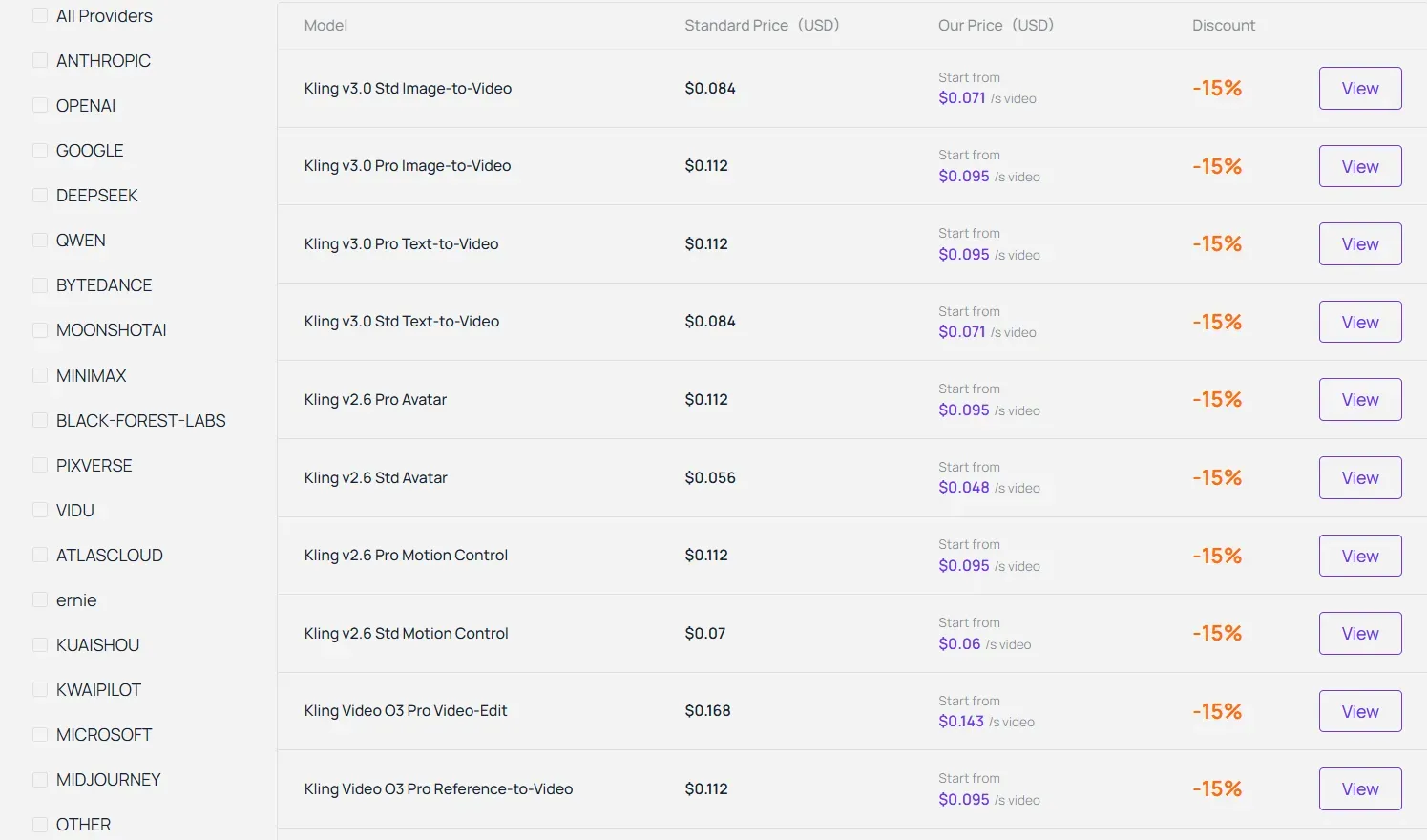
As an advanced AI model aggregator, Atlas Cloud allows production teams to deploy flagship Kling V3 Omni capabilities within a fully managed ecosystem. It serves as an excellent sandbox and production-ready gateway for teams that need to maintain unthrottled rendering speeds and production-grade uptime, while optimizing their API margins day by day.
| Model Name | Generation Type | Base Price (per sec) | Current Price (per sec) | Saving |
| Kling v3.0 Std | Text-to-Video / Image-to-Video | $0.084 / sec | $0.071 / sec | 15% OFF |
| Kling v3.0 Pro | Text-to-Video / Image-to-Video | $0.112 / sec | $0.095 / sec | 15% OFF |
| Kling Video O3 Std | Text-to-Video / Image-to-Video / Reference-to-Video | $0.084 / sec | $0.071 / sec | 15% OFF |
| Kling Video O3 Std | Video-Edit (Natural Language Commands) | $0.126 / sec | $0.107 / sec | 15% OFF |
| Kling Video O3 Pro | Text-to-Video / Image-to-Video / Reference-to-Video | $0.112 / sec | $0.095 / sec | 15% OFF |
| Kling Video O3 Pro | Video-Edit (Object Removal, Background Swap) | $0.168 / sec | $0.143 / sec | 15% OFF |
Live Pricing Note: API rates are dynamic and subject to change; please check the official Atlas Cloud Kling V3 Live Pricing Dashboard for the most up-to-date pricing.
When you cross-examine this matrix with the official prepaid units, Atlas Cloud introduces a highly competitive edge for lean production teams:
- No Capital Lock-Up: Instead of sinking a flat $700 into official Standard Package 1 to get standard unit rates, Atlas Cloud allows developers to access the flagship Kling Video O3 Pro architecture directly on a true serverless, per-second billing model.
- The 15% Margin Gain: With the current promotional campaign dropping Kling v3.0 Standard rendering costs down to $0.071/sec (compared to the official $0.084/sec standard rate), high-volume workflows like automated faceless video channels or digital human rendering pipelines can save up to $65+ per every 1,000 generated clips.
- Advanced O3 Capabilities Unlocked: The platform provides fully managed routing for conversational video editing (Video-Edit API) and multi-image subject referencing (supporting up to 7 reference images for flawless actor consistency). This eliminates the need for developers to maintain complex local visual anchoring nodes, making it the ideal sandbox for rapid deployment.
The Decision Matrix: Which Kling AI Plan Should You Choose?
With all the pricing details covered, let's translate them into a practical recommendation based on how you actually plan to use Kling.
| User Profile | Recommended Plan / Pathway | Key Cost Metric | Why This is Your Best Fit |
| Casual Tester & Hobbyist | Free Plan (Web Tier) | $0 / month (66 credits) | Ideal for basic experimentation. Sufficient for testing prompts and generating standard-resolution clips without financial commitment. |
| Independent Social Creator | Standard Plan (Web Tier) | ~$10/mo | Best value for high-volume social media output. Removes watermarks and provides enough credits for up to 133 high-quality Video 2.5 Turbo standard clips (25 credits each). |
| Professional Studio / Agency | Pro or Ultra Plan (Web Tier) | Variable Monthly Subscription | Essential for projects requiring the flagship Video 3.0 model. High credit pools comfortably absorb the heavier 60-credit cost per video needed to unlock Native Audio and Multi-Shot consistency. |
| Lean Developer / Startup | Atlas Cloud managed Kling V3 API | Pay-As-You-Go | Perfect for teams wanting to avoid official $700+ upfront package lock-ups. Offers true serverless billing and a 15% discount margin on Kling Video O3 Standard/Pro models with zero capital risk. |
| Enterprise Production Pipeline | Official API Resource Packages | Pre-paid Blocks | Mandatory for massive batch automation pipelines requiring maximum multi-threading capabilities (20 concurrent tasks), native platform ecosystem uptime, and dedicated tech support. |
The Hobbyist & Tester Profile
If you're experimenting with AI video for fun, social posts, or learning the tool, the Free Tier is genuinely enough to start. It won't cost you anything while you figure out prompts and motion quality. Once you want a clean, watermark-free loop for casual social content, but don't need heavy volume, the Standard plan is the natural next step. At under $10/month, it's an easy entry point without committing to a serious budgeting for ai video plan.
The Professional Creator & Agency Profile
For indie filmmakers, content creators publishing regularly, or marketing agencies producing client work, Pro or Premier become less of an upgrade and more of a baseline requirement. The best video generation plan for this group depends on output volume, but both tiers offer predictable processing speed and the credit headroom needed for multi-shot consistency across a project.
At this stage, the cost stops being optional. Any kling ai review written from a professional standpoint will note that unreliable queue times or watermarked output simply aren't viable when client deadlines are involved. The roi on paid ai tools here comes down to time saved: faster turnarounds and fewer regenerations offset the monthly fee quickly once you're producing content at scale.
Final Verdict
Choosing the right Kling AI pathway comes down to your production volume and engineering needs. For standard social media creation, the Web subscription plans offer excellent out-of-the-box value. However, if you are scaling a professional application or look to optimize your API margins, shifting to a pay-as-you-go managed infrastructure like Atlas Cloud’s Kling V3 API or upgrading to official enterprise packages will drastically reduce your development friction and ensure production-grade consistency. Pick your tier, audit your credit burn, and start rendering. And if you are still weighing platforms, our Kling AI vs Runway vs Luma comparison shows how the pricing and output compare.





