You have done this before. You find the perfect scene, you want your entire friend group's faces on it, and forty minutes later you are still swapping face number three. Somewhere along the way the app quietly dropped your roommate's face onto the wrong body, and grandma is now sitting where the guy with the beard should be.
Group photos are exactly where every face swap tool falls apart. They are also exactly where a real multiple face swap should shine.
So here is the fun version of that problem. We are going to take Leonardo's Last Supper, keep every crack, candle, and brushstroke intact, and drop a whole table of modern faces into it in a single pass. Same idea works for your group chat, your band, your work Slack, whatever. Let's get into it.
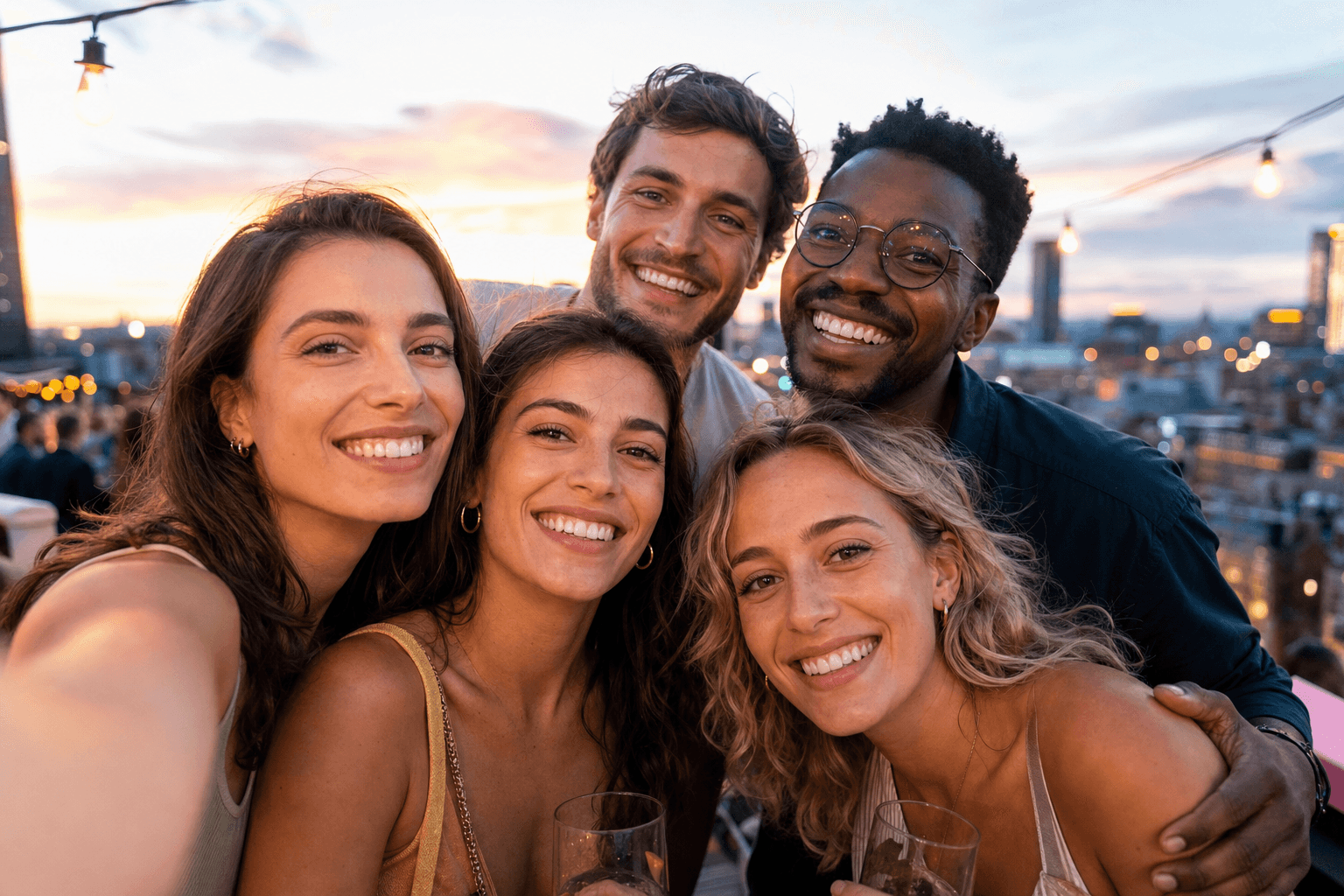
Five friends squeezed together for a group selfie at a rooftop party, evenly lit, all faces clearly visible
Key takeaways
- Yes, you can do a multiple face swap on one photo and change 5 to 10+ faces at once, not one at a time.
- The three things that decide whether it looks real: pick a model that accepts many reference faces, lock the left-to-right mapping so the right face lands on the right person, and force it to keep the original lighting.
- The metered models bill per run with no watermark and no daily cap, so you only pay for the versions you keep.
- For one-face jobs and exact identity transfer, Atlas Cloud's free Swap Face tool charges nothing, with no usage cap and no watermark.
- You can push the finished photo into a short multiple face swap video in the same browser tab.
See a Multiple Face Swap in Action
Before any theory, here is the payoff. On the left, the 1490s original. On the right, the same fresco with a fresh cast of faces swapped into the central seats, lighting and brushwork untouched.
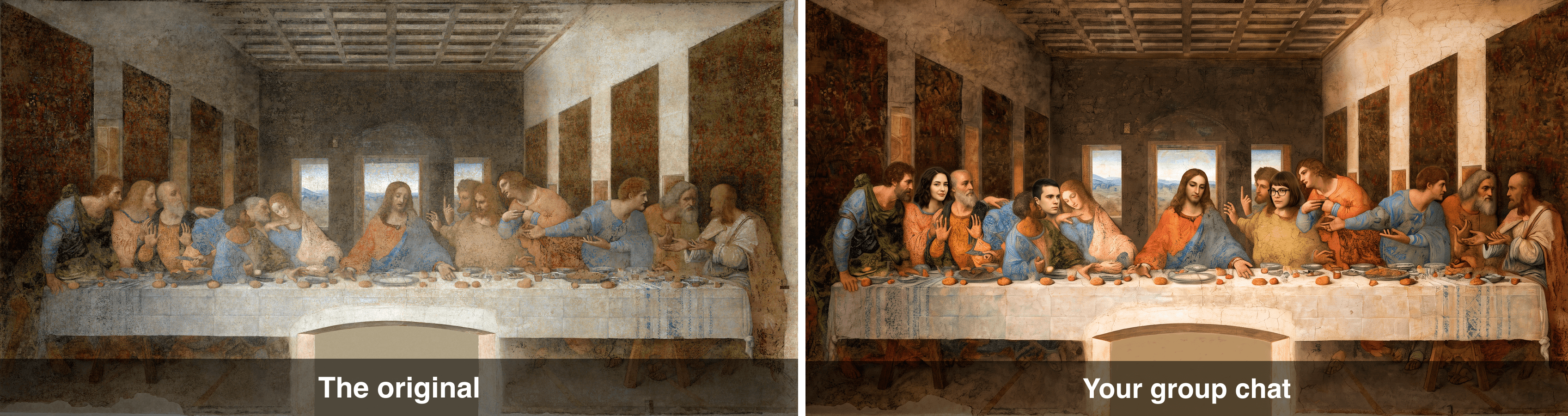
Before and after: the original Last Supper on the left, a version with modern faces swapped in on the right
That is one image, one pass, multiple faces. No stitching four separate edits together, no watermark stamped across Jesus. Keep scrolling and I will show you the exact prompts and settings that made it.
Why Group Face Swaps Go Viral (and Why Most Tools Fail at Multiple Faces)
Group swaps hit different because the reveal scales with the crowd. One swapped face is a chuckle. A whole table of your friends painted into a Renaissance masterpiece is a screenshot that gets sent to every chat you are in. Recreating famous scenes with your own crew, from The Last Supper to Abbey Road, is one of the most reliable formats going right now. A close cousin, "facebombing," puts one person's face on everyone in the shot, and it has been a staple of the format for years (Know Your Meme).
There is a slightly unsettling reason these land so well too: we are getting bad at spotting fakes. Only 0.1% of people can reliably tell AI-generated media from the real thing, and we are 36% worse at catching a fake video than a fake image (iProov, February 2025). The tech has quietly gotten good, which is also why sophisticated synthetic-media fraud attempts jumped 180% year over year (Infosecurity Magazine, November 2025). For a joke photo, that just means your Last Supper will look shockingly convincing.
So why do most free tools choke the moment you add people? A few hard limits show up over and over:
- The one-face ceiling. Plenty of tools only transplant a single face per run, so a table of ten means ten separate jobs.
- The ~5-face cap. Many "multiple" tools quietly max out around five faces, and quality drops as you add more.
- Wrong face, wrong person. With no way to control mapping, the app guesses, and it guesses wrong. Your face ends up on grandma.
- Mismatched lighting. Faces get pasted flat, ignoring the warm candlelight of the scene, and the whole thing screams "edited."
- Watermarks and daily limits. Five swaps a day, then a logo across your masterpiece.
Here is how the typical free tool stacks up against the workflow in this guide.
| What matters for a multiple face swap | Typical free tool | The workflow below |
|---|---|---|
| Faces per single pass | Often 1, capped around 5 | Up to 10 to 14 reference faces |
| Control which face lands on whom | Rarely | Yes, via grid order and prompt |
| Keeps the scene's original lighting | Hit or miss | Yes, enforced in the prompt |
| Watermark | Common on free tiers | None |
| Turn it into a video | Usually separate app | Same browser tab |
The Multiple Face Swap Workflow: Models, Settings, and Cost
You do not need a desktop editor or a GPU for any of this. The whole thing runs in a browser on Atlas Cloud, which hosts each model on its own page and lets you run them one after another, pay-per-image. The metered models are only half the shelf there: the AI tools page collects the free tools that run alongside them, including a free face swap that gets its own section in the tutorial below. Think of it less as a single face swap app and more as picking the right tool for each step.
The pipeline is three or four short jobs:
- Build a face set with a text-to-image model, so every face is clean, front-facing, and evenly lit.
- Swap multiple faces at once with an edit model that accepts many reference images in one pass.
- (Optional) Polish or add more faces with a higher-fidelity edit model.
- (Optional) Turn the still into a short clip.
Here are the models this guide uses and why. The reference-face counts are the reason a whole table is even possible: the edit models take far more inputs than a typical consumer app.
| Job | Model | Max reference faces | Resolution used | Price (as of July 2026) |
|---|---|---|---|---|
| Make the face set | GPT Image 2 | n/a (text to image) | 1024x1024, high | from $0.011 per image (low tier) |
| Swap many faces at once | Nano Banana 2 Edit | up to 14 | 2K | $0.12 per image |
| High-fidelity polish | Seedream 5.0 Pro | up to 10 | 2048x1152 | $0.036 (20% off $0.045) |
| Exact identity transfer | Swap Face tool | 1 per pass | up to 1280px | Free |
| Make it move | Seedance 2.0 Mini | 1 image input | 720p, 5s | $0.43 per 5s clip (30% off, list $0.61) |
One honest note before you start. Generative edit models like Nano Banana 2 and Seedream are brilliant at putting many faces into one scene with a natural blend, but they reinterpret the scene rather than transplanting a real person pixel for pixel, so an exact face can drift a little. If you need a specific real person locked in with zero drift, the free Swap Face tool does true identity transfer, one face per pass, and it gets its own section in the tutorial below. This guide takes the generative route for the group shot because it is the one that swaps a whole crowd at once.
An AI Multiple Face Swap Online, Free vs. Pay-Per-Image
Quick reality check on the free question, because it is the first thing everyone searches. Free face swaps online are genuinely fine for one or two faces, and Atlas has one of its own: the Swap Face tool covered in the tutorial below, which charges nothing and skips the watermark and the daily limit that third-party free tiers lean on. What no free tool gives you is a whole table in a single pass. That job belongs to the pay-per-image edit models, which handle it for pocket change per run. More on exact numbers in the cost section.
How to Do a Multiple Face Swap, Step by Step
This is the whole tutorial, start to finish. Each step has the exact prompt to paste and the settings to pick. Do them in order.
Step 1: Generate Your Face Set
Multiple face swaps live or die on your source faces. Blurry, side-angle, badly lit faces produce mushy results. The trick is to generate all your faces as one clean 2x2 grid, evenly lit at the same scale, so the edit model has an easy time reading each one. You can also drop in real headshots later, but a generated grid is the fastest way to a demo.
Open GPT Image 2, set Quality: high and Size: 1:1 (1024x1024), and paste this:
plaintext1A 2x2 grid (four equal quadrants separated by thin white gaps) of four different studio headshot portraits, all front-facing, evenly soft-lit on a neutral gray background: top-left, a cheerful bearded man in his 30s; top-right, a woman with curly brown hair smiling; bottom-left, a young man with round glasses; bottom-right, an older woman with silver hair. Photorealistic, sharp focus, identical lighting and scale across all four faces.
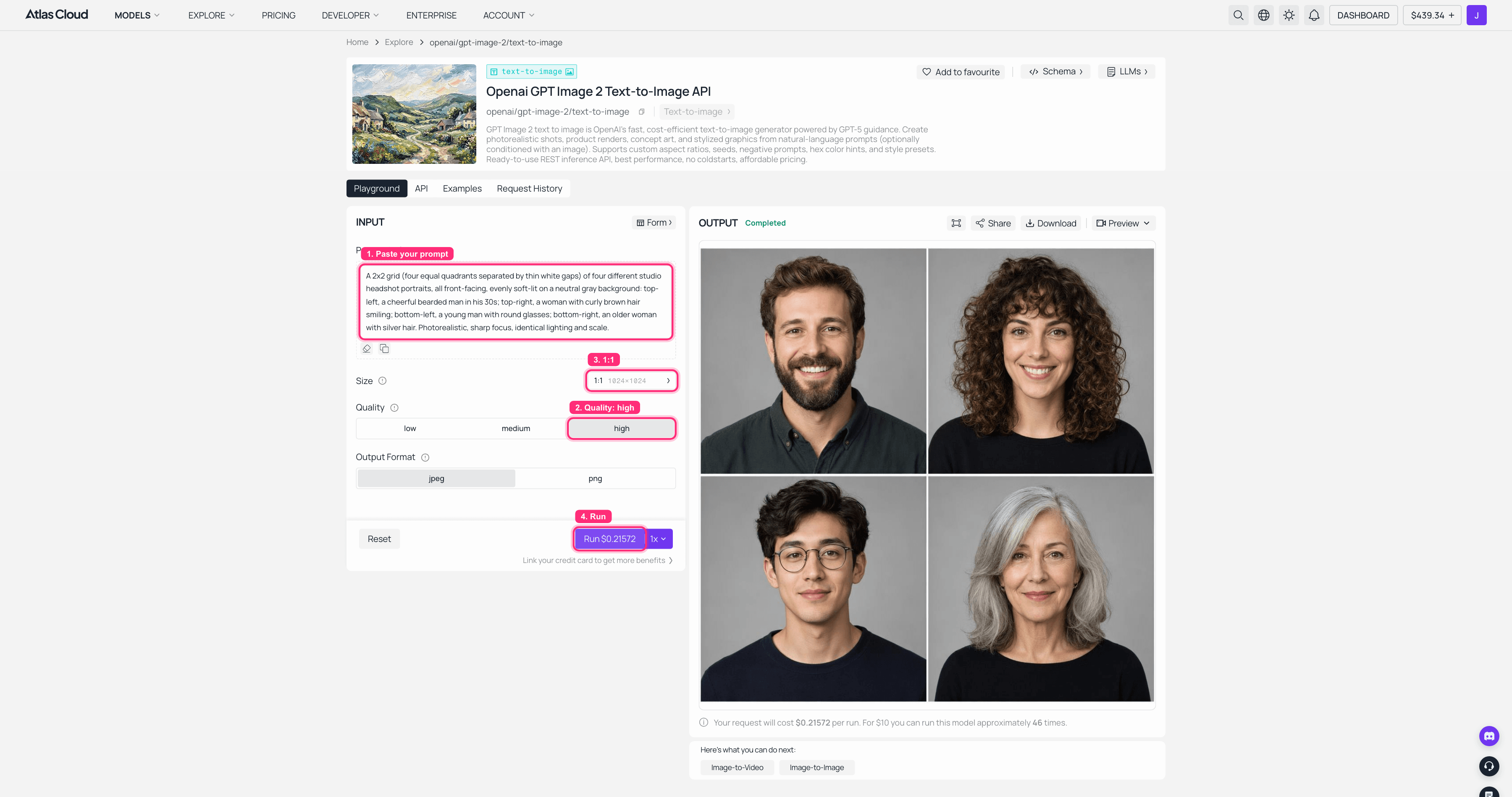
GPT Image 2 on Atlas Cloud: Quality high, 1:1, with the finished 2x2 face grid in the output panel on the right
You now have a tidy grid of four faces at matching scale and lighting. That grid becomes a single reference image in the next step, which is what makes the multiple part painless.
Step 2: Swap Multiple Faces at Once
This is the core move: face swap multiple faces in a single pass. Open Nano Banana 2 Edit, upload two images (your base scene plus the face grid from Step 1), and set Resolution: 2K. It accepts up to 14 reference images, so a full table is well within range.
For the base scene, the Last Supper is a great starting point: it is public domain, the figures are cleanly separated, and the seating gives you an obvious left-to-right mapping. Paste this:
plaintext1Take the four studio faces from the 2x2 grid reference and place them onto the four central figures of the Last Supper painting, one grid face per figure from left to right. Keep every figure's pose, hands, robes and hair exactly as in the original painting, and strictly preserve the mural's existing lighting direction, brushwork, surface cracks and warm color palette. Do not change the table, the background, or any other figure.
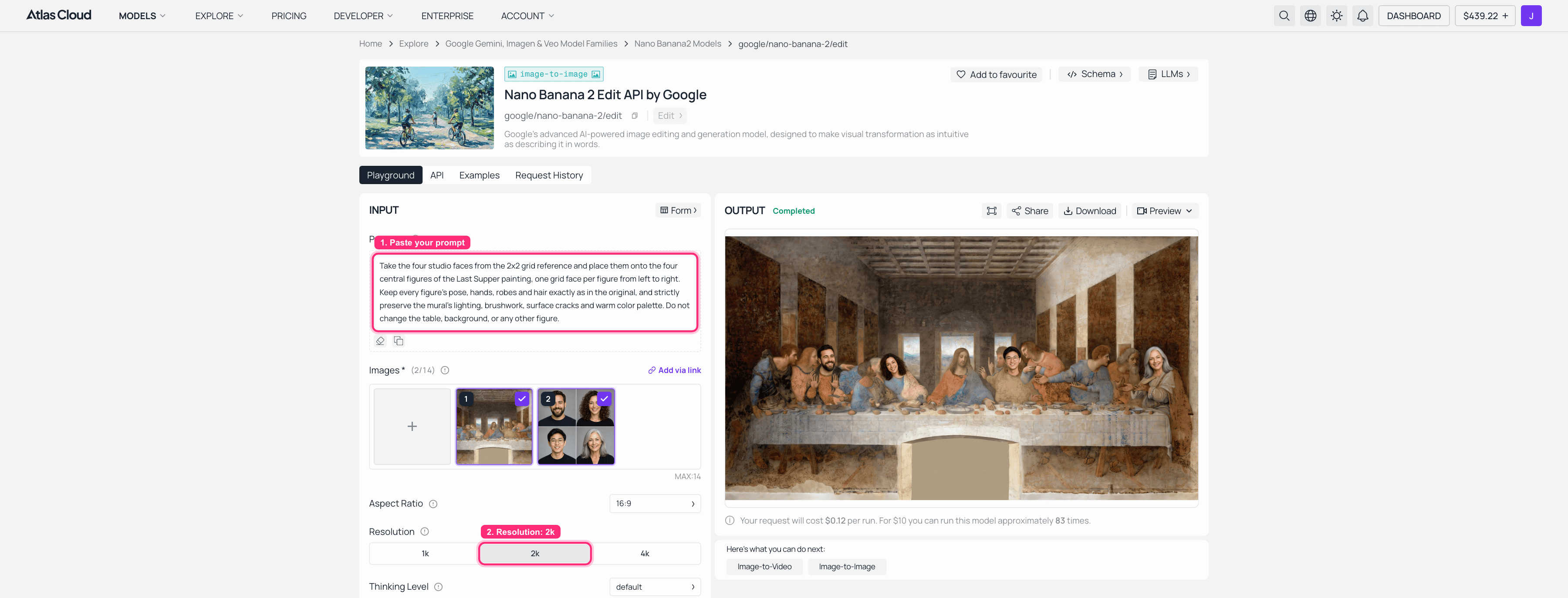
Nano Banana 2 Edit on Atlas Cloud: base painting and face grid uploaded, resolution 2K, the face-swapped Last Supper completed on the right
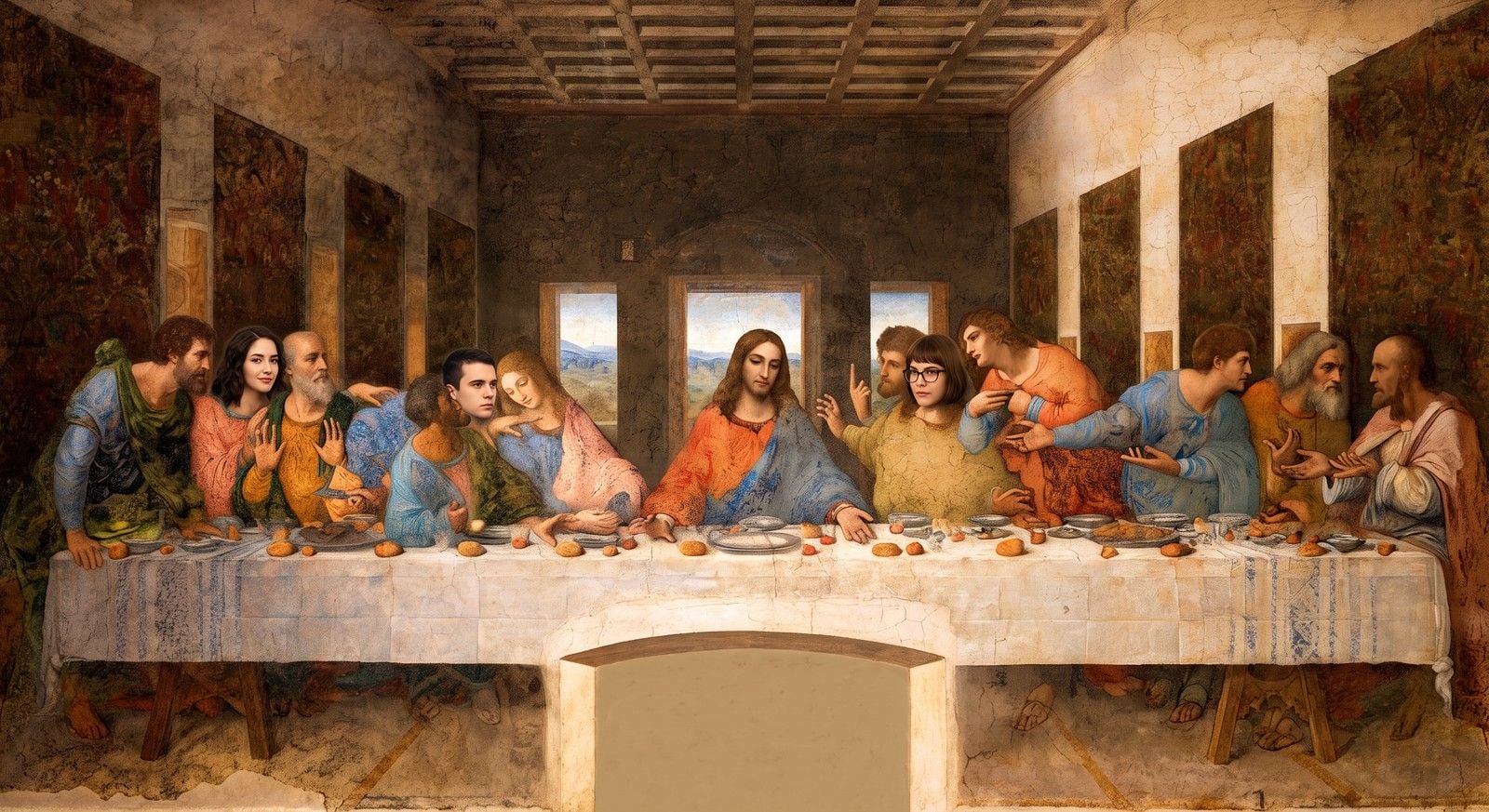
Two things carry the whole result. First, "one grid face per figure from left to right" is your mapping control, the line that stops the wrong face landing on the wrong person. Second, the "strictly preserve the lighting, brushwork and color palette" clause is what keeps the faces sitting inside the painting instead of floating on top of it. Eyeball the output, and if a face lands off, just run it again or trim to three faces. It is a few cents per try.
Step 3: Lock In Identity and Polish (Optional)
If a face came out a little generic, or you want to push to more people, run the result through Seedream 5.0 Pro at size 2048x1152. It holds up to 10 reference faces and is a touch better at blending edges into an existing texture. Paste this:
plaintext1Refine the swapped faces so each blends seamlessly into the painting: match the warm candlelit tone, soften the edges into the brushwork, and keep each identity distinct. Preserve the original composition exactly.
Check it by eye again. Generative models can restage a scene, so keep the versions you like and re-roll the ones you do not.
One Seat at a Time: The Free Swap Face Tool
Everything above bills by the run. Atlas also keeps a lane that bills nothing: the free AI face swap from its AI tools shelf. The input panel is labeled "Free · No charge," and its FAQ answers the is-it-really-free question with a plain yes, no usage cap and no watermark on the result. There is no prompt box. You load a target photo and a face photo, hit swap, and shape the result with two sliders, Blend for how much of the new identity lands and Feather for how softly the edges settle into the surrounding pixels.
Remember the honest note from the workflow section: generative models can drift an identity. This tool is the fix, because it transplants the actual face rather than reinterpreting it. The on-theme move is to claim the middle seat. Crop your finished swap from Step 2 down to the central figure so a single face fills the frame, load that crop as the target photo, and hand a real headshot to the face slot. About eight seconds later the seat of honor holds the real you, not a generic cousin of you.
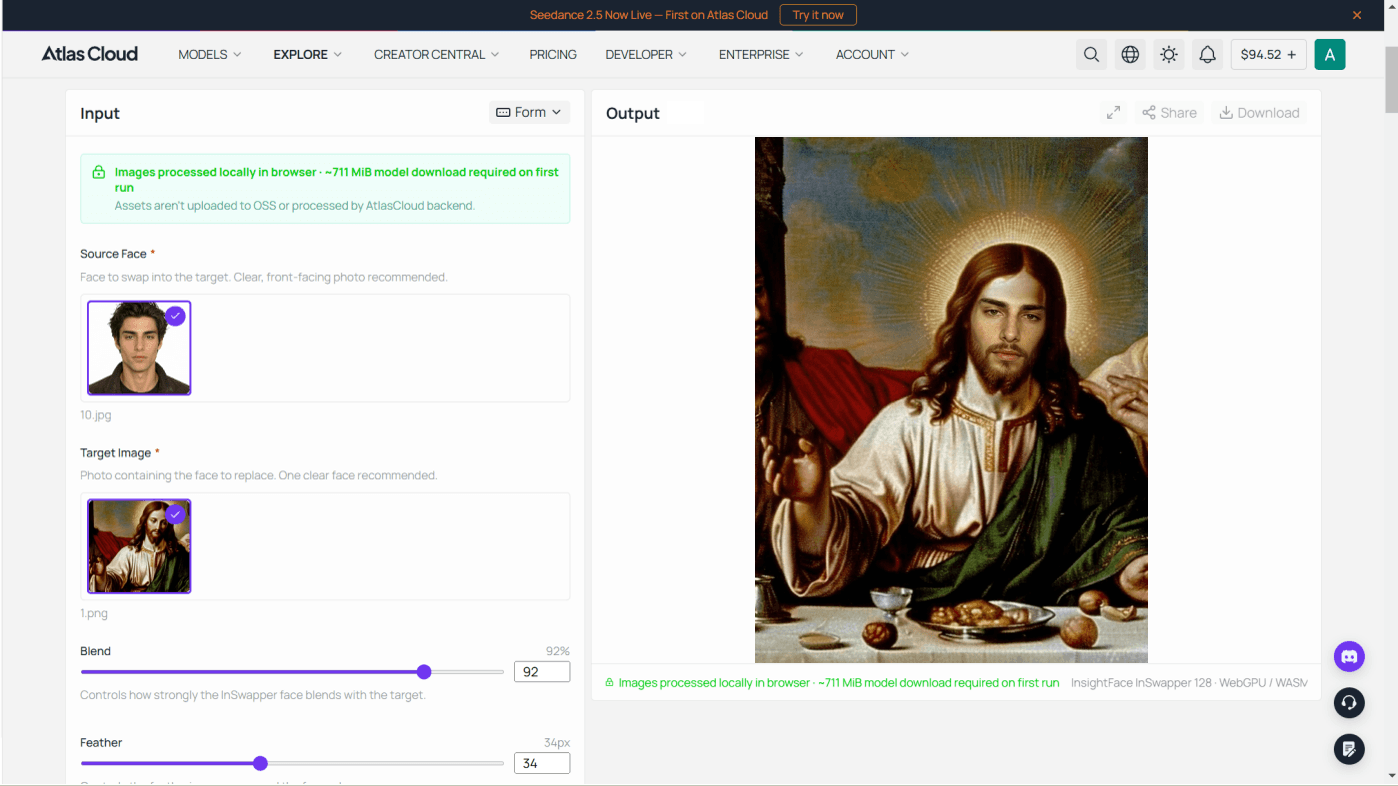
The honest limits: it takes one face per pass and there is no prompt box, so the whole-table single pass stays with Nano Banana in Step 2. Results download as a PNG at the size of your target photo, up to 1280 pixels on the longest side, and the swapped crop drops straight into Step 4 if the solo version of the joke is the one you want to animate.
Step 4: Turn It Into a Multiple Face Swap Video
A still is great. A still that breathes is a scroll-stopper. Feed your finished swap into Seedance 2.0 Mini at 720p, 5 seconds to get a short multiple face swap video. Paste this:
plaintext1The figures at the long table breathe and shift subtly, candlelight flickers gently, a slow cinematic camera push-in, natural lifelike motion.
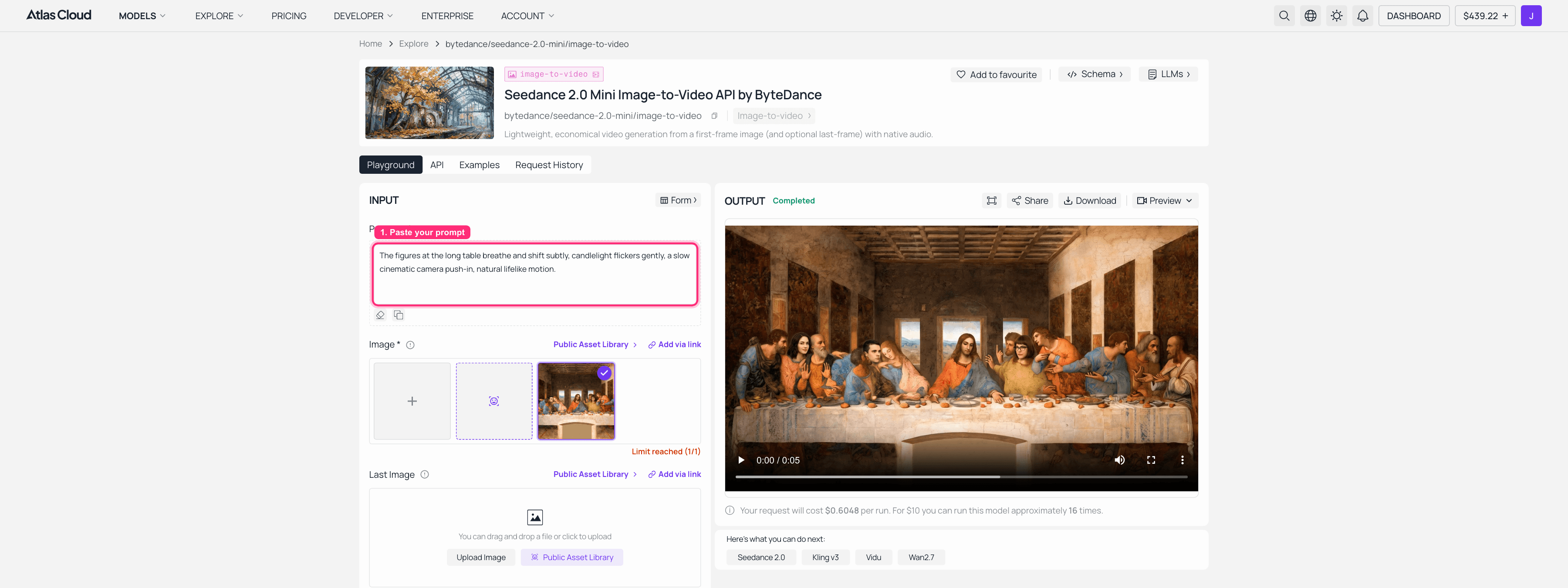
Seedance 2.0 Mini on Atlas Cloud: the swapped Last Supper uploaded as the input frame, a completed 5-second 720p clip in the output panel
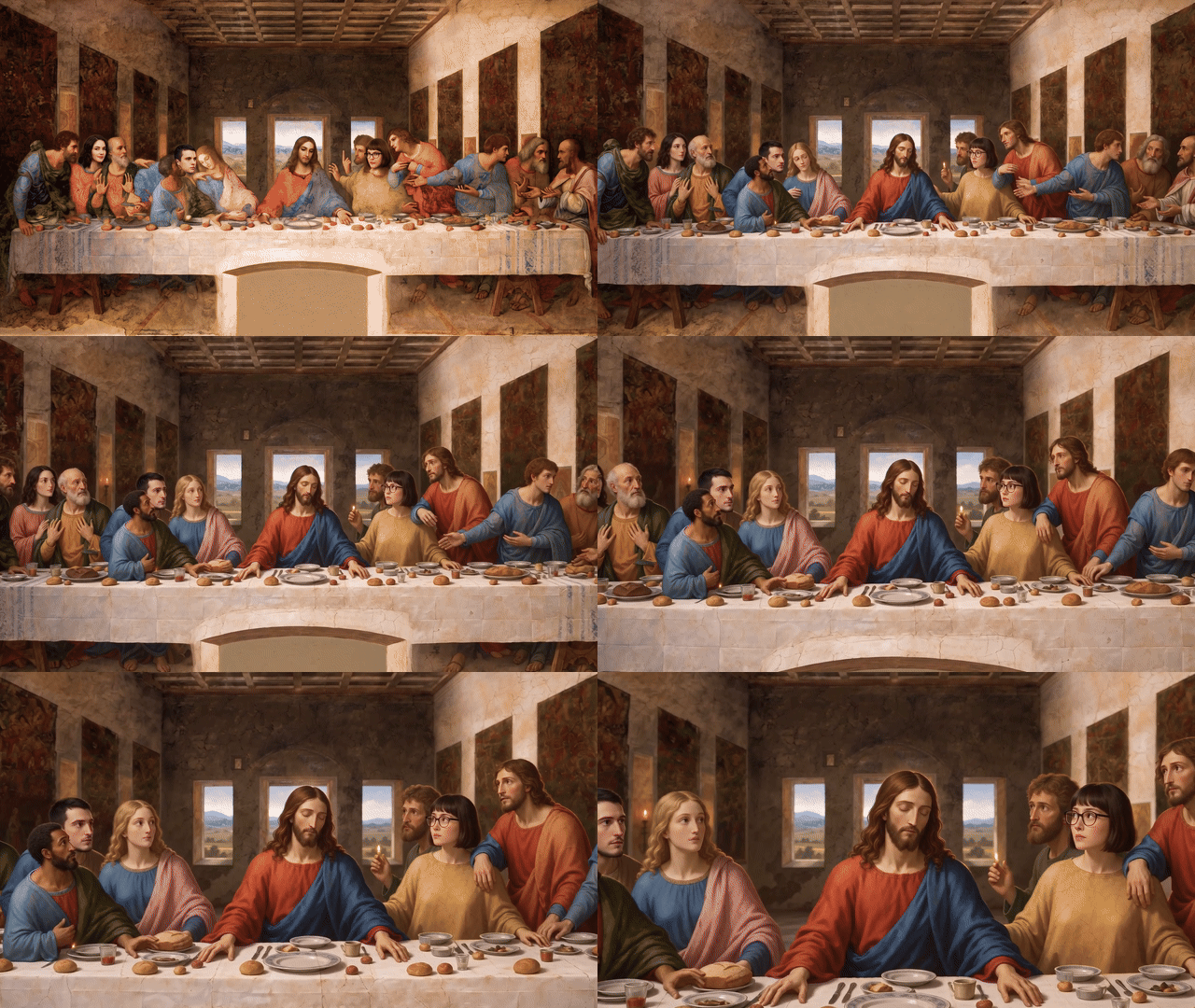
That is the full loop: text to faces, faces into the scene, scene into motion, all in one tab.
How Much Does a Multiple Face Swap Cost?
Cheaper than a coffee, and you own the output with no watermark. Here is a realistic single run, based on the models above.
| Step | Model | Cost |
|---|---|---|
| Face set | GPT Image 2 | ~$0.22 per run at high quality, about a cent ($0.011) at low |
| Multiple face swap | Nano Banana 2 Edit, 2K, 2 refs | ~$0.12 per run |
| Polish (optional) | Seedream 5.0 Pro | $0.045 per image |
| Exact-identity swap (optional) | Swap Face tool | Free |
So a finished still lands around $0.13 to $0.38 depending on quality settings, and adding the video brings the whole thing to roughly $0.56 to $0.81. Compare that to subscription tools that cap you at five watermarked swaps a day and then ask for a monthly fee. Pay-per-image means you only pay for the runs you actually keep, and when the joke only needs one face, the Swap Face tool above does it for nothing.
Is Multiple Face Swap Legal and Safe?
Short version: keep it consensual and keep it honest. Swapping your own friends who are in on the joke, or using public-domain art like the Last Supper, is the safe lane. What you should not do is impersonate someone, put words or actions on a real person, or pass a swap off as real to mislead people. Given that almost nobody can spot a good fake by eye anymore (iProov, above), that line matters more than it used to, and deepfake laws are tightening in a lot of places. Get a yes from the people whose faces you are using, label it as edited when it could be mistaken for real, and have fun.
Frequently Asked Questions
Can I swap multiple faces in one photo at the same time?
Yes. An edit model like Nano Banana 2 reads several reference faces in a single pass and places them onto the figures in your base image at once. The key is giving it clean, evenly lit source faces (a 2x2 grid works great) and telling it the mapping, for example "one face per figure, left to right."
Is there an AI multiple face swap online, free option, and what is the catch?
There is. Atlas Cloud's own Swap Face tool handles photo face swaps at no cost, with no watermark and no usage cap per its FAQ, at one face per pass. Third-party free options exist too, but on group photos their catches appear: a cap around five faces, a watermark on the output, and a daily limit. For many faces in a single pass, pay-per-image edit models do the job for pocket change per run.
How many faces can I swap at once?
It depends on the model. Nano Banana 2 Edit accepts up to 14 reference images in a single pass, and Seedream 5.0 Pro takes up to 10. That is more than enough to seat a full table. Quality holds up best when your source faces are clean and front-facing.
Why do the faces land on the wrong people?
Because the tool guessed the mapping and guessed wrong. Fix it by ordering your faces predictably (a left-to-right grid) and stating the mapping in the prompt, like "one grid face per figure, left to right." If one still lands off, re-run or reduce the number of faces in that pass.
Can I make a multiple face swap video, not just a photo?
Yes. Take your finished swapped still and feed it into an image-to-video model like Seedance 2.0 Mini at 720p for a short clip. You get subtle motion, a slow camera push, and a shareable multiple face swap video from the same browser tab.
Is multiple face swap legal?
For consenting friends and public-domain images, you are on solid ground. Avoid impersonating real people, defaming anyone, or presenting a swap as genuine. Get consent, label edited content when it could mislead, and note that deepfake regulation is getting stricter, so honest, playful use is the way to go.





