You type a sentence. Ninety seconds later you have a video with camera moves, lighting, and sound you never recorded.
That is the whole pitch of PixVerse text to video, and it mostly delivers. What the pitch skips: which version you are actually using, what the free tier withholds, and how the settings you click translate into money. Most guides ranking for this topic describe a PixVerse that is three versions out of date.
This one is current. Every spec below comes from PixVerse's own platform docs, its official blog, and Atlas Cloud's live model page, checked this week.
Key Takeaways
- PixVerse text to video now runs on V6: clips of any length from 1 to 15 seconds, up to 1080p, eight aspect ratios, and optional audio generated in the same pass (PixVerse V6 docs, 2026).
- The free tier is real but variable. PixVerse says daily credit balances differ by account and region, and free renders carry a watermark with a 540p ceiling.
- Billing is per second everywhere. On Atlas Cloud the same V6 model starts at $0.025 per second, and the default 5-second 720p clip with audio costs $0.30.
- Guides answering searches like "pixverse ai text to video free 2025" describe the V4 era: 5 or 8 second caps and no in-pass audio. V4 still runs on the API, but V6 renders the same clip for fewer credits.
What PixVerse Text to Video Can Do Right Now
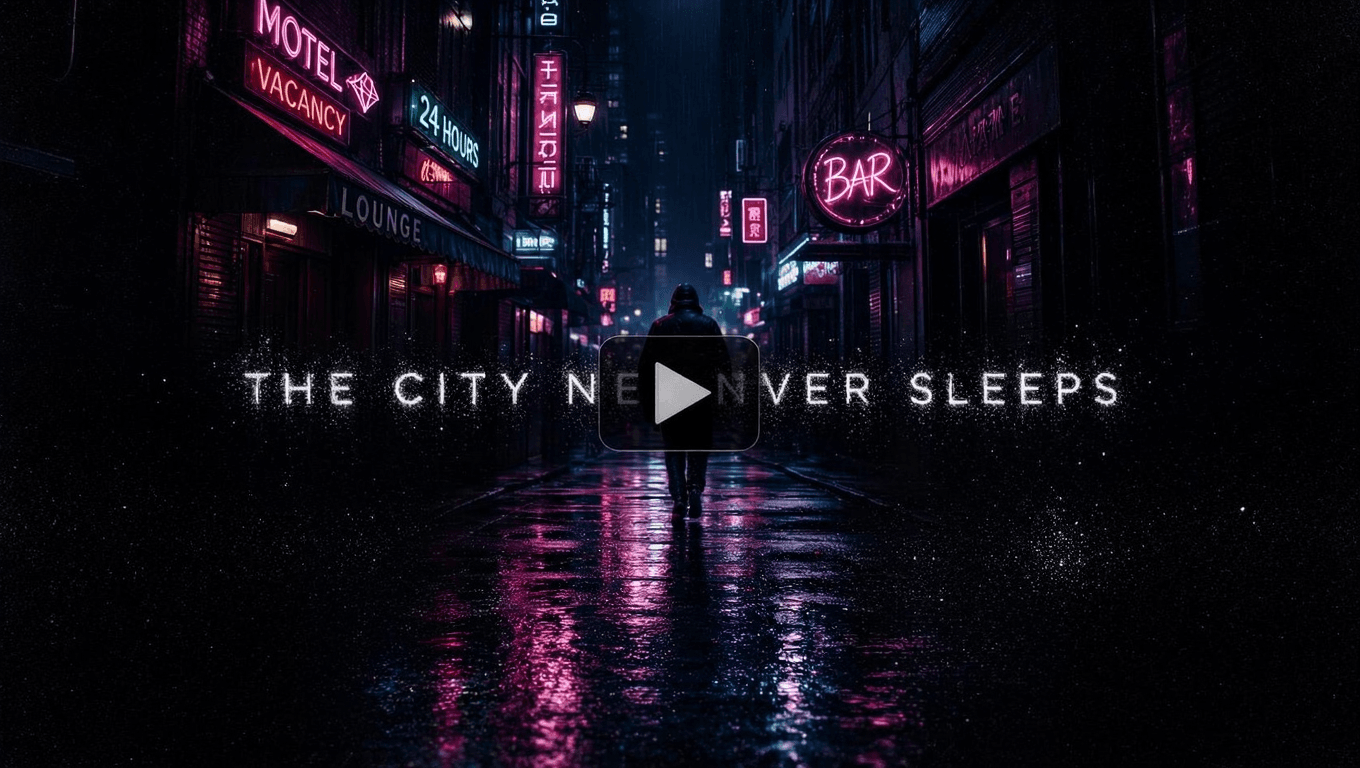
PixVerse text to video turns a written prompt into a finished clip. No source image, no footage. The current engine is V6, released March 30, 2026 per PixVerse's launch announcement, and it behaves very differently from the versions most tutorials describe.
The headline change is flexibility. Older versions locked you into fixed clip presets. V6 renders any whole-second length from 1 to 15, and the official docs state that "1080p supports up to 15s," so the longest clip no longer forces a resolution downgrade. Audio is the other shift. Dialogue, ambient noise, and effects render in the same pass as the pixels, not as a separate lip-sync step.
Text to video is also the mode that gets the full canvas. PixVerse's docs list eight aspect ratios, from 9:16 vertical to 21:9 ultra-wide, for text-to-video and reference-to-video only. Image-to-video inherits the shape of your photo instead.
| Spec | PixVerse V6 text to video |
|---|---|
| Clip length | Any 1 to 15 seconds, chosen per second |
| Resolutions | 360p, 540p, 720p, 1080p |
| Aspect ratios | 16:9, 4:3, 1:1, 3:4, 9:16, 2:3, 3:2, 21:9 |
| Audio | Optional, generated in the same pass |
| Reproducibility | Seed parameter, 0 to 2147483647 |
| Billing unit | Per second of output, higher rate with audio |
| Sibling model | C1, a storyboard-focused alternative |
One naming note before anything else. The official PixVerse AI text to video platform lives at app.pixverse.ai, with the developer API documented at docs.platform.pixverse.ai. Plenty of third-party sites resell the same model under their own branding, often with stale specs. When numbers conflict, trust the first-party pages.
Two Ways to Run the PixVerse AI Text to Video Generator
You do not need a PixVerse subscription to use the current model. Atlas Cloud hosts the same V6 engine among its 400+ models, billed per second with no monthly minimum and no watermark at any tier. The PixVerse family page lists every hosted V6 and C1 endpoint, from text-to-video to reference and extend. For this article, the door that matters is the V6 text-to-video playground.
Method 1: Generate PixVerse Text to Video in the Playground
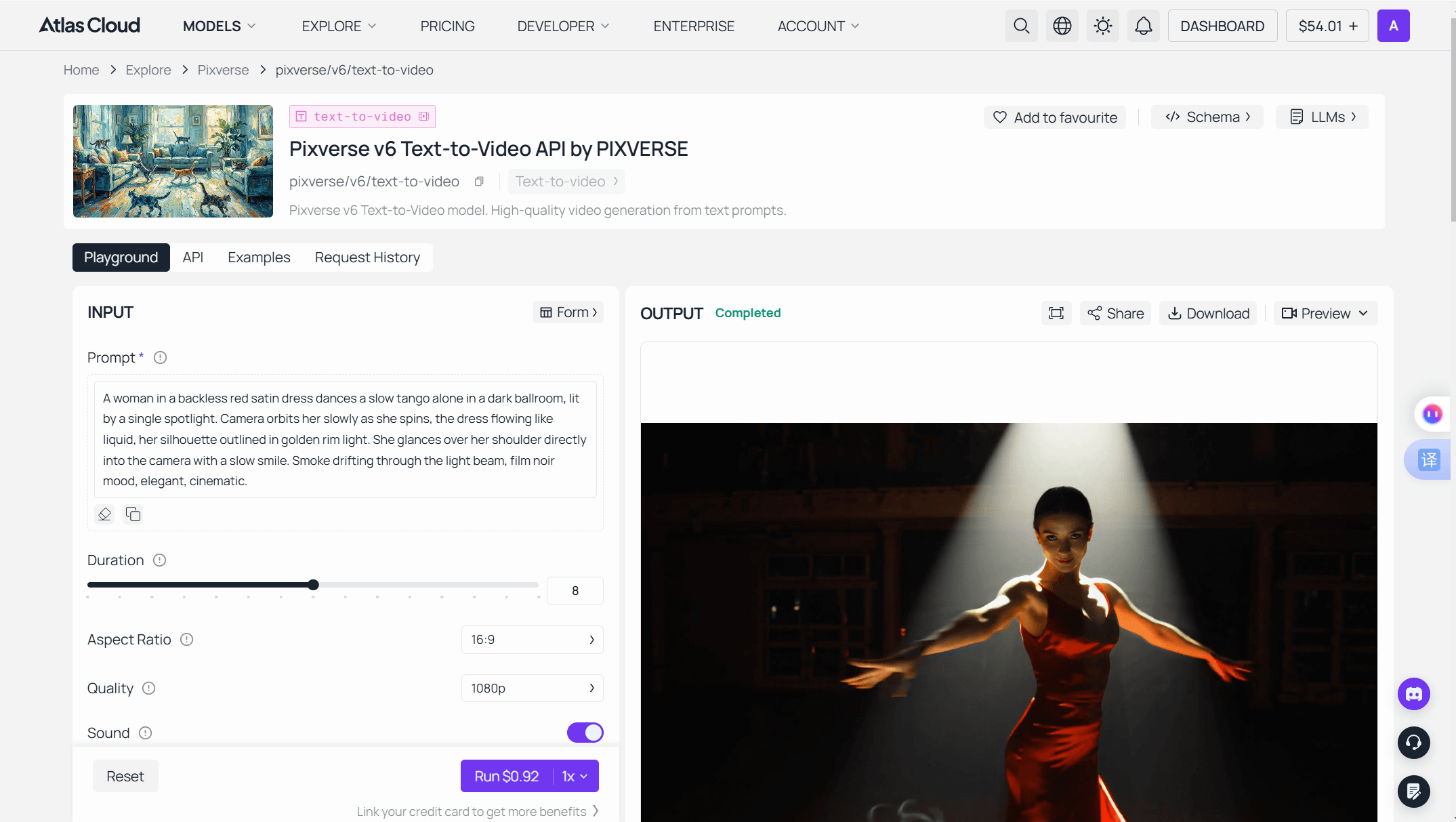
Log in, open the playground, and the form is ready. One field is required: the prompt.
- Write the prompt. Describe subject, action, camera, and light in plain sentences.
- Pick duration and quality. The form defaults to 5 seconds at 720p in 16:9.
- Leave or toggle audio. Sound is on by default and raises the per-second rate.
- Read the Run button. It quotes the exact price of your current settings before you commit. At the defaults that is $0.30 per run, so $10 covers about 33 clips.
- Run and download. The finished video lands in the output panel with download and share controls.
Method 2: Call PixVerse Text to Video Through the API
Once a prompt behaves in the playground, production is two HTTP calls.
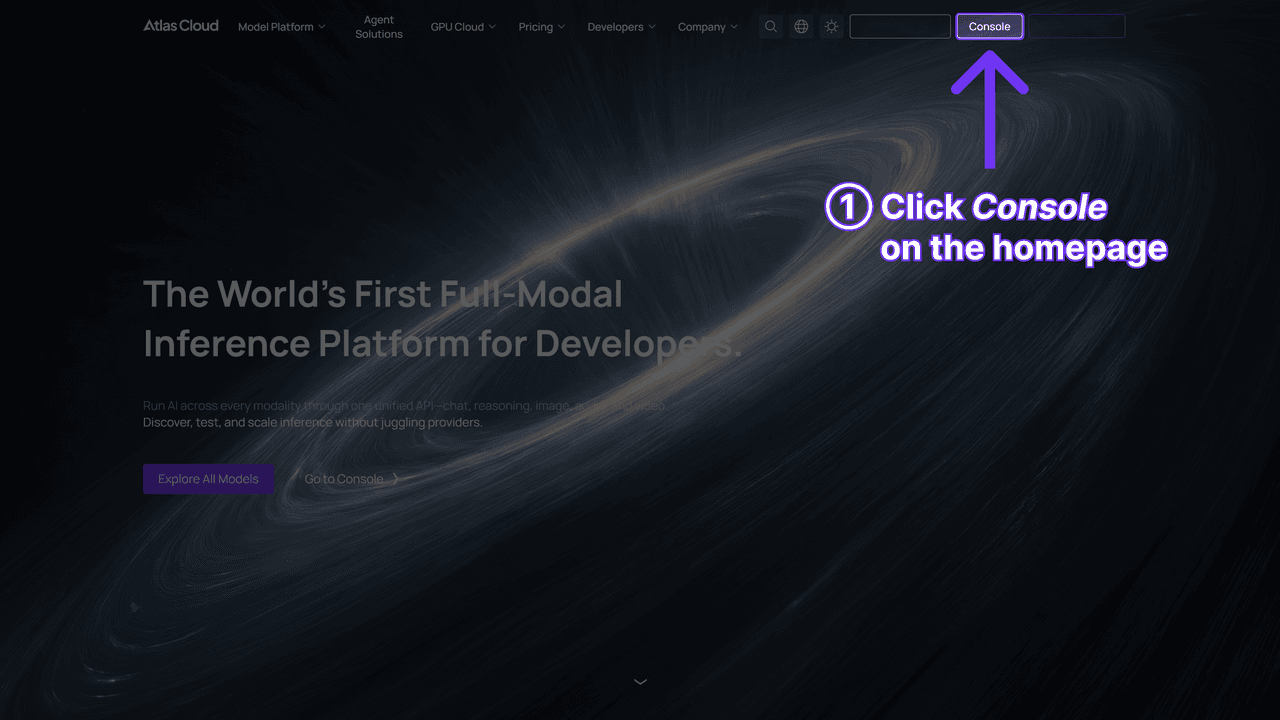
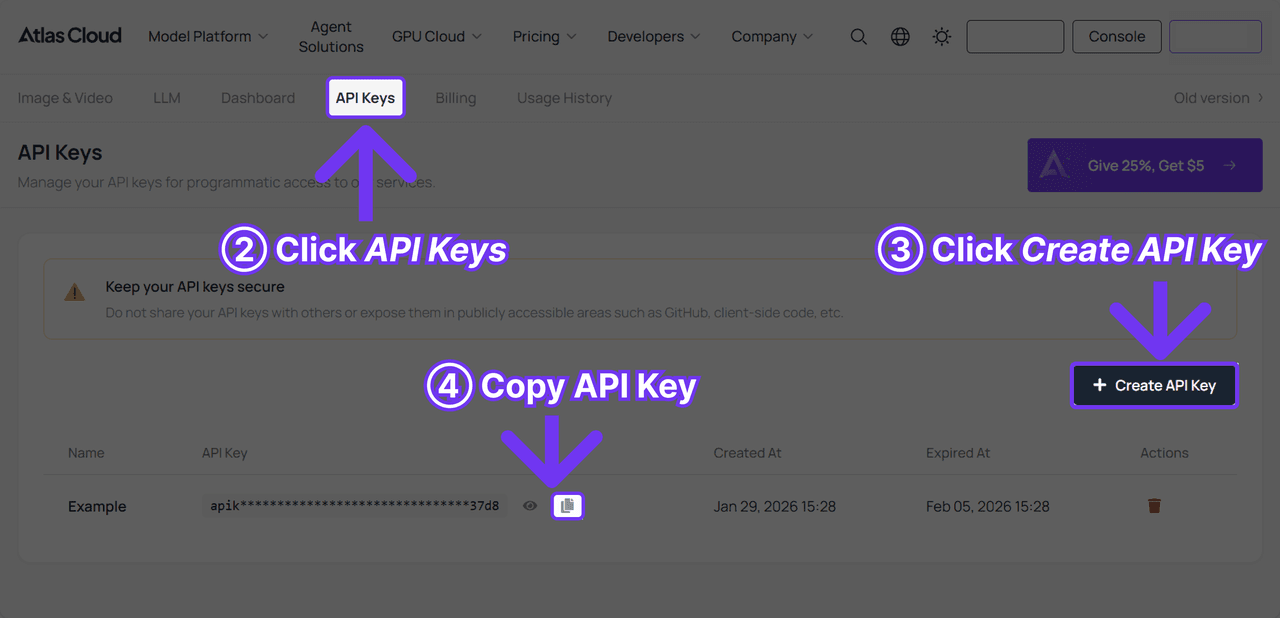
Step 1: Get your API key. Create a key in the Atlas Cloud console and store it as an environment variable, never in client-side code.
Step 2: Check the API docs. Endpoints, parameters, and authentication live in the API documentation.
Step 3: Make your first request. Submit the job:
plaintext1curl -X POST https://api.atlascloud.ai/api/v1/model/generateVideo \ 2 -H "Content-Type: application/json" \ 3 -H "Authorization: Bearer $ATLASCLOUD_API_KEY" \ 4 -d '{ 5 "model": "pixverse/v6/text-to-video", 6 "prompt": "A slow dolly shot through a rain-wet night market, neon signs reflecting in puddles, steam rising from food stalls", 7 "duration": 5, 8 "quality": "720p", 9 "aspect_ratio": "16:9", 10 "sound": true 11 }'
The response returns a prediction ID. Poll it until the status reads completed:
plaintext1curl https://api.atlascloud.ai/api/v1/model/prediction/<prediction_id> \ 2 -H "Authorization: Bearer $ATLASCLOUD_API_KEY"
The completed response carries the hosted video URL. The request shape is the long-term payoff: Atlas Cloud runs one API across the platform, so one key, one auth header, and one submit-and-poll loop cover every model. When the next PixVerse version ships, you swap the model string and keep the rest of your integration untouched.
Inside the PixVerse Text to Video Interface: What Each Setting Costs
The PixVerse text to video interface looks like a simple form. It is actually a price calculator. Every control except aspect ratio and seed changes what you pay, because billing is per second and per quality tier. PixVerse's own docs label the credit table "Calculated per second," and Atlas Cloud mirrors that structure in dollars.
Here is every setting and its billing consequence, at Atlas Cloud's per-second rates:
| Setting | Options | Default | Effect on cost |
|---|---|---|---|
| Prompt | Free text | Required | None. Longer prompts cost nothing extra |
| Duration | 1 to 15 seconds | 5s | Linear. Each second adds one second of billing |
| Quality | 360p to 1080p | 720p | $0.025/s at 360p up to $0.090/s at 1080p, without audio |
| Audio | On or off | On | Adds $0.010 to $0.025 per second by tier |
| Aspect ratio | 8 options | 16:9 | None |
| Seed | 0 to 2147483647 | Random | None. Reuse a seed to iterate on one result |
Two habits follow directly from that table. Draft at 540p without audio and re-render only the keeper at full quality; the examples section below prices that workflow end to end. And treat duration honestly: a 15-second clip costs three times a 5-second one, so default to short unless the shot needs the room.
One field you will not find is a negative prompt box. The consumer web app has none, and PixVerse's current generation API reference lists no negative_prompt parameter either; only an older API how-to page still shows one. So write exclusions as positive instructions: "camera stays steady" beats "no shaky camera." On length, PixVerse's own docs advise keeping prompts between 25 and 200 words. Short and concrete wins.
Is PixVerse AI Text to Video Free? Yes, With Three Catches
PixVerse AI text to video free access exists and does not expire. Registered accounts on the official app receive daily free credits. How many is a moving target: PixVerse's own blog says balances vary by account, region, and product route, and points users to the in-app counter rather than promising a number. That post, published July 13, 2026, is the most current official statement available.
The credits go further than you might expect, because drafts are cheap. At the documented per-second rates, a 5-second 540p clip costs 35 credits without audio and 45 with it. Free balances favor people who draft low and short.
Three catches define the ceiling. Free renders carry a watermark. Resolution tops out at 540p, with watermark removal starting on the $10 Standard plan as of July 2026. And credits burn per attempt, not per keeper, so a warped render costs the same as a perfect one and daily balances reset rather than stack.
| Route | Upfront cost | Watermark | Resolution ceiling | Fits |
|---|---|---|---|---|
| Free app tier | $0 | Yes | 540p | Testing, personal fun |
| Standard plan | $10/mo, $8 billed annually | No | 720p | Regular personal posting |
| PixVerse platform API | $10 credit packs, plans from $100/mo | No | 1080p | Teams already on PixVerse plans |
| Atlas Cloud, per second | None, from $0.025/s | No | 1080p | Volume and product work |
The gap between the last two rows is worth one concrete number. A 5-second 720p clip with audio costs 60 credits, which is $0.60 at the $10 credit pack's rate of 100 credits per dollar. The identical clip runs $0.30 metered on Atlas Cloud, and there is no $100 monthly plan to unlock first.
PixVerse V4 Text to Video: Why 2025 Guides Mislead You Now
Search for PixVerse AI text to video 2025 tutorials and you will find a confident, outdated product. Most of them cover PixVerse V4 text to video, and V4 was a genuinely different tool. Its era capped clips at 5 or 8 seconds, the limit PixVerse's own MCP server README hard-codes as "Duration: 5s or 8s" for its v4.5 and v5 tools, and sound meant running lip-sync as a separate step after the render.
The version history explains why so much advice aged badly within a year:
| Version | Launch | Clip length | Status on official API |
|---|---|---|---|
| V4 | Feb 25, 2025 (Product Hunt) | 5s or 8s | Still callable |
| V4.5 | May 15, 2025 | 5s or 8s | Still callable |
| V5 | Aug 2025 | 5s or 8s | Still callable |
| V5.5 / V5.6 | Late 2025 to Jan 2026 | 5, 8, or 10s (no 10s at 1080p) | Still callable |
| V6 | Mar 30, 2026 | Any 1 to 15s | Current flagship |
V4, V4.5, and V6 dates are as published; V5-era dates are approximate. Clip lengths per version follow the current API reference.
Here is the twist most old guides miss: V4 never left. The current API reference lists every model back to v3.5 as a valid value, so 2025-era model names still run today. There is just no reason to pick them. At 720p and 5 seconds without audio, the official pricing table charges 60 credits on V4 or V4.5 but only 45 on V6, so the newer model is both better and cheaper at the same settings. What actually disappeared is the V2 generation, which now survives only on third-party aggregator sites. The blunt test for any tutorial: if it mentions 8-second caps, per-clip credit prices, or a separate lip-sync pass, it predates V6 and its numbers no longer apply.
PixVerse Text to Video Examples: Three Prompts With Exact Costs
Theory ends here. Each PixVerse text to video example below pairs a working prompt with settings and the exact metered price, so you can budget before you type.
Vertical social clip. "A barista pours latte art in slow motion, close on the cup, steam catching warm window light, shallow depth of field, camera locked." Settings: 9:16, 720p, 5 seconds, audio on. Cost: $0.30. The audio pass adds ambient café sound that makes the clip postable without an edit.
Ultra-wide establishing shot. "Aerial drift over a fjord at dawn, low fog in the valley, a lone red boat crossing dark water, golden light building on the ridgeline." Settings: 21:9, 1080p, 10 seconds, audio off. Cost: $0.90. Score it in your editor instead; generated sound rarely survives an edit on cinematic shots.
Draft-then-final workflow. The cheapest path to a keeper is three drafts at 540p, 5 seconds, no audio, at $0.175 each, changing one variable per attempt. Then re-render the winner at 1080p, 15 seconds, audio on, for $1.73. Total: about $2.25 for a finished, full-length, full-resolution clip with sound.
| Example | Settings | Price |
|---|---|---|
| Social vertical | 720p, 5s, 9:16, audio on | $0.30 |
| Cinematic wide | 1080p, 10s, 21:9, audio off | $0.90 |
| Three drafts + one final | 3 × 540p/5s, then 1080p/15s with audio | ~$2.25 |
One writing rule covers all three examples: adjectives stack up, concrete verbs get rendered.
Frequently Asked Questions
Is PixVerse AI text to video free to use?
Yes, with limits. Registered accounts on the official app get daily free credits, though PixVerse's own blog says the balance varies by account and region. Free renders carry a watermark and cap at 540p. Watermark-free output starts at the $10 Standard plan, or per-second metered access from $0.025.
What is the official PixVerse text to video site?
The official web app is app.pixverse.ai, and the developer API is documented at docs.platform.pixverse.ai. The same V6 model is also licensed to hosts like Atlas Cloud. Other sites offering "PixVerse online" are third-party resellers, and their specs and prices often lag the first-party pages.
Can I still use PixVerse V4 text to video?
Yes. PixVerse's current API reference still accepts model values back to v3.5, including v4 and v4.5. There is little reason to use them: V4 keeps the 5 or 8 second cap and costs 60 credits for a 720p 5-second clip, while V6 renders the same clip for 45. Only the V2 generation is gone from first-party access.
How long can a PixVerse text to video clip be?
Any whole-second length from 1 to 15 seconds on V6, and the official docs confirm 1080p supports the full 15. Older versions run fixed presets instead: 5 or 8 seconds through V5, plus a 10-second option on V5.5 and V5.6. That is why many tutorials still quote an 8-second maximum. Extend endpoints can lengthen a finished clip further.
How much does PixVerse text to video cost through an API?
PixVerse's platform sells credits, from $10 packs to a $100-per-month Essential plan, with V6 billed per second in credits. On Atlas Cloud the same model is metered in dollars: $0.025 to $0.090 per second without audio, $0.035 to $0.115 with audio, no subscription, no watermark.
Conclusion
PixVerse text to video in 2026 is a per-second product: any clip length from 1 to 15 seconds, sound baked into the render, and a price you can read off the settings before you spend. The free tier is a genuine sandbox with a watermark and a 540p ceiling, not a trial that expires. And the biggest source of confusion is not the tool, it is the archive of V4-era guides still ranking for it.
So match the door to your volume. Play for free on the official app. Post regularly and a $10 plan removes the watermark. Ship anything at scale and metered per-second access wins the math, starting at $0.025 per second for the same V6 engine, with a $0.30 default clip as your first test. Type the sentence and check the Run button; the price is right there.





