Every AI video tool looks incredible in its own demo reel. The real question is what happens when you feed it your prompt, on a deadline, with your own money on the line. That gap between the showcase and your screen is what this PixVerse review is about.
We put the PixVerse AI video generator through the questions that actually decide a purchase: how good is the output, how painful is the workflow, and what does it really cost once you get past the free credits. Prices and specs here were verified in July 2026.
Key Takeaways
- PixVerse is a top-tier AI video generator for short cinematic clips, with V6 producing 1 to 15 second videos at up to 1080p with native audio.
- Video quality is strong on single-subject shots, but native audio and fine camera control are inconsistent enough that dialogue scenes still need a review pass.
- PixVerse's own API has no free tier and starts at $100/month, while the same V6 and C1 models run pay-as-you-go from $0.025/sec on Atlas Cloud.
- For casual use the consumer app is capable and starts around $10/month, but cancellation is the weakest part of the experience.
What the PixVerse AI Video Generator Actually Does
PixVerse is a text-to-video and image-to-video platform, not a single model. You describe a scene, or upload an image, and it renders a short clip with optional synchronized audio. What makes it more than a novelty is the spread of models built for different jobs, so a review has to judge the lineup, not just one release.
The flagship is V6, aimed at cinematic clips. C1 is the film-production model that turns storyboards into multi-shot sequences. R1 is a separate real-time experience. On top of the models sit one-click effect templates, the viral "AI Hug" and muscle-transformation clips that made PixVerse a household name on social feeds.
| Model or feature | Best for | Key specs |
|---|---|---|
| V6 | Cinematic single clips | 1 to 15s, up to 1080p, native audio, 20+ camera controls |
| C1 | Storyboard and multi-shot film | Character consistency across shots, up to 1080p and 15s |
| R1 | Real-time interactive video | Continuous stream, 720p output shipped |
| Effect templates | One-click viral clips | Flat credit price per generation |
For context on trust, PixVerse is made by AISphere, a company whose founder previously led ByteDance's AI Lab, and it has grown past 150 million registered users. So this is an established tool, not a weekend project that might disappear mid-workflow.
PixVerse AI Video Quality Review: Are the Results Any Good?
Quality is why you are here, so here is the blunt version. On cinematic single-subject shots, V6 is genuinely strong. Motion holds together, lighting looks intentional, and the native audio generated in the same pass can save a whole sound-design step when it works. Against most tools in the same price range, the look competes at the top tier.
The weak spots cluster around the newest features. Native audio stumbles on multi-character scenes. In one V6 audio test, a creator's first render put two male, robotic voices onto two on-screen women who were clearly talking. Camera control is powerful but slow to master. Another creator spent hours dialing in a single rim-light through a rainy scene before it looked right, though they called the final volumetric shadows genuinely impressive. Precision is available. Speed to that precision is not.
| Capability | Verdict | Notes |
|---|---|---|
| Cinematic single clips | Strong | Up to 1080p, coherent motion and lighting |
| Native audio (single speaker) | Good | Ambient sound and effects prompt in well |
| Native audio (multi-character) | Inconsistent | Voice-to-character mismatches reported |
| Camera control | Powerful but slow | 20+ controls, real learning curve |
| Character consistency | Improving | C1 holds identity across shots better |
The honest read: PixVerse earns its quality reputation, but treat native audio as a feature to check rather than trust, especially before you publish a dialogue scene.
If you build on an API rather than click through the app, the price you pay for identical output depends entirely on which door you use. PixVerse's own API has no free tier and sits behind a monthly subscription floor, a steep entry if you generate in bursts rather than at constant volume.
Atlas Cloud hosts the same PixVerse models on pay-as-you-go, per-second billing with no monthly minimum. Both V6 and C1 cover text-to-video, image-to-video, start-end-to-video, reference-to-video, and video-extend, and the full PixVerse model family is browsable in one place. Here are the current per-second rates, verified on the model pages in July 2026:
| Resolution | V6 (no audio / audio) | C1 (no audio / audio) |
|---|---|---|
| 360p | $0.025 / $0.035 | $0.030 / $0.040 |
| 540p | $0.035 / $0.045 | $0.040 / $0.050 |
| 720p | $0.045 / $0.060 | $0.050 / $0.065 |
| 1080p | $0.090 / $0.115 | $0.095 / $0.120 |
There is no discount on the PixVerse models right now; these are the standard list rates. The pricing review further down charts how this per-second cost stacks up against PixVerse's own API at 1080p. There are two ways in.
Method 1: Try PixVerse V6 in the Atlas Cloud Playground
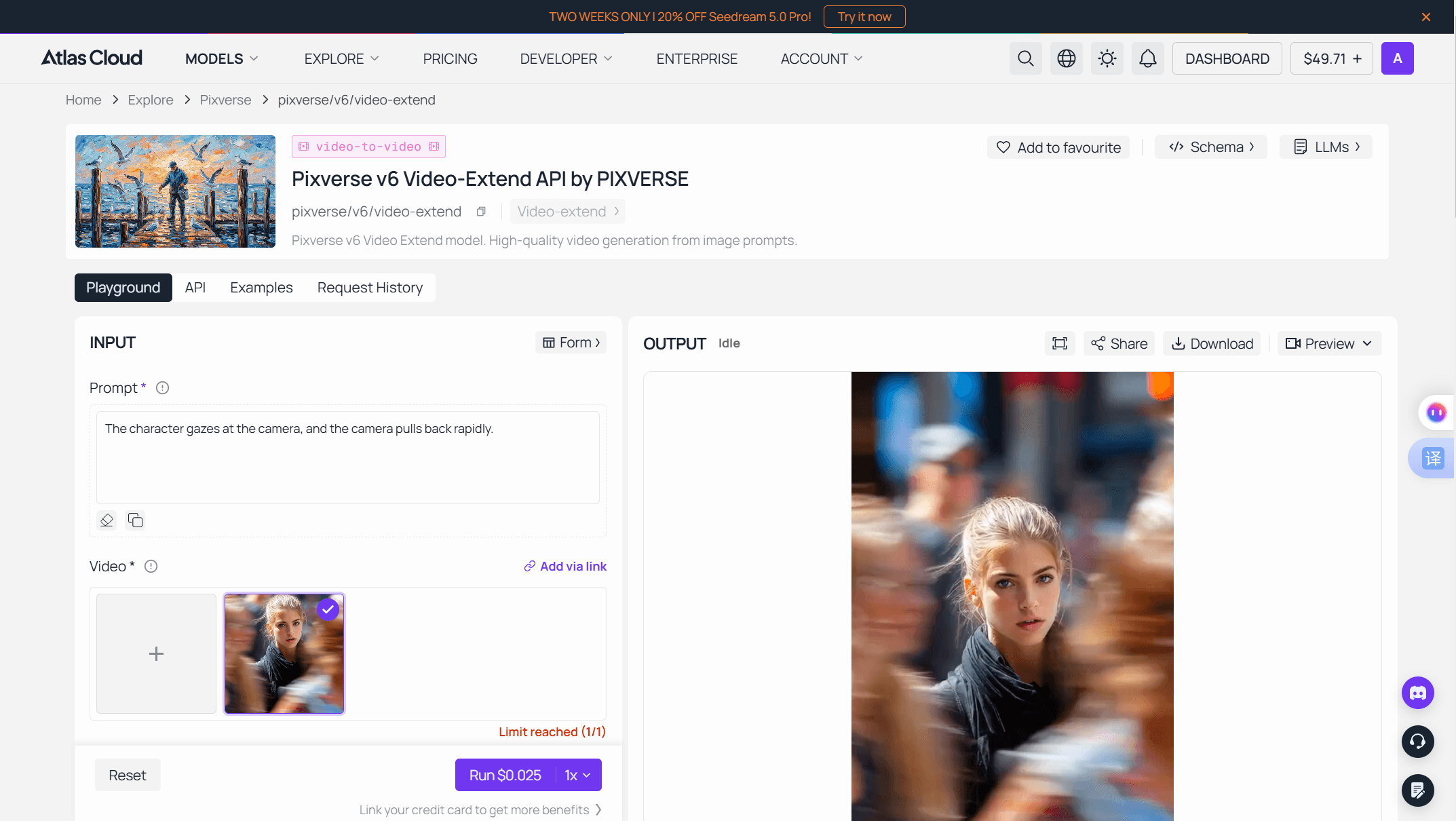
Log in and open the PixVerse V6 text-to-video playground; the form is ready with no setup.
- Write the prompt. Describe subject, action, camera, and light in plain sentences.
- Pick duration, quality, and audio. The Run button re-quotes the exact price as you change settings, so you see the cost before you commit.
- Run and download. The finished clip lands in the output panel with download and share controls.
Method 2: Call the PixVerse API Through Atlas Cloud
Once a prompt behaves in the playground, production is two HTTP calls.
Step 1: Get your API key. Create a key in the Atlas Cloud console and store it as an environment variable, never in client-side code.
Image: Screenshot of the Atlas Cloud console's API keys page with the create-key button and a freshly generated key beside its copy control.
Step 2: Check the API docs. Endpoints, parameters, and authentication live in the API documentation.
Step 3: Make your first request. Submit the job:
plaintext1curl -X POST https://api.atlascloud.ai/api/v1/model/generateVideo \ 2 -H "Content-Type: application/json" \ 3 -H "Authorization: Bearer $ATLASCLOUD_API_KEY" \ 4 -d '{ 5 "model": "pixverse/v6/text-to-video", 6 "prompt": "Golden hour rooftop, a dancer spins in slow motion, handheld camera drifts closer, warm rim light", 7 "duration": 5, 8 "quality": "720p", 9 "aspect_ratio": "16:9", 10 "sound": true 11 }'
The response returns a prediction ID. Poll it until the status reads completed:
plaintext1curl https://api.atlascloud.ai/api/v1/model/prediction/<prediction_id> \ 2 -H "Authorization: Bearer $ATLASCLOUD_API_KEY"
The completed response carries the hosted video URL. Atlas Cloud runs one API across the platform, so one key, one auth header, and one submit-and-poll loop cover every model. When you want C1 instead of V6, or the next PixVerse version ships, you swap the model string and keep
PixVerse AI Ease of Use Review: The Everyday Workflow
For most people the review that matters is the consumer app, and there the story is smooth to start and fiddly in a couple of spots. Signing up is quick. You pick a model, type a prompt, choose a resolution and length, and generate. The interface does not fight you, and the one-click templates make a first viral clip almost effortless.
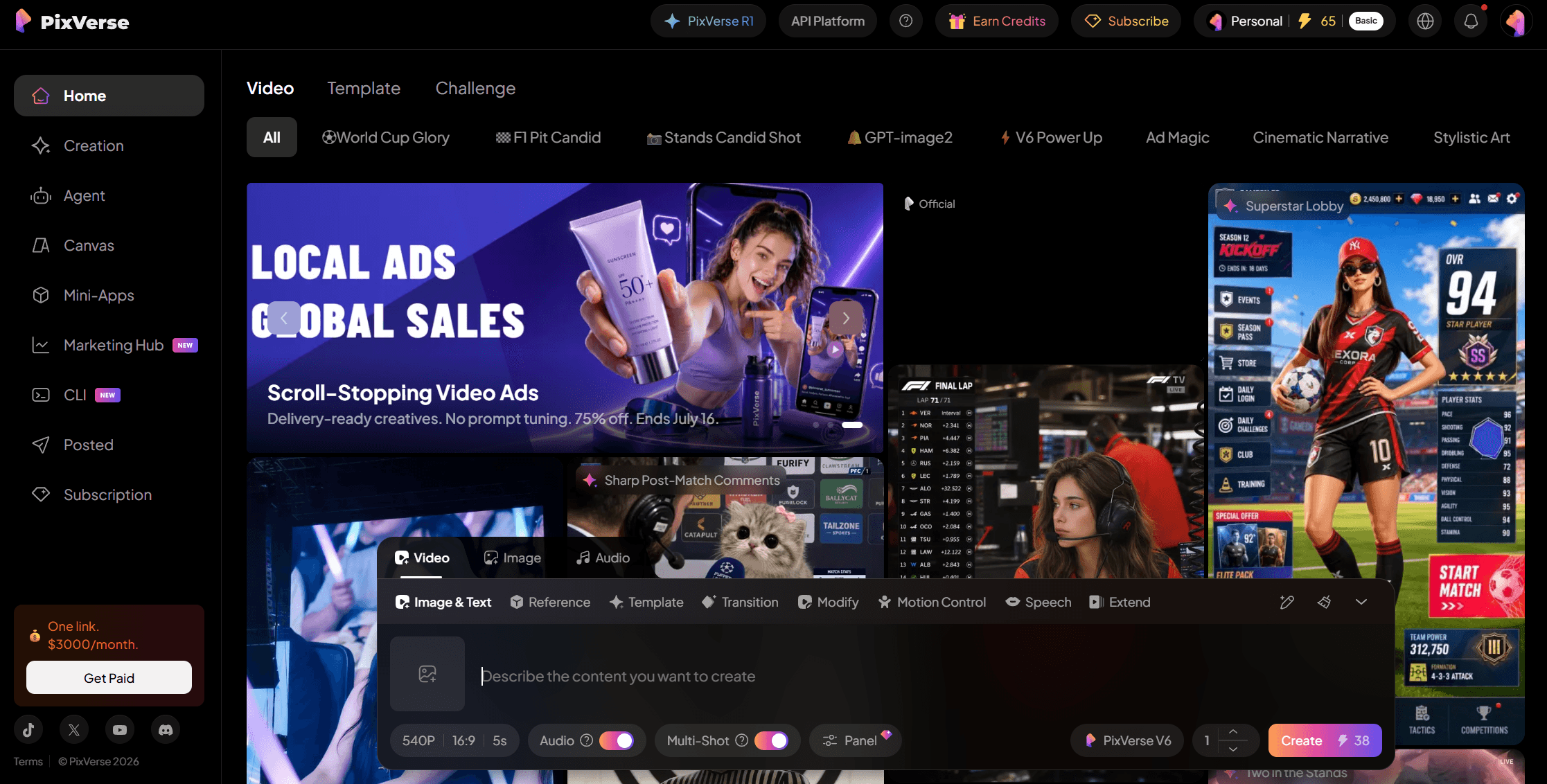 Two friction points show up once you go past the basics. First, the camera and lighting controls that make V6 powerful also carry a learning curve, so early renders can miss before they hit. Second, duration used to trip people up: V6 and C1 now accept any length from 1 to 15 seconds, including at 1080p, but older versions were capped at 5, 8, or 10 seconds, so tutorials quoting an 8-second maximum are simply out of date.
| Workflow step | Experience |
|---|---|
| Sign up and first render | Fast, low friction |
| One-click templates | Very easy, good for viral clips |
| Prompt-to-clip control | Good, camera controls need practice |
| Clip length (V6 / C1) | Any 1 to 15 seconds, 1080p included |
| Cancellation | The weakest part, cancel via billing settings |
The one genuine pain point is leaving. Neither the consumer terms nor the platform terms contain a refund clause, and uninstalling the app does not cancel a subscription. Cancel from the billing settings inside your account, not by deleting the app, and if you need a refund, go through whichever channel you paid on.
PixVerse Pricing Review: Free Tier, Plans, and Per-Second API
Pricing is where a review either saves you money or costs it, so here is the full picture in one place. PixVerse gives you a small daily allowance of free credits that changes over time, and the free tier renders at 540p with a watermark. To remove the watermark and unlock higher resolution, you move to a paid consumer plan that starts around $10 per month.
Generation is billed in credits per second of output, so a longer or higher-resolution clip costs proportionally more. At 1080p, V6 runs roughly 18 to 23 credits per second on PixVerse's own metering, which works out to about $0.10 to $0.15 per second depending on your plan tier and whether audio is on. The developer API is a separate track with no free tier and a $100 per month entry point.
| Access path | Entry cost | What you get |
|---|---|---|
| Free tier | $0 | Small daily credits, 540p, watermark |
| Consumer plan | ~$10/month | Watermark removed, higher resolution |
| PixVerse API | $100/month | 15,000 credits, ~$0.10 to $0.15/sec at 1080p |
| Atlas Cloud API | Pay-as-you-go | From $0.025/sec (V6), no minimum |
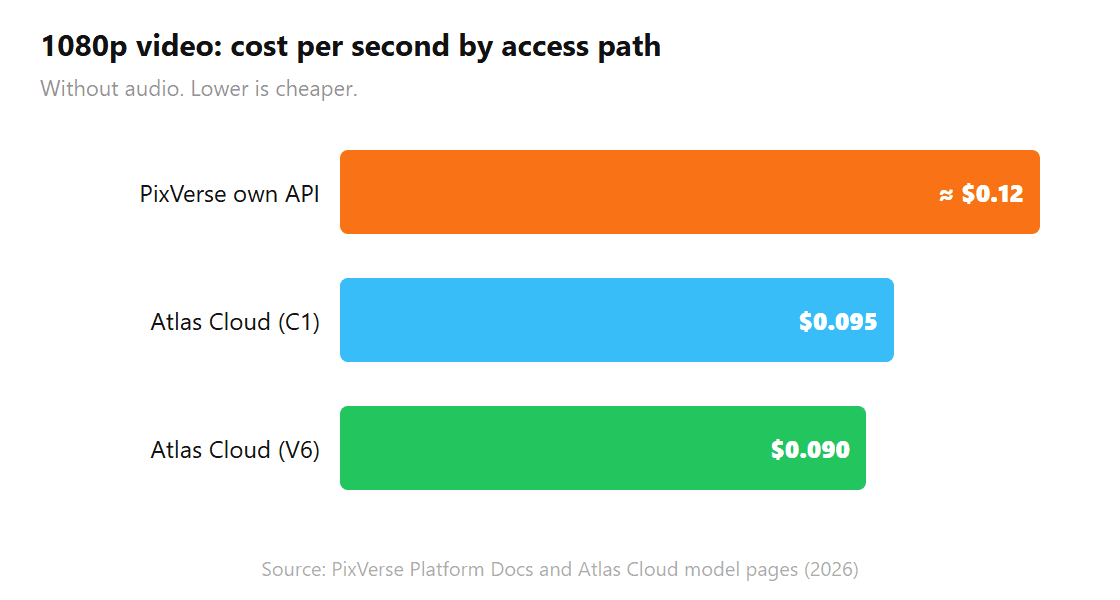
The PixVerse figure is a best-case rate on its entry plan (18 credits per second at 1080p); larger plans lower it slightly, and lighter usage raises the effective cost. The Atlas rates are the published pay-as-you-go prices.
The takeaway for cost: casual creators are fine on the consumer plans, but anyone generating through an API should compare PixVerse's $100 monthly floor against per-second access before committing, because the underlying model is identical.
PixVerse AI Video Generator Review 2026: Pros, Cons, and Verdict
So is the PixVerse AI video generator worth it? For solo creators and marketers making short cinematic clips, yes. The output competes at the top tier, the templates are genuinely fun, and the model lineup covers everything from single clips to storyboard-driven film work. For anyone shipping multi-character dialogue at volume, budget a review pass for audio, because that is still the least reliable part.
| Pros | Cons |
|---|---|
| Top-tier cinematic quality up to 1080p | Native audio unreliable on multi-character scenes |
| Native audio and 20+ camera controls | Camera control has a real learning curve |
| Deep model lineup (V6, C1, R1, templates) | Cancellation and refunds are awkward |
| Per-second API access via Atlas Cloud | PixVerse's own API starts at $100/month |

The buying decision comes down to how you access it. If you want to click and create, the consumer app is capable, just watch the cancellation flow. If you build software, per-second API access beats a monthly subscription floor. Either way, test one real clip against your own bar before you commit.
Frequently Asked Questions
Is the PixVerse AI video generator worth it in 2026?
Yes, for short cinematic clips PixVerse is one of the stronger AI video generators available, with strong quality up to 1080p and native audio. The main caveat is that multi-character dialogue and fine camera work still need hands-on tuning, so budget time for a review pass rather than expecting perfect first renders.
Is PixVerse legit and safe to use?
PixVerse is a legitimate, well-funded product made by AISphere, and it moderates generated content and publishes a privacy policy. The main cautions are consumer-side, mainly awkward subscription cancellation. Use the official pixverse.ai domain and avoid similarly named look-alike sites.
How much does the PixVerse AI video generator cost?
The consumer app has a limited free tier at 540p with a watermark, with paid plans starting around $10 per month. The developer API has no free tier and starts at $100 per month, while the same models run pay-as-you-go from $0.025 per second on Atlas Cloud.
Which PixVerse model is best for video quality?
V6 is the best all-round choice for cinematic single clips, with native audio and detailed camera controls. C1 is the stronger pick for storyboard-driven, multi-shot film work where character consistency across scenes matters more than a single hero shot.
Is there a free version of PixVerse?
Yes, PixVerse offers a free tier with a small daily allowance of credits that changes over time. Free renders are limited to 540p and carry a watermark, and removing both requires a paid plan.
Conclusion
The short version of this PixVerse AI video generator review: it is a capable, legitimate tool that makes genuinely good video, not a demo-only gimmick. Its weak spots, mainly native audio on busy scenes and a camera-control learning curve, are known and manageable rather than dealbreakers. For short cinematic work in 2026, PixVerse earns a place on your shortlist, and the only real question left is which access path fits how you work.





