Two developers read the PixVerse docs this morning. One shipped a negative prompt feature. The other learned that parameter no longer exists.
Both were reading official pages. That is the real state of the PixVerse API in 2026: a capable, fast-moving video generation service wrapped in documentation where old pages and new pages quietly disagree. Most PixVerse AI API developer questions come down to two things. Where are the docs that are actually current? And what will a clip cost once the code works?
This guide answers both. Every endpoint, parameter, and price below was checked against first-party pages this week, on July 23, 2026.
Key Takeaways
- The official PixVerse API documentation lives at docs.platform.pixverse.ai. Keys and credits live at platform.pixverse.ai. The consumer app at app.pixverse.ai is a separate product with separate billing.
- Every call needs two headers: API-KEY plus a fresh Ai-trace-id UUID per request. Generation is asynchronous: submit, get a video_id, poll for the result.
- The docs contradict themselves in places. Older how-to pages still show negative_prompt and water_mark; the current generation reference has neither. When pages disagree, trust the endpoint reference.
- Official billing is in credits ($10 buys 1,000). The same V6 model runs metered on Atlas Cloud from $0.025 per second, where the default 5-second 720p clip with audio costs $0.30 versus $0.60 in pack-rate credits.
The PixVerse API Documentation Map: Where the Real Docs Live
Searching for PixVerse API docs returns four first-party surfaces and a crowd of resellers. The four that matter:
| Surface | URL | What it covers |
|---|---|---|
| Platform docs | docs.platform.pixverse.ai | Quick Start, full API reference, credit pricing, error reference, FAQ |
| Developer console | platform.pixverse.ai | Create API keys, buy credit packs, track usage |
| Consumer app | app.pixverse.ai | The web app. Its plans, free credits, and watermark rules do not apply to the API |
| Official MCP server | github.com/PixVerseAI/PixVerse-MCP | Official wrapper that lets AI assistants call PixVerse directly |
The split that trips people up is app versus platform. The app sells monthly plans from $10 and hands out variable daily free credits. The platform sells API credits and memberships on a separate ledger. A paid app subscription gives you nothing on the API side, and vice versa.
One genuinely useful detail hides in the platform docs: a consolidated plain-text page named PixVerse-api-llm.txt that packs the whole API reference into one document. Paste it into your coding assistant and it can write PixVerse calls against current specs instead of whatever its training data remembers.
The docs describe a service behind "over 100 million creators and enterprises across 175 countries." The scale is real. The version churn that comes with it is the reason this article has a contradictions section.
Two Ways to Use the PixVerse AI API Today
Integrating against PixVerse's own platform gets a full walkthrough in the next section. The fastest way to touch the models first is through a host: Atlas Cloud runs PixVerse V6 and C1 among its 400+ models, billed per second in dollars with no credit packs and no watermark. The PixVerse family page lists all nine hosted endpoints, from text-to-video to reference-to-video and extend. Two ways in: test in the playground, then call the same endpoint from code. The natural starting point is the V6 text-to-video playground.
Method 1: Test the PixVerse V6 API in the Playground
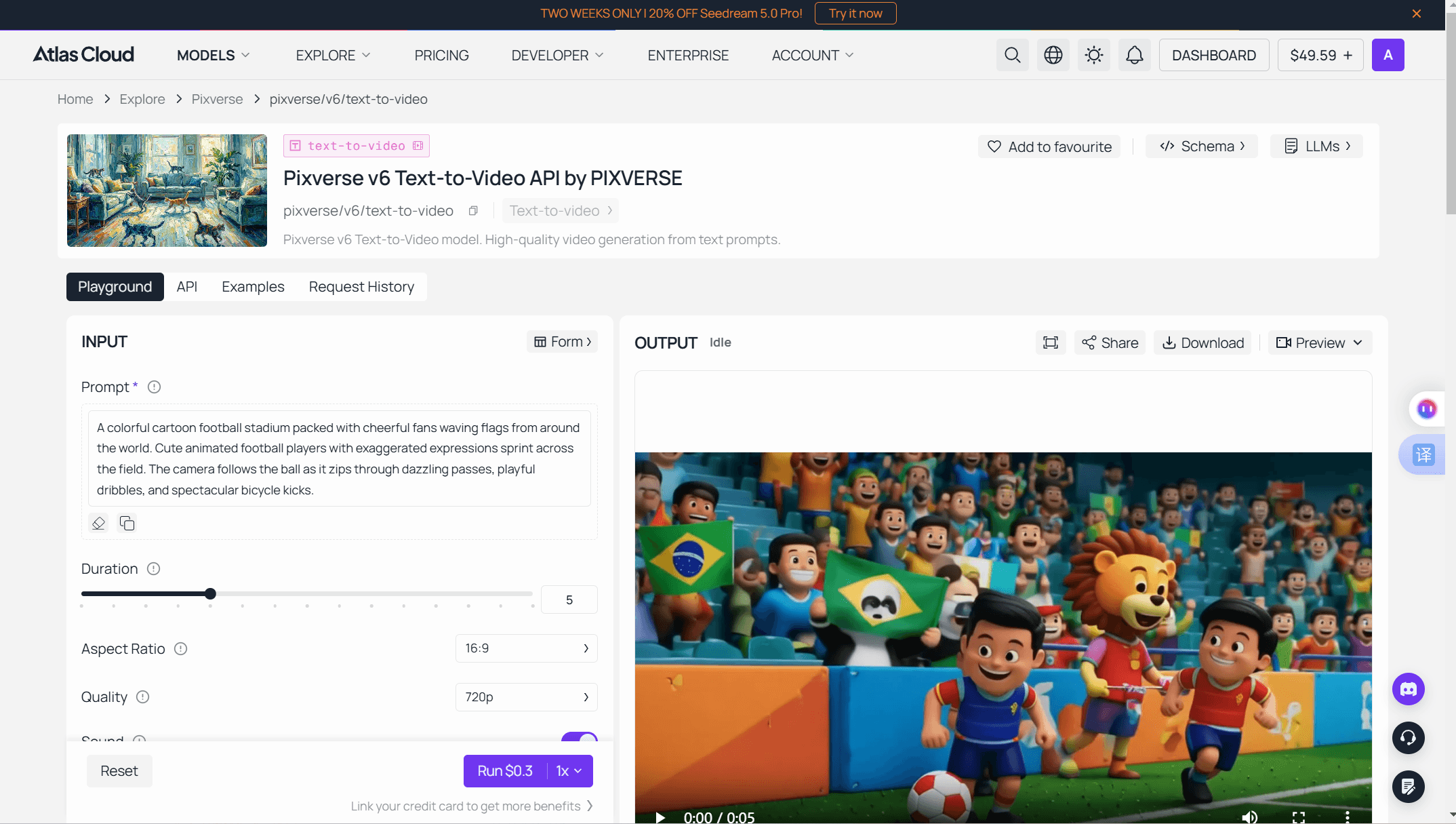
Before writing code, spend ten minutes here. The playground is the same endpoint your code will call, with a price quote attached.
- Log in and open the playground. The prompt field is the only required input.
- Set duration, quality, and aspect ratio. Defaults are 5 seconds, 720p, 16:9.
- Check the audio toggle. Sound is on by default and raises the per-second rate.
- Read the Run button. It shows the exact cost of your current settings. At the defaults that is $0.30, so $10 covers about 33 runs.
- Run, review, download. Iterate on the prompt until the output holds up, then move that exact configuration into code.
Method 2: Call the PixVerse V6 API from Code
The PixVerse V6 developer workflow on Atlas Cloud is two HTTP requests.
Step 1: Get your API key. Create a key in the Atlas Cloud console and store it as an environment variable, never in client code.
Image: Screenshot of the Atlas Cloud console's API keys page, showing the create-key button and a freshly generated key next to its copy control.
Step 2: Check the API docs. Endpoints, parameters, and authentication live in the API documentation.
Step 3: Make your first request. Submit the job:
plaintext1curl -X POST https://api.atlascloud.ai/api/v1/model/generateVideo \ 2 -H "Content-Type: application/json" \ 3 -H "Authorization: Bearer $ATLASCLOUD_API_KEY" \ 4 -d '{ 5 "model": "pixverse/v6/text-to-video", 6 "prompt": "A slow dolly shot through a rain-wet night market, neon signs reflecting in puddles, steam rising from food stalls", 7 "duration": 5, 8 "quality": "720p", 9 "aspect_ratio": "16:9", 10 "sound": true 11 }'
The response returns a prediction ID. Poll it until the status reads completed:
plaintext1curl https://api.atlascloud.ai/api/v1/model/prediction/<prediction_id> \ 2 -H "Authorization: Bearer $ATLASCLOUD_API_KEY"
The completed response carries the hosted video URL. The lasting benefit is the request shape: Atlas Cloud runs one API across every model, so one key, one auth header, and one submit-and-poll loop cover PixVerse today and whatever you add next. Switching models means changing the model string, nothing else.
Inside the Official PixVerse AI API Documentation: How a Call Actually Runs
If you integrate with PixVerse's own platform instead, the API overview defines a three-stage flow against the base domain app-api.pixverse.ai:
| Stage | Endpoint | Notes |
|---|---|---|
| Upload (image-to-video only) | POST /openapi/v2/image/upload | Multipart form. PNG, WebP, or JPEG under 20MB. Returns an img_id integer |
| Generate | POST /openapi/v2/video/text/generate | JSON body. Returns a video_id |
| Poll | GET /openapi/v2/video/result/{video_id} | Status 1 means done, with a download url in the response |
Authentication takes two headers on every call. API-KEY holds the key from your platform console. Ai-trace-id must be a fresh UUID per request; the docs warn that reusing one blocks new generations from starting.
The current text-to-video reference marks five fields required: prompt (up to 5,000 characters), model, duration, quality, and aspect_ratio. The model enum accepts eight values, v3.5 through v5.6 plus v6 and c1, and duration limits follow the generation: 5 or 8 seconds through v5, a 10-second option on v5.5 and v5.6, and any 1 to 15 seconds on v6 and c1. Audio is opt-in through generate_audio_switch, which defaults to false. That default matters for budgeting: the Atlas Cloud playground above defaults sound to on, so the two routes quote different prices for what looks like the same clip.
Image-to-video adds the upload step first. There is no passing a public image URL; you upload the file, take the returned img_id, and reference it in the generation body.
Two operational facts round out the picture, both from the error reference. Concurrent generations are capped by membership tier, and a stuck slot frees itself after about 10 minutes. And poll statuses are worth handling explicitly: 7 means the prompt tripped content moderation, 8 means a server-side failure worth retrying.
Where the PixVerse API Docs Contradict Themselves
The PixVerse API docs are a mix of current endpoint references and older how-to pages that were never fully updated. Reading the wrong page costs real debugging time. The conflicts we verified directly:
| Topic | An older docs page says | The current reference says |
|---|---|---|
| negative_prompt | Shown in the API overview's example request bodies | Not a field on the generation endpoint |
| water_mark | "water_mark": false appears in the same examples | Absent from the current parameter list |
| Clip length | MCP README hard-codes "5s or 8s" | Any 1 to 15 seconds on v6 and c1 |
| Image upload cap | Troubleshooting page: 4000×4000 pixels | Upload reference: 10,000 pixels |
| Prompt length | How-to guide: keep prompts 25 to 200 words | Hard cap of 5,000 characters, no word guidance |
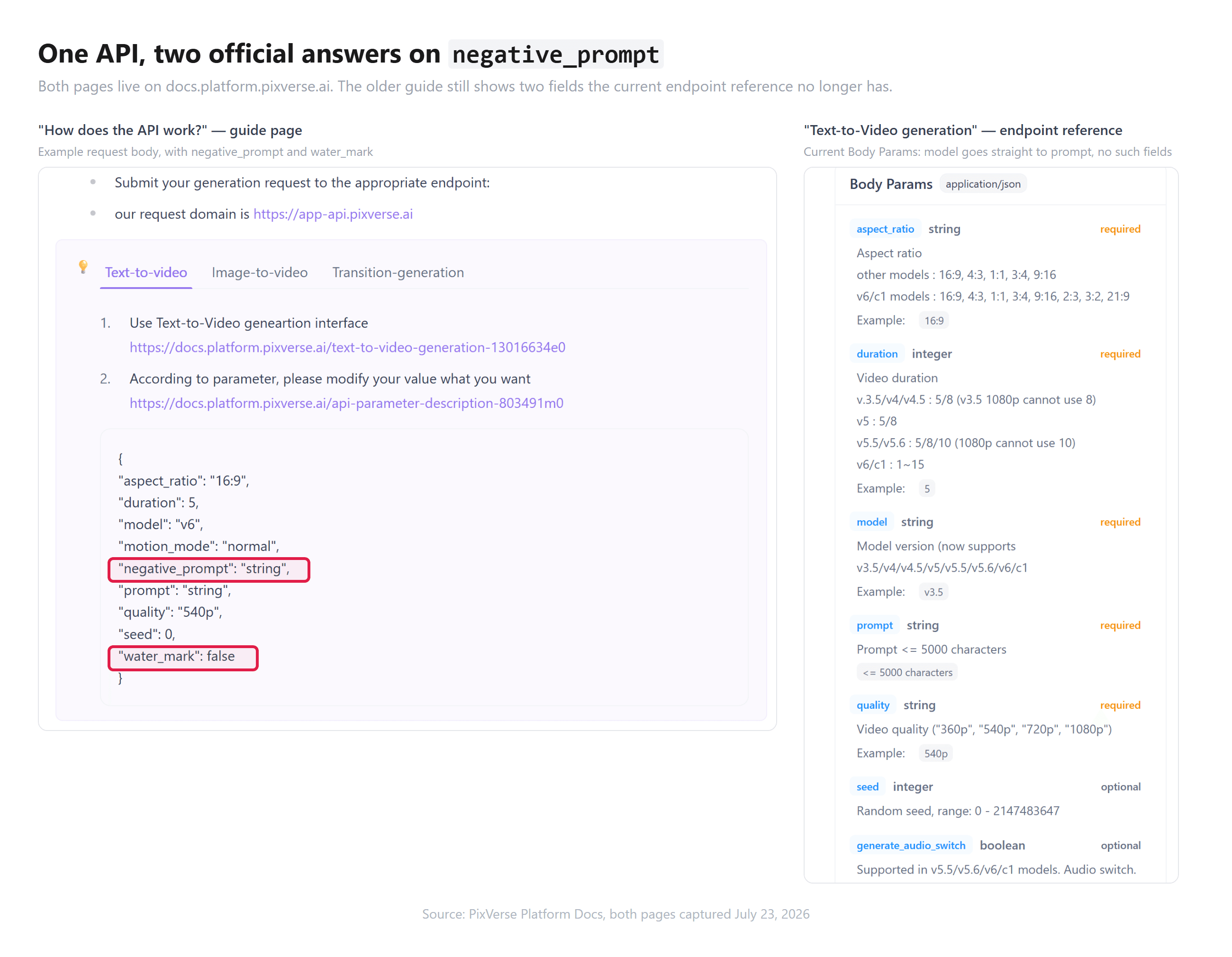
Two rules cover all five rows. When pages disagree, trust the endpoint reference over the how-to page; the references carry current specs, the guides carry history. And when limits disagree, code to the stricter one, so 4000 pixels on uploads.
The version enum deserves its own warning. Old model names still work: v3.5, v4, and v4.5 remain valid values, so 2025-era integrations did not break. They just overpay. At 720p for 5 seconds without audio, official pricing charges 60 credits on V4 but 45 on V6. If you inherit a codebase with an old model string, upgrading it is a one-line change that cuts cost and improves output. Only the V2 generation is gone from first-party access entirely.
PixVerse API Pricing: Credits on the Platform, Dollars on Atlas Cloud
The official PixVerse platform bills in credits, and its pricing page labels the model tables "Calculated per second." Credit packs run from $10 for 1,000 credits to $5,000 for 500,000, with monthly memberships from the $100 Essential plan (15,000 credits) up to a $6,000 Business tier. Per-second credit burn for the current models:
| Quality | V6 (no audio / audio) | C1 (no audio / audio) |
|---|---|---|
| 360p | 5 / 7 credits | 6 / 8 credits |
| 540p | 7 / 9 credits | 8 / 10 credits |
| 720p | 9 / 12 credits | 10 / 13 credits |
| 1080p | 18 / 23 credits | 19 / 24 credits |
Atlas Cloud meters the same two models in dollars per second, no pack or membership first. Verified on the live model pages on July 23, 2026, at list price with no discount running:
| Quality | V6 (no audio / audio) | C1 (no audio / audio) |
|---|---|---|
| 360p | $0.025 / $0.035 | $0.030 / $0.040 |
| 540p | $0.035 / $0.045 | $0.040 / $0.050 |
| 720p | $0.045 / $0.060 | $0.050 / $0.065 |
| 1080p | $0.090 / $0.115 | $0.095 / $0.120 |
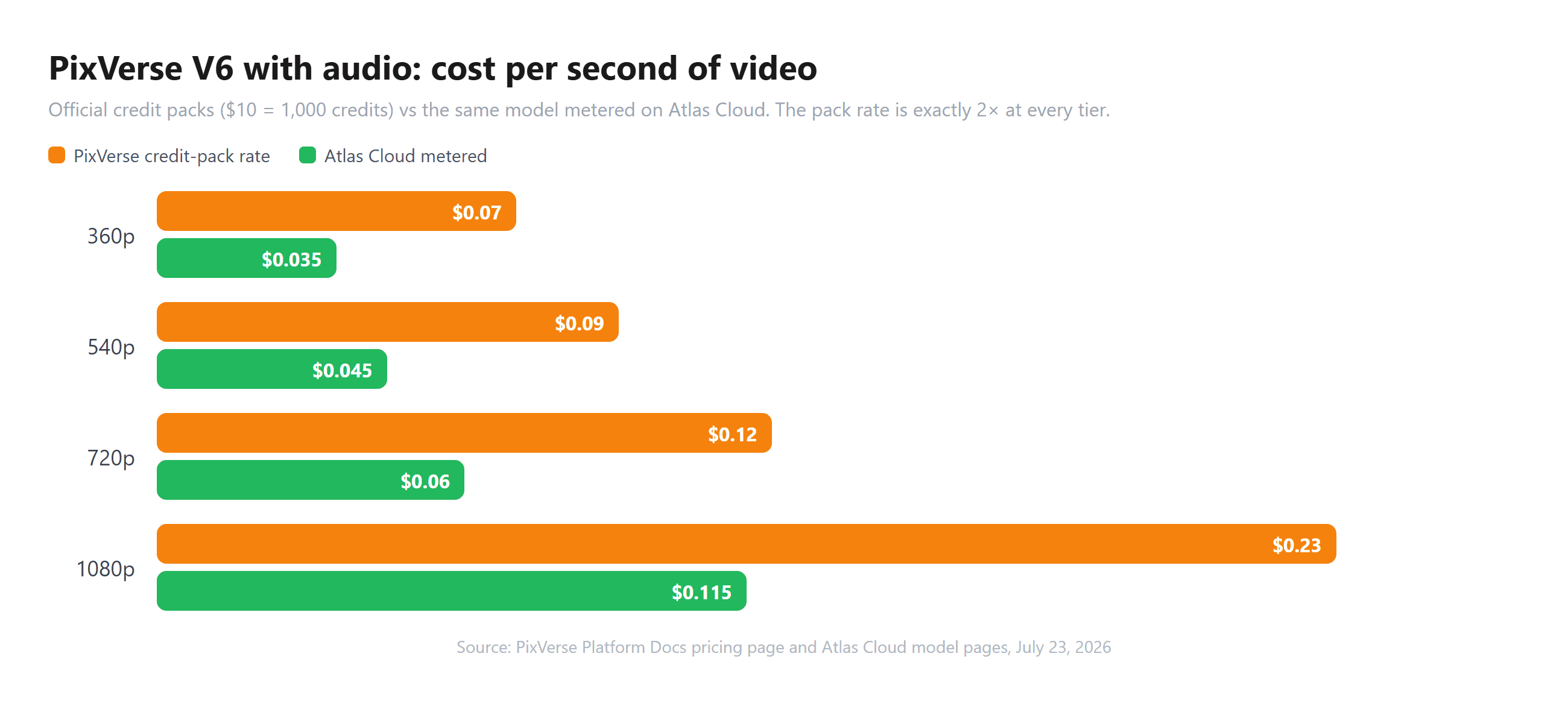
One clip makes the comparison concrete. A 5-second 720p V6 clip with audio costs 60 credits: that is $0.60 at the $10 pack rate, or about $0.40 at the Essential membership rate after committing $100 for the month. Metered on Atlas Cloud, the identical clip is $0.30. The C1 model prices slightly higher per second, $0.325 for that same clip through the C1 playground, which buys its film-production tuning.
Credits still make sense for teams already inside PixVerse's platform, especially at Scale-tier volume where the effective rate drops. For everyone else, per-second dollar pricing is easier to forecast: the price of a render is duration times rate, readable before you spend.
The PixVerse AI Developer Company Behind the API
An API is a bet on the company that runs it, and the PixVerse AI developer company is worth knowing before you build. PixVerse is built by AISphere (Aishi Technology), founded in April 2023 in Beijing and now headquartered in Singapore with roughly 150 staff. Founder and CEO Wang Changhu ran ByteDance's AI Lab vision work from 2017 to 2021, which makes PixVerse a direct rival to Seedance, built by his former employer. Co-founder Jaden Xie came from Lighthouse Capital.
The funding picture is unusually strong for an independent video model shop. On July 13, 2026, the company closed a Series C extension bringing the round to $439 million at a valuation above $2 billion, with Alibaba joining, per TechCrunch. For a developer, that reads as runway: the API you integrate this quarter is unlikely to vanish next year.
The flip side of a well-funded lab is shipping speed. The 2026 release line alone:
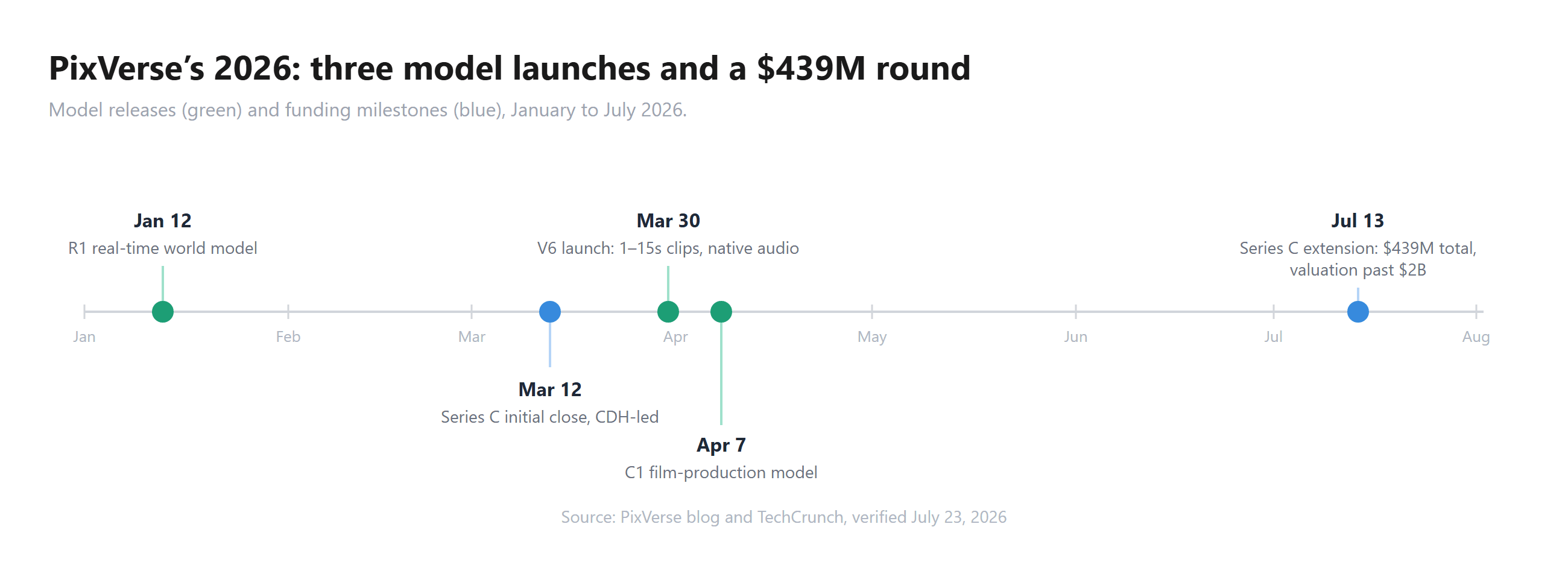
Three model launches inside three months explain the documentation lag this article keeps flagging. Build accordingly: pin your model string, read release notes before bumping it, and re-check the endpoint reference rather than assuming last quarter's parameters survived.
Frequently Asked Questions
Where is the official PixVerse API documentation?
At docs.platform.pixverse.ai, with the developer console at platform.pixverse.ai. Anything hosted on app.pixverse.ai is the consumer product, and third-party "PixVerse API docs" pages frequently describe v4-era parameters. The docs also include a consolidated LLM-ready text page you can feed to a coding assistant.
How do I get a PixVerse API key?
Register on the platform console at platform.pixverse.ai, create a key, and pass it in the API-KEY header along with a unique Ai-trace-id UUID per request. Keys are tied to platform credits, which are purchased separately from any consumer app subscription. On Atlas Cloud, the equivalent is a console key passed as a standard Bearer token.
Does the PixVerse API have a free tier?
The platform pricing docs list only paid credit packs and memberships. The variable daily free credits PixVerse advertises belong to the consumer app and do not flow to the API ledger. The cheapest paid entry points are a $10 credit pack on the official platform or metered generation from $0.025 per second on Atlas Cloud.
Which models can the PixVerse API run?
The current generation endpoint accepts eight model values: v3.5, v4, v4.5, v5, v5.5, v5.6, v6, and c1. V6 and C1 are the current generation, with 1 to 15 second clips and optional native audio. Older names still work but cost more credits at the same settings than V6. The V2 generation is no longer available first-party.
How much does the PixVerse AI API cost per video?
Official platform: a 5-second 720p V6 clip with audio is 60 credits, about $0.60 at the $10 pack rate. Atlas Cloud: the same clip is $0.30 metered, from a per-second range of $0.025 to $0.115 depending on resolution and audio. C1 runs slightly higher, $0.325 for that clip. Prices verified July 23, 2026.
Conclusion
The PixVerse API is in better shape than its documentation. The service itself is fast, well funded, and current: eight model values, clips up to 15 seconds, audio in the same pass, and an asynchronous flow that any junior developer can wire up in an afternoon. The docs just haven't kept pace with the release calendar, so the endpoint references and the how-to guides describe different products.
The working method is simple. Trust the endpoint reference, code to the stricter limit when pages disagree, and pin your model string. Then pick your billing shape: credits on the official platform if your team already lives there, or per-second dollars from $0.025 if you want the price of every render readable before you send it. The $0.30 default clip in the playground is a cheap place to find out which side you're on.





