

Most AI video demos are glossy 3D. Big eyes, soft light, a rat in a kitchen. Flat 2D anime is the harder trick, and it's the one the seedance 2.0 2d animation crowd keeps chasing: clean line art, limited color, that hand-drawn snap on the key frames. When it works, it looks like a real studio short. When it fails, the lines crawl and the whole frame boils.
This guide is the honest version. Why 2D fights the model harder than 3D, what Seedance 2.0 actually gives you, what a short costs, the workflow that keeps a character on-model, a prompt you can copy, the step-by-step production run, and where the copyright line sits for anime.
Key Takeaways
- Flat 2D anime is genuinely harder for any video model than stylized 3D. Clean lines and flat color have nowhere to hide temporal flicker, so line-boil and color crawl are the failure modes to plan around.
- Seedance 2.0's real 2D advantages are its 15-second multi-shot output, its 9-image reference budget for character lock, and native dual-channel audio with lip-sync in 8+ languages.
- On Atlas Cloud, Seedance 2.0 starts near $0.09 per second with a limited-time 20% discount. A 60-second 720p anime short renders for about $11.61.
- Consistency comes from a style bible and reference discipline, not from one lucky prompt. Draft on the cheaper Mini tier, then render finals on the full model.
- The anime look is yours to use. Specific characters aren't. Japanese rights holders have already moved against AI video over anime IP, and ByteDance drew its own cease-and-desist letters at launch.
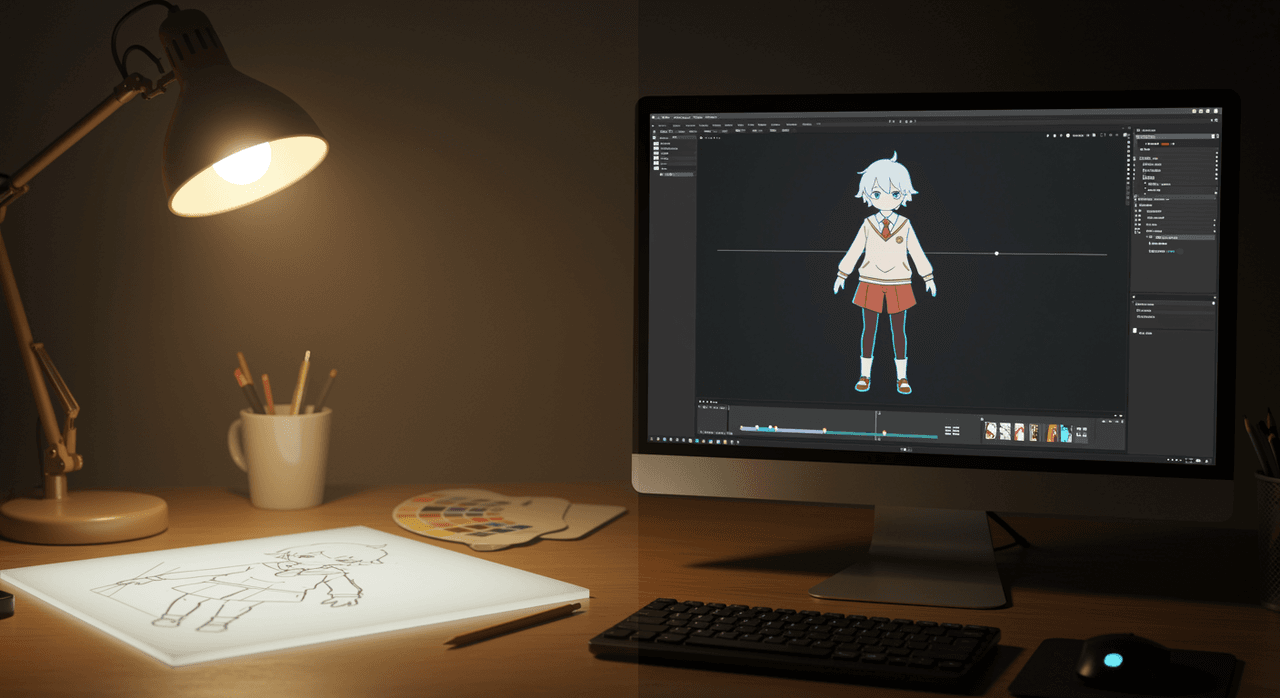
Why 2D Animation Pushes Seedance 2.0 Harder Than 3D
Start with the counterintuitive part. A Pixar-style 3D short is easier for an AI video model than a flat anime one, and understanding why tells you how to prompt.
Stylized 3D is forgiving. A rubbery hand or a physics wobble reads as cartoon charm. Detail, gradients, and soft shadows also give the model texture to hide small frame-to-frame errors inside. Flat 2D has none of that cover. A clean black outline either lands on the exact same pixels next frame or it visibly wiggles. A flat fill either holds its color or it shimmers.
That instability has a name in the research. Temporal consistency, keeping a subject stable across frames, is a known open problem in video diffusion; surveys of the field treat inter-frame flicker as a core failure mode rather than a bug (one 2025 survey catalogs it directly). Those papers aren't about anime specifically, so read this as the reasoned explanation, not an anime benchmark. But the mechanism is exactly what bites flat art hardest.
Here's what actually goes wrong, and how to fight it:
| 2D failure mode | What you see | How to reduce it |
|---|---|---|
| Line boil | Outlines wiggle and crawl frame to frame | Prefer thicker, simpler line work; avoid busy fine detail |
| Color crawl | Flat fills shimmer or shift hue | Use a limited palette with high-contrast, separated colors |
| On-ones smoothing | Motion looks too smooth, loses the anime "snap" | Ask for punchy key poses and held frames, not constant motion |
| Identity drift | Face and hair proportions morph across shots | Lock the character with reference images, covered below |
| Hand and limb melt | Flat hands fold into blobs mid-motion | Keep hands in simple poses; hide complex gestures in cuts |
None of this makes 2D a bad fit. It makes 2D a craft fit. The creators getting clean results treat these as constraints to design around, not surprises.
What Seedance 2.0 Brings to 2D Animation Generation
Now the upside. It isn't theoretical: anime action is already one of the model's most-shared outputs, with community reels of anime fight scenes pulling hundreds of upvotes since launch. The reason 2D animation generation on this model is worth the fight is a specific feature set. ByteDance's launch notes describe a single generation producing up to 15 seconds of multi-shot, audio-video output, accepting up to 9 images, 3 video clips, and 3 audio clips as references.
Map those against what a 2D short actually needs:
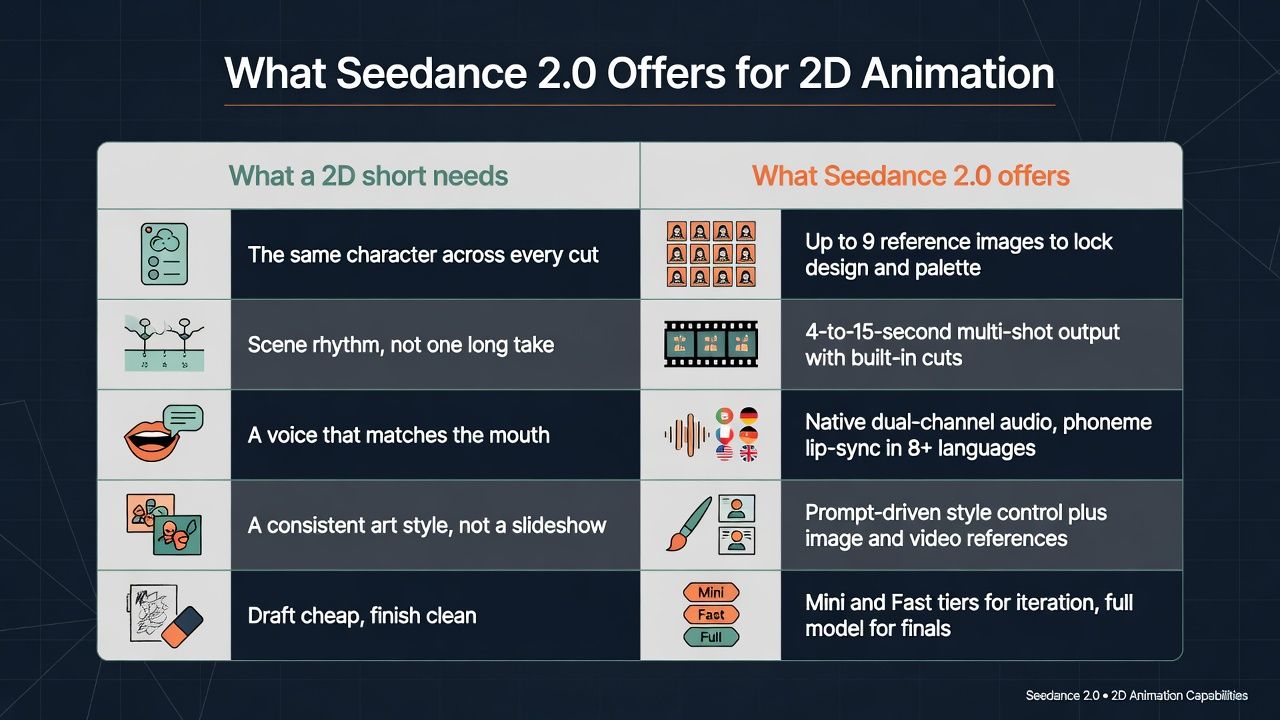
The reference budget is the part that matters most for 2D. A flat character has a fixed design: this nose, this eye shape, this hair silhouette. Feed the model that design as images and it has something concrete to hold onto between shots, which is the single biggest lever against the identity drift from the last section.
One honest caveat stays true here too. A single generation still caps at 15 seconds, so any real anime scene is an editing job across several generations.
Running Seedance 2.0 2D Animation Through an API
Consumer apps queue your job and recompress the output, which is exactly where flat color loses its edges. For direct, metered access to the full-quality model, Atlas Cloud hosts the entire ByteDance model family, and the Seedance 2.0 image-to-video endpoint is the natural entry point for 2D work: hand it your finished character illustration and animate from it. A 20% limited-time discount is live in July 2026, which puts the 480p floor near $0.09 per second.
What typical 2D render jobs cost:
| Render job | Tier | Cost with 20% discount (list) |
|---|---|---|
| 10-second test shot, 720p | Seedance 2.0 | $1.93536 ($2.4192) |
| 60-second draft pass | Seedance 2.0 Mini | from ≈$2.70 (≈$3.36) |
| 60-second final, 480p | Seedance 2.0 | ≈$5.40 (≈$6.72) |
| 60-second final, 720p | Seedance 2.0 | ≈$11.61 (≈$14.51) |
Two things worth knowing before you budget. First, iterate on the cheaper tiers. Mini starts around $0.045 per second and is built for the dozens of throwaway passes 2D consistency work demands; move to the full model only once the poses and timing are locked. Second, a billing wrinkle: when you attach a video reference, that input clip's seconds are billed on top of your output's seconds. Long reference clips quietly cost more than they save, so trim references to the single motion you actually want copied.
From Draft to Final: The Seedance 2.0 2D Production Loop
With the economics clear, here's the loop from blank page to finished short:
- Arrive with assets, not ideas. You need a character sheet, a locked palette, and an opening frame drawn at the exact framing you want — the style-anchor workflow in the next section covers how to build them. In image-to-video mode, that opening frame decides the style more than the prompt does.
- Pick the right endpoint. Image-to-video animates from a start frame and accepts an optional end frame. Reference-to-video takes the full 9-image character sheet, so switch to it when the same character has to survive many separate shots.
- Use the end frame as a key pose. This is the most underused 2D trick. Give the model your opening pose and your closing pose, and it inbetweens the motion, which is much closer to how hand-drawn animation is actually planned than a single-frame prompt.
- Set draft parameters and paste the prompt. 480p, a short 4-to-6-second beat, and a prompt that declares the style first, numbers its shots with camera moves, holds its key frames, and writes the audio in — the copyable recipe later in this guide follows exactly that shape.
- Check the price before you generate. The billing note sits in grey text under the output preview, and the calculator prices your exact run before you commit. No surprises.
- Fix causes, not symptoms. If the character drifts, tighten the references or simplify the line work; if the lines boil, thin out the fine detail. Re-rolling the same prompt and hoping just burns budget.
- Render the final and assemble. Re-run the locked shots at 720p, bundling two or three shots into each multi-shot generation, then cut them together in an editor, grade the color so flat fills match, and caption last.
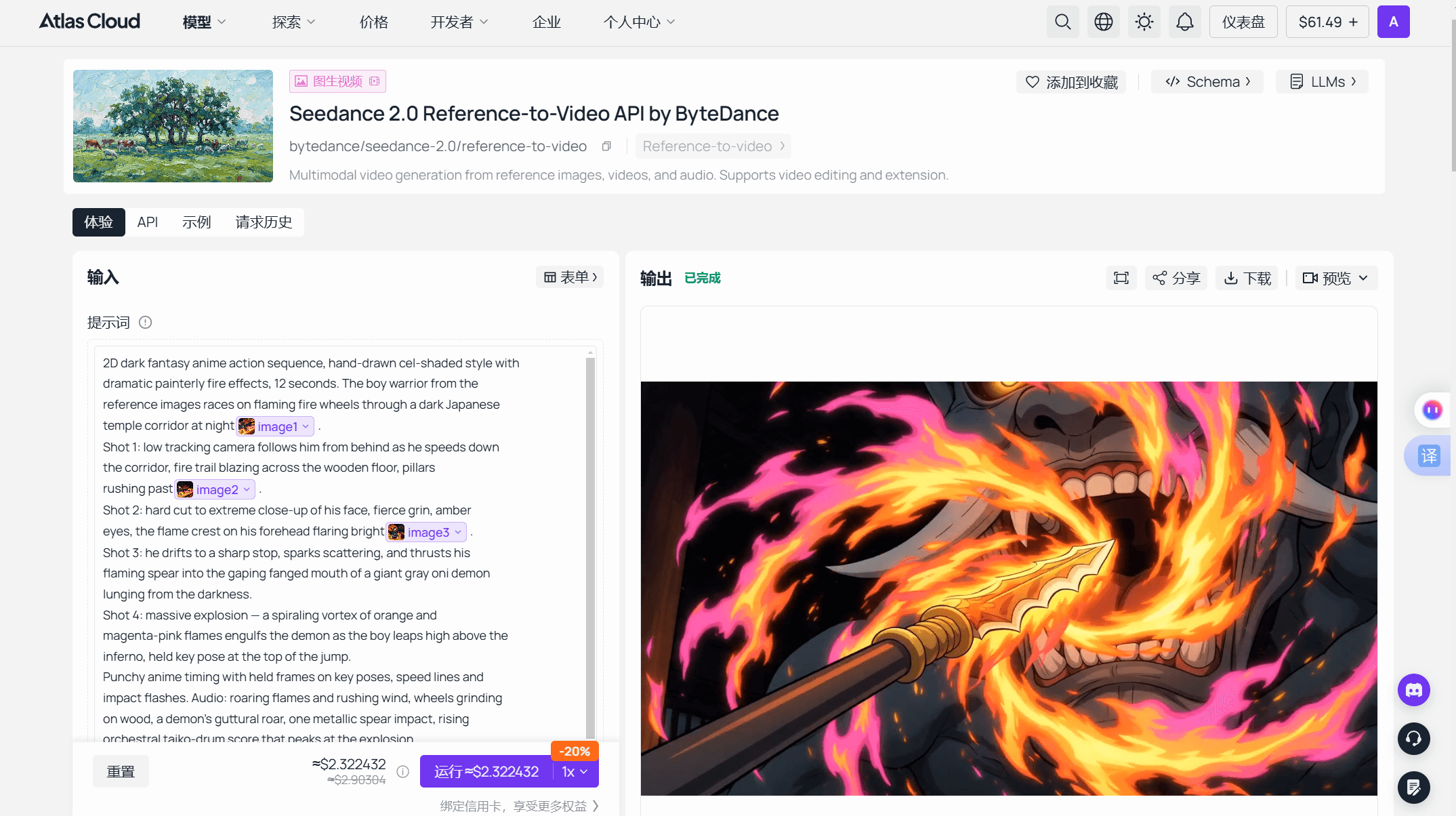
For batch production, the same run works over the API: submit the generation request, poll the status endpoint until it completes, and collect the output. That's the pattern for rendering a whole episode's draft shots overnight instead of babysitting a browser tab.
The settings that matter, draft versus final:
| Setting | Draft pass | Final render |
|---|---|---|
| Tier | Mini or Fast | Seedance 2.0 |
| Resolution | 480p | 720p and up |
| Duration | 4-6s, one beat | 10-15s, multi-shot |
| Per-second cost | from $0.045 | $0.1935 (720p, discounted) |
| What you're checking | Pose, timing, palette | Line stability, audio, final look |
A Style-Anchor Workflow for Consistent 2D Characters
The good anime shorts aren't one prompt. They're pre-production, and the whole point is to beat identity drift before it starts.
- Build a style bible first. In an image model, generate a character sheet: the same character, front and three-quarter and side, plus a few expressions, all under flat even lighting on a neutral background. This is your ground truth.
- Lock the palette. Write down the exact colors. Flat 2D lives or dies on color consistency, and a named palette in your prompt fights the color crawl from section one.
- Attach the sheet as references and name every asset. This is the reference-to-video endpoint's job, the one built for multi-image character lock. Don't just upload images and hope: call the character by name in the prompt so the model binds the reference to the subject.
Getting the references right matters more than filling all nine slots:
| Reference type | What goes wrong | Fix |
|---|---|---|
| Character sheets | Mixed lighting breaks the flat-color identity lock | Draw every pose under identical flat lighting |
| Motion clips | A busy reference dilutes the one beat you wanted | Trim to the single motion or camera move |
| Audio | A re-recorded line drifts in timbre | Reuse the exact same audio file every time |
One advanced trick is worth knowing, because it flips the whole problem. The most consistent anime results often don't start in 2D at all. A widely shared r/singularity thread, with more than 2,800 upvotes, showed a Japanese animator rendering finished anime shots from simple 3D layout models. Block a scene in rough 3D first and the model has stable geometry to follow; the prompt then paints the flat anime style over it. It's more setup, but it's the closest thing to guaranteed shot-to-shot consistency, which is exactly the wall 2D hits.
Creators walking through this end to end are worth watching before you spend credits. Two current tutorials cover it well: one on keeping a character on-model across shots, and one on getting a retro anime look that doesn't read as AI.
A Seedance 2.0 Anime Prompt You Can Copy
Durations run 4 to 15 seconds, aspect ratios span 16:9 down to vertical 9:16, and resolutions climb from 480p drafts to 4K. The prompt below is built for flat 2D on purpose, and it uses an original character so you can ship it. Swap in your own cast and the structure holds:
2D anime short, flat cel-shaded style with clean bold line art and a limited color palette. A teenage courier girl with short teal hair and a red satchel dashes across a rain-slick rooftop at dusk. Shot 1: wide shot, she leaps between two buildings, coat trailing. Shot 2: close-up, determined eyes, a single held key pose as wind whips her hair. Shot 3: she lands, skids, and grins at the camera. Punchy anime timing with held frames, not constant motion. Rain ambience, a whoosh on the jump, light synth score. Warm dusk backlight, 16:9.
Each line is doing a job:
| Prompt element | Why it matters for 2D |
|---|---|
| "Flat cel-shaded, clean line art" up front | Locks the render into 2D before anything else parses |
| "Limited color palette" | Directly fights the flat-fill color crawl |
| "Held frames, not constant motion" | Recovers the anime snap that smooth interpolation kills |
| Numbered shots | Plays to the 15-second multi-shot system |
| Audio written in | The model generates sound natively, so use the channel |
The rule of thumb: the more animation vocabulary you feed it, the more it behaves like animation. "Girl runs" gets you a walk cycle. "She leaps, coat trailing, on a single held key pose" gets you a shot.
The Anime Copyright Line: Style vs. Studio
Here's the part the prompt-selling reels skip, and for 2D it's sharper than for 3D, because anime IP has its own very active front.
Japanese rights holders moved first, and against a different model. TechCrunch reported in November 2025 that CODA, the trade body whose members include Studio Ghibli, asked OpenAI to stop using members' works for machine learning without permission, arguing that replication during training may itself infringe under Japanese law and that opt-out schemes don't satisfy Japan's prior-permission requirement. Japan's government weighed in too; The Register reported that the Cabinet Office formally asked OpenAI not to infringe, with the minister for IP strategy calling anime and manga "irreplaceable treasures."
Seedance 2.0 drew fire on the same principle. Disney sent ByteDance a cease-and-desist a day after launch, and ByteDance pledged to strengthen safeguards around IP and likenesses within days. The full studio-by-studio timeline sits in our breakdown of [Hollywood's pushback on Seedance 2.0](is-hollywood-trying-to-shut-down-seedance-2.0.md).
This isn't a hypothetical risk. One of the most-upvoted Seedance anime threads on Reddit is a reel of Pokémon and Demon Slayer fights — precisely the recognizable characters rights holders are moving to protect. So where's the line for your 2D work? Draw it between a look and a cast:
- The flat anime aesthetic isn't something any studio owns. An original teal-haired courier in that style is the durable, low-risk lane.
- A recognizable character, Totoro, Pikachu, a Demon Slayer lead, is protected IP. Portfolio experiment, maybe; monetized channel, genuinely risky.
- Disclose AI generation. Every major platform now surfaces AI labels, and this audience rewards it.
- Expect filters to tighten. ByteDance has publicly committed to stronger safeguards, so a plan built on protected characters can break overnight.
Frequently Asked Questions
Is "Seedance 2 animation" the same as Seedance 2.0?
Yes. "Seedance 2 animation" is just how people shorten Seedance 2.0, ByteDance's video generation model launched on February 12, 2026. There's no separate "Seedance 2" product. The model handles both 2D and 3D animation from the same text-and-reference workflow.
Can Seedance 2.0 do proper 2D anime, not just 3D?
Yes, though flat 2D is the harder mode. Clean lines and flat color expose frame-to-frame flicker that 3D texture hides, so you'll fight line boil and color crawl. Declaring a flat cel-shaded style up front, using a limited palette, and locking the character with reference images gets you consistent anime results.
How much does a 2D Seedance 2.0 animation cost to generate?
On Atlas Cloud, a 10-second 720p generation is $1.93536 with the current 20% discount, or $2.4192 at list. A 60-second short lands near $11.61 at 720p, and drafting on the Mini tier from about $0.045 per second keeps iteration cheap while you lock the look.
How do I keep an anime character consistent across Seedance 2.0 shots?
Build a character sheet in an image model first, under flat even lighting, then attach it as reference images and name the character in every prompt. Reuse the same palette and the same audio files across generations. Consistency comes from that reference discipline, not from one prompt.
Conclusion
2D is the harder test, and that's exactly why it's worth passing. Anyone can prompt a glossy 3D rat. A clean, on-model anime short that doesn't boil takes a style bible, a locked palette, reference discipline, and a per-second budget spent on the right tier. Those habits are the whole game.
The look is free. The characters aren't. Design your own cast, steal the prompt above, draft cheap and finish clean, and Seedance 2.0 stops being a novelty feed and starts being a 2D animation pipeline you actually control.





