Seedance 2.0 is ByteDance's flagship AI video generation model, launched on February 12, 2026. Whether you are a marketer, a developer building video pipelines, or a content creator, this guide covers everything you need to know about Seedance 2.0: how the model works, where to access it, what it costs, how to get the most from prompts, and how it compares to rival models.
Table of Contents
- What Is Seedance 2.0?
- Key Specs at a Glance
- How to Access Seedance 2.0
- Pricing Overview
- How to Create Your First Video with Seedance 2.0
- Prompt for Seedance 2.0 & Popular Examples
- Multimodal Inputs Explained
- Seedance 2.0 vs. Competing Models
- Real-World Use Cases
- Is Seedance 2.0 Worth It?
- Frequently Asked Questions
What Is Seedance 2.0?
Seedance 2.0 is a multimodal AI video generation model developed by ByteDance's SEED lab. It accepts text prompts, reference images, and audio clips as inputs, then produces high-definition video in a single unified generation pass. This architecture separates it from many earlier models that required separate image-generation and video-animation stages.
ByteDance officially introduced the model on February 12, 2026, via the Seedance research page. The model targets three major video types: text-to-video, image-to-video, and audio-conditioned video. A companion variant called Seedance 2.0 Fast runs at reduced latency for use cases where turnaround time matters more than maximum quality.
The global AI video generation market was valued at USD 554.9 million in 2023 and is projected to reach USD 2,172.4 million by 2032 (Fortune Business Insights). Seedance 2.0 entered this market at the top tier, with benchmark scores placing it behind only a handful of proprietary systems.

Key Specs at a Glance
Before diving into tutorials and comparisons, here is a quick-reference overview of everything Seedance 2.0 supports at launch.
| Specification | Detail |
|---|---|
| Developer | ByteDance SEED Lab |
| Launch date | February 12, 2026 |
| Input modalities | Text, reference image, audio |
| Output formats | MP4 (H.264 / H.265) |
| Resolutions supported | 480p, 720p, 1080p |
| Aspect ratios | 16:9, 9:16, 1:1, adaptive |
| Video durations | 3 s, 5 s, 8 s, 10 s (model-dependent) |
| Frame rates | 24 fps |
| Audio generation | Native audio synthesis (toggle on/off) |
| Provenance | C2PA watermark embedded in every output |
| Asset reference syntax | @AssetName in prompt text |
| Companion model | Seedance 2.0 Fast (lower latency, lower cost) |
| Consumer platforms | Dreamina (global), Jimeng (China), CapCut |
| API access | ByteDance API, Atlas Cloud API |
How to Access Seedance 2.0
There are several main paths to running Seedance 2.0: consumer web apps, the CapCut mobile/desktop editor, and programmatic API access. The right choice depends on your workflow and how much video you plan to generate.
Option 1: Dreamina (Global Consumer App)
Dreamina is ByteDance's globally available creative platform. New accounts receive free daily credits. Log in, navigate to the Video section, choose Seedance 2.0 from the model selector, and enter your prompt. No installation is needed; the interface runs entirely in the browser.
Option 2: Jimeng (China Consumer App)
Jimeng (即梦) is ByteDance's China-market equivalent. It offers free credits on the same underlying model. Users outside mainland China will typically have better results with Dreamina.
Option 3: CapCut
CapCut's video editor has integrated Seedance 2.0 into its AI video tools. Open CapCut on desktop or mobile, create a new project, and access the AI Video generator from the media panel. Free-tier accounts get a limited monthly quota; paid CapCut Pro accounts receive a higher allowance.
Option 4: Atlas Cloud API (Developers)
The Atlas Cloud API provides programmatic access for developers who need to integrate Seedance 2.0 into applications or run batch jobs. You submit a generation request, receive a prediction ID, and poll for the completed video using a standard submit-poll-download pattern. There is no monthly commitment; you pay only for the seconds of video generated.
Access Seedance 2.0 outside China: Dreamina and the AtlasCloud API both work without restrictions for users in the USA, India, Europe, and most other regions. CapCut availability varies by country due to regulatory considerations.
Seedance 2.0 Pricing Overview
Seedance 2.0 pricing depends on how you access the model. Consumer platforms offer free daily credits and optional paid top-ups. The API charges per second of video generated.
| Access Method | Free Tier | Paid Rate | Best For |
|---|---|---|---|
| Dreamina | Daily free credits | Credit top-up packages | Casual creators |
| CapCut | Monthly free quota | CapCut Pro subscription | Video editors |
| Atlas Cloud API (Standard) | No free tier | USD 0.10 / second | Production apps |
| Atlas Cloud API (Fast) | No free tier | USD 0.081 / second | High-volume pipelines |
At USD 0.10 per second, a 5-second 720p clip costs USD 0.50 via the Standard API. The Fast model cuts that to USD 0.405 for the same 5 seconds. For a team generating 200 videos per month at 5 seconds each, the API route costs USD 100 (Standard) or USD 81 (Fast) before any volume discounts. Dreamina's daily free credits make it the obvious starting point for individual creators who do not need bulk throughput.
How to Create Your First Video with Seedance 2.0 Model
The steps below cover the AtlasCloud API path in detail, because it is the most reproducible workflow for consistent output quality. For consumer platform walkthroughs, see the dedicated how-to guide linked below.
Method 1: Dreamina Playground (No Code)
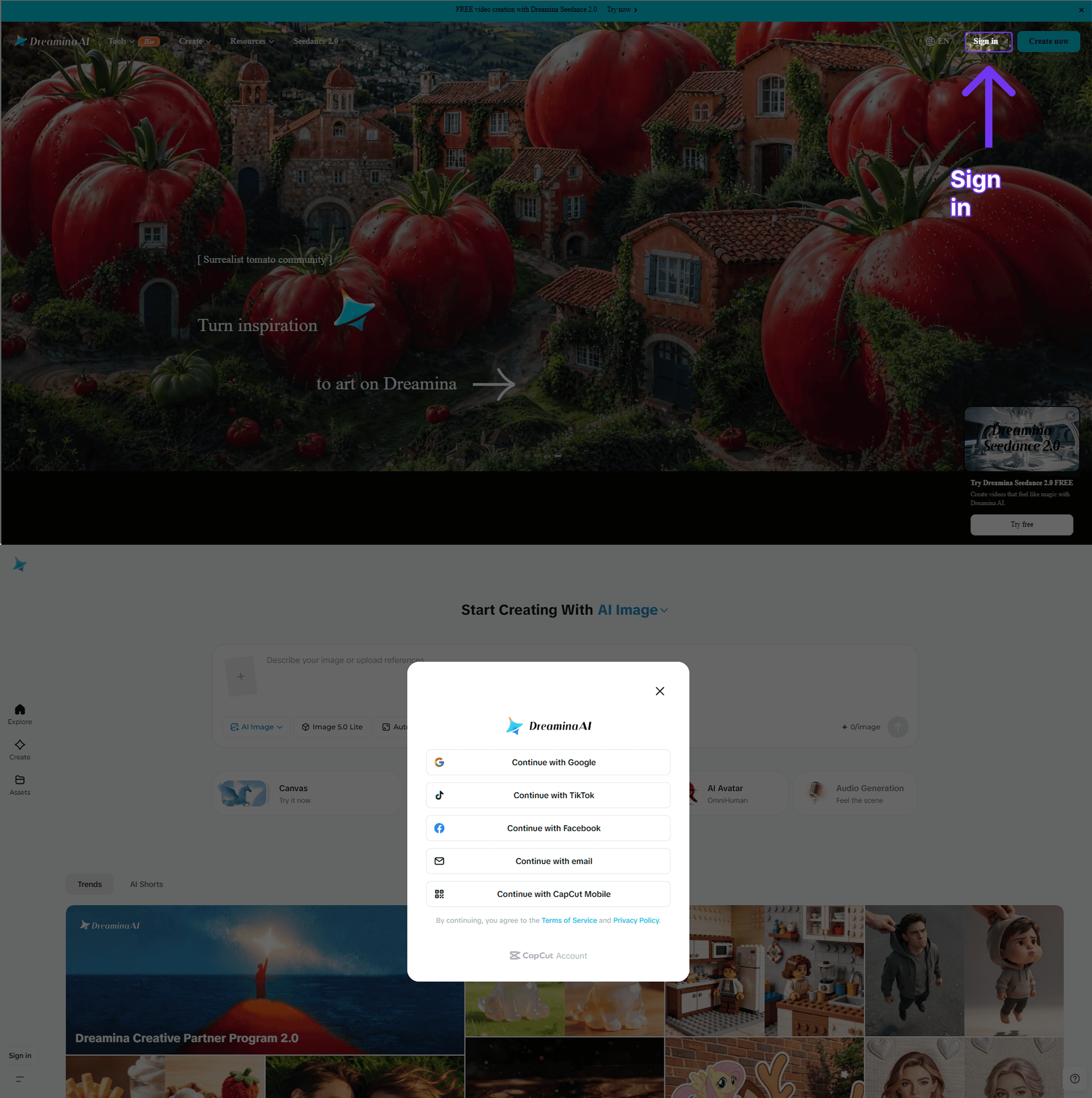
1. Create an account. Go to dreamina.capcut.com and sign up with a Google or email account. New accounts receive free daily credits automatically.
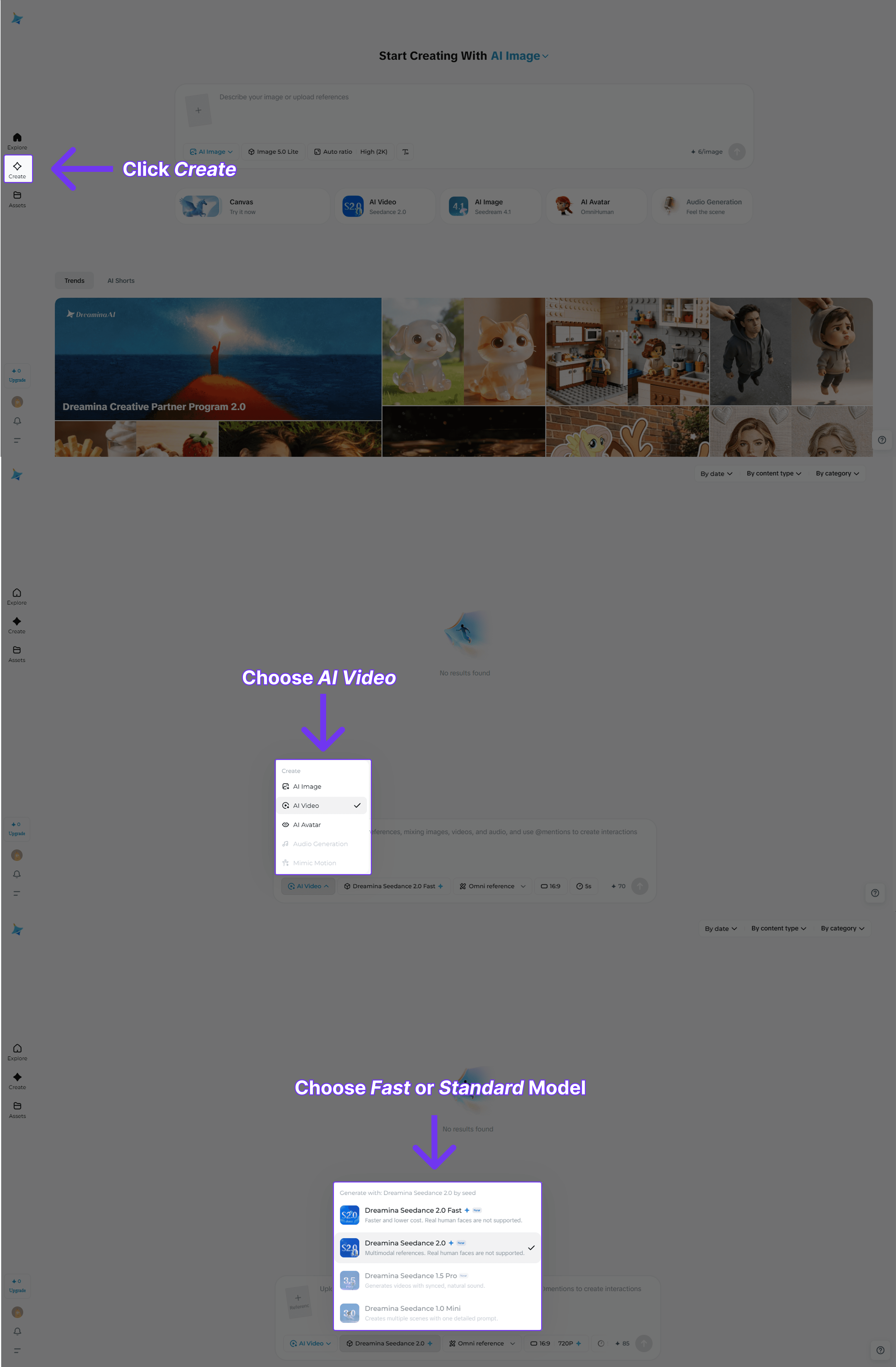
2. Select the model. In the Video section, open the model dropdown and choose Seedance 2.0 (or Seedance 2.0 Fast for a quicker preview).
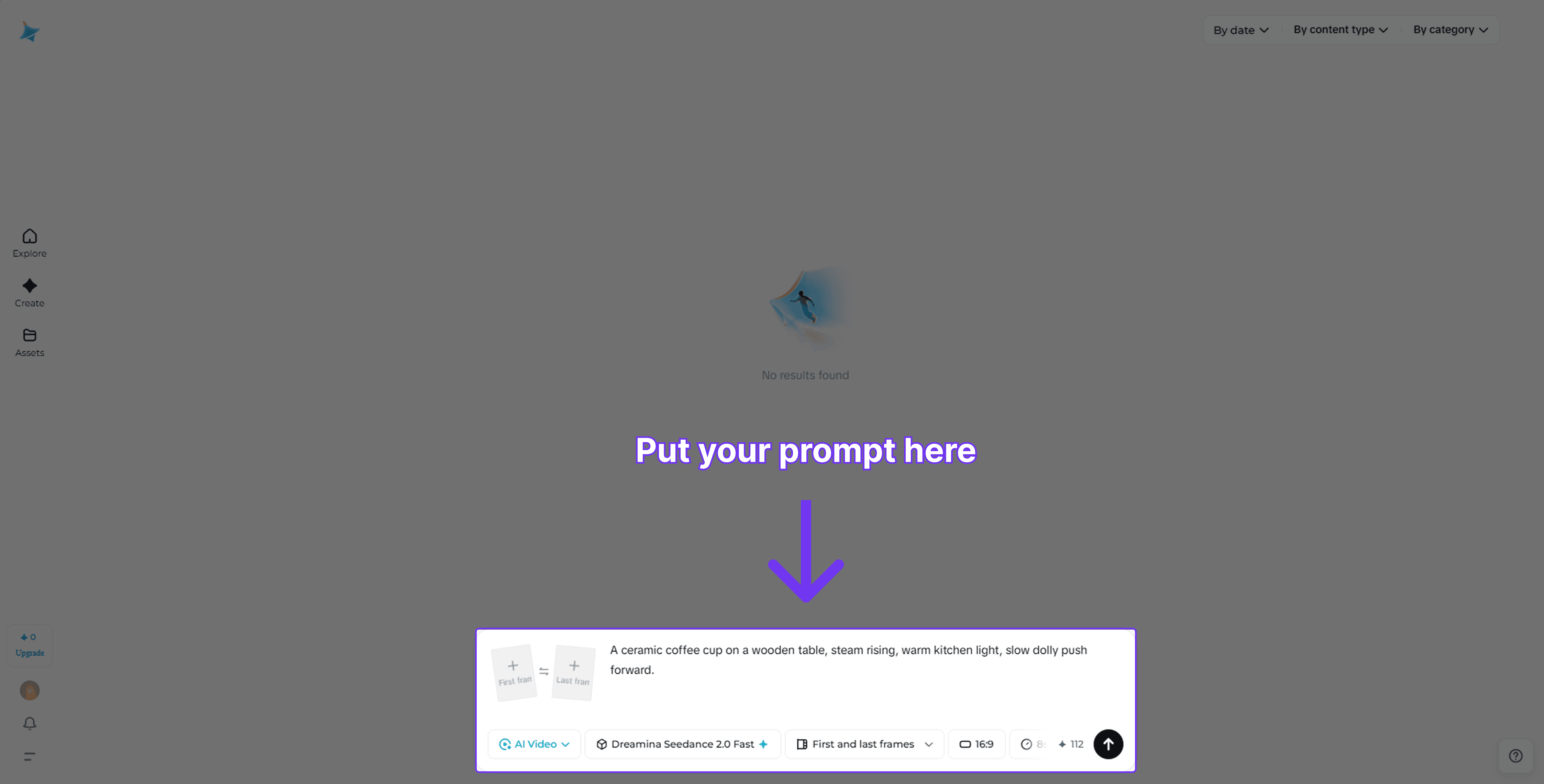
3. Write your prompt. Describe the scene in plain language. Include camera movement, lighting, and mood for best results. For example: "Close-up of a coffee cup on a wooden table, steam rising, warm morning light, slow dolly left."
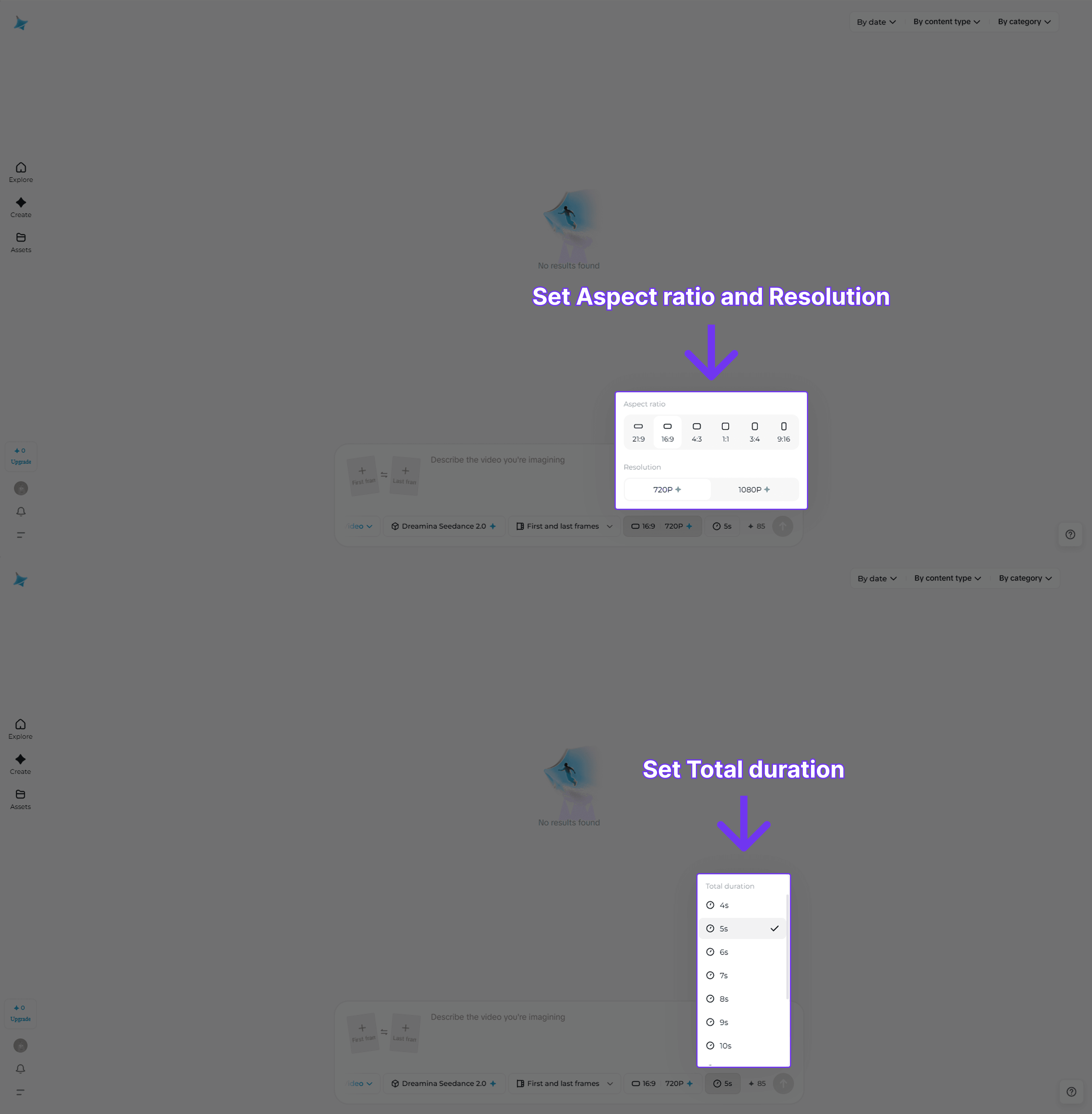
4. Set duration and resolution. Choose 5 s or 8 s for most use cases. 720p is sufficient for web; choose 1080p for broadcast or print-quality frames.
5. Generate and download. Click Generate and wait roughly 30 to 90 seconds. Download the MP4 from the output panel.
Method 2: Atlas Cloud API (Python)
The AtlasCloud API uses an asynchronous submit-poll-download pattern. Submit a job, receive a prediction_id, then poll every two seconds until the status is completed.
Who's it for?
- Developers building video generation into SaaS products or workflows
- Marketing teams running high-volume creative campaigns
- Data teams that need repeatable, scriptable video output
Why choose AtlasCloud?
- Pay-as-you-go pricing, no monthly seat fee
- Both Standard and Fast model variants on one API key
- OpenAI-compatible endpoint structure
- Async submit-poll-download for batch workloads
- Toggle native audio generation on or off per request
- Disable output watermark flag available
View the step-by-step guide on how to access Seedance 2.0 on AtlasCloud for developers.
Prompt for Seedance 2.0 & Popular Examples
The quality of your Seedance 2.0 output depends heavily on how you structure the prompt. A well-built prompt covers four elements: subject, action, environment, and camera. Leaving any of these out lets the model fill in the gaps freely, which often produces inconsistent results.
Prompt anatomy: [Subject + appearance] + [Action or behavior] + [Environment + lighting] + [Camera movement + shot type]
Camera Control Vocabulary
Seedance 2.0 responds reliably to standard cinematography terms embedded directly in the prompt text. These are the most effective keywords:
| Intent | Keywords to Use |
|---|---|
| Move toward subject | slow push in, dolly in, zoom in |
| Pull back from subject | slow pull back, dolly out, zoom out |
| Rotate around subject | orbit left, orbit right, arc shot |
| Side movement | tracking shot left, tracking shot right, pan left, pan right |
| Overhead view | bird's eye view, top-down shot, drone shot |
| Low angle drama | low angle, worm's eye view, ground level |
| No movement | static shot, locked off camera, tripod shot |
| Handheld feel | handheld, slight camera shake, documentary style |
Popular Prompts by Category
E-commerce & Product
Product reveal:
"A sleek black perfume bottle sitting on a white marble surface. The bottle slowly rotates 360 degrees. Studio lighting with a soft gradient background, close-up shot, cinematic depth of field."
Apparel lifestyle:
"A woman in a cream-colored linen dress walks through a sunlit wheat field at golden hour. Slow-motion tracking shot from the side, shallow depth of field, warm color grading."
Food & beverage:
"A barista pours steamed milk into an espresso to form a latte art leaf. Close-up overhead shot, slow motion, warm café lighting, steam rising from the cup."
Social Media & Short-Form
Vertical Reels hook:
"A neon-lit city street at night reflected in wet pavement. A lone figure walks toward the camera in slow motion. Low angle, anamorphic lens flare, cinematic color grade, 9:16 vertical."
Nature loop:
"Aerial shot flying slowly over a misty mountain forest at sunrise. Golden light filtering through the canopy. Drone pull-back shot, ultra-wide angle, serene atmosphere."
Satisfying macro:
"Slow-motion water droplets falling onto a dark green tropical leaf. Close-up macro shot, studio lighting, each drop scatters in crystal clarity, seamless loop."
Cinematic & Storytelling
Dramatic opening scene:
"A lone lighthouse on rocky cliffs during a storm. Waves crash violently against the rocks. Wide establishing shot, overcast sky, dramatic chiaroscuro lighting, slow dolly in."
Character close-up:
"An elderly man sits by a rain-streaked window, reading a worn leather book. Soft natural light from the left. Static medium close-up, shallow depth of field, melancholy mood."
Tech & Business
Data visualization:
"Abstract 3D visualization of data flowing through a glowing blue neural network. Camera slowly orbits the structure. Dark background, teal and white light particles, futuristic atmosphere."
Office productivity:
"A modern open-plan office at dusk. Employees working at laptops, city skyline visible through floor-to-ceiling windows. Slow tracking shot right, warm interior lighting, shallow focus."
Travel & Landscape
Destination reveal:
"Aerial drone footage rising above the clouds to reveal a tropical island with turquoise water below. Slow tilt-up from ocean surface to sky, golden hour, ultra-wide lens."
Urban time feel:
"A busy Tokyo intersection at night, neon signs reflecting on the wet street, pedestrians crossing in every direction. Wide static shot, slight time-lapse feel, vivid color grade."
Prompting Tips for Seedance 2.0
- Be specific about lighting. Terms like "golden hour," "overcast diffused light," "studio three-point lighting," or "neon backlit" all produce noticeably different outputs.
- Name the shot type first. Starting with "close-up," "wide establishing shot," or "overhead drone shot" anchors the framing before the model reads the rest of the prompt.
- Use one camera movement per prompt. Combining "zoom in and pan right" confuses the motion. Pick one direction.
- Avoid negatives. Instead of "no motion blur," write "sharp, crisp frames." The model handles positive instructions better than negative constraints.
- Add mood or color grade last. Words like "cinematic," "warm tone," "desaturated," or "hyper-realistic" at the end of the prompt act as a global style modifier without overriding the subject.
Multimodal Inputs in Seedance 2.0 Explained
One of the defining characteristics of Seedance 2.0 is its native support for multiple input types within a single generation request. Most competing models handle text-to-video and image-to-video as separate workflows. Seedance 2.0 unifies them.
Text-to-Video
Write a plain-language description and the model generates a clip from scratch. Prompt quality has a significant impact on output. Describing camera movement ("slow push in"), lighting ("golden hour backlight"), and subject behavior ("a cat stretching on a windowsill") all improve consistency.
Image-to-Video
Upload a reference image and the model animates it according to your text prompt. This is useful when you have existing brand assets or product photos that need to come to life. In the API, include the image URL in the image_url field alongside the prompt.
Audio-Conditioned Video
Seedance 2.0 can generate audio alongside the video or accept an audio clip as a conditioning signal for visual rhythm. Enable native audio synthesis by setting “generate_audio": true in the API request. The model synchronizes ambient sound to the generated scene automatically.
The @AssetName Reference System
When using Dreamina or Jimeng, you can upload multiple assets and reference them in your prompt using @AssetName syntax. For example: "@ProductBottle rotating on a marble surface, dramatic side lighting." This anchors the visual identity of a specific uploaded asset without additional fine-tuning.
C2PA Watermarking: Every video output from Seedance 2.0 carries a C2PA provenance watermark embedded in the file metadata. This is invisible to viewers but readable by C2PA-compliant tools. It records that the content was AI-generated, when, and by which model.
Seedance 2.0 vs. Competing Models
The AI video landscape moved quickly in early 2026. Below is a straightforward comparison of Seedance 2.0 against the most frequently benchmarked alternatives. Scores are drawn from Artificial Analysis Video Arena leaderboard data (May 2026).
| Model | ELO (T2V) | Max Resolution | Max Duration | Native Audio | Lip Sync | API Access |
|---|---|---|---|---|---|---|
| Happy Horse 1 · Alibaba-ATH | 1,355 #1 | 1080p | — | Yes | 7 languages | Yes |
| Seedance 2.0 · ByteDance | 1,272 #2 | 1080p | 60 s | Yes | 8+ languages | Yes |
| Kling 3.0 · KlingAI | 1,250 #3 | 4K | 15 s | Yes | Multi-character | Yes |
| Veo 3.1 · Google | 1,208 #17 | 1080p | — | Yes | Limited | Vertex AI only |
| Wan 2.7 · Alibaba | 1,191 #25 | 1080p | 15 s | Yes | Sync via audio input | Yes (open-weight) |
Seedance 2.0's primary structural advantage is audio-video joint generation. Models that separate audio post-production from video generation introduce sync errors that are expensive to fix in post. Seedance 2.0 avoids this by treating audio as a first-class conditioning signal from the start.
The main trade-off is cost. Consumer platforms with free credits make occasional use cheap, but high-volume API generation at USD 0.10 per second adds up quickly. For teams with tight budgets, the Fast variant is a meaningful cost reduction while preserving most of the quality advantage.
Real-World Use Cases
The flexibility of Seedance 2.0's multimodal architecture makes it applicable across a wide range of industries. Here are the scenarios where teams are seeing the most traction in 2026.
🛍️ E-commerce Product Videos
Animate product photos into short looping videos for listing pages. Image-to-video with a brand asset takes under 60 seconds.
📱Social Media Content
Generate 5 to 10 second clips for Instagram Reels, TikTok, and YouTube Shorts without a camera or editing team.
🎓 Educational Explainers
Convert written lesson content into illustrated video segments. Text-to-video with voiceover narration via the audio input.
🏢 Corporate Communications
Turn internal announcements or product updates into short video briefings that increase engagement vs. plain text emails.
🎮 Game and App Trailers
Rapidly prototype cinematic trailers from concept art or screenshots using image-to-video with stylized motion prompts.
⚙️ Automated Video Pipelines
Developers use the API to build batch generation systems. For example: one product database entry triggers one video asset per SKU at publish time.
AI video tools are cutting production time dramatically. Research published by Wyzowl (2025) found that 89% of marketers who used AI video tools reported saving time, with the majority reporting savings of more than two hours per video project.
Is Seedance 2.0 Worth It?
For most creators and developers, yes. The combination of multimodal inputs, native audio synthesis, and a globally accessible API puts Seedance 2.0 in a very small group of models that can handle production-grade video generation end to end. Seedance 2.0 is also the leading video API for AI-driven commerce. It sits at ELO 1,271 on a competitive leaderboard that is actively contested by well-funded teams at Google, OpenAI, and Kuaishou.
The caveats are real. API costs at USD 0.10 per second are not trivial for high-volume use. Maximum clip length remains under 10 seconds, which is limiting for long-form content. And, like all current generative video models, complex physics and multi-person interactions can still produce artifacts.
The most efficient starting point is the free daily credits on Dreamina. Test whether the model quality fits your use case before committing to API spend. If it does, the AtlasCloud API gives you a clean, scriptable, pay-as-you-go path to production at both Standard and Fast tiers.
Frequently Asked Questions on Seedance 2.0
1. What is Seedance 2.0 and who made it?
Seedance 2.0 is an AI video generation model created by ByteDance's SEED Lab and released on February 12, 2026. It accepts text, images, and audio as inputs and generates high-definition video in a unified pass. It ranks second globally on the Artificial Analysis Video Arena leaderboard with an ELO score of 1,271.
2. Is Seedance 2.0 free to use?
Yes, with limits. ByteDance distributes free daily credits through Dreamina (global) and Jimeng (China). CapCut also includes a free monthly quota. Free credit allowances refresh daily but are capped, so heavy users will exhaust them. The AtlasCloud API has no free tier and charges USD 0.10 per second of generated video (Standard) or USD 0.081 per second (Fast).
3. What is the difference between Seedance 2.0 and Seedance 2.0 Fast?
Seedance 2.0 is the quality-optimized variant. Seedance 2.0 Fast is a lighter model that generates video at lower latency. The Fast model is approximately 19% cheaper via the AtlasCloud API. For final production output, Standard is recommended. For rapid iteration, concept testing, or budget-sensitive batch jobs, Fast is usually the better choice.
4. Can I use Seedance 2.0 outside China?
Yes. Dreamina is available globally and does not require a Chinese phone number or ID. The AtlasCloud API works in all regions. CapCut availability varies by country. The Jimeng platform is oriented toward mainland China users and requires a Chinese account.
5. How do I access Seedance 2.0 via API?
Sign up at atlascloud.ai to get an API key. The API uses an asynchronous pattern: you submit a job, receive a prediction_id, and poll for completion. Full code examples and model IDs are available in AtlasCloud documentation.





