Three hands on one figure. Three legs under one dress. Testers say Seedream 5.0 Pro produces both far too easily.
That complaint comes from someone who likes the model. In a post from July 21, 2026, a tester called Seedream 5.0 Pro solid overall, then named two problems that kept coming back: prompts that run long start losing elements, and extra hands or extra legs appear far too often. Neither one is disqualifying. Both are manageable once you know the triggers.
This piece maps what actually triggers each bug, what ByteDance itself admits, and the cheapest way to fix a broken render without starting over.
Key Takeaways
- A tester who rates Seedream 5.0 Pro positively still hit two repeatable failures in July 2026: extra limbs, plus dropped elements once prompts run long.
- Extra-limb errors concentrate where limb count is ambiguous: crossed legs, fabric covering joints, reclining poses.
- The model's API schema recommends staying under 600 English words per prompt. One third-party guide draws the line at 200.
- The Edit endpoint patches a bad limb without rerolling the whole composition, though ByteDance concedes pixel-level editing consistency still has gaps.
- Retest runs cost $0.036 each on Atlas Cloud, 20% off the $0.045 list price as of late July 2026.
The Two Bugs Seedream 5 Pro Testers Keep Hitting
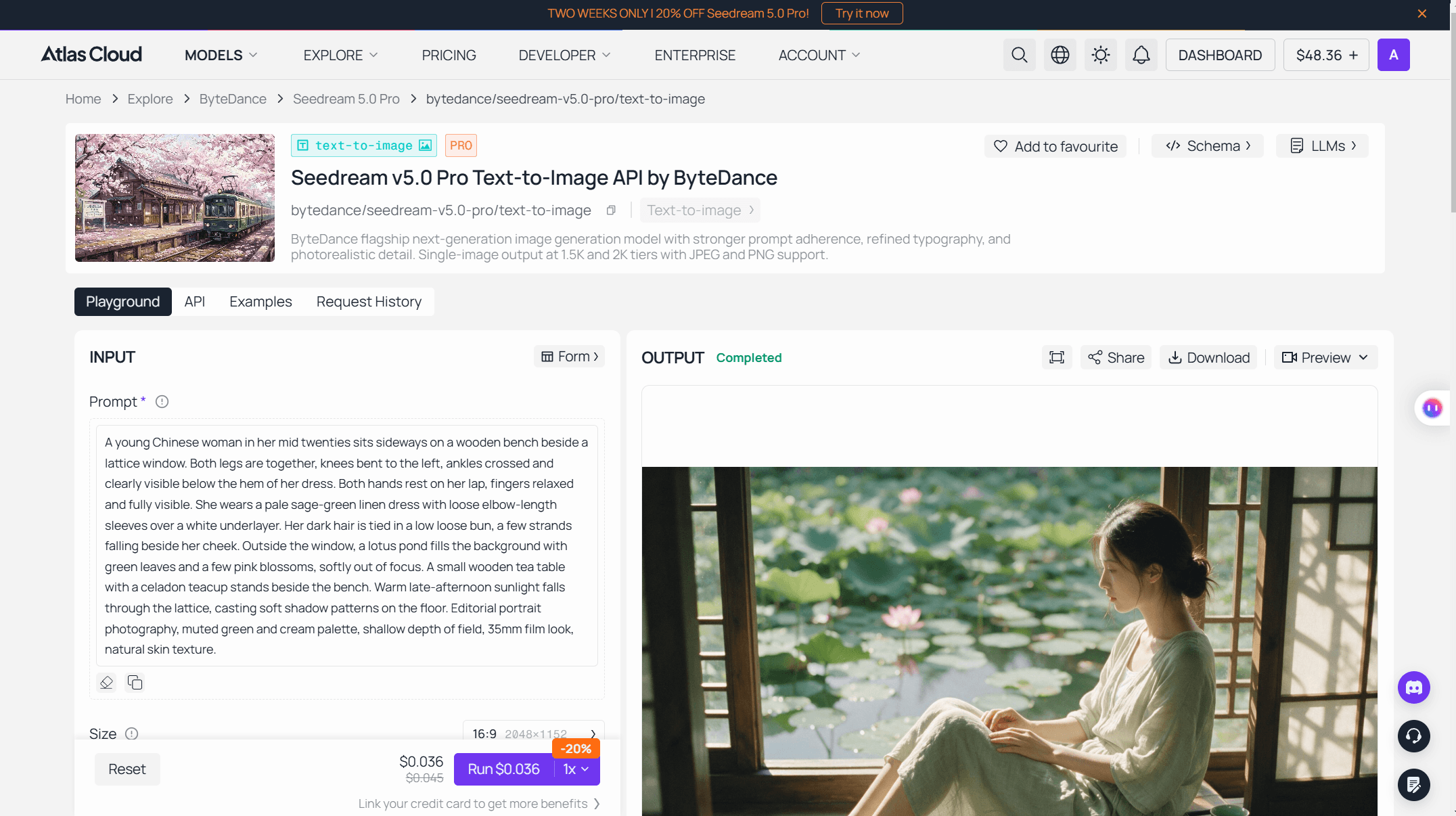
The July 21 report is worth taking seriously because it isn't a hit piece. The tester praised overall quality in the same breath, then flagged two failure patterns: element loss in long prompts, and limbs that multiply. The render they attached shows the other side of that verdict, the output quality that keeps people using the model despite the bugs.
 Source: the tester's original post on X, July 21, 2026
The image holds up. Light through the lattice window, believable fabric, a lotus pond that reads as a real location, and the anatomy is correct. Note the pose, though: a reclined figure, crossed legs, hips hidden under a drape. The section on limb errors comes back to this setup, because it is exactly where the reported failures concentrate.
These two field complaints sit alongside problems ByteDance has already put on the record. The company's launch announcement concedes "room to improve in finer-grained text rendering and pixel-level editing consistency." Launch-day Reddit testers in the r/singularity thread added portrait realism to the list within a day of release.
So the bug list is real, documented from multiple directions, and worth planning around. It is also narrower than it sounds. Most of these issues come with a trigger you can avoid or a repair that costs cents, and the rest of this piece works through them.
Seedream 5 Pro on Atlas Cloud: $0.036 a Run
Anatomy errors are stochastic. The same prompt can produce two clean renders, then a three-legged one. That makes cheap reruns a debugging tool, since you cannot tell a prompt problem from bad luck with a single generation.
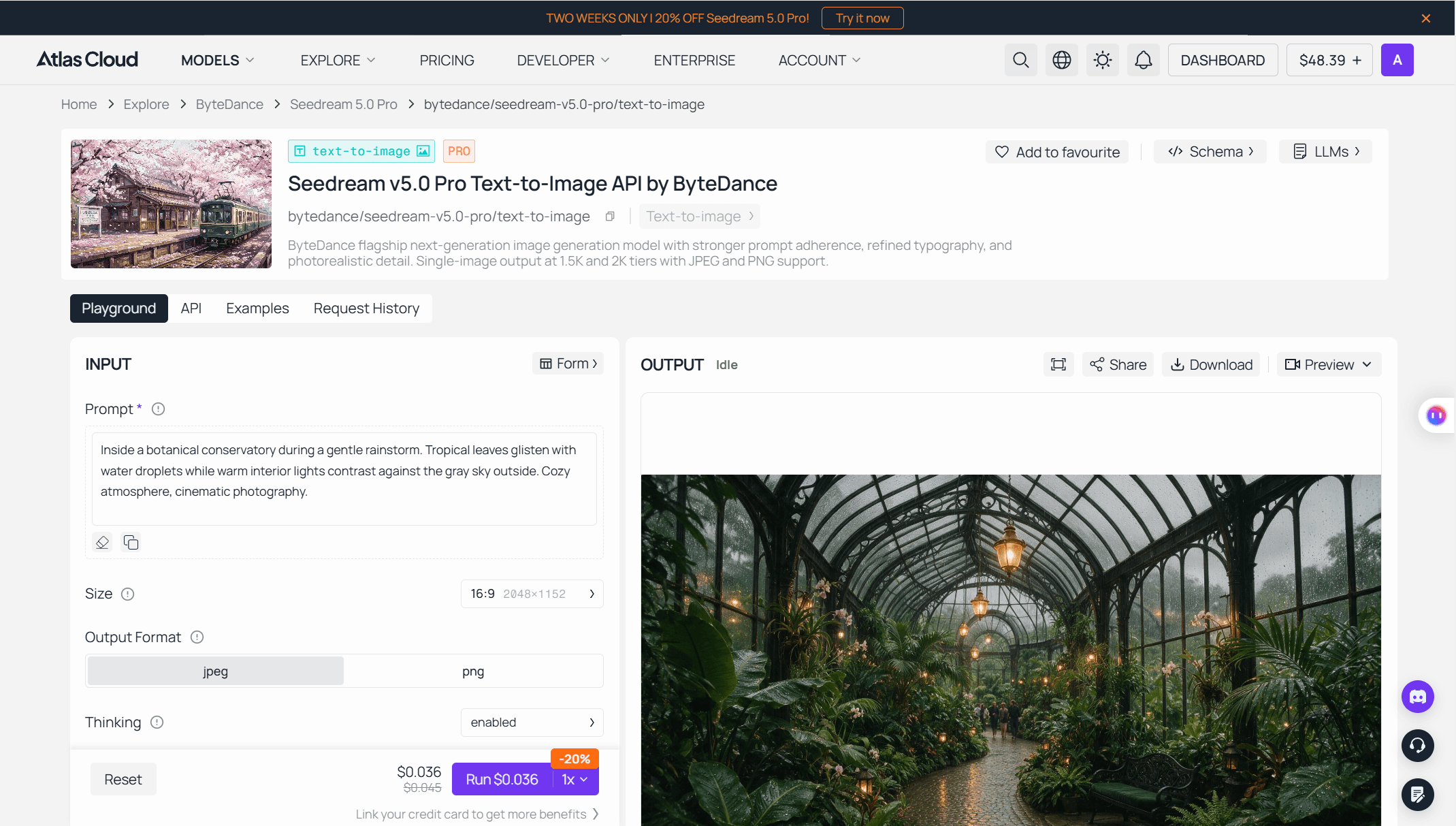
Atlas Cloud is the practical place to run those reruns. It is a full-modal inference platform where Seedream 5.0 Pro sits in the ByteDance model family next to every other Seedream release, so a prompt that misbehaves on Pro can be checked against 4.5 or Lite in the same session. The Seedream 5 Pro playground runs the model with no setup, and each run currently costs $0.036, a 20% cut from the $0.045 list price. Ten dollars covers roughly 277 runs. The discount is a limited-time promotion, live as of July 24, 2026, so treat the $0.045 figure as the durable number.
At that price, a ten-run probe of a suspect prompt costs 36 cents. Every fix suggested in the rest of this article assumes you can afford to verify it.
What Triggers Extra Limbs in Seedream 5 Pro Renders
The report's phrasing is specific: three hands, three legs, triggered easily. Errors like these are not spread evenly across all prompts. They concentrate where the limb count is ambiguous. When a joint is hidden, nothing anchors which shin belongs to which hip, or which fingers belong to which hand, and a plausible-looking spare limb fills the gap.
Look back at the tester's render for the risk pattern in miniature. The hands came out correct, and they were fully visible, both wrapped around a lotus leaf in open light. The legs sat at the other end of the visibility scale: crossed, reclined, hips under a drape. That run landed clean. The report says runs like it often don't, and the parts of a body the model has to infer are the parts that go wrong.
The practical defense is prompt language that pins the count down. The setups that deserve it most:
| High-risk setup | Why the count breaks | Prompt language that lowers the risk |
|---|---|---|
| Hips or knees under loose fabric | Hidden joints stop anchoring the legs | "two lower legs emerge from under the drape, crossed at the ankles" |
| Crossed legs, tucked feet | Overlapping calves blur which shin is which | "legs crossed at the ankles, both feet visible" |
| Interlocked hands, hands behind the back | Occluded fingers invite extras | "both hands rest flat on the table, fingers visible" |
| Two people close together | Limbs get assigned to the wrong body | "her arm on his shoulder, his hands in his pockets" |
A bare "seated elegantly" leaves every one of those counts open. The dull, explicit version is the one that saves money.
Two process rules complete the defense:
- Rerun before you rewrite. Three limb failures in five runs point at the pose description, so fix the prompt. One failure in five is reroll territory.
- Patch instead of rerolling a keeper. The Edit endpoint takes the finished image plus an instruction like "remove the extra leg on the right, extend the fabric over that area" for $0.036, and the launch materials describe point and lasso selection for exactly this kind of local repair. Check the surrounding pixels afterward, since a patch can nudge neighboring detail.
Long Seedream 5 Pro Prompts Lose Elements
The second bug from the July 21 report is quieter than a third leg, and it costs more in production. You write twelve requirements, the model delivers nine, and nothing in the output warns you which three vanished.
There is an irony here worth naming: strong interpretation of long, detailed prompts is one of the model's advertised strengths, and against that pitch the field reports read as a boundary, a point past which adherence degrades. The written guidance agrees a boundary exists, though the recommended limits sit far apart.
| Source | What it says | How to apply it |
|---|---|---|
| Model API schema on Atlas Cloud | Recommended prompt length: under 600 English words | Treat 600 as a hard ceiling, never a target |
| Third-party prompt guide | Keep under 200 words for rendering consistency | A safer working limit for multi-element scenes |
| Field report from July 21 | Long prompts dropped scene elements outright | Past your element budget, split into two passes |
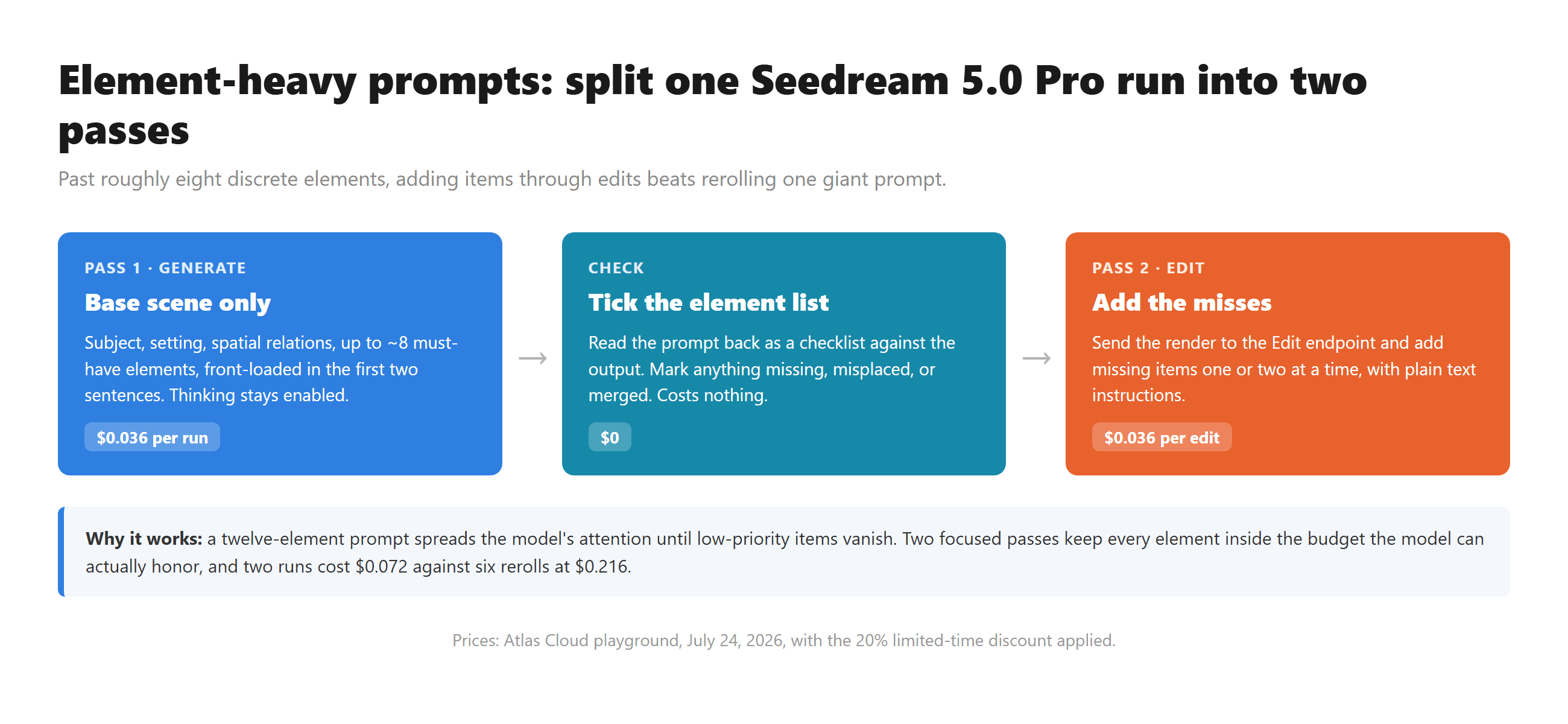
Word count is the visible symptom. The underlying constraint is the number of discrete things you ask for. A 150-word prompt describing one subject in one setting almost always lands. A 150-word prompt containing nine separate objects, two people, specified clothing per person, and three background details starts shedding the low-priority items. Attention spreads across every element you name, and the elements named last, or named vaguely, get the least of it.
What holds up in practice:
- Front-load the non-negotiables. Put the subject, the must-have objects, and their spatial relations in the first two sentences. Style, lighting, mood come after.
- One element per sentence. "A red kettle sits on the stove. A gray cat sleeps on the windowsill" survives better than a comma chain burying both in one clause.
- Budget roughly eight discrete elements per generation. Past that, generate the base scene first, then add the remaining items one or two at a time through the Edit endpoint. Two passes at $0.036 beat six rerolls of a twelve-element prompt.
- Leave Thinking enabled for layered prompts. The reasoning pass exists to plan multi-element layouts. Turning it off speeds up drafts, at the cost of exactly the adherence this bug is about.
- Verify against a checklist. Read the prompt back as a list, tick each element off in the output, and patch the misses with an edit instead of regenerating the whole scene.
Smaller Seedream 5 Pro Flaws Worth Planning Around
Past the two headline bugs, the first weeks of testing surfaced a set of lesser problems. None of them blocks production. All of them are cheaper to handle when you expect them.
One comes from a Japanese tester's side-by-side note posted July 24: output quality is fine, but the model holds a subject's body shape less reliably than Nano Banana 2. An early hands-on review from July 10 reached a similar verdict on series consistency, finding face, build, and outfit hard to keep identical across a set. A teaser from one reviewer on July 22 followed the same pattern: strong praise for the layer editing, then a warning about a flaw big enough to pause a workflow decision.
The deepest test records so far come from outside English. A seventeen-case test by a Chinese tech outlet, published July 9, pushed the model through infographics, UI mock-ups, handwritten homework, and event photography, and its failures were specific: a misspelled servo-motor label in a robotics cost chart, five text errors across a single study-guide card, a handwritten math answer wrong from its first sub-question, and a Tim Cook who does not quite look like Tim Cook. A Japanese developer write-up, also from July 9, logged two quieter traps: running through ByteDance's own developer console, every image carried a visible AI-generated label in the corner until the watermark parameter was switched off, and outputs kept inheriting the camera angle of whatever reference photo was supplied.
The card summary below collects the patterns that follow the model across channels, with the countermeasure for each.
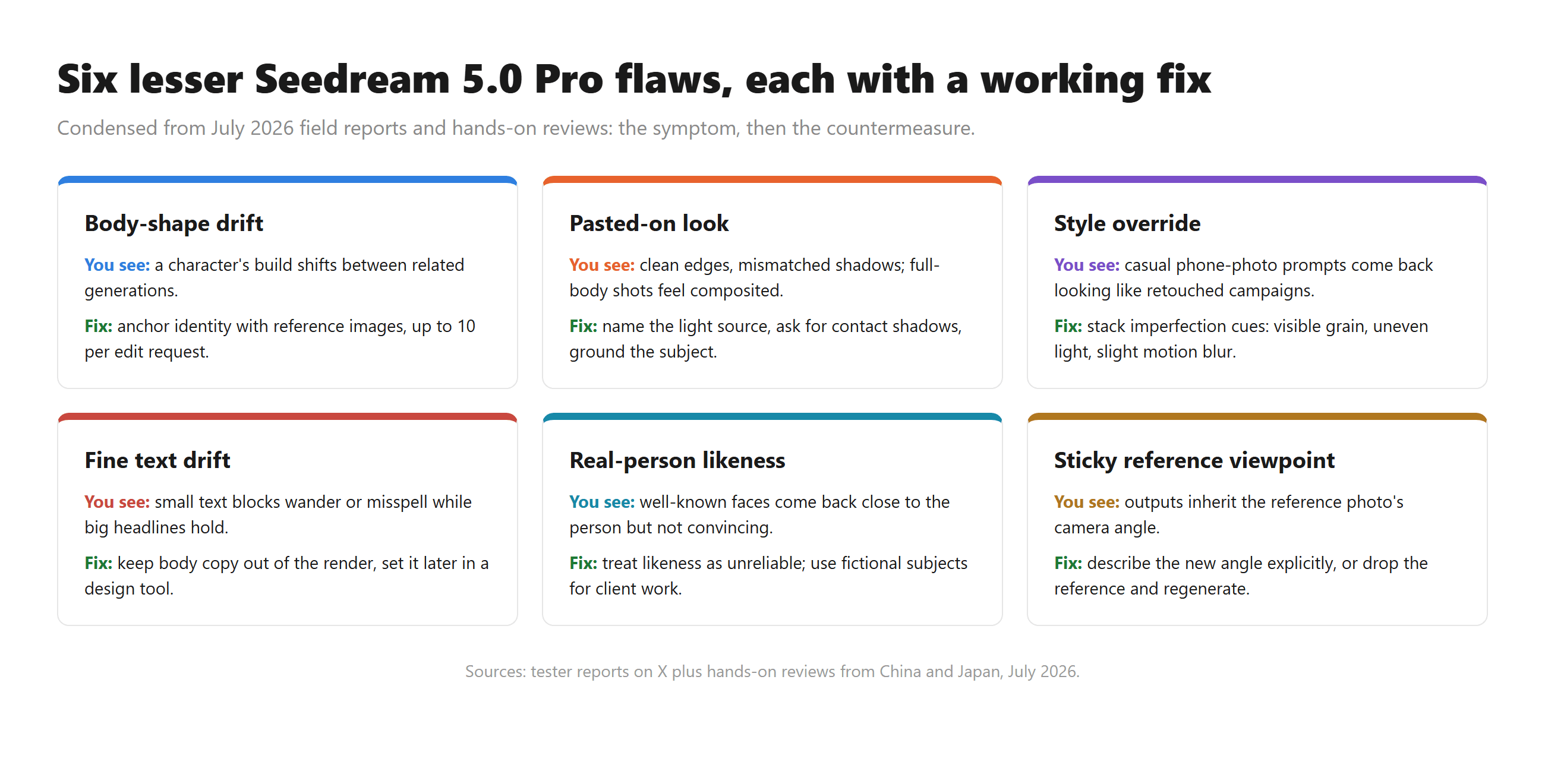 The style override deserves one extra sentence, because it fails silently. Ask for an ordinary, unretouched snapshot and the model quietly upgrades it toward polish: cleaner skin, warmer grading, better composition than the scene deserves. If your use case is authenticity, spell the imperfections out in the prompt. The model will not keep them by default.
Build a Seedream 5 Pro Retest Loop
Everything above turns into routine once you keep a failure suite: the five to ten prompts that actually broke for you, saved verbatim. Rerun the suite when you change prompt patterns, and again when ByteDance ships a model update, since bugs at this layer shift silently between snapshots. Two ways to run it, in the order most people should try them.
Method 1: Rerun Failures in the Seedream 5 Pro Playground
Log in and open the Seedream 5 Pro playground. The model runs with no setup, and the Run button quotes the exact cost before each attempt.
- Paste a failed prompt exactly as it originally ran. Keep the same size preset, since changing resolution changes the failure surface.
- Run it three to five times. Count limbs, tick off prompt elements, note the pass rate.
- Apply one fix at a time: shorten past 200 words, front-load the key elements, or add explicit pose language. Rerun the same count.
- Keep whichever prompt version clears your bar, and move its worst outputs to the Edit endpoint for patching rather than spending more rerolls.
Method 2: Batch Seedream 5 Pro Retests Through the API
Once fixes stabilize, the API turns a ten-prompt suite into a loop instead of an afternoon of clicking. Generation is asynchronous: submit a job, get a prediction ID, poll until done.
Step 1: Get your API key. Create a key in the Atlas Cloud console, copy it, and store it as an environment variable rather than in code.
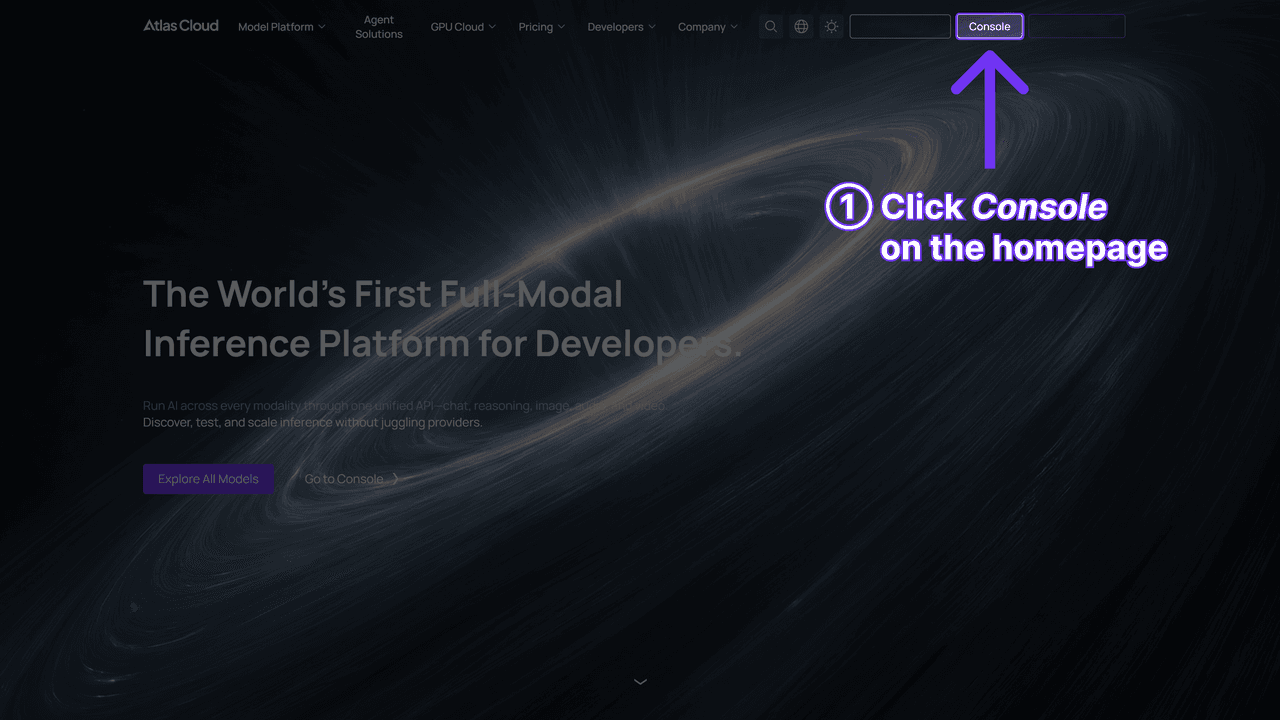
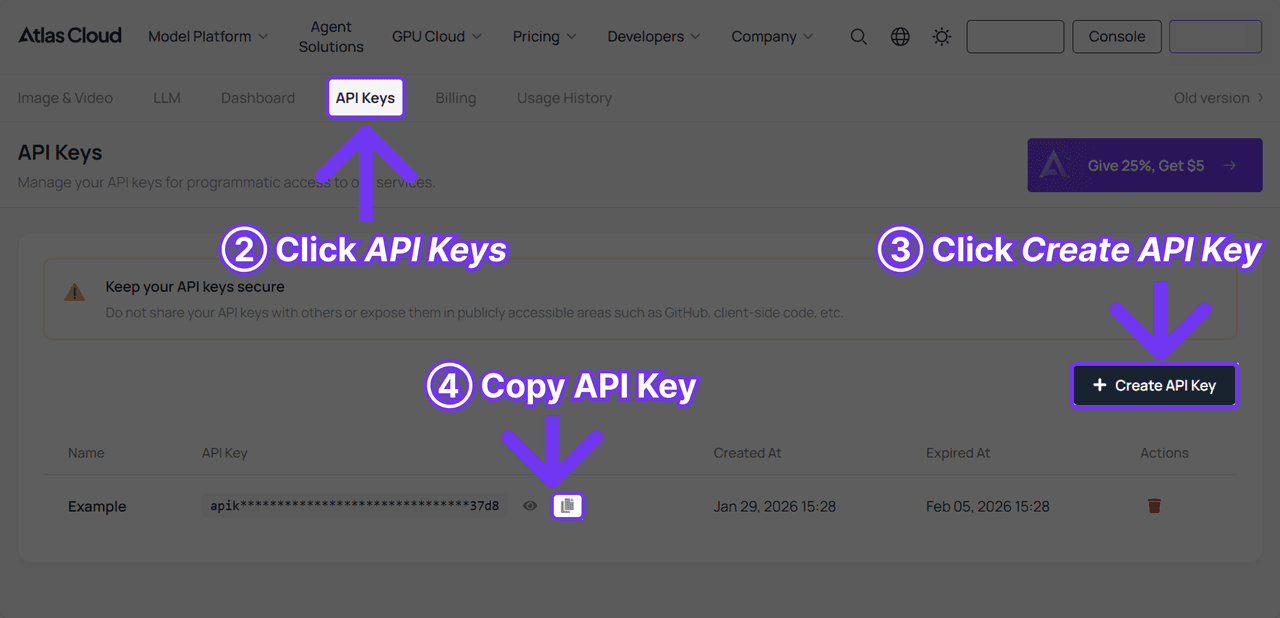
Step 2: Check the API docs. Endpoints, parameters, and auth live in the API documentation. The two calls below cover a full text-to-image retest.
Step 3: Make your first request. Submit one prompt from the suite:
plaintext1curl -X POST https://api.atlascloud.ai/api/v1/model/generateImage \ 2 -H "Content-Type: application/json" \ 3 -H "Authorization: Bearer $ATLASCLOUD_API_KEY" \ 4 -d '{ 5 "model": "bytedance/seedream-v5.0-pro/text-to-image", 6 "prompt": "<one failed prompt from your suite>", 7 "size": "2048*1152", 8 "output_format": "png", 9 "thinking": "enabled" 10 }'
The response returns a prediction ID. Poll it every few seconds:
plaintext1curl https://api.atlascloud.ai/api/v1/model/prediction/<prediction_id> \ 2 -H "Authorization: Bearer $ATLASCLOUD_API_KEY"
Status moves from processing to completed, with the hosted image URL in outputs[0]. Two parameters matter for retests specifically. Pass size explicitly every time, because the API defaults to 2048*2048 while the playground defaults to 2048×1152, and a silent resolution change makes runs incomparable. And keep thinking set the same way across a suite, since the reasoning pass directly affects the long-prompt behavior you are measuring.
The request shape is the durable part. Atlas Cloud exposes one API across the platform: same key, same auth header, same submit-and-poll pattern for every model. When you want to check whether a bug is Pro-specific, you swap the model string for a different Seedream release and rerun the identical suite.
Frequently Asked Questions
Does Seedream 5 Pro Struggle With Hands More Than Other Models?
There is no public benchmark that isolates limb errors per model, so honest answers stay anecdotal. A July 2026 field report describes extra hands and legs appearing easily, and occluded joints, crossed limbs, and draped fabric are the conditions that invite the error. The r/singularity launch thread flagged broader portrait realism gaps against its predecessor. Visible joints, explicit pose language, and cheap rerolls close most of the gap in practice.
How Long Should a Seedream 5 Pro Prompt Be?
The model's API schema recommends staying under 600 English words, and a third-party prompt guide recommends under 200 for consistent rendering. Element count matters more than word count. Keep discrete objects to roughly eight per generation and add the rest through edit passes.
Can Seedream 5 Pro Fix One Bad Hand Without a Full Regenerate?
Yes. The Edit endpoint accepts a finished image plus a local instruction, with point and lasso selection described in the launch materials, at $0.036 per edit on Atlas Cloud as of July 2026. Inspect the area around the patch afterward, since an edit can shift pixels just outside the selected region.
Do These Bugs Make Seedream 5 Pro a Bad Choice?
Not on the evidence so far. The tester behind the three-legs report rated the model positively in the same post, and the model's strengths are just as documented: typography, layout logic, layered editing, with the family's infographic generation beating Nano Banana 2 in independent six-scenario testing. The failures in this article have known triggers, cheap repairs, or both. The reasonable posture is to use the model with a failure suite in place, rather than to avoid it.





