

The heiress slaps the divorce papers on the marble counter. Freeze frame. Episode over. Ninety seconds ago you had never heard of this show, and now you need episode two.
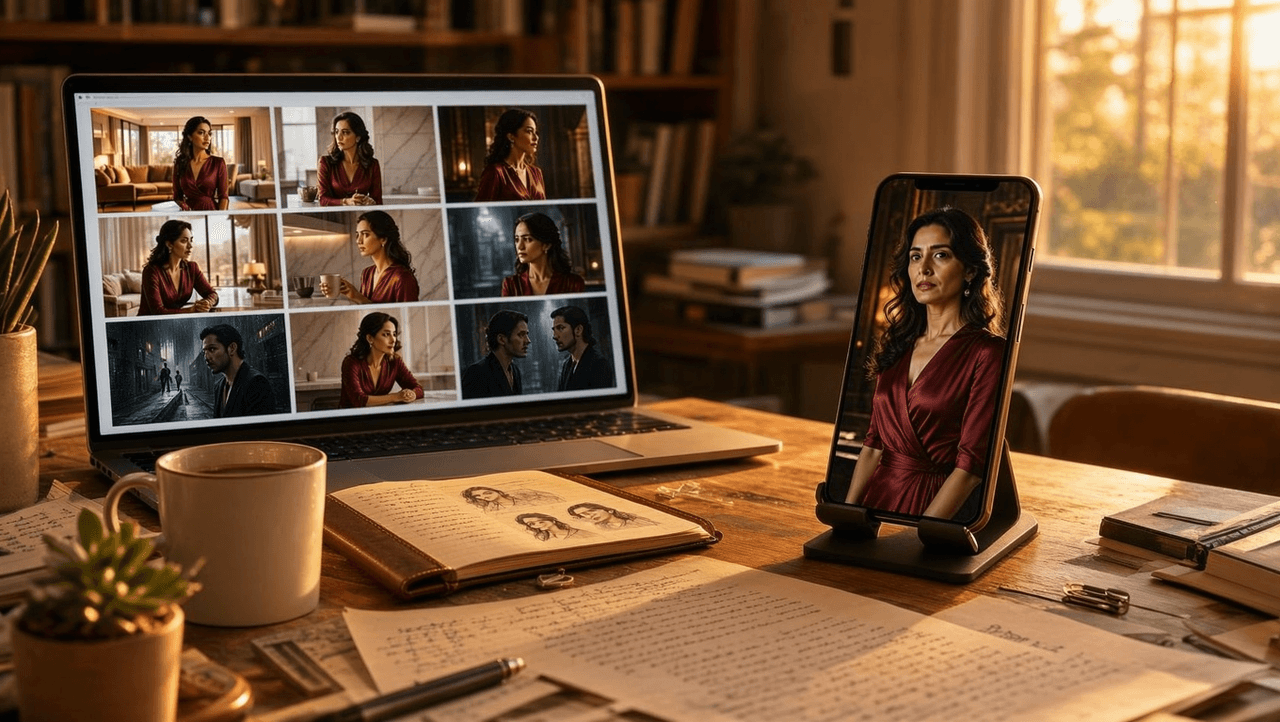
That reflex is a seven-billion-dollar business. It is also, for anyone trying to produce one of these shows, a brutal consistency problem: the same face, the same wardrobe, the same penthouse, held steady across sixty to a hundred episodes. This guide walks through how Seedream 5.0 Pro solves the image half of that problem: casting a repeatable lead, storyboarding episodes in 9:16, repairing continuity, and handing clean frames to a video model. Prompt recipes and a real budget included.
Key Takeaways
- Micro dramas live or die on repeatable characters. Seedream 5.0 Pro holds identity through a reusable "character block" prompt plus up to 10 reference images per run.
- Every still costs a flat $0.045 on Atlas Cloud, so casting, blocking, and continuity mistakes get fixed at image prices, not video prices.
- The Edit endpoint (also $0.045) patches wardrobe, props, and lighting between episodes without recasting the shot.
- A 90-second pilot episode lands near $20 end to end at July 2026 rates, with the Seedance 2.0 video stage claiming almost all of it.
Why Micro Dramas Are Built for Seedream 5.0 Pro
Micro dramas (duanju) are vertical serials with episodes of 30 seconds to 5 minutes, sold one cliffhanger at a time. The format's numbers explain the production pressure. Figures below are from a U.S. International Trade Administration market brief published in December 2025, citing the China Netcasting Service Association and iResearch, plus a CNBC industry profile.
| Micro drama format fact | Figure |
|---|---|
| China market revenue, 2024 | 50.44 billion yuan (about $7 billion), up 34.9% |
| China box office, 2024, for comparison | 47 billion yuan. Micro dramas passed it for the first time |
| Viewers in China by June 2024 | 576 million, 52.4% of the country's internet users |
| Typical episode length | 30 seconds to 5 minutes |
| Typical season length | 60 to 100 episodes |
Now read that last row as a production requirement. A hundred episodes means hundreds of shots of the same two leads. Live-action studios solve it with contracts and continuity supervisors. An AI pipeline solves it with prompts, references, and edits: image-model work, priced in cents while video re-rolls cost dollars. The industry is already staffing for it. A March 2026 industry report profiles China's AI microdrama production lines, including a studio that scaled past 1,200 employees in under six months. Seedream 5.0 Pro, ByteDance's quality-first image flagship announced at the FORCE conference on June 23, 2026 and available by API since July 8, is the casting office, the location scout, and the storyboard artist of this pipeline.
Where to Run Seedream 5.0 Pro for Short Drama Work
Atlas Cloud hosts Seedream 5.0 Pro alongside the rest of the ByteDance family, which matters for this workflow because your image model and your video model share one account and one credit pool. A standard run returns one image at a flat $0.045, whatever size preset you pick. $10 covers about 222 stills, verified on the model page in July 2026.
Method 1: Storyboard in the Seedream 5.0 Pro Playground
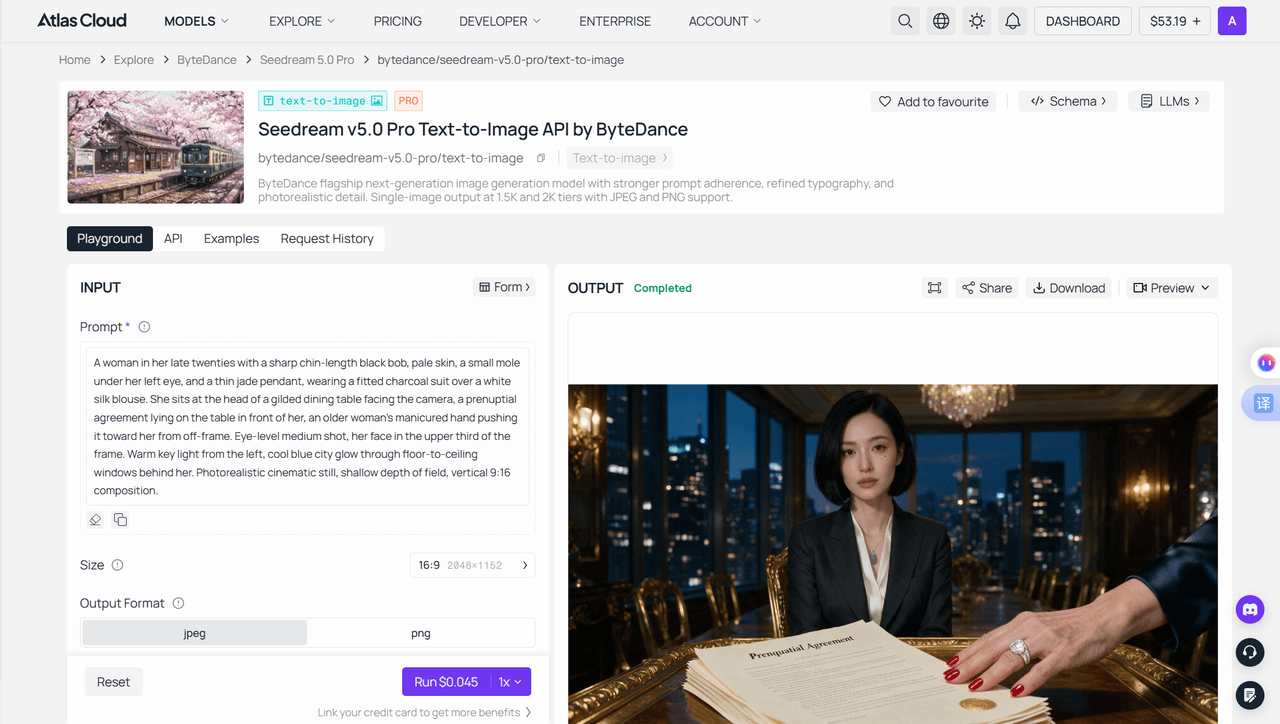
Open the text-to-image playground, log in, and set the size to 1152×2048 before anything else. That is the 9:16 preset, and vertical is not optional in this genre. Write the keyframe prompt (recipes two sections down), run, and iterate. The price under the Run button updates before you commit, so there are no surprises.
Method 2: Batch Episodes Through the Seedream 5.0 Pro API
A season is hundreds of frames. Nobody clicks that many buttons.
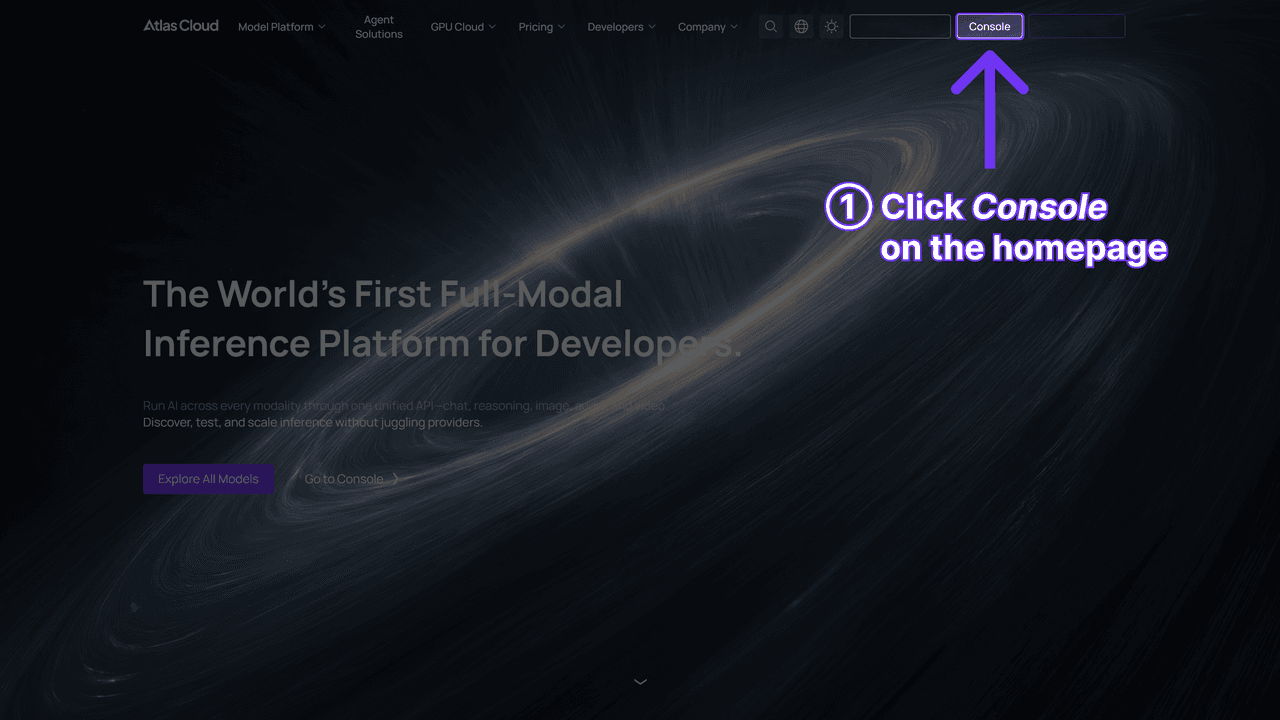
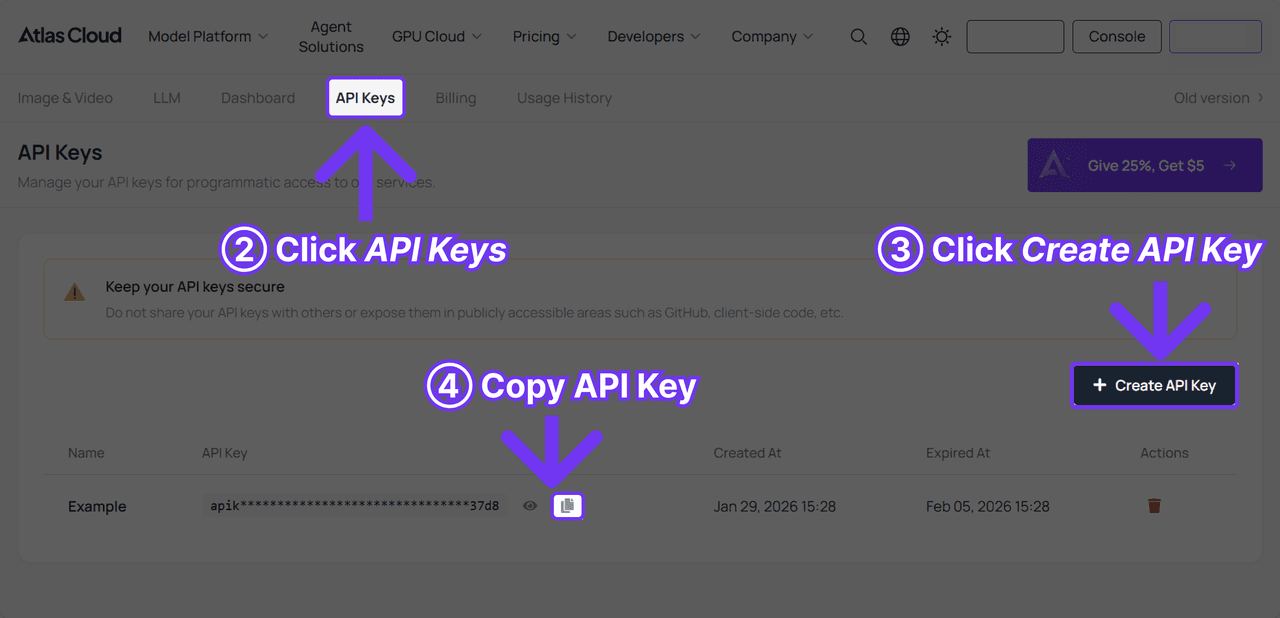
Step 1: Get your API key. Create one in the Atlas Cloud console and keep it server-side.
Step 2: Check the API docs. Endpoints, parameters, and polling live in the API documentation.
Step 3: Make your first request.
plaintext1curl -X POST https://api.atlascloud.ai/api/v1/model/generateImage \ 2 -H "Content-Type: application/json" \ 3 -H "Authorization: Bearer $ATLASCLOUD_API_KEY" \ 4 -d '{ 5 "model": "bytedance/seedream-v5.0-pro/text-to-image", 6 "prompt": "<your keyframe prompt>", 7 "size": "1152*2048" 8 }'
Poll GET /api/v1/model/prediction/ until the job completes. Two API notes that save money on batch storyboarding: the default size is 2048*2048, so always pass size explicitly for vertical work, and setting "thinking": "disabled" skips the model's prompt-optimization pass, which speeds up large batches where your prompts are already tight. The one-API design pays off later: the Edit endpoint and the Seedance video endpoints use the same base URL, the same bearer header, and the same polling loop. Switching models is a model-string swap.
Cast Once: The Seedream 5.0 Pro Character Bible
Micro drama fans forgive cheap sets. They do not forgive a lead whose face drifts between episodes. So before storyboarding anything, build a character bible: a locked prompt plus a locked set of reference images for every recurring character.
The prompt half is the character block, one sentence of 40 to 60 words that pins face, hair, one unmistakable marker, and default wardrobe:
A woman in her late twenties with a sharp chin-length black bob, pale skin, a small mole under her left eye, and a thin jade pendant, wearing a fitted charcoal suit over a white silk blouse.
That sentence opens every prompt she appears in, verbatim. The mole and the pendant are doing real work: distinctive anchors survive regeneration far better than generic prettiness.

The image half uses references, and on Atlas Cloud they travel through the Edit endpoint, which takes 1 to 10 input images alongside the prompt. The text-to-image form has no upload slot, so do not look for one there. The first reference image is free; each additional one adds about $0.003 on top of the $0.045 run. Build the bible itself with text-to-image: a clean model sheet first (front, profile, and back in one frame), then closeups and wardrobe variants as separate runs, one image each. From then on, generate her scenes through Edit with two or three approved stills attached. Prompt plus references is belt plus suspenders, and a season needs both.
Budget reality: a twelve-still bible for your two leads costs $0.54 and gets reused for the entire season.
Storyboard a Micro Drama Episode in Seedream 5.0 Pro
A duanju episode is not a short film. It is a beat machine: hook in the first seconds, one escalation, one reversal, and a cliffhanger you can freeze-frame. Storyboard those beats as keyframes, one per camera setup, all in 1152×2048.
| Beat | Screen time | What the keyframe must show | What changes in the prompt |
|---|---|---|---|
| Cold-open hook | 0 to 10 s | The most shocking image of the episode, mid-action | "champagne mid-splash across her face, guests frozen, marble hotel lobby" |
| Escalation | 10 to 40 s | Power imbalance, two-shot | "she stands rigid while the mother-in-law waves the prenup, gilded dining room" |
| Reversal | 40 to 80 s | The status flip, framed low and close | "she sets a black credit card on the table, faint smile, jade pendant catching light" |
| Cliffhanger | last 10 s | A face reacting to something off-screen | "her eyes widen at the doorway, key light drops to half, shoulders-up framing" |
The character block stays fixed at the front of all four prompts. Lighting direction stays fixed too, one line like "warm key from the left, cool city glow behind" carried through the whole scene, or the edit will feel like four different shows. Write emotion as physical evidence rather than labels: "knuckles white around the phone" animates downstream, "angry" flattens. Keep prompts under 600 words; the model's own guidance recommends it, and beat prompts rarely need 100.
Genre is your shortcut vocabulary. Three premises that map cleanly onto Seedream's strengths, with the palette words to keep in every prompt of that show: the contract-marriage drama (glass penthouse, night skyline, champagne gold), the hidden-heir drama (fluorescent mailroom against marble boardroom), and the regret drama (rain on hospital glass, unread messages glowing on a phone screen). Pick one contrast and let every keyframe restate it.
A worked example, start to finish. Here is the fourth beat, the cliffhanger, as a complete prompt you can run as-is:
A woman in her late twenties with a sharp chin-length black bob, pale skin, a small mole under her left eye, and a thin jade pendant, wearing a fitted charcoal suit over a white silk blouse. She stands at the head of a gilded dining table, eyes wide at someone unseen in the doorway, one hand flat on a signed document. Shot from slightly below at chest height, face in the upper third of the frame. Warm key light from the left dropped to half, cool city glow through the windows behind her. Photorealistic cinematic still, shallow depth of field, vertical 9:16.
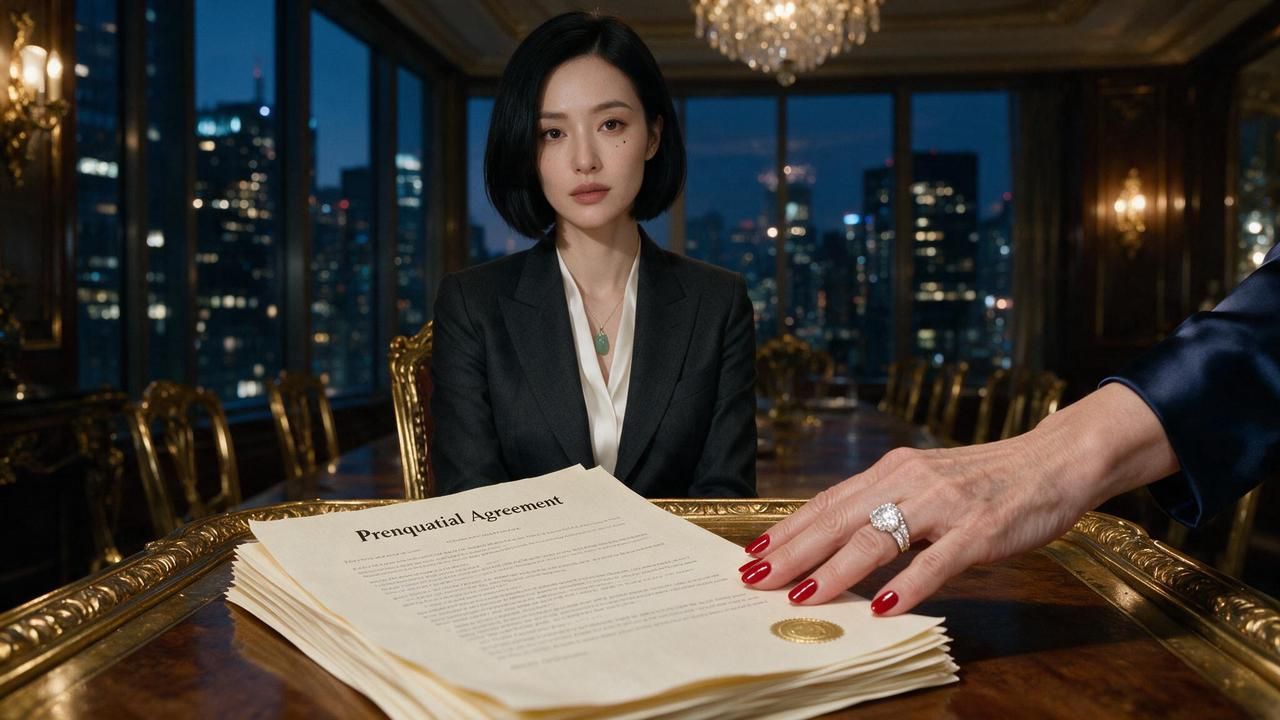
Read it against the recipe. Sentence one is the character block from two sections up, unchanged. Sentences three and four, camera and light, stay fixed for the whole scene. Only sentence two, the action, was written fresh, and the other three beats swap in their own action sentence against the same skeleton. Attach two bible stills through Edit, run all four, and check three things before approving each frame: the face against the bible closeup, the pendant and wardrobe words, and the light still falling from the left. The four-frame board costs about $0.19 with references attached.
Continuity Repairs with Seedream 5.0 Pro Edit
Episode 14 looks perfect except the pendant is missing. Regenerating the shot risks a new face, so do not regenerate. The same Edit endpoint that carries your reference images doubles as a repair bench: it keeps the composition you approved and changes only what you name. Same flat $0.045 per run, model string bytedance/seedream-v5.0-pro/edit, with the images array the only required field beyond the prompt.
| Continuity problem | Edit instruction pattern |
|---|---|
| Wardrobe drift between episodes | "Change her blazer to the fitted charcoal suit from the reference, keep pose and lighting" |
| Missing signature prop | "Add the thin jade pendant at her collarbone, natural shadow" |
| Scene shot at wrong time of day | "Shift the window light to blue evening, interior lamps on" |
| Story-driven change | "Add a healing cut above the right eyebrow" for the post-accident arc |
| Set redress across a season | "Replace the abstract painting with a family portrait" after the reveal |
The last two rows are the interesting ones. Continuity editing is not just damage control; deliberate, trackable changes are how a still-image pipeline shows time passing.
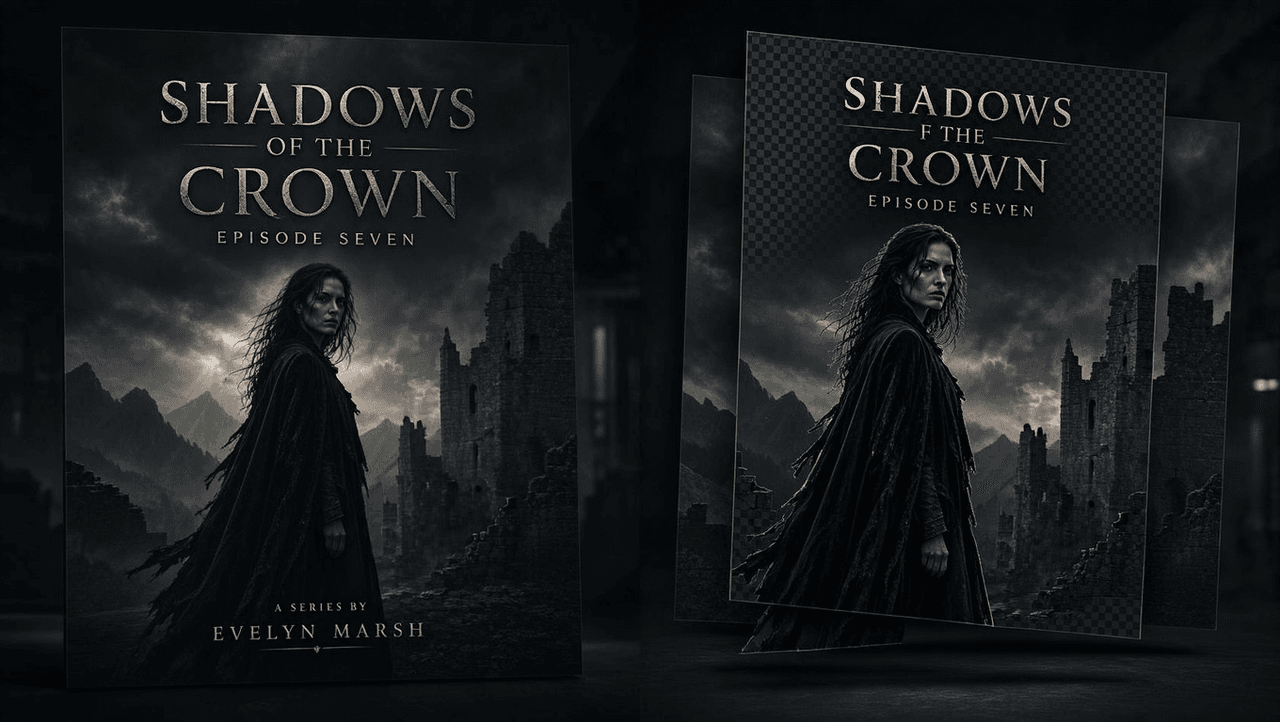
Packaging is the other between-episodes job. Seedream 5.0 Pro renders legible in-image text in 15 languages, which handles episode title cards and localized cover art for a genre that exports aggressively. For covers you plan to re-typeset, use layer separation: one prompted run can return the scene as a background plus separate alpha-channel element layers, the one exception to one-image-per-run (2 to 20 images, billed per image), so the title text lives on its own layer and your designer swaps languages without touching the artwork.
From Seedream 5.0 Pro Stills to Seedance 2.0 Episodes
Approved keyframes become episodes in Seedance 2.0 image-to-video: load a keyframe as the first frame, describe the performance, and generate 4 to 15 seconds per run with native audio, at 720p by default. Two handoff details are worth knowing. First, Seedream 5.0 Pro text-to-image outputs are treated as trusted inputs across the Seedance family and skip input moderation review, which removes a stall point when you submit dozens of clips. Edit outputs earn the same status only after account verification, and a reference-driven pipeline leans on Edit, so get verified before the season starts. Second, enable "return last frame" so each clip's closing frame can seed the next run, keeping a two-part scene continuous.
The smallest real episode: one still, one run. Fifteen seconds is Seedance 2.0's ceiling for a single generation, and multi-shot prompting fits a three-beat scene inside it. That makes a self-contained cliffhanger teaser a two-step job. Take the keyframe skeleton from the storyboard section and swap in a new action sentence: "She sits at the head of a gilded dining table facing the camera, a prenuptial agreement lying on the table in front of her, an older woman's manicured hand pushing it toward her from off-frame." Generate the still, load it as the first frame, then hand the drama to the motion prompt:
SHOT 1: The older woman's hand slaps the prenuptial agreement on the table; the seated woman looks down at it, jaw tight, a breath held. SHOT 2: Close-up on the table as she sets a matte black credit card on the document, a faint smile, the jade pendant catching the light. SHOT 3: Slow push-in. She looks up past the camera, eyes widening at someone entering off-screen, and the warm key light drops to half. Ambient sound only: cutlery going quiet, a chair scraping back, a heavy door opening. No dialogue.
Settings: duration 15, resolution 720p, ratio on adaptive so the clip follows the 9:16 frame, audio on, watermark off. The whole teaser is one still plus one video run, about $2.95 at the current discounted rate ($3.67 at list). It is also the cheapest possible market test in this genre: post the teaser, watch the completion rate, and only then budget the season.
Here is a 90-second pilot episode at July 2026 prices on Atlas Cloud. Note the split: Seedance 2.0 and 2.0 Mini currently carry a 20% limited-time discount, while Seedream 5.0 Pro is at its regular price.
| Stage | Model | Volume | Cost |
|---|---|---|---|
| Character bible (reused all season) | Seedream 5.0 Pro | 12 stills at $0.045 | $0.54 |
| Episode keyframes, with re-rolls | Seedream 5.0 Pro | 16 stills at $0.045 | $0.72 |
| Continuity fixes | Seedream 5.0 Pro Edit | 4 edits at $0.045 | $0.18 |
| Motion drafts on risky shots | Seedance 2.0 Mini, 720p | 3 clips × 10 s at $0.045/s ($0.056 list) | $1.35 |
| Final clips | Seedance 2.0 image-to-video, 720p | 90 s at ≈$0.1935/s ($0.2419 list) | ≈$17.42 |
| Total | one 90 s pilot | ≈$20 |
Two footnotes on the math. Keyframes generated with two reference stills attached cost $0.048 instead of $0.045, since the first reference is free, which adds about a nickel across sixteen runs. And without the video discount the same pilot runs about $25. Either way, the image stages total under $1.50 while deciding everything the viewer will actually judge: who the lead is, how the frame reads, whether episode 14 matches episode 2. A 5-second 720p Seedance clip quotes about $0.97 in the playground right now ($1.21 at list), so every bad decision that reaches the video stage costs twenty stills' worth of fixes. Spend the dimes before the dollars.
Frequently Asked Questions
How much does a micro drama episode cost with Seedream 5.0 Pro?
About $20 for a 90-second 720p vertical pilot at July 2026 rates: under $1.50 in Seedream 5.0 Pro stills and edits, roughly $1.35 in Seedance 2.0 Mini drafts, and about $17.40 in final Seedance 2.0 clips with the current 20% video discount applied. At list video prices the total is near $25. The character bible portion is one-time and amortizes across the season.
Can Seedream 5.0 Pro keep the same actor across a 60-episode season?
Yes, with discipline. Lock a 40-to-60-word character block and paste it verbatim into every prompt, give the character one or two distinctive anchors (a mole, a pendant), and attach two or three approved stills from your character bible on every run. Reference runs go through the Edit endpoint, which takes up to 10 input images; the first is free and extras cost about $0.003 each.
What image size should Seedream 5.0 Pro frames use for short drama apps?
1152×2048, the 9:16 vertical preset. Set it in the playground size picker, and always pass "size": "1152*2048" in API calls, because the API defaults to square 2048*2048 if you omit it.
Does Seedream 5.0 Pro generate the video episodes themselves?
No. It is an image model that returns one still per standard run. The episodes come from pairing it with an image-to-video model; Seedance 2.0 accepts a Seedream keyframe as its first frame, generates 4 to 15 seconds per run with audio, and treats Seedream 5.0 Pro text-to-image outputs as trusted inputs that skip input moderation.
Can Seedream 5.0 Pro make localized title cards for exported short dramas?
Yes. It renders in-image text in 15 languages, and layer separation can return a cover as background plus separate alpha-layer elements in a single prompted run, so title text sits on its own layer for re-typesetting. Layered runs return 2 to 20 images and are billed per image.
Conclusion
Micro drama is a volume game played with a tiny cast. That is precisely the shape of problem an image model solves best: decide the face once, storyboard in beats, patch continuity for $0.045, and only pay video prices for performances you have already approved frame by frame. The format's whole grammar, the hook, the reversal, the freeze-frame cliffhanger, is storyboard grammar.
Start smaller than a season. Build one character bible, storyboard one four-beat episode, and spend twenty dollars finding your show's contrast. If the cliffhanger frame makes you want episode two, you have a series.





