Two designers paste the same prompt into two apps. Both apps say Seedream 5.0 Pro in the model picker. One returns an image. The other returns a refusal before the progress bar moves. Neither designer is wrong about which model they used.
That gap is the whole subject here. ByteDance ships one set of weights and a stack of switches around them, and every company that resells the model picks its own settings for those switches. Resolution ceiling, watermark, price tier, which filter runs and how hard. This piece maps the routes, quotes only numbers that survive a check against first-party documentation, and works through two July 2026 field reports that show how far apart the endpoints can land.
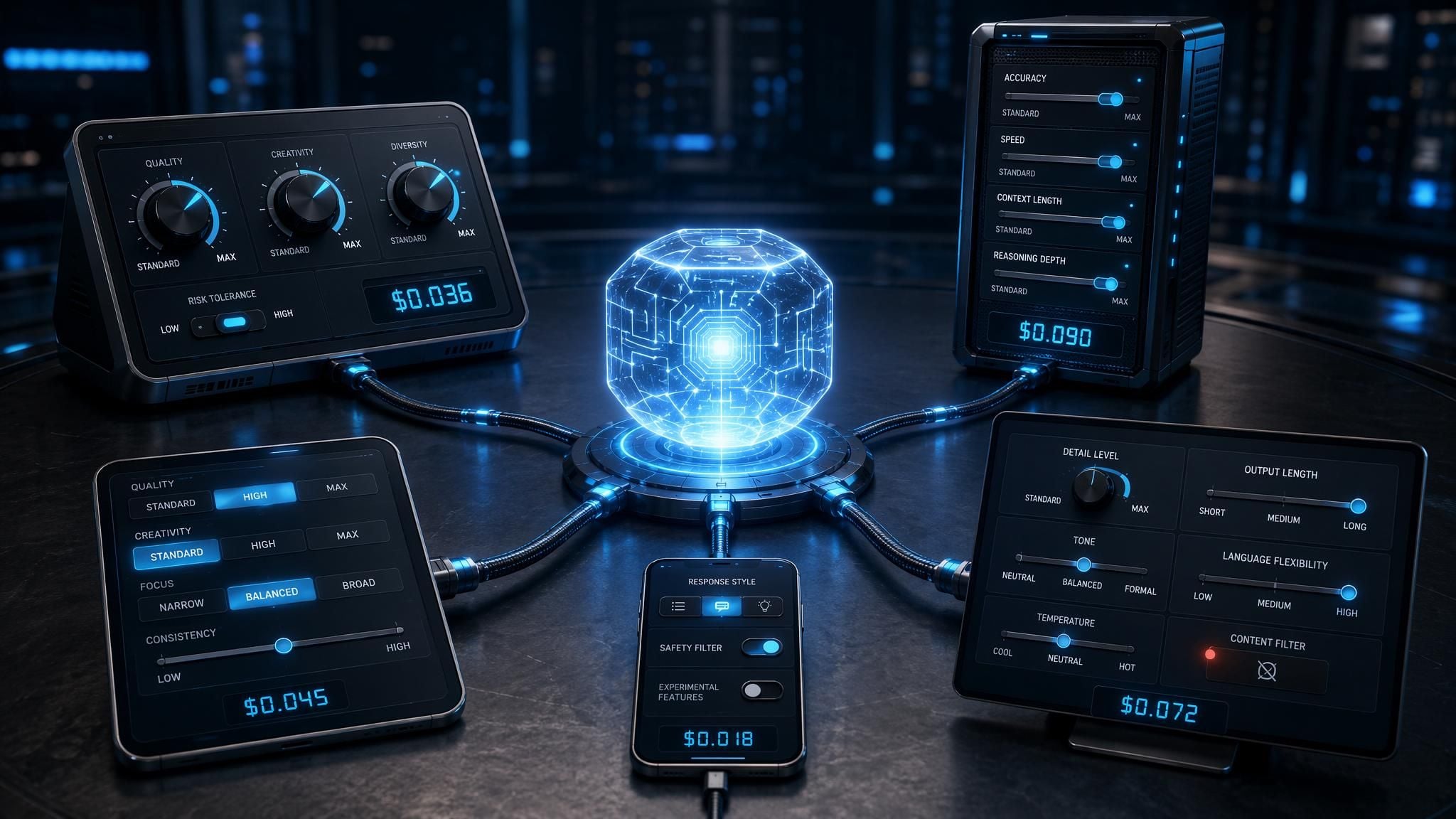
Key Takeaways
- Seedream 5.0 Pro weights are not public, so every route is an API call to ByteDance. Even node-based workflow tools reach it through a partner node that requires a login.
- ByteDance runs content checks as separate pipeline stages with their own error codes, including a post-generation check on the finished image. The policy lives around the model rather than inside the weights.
- The API carries a watermark flag that defaults to true and stamps "AI generated" in the lower-right corner. Whether you see that mark tells you what the channel you are using left switched on.
- First-party output pricing splits at 2.36 megapixels: $0.045 below, $0.09 above. Atlas Cloud quotes $0.036 per run at its default preset as of July 27, 2026, a 20% cut from the $0.045 list price that runs through August 5.
- Two July field reports probe the same edge. One tester got intimate-apparel commerce creative that they say GPT Image 2 refused. Another posted design-app output they judged explicit enough to blur before publishing.
Every Seedream 5.0 Pro Route Ends at the Same API
ByteDance has not released Seedream weights. There is no checkpoint to download, no local inference, no offline mode. Whatever the interface looks like, a Seedream 5.0 Pro image is generated on ByteDance hardware and sent back over HTTP, and the differences creators argue about are differences in the wrapper.
The wrappers fall into five shapes, three of them run by ByteDance itself.
| Route | What you are actually calling | Who sets the limits |
|---|---|---|
| ByteDance's domestic cloud | doubao-seedream-5-0-pro-260628 on ark.cn-beijing.volces.com | ByteDance, with account-level onboarding |
| ByteDance's international cloud | dola-seedream-5-0-pro-260628 on ModelArk, regions ap-southeast-1 and eu-west-1 | ByteDance, same model, separate console |
| ByteDance consumer apps | A subscription tier wrapped around the same model | ByteDance product teams, not the API defaults |
| Node-based workflow tools | A partner node that posts your prompt to the vendor API | The tool vendor picks defaults, ByteDance still gates content |
| Inference platforms and design apps | A reseller's endpoint over the official API | The reseller, on top of whatever ByteDance enforces |
Notice the two model ID strings. The same release carries a different name on each cloud, which is the first hint that "Seedream 5.0 Pro" is a family of deployments rather than one endpoint.
The workflow-tool row surprises people. ComfyUI users are used to weights on disk and no rules, and the Seedream 5.0 Pro node feels the same until you read the requirements: the partner nodes need a logged-in account and a permitted network environment, and billing runs per successfully generated image. The graph is local. The generation is not.
One more thing worth checking before you trust a channel's marketing copy. ComfyUI's partner-node page advertises resolutions up to 4K and editing across up to 14 reference images. ByteDance's own API reference caps total output pixels at 4,624,220, roughly 2048×2048 plus a margin, and describes multi-reference generation at 2 to 10 images. A true 4K frame is 8.3 million pixels, so it does not fit. Resale copy drifts from the spec sheet, and the spec sheet is the one the server enforces.
Seedream 5.0 Pro Moderation Runs as Separate Gates
Here is the part that explains the two designers in the opening. ByteDance does not implement content policy as a property of the model. It implements it as checkpoints in the request path, each with its own HTTP 400 error code.
| Error code | What tripped | Stage |
|---|---|---|
| InputTextSensitiveContentDetected | Your prompt text | Before generation |
| InputImageSensitiveContentDetected | A reference image you uploaded | Before generation |
| InputTextSensitiveContentDetected.PolicyViolation | Prompt text flagged for copyright | Before generation |
| OutputImageSensitiveContentDetected | The finished image the model produced | After generation |
| SensitiveContentDetected | Generic prompt-level refusal | Before generation |
Read the fourth row again. A classifier inspects the rendered image after the model has already drawn it, and it can reject work the prompt filter waved through. That is a second, independent judgment on the same request, which is one reason identical wording can pass on one attempt and fail on the next.
The billing side backs this up. ByteDance's published price table notes that images which fail to output for reasons such as content moderation are not charged. When the output-side check is the one that fires, ByteDance absorbs the cost of an inference it already ran.
Now the flag that makes channel differences visible to the naked eye. Both the international and domestic API references document a watermark boolean that defaults to true and stamps "AI generated" into the lower-right corner of the output. The domestic reference's own sample request passes "watermark": false. So every integrator chooses, and their choice ends up on your deliverable. If you have ever wondered why the same model leaves a mark in one app and a clean file in another, that is the switch.
What none of this documentation says is whether resellers can loosen the content classifiers themselves. The error codes and the watermark flag are published. Moderation thresholds are not. Keep that boundary in mind when you read the two field reports later in this article, because it is exactly where speculation starts.
Running Seedream 5.0 Pro on Atlas Cloud
If your goal is a reference point that behaves like the documentation, you want the official model with nothing added and nothing hidden. Atlas Cloud runs image, video, audio, and language models from every major provider behind one API key, billed per run with no subscription. Seedream 5.0 Pro sits in the ByteDance family next to 5.0 Lite, 4.5, and the Seedance video line, and the Seedream 5.0 Pro playground runs it in the browser.
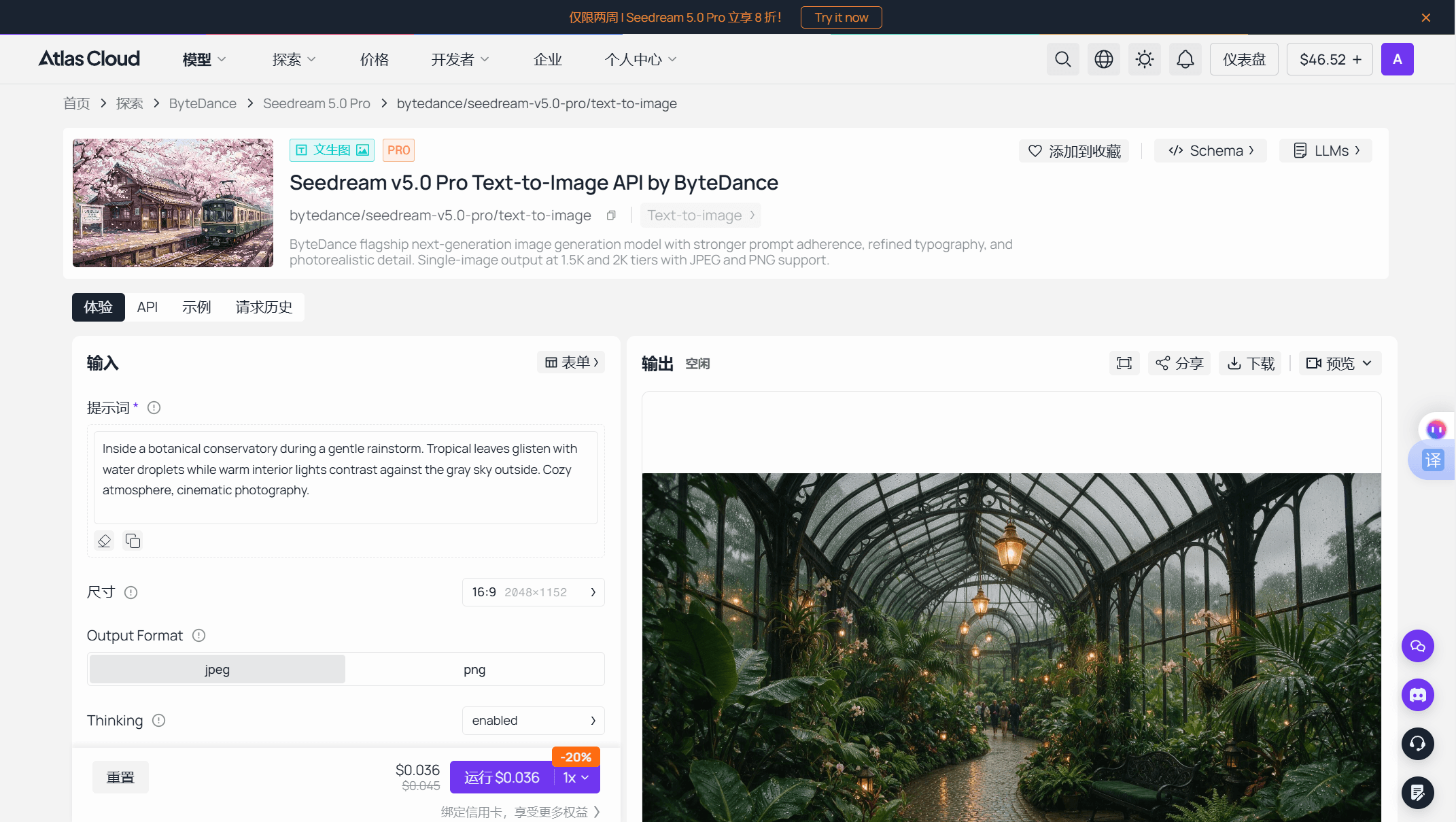
At the default 16:9 preset the playground quotes $0.036 per run as of July 27, 2026, a 20% promotion off the $0.045 list price running through August 5, with $10 covering roughly 277 runs. The edit endpoint quotes the same figure.
That number comes with a caveat that happens to prove this article's point. The Run button quote holds steady when you switch size presets, while the parameter schema on the same endpoint says billing follows total output pixels, splitting at 2.36 megapixels into a 1.5K tier and a 2K tier. One of those two surfaces is telling an incomplete story. Until someone runs a job at each tier and reads the invoice, treat $0.036 as confirmed for the default preset and open above 2.36 megapixels.
One field in the response body is worth knowing about. Completed predictions come back with has_nsfw_contents, an array of booleans, one per output, so you get the classifier's read alongside the image instead of only a pass or fail.
To be plain about scope: this is the official ByteDance API, so ByteDance's gates apply in full. It will not produce explicit material. That predictability is the point of a baseline.
Method 1: Seedream 5.0 Pro in the Playground
Log in, open the playground, and the model is ready with no setup.
Step 1: Paste your prompt. One required field. The schema recommends staying under 600 English words.
Step 2: Set the size. Thirteen presets are available, from 1024×1024 up to the square 2048×2048 that tops out the pixel budget. The picker opens on 16:9 at 2048×1152.
Step 3: Read the quote, then run. The Run button carries the per-run price with the discount badge and the crossed-out list price beside it, so the cost is on screen before you commit rather than on a bill afterwards.
Step 4: Collect the output. Finished images arrive with download controls and follow-on paths into image-to-image and image-to-video.
Method 2: Seedream 5.0 Pro Through the API
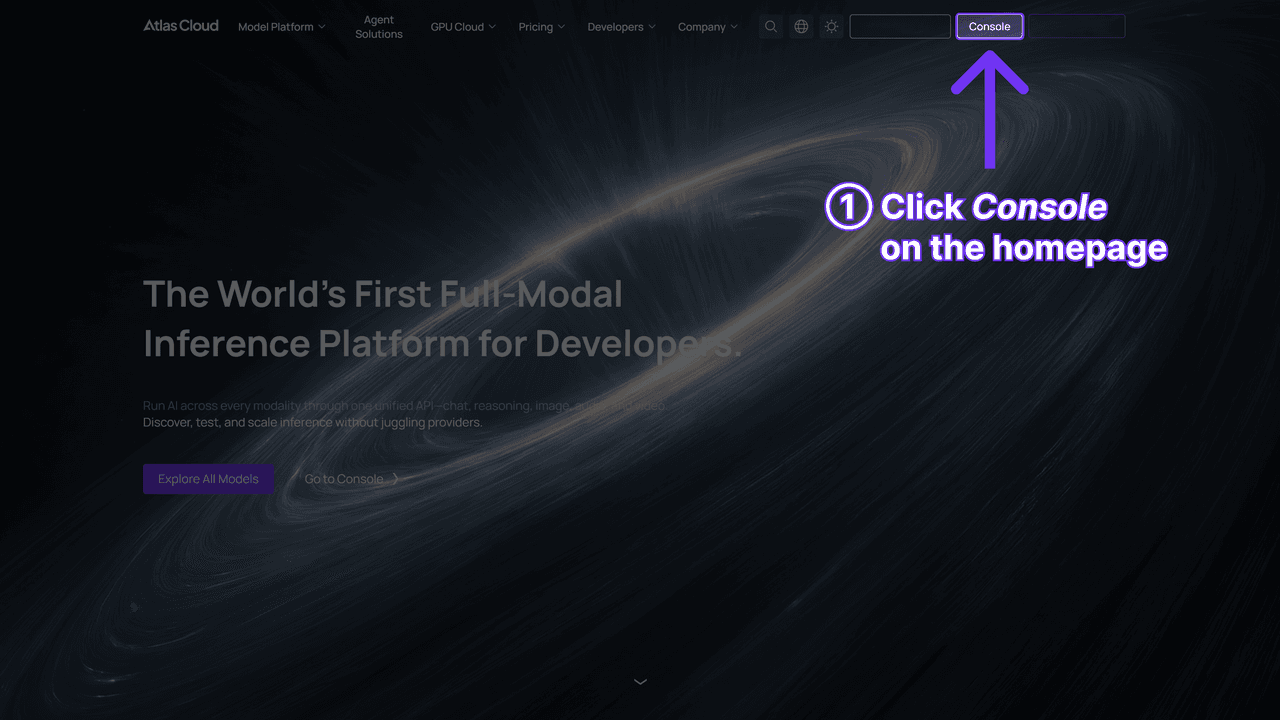
Generation is asynchronous. Submit a job, take the prediction ID, poll until it finishes.
Step 1: Get your API key. Create one in the Atlas Cloud console, copy it, and store it as an environment variable rather than in client code.
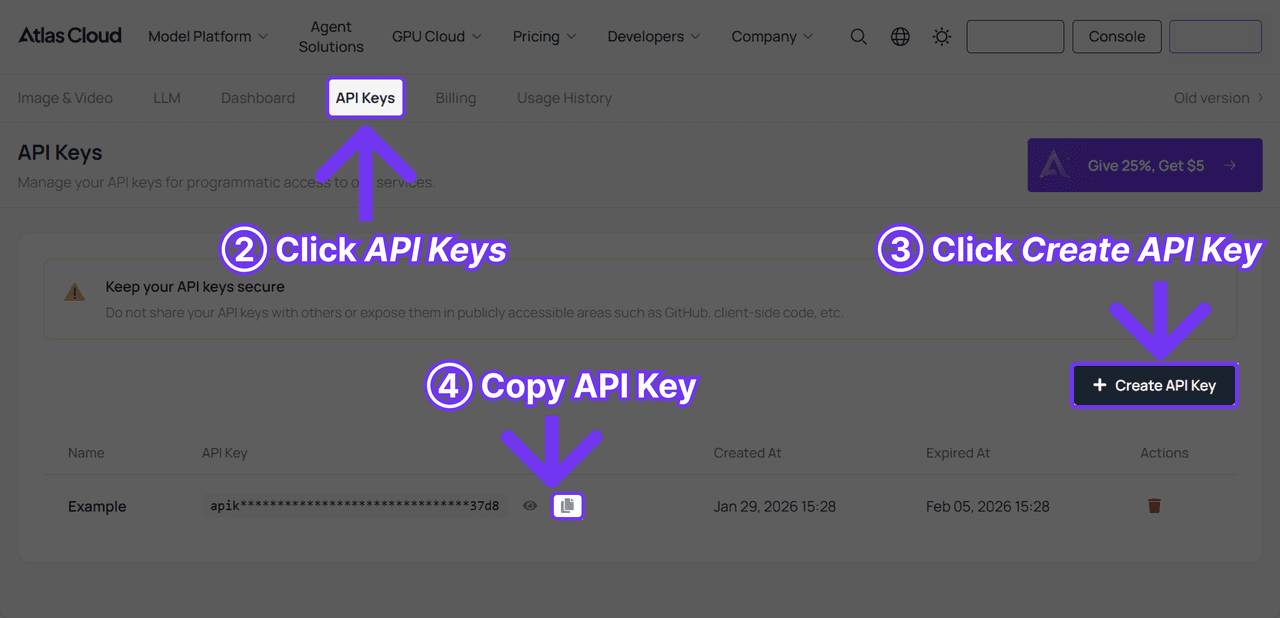
Step 2: Check the docs. Parameters, auth, and endpoint paths live in the API documentation.
Step 3: Send the first request.
plaintext1curl -X POST https://api.atlascloud.ai/api/v1/model/generateImage \ 2 -H "Content-Type: application/json" \ 3 -H "Authorization: Bearer $ATLASCLOUD_API_KEY" \ 4 -d '{ 5 "model": "bytedance/seedream-v5.0-pro/text-to-image", 6 "prompt": "<your prompt>", 7 "size": "2048*1152", 8 "output_format": "png", 9 "thinking": "enabled" 10 }'
Only model and prompt are required. Pass size anyway, because the API defaults to the square 2048*2048 while the playground defaults to 16:9. Then poll:
plaintext1curl https://api.atlascloud.ai/api/v1/model/prediction/<prediction_id> \ 2 -H "Authorization: Bearer $ATLASCLOUD_API_KEY"
The payoff shows up on your second model. One API covers the platform: same key, same auth header, same submit-and-poll shape. Moving to Seedream 5.0 Lite or 4.5 is a one-string change on the same endpoint, and video models follow the identical pattern against generateVideo instead.
A Seedream 5.0 Pro Render That Cleared a Design App's Filter
On July 23, 2026, an X user posted a canvas screenshot from the design agent Lovart with a blunt question, translated from Chinese: did Lovart forget to add a moderation layer? They said they had only seen output at that level from Grok Image before, then floated a theory. Are Seedream 5.0's generation and moderation two separate systems, and did Lovart buy the generation without the moderation?
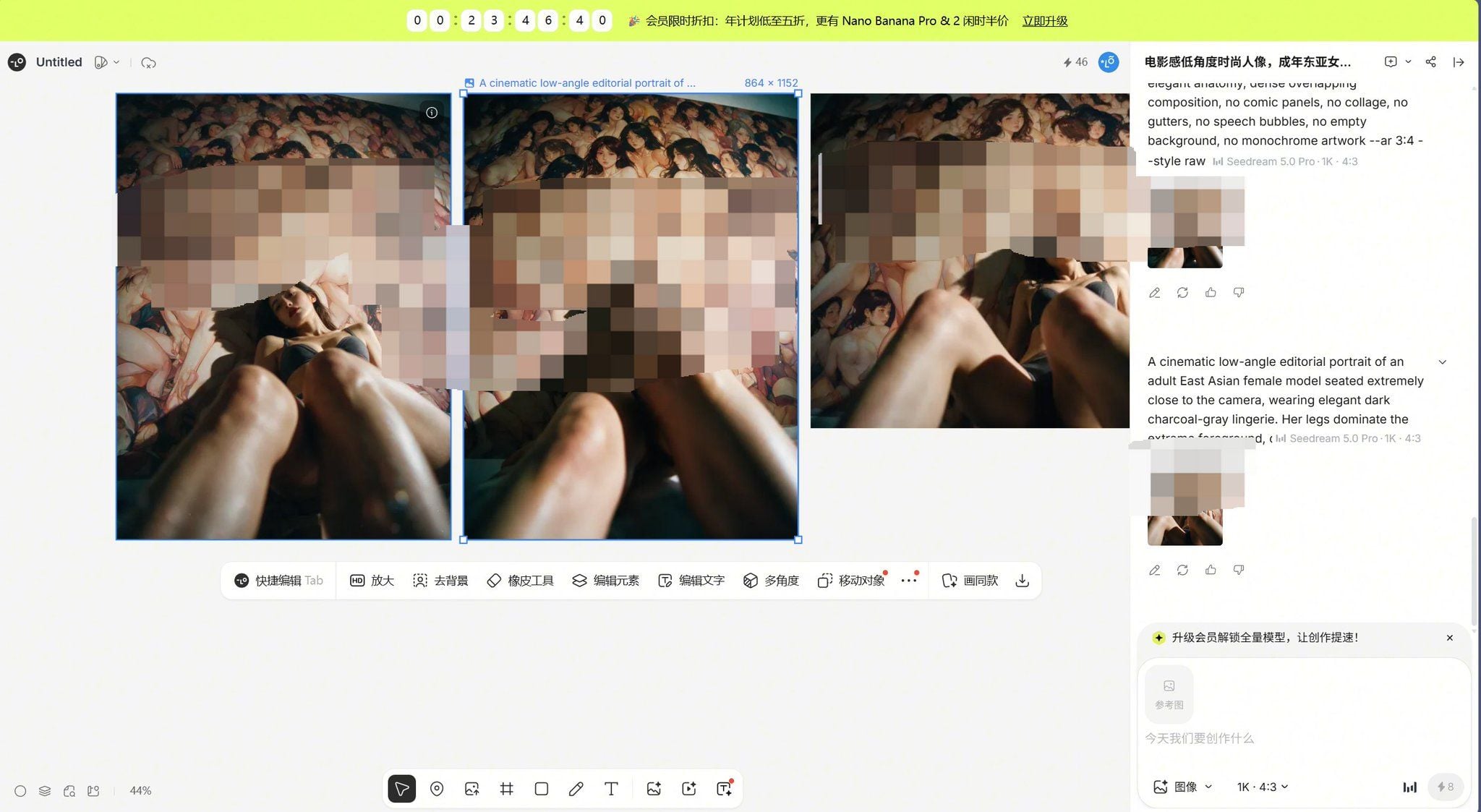
Source: @liyue_ai's canvas screenshot on X, July 23, 2026. The mosaic was applied by the poster before publishing.
What the screenshot actually establishes is narrow, so let us keep to it. The renders are tagged Seedream 5.0 Pro at 1K and 4:3 inside the app's own interface. The prompt is in English and asks for a cinematic low-angle editorial portrait of an adult model in charcoal-gray lingerie, with phrasing about elegant anatomy and dense overlapping composition. Each render cost 8 credits. The poster judged the result explicit enough to pixelate before posting, and that judgment is theirs, not something a reader can verify from a blurred image.
The interesting part is the theory, because ByteDance's documentation makes it structurally plausible without confirming it. Content checks are separate gated stages, as the error-code table shows. A design agent could route around a stage, run on an account configured differently, or apply a looser threshold of its own. It could also be that the prompt simply did not trip the classifiers on that run. Nobody outside the two companies can tell the difference from a screenshot, and Lovart has said nothing publicly about how it configures the model.
Practical read for anyone building on an app like this: your output behavior is a vendor setting you do not control and were never shown, and it can be changed without notice.
Seedream 5.0 Pro Output Reveals Which Defaults a Channel Kept
The second report turns out to be useful for a reason its author never mentioned. On July 9, 2026, the day after launch, a tester posted a six-panel intimate-apparel product set built with Seedream 5.0 Pro, noting that the same prompt had been "basically refused" by Image 2, their shorthand for GPT Image 2.

Source: @GeekCatX's product set on X, July 9, 2026.
Start at the bottom-right corner. The "AI generated" watermark sits exactly where the API reference says the default puts it, which pins down one setting on the channel this tester used: watermark was left at true. A channel that flipped it to false would have returned the same six panels as clean files, with nothing about the model changed. Everything in this article about configuration living outside the weights is visible in that one corner of a real deliverable.
The content around it is ordinary catalog work. Clothed model, product-feature callouts, marketing copy in Chinese, the kind of creative an intimate-apparel storefront normally pays a photographer for. Commerce categories that sit close to the line, lingerie and swimwear and medical illustration and fitness among them, are where filter false positives cost real money, which makes them a practical probe for finding where a channel actually draws its boundary.
The cross-model comparison deserves less weight than the watermark does. The prompt was never published, and one refusal from one tester is not a measured rate. Read it as a reason to run your own category test on whichever channel you are shortlisting.
Choosing a Seedream 5.0 Pro Channel for Your Work
Price is the axis with hard numbers behind it, so settle it first and give the rest of the decision more room.
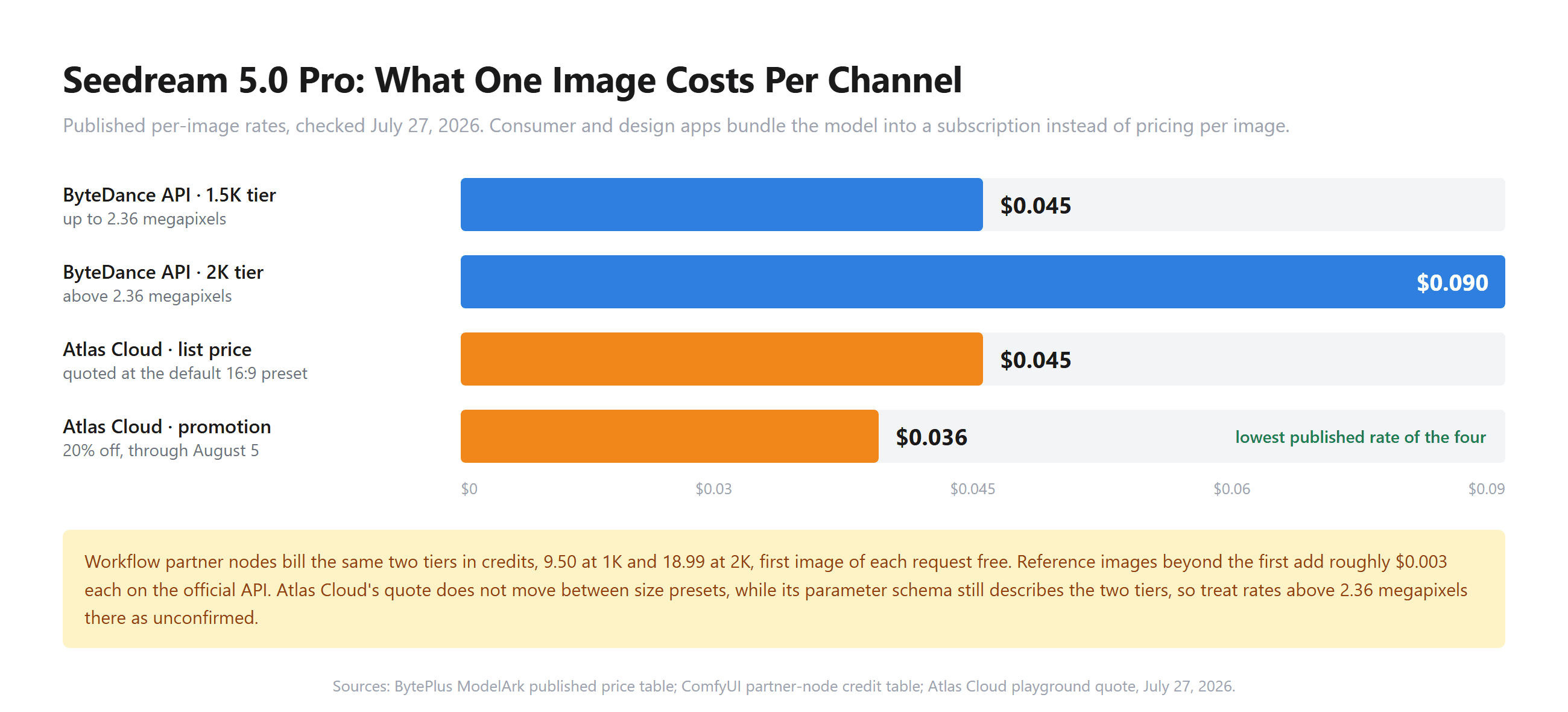
Sources: ByteDance's published ModelArk price table, ComfyUI's partner-node credit table, and the Atlas Cloud playground quote checked July 27, 2026.
The megapixel split is the number to carry around. On the official API, crossing 2.36 megapixels doubles the bill: a 2048×1152 banner stays in the lower tier, a 2048×2048 square does not. Whether a given reseller passes that split through, flattens it, or documents it two different ways is a per-platform question, as the schema mismatch earlier in this article shows. Subscription apps skip per-image cost altogether. Magnific's launch post on July 8, 2026 offered unlimited generations at 1.5K resolution, powered by BytePlus, and if your deliverables live at that resolution, unlimited volume beats a per-image discount at sizes you were never going to render.
Cost rarely decides this on its own, though. What usually decides it is the thing each route quietly takes away from you:
| Route | What you give up | Time to move off it |
|---|---|---|
| Subscription creative app | Resolution headroom, plus any say in how the filter is tuned | The first client deliverable that needs a print-size crop |
| Third-party inference platform | Control over promotional pricing windows and which models get added | When a model you depend on is not carried |
| Official ByteDance cloud | Convenience, since you maintain the integration and pick between two regions and two model IDs | When nobody on the team owns that integration |
| Workflow partner node | Offline reproducibility, because every run needs an account and a permitted network | When a graph has to run unattended or disconnected |
| ByteDance consumer app | Programmatic access entirely | The moment output has to enter an automated pipeline |
Frequently Asked Questions
Where can you use Seedream 5.0 Pro?
Through ByteDance's own clouds in two variants, doubao-seedream-5-0-pro-260628 domestically and dola-seedream-5-0-pro-260628 on ModelArk internationally, through ByteDance's consumer creative apps, through partner nodes in workflow tools like ComfyUI, and through third-party inference platforms and design apps that resell the API. Atlas Cloud runs it in a browser playground and behind a single API key.
Can you run Seedream 5.0 Pro locally?
No. ByteDance has not published the weights, so there is no checkpoint to download and no offline route. A Seedream 5.0 Pro node inside a local workflow tool is a network call to a vendor API that requires a logged-in account, and it bills per successfully generated image just like any other API access.
Why does Seedream 5.0 Pro block a prompt on one platform but not another?
Because content checking happens in stages that sit outside the weights. ByteDance's error table lists distinct codes for prompt text, uploaded reference images, and the finished output image, and each channel wraps its own configuration, sometimes plus an extra filter of its own, around that stack. A refusal can also come from the app layer entirely, which is why testing the same prompt on a second channel is the fastest diagnostic.
Does Seedream 5.0 Pro add a watermark to generated images?
The API's watermark parameter defaults to true and places an "AI generated" mark in the lower-right corner. Each platform decides whether to leave that default alone. The domestic API reference's own sample request sets it to false, so a clean file is available to integrators who ask for one, and the presence of the mark tells you what your channel chose.
What does Seedream 5.0 Pro cost per image?
ByteDance's published output pricing splits by pixel count: $0.045 at or under 2.36 megapixels and $0.09 above it, with the first input reference image free and roughly $0.003 for each additional one. Atlas Cloud quotes $0.036 per run at its default preset as of July 27, 2026, a 20% reduction from the $0.045 list price running through August 5, on both the text-to-image and edit endpoints.
Is Seedream 5.0 Pro less restricted than GPT Image 2?
One tester reported on July 9, 2026 that intimate-apparel product creative rendered on Seedream 5.0 Pro while the same prompt drew a refusal from GPT Image 2. That covers a single unpublished prompt in one category, falls well short of a measured comparison, and says nothing about explicit content, which the official Seedream API refuses. Treat it as a reason to run your own category test rather than as a ranking.
Conclusion
The argument about which platform is looser usually skips a step. Before you can compare filters, you have to notice that the filters are a separate layer from the model, sitting in front of it and behind it as numbered checkpoints, with a watermark switch beside them and a ByteDance price table that doubles at 2.36 megapixels. Every reseller inherits that stack and configures it, and almost none of them publish what they chose.
A better question to carry into a channel comparison: how much of the configuration can you actually see? Published error codes, a visible per-run price, a returned classifier flag, a documented size cap. Those you can check. Vendor marketing that promises 4K on a model capped near 4.6 million pixels gives you nothing to check, and the July field reports show how quickly that gap turns into someone's production problem.





