One creator typed 170 words to get a photo that looks like nobody typed anything at all. Another ended her prompt with a 17-item blocklist. Both posted their Seedream 5.0 Pro results within hours of each other on the morning of July 20, 2026, and their posts teach more than most official docs.
This guide is built from those real generations: what worked, what broke, and how to skip the expensive part of the learning curve.
Key Takeaways
- The most-shared Seedream 5.0 Pro prompts win through *imperfection engineering*: sensor noise, handheld softness, and "no beauty filters" do more for realism than any "8K" keyword.
- There is no dedicated negative-prompt field on the Atlas Cloud playground for this model. Creators write exclusions into the prompt itself, in two distinct patterns shown below.
- The most-reported problems so far: garbled long text (a weakness ByteDance itself admits), over-smoothed skin compared to Seedream 4.5, action overshoot in dynamic scenes, and content-filter false positives.
- Seedream 5.0 Pro returns exactly one image per request and caps output at 2048×2048 total pixels. Resolution words in your prompt do not raise that ceiling.
Inside a Seedream 5.0 Pro Prompt That Actually Works
Start with the strongest teaching example of the week. On July 20, 2026, creator @saniaspeaks_ posted four renders of a nighttime street portrait, with the full 170-word prompt attached:
Ultra-realistic smartphone photo of a beautiful young Japanese woman with smooth fair skin, soft natural facial features, large expressive brown eyes, glossy pink lips, and long straight silky black hair with wispy side-swept bangs, wearing an oversized plain white T-shirt. She is standing naturally beside a pedestrian crossing on a quiet city street at night, looking directly at the camera with a calm, slightly shy expression. The background features modern buildings, leafy trees, parked scooters, wide roads, warm streetlights, and softly glowing city lights with a peaceful urban atmosphere. The image is framed from the waist up at eye level, as if casually taken by a friend using a modern flagship smartphone. Realistic night-mode photography with subtle HDR, authentic skin texture, slight handheld imperfections, natural sensor noise, gentle motion softness, balanced exposure, accurate white balance, and realistic computational photography. No DSLR look, no studio lighting, no beauty filters, no artificial bokeh, no AI-perfect sharpness—just a genuine candid mobile phone photo with an authentic social media aesthetic, ultra-photorealistic, 3:4 aspect ratio.
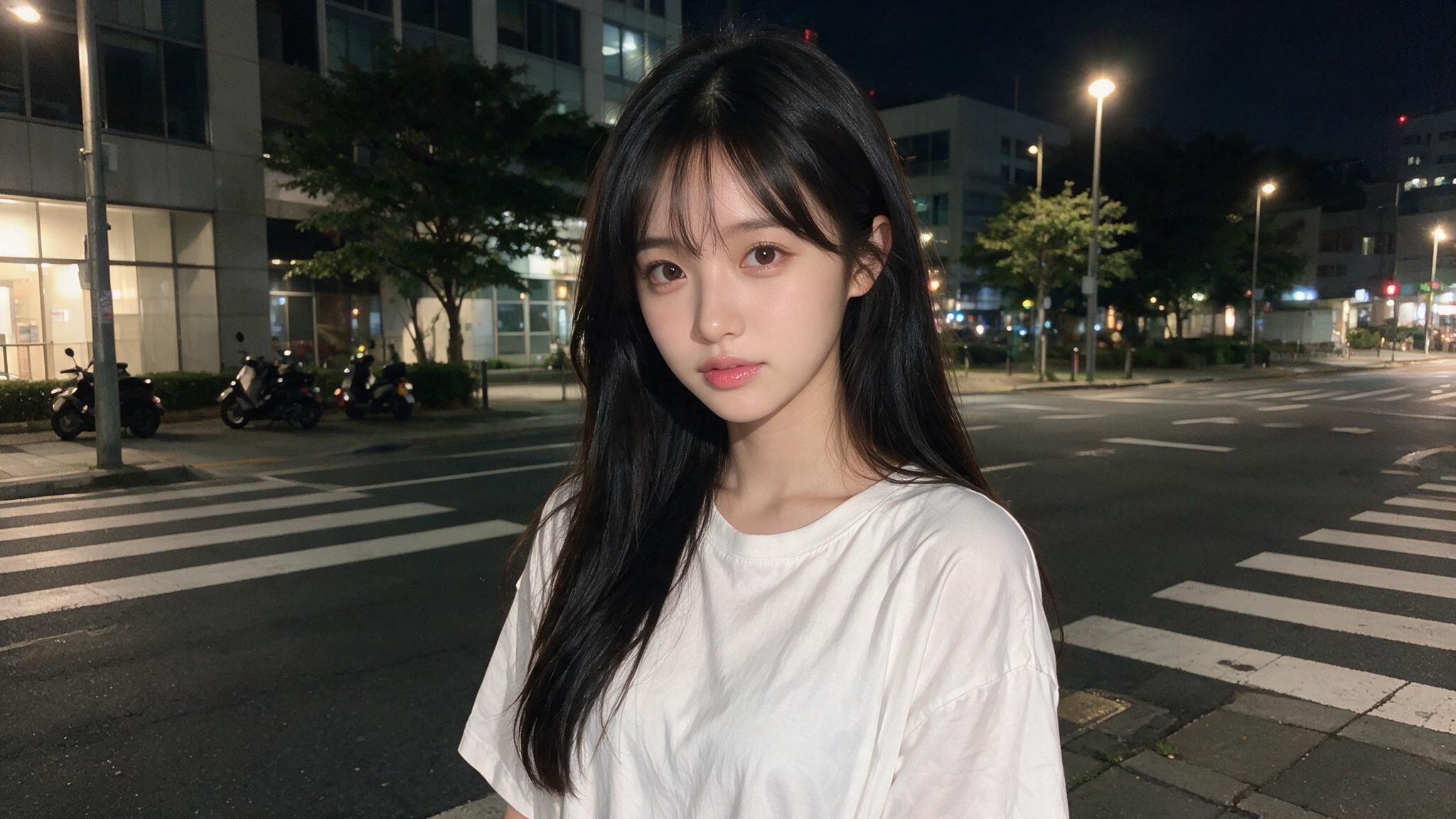
It reads long, but it is not rambling. It is six layers, in a fixed order, each doing one job:
| Layer | Job | Words doing the work |
|---|---|---|
| Subject | Face, hair, skin locked first | "large expressive brown eyes, wispy side-swept bangs" |
| Wardrobe | One garment, no clutter | "oversized plain white T-shirt" |
| Scene | Environment and mood | "pedestrian crossing, parked scooters, warm streetlights" |
| Framing | Crop and camera position | "waist up at eye level, as if casually taken by a friend" |
| Camera physics | The realism engine | "natural sensor noise, slight handheld imperfections, subtle HDR" |
| Exclusions + format | What to avoid, then aspect ratio | "No DSLR look, no beauty filters... 3:4 aspect ratio" |
The counterintuitive part is layer five. Beginners ask for perfection and get plastic. This prompt asks for flaws: noise, motion softness, handheld shake. Real phone photos have all three, and that is what pushes a render out of the uncanny valley.
The structure also fits how the model reads. Early prompting guides for the Seedream 5.0 family converge on the same advice: write complete natural-language sentences, not keyword soup, because the model reasons through instructions rather than pattern-matching tags. Long prompts are fine. Disorganized ones are not.
Testing Seedream 5.0 Pro Portraits on Atlas Cloud
The fastest way to learn from that prompt is to run it yourself. Seedream 5.0 Pro is ByteDance's flagship image model: unveiled at the Volcano Engine FORCE conference on June 23, 2026, live on public APIs since July 8. It runs on Atlas Cloud, which hosts the full ByteDance model family behind one API. There are two ways in: point and click, or code.
Method 1: Use Seedream 5.0 Pro Directly on the Platform
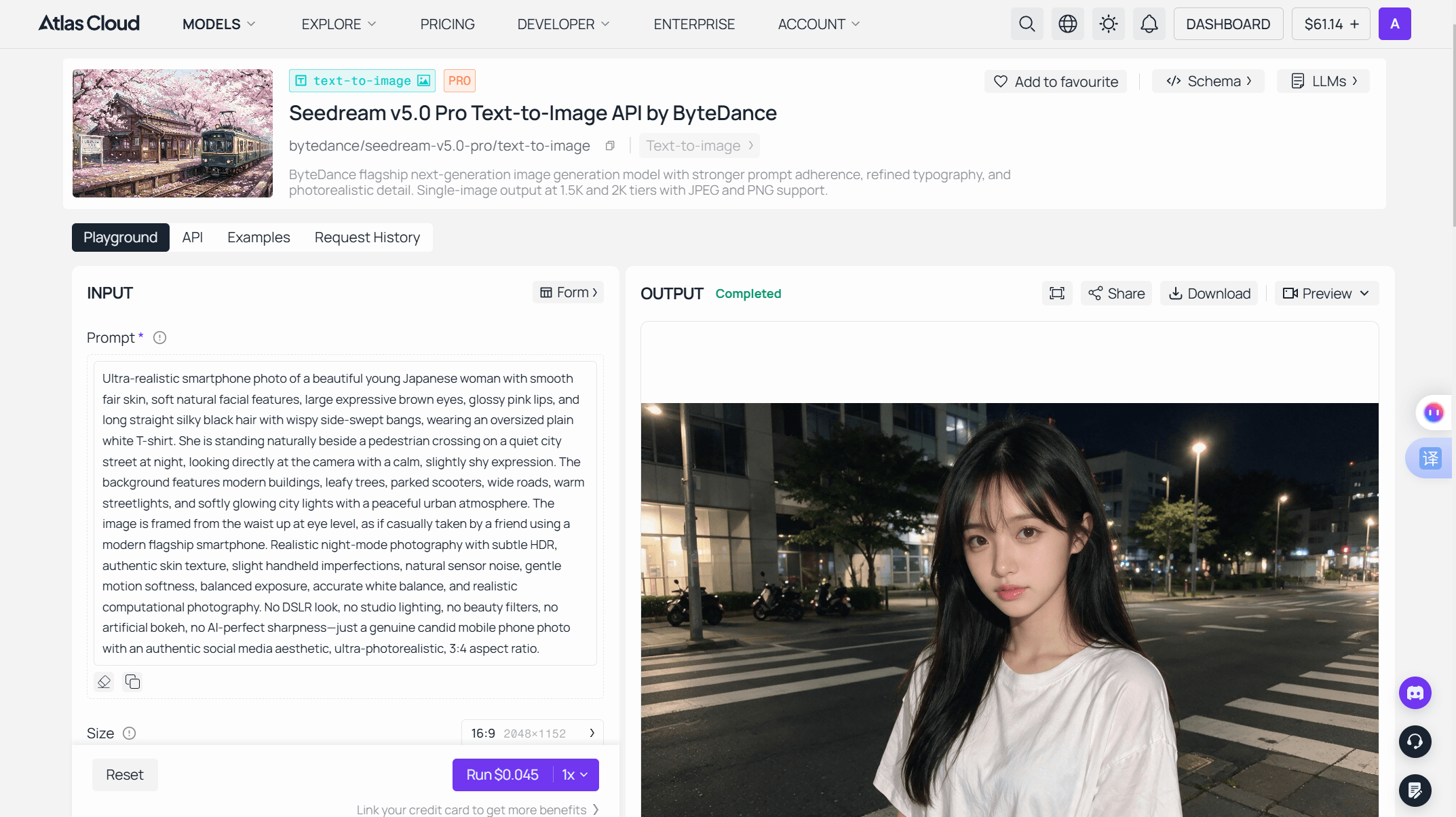
Log in and open the Seedream 5.0 Pro playground. The model is ready to run with no setup. Here is the whole portrait test, start to finish.
Step 1: Paste the prompt. The form has one required field: the prompt box. Paste the full 170-word portrait prompt from above. No splitting, no special syntax, no separate style fields.
Image: Screenshot of the Atlas Cloud Seedream 5.0 Pro playground input form, with the 170-word street-portrait prompt pasted into the prompt field and the size picker and output format controls visible below it.
Step 2: Match the size picker to the prompt. The playground defaults to 16:9 at 2048×1152. The portrait prompt asks for 3:4, so switch to a 3:4 preset. This step matters more than it looks: when an explicit size is set, the picker wins over anything written in prose.
Step 3: Check format and Thinking. Output comes as JPEG or PNG; PNG is the safer pick if the image goes into design handoff. Leave the Thinking toggle on. It enables the reasoning pass that makes long, layered prompts like this one land.
Step 4: Read the price, then run. The Run button quotes the exact cost of your current settings before you commit. At the default size that is $0.045 per image, and $10 covers roughly 222 runs. The quote updates when you change size, so glance at it after step 2.
Step 5: Download or keep going. The finished portrait lands in the output panel with download and share controls, plus two follow-on paths: send the result to image-to-image for edits, or to image-to-video to animate it.
Method 2: Integrate Seedream 5.0 Pro Through the API
Once the prompt behaves in the playground, production is two HTTP calls away. Generation is asynchronous: you submit a job, receive a prediction ID, then poll until it finishes.
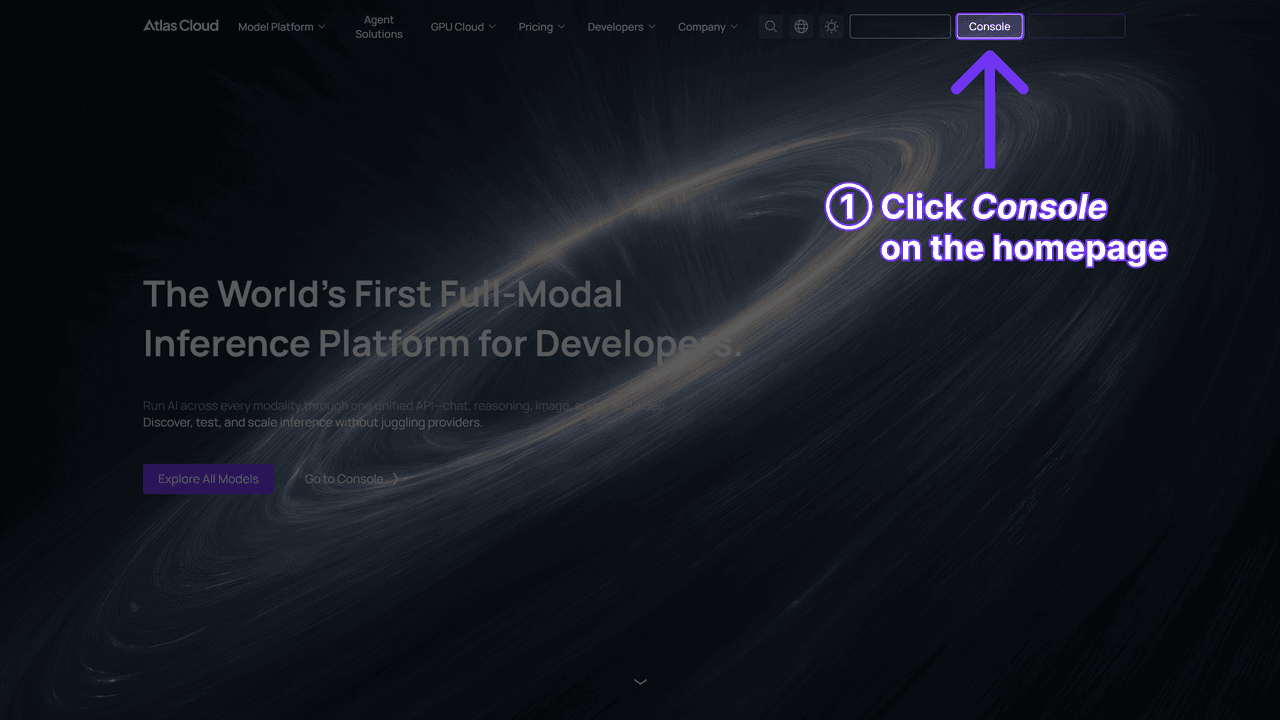
Step 1: Get your API key. Create a key in the Atlas Cloud console, copy it, and set it as an environment variable. Keep it out of client-side code and public repos.
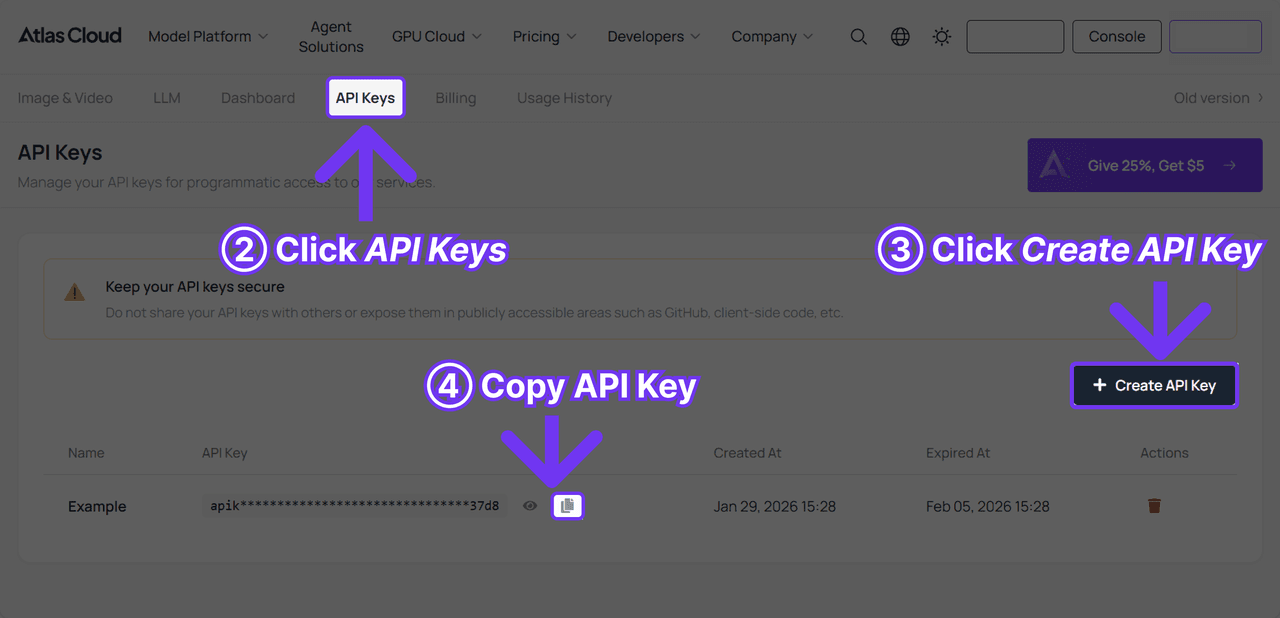
Step 2: Check the API docs. Endpoint paths, request parameters, and authentication details live in the API documentation. For a text-to-image run, the two calls below are the whole story.
Step 3: Make your first request. Submit the portrait job:
plaintext1curl -X POST https://api.atlascloud.ai/api/v1/model/generateImage \ 2 -H "Content-Type: application/json" \ 3 -H "Authorization: Bearer $ATLASCLOUD_API_KEY" \ 4 -d '{ 5 "model": "bytedance/seedream-v5.0-pro/text-to-image", 6 "prompt": "<paste the full 170-word portrait prompt here>", 7 "size": "1328*1776", 8 "output_format": "png", 9 "thinking": "enabled" 10 }'
Only model and prompt are required, but set size every time. The API defaults to 2048*2048, the premium square, and billing follows total pixel count: anything at or under 2.36 million pixels bills at the 1.5K tier, larger sizes at the 2K tier. For portrait work, 1728*2304 is the exact 3:4 preset and bills at the 2K tier; 1328*1776 is the closest portrait preset that stays inside the 1.5K tier. The schema also recommends keeping prompts under 600 English words, so the 170-word portrait prompt uses less than a third of that budget.
The response returns a prediction ID. Poll it every few seconds:
plaintext1curl https://api.atlascloud.ai/api/v1/model/prediction/<prediction_id> \ 2 -H "Authorization: Bearer $ATLASCLOUD_API_KEY"
Status moves from processing to completed or failed. A completed response carries the hosted image URL in outputs[0]; set enable_base64_output to true if you want the image inline instead. One speed lever worth knowing: "thinking": "disabled" skips the prompt-optimization pass and makes text-to-image significantly faster, a reasonable trade during cheap draft loops. Switch it back on for finals.
This request shape is the part that pays off later. Atlas Cloud runs one API across the platform: one key, one auth header, one submit-and-poll pattern. When the next Seedream ships, you swap the model string and keep the rest of your integration untouched.
Expect exactly one image back per run, playground or API. There is no batch mode on Pro, so every variant is a deliberate, priced decision. Key specs to know before you prompt:
| Spec | Seedream 5.0 Pro | Why it matters for prompting |
|---|---|---|
| Output per request | Exactly 1 image | Budget reruns; no "generate 4 variants" |
| Resolution tiers | 1.5K (~2.36MP) and 2K (2048×2048 cap) | "4K" and "8K" prompt words won't exceed this |
| 16:9 special case | Up to 2848×1600 in keyword mode | Widest usable output |
| Aspect ratios | Any ratio from 1:16 to 16:1 | Set it in parameters, not just prose |
| In-image text | Native rendering, 15 languages | Strong on short text, weak on long fine print |
| Price on Atlas Cloud | From $0.045 per image | ~222 test runs per $10 |
| Prompt help | Built-in automatic prompt optimization | Terse prompts get rewritten before generation |
One beginner-relevant footnote: if you want batches, the family's Lite Sequential variant generates up to 15 related images per request at $0.032 per image (10% off the $0.035 list price). Draft there, finalize on Pro.
Negative Prompts on Seedream 5.0 Pro: Two Real Patterns
Here is the question every Stable Diffusion veteran asks first: where does the negative prompt go? The answer: there is no separate field for it. The Atlas Cloud playground for Seedream 5.0 Pro exposes prompt, size, format, and thinking mode; no negative-prompt parameter. Early prompting guides for the family don't document one either. Exclusions ride inside the prompt itself, as plain instructions.
Real users have converged on two patterns for that.
Pattern one: the appended blocklist. The same morning, creator @ZunairaAi shared a head-to-head running the same fashion-poster prompt through Seedream 5.0 Pro and Google's Nano Banana Pro. Her prompt ends with a labeled block:
Negative Prompt: weak expression, casual timid mood, stiff pose, messy hair, extra accessories, blazer, turtleneck, tight T-shirt, distorted hands, bad anatomy, blur, low contrast, dull composition, inaccurate text, text errors, logo, watermark.
Seventeen items, all concrete. Note what the list guards against: mood drift ("timid"), wardrobe substitutions ("blazer, turtleneck"), and the classic AI failure modes ("distorted hands, text errors, watermark").
Pattern two: inline negation. The street-portrait prompt above never uses the words "negative prompt." It weaves exclusions into the prose: "No DSLR look, no studio lighting, no beauty filters." Same function, different placement.
| Pattern | Seen in | Best for |
|---|---|---|
| Appended "Negative Prompt:" block | @ZunairaAi's poster prompt | Long lists; guarding text, anatomy, and wardrobe at once |
| Inline "no X, no Y" phrasing | @saniaspeaks_'s portrait prompt | Style steering; keeping one aesthetic from bleeding in |
Both work for the same reason: Seedream 5.0 Pro treats the whole prompt as instructions to follow, so "no watermark" is just another instruction. Two practical rules. Keep exclusions concrete: "no logo, no watermark" beats "nothing bad." And for anatomy, prefer positive phrasing where you can: "relaxed natural hands, resting at her side" gives the model a target, while a bare "no distorted hands" only names the failure.
Common Seedream 5.0 Pro Bugs and How to Dodge Them
Every early-adopter wave produces the same thing: a pile of broken generations and a few people who figured out why. Here is the current bug map, each entry traced to a real report.
| Symptom | Where it was reported | Fix |
|---|---|---|
| Garbled or misspelled text in image | ByteDance's own launch post; early testers | Quote exact strings, keep copy short, state placement |
| Plastic, over-smoothed skin | Launch-week comparisons vs Seedream 4.5 | Add imperfection keywords; ban beauty filters |
| Action overshoot (objects flying) | Day-one creator testing | Tone down intensity words; one action per subject |
| Harmless prompt refused | Launch-week user reports across hosts | Rephrase trigger words; test on a clean endpoint |
| Output smaller than the "8K" you asked for | Any prompt using resolution keywords | Set size in parameters; prompt words don't raise the cap |
Text rendering is the admitted one. ByteDance's own launch post concedes "there is still room to improve in finer-grained text rendering and pixel-level editing consistency." An early tester of the 5.0 family made the same call back in February: "text rendering does not seem to be improved over 4.5." Short headlines render well; long fine print falls apart. The working countermeasure is visible in the poster prompt above. @ZunairaAi specifies "exact text:" followed by each string in quotation marks, with a position for every one ("top center 'MODE & POWER'"). Quote it, place it, keep it short.
The skin problem cuts the other way. In the launch thread on r/singularity, early testers comparing Pro against Seedream 4.5 reported that Pro looked less realistic on people specifically. That makes layer five of the street-portrait prompt (sensor noise, handheld imperfections, no beauty filters) less a style choice than a workaround for a known soft spot.
Dynamic scenes can overshoot. In a day-one test posted July 8 (in Japanese), illustrator @mugi_AI_Art praised how precisely Pro followed detailed prompts, then noted the flip side: push the dynamism too hard and things go wrong. Her character hurled the katana instead of holding it. If a pose breaks, the first fix is lowering the intensity of your action words, not adding more description.
A Beginner Seedream 5.0 Pro Workflow You Can Copy
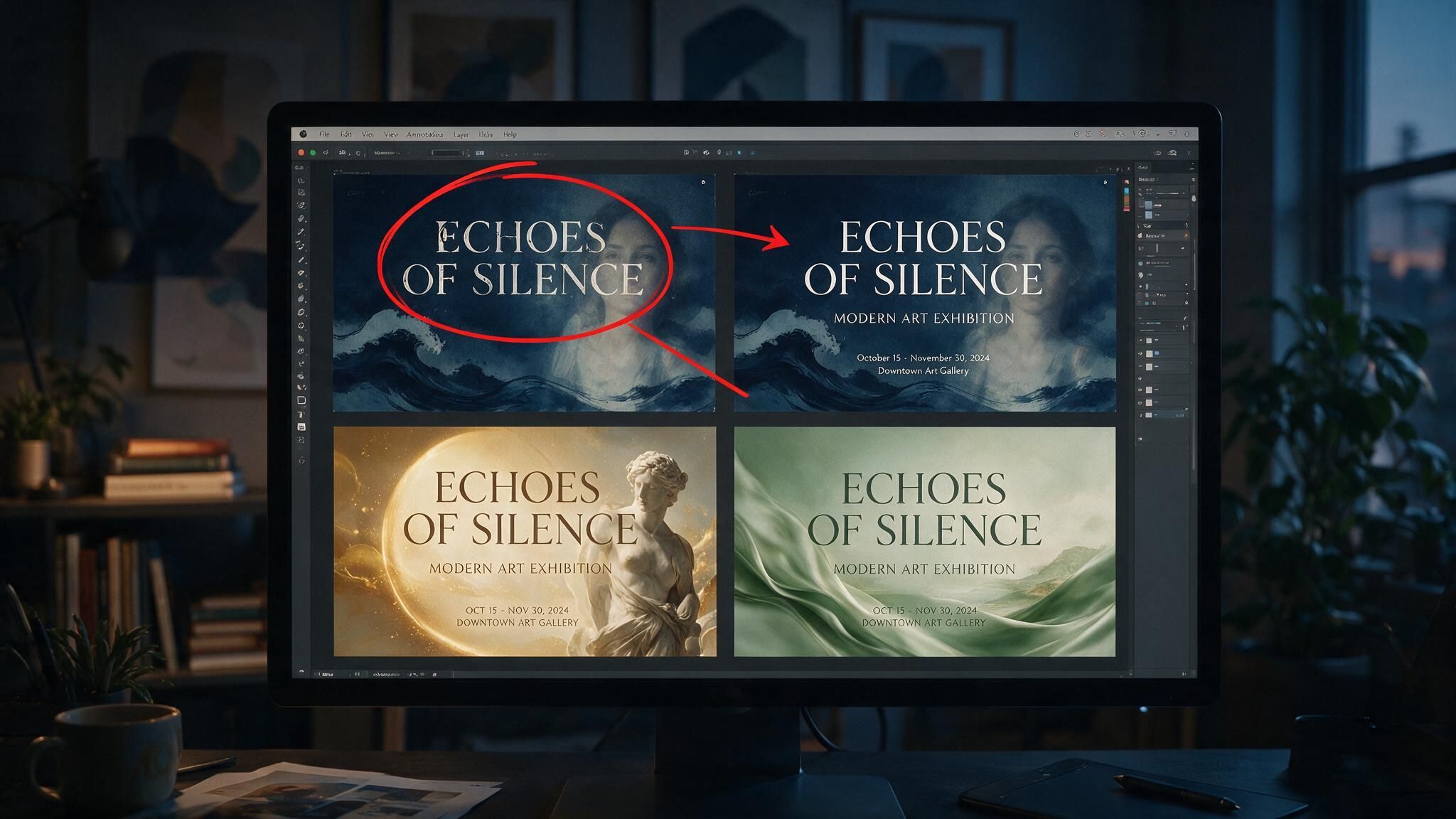
The sections above covered the controls. What they don't give you is the loop: what to change between runs, and when. The creators getting clean results are not typing one perfect prompt. They are iterating in a controlled way:
| Step | What changes between runs | Cost |
|---|---|---|
| 1. Draft | Write the six layers from the portrait teardown | $0 |
| 2. Baseline run | Nothing yet; this run is your reference point | $0.045 |
| 3. Iterate | One layer per rerun, nothing else | $0.045 × 3–4 |
| 4. Patch | Exclusions, added only for failures you actually saw | $0.045 |
| 5. Finalize | Size only: re-run the locked prompt at delivery size | Quoted on the Run button |
If the final size stays in the 1.5K tier, the whole loop costs about $0.27. The discipline in step 3 matters most, and it is borrowed from people who learned it the hard way: editing-model veterans have long pushed a one-change rule for Seedream-style models, because stacking five edits into one rerun makes it impossible to tell which change fixed or broke the result.
Step 4 is the other half of the discipline. Don't front-load a 17-item blocklist on your first run; start clean, see what actually fails, then add exclusions using the two patterns from the negative-prompt section. A blocklist built from observed failures stays short, and short lists keep the model focused on what you do want.
Frequently Asked Questions
Does Seedream 5.0 Pro support negative prompts?
Not as a separate parameter. The Atlas Cloud playground exposes no negative-prompt field, and early prompting guides for the 5.0 family don't document one. Exclusions go inside the prompt itself, either as an appended "Negative Prompt:" block, like @ZunairaAi's 17-item list, or woven inline as "no X, no Y" phrasing. Both work because the model treats them as instructions.
Why does Seedream 5.0 Pro get text wrong in my images?
Long, fine-print text is the model's admitted weak spot. ByteDance's launch post concedes "room to improve in finer-grained text rendering." Short text renders reliably if you quote it exactly and give it a position: "top center 'MODE & POWER'" style. Keep copy blocks short, and add "inaccurate text, text errors" to your exclusions as a backstop.
Why did Seedream 5.0 Pro refuse my harmless prompt?
Probably a filter false positive, and possibly not from the model at all. Refusals can come from three layers: ByteDance's moderation, the hosting platform's own filter, or a client-side setting. Phrasing like "young woman" has a documented history of tripping keyword filters on innocent prompts. Swap the suspect phrase first, then retest the same prompt on a different endpoint before concluding anything.
Can Seedream 5.0 Pro output 4K images?
No. Pro caps at 2048×2048 total pixels, with 16:9 output reaching 2848×1600 in resolution-keyword mode. Writing "4K" or "8K quality" in the prompt changes the style, not the pixel count. If you need true 4K, Seedream 5.0 Lite and Seedream 4.5 both offer it; Pro trades that ceiling for per-image quality.
How much does a Seedream 5.0 Pro image cost?
On Atlas Cloud, generation starts at $0.045 per image at the default 2048×1152 size, which works out to about 222 runs per $10. The full six-run workflow in this guide lands around $0.27 per finished image. Batch drafting is cheaper on Lite Sequential, at $0.032 per image (10% off the $0.035 list price) with up to 15 images per request.
Conclusion
The best Seedream 5.0 Pro documentation right now is being written in public, one shared prompt at a time. The two posts this guide is built on cover the model's biggest lesson and its biggest trap: realism comes from asking for imperfection, and control comes from writing your exclusions into the prompt, because no separate field will do it for you.
Steal the six-layer structure, keep the one-change rule, and treat the bug table as a pre-flight checklist. At $0.045 a run, a disciplined afternoon of testing costs less than a coffee. And unlike the coffee, the prompt you lock in keeps paying you back.





