Cualquier desarrollador conoce este problema: encuentras una API superior, pero la migración parece imposible. Tienes que actualizar incontables integraciones y rehacer toda la lógica de autenticación. Un solo paso en falso podría colapsar todo el entorno de producción. Ese es el impuesto de migración, y es lo que detiene a la mayoría de los equipos antes incluso de empezar. Esta guía de migración de canalizaciones de vídeo detalla exactamente cómo realizar el cambio de forma segura, utilizando Atlas Cloud como implementación de referencia.
Las actualizaciones de sistemas antiguos son un verdadero dolor de cabeza. Los fallos constantes, los nuevos errores y los elevados costes de formación se acumulan rápidamente. Esta presión obliga a muchos equipos a seguir utilizando herramientas obsoletas que deberían haber reemplazado hace mucho tiempo.
Integración de la API de generación de vídeo mediante IA con Atlas Cloud: diseñada para conectarse, no para reemplazar
La API de flujo de trabajo de vídeo con IA de Atlas Cloud se ha diseñado bajo un principio fundamental: encajar en lo que ya tienes. Ya sea que estés extrayendo datos de APIs de generación de imágenes y vídeo existentes o conectándote a canalizaciones locales, la integración de la API de generación de vídeo con IA de Atlas Cloud se integra sobre tu stack actual sin exigir una reescritura completa.
Qué la hace diferente
| Preocupación | Migración tradicional | Enfoque de Atlas Cloud |
| Cambios en el código | Refactorización extensa | Capa adaptadora mínima |
| Riesgo de inactividad | Alto | Bajo: admite despliegue paralelo |
| Compatibilidad legacy | Suele fallar | Conserva los endpoints existentes |
Empieza poco a poco, valida y escala, sin desperdiciar un sprint en la infraestructura básica.
¿Por qué migrar tu canalización de vídeo ahora?
Si tu canalización de vídeo se creó hace tres años, fue diseñada para un mundo de transcodificación y generación de miniaturas, no para IA generativa. Hoy, ese desfase se manifiesta como un problema operativo real, y la reducción de costes de inferencia de IA se ha convertido en una de las prioridades de ingeniería más urgentes para los equipos que escalan funciones generativas.
- Altos costes de inferencia: Ejecutar modelos de vídeo pesados bajo demanda dispara las facturas de la nube. Sin un procesamiento por lotes inteligente o límites de costes, tu gasto mensual se vuelve imposible de predecir.
- Escasez de GPU: La falta de chips disponibles y los largos tiempos de espera provocan grandes retrasos. Estos suelen ocurrir en los peores momentos, como durante lanzamientos importantes de productos.
- Límites de tasa rígidos: La mayoría de las APIs de generación tienen límites fijos que no escalan según tus necesidades. Esto obliga a los equipos a pagar por capacidad extra o a ralentizar sus propias aplicaciones.
Los costes de inferencia de IA representan una de las partidas presupuestarias que más rápido crece para los equipos de producto que escalan funciones generativas. Lograr una reducción significativa de costes de inferencia de IA requiere tanto cambios arquitectónicos como la elección de la capa de API adecuada; no basta solo con negociar mejores precios.
Coste de inferencia de IA: canalización heredada vs. integración con Atlas Cloud:
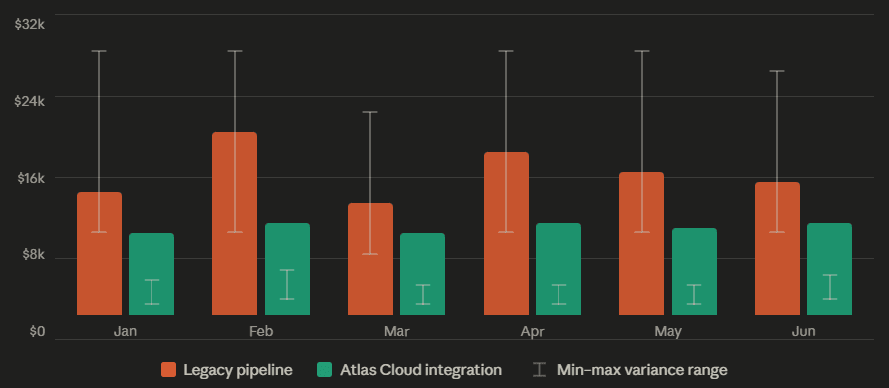
Basado en un equipo de vídeo de mercado intermedio a escala
Ahorro medio: ~39% · Reducción de varianza: ~85%
El cambio a lo multimodal: por qué los flujos de trabajo estáticos no pueden seguir el ritmo
Las canalizaciones de vídeo tradicionales eran lineales: ingesta → transcodificación → entrega. Las demandas de los flujos de trabajo de vídeo con IA generativa son fundamentalmente distintas. Como verás en cualquier guía de migración de canalizaciones de vídeo práctica, el desafío principal no son solo las herramientas, sino repensar la arquitectura. Los modelos ahora gestionan prompts de texto a vídeo, condicionamiento de imágenes y cadenas de generación de múltiples pasos, a menudo en una sola solicitud.
La integración de sistemas antiguos no se diseñó para esto. Acoplar un modelo generativo a una canalización estática suele significar:
| Suposición antigua | Realidad generativa |
| Formatos de entrada/salida fijos | Salidas dinámicas dependientes del modelo |
| Tiempo de cómputo predecible | Duración de inferencia variable |
| Un modelo por tarea | Encadenamiento de múltiples modelos |
La integración de la API de generación de vídeo con IA de Atlas Cloud aborda esto tratando los flujos de trabajo multimodales y de varios pasos como un patrón de diseño de primera clase, no como algo secundario.
Mapeo de la arquitectura: dónde encaja la integración de la API de generación de vídeo con IA en tu stack
Piensa en Atlas Cloud como un puente inteligente, no como un sustituto de tu infraestructura. Se sitúa justo entre tu aplicación principal y el trabajo pesado del procesamiento de IA. Cuando tu front-end realiza una solicitud, Atlas Cloud gestiona el enrutamiento y la ejecución del modelo. Devuelve una respuesta limpia mientras tus servicios internos permanecen ajenos al complejo trabajo que ocurre entre bastidores.
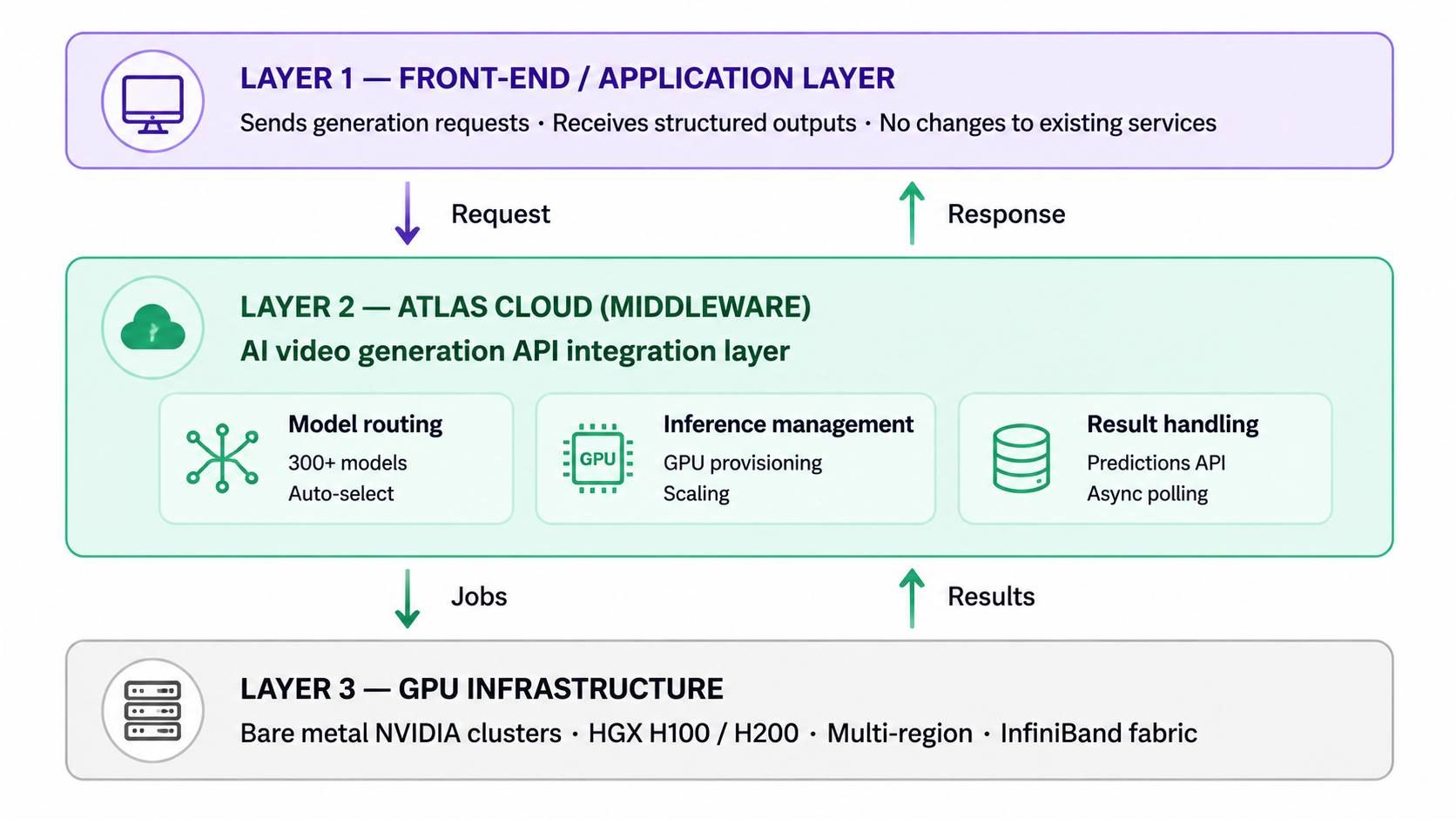
Este patrón de middleware es lo que hace que la integración de la API de generación de vídeo con IA sea práctica para equipos con canalizaciones establecidas. En lugar de desmantelar una arquitectura funcional, insertas Atlas Cloud en la capa de procesamiento. Esto gestiona:
- Enrutamiento de modelos: redirigiendo solicitudes a través de más de 300 modelos de IA, incluidos los que potencian tu flujo de trabajo de vídeo con IA.
- Gestión de inferencia: abstrayendo el aprovisionamiento y escalado de GPU detrás de un único endpoint.
- Gestión de resultados: devolviendo resultados de generación en formatos consistentes y predecibles mediante su Predictions API.
Capa de compatibilidad: adaptándose a tu stack actual
La integración de sistemas antiguos a menudo se estanca porque las nuevas herramientas exigen nuevas cadenas de herramientas. Atlas Cloud evita esto ofreciendo:
| Interfaz de integración | Detalles |
| Estilo de API | RESTful, endpoint compatible con OpenAI |
| Soporte SDK | Python, Node.js y cualquier cliente HTTP |
| Autenticación | Autenticación estándar basada en API key |
| Alcance de modelos | APIs de LLM, imagen y vídeo bajo una misma clave |
El diseño compatible con OpenAI es particularmente útil: los equipos que ya usan el SDK de OpenAI pueden cambiar las URL base y obtener acceso al catálogo completo de modelos de Atlas Cloud, incluyendo modelos de generación de vídeo y generación de imágenes, con cambios mínimos en el código.
Canalización heredada vs. flujo de trabajo de vídeo multimodal con IA:
| DIMENSIÓN | Canalización antigua | Flujo de trabajo multimodal con IA (Atlas Cloud) |
| Modelo de proceso | Lineal: ingesta → transcodificación → entrega. Cada etapa espera a que la anterior termine. | Paralelo multi-paso: prompt, condicionamiento y cadenas de generación en un solo ciclo de solicitud. |
| Perfil de latencia | Predecible pero lento. La transcodificación es limitada; las tareas generativas no tienen soporte nativo. | Variable por modelo, gestionada mediante polling asíncrono. La varianza P50/P95 es menor con endpoints dedicados. |
| Flexibilidad de esquema | Esquemas internos propietarios. Nuevas integraciones requieren reescrituras de adaptadores. | REST compatible con OpenAI. Cambia la URL base; el SDK y la autenticación se mantienen sin cambios. |
| Dependencia de GPU | Instancias spot autogestionadas. La escasez causa picos de cola durante lanzamientos. | Abstraída tras un endpoint. Escala de 0 a 800 GPUs automáticamente; sin aprovisionamiento manual. |
| Modelo de costes | Aprovisionamiento siempre activo. Se paga por capacidad ociosa para evitar estrangulamientos. | Pago por solicitud en nivel serverless. Endpoints dedicados para alto volumen con precios predecibles. |
| Esfuerzo migratorio | — | 3 pasos: sincronización de auth → mapeo de payload → polling asíncrono. Sin inactividad; corre en paralelo al stack actual. |
Guía de migración de 3 pasos: conexión sin inactividad
Cambiar de API no tiene por qué significar una congelación del servicio. Esta guía de migración de canalizaciones de vídeo detalla un enfoque práctico de tres pasos para integrar Atlas Cloud en un stack en vivo sin interrumpir lo que ya está funcionando.
Paso 1: Sincronización de autenticación y entorno
Atlas Cloud autentica cada solicitud mediante un token Bearer pasado en el encabezado de autorización (Authorization header), el mismo patrón utilizado en la mayoría de las API REST modernas, lo que significa que tu middleware de autenticación actual probablemente no necesite cambios.
Lista de verificación de configuración segura:
| Tarea | Recomendación |
| Almacenar API key | Usa variables de entorno (ATLAS_API_KEY), nunca las codifiques directamente |
| Formato de header | Authorization: Bearer <tu_api_key> |
| Base URL | https://api.atlascloud.ai/v1 |
| Rotación de claves | Genera nuevas claves desde el dashboard de Atlas Cloud sin tocar código |
Mantén tu clave fuera del control de versiones. Un archivo .env con una entrada en .gitignore es el estándar mínimo; se prefieren gestores de secretos en producción.
Paso 2: Mapeo de payloads de datos
Cada modelo en el catálogo de Atlas Cloud (ya sea que apunte a sus APIs de imagen y vídeo o a un LLM) acepta un campo de modelo que identifica al objetivo por su ID completo, p. ej., kling-video/v1.6/standard/image-to-video. Aquí es donde los equipos de integración de sistemas antiguos pasan más tiempo: traduciendo esquemas JSON internos a los formatos que cada modelo espera.
Un enfoque de mapeo práctico:
- Audita tu payload existente: identifica campos como input_url, resolución, duración y prompt que deban renombrarse o reestructurarse.
- Consulta la especificación de parámetros del modelo en la documentación de la API de modelos antes de escribir lógica de transformación.
- Escribe una función adaptadora ligera que tome tu esquema interno y genere el cuerpo compatible con Atlas Cloud; mantener la transformación aislada facilita la actualización cuando cambian las versiones de los modelos.
Paso 3: Polling asíncrono de resultados
La generación de vídeo no es instantánea. Enviar una solicitud devuelve un request_id; tu aplicación debe consultar GET /api/v1/model/result/{request_id} hasta que el campo de estado se resuelva en un estado completado y la matriz de salidas esté poblada.
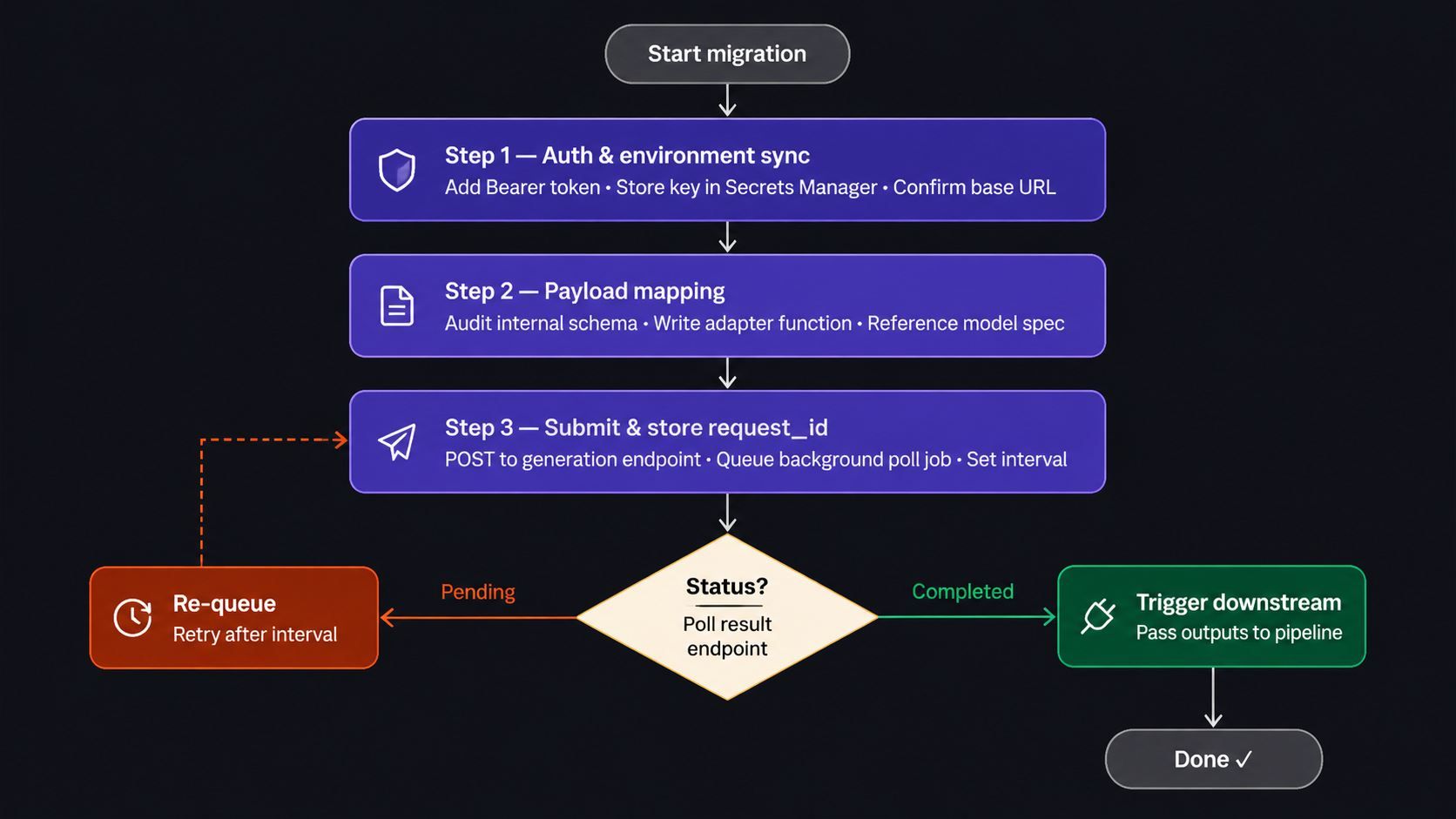
Para mantener tu aplicación sin bloqueos durante un renderizado de vídeo con IA:
- Envía la solicitud de generación y almacena el request_id devuelto.
- Pon en cola una tarea de fondo (p. ej., a través de una cola de tareas como Celery o BullMQ) para consultar el endpoint de resultados en un intervalo razonable.
- Dispara la lógica posterior solo cuando el estado confirme la finalización; luego pasa las salidas a tu canalización de entrega.
Esto desacopla el tiempo de renderizado de la latencia de respuesta de tu API, manteniendo la capa orientada al usuario receptiva en todo momento.
Resolviendo los arranques en frío y la latencia: el factor oculto de la reducción de costes de inferencia de IA
Dos cosas destruyen la confianza de los interesados en un nuevo flujo de trabajo de vídeo con IA más que nada: tiempos lentos de primera respuesta y un rendimiento de renderizado impredecible. Abordarlas es también fundamental para cualquier estrategia seria de reducción de costes de inferencia de IA, ya que la varianza de latencia obliga al aprovisionamiento excesivo, lo que aumenta el gasto.
Procesamiento en el borde vs. centralización en la nube
La latencia en la inferencia de IA suele ser un problema de geografía tanto como de hardware. Cuanto más viaje tu solicitud para llegar a una GPU, más lenta se sentirá tu canalización, independientemente de lo potente que sea el modelo.
Atlas Cloud opera clusters de GPU en metal puro (bare metal) en múltiples regiones, dando a los equipos la opción de enrutar las cargas de trabajo más cerca de sus usuarios o fuentes de datos:
| Modelo GPU | Ubicación | Cant. | Precio ($/Gpu/Hora) | Red |
| H100 | UE | 200 | $1.95 | IB |
| Singapur | 32 | $2.10 | IB | |
| EE. UU. | 16 | $2.10 | IB | |
| H200 | EE. UU. | 128 | $2.35 | RoCe |
| Japón | 8 | $2.40 | IB | |
| UE | 16 | $2.40 | IB | |
| Singapur | 8 | $2.40 | IB | |
| EE. UU. | 8 | $2.40 | IB | |
| GB200 | Malasia | 8 | $4.50 | IB |
| A100 | EE. UU. | 64 | $1.35 | / |
Fuente: Atlas Cloud Bare Metal
A diferencia de los entornos de nube virtualizados, las instancias bare metal dan a tu flujo de trabajo de vídeo con IA acceso directo al hardware de NVIDIA; sin sobrecarga de hipervisor que afecte al rendimiento de inferencia. Los clusters HGX H100 y H200 de Atlas utilizan un diseño InfiniBand optimizado específicamente para minimizar la latencia entre nodos durante tareas de generación paralelas.
Para los equipos en el nivel serverless, el Endpoint Dedicado de Atlas Cloud escala de 0 a 800 GPUs en segundos y asegura una reducción del 90% en los tiempos de arranque en frío en comparación con despliegues estándar, abordando la queja de latencia más común durante los picos de tráfico.
Evaluación del rendimiento: qué medir antes de comprometerse
Ningún benchmark de proveedor sustituye a tu propia prueba de carga. Al realizar pruebas de esfuerzo de la integración de Atlas Cloud frente a tus APIs actuales, concéntrate en tres métricas:
| Métrica | Por qué importa | Umbral objetivo | Qué vigilar |
| Tiempo render P50 | Experiencia mediana para la mayoría de solicitudes; tu expectativa de usuario base. | ≤ 8 s para clip de 15s | Si el P50 ya está por encima, la arquitectura no mejorará a escala. |
| Tiempo render P95 | La varianza es el coste real. La latencia impredecible fuerza el sobre-aprovisionamiento. | ≤ 2x P50 | Un P50 de 8s con un P95 de 45s es peor que un P50 de 12s con un P95 de 14s. |
| Latencia arranque frío | Retraso de la primera solicitud tras periodos de inactividad; principal queja de UX. | ≤ 3 s al primer token | Compara endpoint dedicado vs. nivel serverless. |
| Tasa de errores | Los límites de tasa y escasez de GPU aparecen como errores a volumen de producción. | < 0.5% en RPS pico | Realiza pruebas de estrés al doble del pico esperado. Más del 1% indica falta de margen de reserva. |
| Consistencia salida | Los modelos generativos pueden variar en resolución o formato entre prompts idénticos. | 100% formato especificado | Registra variaciones en 50+ ejecuciones. Marca anomalías mayores a ±10%. |
| Coste por render | La economía unitaria que determina si la integración se paga sola a escala. | Comparar vs. proveedor actual | Compara el coste total incluyendo GPU ociosa, no solo por solicitud. Atlas Cloud: pago por solicitud. |
Realiza pruebas paralelas: prueba enviando los mismos prompts a tu configuración actual y a Atlas Cloud simultáneamente. Verifica la velocidad de renderizado, la calidad final y la tasa de fallos. La mayoría de los equipos se dan cuenta de que el mayor beneficio no es solo la velocidad, sino la fiabilidad. Es preferible un tiempo de espera constante de 8 segundos que no saber si una tarea tardará 3 o 25 segundos.
Escenarios de integración en el mundo real
Las discusiones arquitectónicas se vuelven concretas cuando las mapeas con los sistemas que la mayoría de los equipos ya utilizan. Los dos escenarios siguientes son patrones de integración representativos, construidos sobre las capacidades verificadas de Atlas Cloud.
Escenario A: Suite creativa: previsualizaciones de vídeo para redes sociales activadas por CMS
La configuración: Un grupo de medios digitales utiliza un CMS headless como Contentful o Sanity para publicar sus historias. Cada artículo nuevo necesita un vídeo de 15 segundos para redes sociales. Hacer estos vídeos manualmente es demasiado lento; genera un cuello de botella masivo entre los redactores y el equipo de redes sociales.
Cómo encaja la integración de la API de Atlas Cloud:
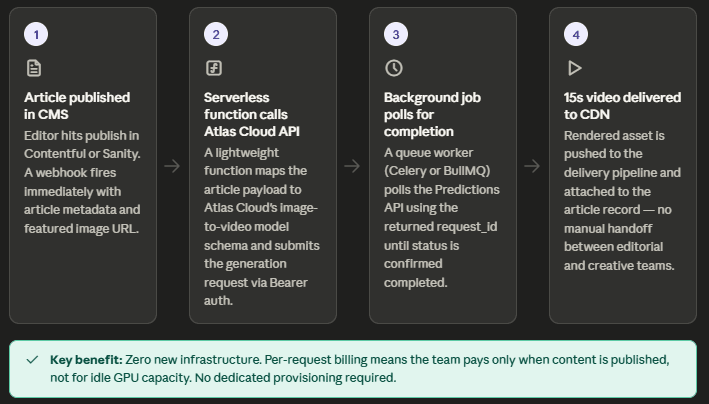
| Etapa | Sistema | Rol de Atlas Cloud |
| Trigger | Webhook de CMS | Recibe evento POST con metadatos del artículo |
| Construcción prompt | Middleware interno | Ensambla el prompt a partir del título + URL de la miniatura |
| Generación vídeo | API de vídeo | Llama a modelos como Kling o Hailuo vía endpoint unificado |
| Entrega resultado | Campo del CMS | Consulta GET /api/v1/model/result/{request_id} y escribe la URL de vuelta |
Dado que las APIs de Atlas Cloud aceptan llamadas REST estándar con autenticación Bearer, la integración con el CMS requiere solo una función serverless ligera, sin nueva infraestructura ni compra de GPU. El modelo de pago por solicitud implica que el equipo solo paga cuando se publica contenido.
Beneficio clave: Flujo de trabajo de vídeo con IA totalmente automatizado, desde el evento de publicación hasta el recurso renderizado, sin intervención manual.
Escenario B: Sandbox empresarial: mejora de vídeo masiva en DAM
La configuración: El sistema de gestión de activos digitales (DAM) de una gran marca almacena miles de vídeos de productos; muchos tienen resoluciones obsoletas o les faltan superposiciones de marca. La tarea consiste en mejorar y renderizar de nuevo estos vídeos a escala sin reconstruir la capa de integración del DAM.
Cómo encaja Atlas Cloud:
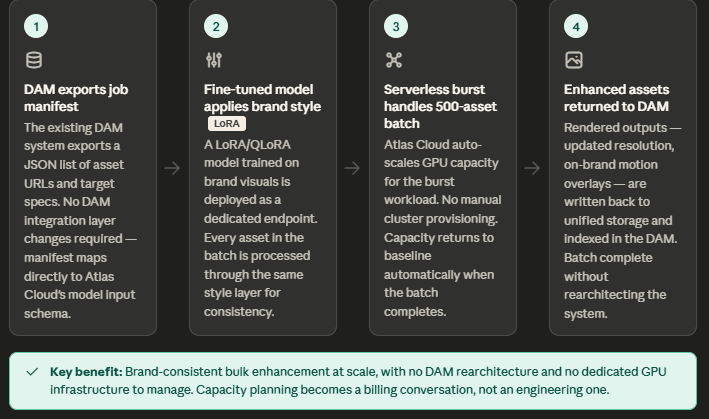
- Se conserva la integración heredada: el DAM exporta un manifiesto de trabajo (lista JSON de URLs de activos y especificaciones) que mapea directamente al esquema de entrada de Atlas Cloud.
- Modelos ajustados: mediante LoRA/QLoRA, se pueden entrenar modelos en estilos visuales específicos de la marca y desplegarlos como endpoints de inferencia dedicados.
- Escalado serverless: maneja cargas de trabajo intensas; un trabajo por lotes de 500 activos puede escalar a la capacidad necesaria automáticamente.
- Almacenamiento unificado: mantiene pesos de modelos ajustados, activos de entrada y salidas renderizadas accesibles desde una sola ubicación.
Beneficio clave: Mejora de vídeo masiva y consistente con la marca, sin reestructurar el DAM ni gestionar infraestructura de GPU dedicada.
Preparación para el futuro: privacidad y escalabilidad
Privacidad desde el diseño
Para los equipos que manejan activos sensibles en su flujo de trabajo de vídeo, Atlas Cloud se ha construido con cumplimiento normativo a nivel de infraestructura. La plataforma cuenta con certificación SOC I & II y cumplimiento HIPAA en todos los niveles.
Para la integración de sistemas antiguos en industrias reguladas, esto elimina un bloqueador común: demostrar a los equipos de seguridad que un nuevo proveedor cumple con los estándares de gobernanza de datos sin requerir auditorías personalizadas.
Escalar sin intervención manual
El crecimiento del volumen es donde muchas APIs de generación de imágenes y vídeo fallan silenciosamente. El Endpoint Dedicado de Atlas Cloud aborda esto directamente:
| Trigger escala | Respuesta de Atlas Cloud |
| Pico de tráfico | Escala de 0 a 800 GPUs en segundos |
| Arranque en frío | 90% de reducción vs. serverless estándar |
| Modelo de pago | Solo por solicitud; sin costes ociosos |
No se requieren ajustes manuales de infraestructura entre 10 y 10,000 solicitudes. La misma integración de API de Atlas Cloud gestiona ambos casos, convirtiendo la planificación de capacidad en una conversación sobre facturación y no de ingeniería.






