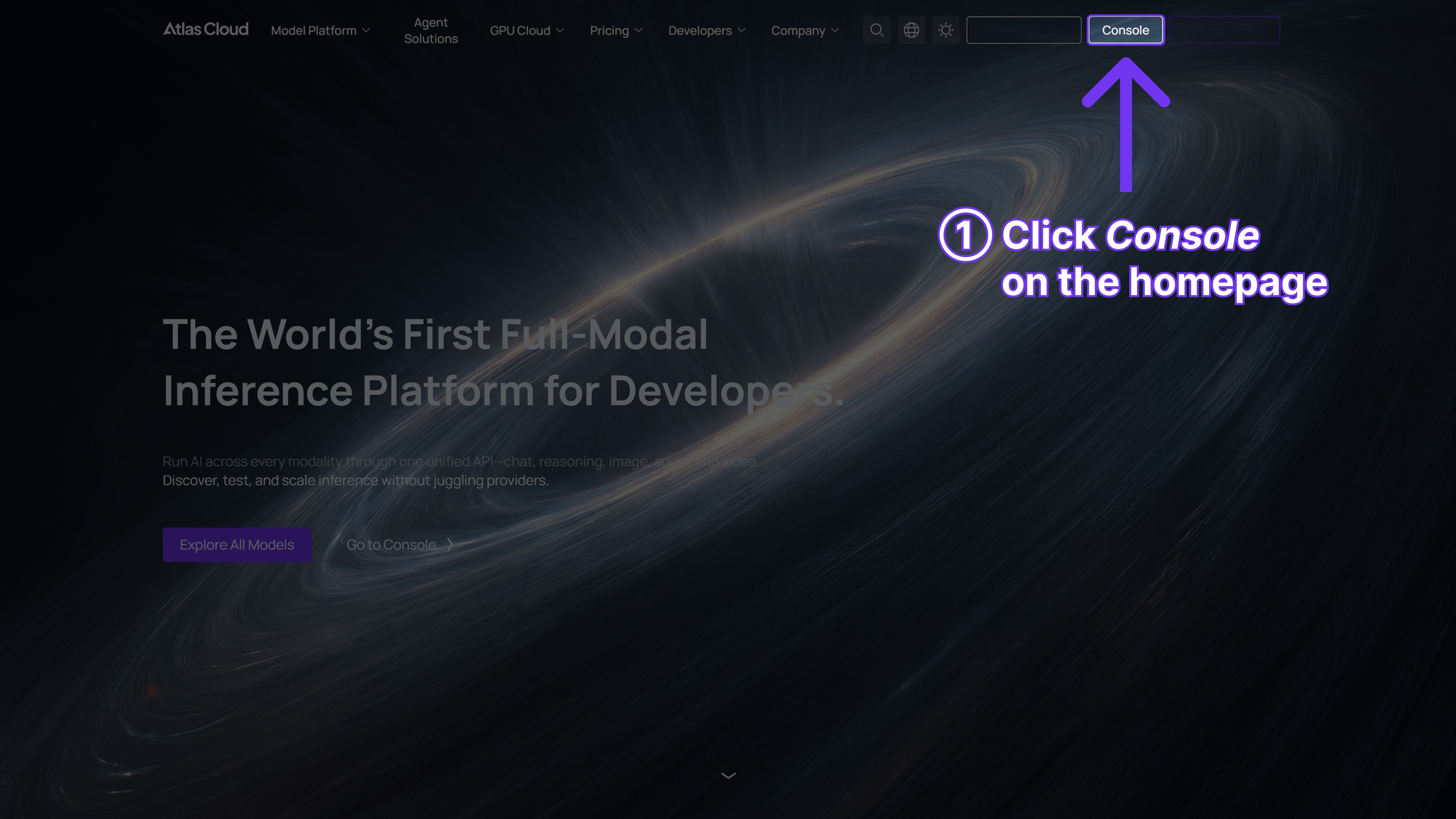
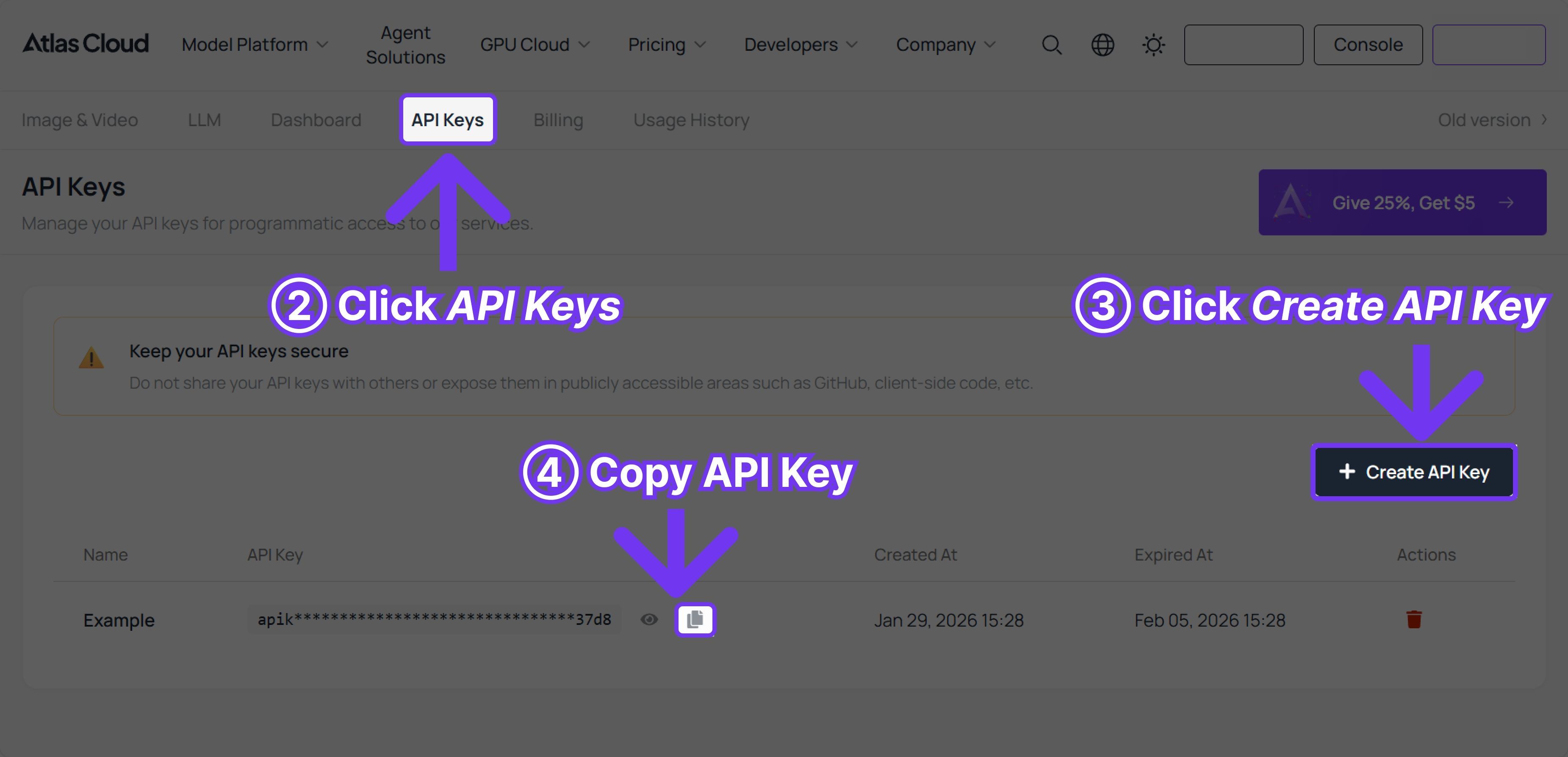
You don't just want a photo to move—you want it to look like you. If you are wondering how to keep the same face in an AI video for free, you're in the right place. Today’s top free photo-to-video AI models have finally cracked character identity. The best part? You can test this consistency without spending a dime. Once you find the perfect look on a free tier, you can simply connect to an API aggregator to scale your production and unlock commercial-grade 4K exports. Here is how it actually works.
Top Free Photo-to-Video AI Models – Capability Comparison Summary
[Suggested Table: AI Model Capability Comparison]
(Table Description: A quick-reference comparison chart of the top 6 Photo-to-video AI models.)
| Model | Official Provider | Character Consistency | 4K Export (via API) | Free Quota | Output Quality | Speed | API |
|---|---|---|---|---|---|---|---|
| Kling 3.0 | Kuaishou | Excellent (Strong face lock) | Yes | 60 credits / video in kling.ai, new registered users can get 66 credits. | Highly realistic | Moderate | Yes |
| Hailuo 2.3Hailuo2.3 | Minimax | Excellent | Yes | 25 credits / video in hailuoai.video, new registered users can get 200 credits. | Cinematic | Fast | Yes |
| Gen-4 Turbo | Runway | Very Good | Yes | Credits are deducted by the second, for example, Gen-4 Turbo uses 12 credits per second in app.runwayml.com,new registered users can get 500 credits. | Highly artistic | Fast | Yes |
| Ray 3 | Luma AI | Good | Yes | On lumalabs.ai, taking Ray 3 as an example, each video costs 20 credits. | Smooth motion | Fast | Yes |
| Pika 2.5 | Pika Labs | Good | Yes | On pika.art, taking Pika 2.5 as an example, each video costs 12 credits, new registered users can get 80 credits. | Stylized/Anime | Very Fast | Yes |
| PixVerse v6 | PixVerse | Good | Yes | On app.pixverse.ai, taking PixVerse v6 as an example, each video costs 25 credits, new registered users can get 90 credits. | Great for wide shots | Fast | Yes |
*Note: Most models free quota only support 1080p video exports, but an API aggregator like Atlas Cloud allows you to build a seamless pipeline: generate the video with Kling, and export up it for a pristine 4K export.You should use your daily free quota just to test if the AI video character Consistency feature works for your specific photo. If the face holds up during your free test, you found your winner. Once you are ready to expand or export in high quality, plug into an API aggregator (like Atlas Cloud). It is the smartest way to manage your video budget.
Why These Are the Best Free Photo-to-Video AI Models for Character Consistency and 4K Export?
Let's break down exactly why these specific tools made the cut. I ranked them based on how well they keep a face intact and their overall realism.
Model 1 - Kling 3.0
Key strength: Unmatched facial locking and physical world physics.
If you watch any recent Kling 3.0 character lock tutorial online, you will see why creators are obsessed. It grips your character's face and simply doesn't let go, even when they turn their head completely around.
Model 2 - Hailuo 2.3
Key strength: Hyper-realistic, cinematic quality.
Hailuo 2.3 creates shots that look like actual movies. I often test video stability against high-end tech like Seedance 2.0 identity preservation, and Hailuo holds its own effortlessly. It processes skin textures, shadows, and eye movements without making the person look like a plastic doll.
Model 3 - Gen-4 Turbo (Runway)
Key strength: Ultimate artistic control and structural stability.
Gen-4 Turbo is basically the industry standard right now. You do not get a ton of free credits, but the structural consistency is top-tier. It understands complex lighting prompts better than almost any other tool.
Model 4 - Ray 3 (Luma)
Key strength: Smooth, sweeping camera movements.
I usually reach for Ray 3 when my photo needs a dramatic camera pan. It does a surprisingly good job of "guessing" what is behind your character when the camera circles them, keeping the scene immersive.
Model 5 - Pika 2.5
Key strength: Stylized animation and fast lip-syncing.
If you are working with anime, 3D cartoons, or need quick lip-syncing, Pika 2.5 is your best bet. It generates incredibly fast, which makes it perfect for churning out quick social media clips.
Model 6 - PixVerse v6
Key strength: Wide environmental shots.
When your character is far away from the camera, some older models completely scramble the face. PixVerse v6 handles wide shots really well. It keeps your character intact while the background moves naturally.
What Pain Points Do These Top Free Image-to-Video AI Models Solve?
Let's be honest, a lot of free AI tools kind of miss the mark. You feed them a great photo, and the result is a blurry, weird mess. It's not that you don't know how to prompt. The models just lack the horsepower.
But if you choose the right model, everything changes. You save massive amounts of time and money. With just one good photo, you can actually create real, publishable video content. Here is exactly what these top-tier models fix.
Pain Point 1 – Paying Before You Try
It is so frustrating when truly useful features are locked behind a paywall.
Solution: Generous free quotas let you test the waters. You can verify if the tool actually works for your specific photo before spending a dime.
Pain Point 2 – The "Shape-Shifter" Effect
Frame one is you. Frame two looks like your weird cousin. Frame three is a total stranger.
Solution: This is where multi-shot character consistency AI steps in. The model locks your identity so the character stays completely consistent across every single frame.
Pain Point 3 – Creepy Facial Distortions
Nothing ruins a video faster than drifting eyes, melting skin, or unnatural mouth movements.
Solution: The newest models map physical faces much better. Facial details, shadows, and expressions actually look human and natural.
Pain Point 4 – The PowerPoint Vibe
Stuttering and frame skipping make your video look like a cheap slideshow, not a movie.
Solution: Advanced physics engines create smooth motion. There is no stuttering or weird flickering.
Pain Point 5 – Unusable Low Resolutions
Web apps often cap you at 480p or 1080p. That is basically useless for commercial work.
Solution: Reliable export quality changes the game. If you are wondering how to export 4K AI video for free or at scale, test the base model for free first. Then, route it through an API aggregator platform to pull the heavy 4K files.
Pain Point 6 – Manual, Slow Generation
Clicking "generate" one by one on a website is exhausting. It is nearly impossible to batch-create.
Solution: Scalable API support. You can automate the whole process and generate dozens of clips while you sleep.
[Pain Point vs. Solution Summary]
| The Annoying Problem | The top AI Models Solution |
|---|---|
| Forced to pay upfront | Free daily credits for testing |
| Face changes every second | Identity lock / Character consistency |
| Weird, melting faces | Natural facial mapping |
| Choppy, slideshow motion | Smooth, high-frame-rate movement |
| Low quality (720p) | 4K export capability (via API Aggregator Service Platform) |
| Clicking one-by-one | Batch generation via API |
How to Use These Top Free Photo-to-Video AI Models to Drive Scalable Growth
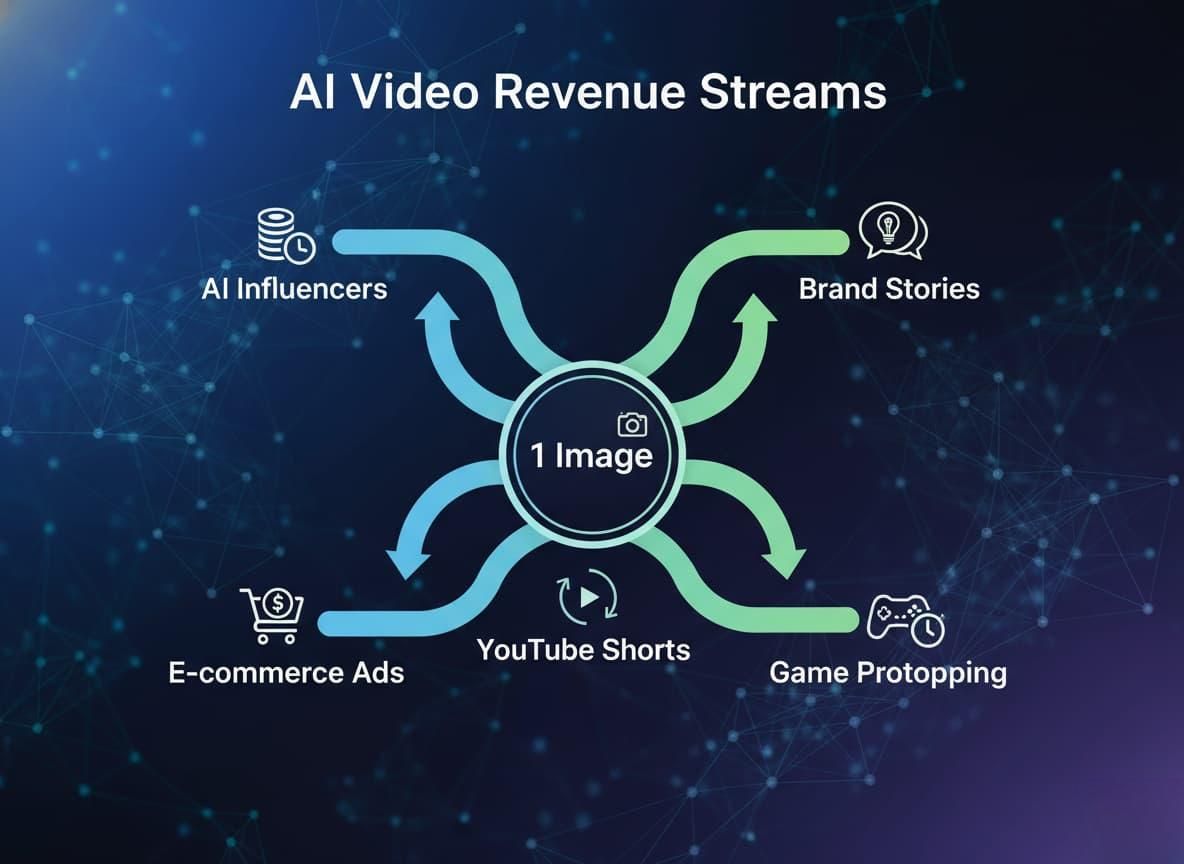
Now that you have found the best phot, what is the next step? Getting cool video results is definitely fun. But honestly, you need to turn these models into traffic, content, or actual revenue.
Here is how I see smart creators actually making money and saving time with this tech right now.
Virtual Character Monetization
Building an AI influencer used to take a whole team. Now, you just generate a "stable character" from one good photo. You can constantly push out new, consistent videos for Instagram or TikTok.
The Money: Once the account grows, you make money through brand endorsements, ad revenue, or affiliate marketing.
The Bottom Line: With consistent character generation, a single photo becomes a highly scalable online identity.
E-commerce / Product Marketing Videos
Traditional product shoots are insanely expensive. I suggest taking your basic Shopify or Amazon photos and animating them instead. Turn a boring flat picture of a shoe into a dynamic, moving clip for Meta ads.
The Money: You drastically lower your video production costs. You can literally start testing these video ads using free tools first.
The ROI: Turn static product images into eye-catching ads without ever hiring a video team.
Batch Short-Form Content Production
Have you noticed the huge spike in "faceless" YouTube channels? Creators are batch-generating emotional stories or historical videos using AI clips.
The Money: You can pump out YouTube Shorts and TikToks at massive scale to capture ad revenue.
The Strategic Advantage: Photo-to-video AI changes content creation. It shifts from slow, manual input to high-volume production.
Game / Animation Prototyping
If you develop games, you can take flat character design sheets and quickly turn them into animated pitch demos.
The Money: Connect to a multi-modal API platform. You can test proofs of concept and save hundreds of hours of early animation work.
The Takeaway: Developers get to test character movement freely before fully committing to an expensive animation pipeline.
Brand Story / Ad Creative
You can generate cinematic-quality ads starting from just one image. It is pretty amazing how good the lighting looks on the latest models.
The Money: High-quality output gives your brand marketing videos a massive boost in business value.
The Point: High-quality AI lets you build cinematic storytelling without a massive production crew.
To sum it up: If you want to scale these revenue streams, you have to move past clicking buttons on a website. Relying strictly on "daily free credits" won't cut it when you need real volume.
How to Use Multiple Top Free Photo-to-Video AI Models at the Same Time
You simply cannot rely on just one tool for all your video production. No single AI model delivers the best results every single time. Sometimes Runway nails the cinematic lighting perfectly, but Kling handles the facial expressions way better.
To really optimize your quality, cost, and volume, you need a unified API interface. This setup lets you connect to multiple AI models from one place.
Seamless Model Switching
Instead of guessing, take your same input photo and run it through a few different models. You can quickly see which AI handles that specific scene best. Finally, use the best tool for the specific task at hand. Don't force a one-size-fits-all approach, because the final video usually ends up looking pretty clunky.
Cost Optimization
Generating high-end video burns through credits fast. You can start out using free or super low-cost models just for testing. Get the motion and framing right first. Once your cheap test looks good, scale up to the stronger models to grab that premium output. You only spend money when the shot is actually ready.
Mature Workflow
Juggling six different browser tabs and monthly subscriptions is a nightmare. A mature workflow means one single API handles your uploads, the actual processing, and the final export. You completely replace all those fragmented web dashboards. What normally takes hours of manual clicking can be automated in minutes using an aggregator API. It removes the annoying bottlenecks so you can finally produce content at scale.
The Takeaway: It is perfectly fine to start by testing your ideas on a standard photo to video ai free tool. Once you figure out what works for your brand, choosing an aggregator API platform is the smartest next step. It lets you smash past those daily free limits without completely changing your workflow, paving the way for real, scalable growth.
Summary – Why Do Global Creators and Developers Choose Aggregator API Platforms Like Atlas Cloud?
Playing around with a free AI video generator is a great starting point. But when you are ready to build a scalable business, managing a dozen different web tabs, separate subscriptions, and daily credit limits will choke your workflow.
This is exactly why global creators and developers are moving to aggregator platforms like Atlas Cloud. Instead of managing separate billing for Kling, Hailuo, and Luma, you get one unified API endpoint. You write the code once, and you instantly unlock the best video engines on the market. It’s the ultimate way to guarantee character consistency across hundreds of clips while only paying for the exact seconds of video you generate.
Access Top Models Through One Unified API
The free quota only allows you to generate one video at a time, and there are restrictions on IP/commercial use. Instead of buying separate subscriptions for Kling and Hailuo, you just use one endpoint. Atlas Cloud puts all these top-tier engines under one roof. You write the code once, and suddenly can concurrently access to the best tools on the market.