An AI API for batch generation is useful when every output can be found, reviewed, and retried on its own. That matters more than how many prompts you submit at once. The costly moment is not request number 1,000. It is when task 37 times out, task 38 succeeds, two files share a name, and nobody can tell which image is safe to publish.
Treat a batch as a collection of recoverable asset jobs. Give each job a durable business ID, save the exact input and model settings, cap concurrency, and retry only the item that actually failed. This guide uses an 8-asset character-campaign workflow so a developer or growth team can turn a manifest into a controlled production run.
Key takeaways
- A batch job and parallel requests solve different latency and control problems.
- Stable asset IDs and idempotency keys make partial failure manageable.
- Start with 4 to 8 visual assets, review them, then expand.
- A successful API response still needs visual and rights review before publishing.
AI API for Batch Generation: The Answer First
An AI API for batch generation submits a set of distinct generation tasks to an asynchronous queue, then returns their results through status checks, a completion callback, or a downloadable output file. Each task needs an identity that exists outside the model provider. The provider's job ID helps operations, but maya-ridgeline-001 is what lets your editorial or campaign system identify the asset months later.
Do not merge three related ideas. A single prompt can request several variations. Your own worker can send several normal requests at the same time. A server-side batch job is a provider-managed collection that completes later. The latter often fits offline work, while controlled parallel requests fit a dashboard that needs progress immediately.
OpenAI's current Batch API documentation illustrates the async pattern: requests are collected into JSONL, submitted as a job, checked for completion, and retrieved as results. Its 24-hour window, separate batch rate limits, and limits are specific to that service, not a promise every image provider makes (OpenAI Batch API documentation, September 2026). Gemini's current reference likewise documents long-running batch jobs, status checks, and webhook support for its service (Gemini Batch API reference, September 2026).
| Decision point | Batch API | Controlled parallel requests |
|---|---|---|
| Expected response | Deferred completion | Each request returns as it finishes |
| Best for | Offline catalog, storyboard, and content-library work | Interactive tools and short review loops |
| Failure handling | Read per-item results after a job completes | Handle each child request as it settles |
| Cost and limits | Provider-specific batch rules may differ from live traffic | Uses the account's ordinary request limits |
| Essential record | Asset ID, request ID, result state, output location | The same fields, plus in-flight attempt state |
Choose controlled parallel requests when a reviewer needs to see the first usable image quickly. Choose a server-side batch job when the work can wait and the provider documents a batch path. In either case, store asset_id, normalized input, reference hash, model, attempt count, and output URL. That common layer keeps the workflow portable if the delivery mechanism changes.
Why Batch Image Projects Fail at Scale
Production batches usually fail in pieces. A request can be completed, timed out, rejected, or return an output that is technically valid but visually unusable. An application that records only a final URL has thrown away the information needed to recover from all but the simplest success case.
The first failure is missing identity. If the request only carries a prompt string, an output cannot be mapped reliably back to a product, a campaign locale, or a source row. Filenames derived from the prompt are fragile because prompt revisions and repeated products collide. Use a stable asset ID from the business record, then give every generation attempt its own suffix.
The second failure is retrying without idempotency. A network timeout does not prove that the provider did no work. If a worker immediately resubmits the same asset with a new request identity, it can create duplicate outputs and duplicate charges. An idempotency key lets the caller say, in effect, "this is still the same requested asset." Whether a specific endpoint supports that mechanism is provider-dependent, so confirm it in the API documentation before relying on it.
The third failure is a blind 40- or 60-prompt queue. A color, composition, or product-identity drift can become visible only after the run finishes. A recent creator discussion describes reviewing storyboard pages of roughly 7 to 8 images before sending the next page, specifically to catch accuracy and consistency errors (batch image generation discussion, June 2026). That is community experience, not a benchmark, but it is a sensible operational checkpoint.
Use a small-batch QC rule: run 4 to 8 assets, inspect them, repair the prompt or reference if necessary, then unlock the next group. Keep the original prompt, prompt version, input reference, model revision when available, quality setting, aspect ratio, timestamps, error class, and review decision. A URL alone cannot answer why an asset exists or whether it should be reused.
Design a Reliable AI API for Batch Generation
The implementation can be small. A manifest, a queue worker, an append-only job record, and a reviewer-friendly output folder are enough to begin. The goal is not a large orchestration system. It is a workflow where a person can answer: what was requested, what happened, and what should run next?
Give every batch output a durable asset identity
Make asset_id a business key, not a provider job ID. A useful task record can include the fields below. Keep it in a database when several workers operate, or in a versioned CSV plus JSONL log for a smaller team.
| Field | Why it exists |
|---|---|
asset_id | Immutable identity for the publishable asset |
source_row | Maps back to the product, campaign, or content record |
prompt_version | Shows which instruction template produced the result |
reference_hash | Confirms which locked source image was used |
model, aspect_ratio, quality | Makes the run reproducible enough to diagnose |
attempt, idempotency_key, status | Separates a child-job retry from a new request |
output_url, review_status, failure_reason | Connects delivery and human acceptance |
For example, maya-train-001 stays the asset identity. maya-train-001-a2 is attempt 2. The idempotency key can be maya-train-001-v1, where v1 identifies the immutable requested specification. If the brief changes materially, create a new prompt version instead of overwriting the old record.
Use a batch queue, not an unlimited loop
Set a concurrency ceiling, an asset-count cap, a monetary guardrail, and a retry cap before dispatch. A practical starting configuration is 4 in-flight jobs, at most 2 generation attempts per job, and no more than 8 visual tasks before the next quality gate. These are starting values, not platform guarantees. Set them below your account's documented limits and adjust after observing real completion times and error rates.
The worker should claim one pending task, mark it submitted, store the provider request ID, and update that same record when a result arrives. When a budget cap is hit, stop claiming work. When the queue is paused for review, allow already-submitted work to settle but do not release another group automatically.
Retry only the failed child job
Retry failed, timed_out, or provider-specific retryable states one asset at a time. Use capped exponential backoff with jitter for 429 responses, transient 5xx responses, and genuine transport timeouts. Store the error classification and scheduled retry time. Do not auto-repeat a content-policy refusal, malformed input, missing reference, or a visual rejection from a human reviewer.
Never resubmit a whole batch because one child failed. Archive successful results immediately and preserve the source-to-output mapping. If a batch job expires with partial results, ingest the completed children, identify the unfinished asset IDs, and create a new job containing only those remaining records. This is the difference between recovery and duplication.
A Copyable 8-Asset Batch Image Workflow
The following example is deliberately fictional: Maya, an adult travel photographer on a highland assignment. It makes the operating mechanics concrete without implying that a real person endorsed the campaign. Replace the fields with your own permitted character, talent-release, or campaign data and keep the structure.
Step 0: Create the manifest before you generate
Create batch-manifest.csv before opening a playground or calling an endpoint. It gives the operator a clear acceptance target for each asset.
| asset_id | batch | use_case | ratio | status |
|---|---|---|---|---|
| maya-master-001 | master | canonical character reference | 16:9 | pending |
| maya-ridgeline-001 | a | sunrise ridgeline campaign image | 16:9 | pending |
| maya-market-001 | a | mountain market editorial image | 16:9 | pending |
| maya-cabin-001 | a | cabin planning editorial image | 16:9 | pending |
| maya-lake-001 | a | lakeside field-notes image | 16:9 | pending |
| maya-forest-001 | b | forest trail campaign image | 16:9 | pending |
| maya-train-001 | b | train journey editorial image | 16:9 | pending |
| maya-workbench-001 | b | field-kit preparation image | 16:9 | pending |
| maya-portrait-001 | b | close portrait campaign image | 16:9 | pending |
Generate a deterministic idempotency key for every immutable request, such as maya-ridgeline-001-v1. The shape below is provider-neutral on purpose. Put the provider endpoint and its documented parameters inside request; do not copy a fictional private endpoint into production.
plaintext1{"asset_id":"maya-ridgeline-001","idempotency_key":"maya-ridgeline-001-v1","request":{"model":"your-approved-model","ratio":"16:9","reference_hash":"sha256:...","prompt_version":"maya-highlands-v1"}}
Step 1: Create one canonical character reference
Generate the master image separately. It is the identity anchor for every later scene, so it deserves a short review before any batch begins. In the GPT Image 2 playground, select High quality and 16:9, then use this prompt:
plaintext1Editorial portrait of Maya, a fictional adult travel photographer in her early thirties, with short wavy dark-brown hair, warm olive complexion, a weathered rust-orange field jacket over a charcoal knit top, and a compact black camera on a woven shoulder strap. She stands three-quarter length against a softly lit pale-stone studio backdrop, facing slightly right with a calm, observant expression. Soft window light from the upper left, realistic subtle shadow, no logo, no text, no other people, no duplicated hands or camera. Clean cinematic campaign composition with negative space on both sides.
Keep one image that clearly shows Maya's face, hair, jacket, camera strap, and one complete pair of hands, with no text or duplicate person. Save it as maya-master-001.png, calculate a reference hash, and attach that same source to downstream child jobs. Do not batch this step. A weak master reference multiplies ambiguity across every scene.

Feature demo for AI API for batch generation: Maya's character-reference prompt beside the generated travel-photographer portrait
A real GPT Image 2 master-reference run: the prompt establishes the fictional photographer whose identity later scene jobs must preserve.
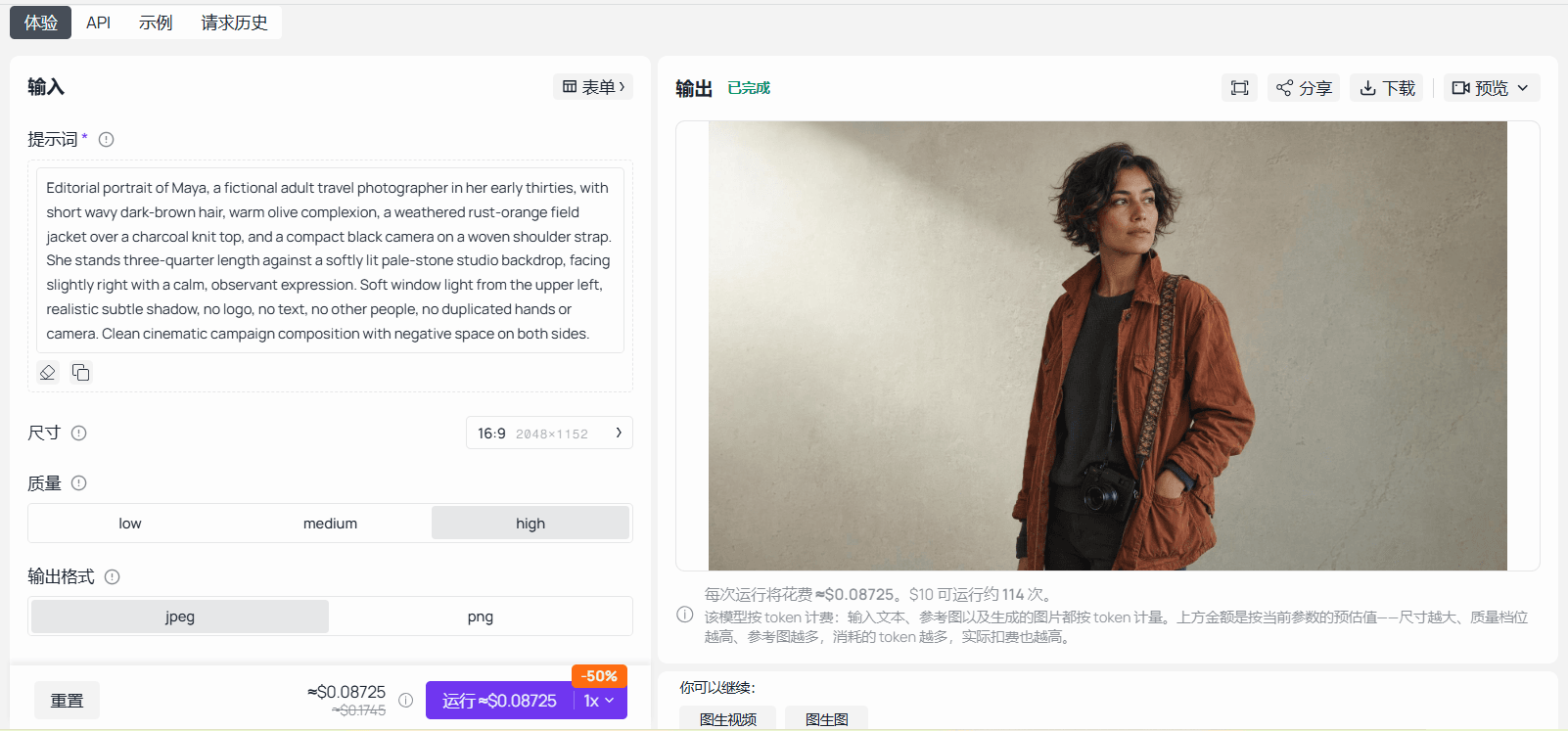
GPT Image 2 playground completed with High quality, a 16:9 setting, and Maya's master portrait
GPT Image 2 on Atlas Cloud with the article's character-reference prompt and its completed result in the output panel.
Step 2: Run Batch A as 4 linked character scenes
Upload maya-master-001.png to Seedream v4.7 Sequential. Keep the reference, prompt template, and 16:9 ratio constant. Use this prompt:
plaintext1Use the supplied Maya portrait as the immutable character reference. Generate four separate 16:9 cinematic travel-editorial images as one coherent sequence. In every output, preserve the same fictional adult woman: short wavy dark-brown hair, warm olive complexion, rust-orange field jacket, charcoal knit top, and compact black camera on a woven shoulder strap. One person only. No logo, no label text, no duplicate person, no malformed hands, and no identity drift. 2 3Image 1: Maya on a sunlit granite ridgeline, consulting a folded topographic map at sunrise, distant cloud-filled valley below. 4Image 2: Maya walking through a small mountain market, photographing bright woven textiles, soft morning activity behind her. 5Image 3: Maya at a timber cabin table, arranging printed contact sheets and a notebook beside a rain-speckled window. 6Image 4: Maya kneeling by a clear alpine lake, taking field notes while her camera rests on a rock, late-afternoon light. 7 8Keep the composition editorial and realistic. Leave clean negative space on the left third for possible marketing copy, but do not render any text.
Use the sequential or coherent-batch mode that the live page actually exposes. Accept only outputs that can be mapped unambiguously to maya-ridgeline-001 through maya-lake-001. If the playground returns one output per request instead of 4 separate child assets, submit the same locked template as 4 child jobs. Preserve the same reference hash and parameters rather than pretending the interface returned a feature it did not.

Four real Seedream v4.7 Sequential Maya scene outputs in a grid, mapped to ridgeline, market, cabin, and lake asset IDs
The 4-scene Batch A output grid: each frame remains a separate asset record even when the model produces a coherent sequence.
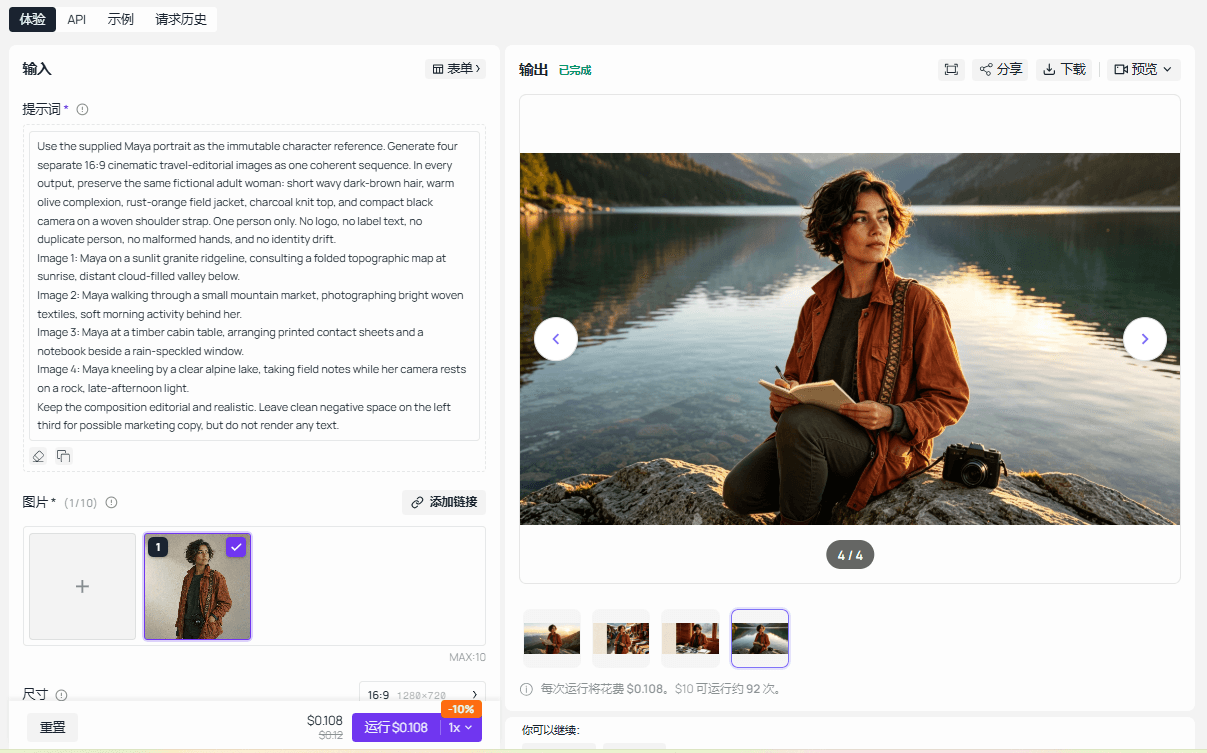
Seedream v4.7 Sequential playground completed with the linked Maya scene prompt and its real output
Seedream v4.7 Sequential on Atlas Cloud with the article's linked character-scene prompt and a completed result.
Step 3: Run Batch B, then stop for quality control
Reuse the approved master reference. Do not re-create it and do not rewrite the identity rules. Submit the next 4 scenes with a new batch label and the same acceptance checks:
plaintext1Use the supplied Maya portrait as the immutable character reference. Generate four separate 16:9 cinematic travel-editorial images as one coherent sequence. In every output, preserve the same fictional adult woman: short wavy dark-brown hair, warm olive complexion, rust-orange field jacket, charcoal knit top, and compact black camera on a woven shoulder strap. One person only. No logo, no label text, no duplicate person, no malformed hands, and no identity drift. 2 3Image 1: Maya moving through a mossy cedar forest on a narrow trail, camera raised toward a shaft of morning light. 4Image 2: Maya seated at a train-window table, reviewing contact sheets as a sunlit landscape blurs outside. 5Image 3: Maya at a weathered cabin workbench, packing film canisters, a lens cloth, and a folded paper map before departure. 6Image 4: close three-quarter portrait of Maya outdoors in light mist, camera strap visible, shallow depth of field, no text. 7 8Keep the same visual color treatment as the first sequence. Leave clean negative space on the left third where the composition permits, but do not render any text.
After Batch B, stop. Review all 8 scene records before releasing another campaign sequence. This pause catches the kinds of drift that queues conceal: hair or wardrobe changing, a second person appearing, unrequested lettering, malformed hands, or a scene that no longer serves its channel. Store the reviewer decision next to the asset rather than in an untracked chat message.
Step 4: Apply a publish, retry, or reject decision
Mark an image approved when it contains one Maya, matches the master reference in face, hair, wardrobe, and camera, contains no broken text or malformed anatomy, and fits its assigned scene. Mark it retry when Maya duplicates, drifts, loses a necessary prop, or shows malformed hands or lettering. Mark it rejected when the composition cannot serve the intended channel or the character is no longer recognizable.
For a retry, retain maya-train-001 as the business asset and create attempt maya-train-001-a2. Submit only that child job with the original idempotency key specification adjusted only if the prompt is being deliberately versioned. Do not rerun the other 7 assets just because one scene needs repair.
Choosing Models for Batch Generation
Choose a model around the work unit, not a leaderboard. A clean master reference and a coherent scene sequence are different jobs. An edit of one failed image is different again. If a team wants to test those stages through one OpenAI-compatible integration, Atlas Cloud provides a natural place to validate the two model pages used in this example.
| Job | Model and working method | Price context to verify before queuing |
|---|---|---|
| Create a clean character master | GPT Image 2, one High-quality 16:9 run that becomes the reference anchor | GPT Image 2 Developer text-to-image is listed from about $0.004 per image versus $0.009 standard, a 50% displayed discount as of September 2026 |
| Build a coherent scene set | Seedream v4.7 Sequential, same reference and locked prompt schema across child jobs | The current catalog lists $0.03 per image; verify the live output mode and price before production |
| Repair one failed asset | GPT Image 2 edit mode, limited to the asset that failed review | Confirm the edit endpoint, output size, quality, and current price before committing |
Prices change by model, mode, and selected settings. Use the Atlas Cloud models catalog to re-check availability, discounts, and the exact mode on the day you queue work. Treat the table as an estimation input, never a promotional claim or a cost guarantee.
Quality Control, Cost, and Rights Before You Scale
Generation completion has 3 separate meanings: the provider reports success, the file was archived correctly, and a human reviewer accepts it for publication. Make all 3 visible in your records. A completed task with a missing output file is an operational failure. A saved file with a duplicate character is a creative failure. Neither should advance automatically to publishing.
Use a reviewer checklist that is simple enough to apply to every child asset:
| Check | Reviewer question |
|---|---|
| Character identity | Does Maya match the approved master reference in face, hair, wardrobe, and camera? |
| Object count | Is there exactly the expected number of key objects? |
| Prompt match | Does the scene deliver the assigned use case? |
| Text artifacts | Is there unwanted, malformed, or unsupported text? |
| Ratio and filename | Does the saved file match the manifest record? |
| Rights review | Are the reference and intended claims permitted for this use? |
Estimate cost after the run with approved asset cost = total completed attempts cost / approved assets. This exposes the cost of retries and rejected results without pretending that every image has the same final cost. Set a task cap, a batch cap, and a daily cap before you start. Pause dispatch if any of those ceilings is reached.
Use only owned, licensed, or otherwise permitted reference images. Check the current platform policies and the model's terms before commercial use. Do not ask the model to invent certifications, laboratory results, safety promises, medical claims, or unverified product specifications. A polished output does not turn an unsupported claim into a publishable one.
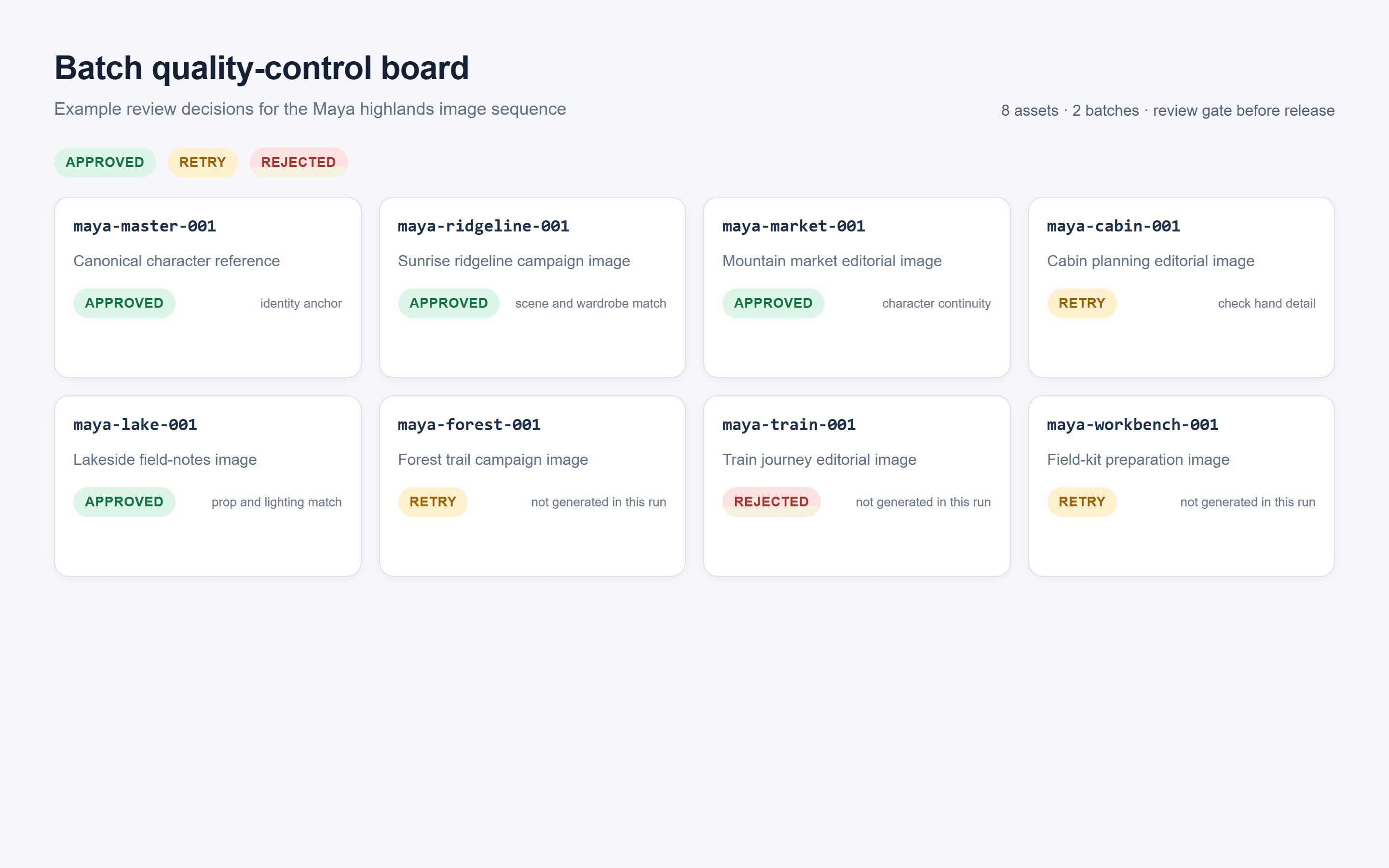
Browser-rendered batch quality-control board showing 8 Maya asset IDs with approved, retry, and rejected review states
A browser-rendered review board maps real run files back to their 8 asset IDs and makes the publish, retry, or reject decision visible.
AI API for Batch Generation: Production Launch Checklist
Before moving from the 8-asset exercise to a live catalog or content library, confirm each item below.
- Every asset has an immutable
asset_id. - The prompt, reference hash, model, ratio, and quality are recorded.
- Every submission has an idempotency key where the provider supports one.
- Concurrency remains below the account's actual documented limit.
- Task, batch, and daily budget caps exist.
- 429 responses, 5xx responses, timeouts, and content refusals follow different rules.
- Retries have a hard maximum.
- Successful results are archived and mapped back to source data immediately.
- A small-batch QC gate passes before the next group is released.
- A final sample review checks character identity, text, ratio, filenames, and rights.
This checklist keeps an AI API for batch generation useful when volume grows. It also leaves a clear audit trail when an editor asks why a particular image was generated, accepted, or rerun.
FAQ: AI API for Batch Generation
What is an AI API for batch generation?
It is a way to submit many independent AI tasks, track their execution, and collect results later. A good implementation keeps a durable business asset ID for every task, regardless of whether the provider uses an async batch job or normal concurrent requests.
Is a batch API better than sending image requests in parallel?
Neither is automatically better. Use controlled parallel requests when the workflow needs immediate progress. Use a provider batch job for non-urgent volume when its documented queue, turnaround, and cost rules fit your work. Both need per-asset logs and review.
How many AI images should I put in one batch?
Start with 4 to 8 visual assets when you are validating a new prompt schema or character reference. Increase only after the team can map every result, spot drift quickly, and recover a failed child job without restarting the group. Provider limits may allow far more, but an operationally useful batch is a reviewable one.
How do idempotency keys prevent duplicate generation costs?
They identify a submission as the same intended operation after a retry. If the endpoint supports idempotency, the provider can avoid treating a repeat network call as a wholly new generation. Store the key with the asset record and confirm the exact semantics in the provider's documentation.
Can I batch generate images from the same character reference?
Yes. Use one approved, permitted reference image; attach its hash to each child job; lock the identity instructions; and review a small scene group before expansion. Reference consistency reduces ambiguity, but it does not replace visual QC.
Should I retry an entire failed batch or only failed assets?
Retry only the failed assets. Archive successes first, classify the failure, and create a new attempt record for the affected child job. Whole-batch resubmission makes duplicate assets and unnecessary spend more likely.





