An "AI Chinese filter" typically evokes ink wash, Gongbi silk, Hanfu, Hong Kong neon, or tiktok makeup. Keeping your subject recognizable requires separating full texture transfer from targeted regional editing. While Seedream v5.5 retexturing converts landscapes into brushwork without shifting horizon lines, Seedream 5.0 Pro swaps wardrobe and studio lighting while locking facial bone structure.
Which AI Chinese Filter Style Fits Your Photo?
Pick your workflow by subject. Landscapes tolerate heavy brushwork, but close-ups collapse if facial geometry or lighting shifts. Select your photo's matching model below.
| Style | Recommended Model | Visual Result | Editing Focus |
| Shuimo Ink Wash | Seedream 5.5 Edit | Traditional ink painting on Xuan paper | Brushwork, ink washes, and negative space |
| Gongbi Silk | Seedream 5.0 Pro (Likeness) / Wan 2.7 (Colors) | Detailed silk painting with fine outlines | Facial details, contour lines, and mineral pigments |
| Hanfu Tang Studio | Wan 2.7 (Identity) / Seedream 5.0 (Styling) | Tang-style clothing and a traditional courtyard setting | Facial identity, period clothing, and hairstyle |
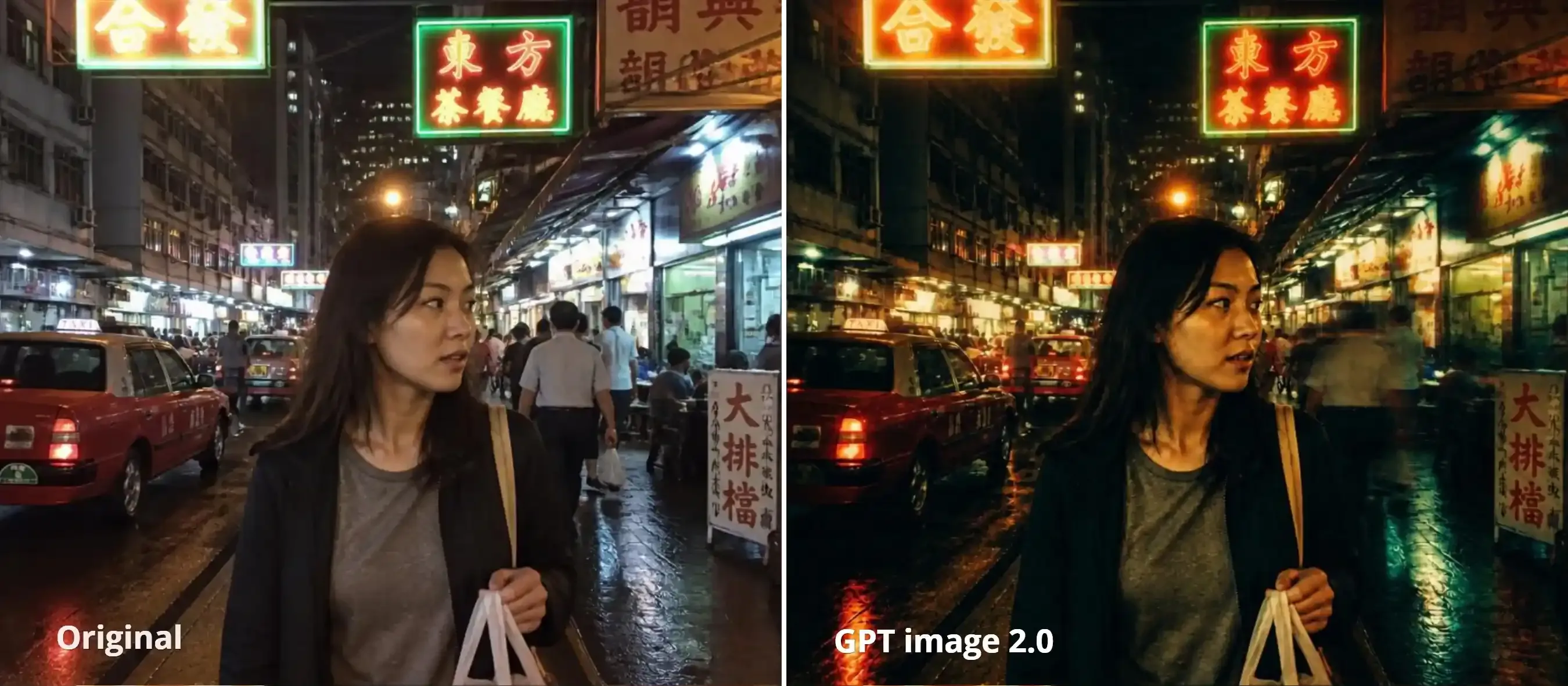
| 90s HK Cinema | GPT Image 2.0 | Moody neon lighting and 35mm film texture | Color separation, halation, and background motion blur |
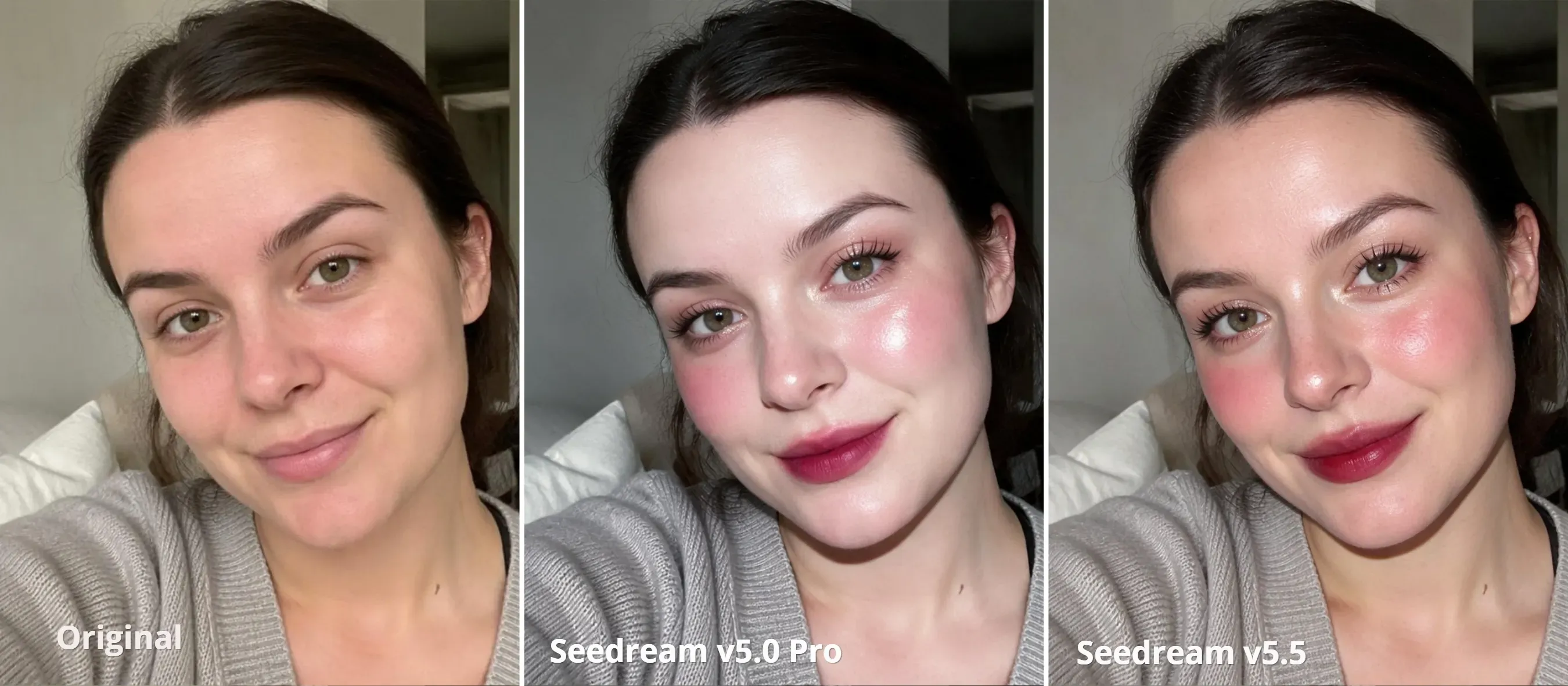
| TikTok Glass-Skin Portrait | Seedream 5.0 Pro | Cool porcelain makeup with camera-flash highlights | Skin texture, facial proportions, and localized makeup |
Preparing Your Source Photo So the Filter Keeps Your Face and Framing
Bad input kills good style transfer. A cramped, shadowed selfie will distort facial features long before applying any style. Spend 30 seconds prepping your photo to save credits.
- Pick a source photo with flat, neutral lighting across the face. Harsh side shadows choke edge detection. When dark contrast cuts across the nose bridge, Shuimo and Gongbi filters misread the geometry and bleed heavy ink blotches directly onto your skin.
- Leave 30% open space (Liubai). Shoot chest-up with negative space. Chinese ink wash needs room to bleed and fade.
- Match the editing mode to how close the camera sits. Unanchored style transfer warps faces. Lock facial features on close-up portraits; save full retexturing for landscapes and objects.
5 Classic AI Chinese Filter Styles Prompts and Settings
Generic tags fail fast. Typing a two-word style label into a prompt box produces muddy clichés. Run the specific paper textures, pigment names, and lighting constraints below inside controllable image model families to lock the exact look.
1. Shuimo Ink Wash Filter Best for Landscapes, Architecture, and Pets
To avoid looking like a cheap filter, use Seedream 5.5 Edit to prompt for Xuan paper, Feibai strokes, and Liubai negative space.
plaintext1Restyle the source image as a traditional Chinese Shuimo ink wash painting on raw absorbent Xuan rice paper. Keep the original composition and subject silhouette intact. Render edges with graded black sumi ink wash and dry-brush Feibai strokes, with subtle mineral indigo and burnt sienna accents. Preserve 30% open unpainted paper grain as Liubai negative space. Include one small blank cinnabar red square seal stamp in the lower corner, no text, no calligraphy characters.
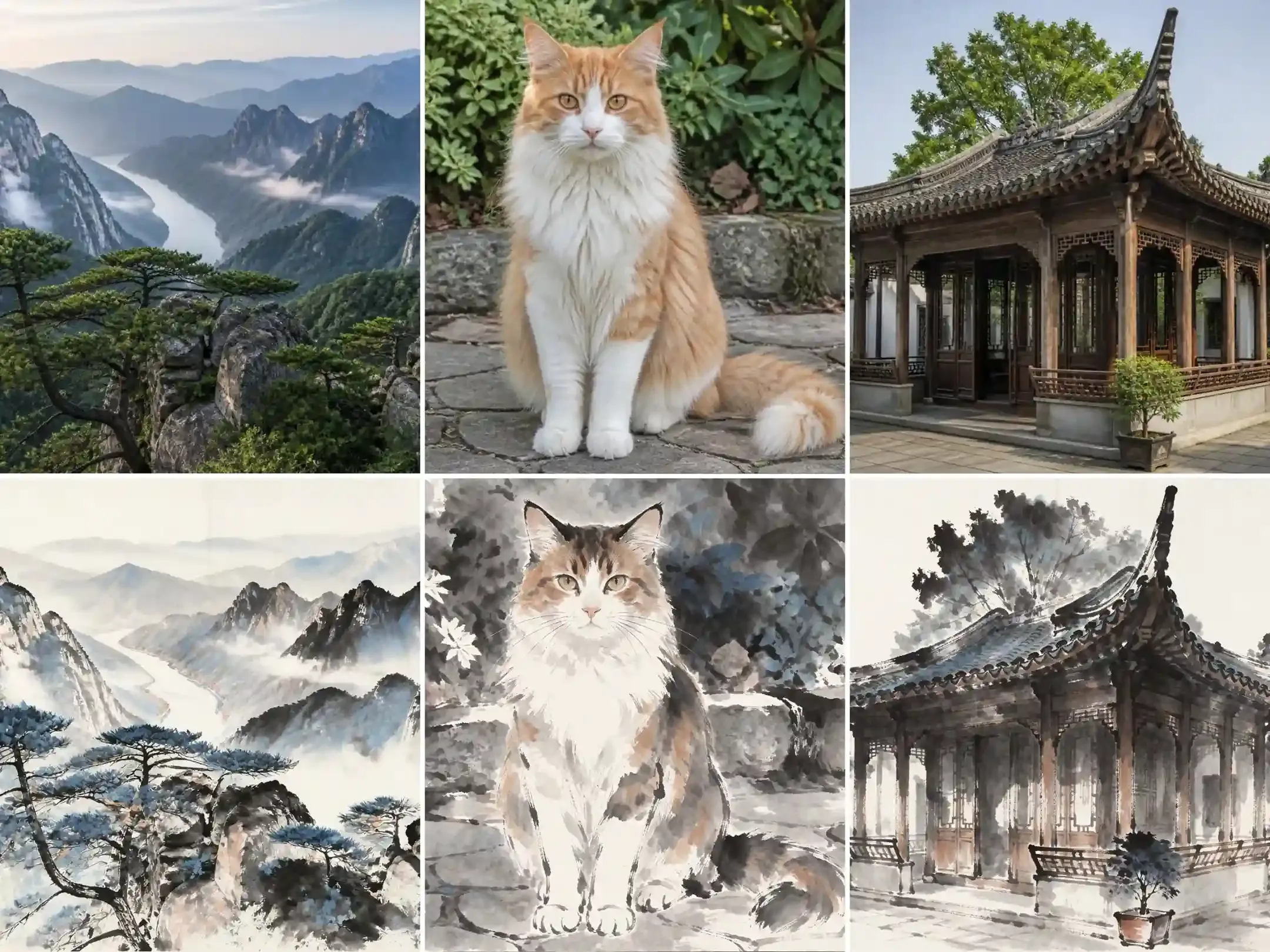
- Dry-brush Feibai and raw Xuan paper tokens: Triggers visible paper tooth and dry-brush streaks instead of a flat gray wash.
- 30% Liubai negative space constraint: Stops dark ink gradients from flooding the sky or background wall, keeping the subject silhouette readable.
- Blank cinnabar seal with
no calligraphy characters: Adds traditional red Yinzhang visual balance without letting the model invent garbled pseudo-Chinese text.
2. Gongbi Fine-Brush Silk Filter Best for Half-Body Portraits and Botanicals
Gongbi demands razor-sharp ink lines. Where Shuimo washes bleed outward, court-style silk painting locks pigment inside delicate boundaries.
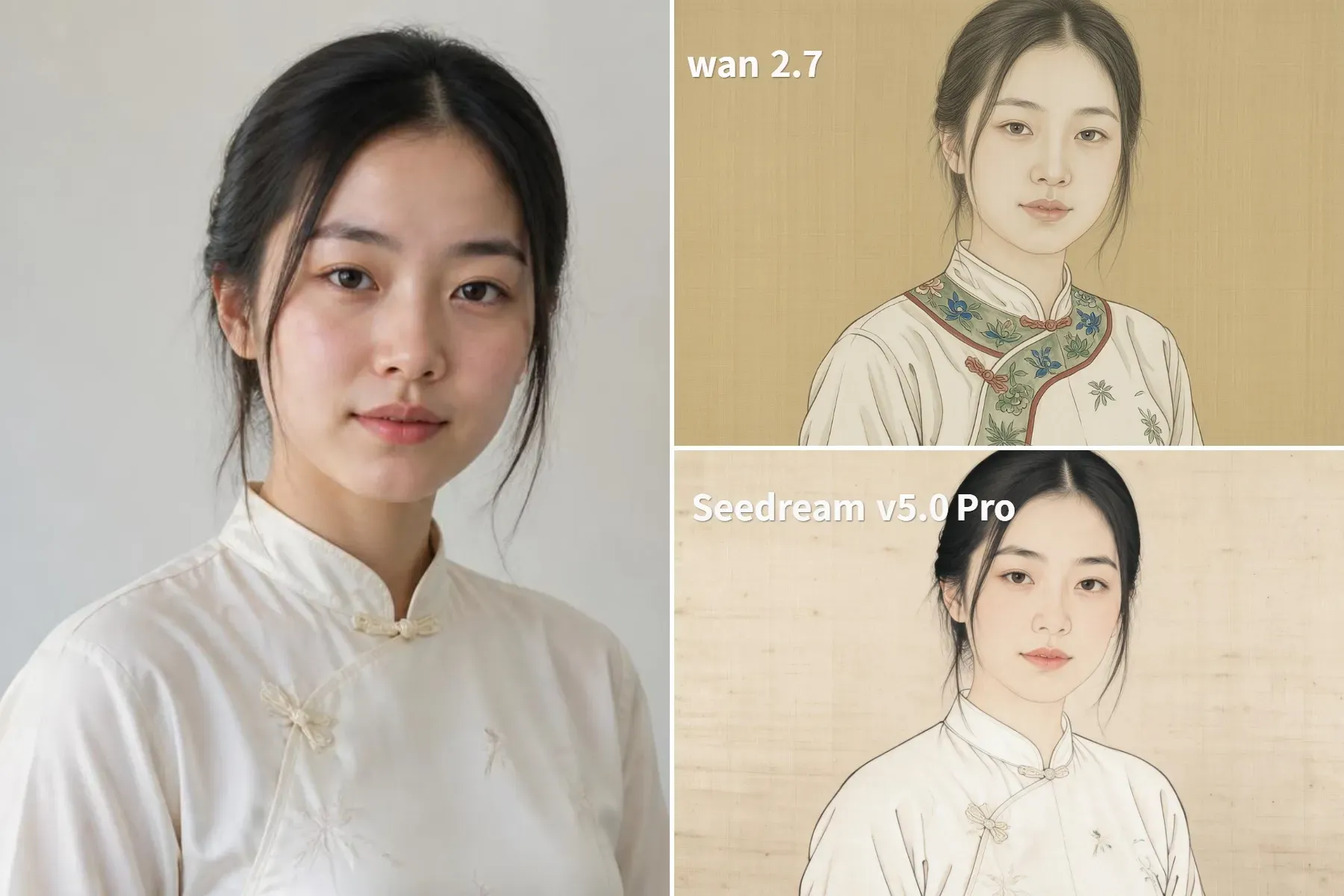
Pick Seedream 5.0 Pro for facial likeness, or switch to Wan 2.7 for punchier robe patterns and color.
plaintext1Convert this photo into a meticulous Chinese Gongbi court painting on warm aged woven silk. Trace the subject, hair strands, and clothing folds with ultra-fine dark ink brush outlines. Fill the shapes using flat layered mineral pigments in malachite green, azurite blue, shell white, and muted cinnabar. Keep the exact facial bone structure, eye spacing, and gaze direction of the original subject. Soft flat lighting, visible fine silk weave texture, zero airbrushed 3D shading.
- Aged woven silk and
zero airbrushed 3D shading: Flattens modern camera gloss into matte mineral pigment layers that sit inside the silk grain. - Ultra-fine dark ink brush outlines: Tells the model to draw distinct boundary lines around eyes, lips, and collar folds before applying color washes.
- Mineral pigment naming (malachite, azurite, shell white): Replaces neon digital saturation with authentic court painting palettes.
Field Tips:
Seedream 5.0 Pro holds face shape and silk grain with precision, but defaults to a faded, almost grayscale palette. Anchor colors to garments to stop dye spilling onto skin.
Wan 2.7 excels at rich, authentic mineral fills on clothing, but aggressively beautifies faces into stylized court templates. If preserving the subject's exact identity is mandatory, prioritize Seedream.
3. Hanfu and Tang Dynasty Studio Portrait Filter The Viral "Chinamaxxing" Look
Wardrobe swaps often drift. When generating period clothing, different diffusion passes handle facial likeness and historical styling in radically different ways. Running the exact same prompt across Seedream 5.0, Wan 2.7, and Seedream 5.5 shows exactly where each engine excels and where it fails.
plaintext1Keep the exact face, eye shape, nose bridge, jawline, skin tone, and head angle from the source photo unchanged. Replace the modern clothing with an authentic Tang Dynasty embroidered silk Ruqun Hanfu in deep crimson and muted gold thread, showing woven brocade texture and wide flowing sleeves. Add a simple jade hairpin tucked into the existing hair texture. Replace the background with a softly blurred night courtyard lit by warm red paper lanterns, shallow 85mm depth of field, natural skin pores.
- Front-loaded facial lock clause: Mandatory for Wan and Seedream 5.0 to keep original bone structure grounded.
- Woven brocade texture: Forces heavy fabric drape and gold thread sheen, preventing flat Halloween-costume polyester looks.
- 85mm lantern bokeh: Casts warm rim lighting onto the collar and shoulders, integrating the subject naturally into the evening courtyard.
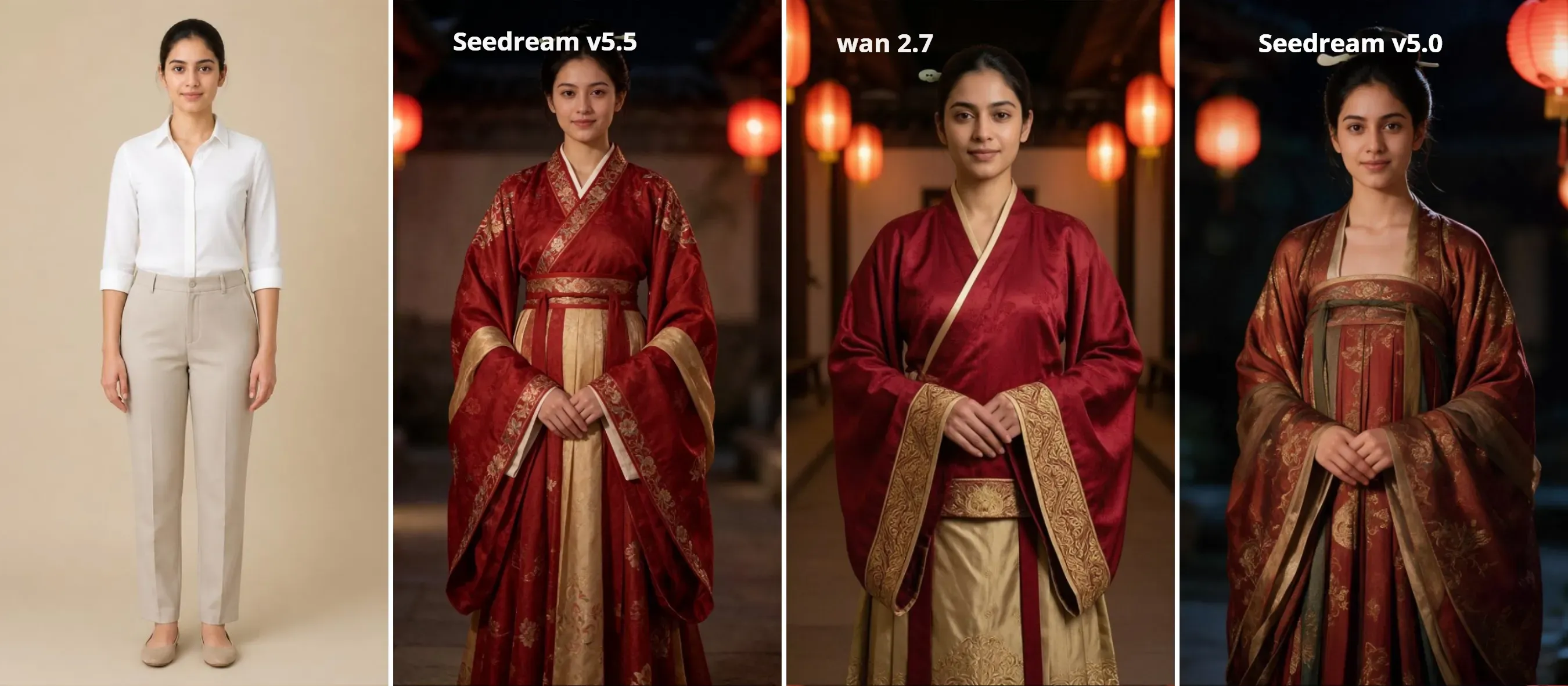
- Seedream 5.0 generates authentic Tang silhouettes (Qixiong Ruqun, pibo shawls, period updos) while keeping skin texture and likeness intact;
- Wan 2.7 delivers near-flawless facial fidelity. It locks the subject's exact nose bridge, deep-set eyes, and original ethnic features with zero drift. The trade-off: clothing styling stays much simpler, defaulting to a standard crossover robe without complex updo styling;
- Seedream 5.5, while the brocade embroidery looks clean, the model aggressively overwrites the subject's facial geometry. It smooths out original features and force-fits an East Asian beauty filter template, completely losing identity likeness.
Pick Wan 2.7 to lock exact bone structure and ethnic likeness, especially for non-East Asian faces. Choose Seedream 5.0 for historically accurate Tang silhouettes and period updos out of the box. Go with Seedream 5.5 for commercial, porcelain-skin beautification where strict facial fidelity is secondary.
4. 90s Hong Kong Neon Cinema Filter Wong Kar-Wai Retro Aesthetic
Skip the wardrobe swap here. This filter relies on optical physics—color temperature shifts, halation blooms, and shutter drag.
GPT Image 2.0 natively replicates 35mm film stock and temporal blur mechanics. Feed a night street snap into GPT 2.0 using the prompt below.
plaintext1Apply a 1990s Hong Kong 35mm cinema color grade and high-contrast night aesthetics, while strictly keeping the woman's face, body, casual outfit, and the surrounding street geometry identical. 2Transform the shadows into moody tungsten emerald green and deep cyan, while applying warm amber, golden, and crimson halation (high-light blooming) around all the neon signs, street lamps, and shop interiors. Create rich, filmic contrast with humid, glinting reflections on the wet pavement, wet cars, and on her skin and hair. Include coarse, textured Kodak Vision3 500T film grain throughout, subtle lens flare, and soft step-printed motion blur on background pedestrians and passing vehicles on the right while keeping the woman's eyes and face sharp. Cinema still, film-like analog contrast, night-time atmospheric haze, directed by Wong Kar-wai, cinematography by Christopher Doyle.
- Isolate Motion Blur: Restrict shutter drag to background traffic; lock facial features tack-sharp.
- Split Color Tones: Route tungsten emerald strictly to shadows and warm halation to neon highlights.
- Lock Geometry, Free Light: Freeze facial contours and scene layout, but let the model repaint neon contrast.
- Target Physical Optics: Swap words like "vintage" or "retro" with
Kodak 500T grain,halation bloom, andChristopher Doyle.
TikTok Glass-Skin and Cool Porcelain Portrait Filter
Mobile beauty apps botch faces. Phone sliders shrink your chin into a triangle and blur skin into wax. Run a regional instruction pass in Seedream 5.0 Pro or Seedream v5.5 with geometry changes clamped under 0.25; you get high-contrast flash makeup while keeping real skin pores.
plaintext1TikTok porcelain flash aesthetic. Strictly lock the original jawline, eye size, and facial proportions unchanged. Cool porcelain skin with visible natural pores, lit by hard direct CCD camera flash with crisp specular highlights on cheekbones and nose tip. Add champagne shimmer along the lower aegyo-sal, crisp separated manga lashes, soft rosy blush on mid-cheeks, and a diffused gradient berry lip tint.
- Strict jawline and eye-size lock: Blocks the default V-line face slimming and anime eye enlargement that ruin standard mobile beauty filters.
- Direct camera-flash specular highlights: Simulates the crisp, high-contrast CCD digital camera flash popular in TikTok portraits instead of flat studio lighting.
- Targeted aegyo-sal, lash, and gradient lip tokens: Restricts cosmetic changes to exact pigment placement around the eyes and lips without waxing over cheek texture.
Optional Next Step Turning Your Restyled Photo into a 3-30s Motion Clip
Static frames only go halfway. Short-form feeds reward subtle ambient motion over frozen JPEGs. Instead of animating a raw selfie from scratch, two-stage photo-to-video pipelines lock your restyled Shuimo or Hanfu render as the starting keyframe before adding physics.
-
Export your restyled still at full 2K resolution. Clean edges give the model clear boundaries, whether it is tracking ultra-fine ink-wash gradients or heavy embroidered silk seams.
-
Upload your image into Seedance 2.5 and select a 5-second duration. For a single-image ambient loop, upload your restyled photo as the base frame. For a before-and-after transformation, upload both the original photo (
@Image1) and your restyled portrait (@Image2). -
Control motion speed entirely through prompt syntax. Because Seedance 2.5 lacks a manual motion strength slider, keep movement subtle and prevent warping by strictly animating secondary textures while locking the subject:
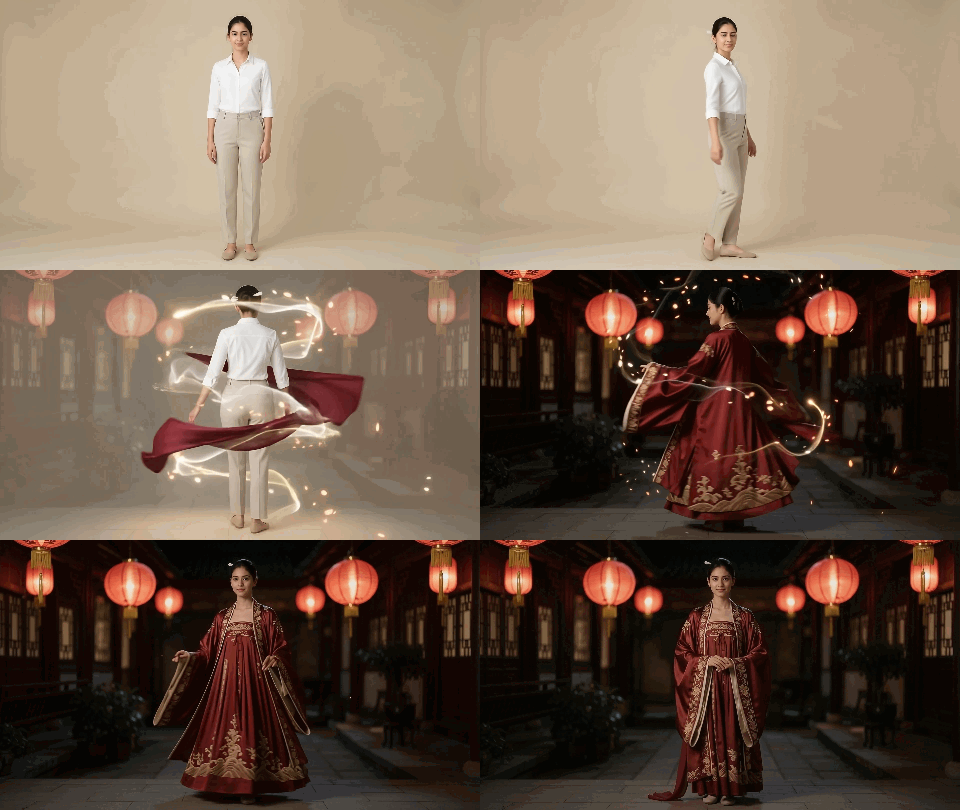
- For Hanfu/Tang Dynasty Portraits: Prompt a slow breeze through wide sleeves and floating silk ribbons, or direct a fluid 360-degree spin behind the camera while clamping facial bone structure.
- For Shuimo Ink Paintings: Direct motion into atmospheric effects—subtle rising mist, gently drifting dry-brush edges, or slowly expanding wet ink washes while keeping the central figure tack-sharp.
Hanfu or Tang Dynasty 360° Transformation Promp
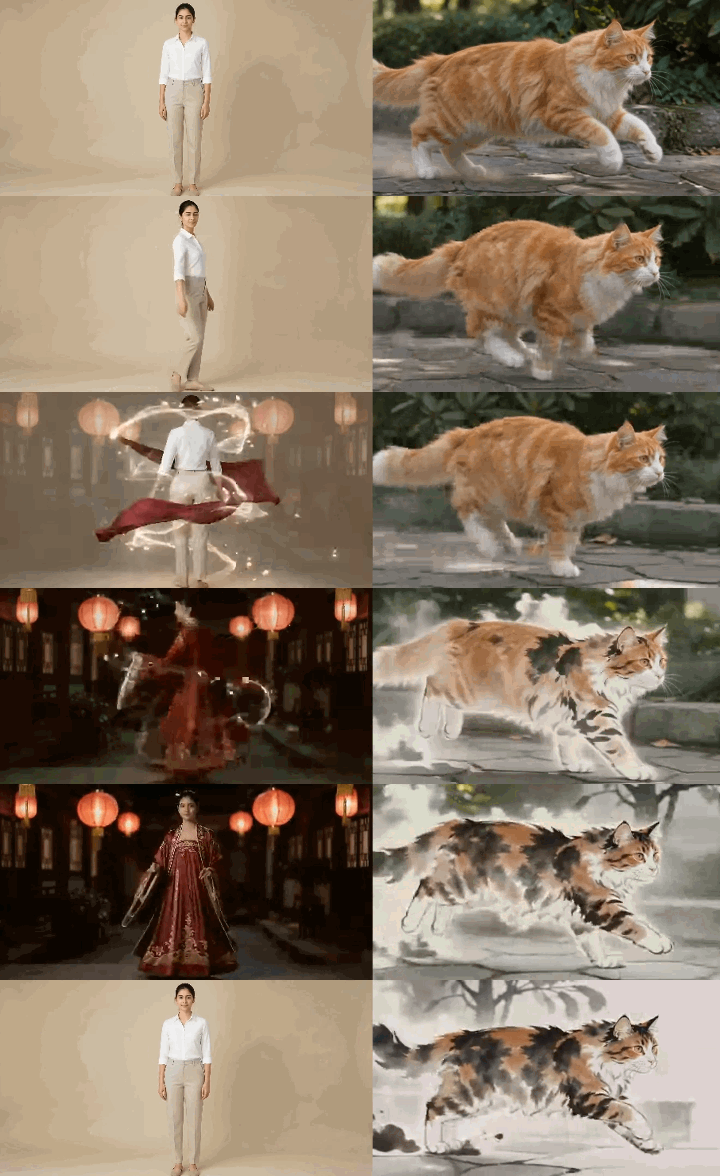
plaintext1Cinematic 5-second fashion transformation clip, fixed full-length framing throughout with zero camera zoom. 2Starting from the full-body standing pose in @Image1, the woman initiates a fluid 360-degree spin to her right. As her back turns to the camera, the modern white shirt and trousers dissolve seamlessly into the crimson silk Tang Dynasty Ruqun from @Image2, naturally extending into a flowing, floor-length embroidered skirt. The beige studio background transitions in sync into a dark courtyard illuminated by glowing red lanterns. 3By the final second, she completes the 360-degree rotation and settles into a steady, full-length standing pose facing the camera. The floor-length hemline drapes naturally to the ground while strictly locking the exact facial identity, gaze, and hairstyle of @Image2. Realistic centrifugal fabric physics, zero face morphing glitch.
Shuimo Ink Metamorphosis Prompt
plaintext110-second continuous transformation from @Image1 to @Image2, fixed side-view tracking strictly left-to-right. 2[Camera & Staging] 3Locked side-profile tracking moving rightwards. Zero camera pan, tilt, or zoom. The cat faces strictly right from frame 0 and sprints rightward with zero head-flipping or directional turning. 4[Timeline & Transformation] 5- 0-2s: The photorealistic cat from @Image1 bursts into an active forward sprint along the stone path, strictly facing right. 6- 2-6s: Mid-stride, all 3D lighting and photoreal fur strip away; the running body dissolves into 2D Chinese ink washes, adopting the exact calico brushwork, dry-brush outlines, and ink tones of @Image2. Environment flattens into raw Xuan paper grain. 7- 6-8s: The flat 2D sumi-e cat continues bounding across the paper scroll as dynamic calligraphic strokes with trailing ink splashes. 8- 8-10s: Forward momentum smoothly slides and settles into the exact seated pose and gaze of @Image2 as wet ink absorbs into the fiber. Seamless deceleration, zero cut-to-pose jump. 9[Negative Constraints] 10Single rightward vector. No 3D lighting, no photoreal fur textures after 3s, no abrupt pose snapping, no dual-head artifacts. 11[Audio Design] 12Brisk Guzheng and Pipa melodies building in tempo, layered with airy wind and fluid ink-splash whooshes, resolving into bamboo flute. Pure strings and woodwinds only; strictly no rhythmic tapping, footsteps, or percussive clattering.
Pro tips: Explicitly command the model to strip 3D lighting and photorealistic fur midway, adding a brief deceleration phase before the final frame to prevent abrupt pose snapping.
Fixing Common AI Chinese Filter Glitches
Credits burn fast on blind reruns. When diffusion passes clip or video meshes tear, guessing prompt tags will not save the generation. Use the diagnostic table below to isolate prompt collisions, strip stubborn 3D anchors, and clamp motion vectors before spending another token.
| Glitch Symptom | Likely Cause | Quick Fix |
| Face changes or looks unfamiliar | Excessive structural editing | Prioritize facial identity preservation; adjust edit strength only when supported by the model. |
| Ink wash looks like a blurry grayscale photo | Missing paper and brushwork details | Specify Xuan paper grain, Feibai strokes, and Liubai negative space. |
| Red seals contain garbled characters | Unwanted text generation | Add no text, no calligraphy, blank cinnabar seal only; crop artifacts if needed. |
| Hanfu portraits have waxy skin | Excessive skin smoothing | Request natural skin pores and preserve the original complexion. |
| Neon edits look flat or faces turn green | Poor color separation and light bloom | Specify cyan-green shadows, amber-red halation, and natural skin tones. |
| Motion blur makes the subject look blurry | Blur affects the entire frame | Restrict motion blur to background edges and keep the subject's face sharp. |
| 3D fur remains while the background turns into ink | The subject's original 3D appearance is preserved | Add a mid-clip instruction to remove photorealistic fur and 3D lighting, replacing them with 2D ink strokes matching the target frame. |
| Motion direction flips or the pose suddenly snaps | Unlocked movement direction or abrupt pose transition | Lock movement direction from the first frame and add a brief settling transition into the final pose. |
| Horse-hoof sounds appear unexpectedly | Galloping visuals trigger unwanted audio effects | Remove paw and footstep references; specify Guzheng and ambient wind, or generate silent video and add audio afterward. |
From Single Edits to Production: Building Your Chinese Aesthetic Workflow
One-click presets do not work for authentic Chinese art styles.
High-end results depend on separating your passes. Use Seedream 5.5 Edit when you need raw Xuan paper bleeding and Liubai negative space without distorting building lines or pet silhouettes. Switch to Seedream 5.0 Pro or Wan 2.7 when facial bone structure must remain locked under heavy Tang Dynasty brocade embroidery. For kinetic motion, skip single-prompt miracles; feed your verified stills into Seedance 2.5 as dual keyframes to clamp your motion vectors before animating.
Test your lighting on a single still first. Once prompt anchors hold, scale your pipeline across Atlas Cloud GPUs to batch test styles and render 2K assets without VRAM bottlenecks.


