Ask AI for a summary
Feed a broad prompt like "make me clay" into a basic generator, and the diffusion denoiser defaults to glossy 3D CGI shading. Skin pores vanish completely. Mobile presets swap natural facial grain for uniform specular glare; your portrait ends up looking like factory-molded vinyl.
The Tactile Triad of Real Clay
Authentic studio puppets rely on three physical markers to fool a macro lens. Skip them, and the material fails.
- Micro-indentations: Real plasticine holds shallow thumbprints, fingernail nicks, and sculpting rake lines across the cheeks.
- Light dissipation: Unbaked clay scatters studio light; its chalky matte surface chokes harsh white glare along the nose bridge.
- Armature seams: Handcrafted figurines show carved neck joints, thick collar edges, and separate bead eyes instead of blended gradients.
Building a believable plasticine photo filter requires clamping specular highlights and injecting raw surface grit through explicit prompt tags.
Preparing Your Reference Photo to Lock Facial Likeness
Feed a grinning party snapshot into an AI clay filter, and your teeth fuse into a single white porcelain block. Bad inputs wreck identity fast. Even precision editing models like Seedream v5.5 or ChatGPT Image 2.6 need clean geometry to anchor your facial structure.
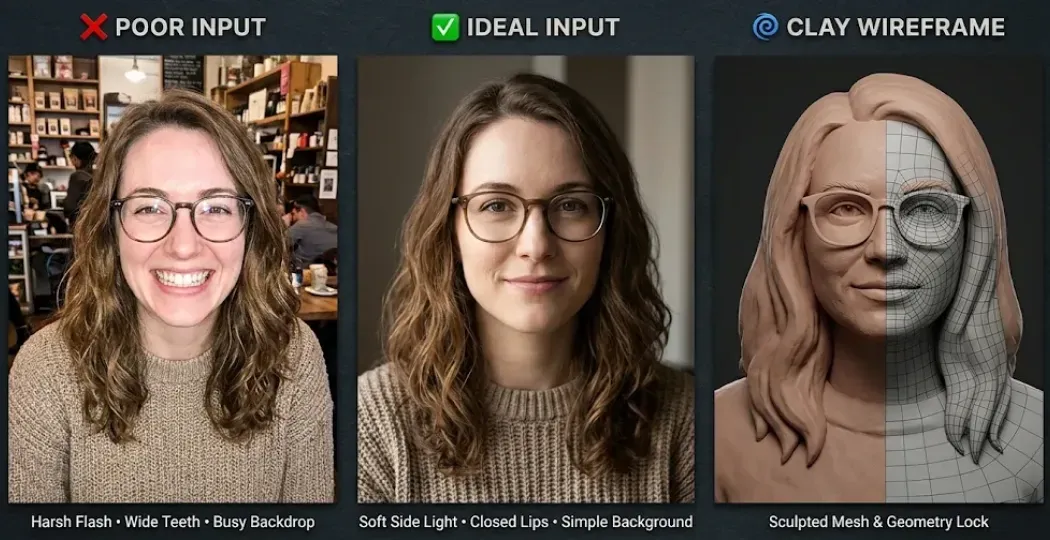
Three Input Rules for Sharp Clay Contours
- Keep the Mouth Closed: Stick to closed lips. It's much easier for the model to trace.
- Use Soft Directional Lighting: Use soft side light. It gives the model clear depth to work with.
- Keep the Background Simple: Drop the busy backdrop. A simple, contrasting backdrop keeps your hair and outline sharp.
Quick Photo Readiness Checklist
| Input Factor | Avoid | Recommended |
| Expression | Wide open-mouth laugh, distorted facial details | Neutral expression or relaxed closed-lip smile |
| Lighting | Harsh frontal flash, overexposure, heavy filters | Soft directional light with visible facial shadows |
| Background | Busy patterns, objects overlapping the head | Simple background with clear separation from hair and shoulders |
Style 1: Classic Plasticine Stop-Motion (The Aardman Look)
On physical Aardman studio sets, animators press real thumbprints into Wallace and Gromit on every single frame. Perfection kills stop-motion charm.
Prompt and Practical Tips
I tested the same reference photo with Nano Banana 2.1, GPT Image 2.6, and Seedream v5.5 to see how each model handles the classic plasticine look.
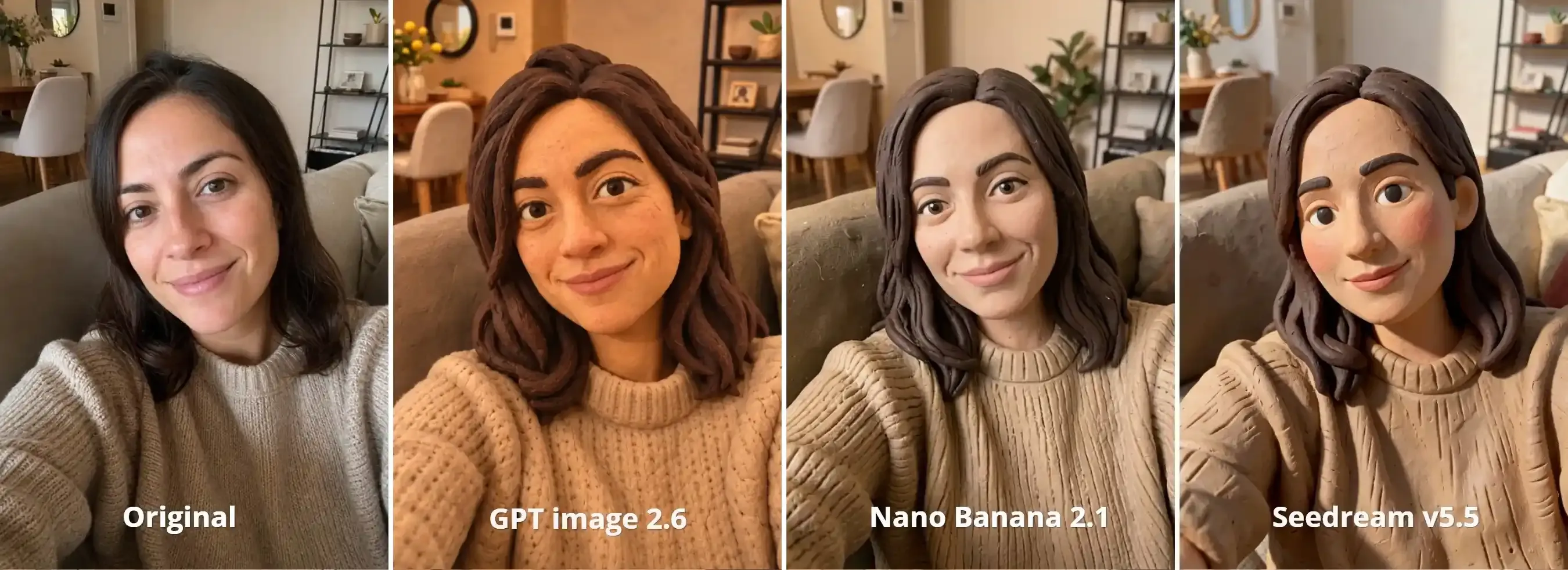
Personally, I prefer Seedream v5.5. It produced the most convincing handmade clay texture, with visible sculpting marks, slightly uneven edges, and more pronounced plasticine details. GPT Image 2.6 delivered a balanced result, while Nano Banana 2.1 did a better job of retaining the original facial proportions and expression. The best choice depends on whether you care more about the handmade clay effect or facial likeness.
Here is the prompt I used:
plaintext1Transform the input photo into a handcrafted plasticine stop-motion character. 2Preserve the person's recognizable facial features and expression. Recreate the face, hair, and clothing as sculpted colored modeling clay, with matte surfaces, visible fingerprints, hand-shaped details, and slightly uneven edges. 3Rounded sculptural forms, tactile clay texture, miniature stop-motion set photography. 4Avoid glossy plastic, polished CGI, and exaggerated cartoon proportions.
A few practical tips from my tests:
- Describe the texture: Specify matte clay, visible fingerprints, and hand-shaped details instead of relying on "claymation" alone.
- Balance likeness and style: Stronger clay textures can distort facial features. Keep facial proportions and expressions as explicit instructions.
Style 2: Smooth Polymer Clay Miniature (Desktop Diorama)
Run a fluffy pet photo or detailed selfie through a basic mobile preset, and the fur turns into spiky plastic needles. Soft plasticine looks too messy here. Replicating oven-baked Fimo or Sculpey figures requires stripping out thumbprints and locking in firm, cured edges.
Prompt and Practical Tips
For this test, I changed Nano Banana 2.1 to Seedream v5.0 Pro.
Seedream v5.5 remains my pick. It nails the craft: chunky chibi proportions, crisp blade seams, and raw, hand-pressed tool marks.
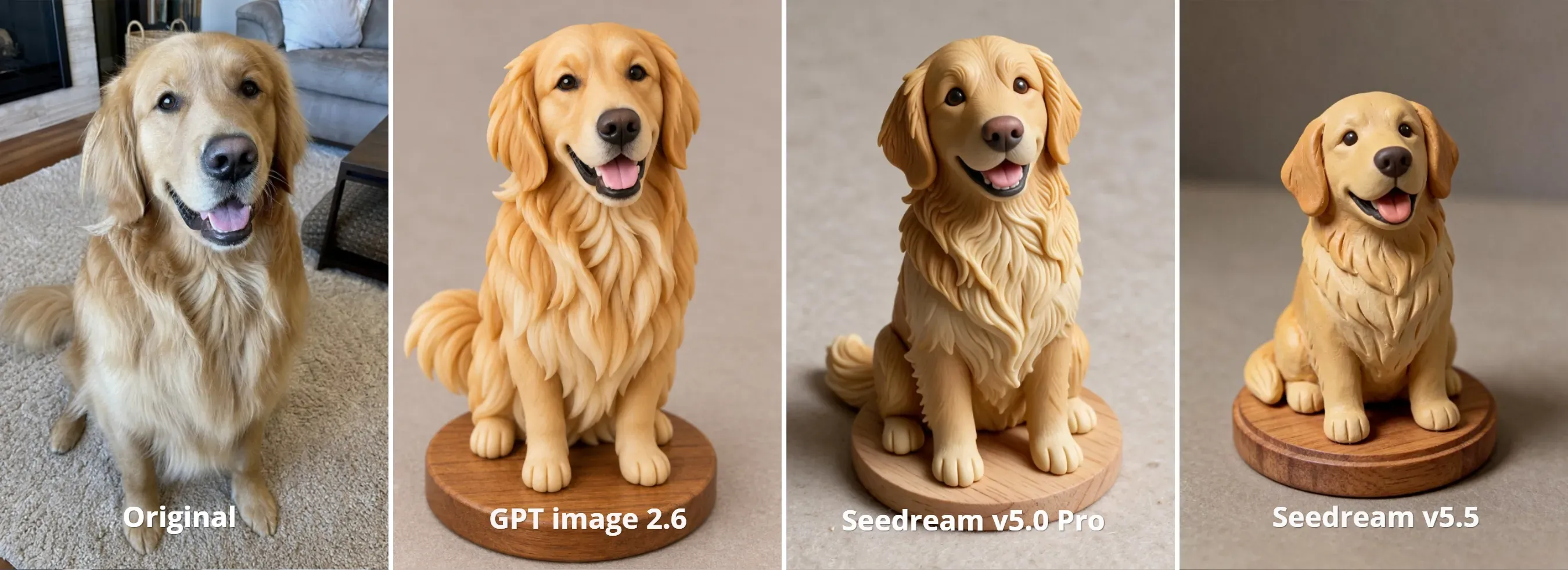
Seedream v5.0 Pro nailed the dog's expression and coat, but stuck to realistic anatomy over chibi proportions. GPT Image 2.6 cuts clean edges, but its flowing fur reads like a 3D render, not clay. Go with Seedream v5.0 Pro if you need strict facial likeness. Pick v5.5 if you want an authentic desktop collectible.
Here is the prompt I used:
plaintext1Create a handcrafted polymer clay miniature figurine based on the reference photo. 2Preserve the subject's recognizable features, colors, and distinctive details. 3Use smooth, firm, opaque baked polymer clay, with crisp sculpted edges, clean color boundaries, and a subtle satin finish. 4Carefully sculpted details, simplified forms, mounted on a small circular wooden display base. 5Macro product photography, soft studio lighting, neutral tabletop background. 6Avoid rough fingerprints, fuzzy textures, glossy plastic, and polished metallic surfaces.
A few practical tips from my tests:
- Lock in cured edges: Use
crisp blade seamsandsmooth cured surfacesrather than generic clay tags to prevent soft plasticine smudges. - Balance likeness and styling:
Miniature chibi proportionscreates a toy aesthetic, but switch to1:10 scale realistic figurineto preserve facial features. - Block out fur chunks: Prompt
thick sculpted clay slabsinstead of fine fur details to stop the render from drifting into silky 3D CGI.
Style 3: Glazed Ceramic Figurine (Kiln-Fired Pottery)
Type "ceramic statue" into a basic AI clay filter, and the generator coats your portrait in liquid chrome or flat latex paint. Glassy finishes need depth.
Prompt and Practical Tips
This test I use the same three models: GPT image 2.6, Seedream v5.0 Pro, and Seedream v5.5.
Seedream v5.0 Pro is both my top pick and the truest stoneware match. It nails the physics: glassy coat highlights, porcelain skin, and sharp, unmelted eyeglasses.
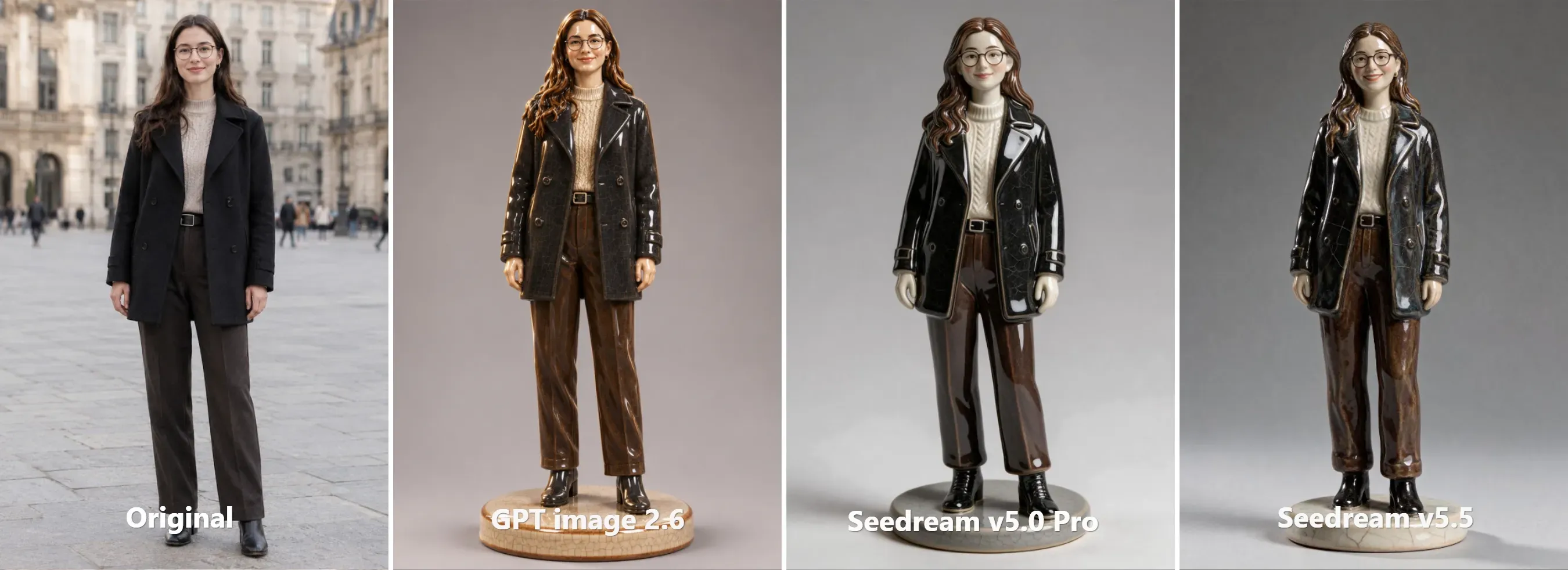
Seedream v5.5 captured genuine glaze crazing across the pedestal, but the heavy glaze softened facial contours. GPT image 2.6 tracked the standing silhouette closely, though its flat reflections look closer to 3D resin than mineral glaze.
Here is the prompt I used:
plaintext1A full-length standing glossy kiln-fired ceramic figurine of a smiling woman wearing thin dark round eyeglasses, an open dark coat, trousers, and boots based on the uploaded reference photo, full-body shot from head to toe, sculpted earthenware pottery, smooth porcelain facial contours, lustrous clear reflective glaze, delicate fine-line crazing pattern on the coat and base, rich mineral pigments, studio rim lighting, boots firmly planted on a round ceramic display pedestal, isolated against a clean neutral studio background
A few practical tips from my tests:
- Keep the photo unobstructed: Use clear standing poses or prompt ceramic bust to isolate clean shoulders. Otherwise, you will get a result like this:
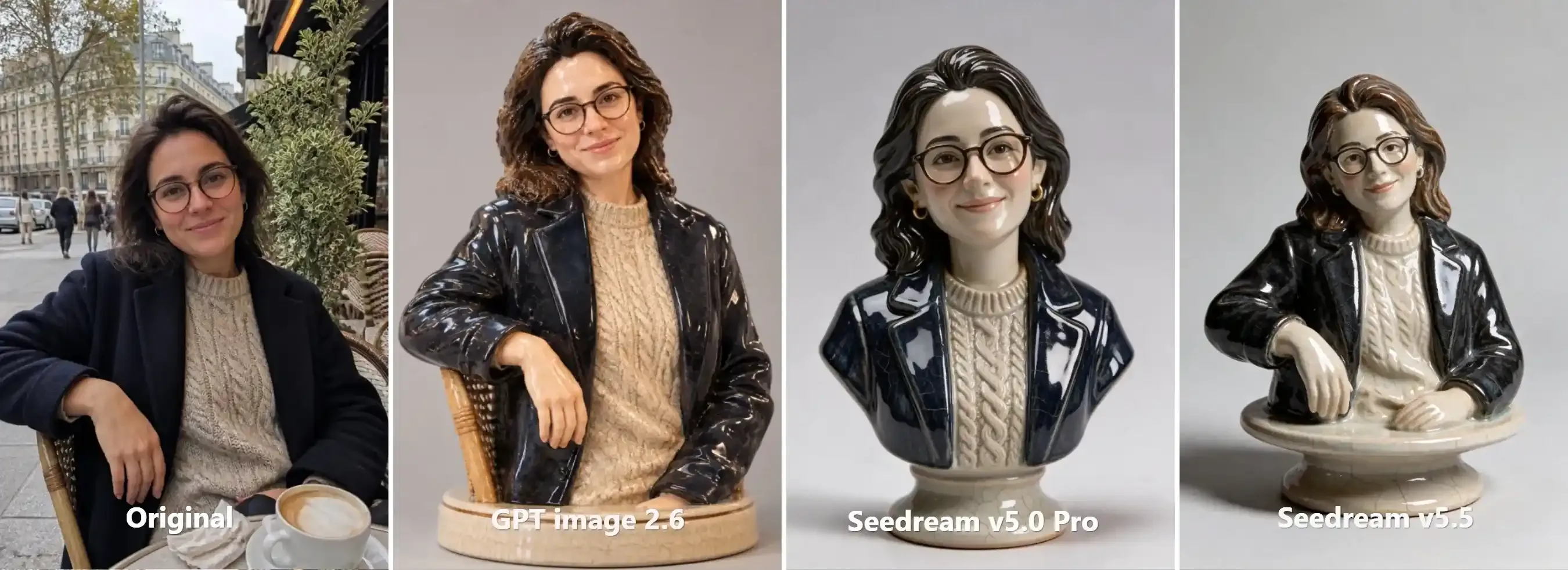
- Isolate glaze crazing: Anchor crazing on the garment and base to stop micro-cracks from breaking across smooth facial porcelain.
- Plant the feet: Specify boots firmly planted on a pedestal to prevent knee-level crops on full-body figurines.
Style 4: Dark Armature Puppet (Tactile Gothic Stop-Motion)
Bright presets ruin dark fantasy. On real soundstages for films like Guillermo del Toro's Pinocchio, fabricators build puppets over jointed metal skeletons that leave raw mechanical seams across the clay.
Prompt and Practical Tips
Seedream v5.5 is my favorite here. It captures authentic stop-motion physics: weathered clay, sculpted hair, exposed brass joints, and amber rim light.
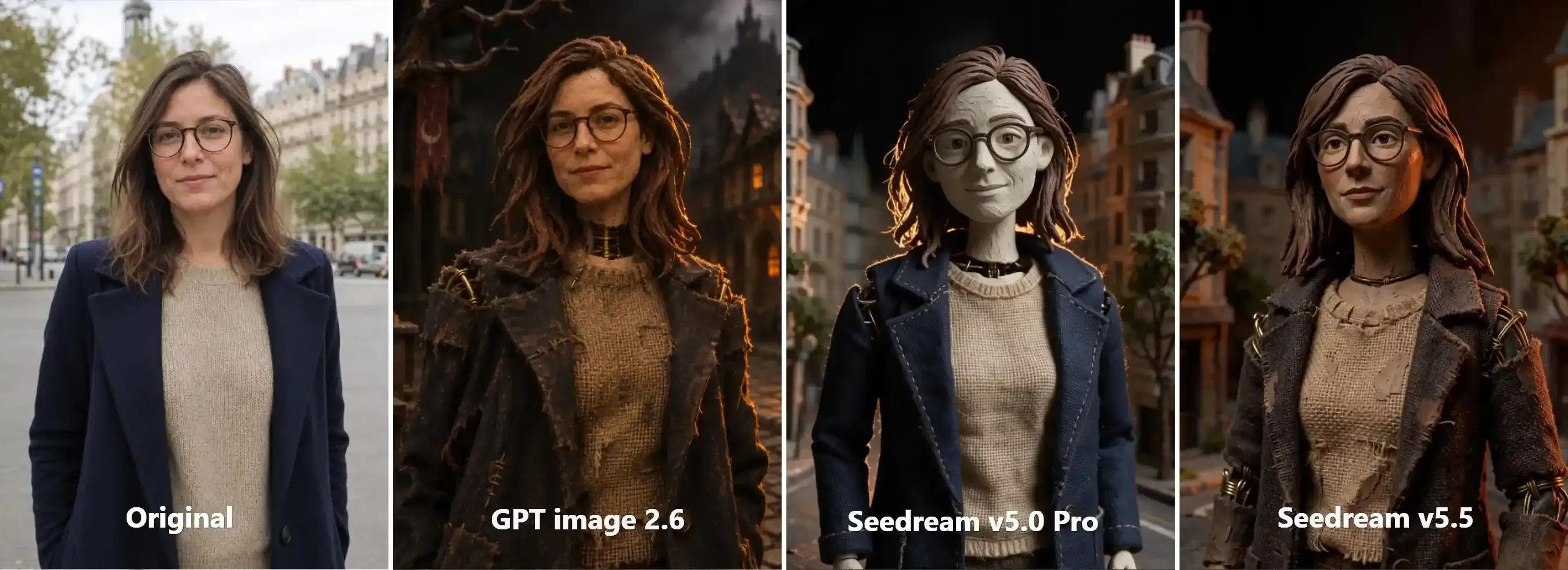
Seedream v5.0 Pro leaned into a clean Laika-style animation puppet, complete with a pale sculpted face and sharp frames, but missed the gritty decay. GPT image 2.6 built great frayed burlap textures, but kept realistic human skin, reading like a live-action fantasy film rather than a handmade puppet.
Here is the prompt I used:
plaintext1Transform the woman from the uploaded reference portrait into a handcrafted dark fantasy stop-motion puppet, strictly preserving her facial features and thin dark round eyeglasses. 2Convert her skin and clothes into weathered sculptors clay with visible tool marks, exposed brass wire armature seams at the neck and shoulders, and coarse burlap fabrics. 3Set within a physical miniature diorama with moody chiaroscuro lighting, deep shadows, and a sharp amber rim light, 35mm stop-motion film stil
A few practical tips from my tests:
- De-skin GPT image 2.6: Specify
unglazed crumbling clay faceandtool marksto prevent GPT from defaulting to live-action human skin. - Isolate brass armatures: Restrict exposed wiring to
the neck and shoulder jointsso metal seams don't slice across the eyes or eyeglasses. - Carve dark silhouettes: Pair heavy chiaroscuro shadows with a
sharp amber rim lightto separate dark burlap clothing from miniature backdrops. - Differentiate materials: Prompt
frayed burlap stitchingalongsideweathered clayto keep fabrics distinct from sculpted clay body parts.
Bringing Still Clay Art to Life with Stop-Motion Motion Models
Smooth motion kills physical clay. Real studio animators shoot "on twos" at 12 frames per second to create that signature stepped, hand-shifted stutter.
3 Scenario-Specific Motion Prompt Recipes
Upload your still clay render as Frame 1 in your video workspace and match your prompt to the physical properties of your subject:
1. Subtle Character Life (Tactile Polymer & Plasticine)
Copyable template: Dramatic 12 fps stop-motion animation, shot on twos. [SCENE DESIGN: Subject & Step Action Chain + Dynamic Light & Shadow + Micro-Material Reaction]. Macro diorama depth, locked static camera, tangible tactile stop-motion weight, zero liquid morphing.
Practical Substitution Examples:
plaintext1Dramatic 12 fps stop-motion animation. The puppet reaches stiffly into her frayed burlap pocket, pulls out a small ticking brass pocket watch, and angles it toward her face. A sharp amber streetlamp flickers off-camera, casting stepped, shifting hard shadows across her unglazed clay cheekbones and dark coat. Her sculpted eyes track the dial with rigid mechanical ticks. Macro diorama depth, locked camera, tangible tactile stop-motion weight.
2. Display Turntable & Light Roll (Glazed Ceramic & Porcelain)
Copyable template: Dramatic 12 fps stop-motion animation, shot on twos. [SCENE DESIGN: Rigid Ceramic Subject on Pedestal/Base + Dynamic Lighting Sweep + Stepped Mechanical/Ball-Joint Action & Miniature Prop + Specular Glaze & Crackle Reflection + Zero-Stretch Porcelain Constraint]. Macro diorama framing, locked static tripod camera, intense noir chiaroscuro lighting, authentic hand-manipulated stop-motion stutter, heavy tangible porcelain weight.
Practical Substitution Examples:
plaintext1Dramatic 12 fps stop-motion animation, shot on twos, cinematic dark mystery storytelling. A sentient vintage porcelain doll detective, based on the reference image, stands on a round ceramic plinth in a dusty midnight antique cabinet. 2An off-camera flashlight beam sweeps past and fades into darkness. The porcelain figurine suddenly comes to life with crisp, stepped mechanical clicks. She stiffly turns her rigid head to check the shadows, raises a glossy ceramic arm with sharp ball-jointed precision, and reaches inside her crackle-glazed trench coat to draw out a miniature brass magnifying glass. Stepping to the edge of her base with a heavy ceramic tap, she angles the glass downward to inspect an etched cipher on the floor, her spectacles catching a sharp glint of lantern light. Her body remains completely solid fired porcelain—zero rubbery morphing, zero organic flesh stretching. 3Macro diorama framing, locked static tripod camera, intense noir chiaroscuro lighting, authentic hand-manipulated stop-motion stutter, heavy tangible porcelain weight.
3. Classic Plasticine Stop-Motion (The Aardman Look)
Copyable template: Classic 12 fps plasticine stop-motion animation, shot on twos, British Aardman style. [SCENE DESIGN: Plasticine Subject & Environment + Continuous One-Shot Action Chain + Clay Squash-and-Stretch / Expressive Clay Reactions + Prop & Material Interactions]. Macro diorama framing, locked camera, tactile clay-boil stutter, visible artisan thumbprints, zero CGI morphing.
Practical Substitution Examples:
plaintext1Classic 12 fps plasticine stop-motion animation, shot on twos, British Aardman style. A continuous one-shot handheld selfie vlog with zero cuts. Based on the reference image, the handcrafted clay woman holds her smartphone out, excitedly introducing her cozy apartment diorama. She talks with lively stepped mouth shapes, swinging her extended arm smoothly to pan the camera across her miniature living room, pointing enthusiastically toward the wooden dining table and shelf in the background. Her clay curls bounce with authentic stop-motion jitter as she leans into the frame, nodding expressively and flashing a wide, toothy grin to conclude the tour. First-person handheld POV, natural indoor lighting, tactile clay-boil stutter, visible thumbprints, zero CGI morphing.
Troubleshooting Distortion and Model Failure Cases
Blind re-rolls waste credits. When an AI clay filter botches facial anatomy, you need targeted parameter overrides instead of starting from scratch.
Match the visual artifact in your render to its root cause below and apply the corresponding parameter adjustment:
| Failure Artifact | Root Cause | Direct Prompt or Parameter Fix |
| Melted Wax / Candle Skin | Over-denoising strips physical micro-texture. | Add: visible thumbprints, matte plasticine (clay) or fired porcelain, crackle crazing (ceramic). |
| Liquid / Rubbery Morphing | Video model misreads specular sweeps as mesh flex. | Suffix: tangible physical weight, zero liquid morphing, rigid structure. |
| Picket Fence Teeth | Open smile blurs miniature tooth gaps. | Use closed-mouth photo, or add: stepped replacement-mouth, Aardman toothy grin. |
| 360° Mesh Hallucination | I2V pipeline lacks rear-view reference data. | Clamp arc: slow, stepped 15-degree arc. Avoid 360° rotation. |
| Facial Identity Drift | Style prompt weight overpowers source face geometry. | Lower style weight; add: maintain exact eyes, jawline, and spectacles from photo. |
| Background Soup | Uncontrolled background depth ruins miniature scale. | Add: macro diorama framing, tabletop miniature set, shallow DOF. |
Clean inputs beat complex prompt engineering every time. Lock down your reference lighting and facial geometry before testing material weights. Once your static clay or porcelain render holds its shape under a macro crop, export it directly into a 12 fps video workflow to add physical weight and tangible craft.
Pick one material from the recipes above, run a single-variable test with your reference portrait, and refine the surface physics before scaling into a full series.


