

A costume idea can sound perfect until you picture yourself wearing it for four hours. The hat hides your face. The cape drags on the floor. The clever prop needs a hand you planned to use for your phone. An AI Halloween costume preview helps you spot those problems while the idea is still easy to change. Start with one clear, full-body photo, test several outfits on that same person, then choose the version you could actually assemble and move around in. The generated picture is a concept to examine, not a size chart or a promise about how a garment will fit.
Key takeaways
- Use the same full-body photo, pose, and background for each look so you compare costumes rather than camera tricks.
- Describe real clothing layers and simple accessories. Ask the generator to keep your face, proportions, and body position recognizable.
- Judge the result twice: first as an image, then as a list of things you can wear, carry, or make.
- Check the physical costume for fit, visibility, and fire safety before you buy or build it.
Decide what kind of costume answer you need
An AI Halloween costume generator can answer three different questions. It can invent an outfit, show a proposed outfit on a particular person, or help you revise a design you already like. Those are separate jobs. If you ask for all three at once, the result may be striking but hard to use: the person changes, the outfit gains impossible pieces, and there is no clear decision to make afterward.
| Your question | Best starting point | Useful output | What it cannot prove |
|---|---|---|---|
| What could I dress as? | A text description of your time, clothes, and preferred mood | A costume concept or short list of directions | Whether it suits your face or body |
| How might this look on me? | One well-lit full-body photo | A visual outfit preview on the same person | Actual sizing, fabric feel, or comfort |
| How do I improve this version? | Your photo plus the first generated result | A targeted change to one garment or accessory | That an unseen seam or closure will work |
The distinction matters when you search for AI-generated Halloween costumes. Many attractive results are character portraits. A character portrait can inspire a party photo, but it is a poor shopping guide if the outfit depends on floating ornaments, invisible fasteners, or a floor-length train. For a costume decision, ask the tool to show the entire outfit in ordinary light before you request a dramatic setting.
The three looks below are designed for that kind of decision. They use one person, one camera angle, and one plain background. The clothing changes; the comparison conditions stay steady. You can put the results side by side and ask a useful question: which silhouette and list of parts are worth taking into the real world?
Start with a photo the generator can actually use
Choose a picture that shows you from head to shoes. Stand naturally, leave some space around your arms, and make sure your hair, face, and current clothing are visible. A plain wall or uncluttered room helps the model separate your body from the background. Even light is more useful here than moody Halloween lighting because you need to inspect the costume's shape. A mirror selfie can work for a headpiece, but a phone covering your torso makes a full-outfit preview less informative.
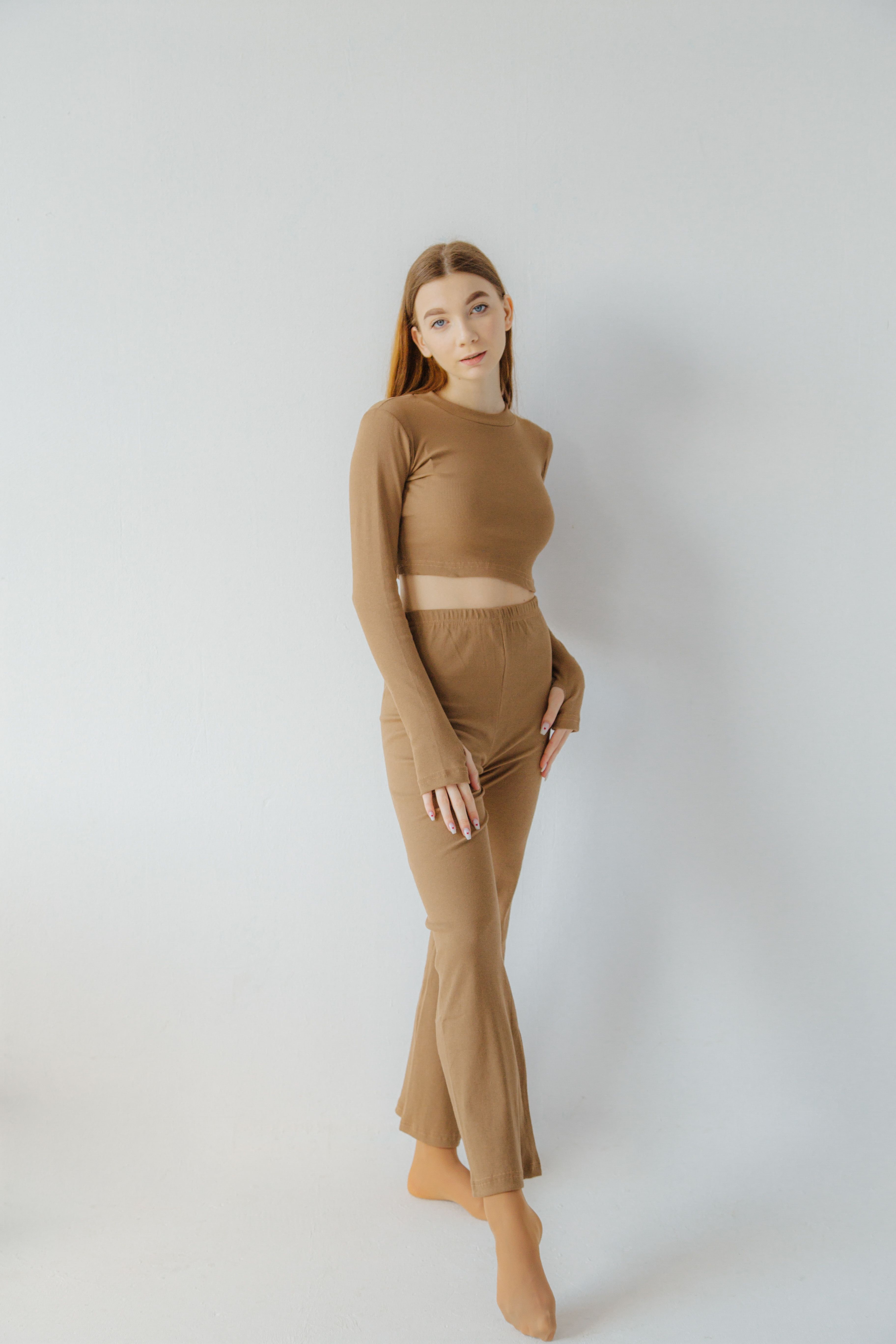
One full-body reference keeps the person, pose, and background consistent across the three looks.
If the outfit needs a partner, upload one photo that contains both people. Tell the model the exact headcount and where each person stands. For a solo comparison, keep the same source image for every look. Changing the source photo between prompts changes the pose, crop, and lighting, so the costume is no longer the only variable. Use a photo you own or have permission to edit and share.
Write down your real constraints before opening an image tool. What pieces are already in your closet? Will you walk outdoors? Do you need to sit, dance, or carry something? Is there a hat, mask, or face paint you will not wear? These details make Halloween costume design online more useful than a generic “make me spooky” request. You can put them in the prompt instead of trying to repair an impractical result later.
A good preview prompt has four parts: the person to preserve, the clothing to change, the view you need, and the things to avoid. “Keep my face and standing pose; replace only my outfit; show the whole body against the same wall; no floating pieces” gives the generator a narrower task than “turn me into a witch.” You can still ask for atmosphere once the outfit itself makes sense.
Try 3 distinct looks on the same person
These are starting points, not a list of costumes everyone should wear. Each prompt makes a different demand on time and materials: a closet-based classic, a handmade character, and a playful look built from common outerwear. Upload the same full-body photo for all three. Generate each result separately, and keep the original framing so you can compare the garments rather than the scenery.
1. The modern witch you can build from a closet
This version asks for ordinary black layers, low shoes, and two removable accents. The hat provides the recognizable silhouette, while the scarf and pin give you color without requiring a complicated dress. If the output invents a sweeping cape, it has drifted away from the practical brief. Ask for a shorter hem before deciding whether the concept works.
plaintext1Edit my uploaded full-body photo into a practical modern-witch Halloween costume. Keep my 2recognizable face, skin tone, hairstyle, body proportions, standing pose, and the same plain 3background. Change only the outfit: a black long-sleeved top, straight black trousers, a 4deep-plum scarf, low black shoes, a soft felt wide-brim hat, and one small crescent pin. 5Every piece should look wearable and separately removable. Show me head to shoes in even 6studio-like light so I can judge the silhouette. No broom, cape, floating objects, mask, 7text, extra people, or altered hands.
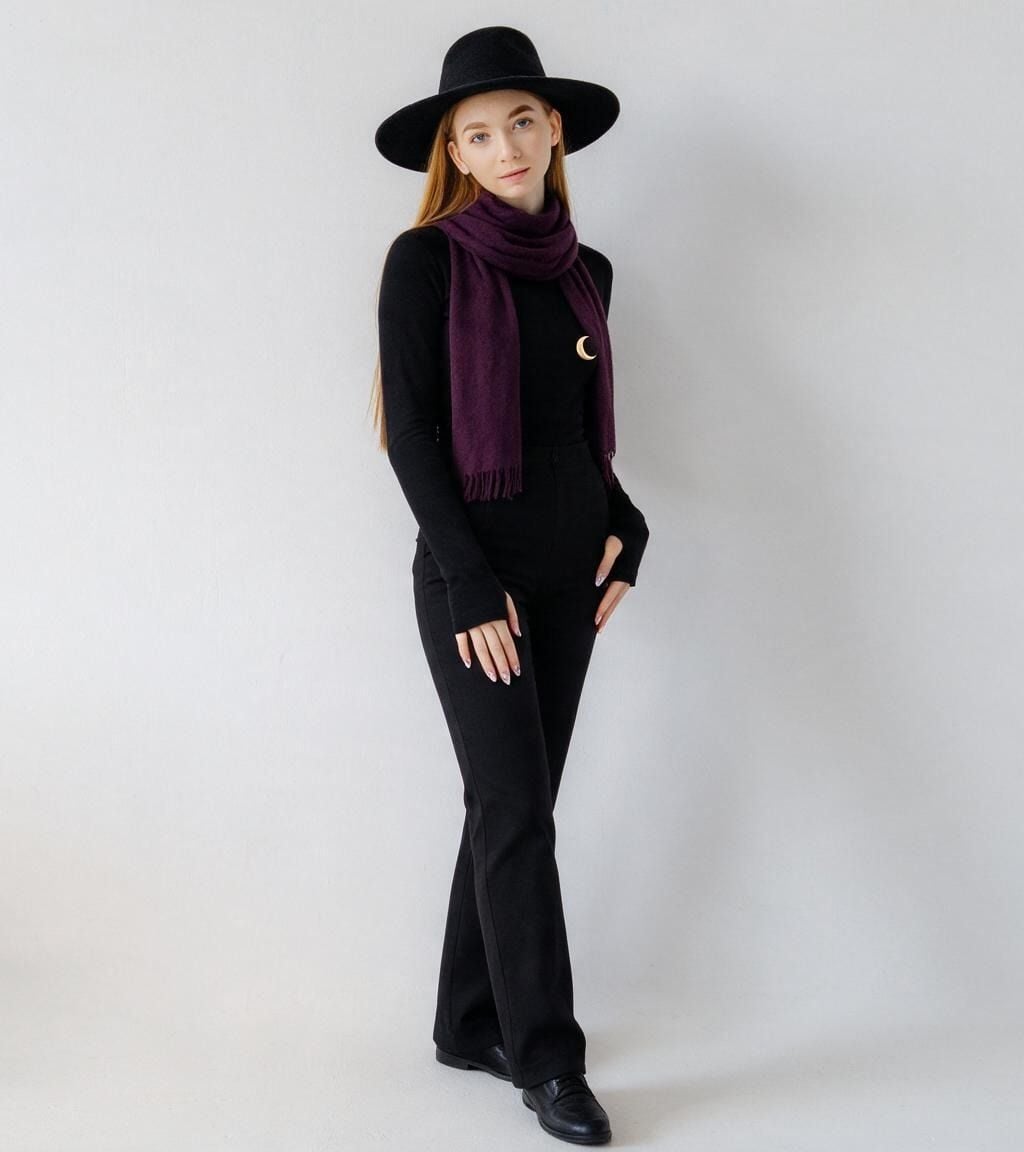
The hat, scarf, and crescent pin are visible against the same plain background as the reference photo, making the outfit easier to compare with the other looks.
The useful test is not whether the picture looks magical. Look at the hat's size relative to your shoulders, whether the scarf covers your face, and whether the outfit could be assembled from items you already own. A good first result can still fail one of those checks.
2. A moonlit botanist with handmade details
The botanist keeps a familiar jacket-and-trousers shape but adds small fabric details you could attach yourself. It is a better test of craft effort than the witch: leaves need to sit on a seam or pocket, and the brooch needs a real place to fasten. When an AI image shows ornamentation that has no visible attachment, treat it as a sketch, not an instruction.
plaintext1Use the same uploaded full-body photo as the identity and pose reference. Keep my face, skin 2tone, hairstyle, body proportions, camera angle, and plain background unchanged. Replace my 3clothing with a wearable moonlit-botanist costume: an olive utility jacket over a dark 4shirt, straight black trousers, practical flat shoes, a narrow belt, a few fabric leaf 5appliqués sewn to the jacket cuffs and pocket edges, and one small felt moth brooch pinned 6to the lapel. The costume should be easy to move in, with no trailing fabric. Show the full 7outfit in even light. No plants growing from the body, floating leaves, glowing effects, 8mask, text, or extra people.
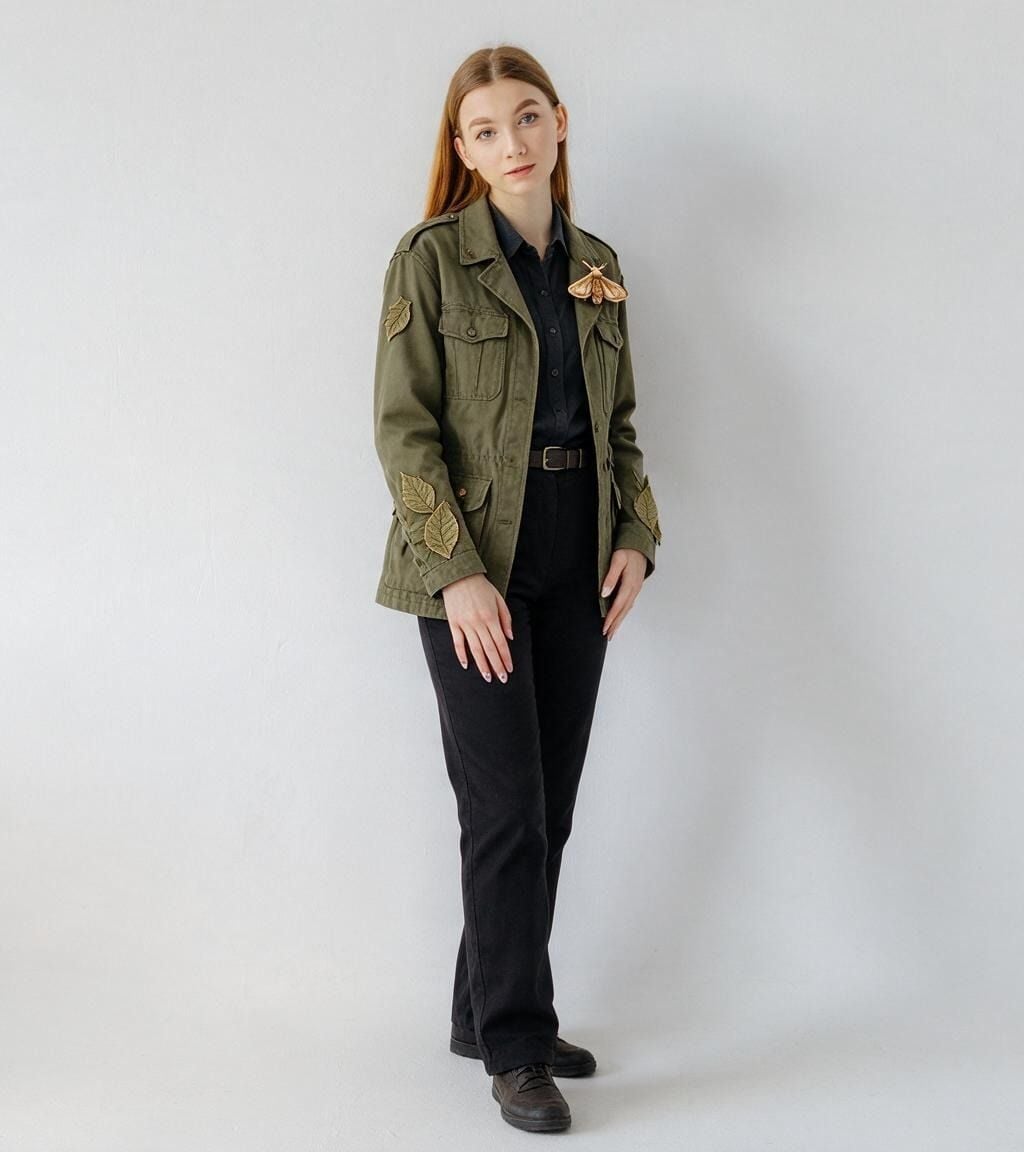
Leaf details sit on the jacket cuffs and a moth brooch sits on the lapel, so the image shows where the handmade parts would attach.
Compare this output with the witch using the same questions. Which pieces are already available? Which details would take an evening to make? If the answer depends on dozens of tiny ornaments, simplify the design. The AI is useful when it helps you remove work as well as add visual ideas.
3. A storm reporter with one strong prop
This look uses a raincoat and boots as the base, so its success depends less on tailoring and more on a clear, safe accessory. A lightweight cloud headband and fabric raindrops explain the joke without hiding the face. A cardboard microphone can make the role readable, but it should remain small enough to carry easily.
plaintext1Edit the same uploaded full-body photo into a playful storm-reporter Halloween costume. 2Preserve my recognizable face, hair, skin tone, body proportions, standing pose, camera 3height, and plain background. Dress me in a navy raincoat that ends above the knees, dark 4trousers, practical rain boots, and a blue scarf. Add a lightweight foam-cloud headband with 5a few short fabric raindrops attached securely above my hair, plus one small cardboard 6microphone in my right hand. Keep my face and eyes unobstructed, the left hand free, and all 7pieces physically wearable. Show head to shoes in even light. No real lightning, floating 8clouds, long cords, logos, writing, extra hands, or extra people.
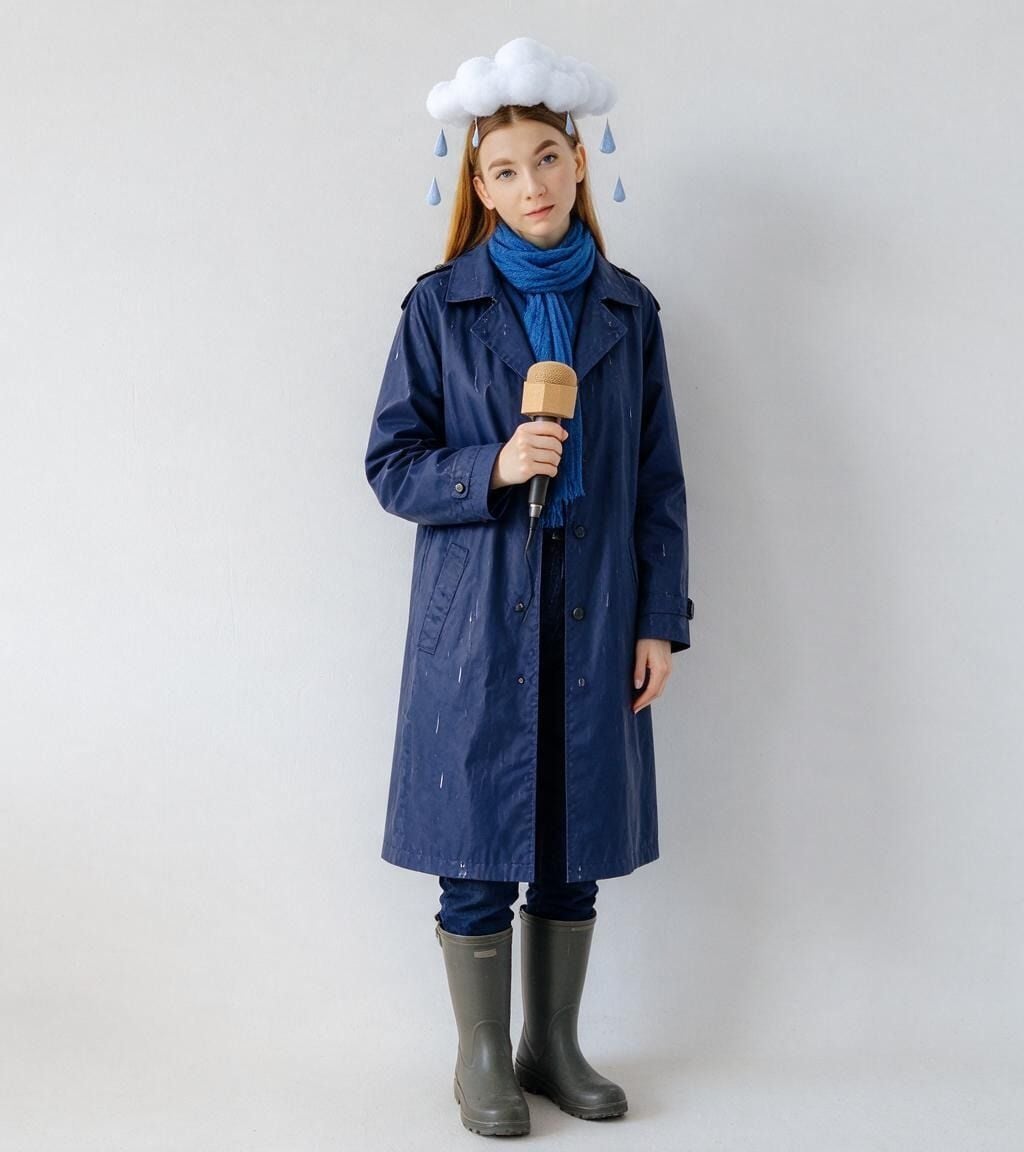
The headband leaves the face visible and the left hand stays free. The generated raincoat falls below the knee, longer than requested, so its hem is one detail to revise before using this preview as a parts list.
Here the decision is about movement. The outfit may be easy to recognize in a still image, but check whether the headband would stay put when you turn and whether the prop leaves a hand available. A costume you can wear through the event is more useful than a picture that only works from one angle.
Use the image generator for a controlled comparison
Atlas Cloud provides image generation and editing in one workspace. Its Image Generator supports text prompts and uploaded reference images. For these three looks, choose an image-edit or reference-image workflow rather than a text-only one, because the point is to see the outfit on the same person. The available controls can differ by model; use the option that accepts your photo and lets you describe an edit.
Upload the full-body photo once for each prompt, then save each result with a name that identifies the look. Keep the same aspect ratio. If the tool offers several variations, compare them against the same checklist rather than changing prompts between every run. Note where the model followed the brief and where it invented a new garment. That record makes the next instruction specific.
After you choose a direction, make one small edit. For example: “Keep my face, coat, trousers, pose, and background. Shorten only the hat brim so both eyebrows remain visible.” This is more testable than regenerating the whole outfit with “make it better.” The OpenAI guide to image editing also describes uploading an image and asking for a targeted change in ChatGPT Images, if that is the tool you use instead. Name the tool that actually produced your result when you share it.
If you do not want to upload a personal photo, start with text-only costume concepts and a fictional adult model. That can help you choose colors and parts, but it is not a preview of your own fit. An AI Halloween costume generator is most useful when its input matches the question you want answered.
Turn the preview into a costume you can wear
The image is a decision aid, not a sewing pattern. Before buying anything, write a short parts list from the chosen result: base clothes, one or two defining accessories, shoes, and any handmade pieces. Mark what you own, what you can borrow, and what you would need to make. If you cannot identify where a piece attaches, treat that detail as optional until you solve it with a real fastener or garment.
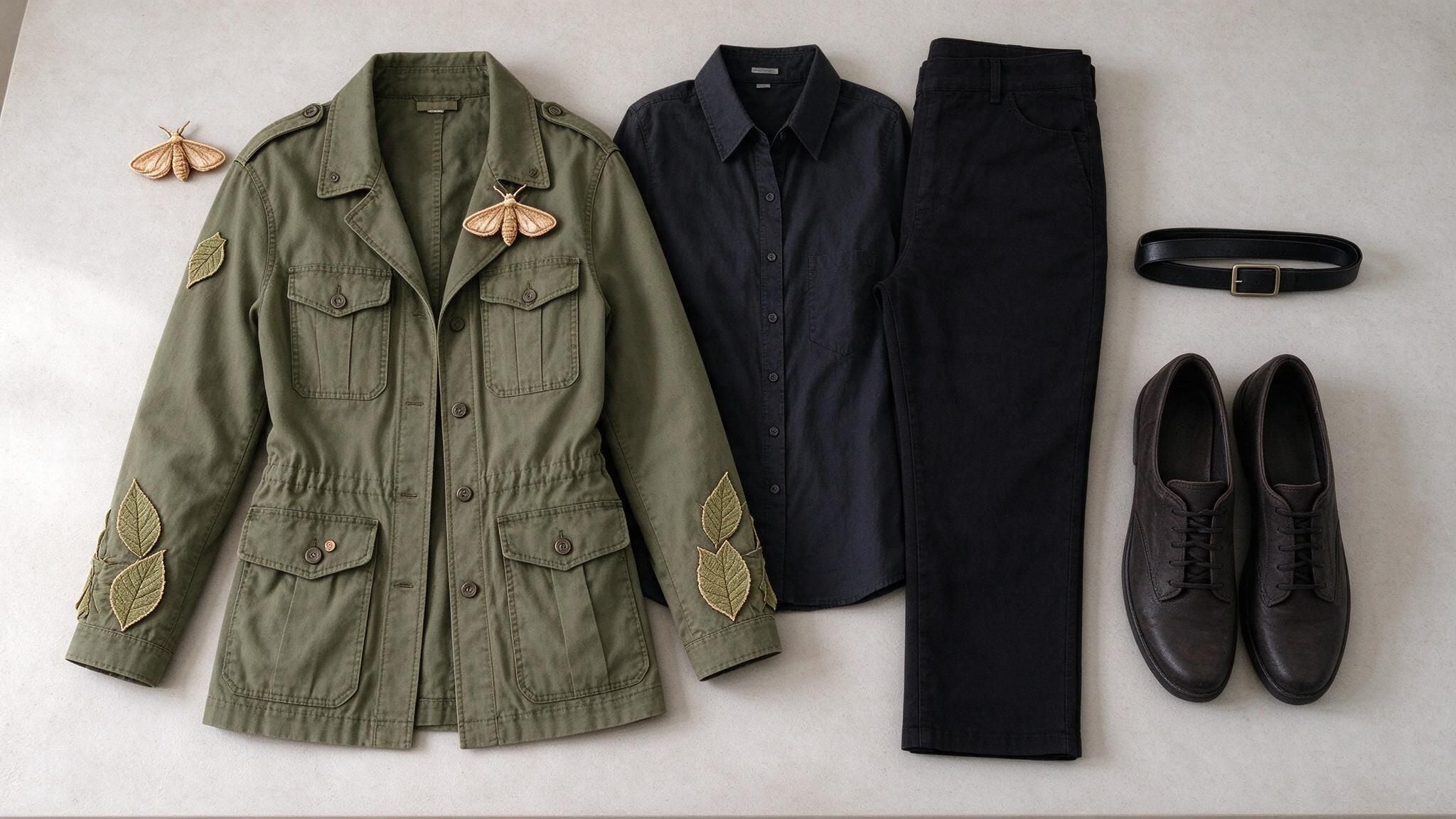
This AI-generated parts board turns the botanist preview into a checklist you can inspect: base clothing, shoes, a belt, and the small details that make the character recognizable.
Inspect the result at normal size and zoomed in. At normal size, ask whether someone would understand the costume without a caption. Up close, check hems, closures, cuffs, and props. A generated image can hide a missing sleeve behind a pose or imply a rigid shape that fabric will not hold. For the three looks above, the hardest checks are different: hat visibility for the witch, appliqué placement for the botanist, and headband stability for the reporter.
Then do a real-world check with the items themselves. The U.S. Consumer Product Safety Commission's Halloween guidance recommends costumes that fit well, do not drag on the ground, and remain visible after dark; it also advises looking for flame-resistant fabrics and avoiding overly billowy pieces near ignition sources. A generated preview cannot verify any of those properties. If the outfit will be worn outside, judge it while walking, turning, and carrying the things you expect to hold.
This is where an AI Halloween outfit generator earns its place in the process. It helps you reject a weak idea before you spend time on it. Once you choose one, the final authority is the real garment on the real person, not a polished render.
Fix one wrong detail instead of starting over
Most first results have something to correct. Decide whether the problem is identity, clothing, or practicality. If the face changed, use the original photo again and ask for the facial features to match it. If a garment became too elaborate, name the exact item to simplify. If the pose hides an accessory, request a front view with both arms visible. Keep the rest of the scene fixed so you can tell whether the edit helped.
plaintext1Keep the same person, face, standing pose, camera angle, background, lighting, and all 2approved clothing. Change only [one specific problem]. The corrected detail must look 3physically wearable and match the surrounding outfit. Do not add new people, props, text, 4extra hands, or floating pieces.
Replace the bracket with an observable change such as “remove the long train from the skirt,” “move the leaf appliqués onto the jacket cuffs,” or “make the cloud headband smaller so it clears both eyes.” Avoid subjective instructions like “make it cooler.” They do not tell you what to inspect in the next result.
If by AI Halloween costume you mean dressing as an AI character, the same method still applies. Start with a wearable base, such as a dark jacket, geometric fabric patches, and reflective trim, rather than a fictional hologram. Ask for the outfit as a full-body photo with visible seams and no screen-like graphics or unreadable text. You can then build the character with real materials without relying on the image to invent an impossible device.
Frequently asked questions
Can I use a selfie instead of a full-body photo?
Use a selfie for face paint, a hat, or a shoulder-up Halloween portrait. It cannot show how a coat, skirt, boots, or prop sits on your whole body. For a costume decision, take a new full-body photo if you can.
Can ChatGPT make an AI Halloween costume preview?
ChatGPT Images can edit an uploaded photo with written instructions. Use the same identity, outfit, and framing details you would use in another image editor. Its output is still a visual concept, so check it against your original photo and the real clothing you plan to wear.
Are AI-generated Halloween costumes accurate enough to buy from?
They can help you compare silhouettes and accessory ideas. They cannot confirm garment measurements, fabric behavior, or comfort. Use the image to make a shortlist, then check size charts, materials, and the actual pieces.
What if I do not have a photo to upload?
Describe your existing clothes, the event, and how much you want to make. Ask for a fictional full-body costume concept in a plain setting. You can use that as a parts list, but do not treat it as a try-on of yourself.





