The AI Halloween trend turns an ordinary portrait into a complete Halloween scene while keeping the person recognizable. The most satisfying reveal changes the setting, costume, makeup, props, and lighting together. Below are four different people in four different before-and-after edits: a book releasing paper bats, a masquerade after the curtain, a haunted portrait, and a midnight train.
Key takeaways
- Use an image editor and a clear source photo when the result should still look like the original person.
- Give the model a complete scene plan: identity, clothing, makeup, environment, light, and one focal surprise.
- Keep the camera view and the person's facial features coherent across both images.
- Compare the paired images at full size, especially hands, props, eye visibility, and background perspective.
What is the AI Halloween trend?
In its common photo form, someone uploads a portrait or selfie and asks an image model to turn it into a Halloween scene. The original and edited pictures often appear side by side in a post or as the first and second frames of a short reveal. One recognizable version uses a late-1990s or early-2000s flash-photo mood, with a threatening figure somewhere behind the subject. The broader format leaves room for quieter surprises, elaborate settings, and costume details that still preserve the original person.
The masked horror-photo format spread on TikTok and Instagram in late September 2025, according to Know Your Meme's timeline. That version is often called the Ghostface AI trend; the broader Halloween AI trend includes many other scenes. Google's Halloween image ideas from October 2025 show spooky photo edits alongside costume and pet concepts. These sources establish examples of the format; they do not prove that one prompt or visual style dominates every feed in 2026.
The phrase AI Halloween photo trend therefore describes a family of edits, not a single filter. A photo of yourself plus an instruction to preserve your face is an image edit. A prompt without an uploaded photo is a new image. Those can look similar on a feed, but they answer different questions. If you want a picture of you at a fictional Halloween party, choose an editing path and judge likeness against the source.
Which version should you try first?
Choose a source photo with one useful physical anchor. The book, mask, empty frame, and platform in these examples give the edit a starting point. The rest of the scene can change dramatically, but the anchor makes the reveal understandable when the two pictures sit together.
| Look | Useful source photo | Planned transformation | Main thing to inspect |
|---|---|---|---|
| Bats lifting from a book | A seated portrait with an open book and both hands visible | Outdoor pumpkin courtyard, velvet cape, celestial eye makeup, paper bats | Bats begin at the pages; face and fingers stay recognizable |
| Masquerade after the curtain | A waist-up portrait holding a simple mask | Empty opera house, satin gown, jeweled makeup, ornate mask | The mask stays in the hand and leaves both eyes visible |
| Portrait that watches back | One person holding a blank picture frame | Candlelit gallery, brocade costume, spiderweb makeup, painted stranger | The unfamiliar figure remains inside the frame |
| Midnight train platform | A wider station photo with the subject and train visible | Rainy night platform, velvet travel coat, constellation makeup, vintage carriage | Three silhouettes stay behind the windows and train perspective holds |
These are four different transformations, not four filters on one photo. Use a similarly clear object or spatial cue in your own image, then adapt the clothing, makeup, and setting to suit that person.
How to do the Halloween AI trend with your own photo
Start with an original photo, not a screenshot of an earlier edit. Keep the face reasonably sharp and unobstructed. For a book or mask scene, show the relevant hands; for a train scene, include enough ground and background to establish perspective. The eight images below use four fictional people generated for this article in the Atlas Cloud test environment. No reader photo was used.
Use an image editor that accepts both a photo and an instruction. The Atlas Cloud image generator and editor provides reference-image editing options. Upload the photo, choose an editing model, and describe the makeover as a connected set of changes. The exact controls depend on the model shown in your session.
First lock identity and composition: name the facial features, hair, skin tone, hand placement, camera height, and key object to preserve. Then specify the costume, makeup, environment, props, and lighting in separate clauses. A detailed prompt can change many things without becoming vague when every change supports one coherent Halloween scene. Google's image prompting guidance recommends concrete details about subject, composition, action, setting, and style.
Generate one edit and compare it with the source. Check likeness before atmosphere, then examine hands and physical contact, the main effect, lighting direction, and perspective. If one defect remains, repair that one detail in a short follow-up. Keep the original and edited files together for the final side-by-side reveal. If you need a selfie viewpoint first, the Atlas Cloud selfie generator is an optional framing step, though these four examples keep their original camera viewpoints.
Copy-and-paste AI Halloween trend prompts
Each pair below shows the actual fictional input on the left and its edited output on the right. The prompts are specific to those inputs so you can see how the details work together. When using your own photo, replace the subject and source-object details that do not match; keep the identity and error-prevention instructions.
1. A book releases a flock of paper bats
The ordinary input is a young woman reading indoors in a navy sweater. The edit takes the same face, hands, and open book outdoors to a lantern-lit pumpkin courtyard. Her velvet cape, celestial makeup, and a large flock of folded paper bats make the makeover visible even before the viewer studies the background.
plaintext1Transform the uploaded photograph into a Halloween night portrait, keeping the SAME woman recognizably identical: preserve her facial structure, eyes, nose, mouth, skin tone, short dark bob, expression, hand anatomy, open cream book, and seated three-quarter camera perspective. Move her and the tabletop to an outdoor old stone garden courtyard at blue hour, with climbing ivy, fallen copper leaves, softly glowing carved pumpkins, and small lanterns deep in the background. Replace the plain navy sweater with a plum-black velvet high-collar dress and embroidered midnight cape. Add refined copper crescent eyeliner, tiny gold stars at the outer eye corners, and berry lipstick, leaving the face fully visible. From the book's center fold, send about eighteen folded black PAPER bats upward in layered depths; catch a few creases in warm amber light. Their flight starts between the pages, never at her sleeves, and none cross her eyes. Use warm lantern light on face and hands, cool violet-blue rim light, subtle mist behind her, natural contact shadows, and a cinematic 50mm photo texture. Keep all fingers plausible and both hands attached to the book. No extra person, real bats, gore, readable writing, split screen, or watermark.

Same fictional subject and book; clothing, makeup, setting, light, and the book effect all change.
If the bats start at a sleeve, ask the editor to move only their point of origin to the book's center fold. Check the fingers and the subject's likeness again after that repair.
2. Masquerade after the final curtain
A Black woman with long microbraids holds a plain white mask in a daylight corridor. The edit turns the corridor into an empty opera house, changes her shirt to satin and lace, adds plum-and-gold makeup, and makes the mask ornate while keeping it in her hand beside her uncovered face.
plaintext1Use the uploaded photo as the exact identity reference for this woman. Keep her recognizable face, deep skin tone, small beauty mark above her left cheek, long microbraids, natural age, eye shape, and half-body front-facing camera perspective. Keep one hand gripping one mask and both eyes unobstructed. Transform the plain rehearsal corridor into an empty grand opera house just after a Halloween masquerade, with deep crimson velvet curtains, dark polished stage, tarnished gold balcony rails in soft focus, and scattered tiny gold paper stars and black feathers. Replace the ivory shirt with a fitted oxblood satin gown with subtle black lace sleeves and an antique gold collar; weave a few metallic threads into the braids. Replace the plain white mask with one black filigree half-mask with gold edging, held BESIDE her cheek and below eye level, never worn over the face. Add elegant plum smoky eye makeup, precise gold-leaf accents, and deep berry lip color without changing facial structure. One warm theater spotlight shapes her face and gown; cool blue spill and faint stage haze recede behind her. Use believable silk and lace texture, gentle 35mm grain, a sharp face, and a softly blurred background. No second person, duplicated face, floating mask, extra fingers, covered eyes, gore, legible sign, split screen, or watermark.
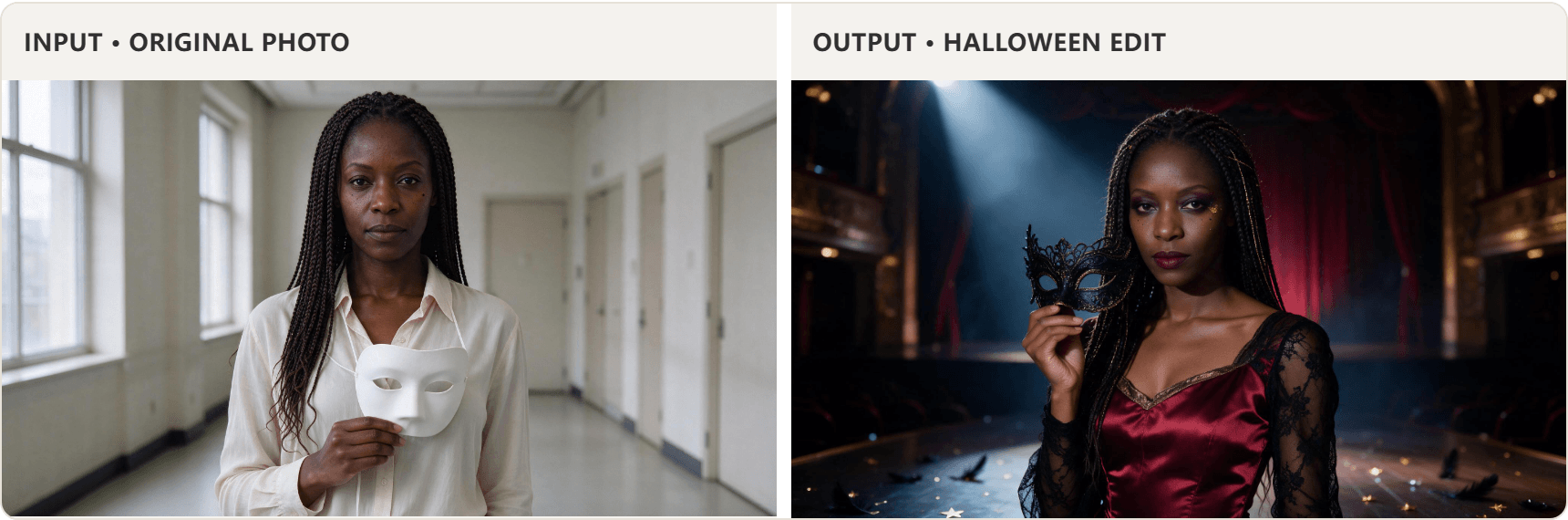
Same fictional subject and mask hand; the stage, gown, makeup, and mask styling create the reveal.
The mask should have a clear grip point. If it floats or covers the eyes, move the mask beside the cheek while keeping the person's face, makeup, and theater lighting.
3. The portrait that watches back
A man holds an empty oval frame in a bright apartment. The edited photo moves him to a candlelit gallery in brocade and subtle spiderweb makeup. The frame now contains an unfamiliar painted sitter whose sideways gaze points toward the man.
plaintext1Edit this photograph into an atmospheric Halloween portrait while preserving the SAME man: keep his recognizable face, warm olive skin, wavy shoulder-length dark hair, eye shape, expression, both hands, and three-quarter waist-up viewpoint. Keep the antique oval frame he is holding, its shape, and hand contact. Transform the bright apartment into a shadowed old portrait gallery at night with deep peacock-green walls, worn dark wood, small brass candle sconces, and drifting dust visible in the light. Replace his olive overshirt and tee with a fitted charcoal brocade waistcoat, high-collar ivory shirt, narrow burgundy cravat, and silver crescent pin. Add subtle silver spiderweb makeup at his left temple and soft charcoal eyeliner while retaining natural skin and a human face. Inside the oval frame, replace the blank space with a believable antique oil painting of an unfamiliar Victorian woman in a black lace veil. The PAINTED woman's eyes glance sideways toward the man; her head and shoulders remain completely inside the canvas, with visible brush texture. Light the man's face with warm candle glow and a cool moonlit edge. Include a faint reflection on the frame glass, realistic shadows, finely textured fabric, and a dark emerald, antique gold, and charcoal palette. Keep the real man dominant. No figure outside the frame, extra hands, floating frame, duplicated foreground person, gore, words, split screen, or watermark.
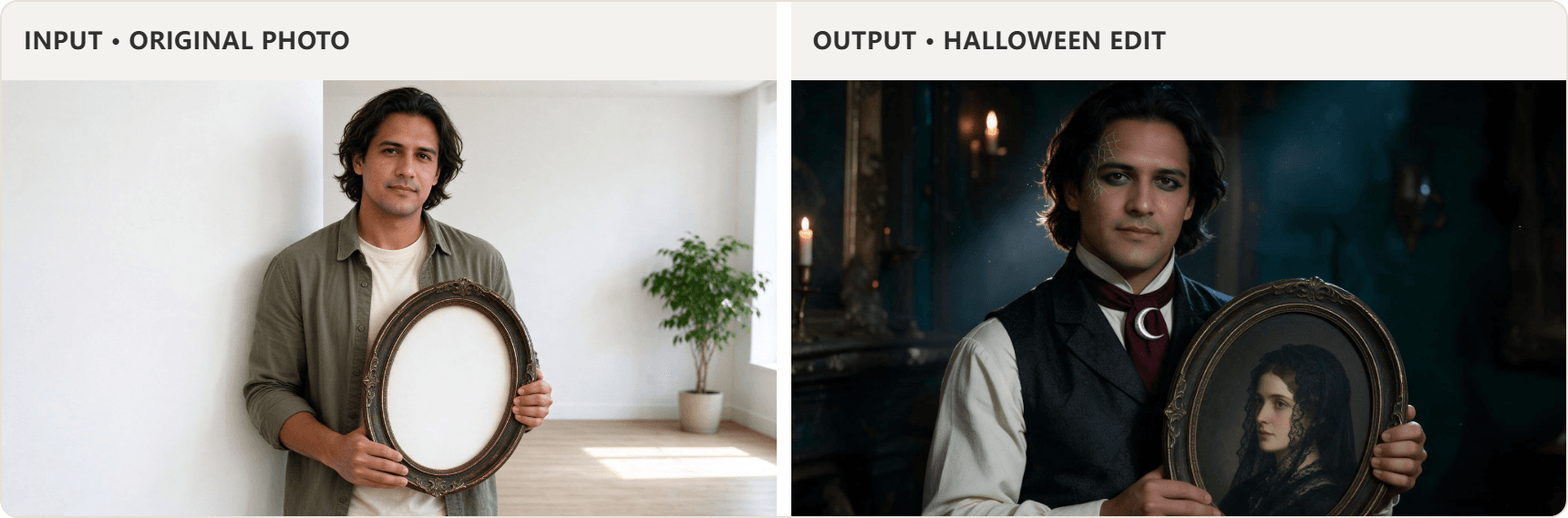
Same fictional subject and oval frame; the costume, makeup, gallery, and painted sitter change.
Inspect the painting separately from the living subject. The painted sitter should read as oil paint within the oval edge, while the man's face remains the same person as in the input.
4. The last train has no visible passengers
The input is a woman with a suitcase on a modern daylight platform. The edit changes the station to a rain-soaked midnight setting, gives her a velvet travel coat and silver constellation makeup, and replaces the commuter train with a vintage carriage whose three lit windows contain indistinct silhouettes.
plaintext1Transform the uploaded daytime platform photograph into a dramatic but believable Halloween night portrait of the SAME South Asian woman. Preserve her face, deep brown eyes, long dark curls, small silver nose stud, skin tone, body proportions, suitcase grip, and eye-level three-quarter-body composition. Change her denim jacket and plain trousers into a deep emerald velvet Victorian-inspired travel coat over a black high-neck dress, with lace cuffs and practical dark lace-up boots. Add finely drawn silver constellation eyeliner around one eye, a tiny crescent at the temple, and muted wine lip color, leaving both eyes and the recognizable face fully visible. Rebuild the modern station as an old iron-and-glass platform at midnight after rain: wet dark tiles with coherent reflections, an amber gas-style lamp near her, pale blue moonlight beyond the canopy, and a thin veil of mist near the rails. Replace the plain train with one stationary dark green vintage carriage behind her, aligned with the existing rails and perspective. Exactly three warm-lit windows reveal three faint faceless human silhouettes BEHIND the glass, never outside the train. Keep the brown suitcase as a weathered antique leather case beside her, not floating. Use cinematic full-body editorial photography, a 35mm lens, a crisp dominant subject, and an emerald, silver, amber, and midnight-blue palette. No new foreground people, face swap, gore, legible signs, extra limbs, misplaced train, split screen, or watermark.
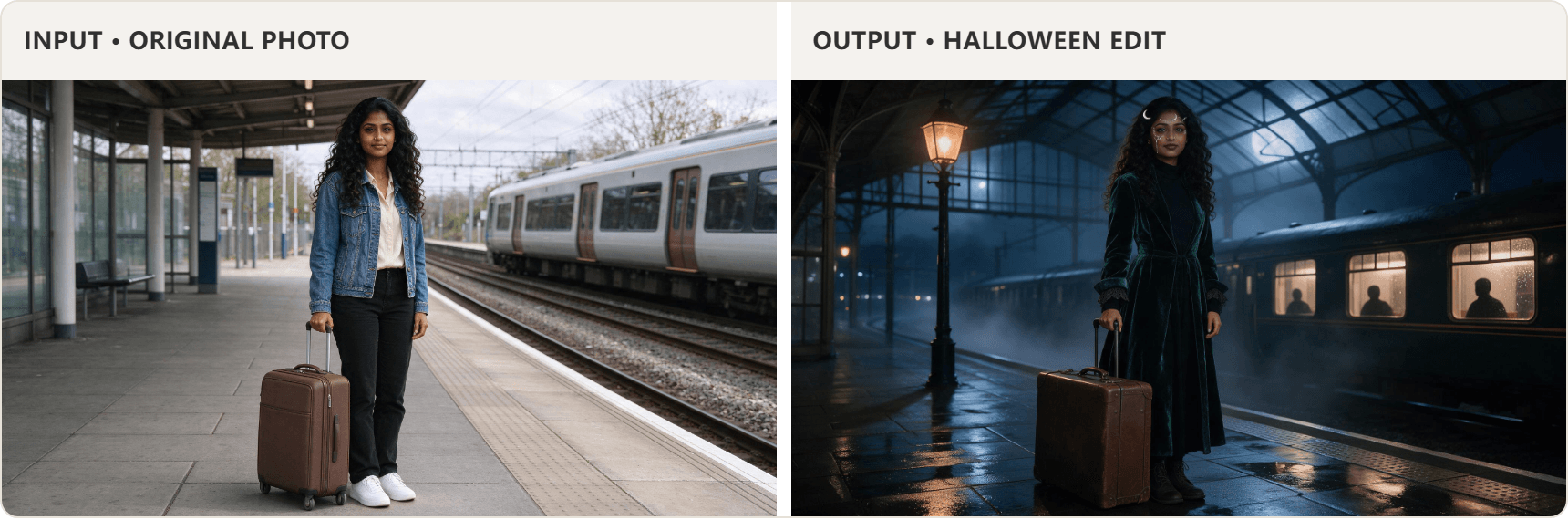
Same fictional subject and suitcase; the outfit, makeup, station, weather, and train all change.
Follow the line of the platform edge into the carriage and count the three silhouettes. They should remain behind glass, with no extra person standing on the platform.
Bonus case: Three reference photos become one Halloween scene
This edit starts with three separate, ordinary photos: an older woman at home, a man in a daylight courtyard, and a raven on a stone wall. The result brings all three into one moonlit glasshouse. Their faces and the raven's shape remain recognizable while the clothes, surroundings, lighting, and mood change together.
plaintext1Use the three uploaded images as references to create one natural, photorealistic Halloween photograph. Image 1 is the elderly woman, image 2 is the adult man, and image 3 is the raven. Preserve the woman's recognizable face, silver-white hair, round glasses, and smile lines; preserve the man's recognizable face, wavy dark hair, and trimmed beard; preserve the raven's blue-black feathers and curved beak. 2 3Capture a candid moment inside an old Victorian glasshouse on Halloween night. The woman has just noticed the raven perched on a nearby iron railing. She turns slightly toward it with a small, spontaneous smile. The man stands beside her, holding an antique lantern low enough to illuminate the path; he glances toward the woman as if responding to something she has said. Neither person poses for the camera. Their shoulders, hands, gaze, and distance from one another should feel relaxed and physically natural. Show exactly one raven, clearly visible at a believable size, with its feet resting on the railing. 4 5Change their everyday clothes into believable Halloween outfits that they could comfortably wear: the woman wears a dark indigo velvet coat with subtle silver details, and the man wears a charcoal vintage coat over a burgundy waistcoat. Add only light, tasteful Halloween makeup so both faces remain familiar and expressive. Let the costumes have natural folds and slight signs of wear rather than looking like rigid studio wardrobe. 6 7The glasshouse has overgrown vines, fallen autumn leaves, a few softly glowing carved pumpkins, and a little mist near the floor. Cool moonlight through the glass roof mixes naturally with the warm lantern light. Compose it like an unplanned photograph taken from a few steps away, with a slightly imperfect but pleasing balance, realistic depth, consistent perspective, soft shadows, and genuine human expressions. All three reference subjects belong naturally in the same scene. Wide 16:9 image. 8 9No collage, split screen, extra people or birds, duplicated limbs, stiff symmetrical posing, forced smiles, exaggerated makeup, floating objects, text, or logos.
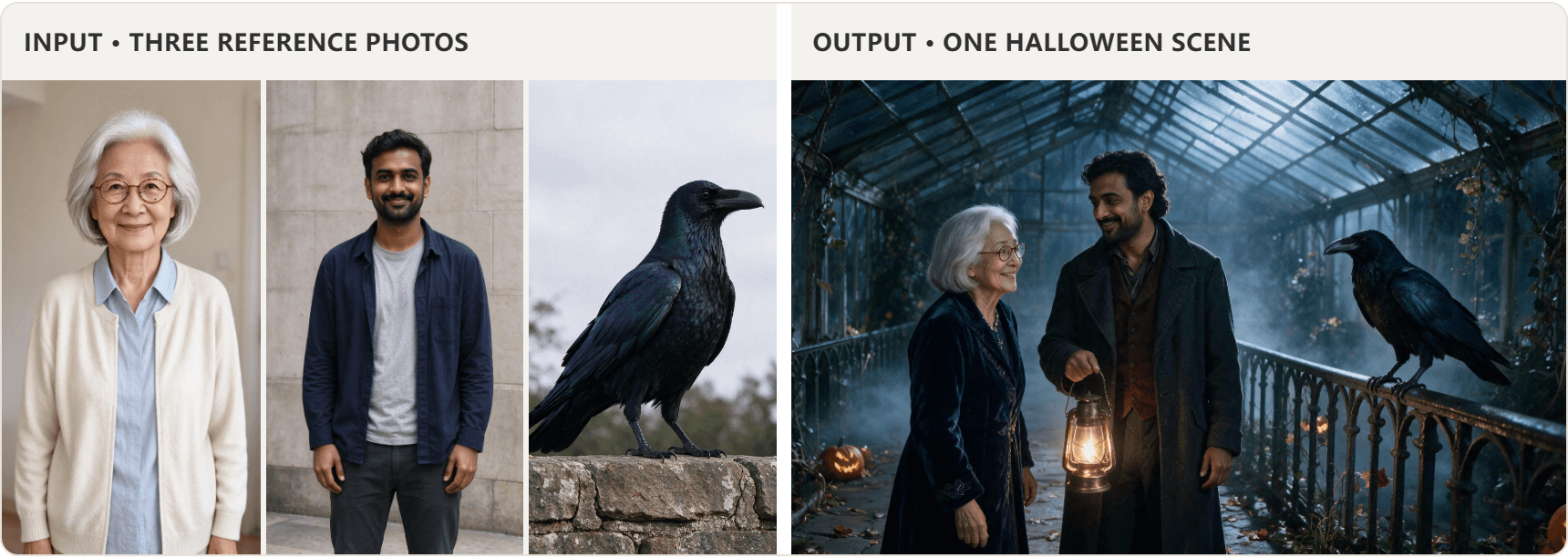
Three separate inputs become one scene: the two people keep their identities, and the raven perches naturally beside them.
Compare the two faces with their source photos, then check the raven's feet on the railing and the lantern light on nearby surfaces. These contact and lighting details make the three references feel like one photograph.
Why the first result often looks wrong
The most important failure is identity drift. A model can produce convincing theater lighting or an ornate costume while quietly changing the person's eye shape or face. Compare the face with the original before judging the styling. If likeness fails, ask it to restore the original facial structure, hairline, skin tone, and distinctive features while keeping the costume and environment.
The next problem is an incomplete makeover. If the prompt says only “add bats” or “make it Halloween,” the model may leave the room, sweater, and daylight untouched. Name each layer you want to change: clothing, makeup, place, props, light, and palette. Keep those layers consistent with one scene rather than mixing unrelated effects.
Hands and boundaries need their own check. Paper bats should emerge from pages, a mask should touch the visible hand, a portrait should stay inside its frame, and silhouettes should remain behind train windows. The platform edge and carriage should obey one perspective. If one element fails, repair its location or contact point without regenerating the whole design.
Finally, judge the pair together. The edited image can be striking on its own yet fail as a before-and-after if the camera angle or person changes too much. The four comparisons above keep a recognizable subject and object across the cut, which makes the transformation easy to read.
Before you post the result
Keep the original and the edited image together when the transformation is the point. A side-by-side post lets someone see the ordinary starting photo and the complete Halloween makeover in one glance. If the scene is styled like an old photo, avoid implying it is a real archival image. Get permission before uploading or sharing anyone else's face; use a fictional stand-in if you cannot get it.
Choose the source that already contains a useful object or spatial cue, copy the matching prompt, and adapt the subject description to your photo. Check identity, clothing, makeup, scene, light, hands, and placement before exporting the final pair.
Frequently asked questions
What is the AI Halloween trend prompt everyone uses?
There is no single universal prompt. The recognizable flash-photo variant asks for a spooky figure behind an ordinary person, but the format also supports a full costume, makeup, setting, and lighting transformation. The four prompts above use different people and scenes while asking the editor to preserve each person's identity.
How do I do the Halloween AI photo trend for free?
Use a tool whose current account offer includes an eligible free run, upload a clear photo, and start with one short edit prompt. The Atlas Cloud selfie tool describes a free first eligible generation for creating a selfie angle, while the broader image editor offers reference-based editing; check the current interface and account terms before generating. A free selfie reframe does not automatically add the Halloween scene.
Can I make a Halloween AI trend photo without uploading my face?
Yes, if you want a fictional person or scene. Use text-to-image and describe the subject, camera, setting, and Halloween element. The result cannot be verified as “still you” because the model had no photo of you to preserve.
Why does the image not look like me?
Start with a sharper original where the face is unobstructed. Name the specific features to preserve, including eye shape, skin tone, hairline, and any distinctive mark. If the full makeover drifts, restore identity in a follow-up or switch to an editing model better suited to consistency. Compare the exported image with the original at full size.
Can the photo version become a video?
Some image and video tools can animate a finished still. Keep the motion request short and concrete, such as paper bats lifting once from the book while the person stays still. Inspect the output for face drift, changed hands, and unwanted extra people before posting. A video model's capabilities, access, and output controls vary, so the still-image prompts above are the reproducible starting point.





