Have you ever tried transforming your photos into an AI-generated miniature landscape? It’s a really fun AI effect.
At first, I tried typing "tilt-shift portrait" into image generators. I got ordinary photos with blurry edges.
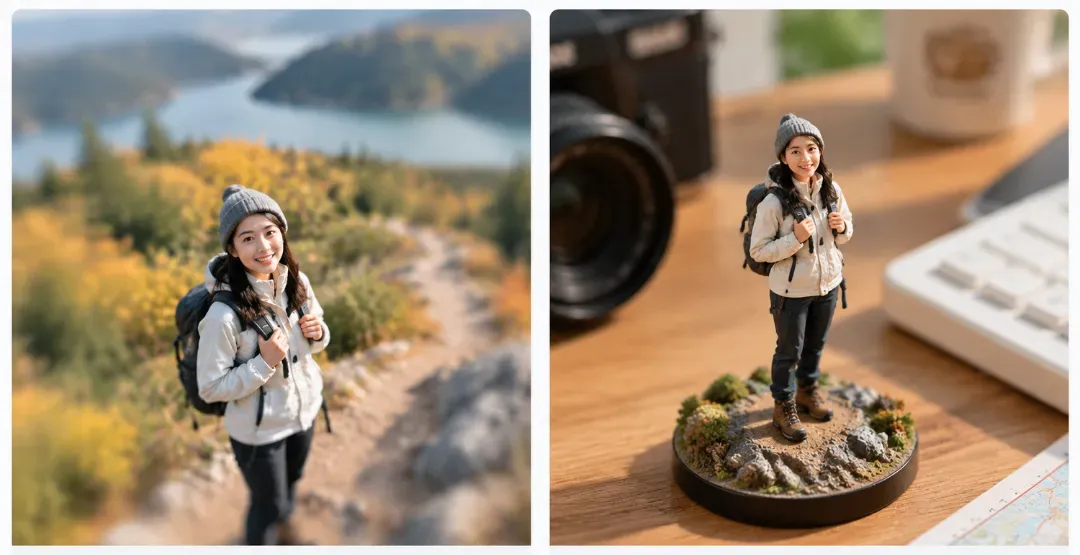
On the left is a tilt-shift hiking portrait; On the right is a realistic 3D miniature figurine.
The model ignored the toy aesthetic. Lens blur alone cannot trick the brain. We perceive miniature scale only when four optical triggers interact.
The Four Optical Scale Triggers
| Optical Trigger | Visual Mechanism | Prompt Implementation |
| Focal Band | Razor-thin depth of field | Macro 100mm lens, f/2.0 aperture falloff |
| Vantage Elevation | 45-degree downward viewing angle | High-angle shot looking down at tabletop |
| Scale Anchor | Direct size contrast against everyday items | Standing next to mechanical keyboard keys |
| Specular Gloss | Sharp light reflections on toy material | Glossy molded PVC finish, acrylic base |
Traditional tilt-shift blurs skylines to fake distance. The figurine aesthetic works in reverse.
If you mount the subject on a clear pedestal, blast hard desktop light across plastic surfaces; and drop oversized props into the background.
The scale mismatch tricks the brain. The viewer sees a collectible toy, not a real human.
Choosing the Right Reference Photo for Miniature Conversion
You don't need a professional studio shoot to make this work. Almost any personal photo, a snapshot from a mountain hike, an everyday outfit check, or a casual desk photo can be turned into a collectible figurine.
The only non-negotiable rule is high definition.
Multimodal vision models sculpt 3D geometry straight from source pixels. Avoid low-res crops, compressed screenshots, and blurry selfies.
The generator bakes input noise directly into the figurine mold. Pixel artifacts melt facial contours and distort limbs.
Prep every source photo before touching a prompt:
- Clarity & Sharpness: Select original, high-res images with crisp facial details, clothing folds, and textures. Sharp edges give the model distinct boundaries to sculpt clean surfaces.
- Balanced Lighting: Pick shots with directional, even illumination. Heavy shadows confuse the vision model and fuse limbs directly into the torso.
Step-by-Step Workflow: Generating 3D Figurines from 2D Photos
I tested Google Gemini (Nano Banana 2), Midjourney V8.1, and ChatGPT (GPT Image 2) using a reference image and straightforward natural-language instructions. All three produced miniature-style results, although the composition and visual treatment varied.
Step 1: Upload a Reference Photo
Start with a clear image that shows the subject's appearance and outfit. A full-body photo works well for a single figurine, while a detailed workspace image gives the model more environmental elements to reinterpret as a miniature scene.
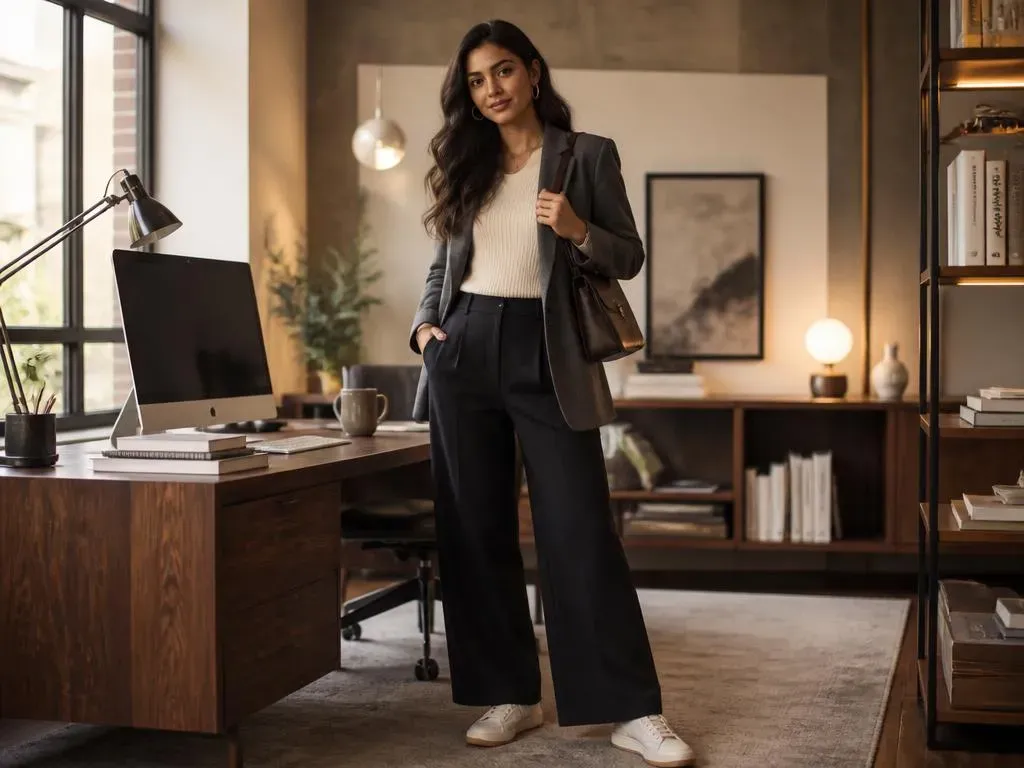
Step 2: Describe the Miniature Effect
Enter a prompt that specifies the subject, scale, materials, and setting. For example:
"Transform the uploaded image into a realistic miniature collectible figurine scene. Preserve the person's recognizable appearance, hairstyle, clothing, and colors. Show a finely crafted 3D figurine displayed on a desk, with surrounding objects that establish its miniature scale. Use realistic materials, detailed textures, natural lighting, and professional product photography."
This prompt provides a common starting point without relying on model-specific syntax. You can add details such as an acrylic display base, a wooden desk, or a computer keyboard if you want a more recognizable collectible-photography look.
Step 3: Generate and Compare the Results
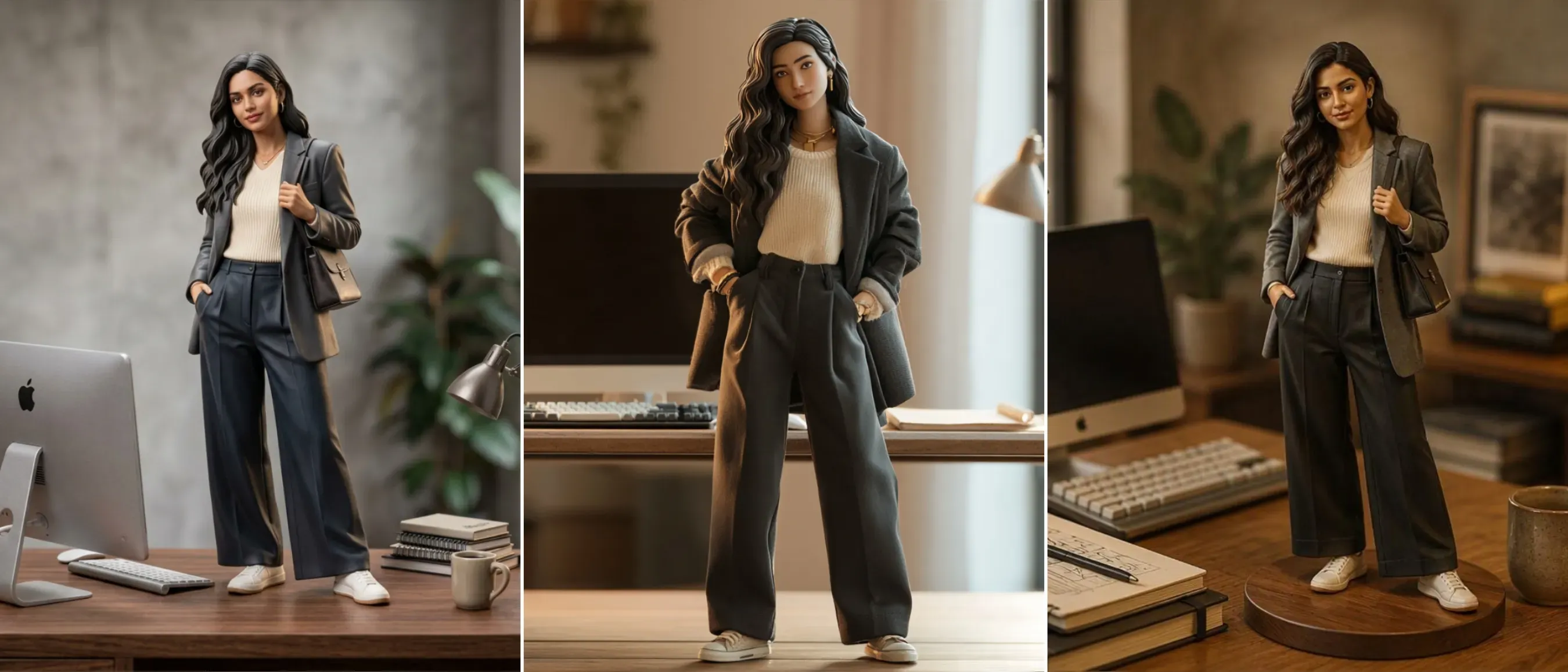
From left to right, the generated results are from: Nano Banana 2, Midjourney V8.1, and GPT Image 2.
All three tools could produce a convincing miniature-style image from a reference photo without elaborate parameter tuning. The results differed in how they rendered the figure, clothing, lighting, and surrounding workspace.
- Google Gemini (Nano Banana 2): Generated a miniature figure with a transparent display base and a desktop setting. The keyboard helped communicate the figure's scale.
- Midjourney V8.1: I really like this one. The engine takes clear creative liberties. It shifts the original pose and facial contours. The output prioritizes visual polish over reference fidelity.
- ChatGPT (GPT Image 2): Produced a miniature-style scene with the subject and workspace integrated into the composition.
These outputs serve as benchmarks, not definitive rankings. They highlight the fundamental GPT image 2 vs. Nano Banana vs. Midjourney divergence between rigid geometric fidelity and hyper-polished collectible aesthetics.
Source photo quality, prompt structure, and model parameters dictate the final render. Select the engine that matches your target visual style.
Step 4: Refine Only When Necessary
Keep the initial render if it captures the miniature scale. Otherwise, inject a single targeted fix. Reinforce molded plastic textures, lock original clothing details, or scale up background props.
Never rewrite the full prompt between iterations. Adjust a single variable at a time. Isolated edits instantly reveal what improves the render.
Converting Static AI Miniatures into Animated Video Clips
A finished miniature figurine image can become more engaging when presented as a physical collectible. To demonstrate this, I used Veo to turn one of the miniature images generated in the previous section into an 8-second video featuring the original portrait and its matching figurine.
I skip limb animation entirely. Instead, a human hand lifts the figurine for close inspection. This physical contact proves miniature scale, showcases 3D depth, and locks character geometry.
Animate the Existing Miniature Image with Veo
Upload the miniature image generated in the previous section as the reference image in Veo. Keep the prompt focused on one continuous action, with natural hand movement and a consistent figurine appearance.
Prompt:
plaintext1Create an 8-second photorealistic, single continuous macro product video based on the uploaded image. The original portrait photo and its matching miniature figurine sit side by side on a wooden desk. A realistic human hand gently picks up the figurine by its base, lifts it toward the camera, and slightly tilts it for a closer look at the sculpted clothing and facial details. Keep the figurine's appearance, proportions, outfit, and base consistent with the reference image. Natural hand movements, realistic physical contact, soft daylight, shallow depth of field, and authentic miniature scale. No cuts, morphing, melting, or sudden movements.
What to Check in the Generated Video
Post-generation, I inspect three core checkpoints: portrait likeness, natural hand grip, and structural rigidity during the lift.
I keep motion simple. A single continuous take sells the miniature illusion. Skip multi-scene cuts and complex camera paths.
4 Viral Staging Recipes: Ready-to-Use Video Prompt Templates
Placing every figure on the same plain wooden desk gets repetitive quickly. To catch people's eye and hold their attention, your staging has to be creative. Switching up the environment and scale anchors tells a fresh micro-story every time, giving viewers a real reason to stop scrolling.
Match your creative concept to your target platform before writing the prompt:
| Aspect Ratio | Target Platform | Framing Strategy |
| 4:5 | Instagram Feeds | Centered tabletop diorama with a tight macro crop. |
| 9:16 | TikTok, YouTube Shorts | Vertical framing with extra headroom for motion tilts and UI clearance. |
| 2:3 | Vertical stacking with tall background props to emphasize scale contrast. |
The Universal 4-Part Video Staging Formula
To maintain structural rigidity and scale consistency across video models, every staging prompt follows the same four-layer syntax:
- [Scene & Base]: Scale anchors, lighting style, and surface materials.
- [Interaction Action]: Single continuous physical contact (e.g., hand grip, cup lift).
- [Camera Vector]: Slow macro moves (push-in, arc, rack focus) without scene cuts.
- [Negative Constraints]: Specific tokens preventing morphing and anatomical glitches.
The Desktop Tech Diorama
The most recognizable elements of this theme are the mechanical keyboard, RGB lighting, and the interaction between miniature figures and a high-tech desktop setup. I designed the video to feature a miniature, tech-infused scene where a real person and a figurine appear in the same frame: the figurine stands on a base on the desk next to a mechanical keyboard, while the person sits at the table, picks up the figure, and examines it closely.
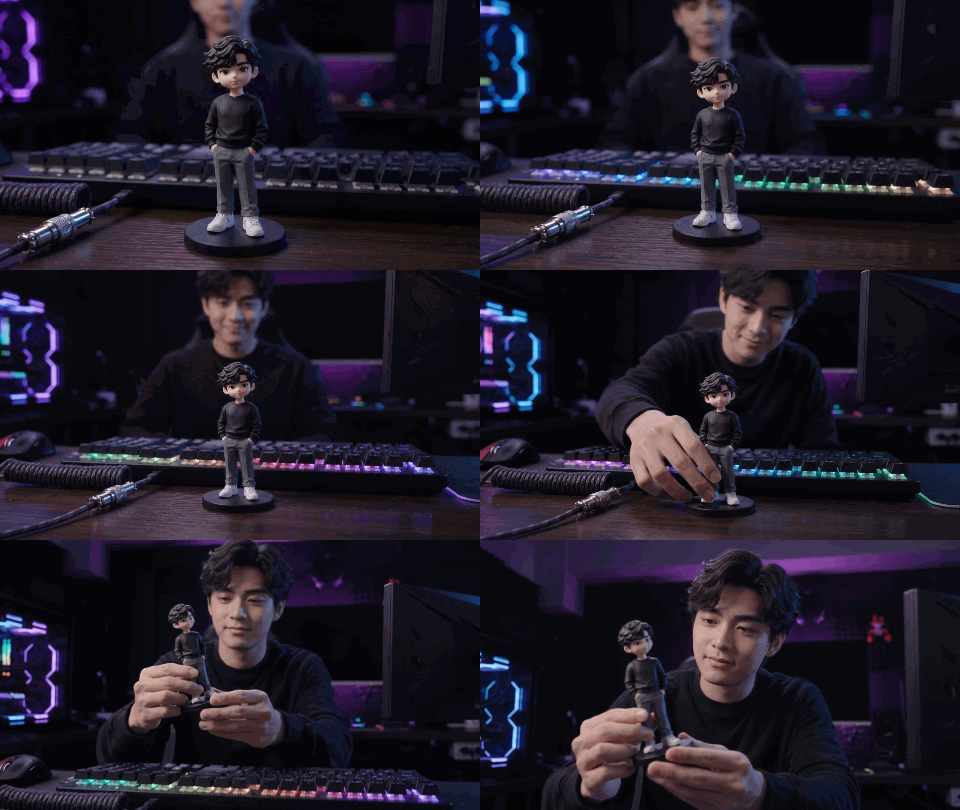
My prompt:
Create an 8-second photorealistic cinematic video in one continuous shot using both reference images.
A miniature figurine stands on its display base beside an oversized mechanical keyboard with violet, cyan, and magenta RGB lighting. The real man, wearing the same black sweatshirt, gray trousers, and white sneakers, sits behind the desk.
Start with a close-up of the figurine as the RGB lights brighten. The camera smoothly pulls back to reveal the man smiling at his miniature counterpart. He gently picks it up by the base and examines it, keeping both his face and the figurine visible in the final frame.
Preserve the man's identity and the figurine's exact appearance, outfit, and proportions. Natural hand movements, realistic materials, shallow depth of field, cinematic lighting.
One continuous shot, no cuts, no morphing, no duplicate characters, no distorted hands, no floating objects, no text or logos.
The Collector Display Case
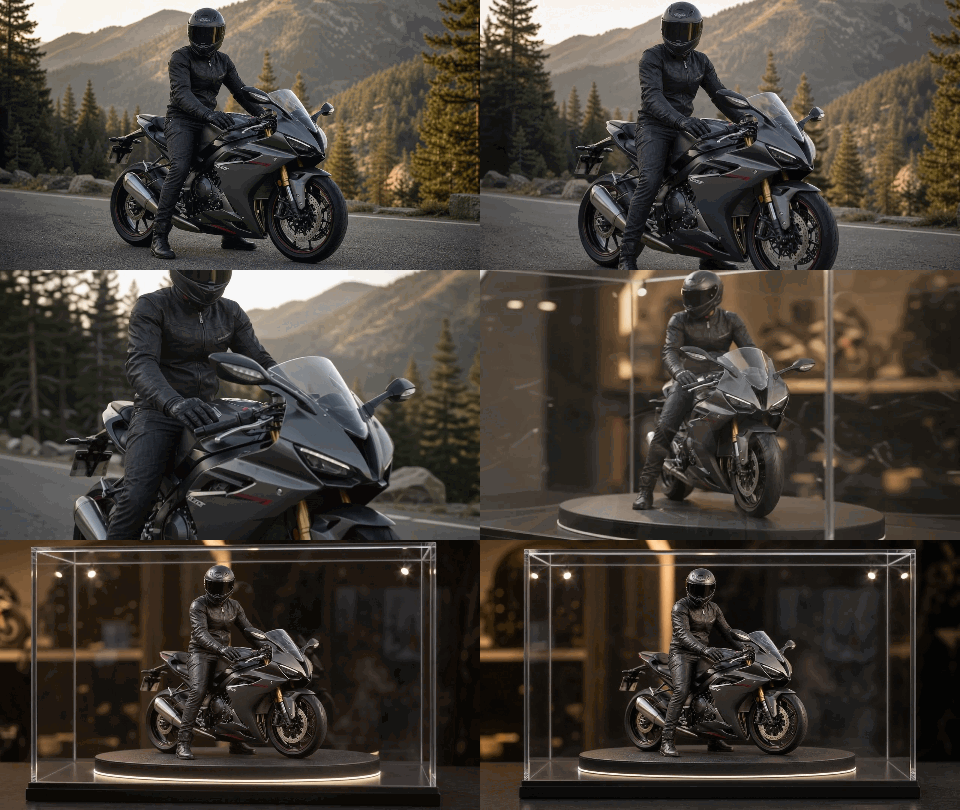
You can turn any of your photos, those that hold special meaning into miniature collectibles; for instance, snapshots from your first hike, your first mountain climb, or your first time riding a motorcycle...
I used a photo of riding a motorcycle as an example:
My prompt:
Create an 8-second photorealistic cinematic video in one continuous shot using both reference images.
Start with the real rider on the black sport motorcycle on the mountain road. The camera slowly pushes toward the rider, then seamlessly transitions into the matching miniature motorcycle collectible inside the clear acrylic display case, using continuous forward camera movement and changing depth of field.
The camera smoothly arcs around the showcase as the warm white LED base lighting gradually illuminates the detailed resin motorcycle and rider. End with the entire display case clearly framed.
Preserve the motorcycle's design, colors, rider's pose, and riding gear across both references. Keep the miniature stationary, with realistic acrylic reflections and premium product photography.
One uninterrupted camera movement, no cuts, no fades, no abrupt transitions, no morphing artifacts, no distorted motorcycle parts, no flickering, no text or logos.
The Cozy Teacup Perch
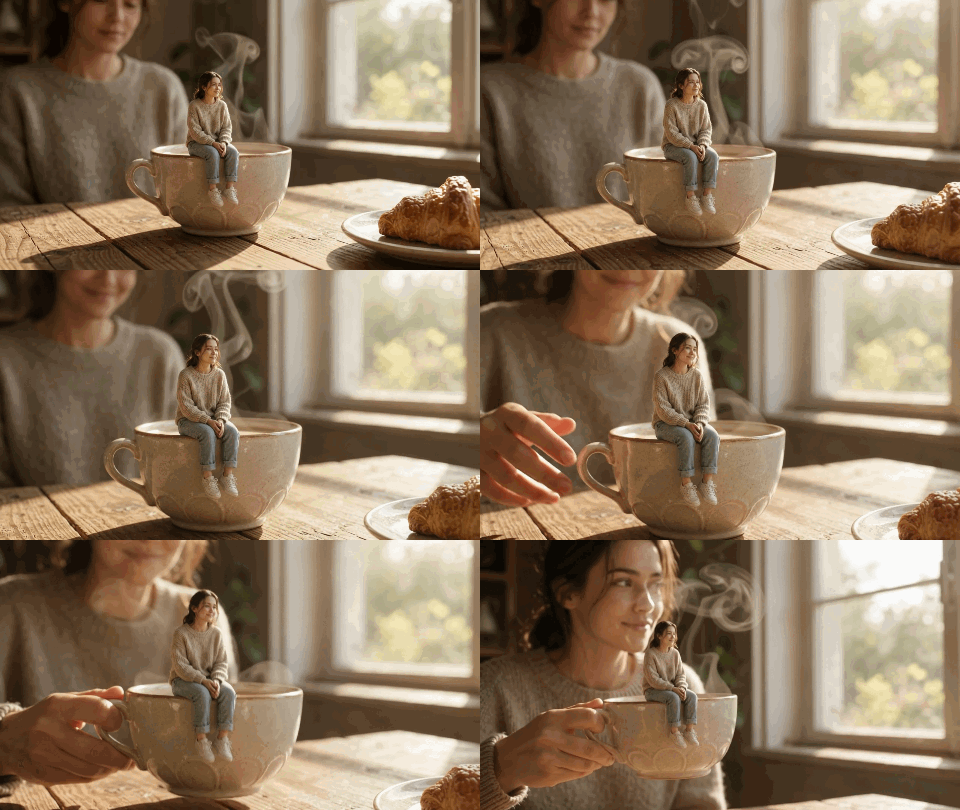
Turning heartwarming, everyday snapshots into miniature-style videos is a great idea; the next concept involves a doll perched on the rim of a coffee cup, interacting with a real person.
My prompt:
Create an 8-second photorealistic cinematic video in one continuous shot using both reference images.
A tiny figurine of the real person sits securely on the rim of a vintage ceramic coffee cup on a sunlit wooden table. Warm morning light streams through the window as delicate steam rises from the coffee.
The camera slowly glides toward the cup, revealing the figurine's detailed face, outfit, ceramic glaze, and tiny condensation droplets. The real person appears softly in the background, smiles at the miniature, then gently lifts the cup by its handle without disturbing the figurine. End with both the person and figurine visible in the warm morning light.
Preserve the real person's identity and the figurine's exact appearance. Keep the figurine securely seated and stationary on the cup rim. Natural hand movement, soft backlighting, shallow macro depth of field, cozy lifestyle photography.
One continuous shot, no cuts, no morphing, no falling figurine, no distorted hands, no spilling coffee, no text or logos.
The Terrarium Explorer
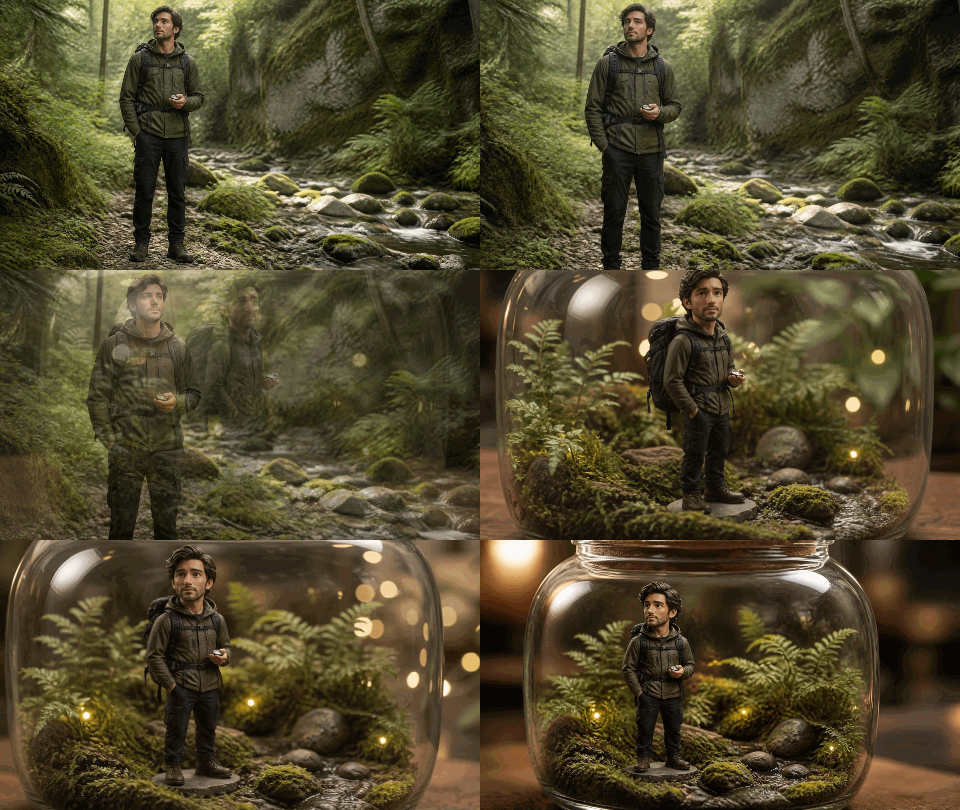
This prompt fits outdoor, travel, and adventure profiles looking for an organic look.
My prompt:
Create an 8-second photorealistic cinematic video using both reference images in one continuous shot. Begin with the real explorer standing on the forest trail. Slowly push the camera toward them, seamlessly transitioning into the matching miniature figurine inside the glass terrarium jar. Continue with a gentle camera orbit around the jar as warm fairy lights softly glow across the moss, tiny ferns, and river pebbles. Preserve the explorer's appearance and outfit. Keep the figurine and terrarium stationary, with realistic glass reflections and macro depth of field. End with the full terrarium clearly framed. No cuts, no sudden movement, no flickering, no distorted anatomy, no extra figures, no text or logos.
Diagnosing and Fixing Common Miniature Scale Artifacts
Most miniature defects come down to unclear scale cues, inconsistent materials, or unwanted changes to the subject. Use the table below to identify the problem and apply a targeted fix.
Miniature Defect Resolution Matrix
| Common Issue | Recommended Fix |
| The subject looks like a real photograph rather than a miniature figurine | Emphasize terms such as “collectible figurine,” “sculpted surfaces,” and “display base.” |
| The face looks overly smooth or plastic-like | Specify “matte painted facial details” and reduce glossy highlights on the face. |
| The body proportions or clothing change | Explicitly instruct the model to preserve the original pose, outfit, hairstyle, and key colors. |
| The miniature lacks a convincing sense of scale | Add familiar size references, such as a keyboard, coffee cup, or other full-sized object. |
| Background objects have inconsistent proportions | Reduce the number of background props and prioritize one or two clear scale references. |
| The figurine deforms during video generation | Simplify the action and avoid complex gripping, rotation, or interactions involving multiple people. |
Two Rules for Clean Iterations
- Separate Skin from Plastic: Drop global material tags like "acrylic" or "glossy plastic." Confine high-gloss terms to clothing, hair, and the display pedestal. Define facial features as hand-painted matte surfaces.
- Enforce Scale Contradictions: Generative models demand conflicting size cues to trigger miniaturization. Anchor the figure directly beside a recognizable, full-sized desktop object.
Turning a photo into an AI miniature figurine is easier than it looks. With the right reference photo and a few prompt adjustments, you can create anything from a desktop collectible to a tiny explorer in a glass terrarium. Start with a photo you like, experiment with different miniature styles, and see what you can create. You might be surprised by how much you can do with a single image.


