

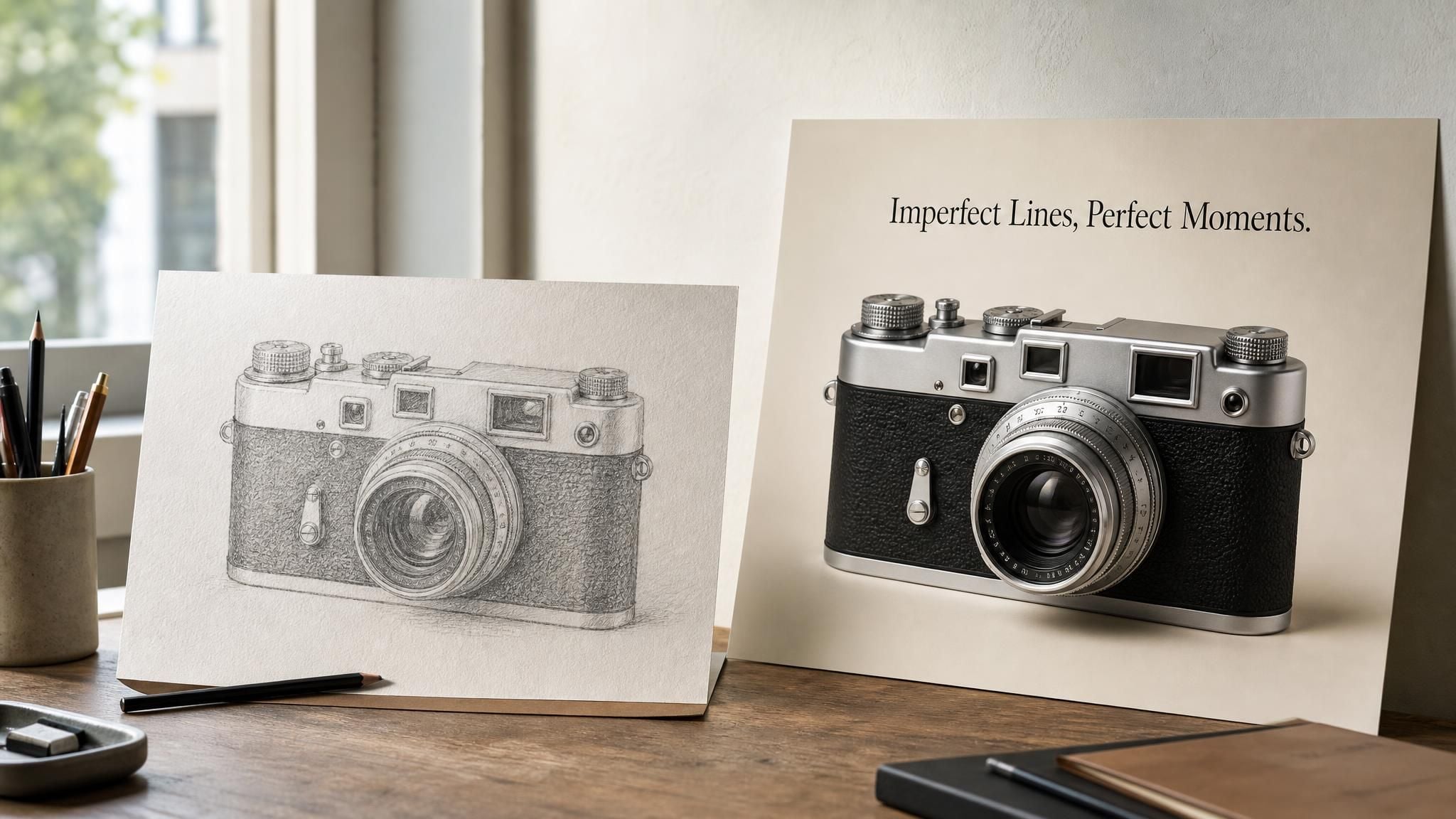
The fastest way to sort the best AI poster generators is to hand every one of them the same job: one product photo, one exact headline in quotation marks, one sentence of direction. Some tools return a finished 9:16 poster with the headline rendered letter for letter. Some return a pretty image with the words melted into the pixels, so a single typo means starting over. And some return a template with real text boxes you can retype for the next event. That split, editable text versus baked-in text, decides more than any style gallery does.
So it runs through every ranking below, alongside the free-tier fine print each vendor publishes and what poster makers on Reddit say after a month of using these things.
Key Takeaways
- Two very different tools hide behind the phrase AI poster generator: design editors that place real, editable text over AI art, and image models that paint the letters into the pixels.
- Atlas Cloud's free AI ad generator is the product-photo route: one packshot, one sentence, a 9:16 poster with the quoted headline rendered as typed and no watermark on the first free run.
- Canva, Adobe Express, Piktochart and Sivi keep text as layers you can retype; Ideogram now adds a Layerize Text step that pulls baked-in text back out into editable lines.
- Every free tier carries a catch worth reading before you print: public galleries, non-commercial licences, daily or weekly caps, or a single free run.
- Print math beats pixel counts. A 2,048 px long side is 6.8 inches at 300 DPI, so plan an upscale before anything larger than a flyer.
AI Poster Generator Comparison Table
Eight tools, four things that decide whether the poster is usable: how the tool starts (a photo, a prompt, or a template), whether the text stays editable, what the free tier actually hands over, and whether that free output is yours to use commercially. The cells below come from each vendor's live pages, read on 2026-09-04.
| Tool | Starts from | Text on the poster | Free tier | Commercial use on free | Output / export |
|---|---|---|---|---|---|
| Atlas Cloud AI Ad Generator | Product photo + one sentence | Rendered into the image as typed | First run free per account, sign-in required, no watermark | Yes | 1152 × 2048 px, 9:16 |
| Canva | Prompt (Magic Media) inside a template editor | Editable text layers over the image | A number of credits on Canva Free, count not published on the poster page | Not stated on the poster page | Editor export, Canva Print |
| Ideogram | Prompt, design category | Baked in, then optional Layerize Text | Weekly slow credits, public generations, no quality export | Not stated on the pricing table | Up to 2,048 px per side on 4.0 |
| Adobe Express | Template + text-to-image | Editable text layers | Limited free daily generations, refresh each day | Yes, except beta features | PDF, PNG, JPG; 11 × 17, 18 × 24, custom |
| Sivi | Brief or structured copy | Editable elements | 12 banners per month, no watermark | Copyright-free per its FAQ | JPG, PNG, PDF, HTML; IAB and social sizes |
| Piktochart | One-sentence prompt | Every element editable | Page says 60 AI credits per month; our new account showed 2 | Yes | PNG, JPG, PDF on the free plan |
| Microsoft Designer | Prompt or template | Editable in the editor | Free with a Microsoft account | No, personal use only | Sizes not listed on its FAQ |
| Recraft | Prompt, vector or raster | Baked in (raster) or vector shapes | 3 generations per style per day, all public | No | Raster or vector; commercial rights on paid plans |
How We Tested Every Tool on This List
We evaluated eight tools in the first week of September 2026 by running one shared brief through every one of them and reading each vendor's live product, pricing and help pages, because free-tier rules in this category change without notice. The brief was a pencil sketch of a vintage rangefinder film camera, uploaded as the product photo, with the instruction: a vintage film camera poster with the exact headline "Imperfect Lines, Perfect Moments."
Tools with an upload slot got the sketch itself; tools that only take text got the same sentence as a prompt.
Four criteria decided the ranking:
- Headline fidelity: does "Imperfect Lines, Perfect Moments." come out spelled and cased as typed, and can you change it afterwards without regenerating?
- Free-tier usability: watermark, resolution, public-by-default galleries, and whether the free file may be used commercially.
- Format fit: vertical poster, print sheet, or a set of banner sizes from one brief.
- Cost transparency: whether the vendor publishes what a run costs after the free allowance ends.
Headline fidelity carried the most weight. A poster whose one line of copy is wrong, or cannot be edited when the date changes, has not saved anyone time.
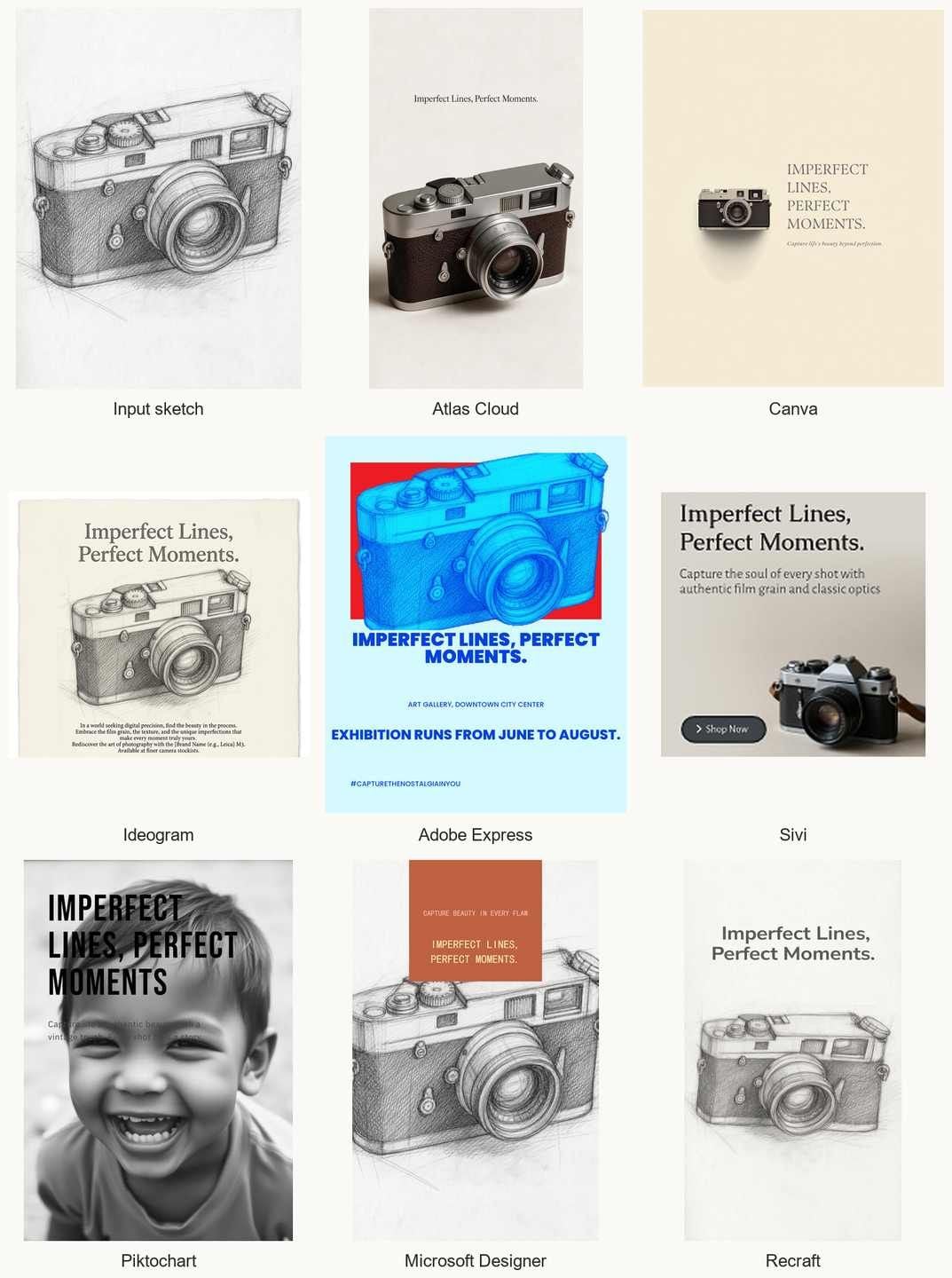
The sketch turned out to be the sharper test. Eight tools, one drawing: one returned the same camera as a photograph, four kept the drawing a drawing and built a layout around it, two could not take the drawing at all and guessed at the product from the sentence, and one composed a square banner, headline and call to action included, around a photograph of a different camera.
Disclosure: Atlas Cloud publishes this article and operates the tool ranked first. No other tool paid for placement, and every competing entry is described from its own published pages and our test run.
1. Atlas Cloud: Best AI Poster Generator for Product Ad Posters From One Photo
Atlas Cloud takes the one input the prompt-only tools cannot: your actual product. Upload a packshot of up to 10MB, write one sentence covering product, audience and mood, put any exact headline in quotation marks, and the free AI ad generator returns a finished 1152 × 2048 poster, typically in under 90 seconds.
The product in the poster is the product in your photo, down to the label, because the tool treats the upload as the source of truth and designs the scene around it.
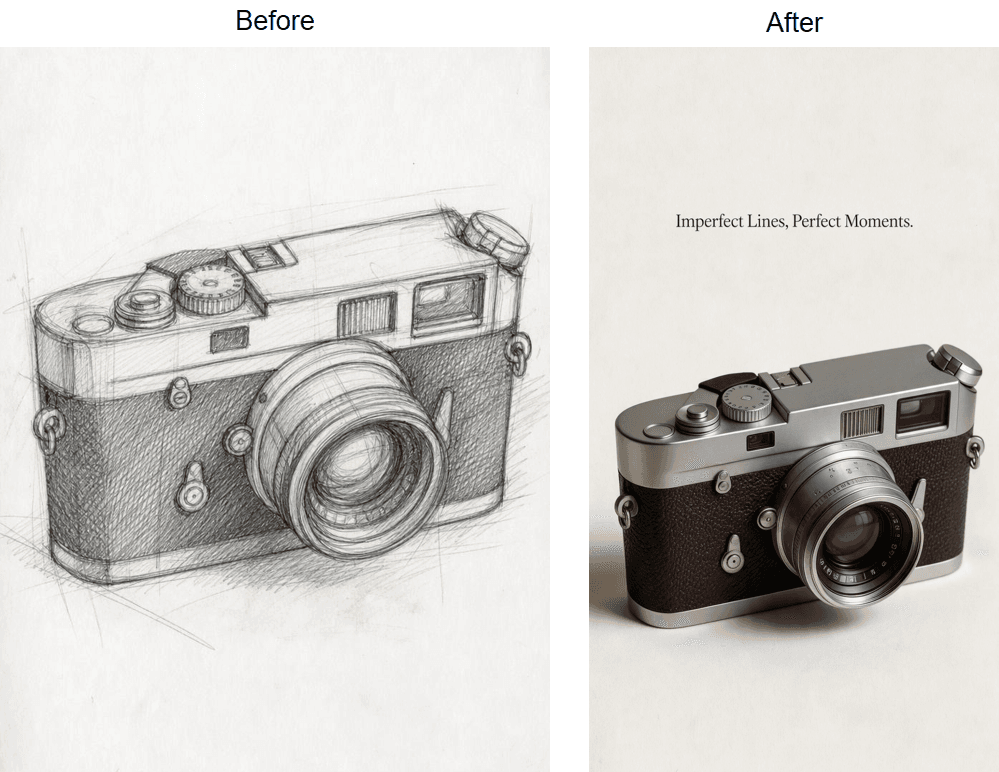
Why it stands out: it reads the product, not just the prompt. Our input was a pencil drawing, and the poster came back with the same camera as a photograph: the same two-tone body, the same shutter dial and rewind knob, the same lens, now in brushed metal and grained leather on a cream ground.
Of the eight outputs in the test, this is the one where the product changed medium and kept its shape. The tool page lists "Headlines Render Clean" as a feature, and the headline arrived as typed, in a thin serif near the top, set smaller than a poster headline usually is. Downloads carry no watermark.
Best for: sellers who already have a catalogue shot and need a launch, listing or story poster today, without opening a design editor.
Pricing: one free generation per account once you sign in, with later runs metered from a prepaid balance rather than a subscription. The tool sits in the platform's limited free tools list, not the unlimited one, so the free poster is a trial run, not a daily allowance.
Method 1: Make an Ad Poster in the Free Tool
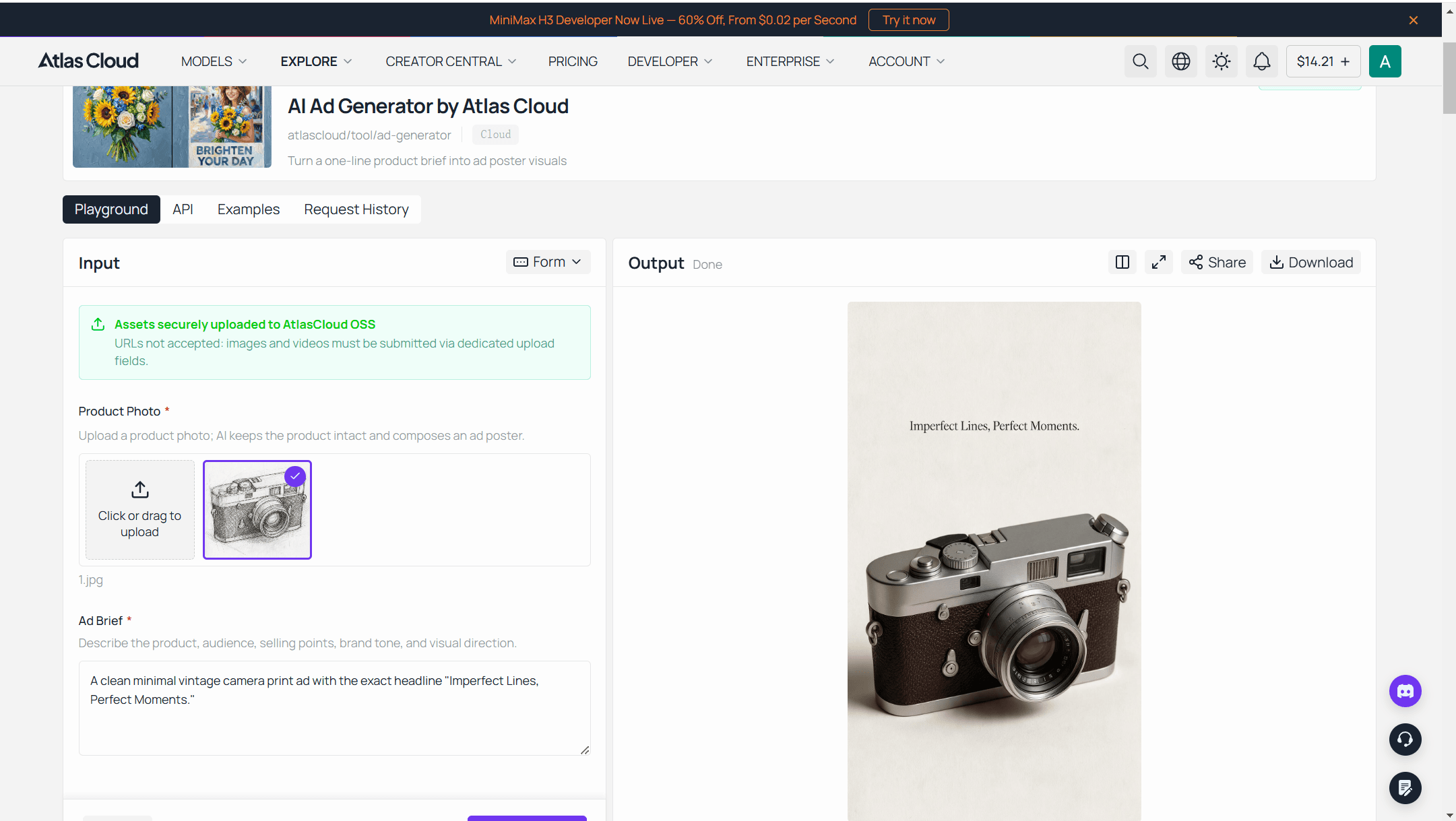
Sign in, open the ad generator tool page, and either load the official example or drop in your own photo. Three moves, in the tool's own order:
- Add photo and brief. One sentence is enough: who it is for, the single strongest benefit, and the mood. Put the exact headline in quotation marks.
- Run the generator. The first poster is free; the button switches to metered billing from the second run.
- Download the poster. It arrives as a standard image you can crop or resize for other placements.
The tool sits inside Atlas Cloud's free AI tools hub, next to a background remover and an upscaler that are useful before and after a poster run: clean the packshot first, enlarge the poster later.
One thing to know before you start: each run is a finished 9:16 raster, with no text box to nudge afterwards. A headline change is one more run, and a landscape banner is a crop rather than a re-layout, which is exactly why the second method exists.
Method 2: Batch Poster Runs Through the Atlas Cloud API
One poster per product is a browser job. Forty products before a seasonal sale is an API job, and the same generator is exposed as a model on the ad generator playground page.
Step 1: Create an API key. Open the Atlas Cloud console, create a key, and copy it before it is hidden.
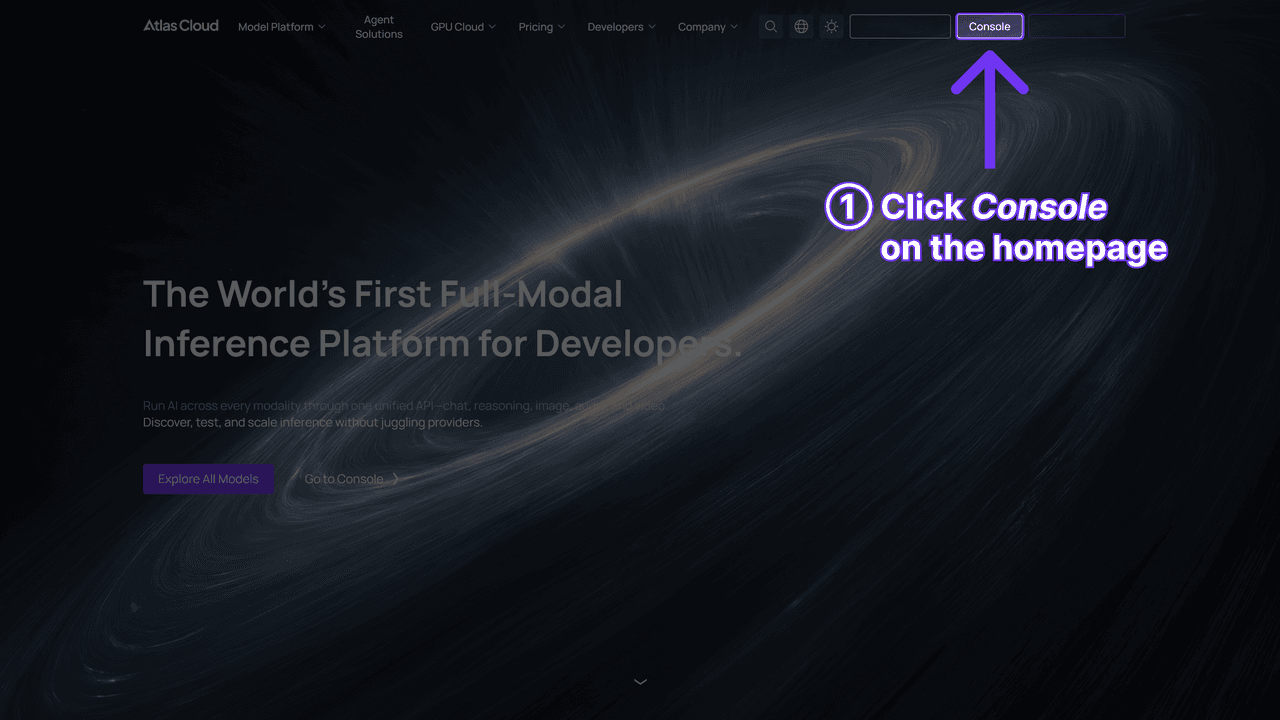
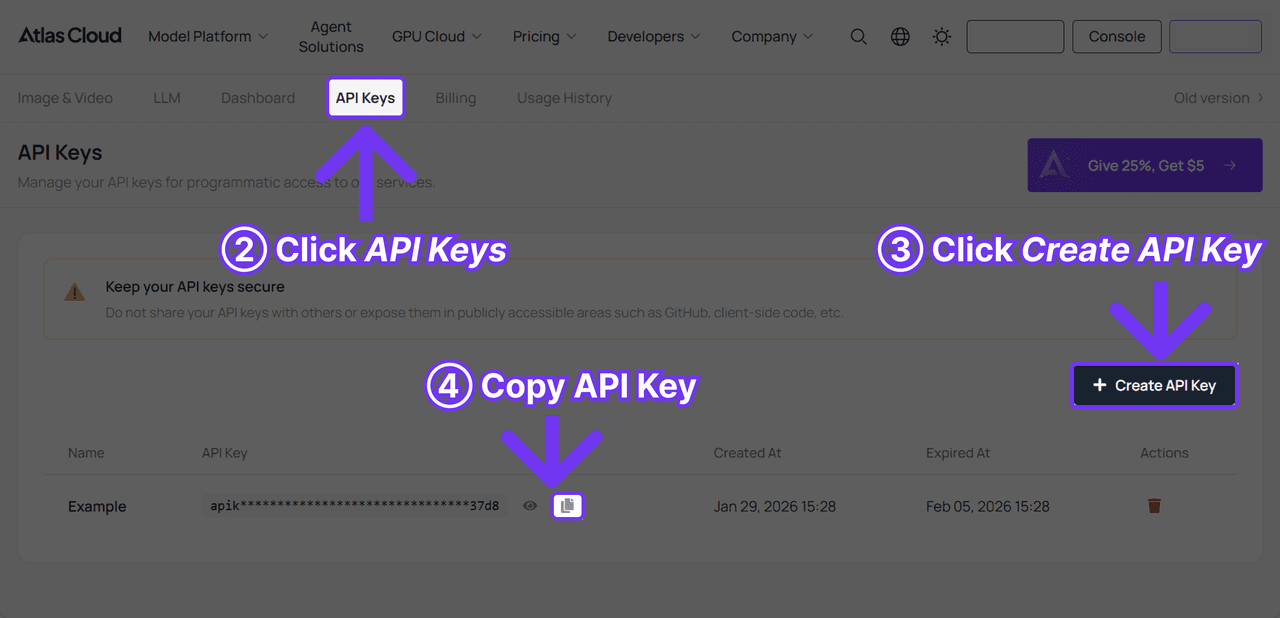
Step 2: Check the request shape. Authentication and the polling contract are in the API documentation, and the playground page exposes the same two inputs the form uses: a product image and a text brief.
Step 3: Send the request and poll. Submission is asynchronous and returns a prediction id:
Bash1curl -X POST https://api.atlascloud.ai/api/v1/model/generateImage \ 2 -H "Content-Type: application/json" \ 3 -H "Authorization: Bearer $ATLASCLOUD_API_KEY" \ 4 -d '{ 5 "model": "atlascloud/tool/ad-generator", 6 "prompt": "A vintage film camera poster for analogue photography fans, warm nostalgic mood, the exact headline "Imperfect Lines, Perfect Moments."", 7 "image": "https://your-cdn.com/camera-sketch.jpg" 8 }'
Bash1curl -s https://api.atlascloud.ai/api/v1/model/prediction/<PREDICTION_ID> \ 2 -H "Authorization: Bearer $ATLASCLOUD_API_KEY"
Poll until status reads completed and take the poster URL from outputs. Swap the model string and the same endpoint, key and polling loop drive any other image model on Atlas Cloud, which is the point of one API: the poster generator and a text-to-image model for a from-scratch concept answer to the same three calls.
2. Canva: Best Free AI Poster Generator With Editable Text Layers
Canva's AI poster generator is Magic Media, its text-to-image tool, dropped inside the normal Canva editor. You type a prompt, pick a style, and the generated picture lands on a canvas where the headline, date and logo are ordinary text boxes. That is the whole argument for Canva on a poster job: the AI paints the background, the words stay yours.
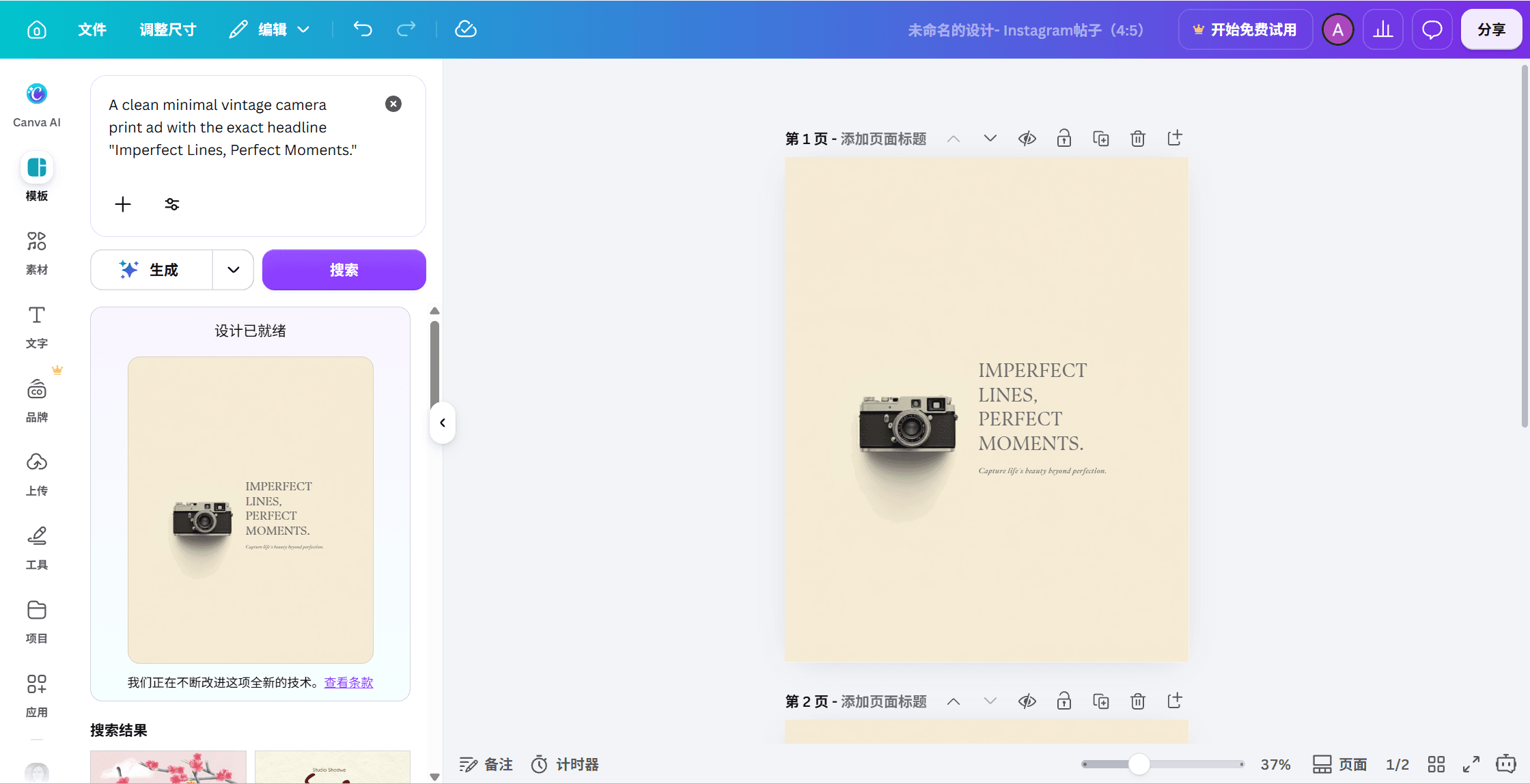
In our run Canva had no slot for the sketch, so it drew its own camera from the sentence: a small body on a wide cream field, headline and tagline set as live text beside it. Recognisably a camera, not our camera, and small enough that the type carries the poster.
Where the free tier stops you: Canva's poster page says Canva Free comes with "a number of poster generator credits" and that Canva Pro unlocks more. It does not print the number. Plan on testing a handful of prompts, not a campaign.
What one usable poster actually costs: nothing on the free plan if the credits hold out, since the editor and download are free. Repurposing one poster into a story, a banner and a flyer leans on Magic Resize, which the poster page links to under Canva Pro.
What users report: the r/canva community spent August 2026 arguing about exactly this tool. One member's side-by-side found the AI version's text baked into the image, and in a second thread the highest-voted replies skip Canva's AI features altogether. Both threads are unpacked in the Reddit section below.
Where it falls short for posters: no product-photo input in the poster generator itself. If the poster must show your camera, you generate a scene and place your cut-out over it by hand.
Fits: anyone who already lives in Canva and wants an AI starting point they can fully edit. Not for you if: you need the product itself in the picture, or you want a finished poster without touching a layout.
3. Ideogram: Best Free AI Poster Generator From Text
Ideogram built its reputation on one thing poster makers care about: spelling. Type a headline into the prompt and the model renders the letters as letters. Its June 3, 2026 technical post on Ideogram 4.0 reports an X-Omni English OCR accuracy of 0.97 for in-image text and a resolution range of 256 to 2,048 pixels per side, and the same release put the 9.3B-parameter weights on Hugging Face under a non-commercial licence for people who want to run it locally.
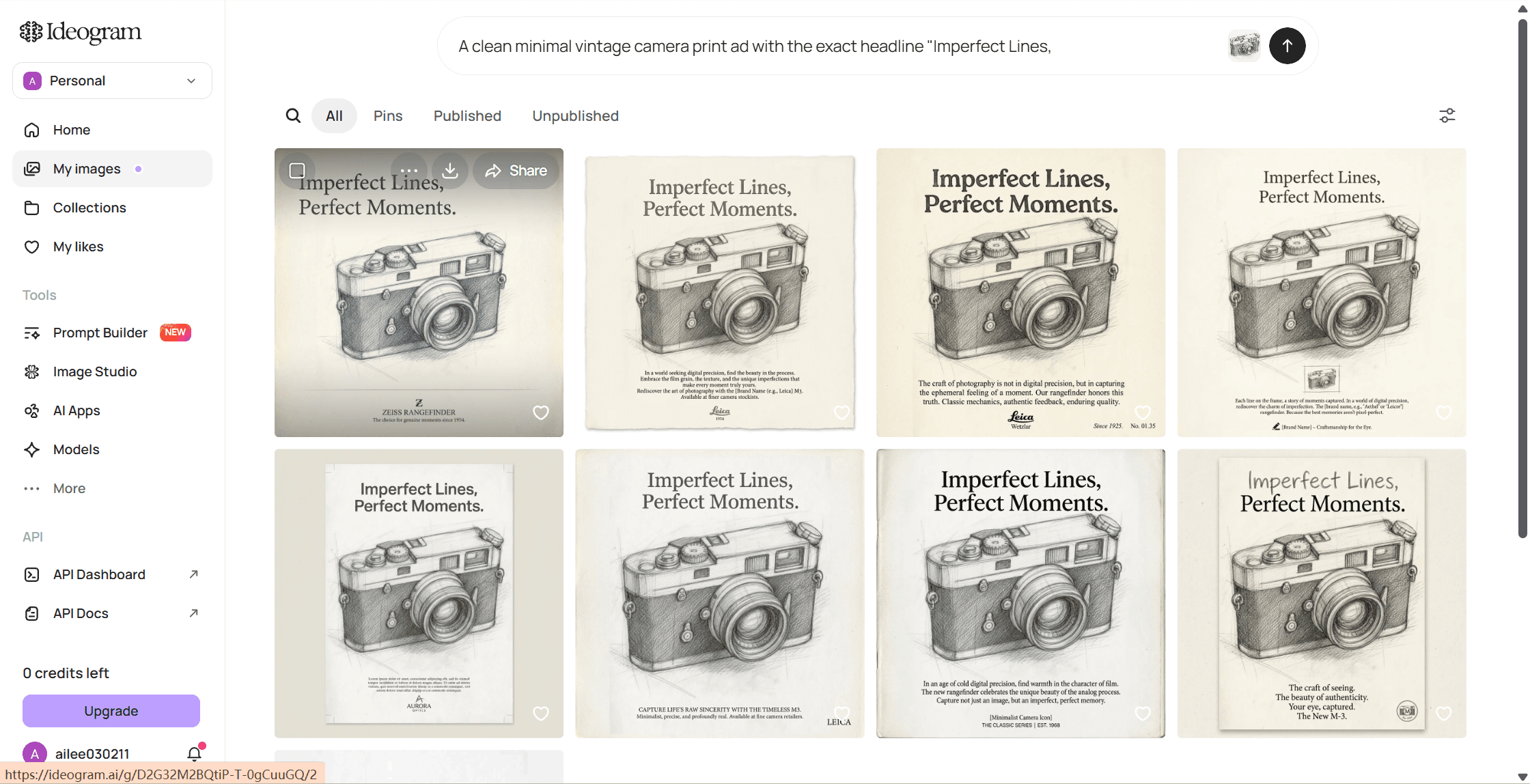
With the sketch attached as a reference, Ideogram kept it a drawing and set the headline exactly as typed. The small copy it wrote underneath is the problem: an invented brand line that ends in a bracketed placeholder where a model name should go, plus a camera maker's wordmark nobody asked for, cropped out of the image here. On our account the free allowance worked out to one generation a day.
The catch with pure image models used to be that perfect spelling was still frozen into pixels. Ideogram's own feature page now describes a Layerize Text step: press it and every line of text in the design becomes its own selectable component you can retype, refont or resize while the artwork stays put. That narrows the gap with template editors, although the text starts life as an image and the layerize pass is a second step rather than the default.
Where the free tier stops you: the pricing table gives the Free plan weekly slow credits "for eligible accounts", one running or queued generation at a time, no private generations and no quality export. In practice our new account got one free generation per day. Free posters are public and downloaded at standard quality.
What one usable poster actually costs: priority credits start with the Plus plan, which the page lists at $15 per month billed annually, or $20 month to month, for 1,000 credits. The credit cost per image depends on model and rendering setting, and the table that shows it loads live on the pricing page.
What users report: a gig-poster designer on r/texttovideo asked in May 2026 whether Ideogram could finally handle the art and the type in one pass, and a June 2026 r/StableDiffusion post recreating 1980s horror posters with Ideogram 4 and bounding boxes drew 350-plus upvotes. Both are unpacked in the Reddit section.
Where it falls short for posters: a reference image steers the style, not the product. Our sketch came back as a sketch, and the free copy it added around the headline needed deleting before the poster could be shown to anyone.
Fits: event, gig and concept posters where the art and the typography should be generated together. Not for you if: your free drafts must stay private, or the poster has to show a real product.
4. Adobe Express: Best Poster Generator AI for Print Sizes
Adobe Express is the template-first route with generative AI stitched in. Start from one of the "thousands of free, professionally designed poster templates", or type a prompt and let the text-to-image feature fill the artwork, then keep every headline as a live text layer. What sets it apart in this group is the print pipeline: the poster page lists standard sizes of 11 × 17, 18 × 24 and 20 × 20 inches with custom sizing, bleed handling through the Resize tool, and PDF export "for professional printing" alongside PNG and JPG.
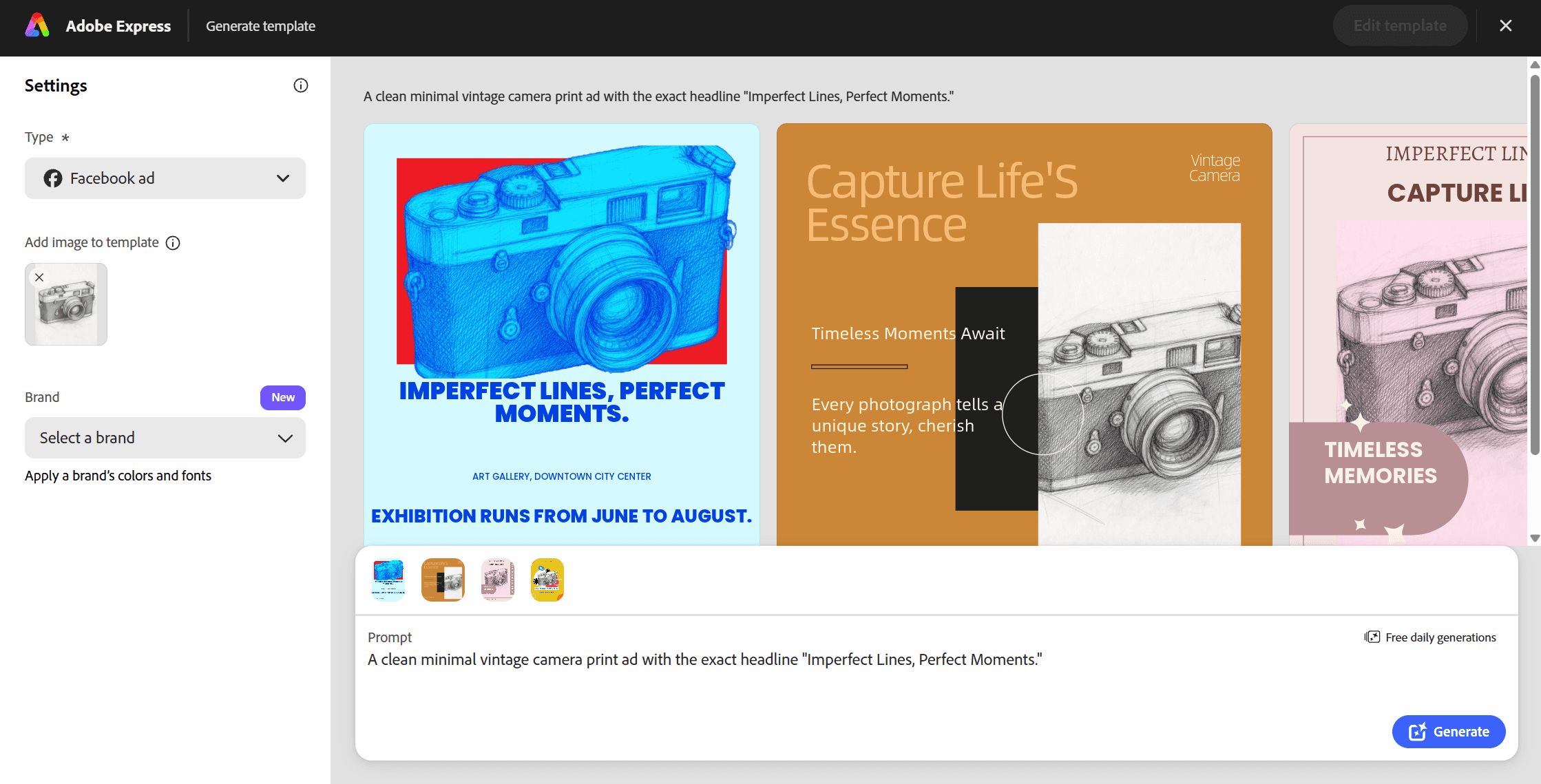
Our sketch went in as an uploaded image and came out as a sketch, tinted cyan on a red block inside an exhibition template. The headline is correct and editable. So is the filler Express wrote for us, a gallery address, a June to August run and a hashtag, which is the template showing through and the first thing to delete.
Where the free tier stops you: Adobe's generative credits FAQ, updated September 3, 2026, says free users of Adobe Express get "a limited number of free daily generations across all generative AI features, available on a curated set of models", and that the limits refresh each day. The number itself is not printed on that page. Templates, photo tools and effects stay free regardless.
What one usable poster actually costs: nothing for the template and text work on the free plan. The pricing page adds that generative outputs may be used commercially, except features marked beta.
What users report: little that is poster-specific. Express is a general design app, so its ratings reflect social posts and video clips as much as print work, and the poster maker has no review base of its own.
Where it falls short for posters: the same limit as Canva. The poster page describes templates and text-to-image generation, not a product photo as the subject, so a product poster means placing your own shot over generated art.
Fits: anyone who needs a printed poster in a standard sheet size with bleed, and wants Adobe's commercial-use statement behind the AI parts. Not for you if: you want the product in the picture generated for you, or you plan to burn through many AI variations a day on the free plan.
5. Sivi: Best AI Banner Generator for Editable Multi-Size Sets
Posters have a wide-format cousin, and it is where a single-output poster tool runs out: a 9:16 poster does not become a 728 × 90 leaderboard by cropping. Sivi is built for that job.
You enter a brief, or paste structured copy (headline, body, call to action, product URL), and its design model composes the banner with the text placed "as editable elements", positions the images and applies your brand kit. Its page lists standard IAB sizes (728 × 90, 300 × 250, 160 × 600, 300 × 600), social headers (820 × 312, 1584 × 396, 1500 × 500) and custom dimensions, with export to JPG, PNG, PDF or HTML.
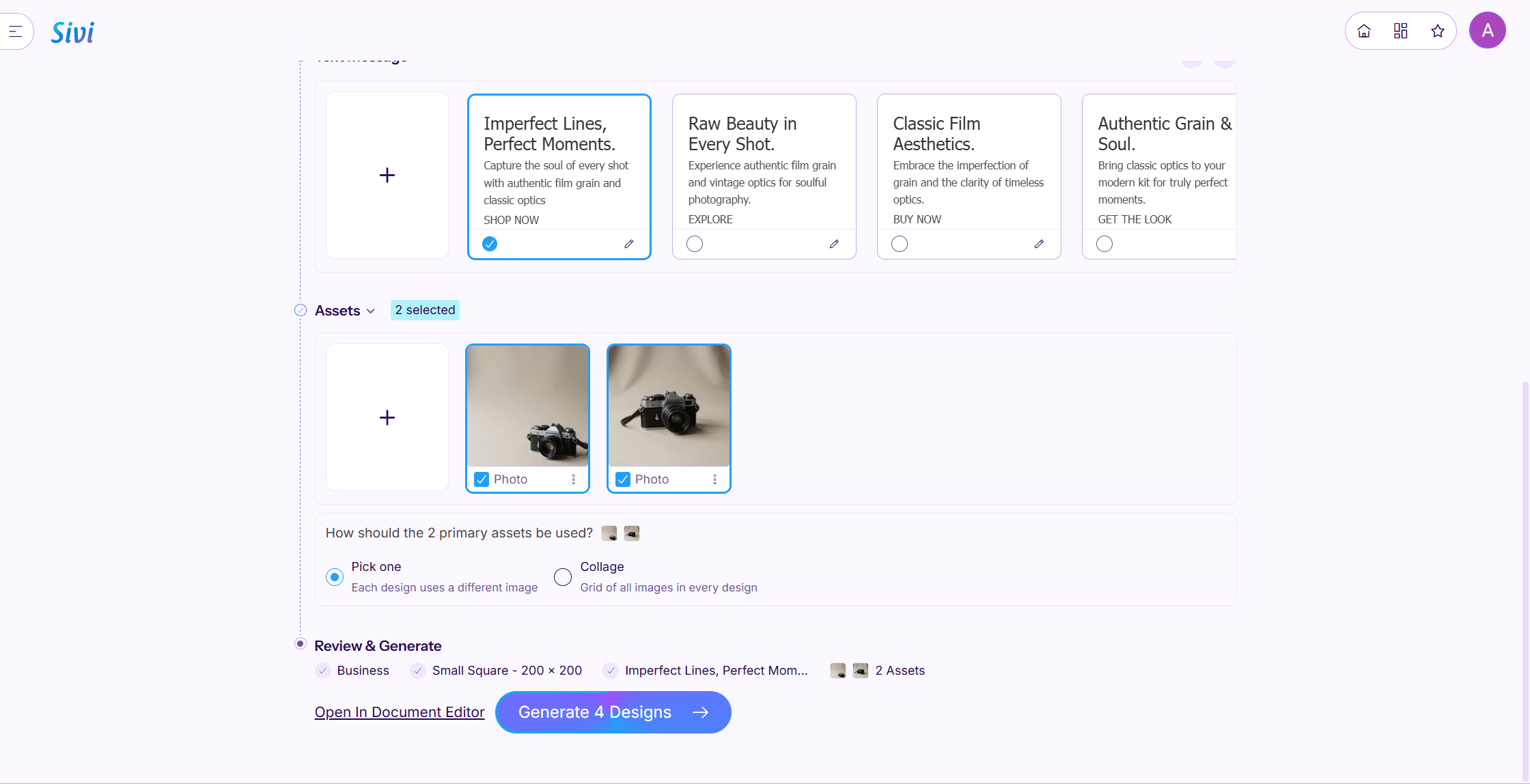
In our run Sivi did the banner job as advertised: headline as typed at the top, a subline it wrote itself about film grain and classic optics, a Shop Now button, and a product photo in the lower half, each piece its own editable element. The camera was not ours, though. The sketch shows a rangefinder; the banner shows a single-lens reflex with a leather strap, so the image layer was generated from the sentence rather than the drawing.
Where the free tier stops you: "With the free plan, you can generate up to 12 AI banners per month", and the page states there is no watermark on that plan. Each prompt returns two to four variations, so twelve banners is roughly three to six briefs.
What one usable banner actually costs: nothing for the first dozen. The FAQ also says banners made with Sivi are copyright-free, which matters for ad accounts.
What users report: no poster-maker threads name it in the Reddit searches we ran for this article, so the notes above rest on Sivi's own pages rather than a test run.
Where it falls short for posters: it is a banner tool that also does tall formats, not a poster tool that also does banners. The image step drew a camera of its own rather than the one in the sketch; layout, copy placement and size sets are the strength.
Fits: anyone who needs one brief turned into a display campaign or a set of social headers. Not for you if: the deliverable is one dramatic vertical poster.
The Other Three AI Poster Generators Worth Knowing
Each of these solves one part of the poster job well and publishes its limits plainly. The table carries the numbers so the notes below can stay short.
| Tool | Free allowance (vendor wording) | Free output ownership | Editable text | Best single use |
|---|---|---|---|---|
| Piktochart | Page: 60 AI credits per month on the forever-free plan, 1 credit per poster, 25 per in-editor image generation. Our new account: 2 credits at sign-up | Yours to use commercially | Yes, every element | Information-dense posters |
| Microsoft Designer | Free with a Microsoft account; a subscription "may be required" to create more frequently | Personal, non-commercial use | Yes, in the editor | Quick social posters with content credentials |
| Recraft | 3 generations per style per day, 3 uploads per day | Public, no commercial use on Free | Vector generation available | Vector poster art and brand illustration |
6. Piktochart
Piktochart's poster generator turns a one-sentence prompt into a full layout in under 10 seconds, then hands you a drag-and-drop editor where "every element is editable". Its own positioning is "data-driven visuals", so it is the pick when the poster carries a schedule, a chart or a list of speakers rather than one hero image. Free exports include PDF with bleed settings preserved.
Two things from our run: the camera brief, text only, produced a polished black-and-white portrait of a laughing child under the headline, with nothing camera-shaped in it, and the account we opened showed 2 AI credits rather than the 60 a month the page advertises, one of which the poster used. Not for you if: the poster is a single photographic scene, since in-editor image generation alone costs 25 credits.
7. Microsoft Designer
Designer is free once you sign in with a Microsoft account, and every image made with its editing features carries C2PA content credentials, so anyone can check that the poster was AI-assisted. In our run it kept the uploaded sketch as a sketch and added a burnt-orange panel carrying the headline and a subline of its own, all editable in the editor.
The licence is the limit: Microsoft's FAQ says Designer "is licensed for personal, non-commercial use with your Microsoft account". Fits: a club night flyer or a classroom poster. Not for you if: the poster sells anything.
8. Recraft
Recraft is the poster tool for people who want vectors: vector generation is part of its model lineup, and paid plans carry full ownership and commercial rights. Its Free plan is explicit: three generations per style per day, all images public, no commercial use, Recraft models only.
In our run it took the sketch as one of those daily uploads and returned a cleaner pencil rendering of the same camera with the headline set as typed in a heavy grey sans above it, still a drawing, spelled right. Fits: a designer sketching poster concepts who will finish in a vector editor. Not for you if: you need a private or commercially usable file without paying.
Will an AI Poster Actually Print at Poster Size?
Style galleries get the attention in this category. The arithmetic that decides whether the file survives the printer gets less, so here it is. Print height in inches is simply the long side in pixels divided by the DPI, and the chart below runs that division for the output sizes you actually get from these tools.
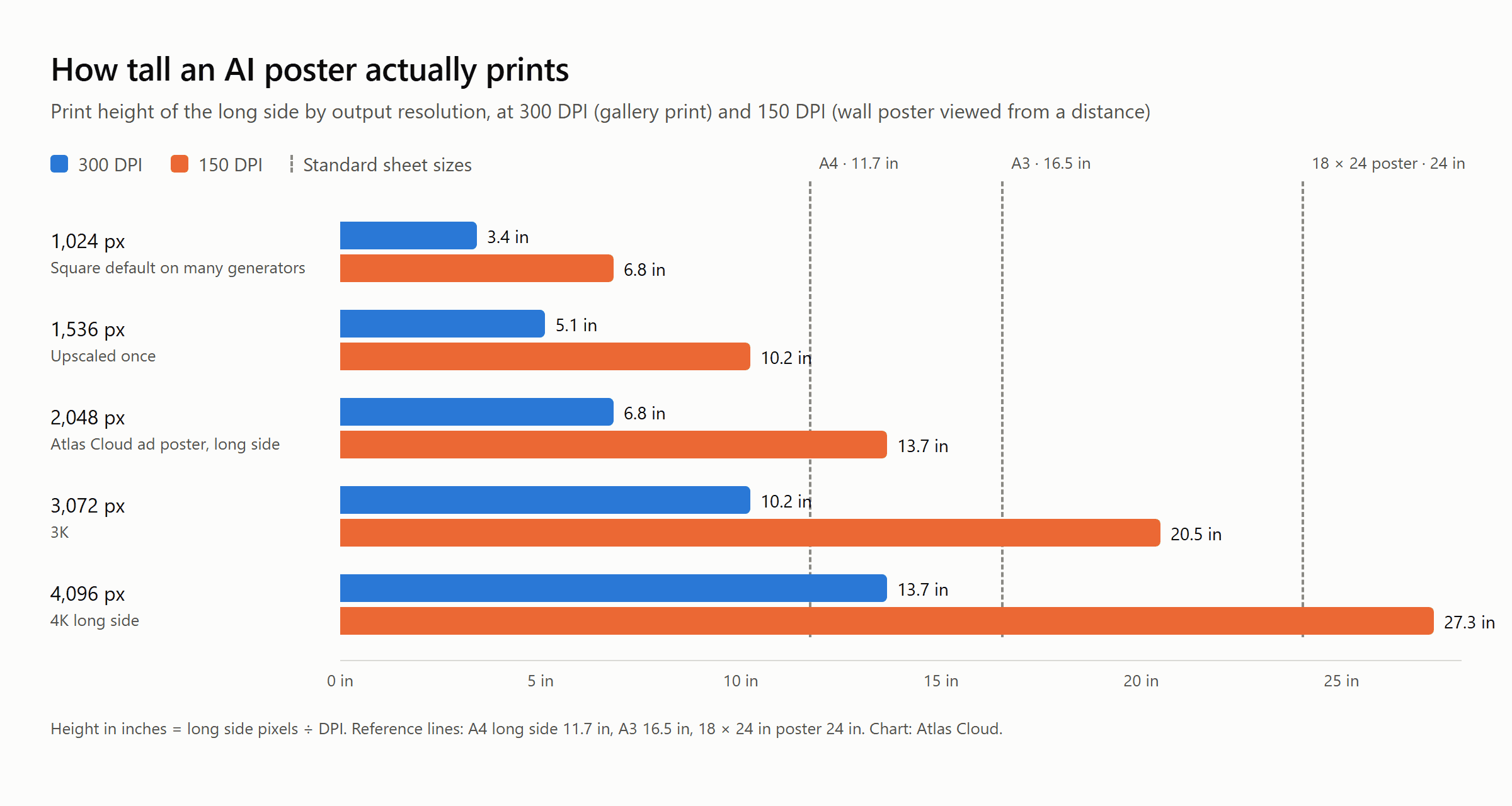
Read it two ways. At 300 DPI, the standard for something viewed at arm's length, a 2,048 px long side is a 6.8 inch print, a large postcard, and even a 4,096 px file stops short of A3. At 150 DPI, which is normal for a wall poster read from a metre or two away, the same 2,048 px file covers A4 with room to spare and a 4,096 px file clears an 18 × 24 sheet.
So the working rule for the tools above: anything exporting around 1,024 px is a social graphic, not a poster, until it is upscaled. A 2,048 px vertical is a flyer or a shelf card at 300 DPI and an A4 poster at 150.
For A3 and beyond, either start in a template tool that exports PDF at the sheet size (Adobe Express and Piktochart both do) or run the raster through an upscaler before sending it to print. Atlas Cloud's free tools hub includes a 2x image upscaler for exactly that step; check its input limit against your file before relying on it for a print run.
What Does Reddit Say About the Best AI Poster Generator?
Ask Reddit for the best AI poster generator and the useful answers come from people who make posters every week, not from the tool launch posts. Their verdict in 2026 splits cleanly along the line this article has been drawing.
| Thread | Where and when | What the poster asked or found |
|---|---|---|
| AI poster maker vs building by hand | r/canva, August 2026 | Generated version looked fine as a thumbnail, fell apart up close; text baked in, headline uneditable |
| Do you actually use the AI poster maker? | r/canva, August 2026 | Fast layout, generic type, half rebuilt anyway; occasionally useful as a starting point |
| Ideogram vs Krea for typography | r/texttovideo, May 2026 | Gig-poster designer generating art in one tool and setting type in Illustrator, looking for one tool that does both |
| Ideogram 4 has scary control | r/StableDiffusion, June 2026 | 1980s horror posters recreated from prompts and bounding boxes alone; several hundred upvotes |
The Canva threads are the sharpest. In one August 2026 post, a member timed the AI poster maker against a 40-minute manual build of the same event poster and concluded that generation is fine for a mood or a background, useless the minute a word has to change.
A second thread asking whether anyone trusts the output for client work drew an 18-point top reply that skips Canva's AI features altogether, several members who build by hand from saved templates, and one dissenter who defends the premium renders while noting how many credits they burn.
The image-model side of Reddit is more excited, and for a specific reason. A May 2026 question from someone who designs gig posters describes the old workflow, generate the art, then typeset in Illustrator, and asks whether any generator can do both. One reply had run the same loop and named the reason: Ideogram handled spelling but broke the layout flow, while the sharpening tool lacked reliable lettering.
A month later, a post on r/StableDiffusion answered it in practice with a set of horror posters built from prompts and bounding boxes, the author stressing that no image-to-image, inpainting or compositing was involved, just prompts and box coordinates.
Put the two halves together and the community's position is consistent: baked-in text is acceptable when the model spells it right and you will not need to change it; the moment a poster has a date, a price or a boss with revisions, editable layers win. Which is exactly why the product-photo route at the top of this list quotes the headline in the brief and renders it once, cleanly, instead of asking you to fix it later.
Frequently Asked Questions
What is the best AI poster generator in 2026?
It depends on what the poster starts from. Atlas Cloud's free AI ad generator ranks first for product posters because it works from your own photo and renders the quoted headline as typed. Canva and Adobe Express lead when you need editable text layers and print sizes, and Ideogram leads when the art and the typography should be generated together from a prompt.
Is there a best AI poster generator free of watermarks?
Yes, several. Atlas Cloud downloads the first poster on each account with no watermark, Sivi states no watermark on its free plan, and Piktochart exports PNG, JPG and PDF on its forever-free plan. Read the ownership line too: Microsoft Designer and Recraft allow free use but not commercial use of free output.
What does an AI poster cost after the free run on Atlas Cloud?
After the one free generation per account, the Run button switches to metered billing at $0.045 per 1152 × 2048 poster, drawn from a prepaid balance, with no subscription. That figure comes from the tool page's own FAQ and matched the platform's price calculator on 2026-09-04 with no discount applied.
Which is the best free AI poster generator from text only?
Ideogram, if the words matter most: it publishes an in-image text OCR score for its model, and its Layerize Text step can turn those words into editable lines afterwards. Piktochart is the better free pick when the poster is mostly information, since its editable layouts are built for that, though check how many credits your account actually receives.
What is the best AI banner generator free to try?
Sivi, for a set of standard display and social sizes from one brief, with 12 free banners a month and editable text. If the banner is a single wide image rather than a size set, any of the template tools above will resize a poster layout, and Atlas Cloud's 9:16 poster suits story placements rather than leaderboards.
Can an AI poster generator work from a photo of my product?
Atlas Cloud's ad generator is the tool on this list built around that input: the photo you upload is the product that appears in the poster. In our test the same pencil sketch came back as a photograph of the same camera there, stayed a drawing in four other tools, and turned into a different camera entirely in Sivi. The template editors treat your photo as a layer to place by hand, and the pure image models describe a product rather than reproduce yours.
Conclusion
The eight tools here split into two families, and picking the right family matters more than picking the right brand. Template editors such as Canva, Adobe Express and Piktochart keep every word live, which is what you want for anything with a date or a price that will change. Image models such as Ideogram put the headline into the pixels straight from the prompt and now offer a way to pull it back out, which suits posters where art and type are born together. Sivi covers the wide formats, and the print chart tells you when any file needs an upscale.
For a product poster, though, the shortest path is the one that starts from the product. Atlas Cloud's free AI ad generator takes one photo and one sentence, renders your quoted headline cleanly into a 9:16 poster with no watermark, and does it again through the same API when there are forty products to cover. Run the free poster first, then decide which of the best AI poster generators deserves your second one.





