One of the roundups ranking for this search still says Runway extends a clip by 5 or 10 seconds. Open Runway's help center and the Gen-3 Alpha article now says the feature "is no longer available." Runway retired it in July 2026, and none of its Gen-4 models picked it up.
So we rebuilt the list from what each company publishes this week: how many seconds one pass adds, which clips the tool accepts, whether the new seconds carry sound, and what a pass costs. Ten tools made it, ranked for anyone after the best AI video extender for a clip that ends a beat too early.
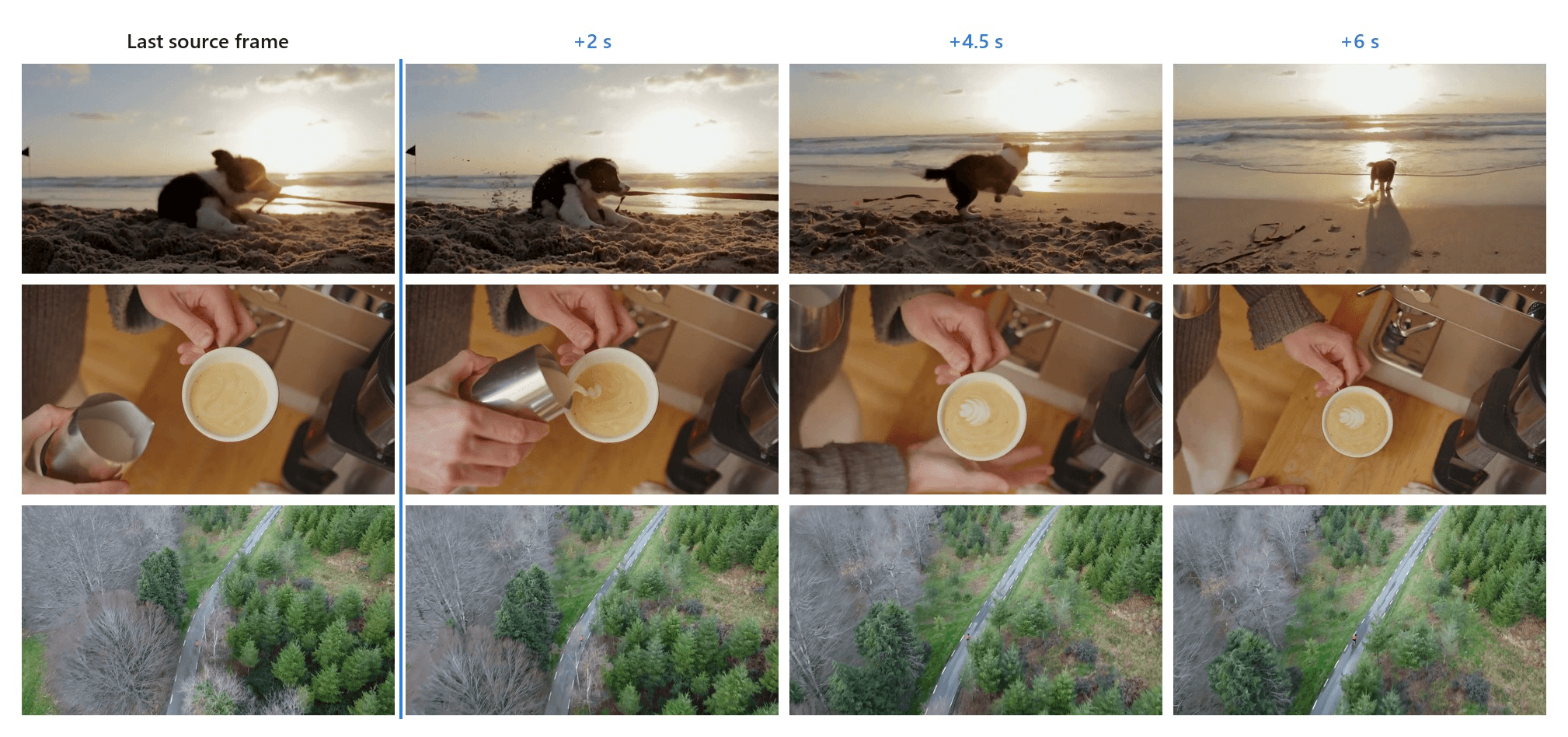
Key Takeaways
- The Atlas Cloud video extender takes a clip you already have and runs it through four extension models, including Wan-2.5, which generates sound for the new seconds.
- Published per-pass ceilings run from 2 seconds in Premiere Pro's Generative Extend to 30 seconds in Higgsfield, Media.io, and Runway's hosted Seedance 2.5 mode.
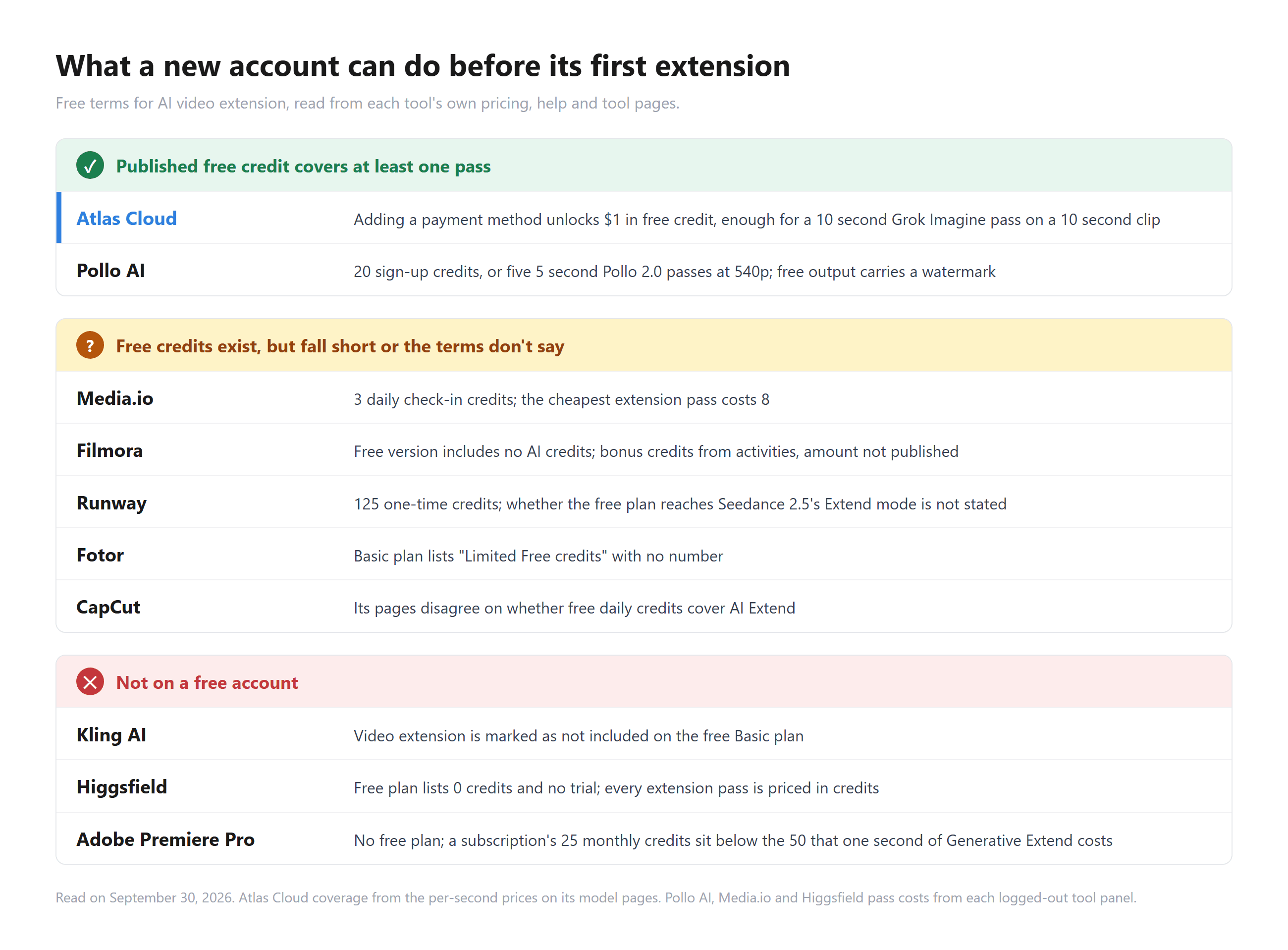
- Free tiers stop in different places. Kling marks extension as not includedonits free plan, Higgsfield's free plan carries 0 credits, and Premiere Pro has no free plan at all.
- Kling extends clips generated inside Kling. Its announced 4.0 option to upload and extend your own video is still marked coming soon.
- Runway's ownExtendfeature is gone. Extension on Runway now runs through the Seedance 2.5 model it hosts.
AI Video Extender Comparison Table
Premiere Pro adds 2 seconds per pass, Kling 4 to 5, and three tools publish passes of up to 30 seconds. Eight of the ten take a clip you upload, and six publish a way to build footage before the first frame. Entry paid plans run from US$3.99 a month at Fotor, billed yearly, to US$22.99 for Premiere Pro on an annual plan, close to a sixfold spread. Atlas Cloud bills the seconds you generate in dollars, while the other nine price extension in credits.
| Tool | Best for | Free tier | Entry paid plan | Seconds added per pass | Clips it will extend |
|---|---|---|---|---|---|
| Atlas Cloud Video Extend | A clip you already have, with or without new sound | $1 credit after adding a payment method | No plan, billed per second | 1 to 15 s by model, up to 481 frames on LTX 2.3 | Uploads; Grok Imagine takes 2 to 15 s clips |
| Higgsfield | Long passes in either direction | Free plan with 0 credits, watermarked | Starter US$19 a month, 270 credits | 4 to 30 s | Uploads, 2 to 30 s |
| Pollo AI | Trying several extension models | 20 sign-up credits, watermarked | Lite US$12 a month billed yearly, 400 credits | 1 to 7 s on Pollo 2.0, up to 20 s on Flux 3 | Uploads up to 32 MB in the tool |
| Kling AI | Chaining a Kling generation toward 3 minutes | Extension not included on the free plan | Standard US$79.20 a year, 660 credits a month | 4 to 5 s | Videos generated in Kling |
| Media.io | Two-way extensions in a browser | 3 daily check-in credits | Standard US$7.99 a month billed yearly, 200 credits | 4 to 30 s on Seedance 2.5 | Uploads, 2 to 30 s, up to 200 MB |
| Wondershare Filmora | Extending inside a desktop edit | Free version, no AI credits, watermarked | Advanced US$59.99 a year, 1,000 credits a month | 5 or 8 s | Clips on the timeline, Windows and Mac |
| Fotor | A fixed-length ending | "Limited Free credits", no number | Pro US$3.99 a month billed yearly, 100 credits | 5 or 8 s, end only | Uploads in MP4, MOV or WebM |
| Adobe Premiere Pro | A short handle inside a pro edit | No free plan | US$22.99 a month on an annual plan, 25 credits | 2 s of video, 10 s of ambient audio | Clips on the timeline, 2 s minimum |
| Runway | Existing Runway users on higher plans | 125 one-time credits, watermarked | Standard US$12 a month billed yearly, 625 credits | 4 to 30 s in Seedance 2.5 mode | A source video you drop in |
| CapCut | CapCut PC subscribers | Not stated for AI Extend | No pricing page, varies by region | Not published | Not stated |
How We Tested Every AI Video Extender on This List
We read each extender's pricing page, help center and logged-out tool panel on September 30, 2026. Where a feature page and the tool disagree, and several do, we say which one said what.
The tool we rank first is one we run, so we measured it instead: four Pexels clips through its Video Extend tab, three on Grok Imagine and one on Wan-2.5, with limits and per-second prices taken from its model pages.
Four criteria decided the ranking:
- Which clips it will extend. A clip you upload, or only one the tool generated itself, and how long the source can run.
- What one pass adds. Seconds, direction, output resolution, and whether the extension comes with sound.
- Price transparency. Whether the cost of one pass can be worked out from published numbers.
- How far a free account gets. Whether a new account can run a single extension before buying anything.
The last one carries the most weight. We only ran extensions on the tool we operate, so the other nine are ranked on what they publish. What a new account may do is directly comparable, and it is where published terms sit furthest apart: two tools state free terms that cover a pass, three rule it out, and five leave it short or unstated.
Disclosure: Atlas Cloud publishes this article and runs the tool ranked first. No tool on this list paid for placement, and none of the other nine were contacted. Each is described from its own published pages.
1. Atlas Cloud: Best AI Video Extender Overall
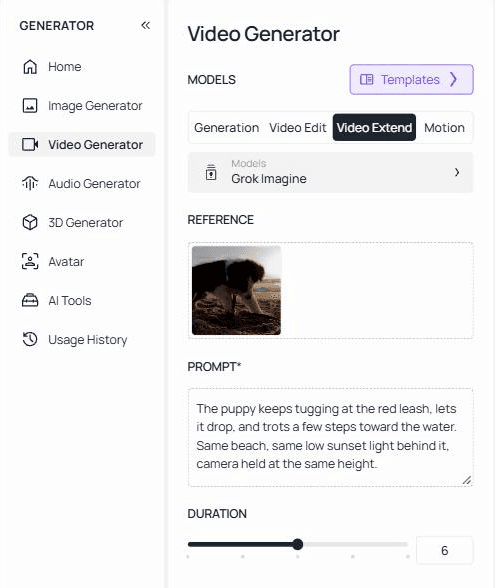
Hand Atlas Cloud a clip that stops too soon, write one sentence about what happens next, and the shot picks up from its last frame, built to carry the lighting and camera movement it already had. How much one pass adds depends on which of its four models you pick. Our eight second beach clip of a border collie puppy came back as a single 14 second file, with the puppy letting go of its leash and trotting toward the water as the prompt asked.
Upload yours on the Video Extend tab, where Grok Imagine is already selected.
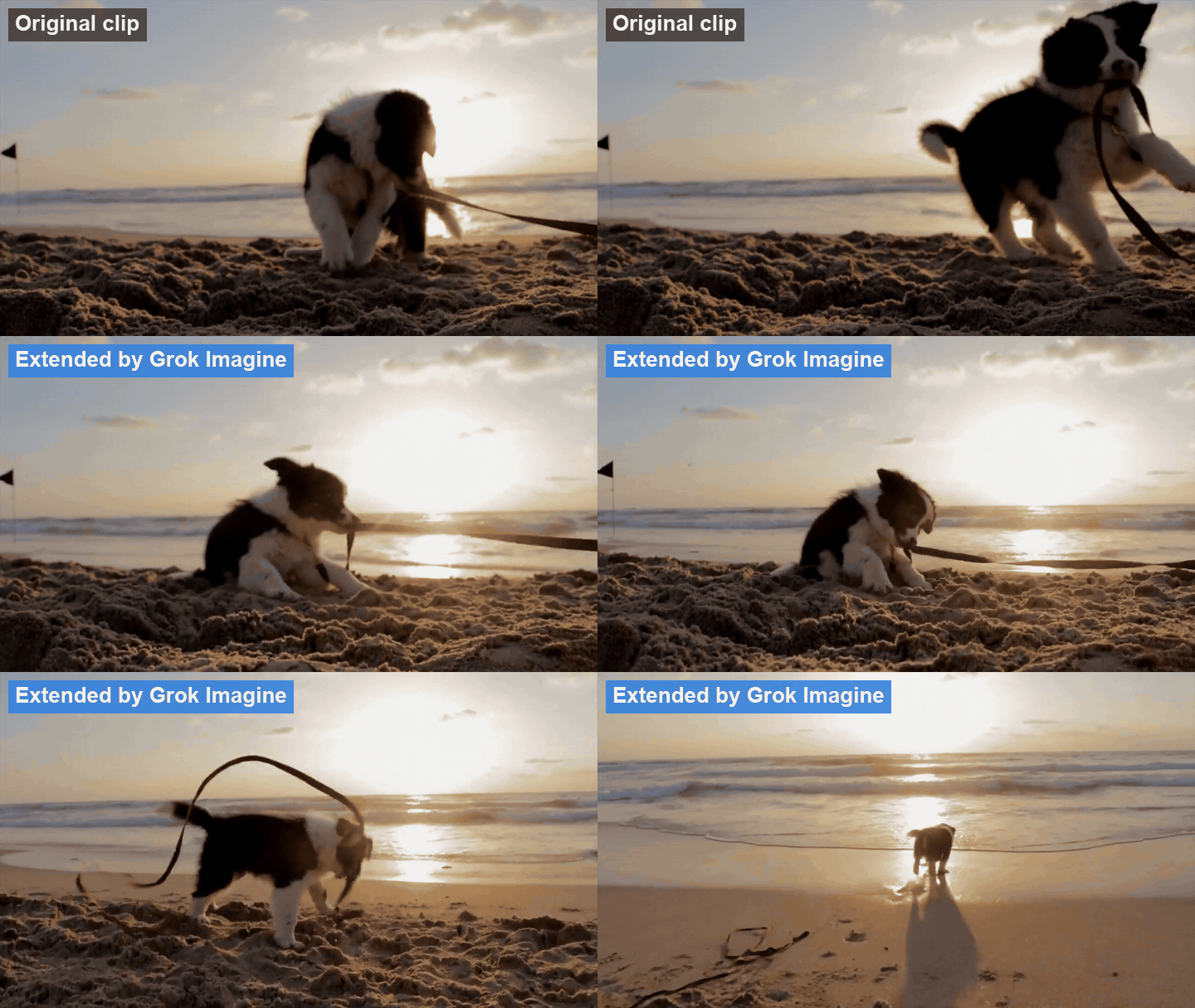
Grok Imagine on the Video Extend tab: the last three seconds of the source clip, then the six seconds it added.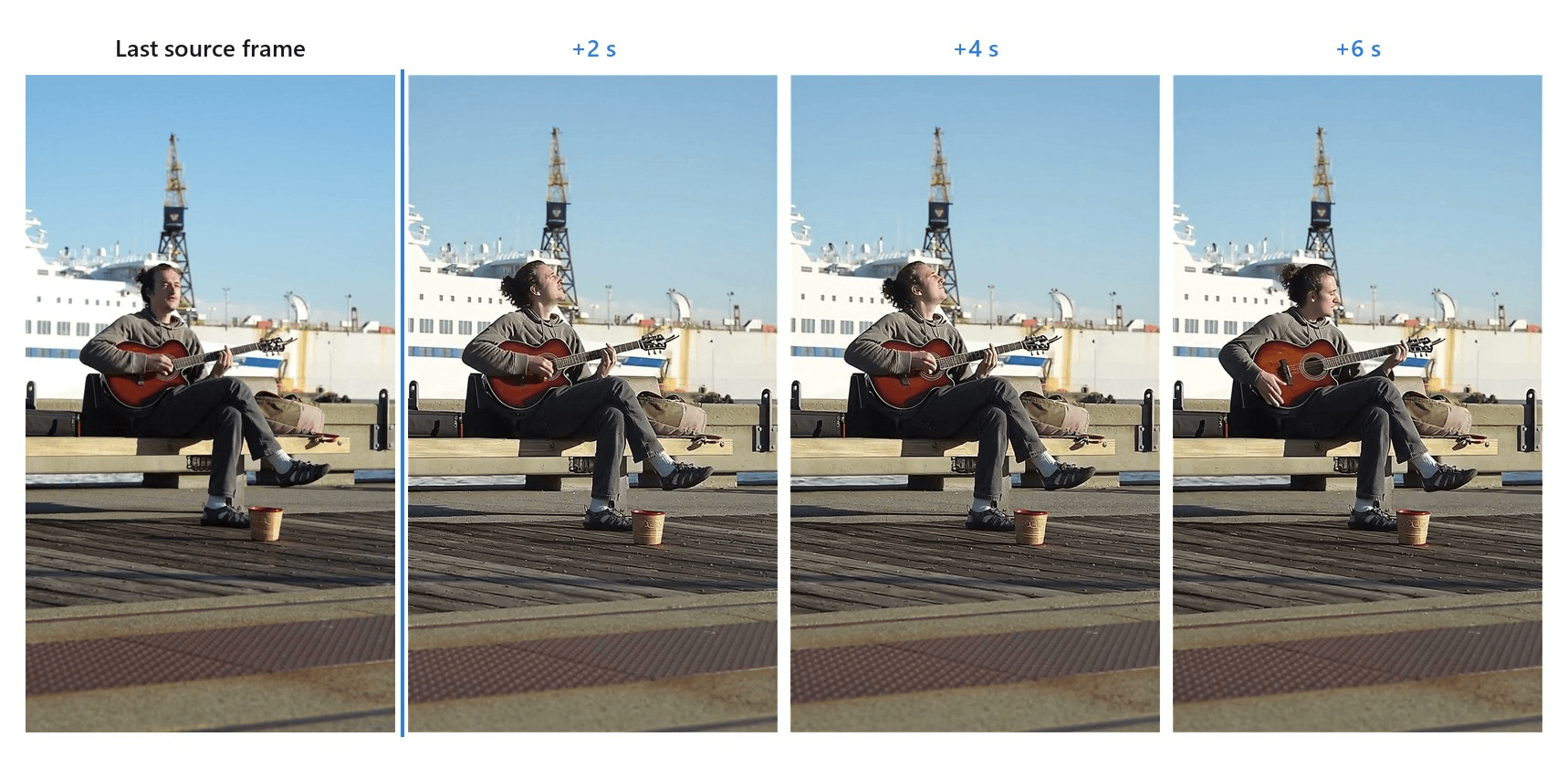
Wan-2.5 on the Video Extend tab, six seconds added at 720p to an eight second Pexels clip. The new seconds came back with generated sound, where the source carried only faint harbour noise.
Why it stands out: Four extension models share the one tab, and each suits a different clip. Grok Imagine, the default, takes an MP4 of 2 to 15 seconds, adds 2 to 10, and returns one continuous file in the source's aspect ratio at up to 720p.
PixVerse v6 adds 1 to 15 seconds at up to 1080p. Wan-2.5 adds 5 to 10 seconds and generates sound for the new footage, and it will take an audio file to steer that sound. LTX 2.3 counts its extension in frames, up to 481, or about 20 seconds at 24 fps. It can build footage before the first frame as well as after the last one, with its own audio switch.
Sound is easy to forget until a clip with music or street noise falls silent at the join, which gives the edit away faster than any visual seam. Wan-2.5 and LTX 2.3 are built to fill those seconds with audio of their own.
Passes chain, too, each one picking up where the last left off. We mapped how that works for PixVerse footage in our PixVerse length guide.
Best for: Anyone holding a finished clip that needs a few more seconds. A product shot that cuts off before the logo settles is the classic case. So is a B-roll insert that has to cover one more line of voice-over.
Pricing: Billed by the second you generate, with no plan to buy. Adding a payment method unlocks $1 in free credit, which covers a 10 second Grok Imagine pass on a 10 second clip.
2. Higgsfield: Best AI Video Extender for Two-Way Extensions
Higgsfield's Extend Video tool, filed under Edit Video, takes a clip of 2 to 30 seconds and offers 4 to 30 seconds of new footage in its Duration setting. Then it asks where that footage goes: Sequel continues after the end, Prequel builds before the start. An Audio switch sits in the same panel, turned on by default, and output comes at 480p, 720p or 1080p.
The panel names no model. Higgsfield's own Seedance 2.5 announcement from August 2026 lists the same forward, lead-in and 30 second options, which suggests where the numbers come from.
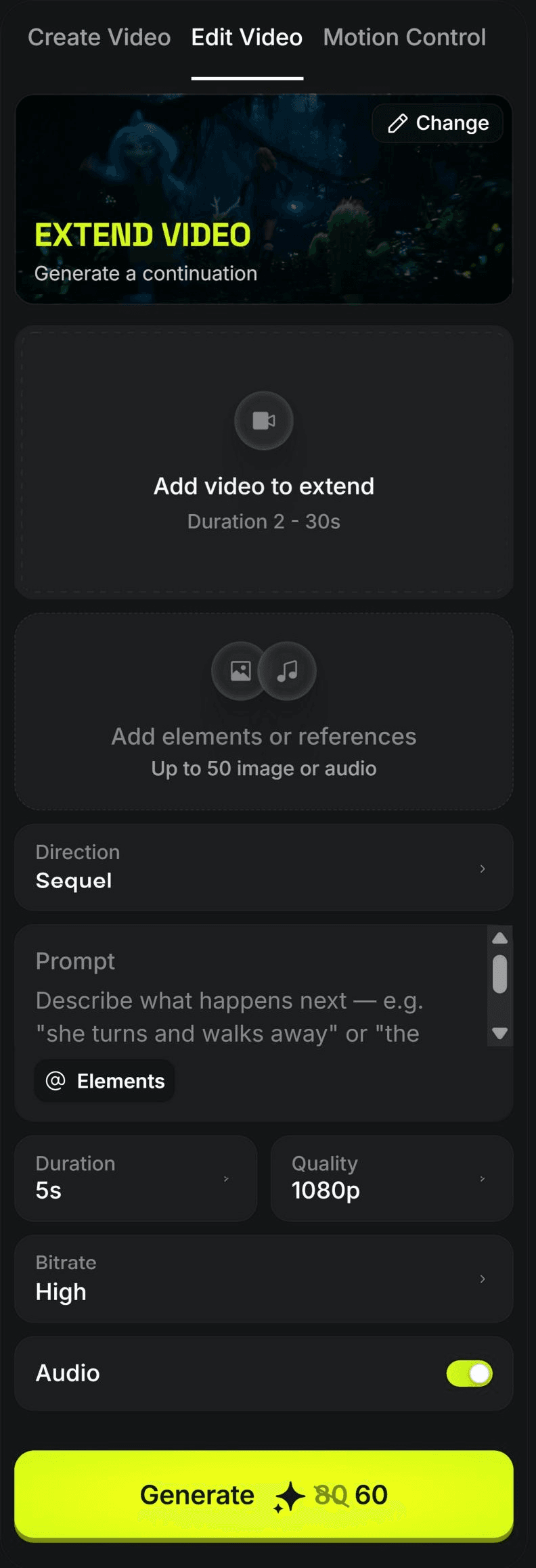
Screenshot from Higgsfield's Extend Video tool, logged out, September 2026.
Where the free tier stops you: Almost immediately. The pricing table lists the free plan at 0 credits, and the help center says free access covers a small set of models with no credits and no trial period. Every free generation carries a Higgsfield watermark.
What one usable extension actually costs: Starter is US$19 a month, monthly or yearly, for a fixed 270 credits. A 5 second pass at 1080p lists at 80 credits, with a promotional price of 60 showing when we checked, and falls to 15 credits at 480p. That puts three 1080p passes a month in Starter at list price, or 18 at 480p.
What users report: 4.0 stars from 4,714 reviews on Trustpilot. We found no official app store listing to compare.
Where it falls short for video extension: Two extenders share one name. The landing page widget runs edit models at 3 to 10 seconds and describes lengthening both ends at once, while the real tool runs 4 to 30 seconds in one direction per pass.
Fits: Creators who need a long pass, want sound in it, and already pay for a subscription. Not for you if : you want to try an extension before paying anything.
3. Pollo AI: Best AI Video Extender for Switching Models
Pollo puts six models in one Extend dropdown: its own Pollo 2.0 plus Vidu Q2, Gemini Omni 1.1 Flash, Flux 3, Runway Gen 4 Aleph and Seedance 2.5. Each sets its own range. Pollo 2.0 adds 1 to 7 seconds, Gemini Omni 1.1 Flash 3 to 10, and Flux 3 anywhere from 5 to 20. The upload box takes MP4 or MOV files up to 32 MB, or 50 MB on Flux 3.
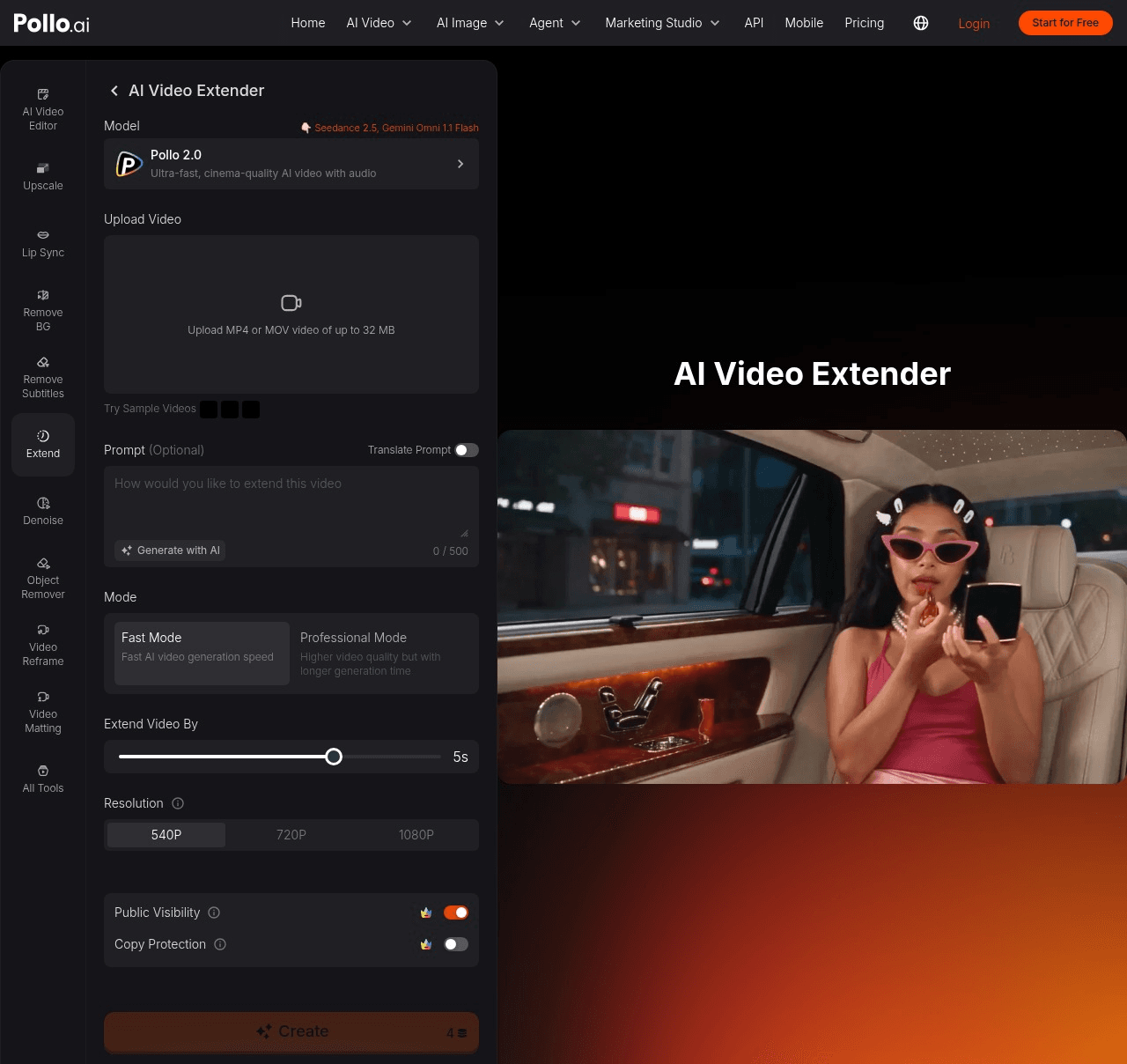
Screenshot from Pollo AI's AI Video Extender page, logged out, September 2026.
Where the free tier stops you: Sign-up brings 20 free credits, once. More come from daily check-ins, invites and watching ads, in amounts the FAQ doesn't give. Free downloads carry a watermark. In the panel we captured, the Public Visibility switch sat on, with a subscriber crown beside it.
What one usable extension actually costs: A 5 second Pollo 2.0 pass in Fast Mode is 4 credits at 540p, 8 at 720p and 18 at 1080p. Lite costs US$15 a month, or US$12 a month billed yearly, for 400 credits, which works out to about 54 cents for a 1080p Fast pass on the yearly plan.
What users report: 4.3 stars from 5,492 reviews on Trustpilot, 4.47 from about 13,000 ratings on the App Store, and 4.46 from about 48,000 on Google Play.
Where it falls short for video extension: Direction and access. The panel has no direction setting, Seedance 2.5 opens a paywall on a free account, and the copy above the tool describes extending only videos you created with Pollo AI.
Fits: People who want to compare several extension models on one clip without juggling accounts. Not for you if : you need to build footage before the first frame, or you want free output without a watermark.
4. Kling AI: Best AI Video Extender for Kling-Made Clips
Kling's guide calls the feature Extend with Prompts, in two modes. Auto-Extend continues on its own, and Customized Extend follows your prompt. Each pass adds 4 to 5 seconds, and passes stack until the video reaches 3 minutes. The Kling extend video control sits at the bottom left of a finished generation, which is the catch: today it works on clips Kling generated.
That is set to change with Kling 4.0. Kling's release note from September 28, 2026 lists uploading a video and extending it several times, up to 2 minutes, marked coming soon, with the full 4.0 launch planned for October. How the chain holds up past 30 seconds is covered in our Kling length limit guide.
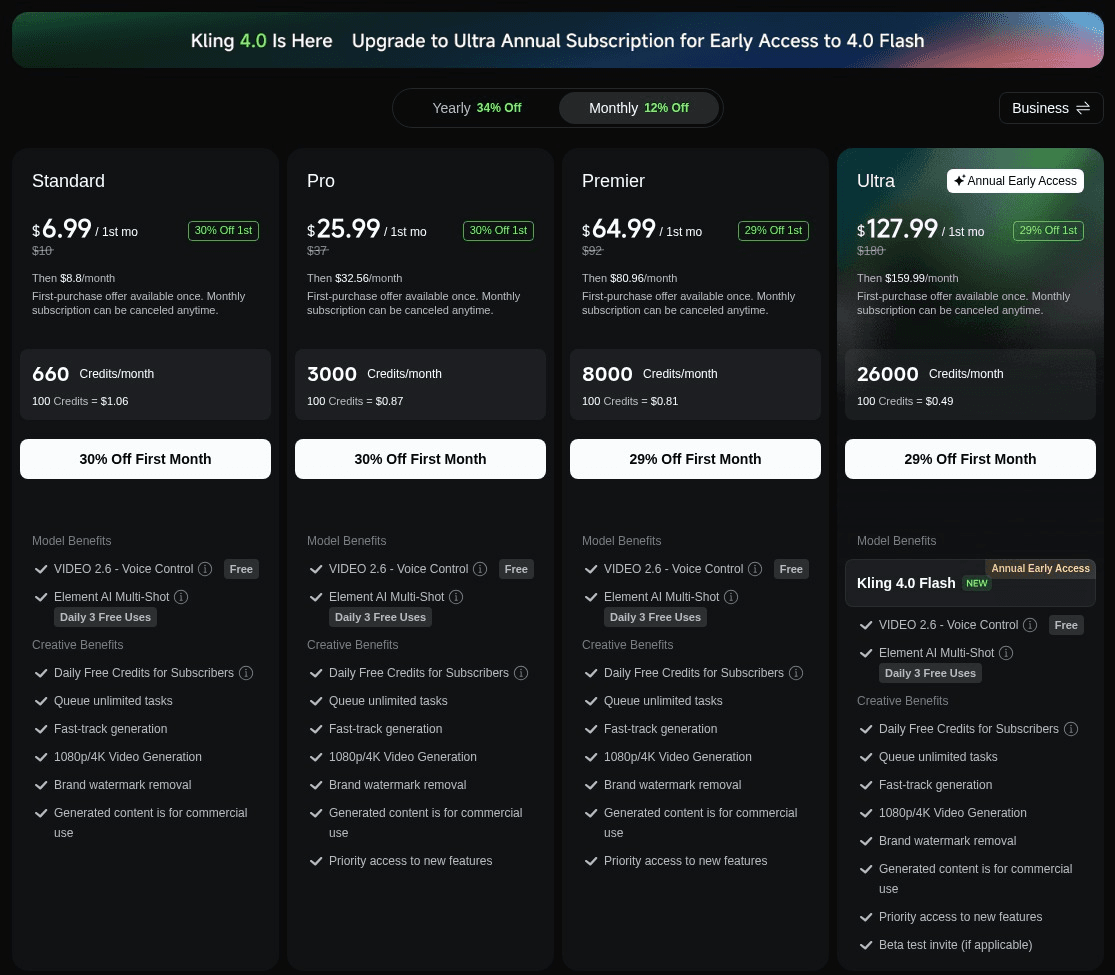
Screenshot from Kling AI's membership plan page, monthly view, September 2026.
Where the free tier stops you: Before the first pass. The membership table shows a dash for video extension on the free Basic plan, and Kling's credits policy lists video extension among its "premium-only functions." Free accounts get monthly credits in an amount the page doesn't show, and free output is watermarked.
What one usable extension actually costs: Standard lists at US$10 a month, with a first month at US$6.99 and US$8.80 after that, or US$79.20 a year, for 660 credits a month. Kling doesn't publish how many credits one extension uses, so the cost of a pass can't be worked out before you spend them.
What users report: 4.68 from about 31,000 ratings on the App Store and 4.54 from about 598,000 on Google Play. The klingai.com profile on Trustpilot sits at 1.2 from 398 reviews.
Where it falls short for video extension: The developer side. The API changelog documents extension for the V1.0, V1.5 and V1.6 models, and the current docs list no extension endpoint.
Fits: Anyone who generates in Kling and wants a documented path to 3 minutes. Not for you if: your footage came from a camera or another tool, at least until 4.0's upload option goes live.
5. Media.io: Best Online Video Extender on a Low Monthly Plan
Media.io's AI Video Extender runs in the browser, under Video AI, then Edit Video, then Video Extend. Pick Seedance 2.5 and you can add 4 to 30 seconds in either direction, with Sequel continuing after the end and Prequel building before the start. The source clip can run 2 to 30 seconds and up to 200 MB, and you can attach up to 30 images or 10 audio files to guide the new footage.
Seedance 2.5 outputs at 480p, the default, or 720p. The second model in the menu, Vidu Q2, adds 5 or 7 seconds forward at 720p or 1080p.
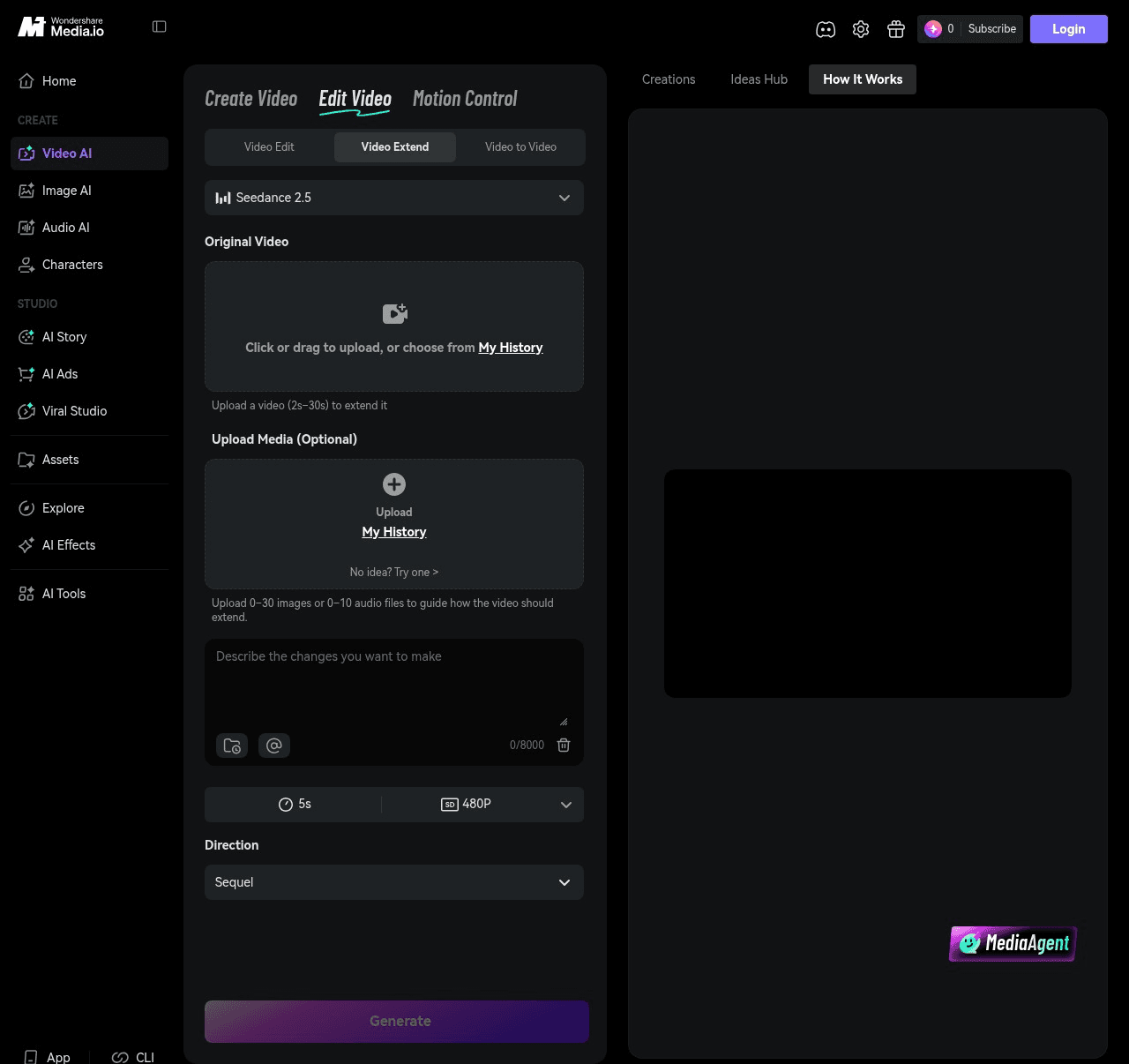
Screenshot from Media.io's AI Video Extender, logged out, September 2026.
Where the free tier stops you: At the first pass, on the published numbers. You need an account, and the free plan brings 3 daily check-in credits that expire after 24 hours. The cheapest pass in the menu, Vidu Q2 at 5 seconds and 720p, costs 8. A Seedance 2.5 pass starts at 48. Media.io also lists sign-up credits without saying how many.
What one usable extension actually costs: Seedance 2.5 bills 12 credits a second at 480p and 24 at 720p, so a 5 second pass is 60 or 120. Standard costs US$7.99 a month billed yearly, or US$15.99 month to month, for 200 credits. On the yearly plan a 5 second 480p pass comes to about US$2.40, and a month of credits covers roughly 16 seconds at 480p.
What users report: 2.1 stars from 257 reviews on Trustpilot. The page itself shows a 4.7 rating from its own votes, for Media.io's online AI tools as a whole.
Where it falls short for video extension: Resolution, since the long two-way model tops out at 720p. The page also doesn't say whether the extension has sound. Uploaded and generated files are deleted within 7 days unless you are on a paid plan.
Fits: Anyone who wants a long pass before or after the clip from a browser, on a plan that costs less than US$8 a month billed yearly. Not for you if: the extension has to match 1080p source footage.
The Other Five AI Video Extenders Worth Knowing
All five extend video. Each sits below the line for its own reason. Two publish conflicting numbers for the same pass, one caps a pass at 2 seconds, one retired its own extend model and now routes the job through a hosted one, and one publishes almost no numbers at all.
| Tool | Free tier in its own words | The number that matters |
|---|---|---|
| Wondershare Filmora | "Paid by AI Credits" in the free column | 150 to 500 credits per pass |
| Fotor | "Limited Free credits" | 10 to 30 credits per 5 s pass |
| Adobe Premiere Pro | Complimentary tries on Creative Cloud plans | 50 to 175 credits per second |
| Runway | 125 one-time credits | 20 to 68 credits per second in Seedance 2.5 mode |
| CapCut | Its pages disagree | No per-second rate published |
6. Wondershare Filmora: AI Extend Inside a Desktop Timeline
Filmora's AI Extend runs in the Windows and Mac desktop app and extends forward or backward at 720p or 1080p. How far depends on which Wondershare page you read. The feature page says forward up to 5 seconds and backward up to 8, while the credit table flips it to backward 5 and forward 5 or 8.
A pass costs 150 to 500 credits. Advanced, at US$59.99 a year, includes 1,000 credits a month that expire after 30 days, and the free version exports with a watermark. Worth it if the clip already sits in a Filmora edit, and our AI video editor roundup covers the editor itself.
7. Fotor
Fotor's Extend adds footage to the end of a clip, in fixed steps. The landing page says 4 or 8 seconds, and the tool's own menu offers 5 or 8. Output comes at 540p, 720p or 1080p, though 1080p greyed out when we chose 8 seconds.
A 5 second pass costs 10 credits at 540p and 30 at 1080p, and Pro is US$3.99 a month billed yearly for 100 credits. The page promises no login and no watermark. The tool shows a Log in button and a credit price on Generate.
8. Adobe Premiere Pro: Generative Extend
Generative Extend works inside the Premiere timeline, on the start or the end of a clip but not both, and adds up to 2 seconds of video or 10 seconds of ambient audio.
The single-app plan costs US$22.99 a month on an annual commitment and includes 25 generative credits a month, while an extension costs 50 to 175 credits per second depending on resolution and frame rate. In practice that means a Firefly or Creative Cloud Pro plan on top. Adobe says media sent for an extension is never used to train its model.
9. Runway
Runway's own Extend belonged to Gen-3 Alpha and Gen-3 Alpha Turbo, the retired models this piece opened with. Gen-4's Expand Video changes the frame's aspect ratio rather than its length, and Gen-4.5 takes text and image prompts only.
Extension on Runway today runs through Seedance 2.5, a ByteDance model Runway hosts, at 4 to 30 seconds in either direction with an audio switch. It costs 20, 30 or 68 credits a second at 480p, 720p or 1080p. Standard is US$12 a month billed yearly for 625 credits, but the pricing page lists Seedance 2.5 under Pro and Max, not Standard.
10. CapCut
CapCut added AI Extend to CapCut PC in August 2026, running on Seedance 2.5. That is most of what it publishes. There is no seconds-per-pass figure, no resolution, no rate beyond billing by the second, and no pricing page, since CapCut says prices vary by region and device.
The Seedance 2.5 rollout named Europe, Asia, the Middle East and South America for subscriber accounts, which makes it hard to plan around today.
Will an AI Video Extender Match Your Original Clip?
Whether a tool takes your clip is the easy question. The harder one is whether anyone watching will spot the join. An extender generates from the end of what you give it. xAI's documentation for Grok Imagine describes a result that "picks up seamlessly from the last frame of the input," and Adobe's FAQ says Generative Extend sends a short segment, typically 1.5 to 3 seconds, to its cloud model. Whatever the join depends on has to be visible in those final moments.
Three things decide whether the new seconds pass for the old ones.
Sound. Premiere extends room tone and background sound for up to 10 seconds, mutes dialogue, and won't extend a clip that contains music. Luma, which we left off this list because its Extend works only on videos generated in Luma, says its Ray3.14 model produces no native audio.
Picture format. Premiere's extensions are always 8-bit SDR, and anything above 30 fps is generated at 30 fps. Put a 2 second tail on a 60 fps HDR clip and the tail won't match the source's bit depth or frame rate.
The clip itself. Not every page ranking for this search makes new footage. Vidnoz's AI Video Extender guide describes lengthening a video by adding scenes, stock clips and voice-over, and by slowing playback. Drift is the other risk once you chain passes. The team behind the FramePack paper defines drifting as visual quality degrading as errors accumulate over time, and every chained pass adds time for errors to build on.
| Tool | Sound in the new seconds | Output ceiling |
|---|---|---|
| Atlas Cloud | Wan-2.5 generates it; LTX 2.3 has a switch | Up to 1080p on PixVerse v6 and Wan-2.5 |
| Higgsfield | Audio switch, on by default | 1080p |
| Pollo AI | Generate Audio switch on Flux 3 | 1080p, 4K on Gemini Omni 1.1 Flash |
| Kling AI | Not stated for extension | Not stated for extension |
| Media.io | Not stated | 720p on Seedance 2.5, 1080p on Vidu Q2 |
| Wondershare Filmora | Background audio extension | 1080p |
| Fotor | Page says it supports audio extension | 1080p on 5 s passes |
| Adobe Premiere Pro | Ambient audio up to 10 s, dialogue muted | 4K UHD source, 8-bit SDR, 30 fps |
| Runway | Audio switch in Seedance 2.5 mode | 1080p |
| CapCut | Not stated | Not stated |
What to do instead:
- End the source on a steady moment. Adobe's own guidance says Generative Extend does best when the shot has little contextual change, and the same logic holds for any tool reading your final frames.
- Decide on sound before you pick a tool. Dialogue needs a cut or music over the join, while room tone calls for a tool that generates audio for the extension.
- Extend at the resolution and frame rate the clip will ship in, and grade after the extension rather than before.
What Does Reddit Say About the Best AI Video Extender?
One r/VideoEditors thread from January 2026 asked this article's question in its title. A YouTube editor chaining Midjourney's extend button for b-roll had burned through "15h of video generating in one day" and wanted something cheaper. The one reply pointed to Higgsfield, Runway's Gen-3 Alpha Extend and Luma's Dream Machine Extend. Runway has since retired that Extend, and Luma's only works on clips generated in Luma.
Four months later, a poster in r/generativeAI was still asking Higgsfield to "EXTEND my clips." Higgsfield's Seedance 2.5 announcement, which lists extension, followed in August.
The quality complaints are louder in r/seedance, and Media.io, Runway and CapCut all offer Seedance 2.5 for extension. A May 2026 thread there described a 15 second dialogue scene turning at the join, with "unnecessary noise and saturation" and voices gone robotic. Replies split between feeding the model only the last frame or last few seconds and sending the whole clip for context. The top technical answer set the ceiling at "a 95% stitch job," finished with a colour pass in post.
One reply in that thread matters on a free tier. A user extracting frames from watermarked output found each pass added another copy of the watermark beside the first, which left the chained clip unusable.
A thread in r/aitubers from November 2025 hit the upload wall instead. A user trying Kling found their uploaded clips never appeared for extension and asked, "Is it because the function is limited to Kling's creations?" In r/generativeAI, a Wan 2.7 user hit a different wall: Extend on Wan's own site reads a five second slice of the clip and loses any character who is not in it, so they asked for "reference images for character and environment."
| What the threads worried about | What this article found |
|---|---|
| Uploaded clips missing from Kling's extend history | Kling's guide describes extending AI-generated video, and its upload-and-extend option for 4.0 is marked coming soon |
| Extend losing characters who leave the frame | Higgsfield's Extend Video takes up to 50 image or audio references, and Media.io's takes up to 30 images or 10 audio files |
| Watermarks stacking on chained free output | Pollo, Higgsfield, Kling, Runway and Filmora all watermark free output; the Atlas Cloud clips in this article came back with none |
Frequently Asked Questions
Which Is the Best AI Video Extender Free Tier?
On published terms, two tools let a new account run a pass without buying a plan, and they trade off differently. Pollo's 20 sign-up credits stretch to five short passes, with a watermark on every download. Atlas Cloud's $1 credit is spent by the second, so it can go on one longer Grok Imagine pass or four 2 second ones on a 10 second clip.
Runway's 125 free credits are real, but its pages don't say whether the free plan reaches the Seedance 2.5 Extend mode.
How Does Kling AI Extend Video Past 15 Seconds?
Kling's app listings describe generating up to 15 seconds and then using Video Extension to reach up to 3 minutes. At 4 to 5 seconds a pass, a 15 second generation takes somewhere between 33 and 42 passes to hit that cap. Customized Extend takes a prompt on every pass, which is the place to steer each new stretch instead of letting Auto-Extend run on its own.
How Much Does One AI Video Extension Cost?
It depends on the unit each tool bills in. On Atlas Cloud, Grok Imagine charges $0.07 for each new second plus $0.01 for each second of source video, so a 6 second pass on a 10 second clip comes to $0.52. Wan-2.5, the model that adds sound, runs $0.0525 a second at 480p and $0.105 at 720p. Those are list prices as of September 30, 2026, with no discount applied.
Elsewhere the price sits behind credits. A 5 second 480p Media.io pass is about $2.40 on a yearly Standard plan, and Premiere Pro's cheapest Generative Extend rate is 50 credits for one second of 720p at 24 fps.
Is an Online Video Extender the Same as an Expand Video Tool?
No. An online video extender adds time, meaning new seconds before or after the clip. An expand tool adds space around the frame, usually to turn a horizontal video vertical. If a tool asks for a target aspect ratio rather than a duration, it's an expander.
Conclusion
The Runway line this piece opened with is the category in miniature. Vendors add extension, rename it, move it to a different model, and occasionally retire it, so the spec worth trusting is the one on the tool panel this week. The numbers that decide a pick are few: seconds per pass, which clips it accepts, whether the extension has sound, and what a pass costs.
If your clip was made in Kling and you want it long, stay in Kling. If you want 30 seconds in one pass with sound and will pay a subscription, Higgsfield runs that range in either direction. If you have footage of your own and would rather pay by the second than by the month, the best AI video extender on this list is the one that starts with your clip and a single sentence about what happens next.





