


For anyone asking can AI make 3D models, the answer is yes: AI can generate actual 3D geometry from a written description or an image, and many tools can add surface colors and materials. You can download the resulting mesh and open it in a compatible 3D application.
The more useful question is whether that file can do your job. A background prop, an animated character, and a printable replacement part have different requirements. A convincing preview settles only a small part of that decision.
This guide uses public reconstruction examples and an inspection of a published mesh to show what AI delivers, where cleanup enters the process, and what to check before using the result.
Key takeaways
- An AI 3D model generator can produce editable geometry. A rendered image or MP4 alone does not give you that geometry.
- Text describes a design; images constrain its appearance. Neither automatically supplies exact measurements or verified hidden surfaces.
- Game assets need performance and deformation checks. Printable models need solid geometry, suitable thickness, and a successful slicer preview.
- Download and inspect one representative asset before committing to a tool, subscription, or larger batch.
What does an AI 3D model generator actually produce?
A polygon mesh describes an object's surface using vertices, edges, and faces. Materials describe how that surface looks under light. A generation tool may deliver both, or provide a geometry-only stage before it adds appearance.
Those distinctions explain why two results that look similar in a browser can behave differently after export. One may carry textures and usable geometry. Another may be a flat picture with shading, or an animation that suggests a camera orbit without supplying an object you can edit.
Ask for the downloadable artifact early. Open it in the application where you intend to work, rotate it to a new view, and inspect the geometry. An interactive preview helps you evaluate appearance, but a successful import confirms more about what you actually received.
| Delivered file | What it can carry | What still needs checking |
|---|---|---|
| GLB or glTF | Meshes, materials, and potentially animation; GLB packages data in one binary file | Whether the export actually includes textures, a skeleton, or animation |
| OBJ with supporting files | Mesh geometry and references to materials and texture images | Whether the MTL file and image files travel with the OBJ |
| FBX | Meshes and potentially rigging or animation data | Which features the generator exported and the destination imported |
| STL | Triangulated surface geometry | Scale, solid volume, thin features, and printability |
| PNG, JPG, GIF, or MP4 | A picture or sequence of rendered views | These files alone do not contain an editable polygon mesh |
A format's capabilities are only possibilities. An FBX file does not prove that someone rigged the character inside it. Likewise, changing a file extension cannot create missing geometry or materials.
For a product visualization, opening a textured GLB may be enough to begin arranging a scene. For a hinge that must fit a real enclosure, you also need measured dimensions and a construction method that preserves them. Define that destination before choosing your AI 3D modeling software.
Real AI-generated 3D models: what public examples prove
Public demonstrations help answer “can AI generate 3D models?” when they show the input, the reconstructed object, and the downloadable output. Treat them as examples of a particular system, rather than a guarantee about every object you might upload.
A pickaxe prop: a reference image becomes an editable mesh
Stability AI's Stable Fast 3D public gallery includes a wooden-handled pickaxe with a broad metal blade. We downloaded the gallery's reference image and its accompanying GLB, then rendered the actual mesh locally. This example and the next 2 come from that gallery, rather than new generations performed for this article. (Stable Fast 3D official project, accessed November 2026.)
The file contains 4,632 position vertices and 7,194 triangles, together with UV coordinates, a base-color image, and a normal-map image. Those are concrete components of an editable 3D asset. The normal map contributes surface shading; it does not turn every scratch visible in the reference into a modeled groove.
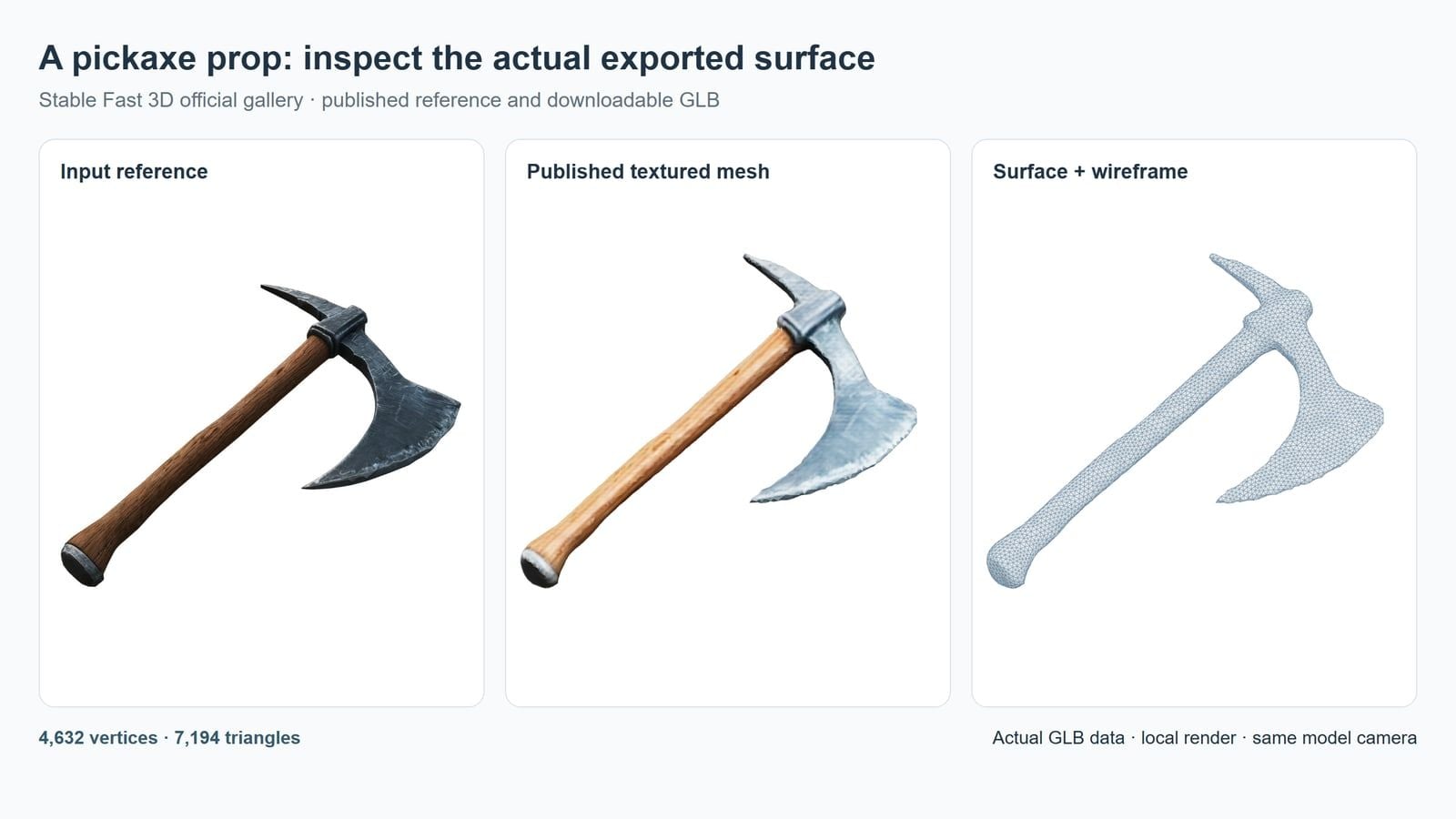
Published Stable Fast 3D pickaxe sample, rendered locally from its downloadable GLB. The middle and right panels share the same camera and geometry.
For a static game prop, inspect the blade's thickness and its connection to the handle before making copies. The triangle count gives you a starting measurement, while an import into your actual game determines whether the object meets its rendering and collision needs.
A house miniature: inspect the structure behind the detail
The same gallery provides a house with a tiled roof, porch, tree, and garden base. Its GLB contains 38,393 position vertices and 51,834 triangles. The published input makes the front and one side visible; the downloadable object also lets you inspect the rear and underside.
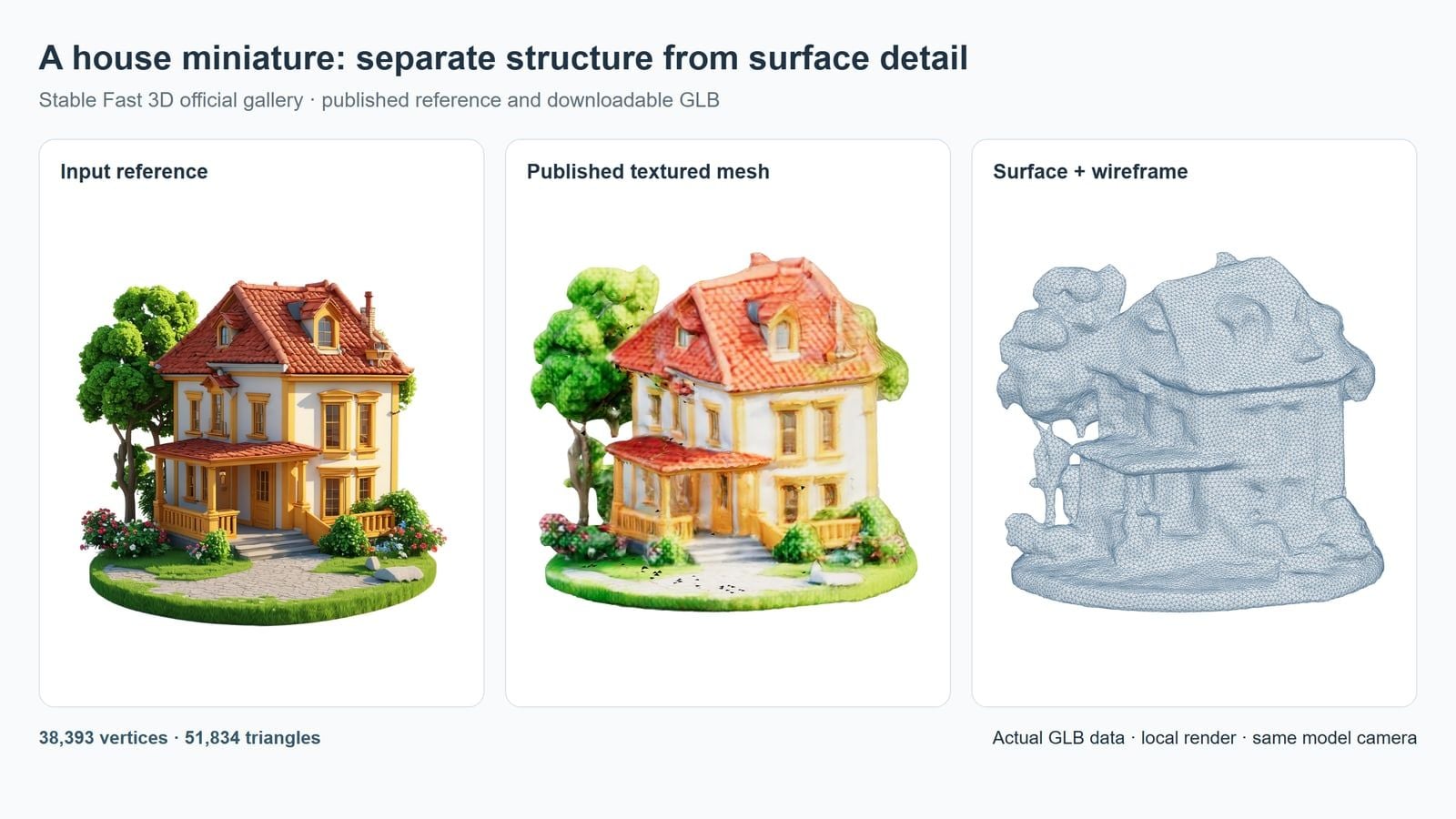
Published Stable Fast 3D house sample. The textured and wireframe views show the same exported object under local inspection lighting.
Use the roof, window frames, porch posts, and foliage as separate inspection targets. A detailed image can suggest many small components, while a reconstruction may join them into broader surfaces. The wireframe helps you examine how the file represents that detail without mistaking every color boundary for a separate piece of geometry.
This sample is delivered as one mesh primitive. That does not establish separate editable doors, an accessible interior, or measured architectural dimensions. For a miniature in a scene, inspect its silhouette and materials. For an explorable building, verify openings and interior space before planning navigation around it.
A raccoon wizard: a character mesh still needs an animation check
The raccoon-wizard example adds a different requirement: clothing, a pointed hat, a staff, and a tail must remain readable around a character's body. Its published GLB has 11,997 position vertices and 18,062 triangles, with texture data and UV coordinates.
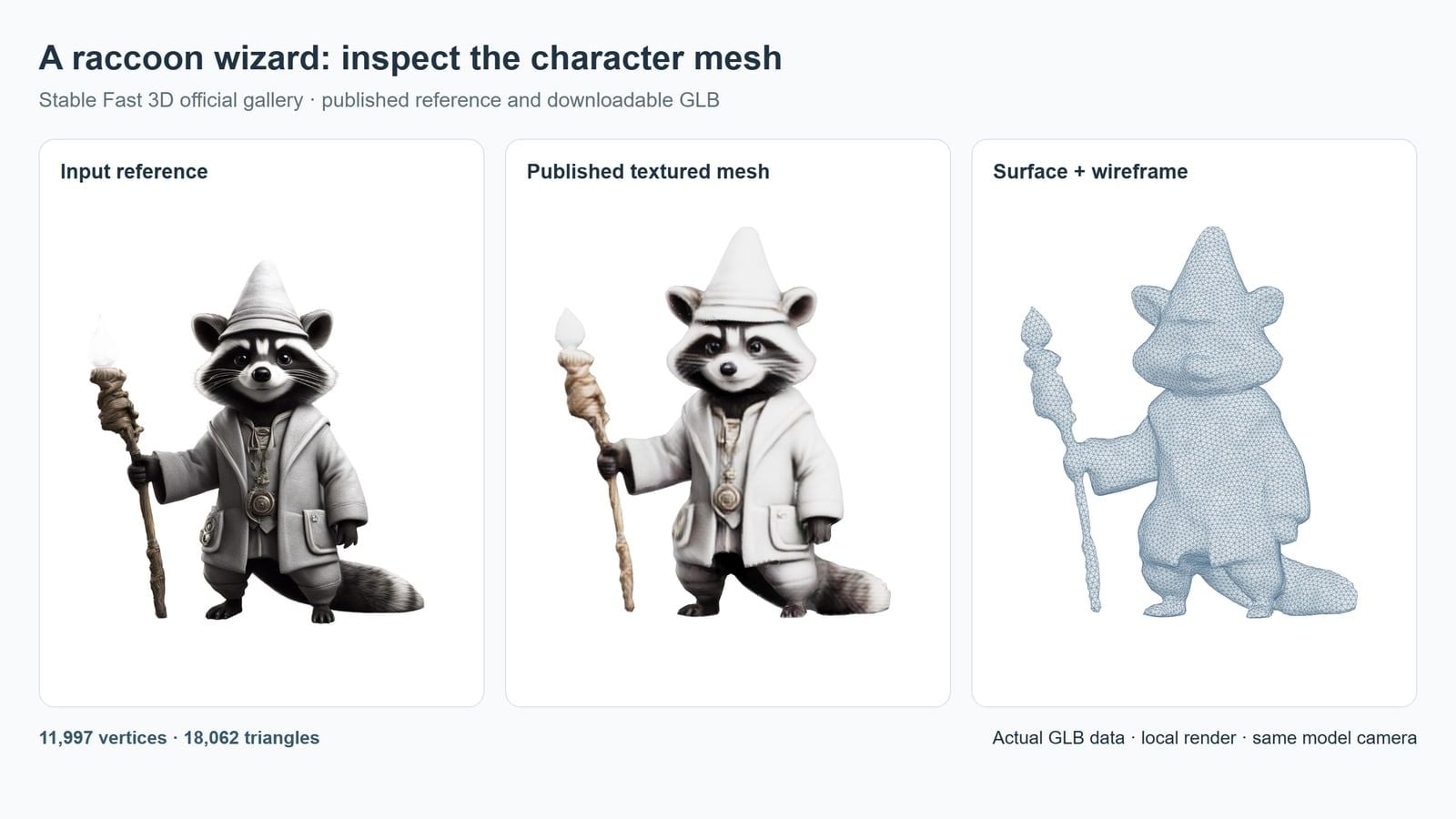
Published Stable Fast 3D raccoon-wizard sample, rendered from the actual GLB. A reconstructed character's appearance does not establish animation readiness.
The file contains no skin or animation entries. It therefore supplies a static character mesh rather than a demonstrated rigged performance. Before animating it, inspect the staff-hand contact, the space between the legs, and the separation of the sleeves and body. Then prepare and test the required rigging and deformation.
For a stationary figurine or background character, those animation requirements may be unnecessary. For a playable character, test a representative arm and leg movement before investing in an animation set. The same recognizable design can serve very different production jobs.
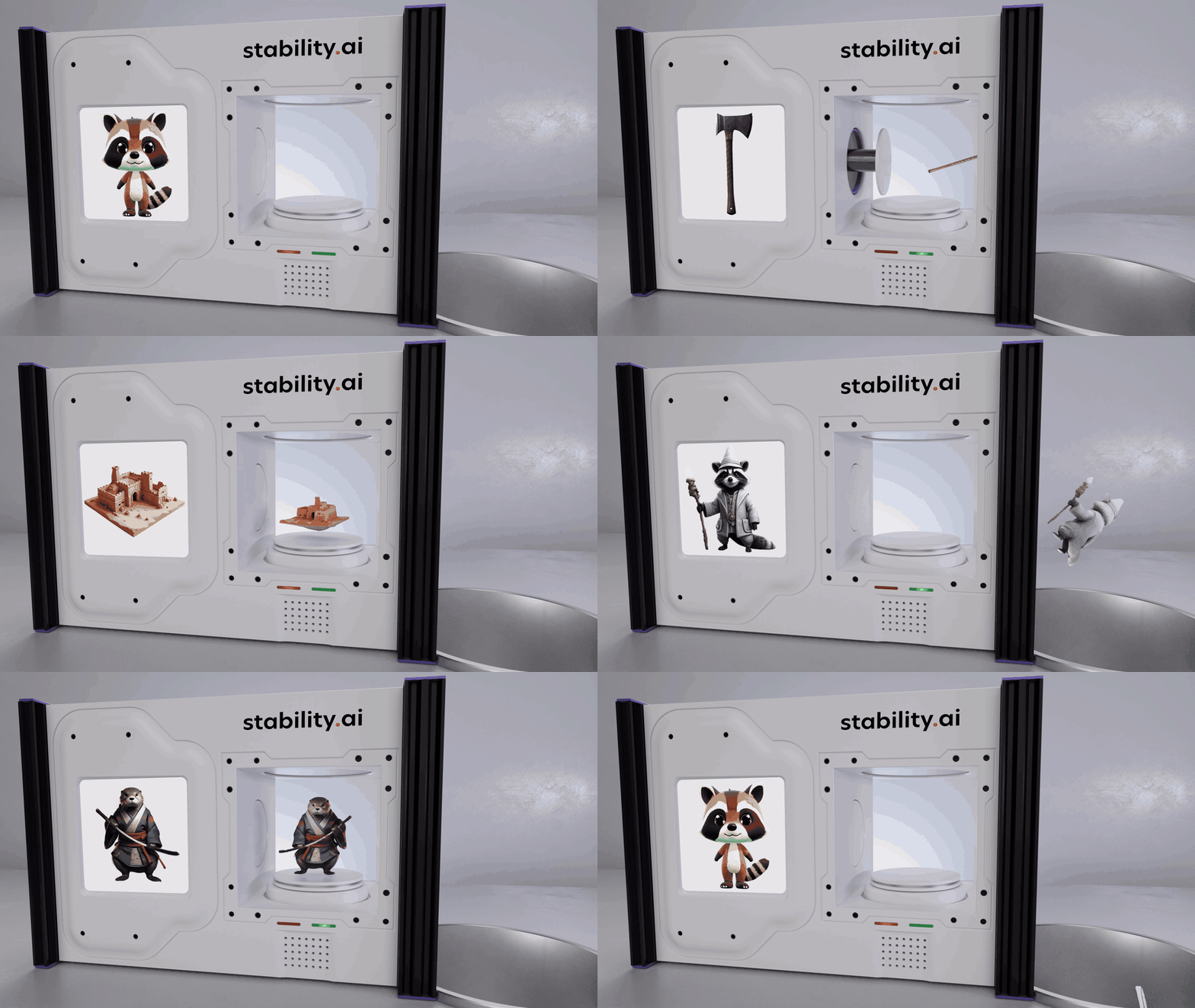
Stable Fast 3D's complete 13.6-second release animation, converted to a looping GIF, includes this raccoon wizard around 7 seconds. It is a stylized presentation of reference images and reconstructed objects, rather than a recorded software tutorial or a physical manufacturing process.
HoloPart: turn a whole shape into editable parts
A generated object can look complete while still being awkward to edit as a single surface.
HoloPart: Generative 3D Part Amodal Segmentation addresses that next stage: it decomposes an existing 3D shape into meaningful parts and uses a generative completion step to recover their hidden geometry. This is a different operation from generating the initial object from a picture. (HoloPart official project, accessed November 2026.)
Watch the vehicle's body and wheels separate, then compare the segmentation and completion views of the headphone-wearing monkey. Near the end, a bishop-style figure demonstrates geometry editing. These sequences make the components and their relationships visible beyond a single textured preview.
Official HoloPart applications video, approximately 70.4 seconds, reproduced in full. The sequences demonstrate part completion, separation, and geometry editing; they are published project results, not a generation performed for this article.
The practical advantage is control over components. Separating a model into meaningful parts can let you change one component's geometry or material and prepare individual pieces for motion. A colored region on a single mesh does not, by itself, provide that same editable structure.
For an AI-generated asset you plan to animate, decide which components must move separately before accepting the mesh. Then check that the corresponding parts exist, that their hidden surfaces are complete enough for the intended views, and that their motion works in the destination application. This demonstration shows why an inspectable first mesh and a production-ready asset can require different stages of work.
How to create 3D models with AI from text or an image
Choose the input route around the information you already possess. Text works when you want to explore a design. An image helps preserve a specific silhouette or arrangement of visible features. Genuine additional views can reduce uncertainty where a model explicitly supports multiple images.
Atlas Cloud offers both text-to-3D and image-to-3D routes. Use the individual model's controls and output list to choose between them. A model name alone does not tell you whether it accepts several references, generates materials, or exports your required format.
Start with a defined object and destination
Give the generator one object with a readable structure. Describe its main volume, separate parts, openings, and intended appearance. Avoid asking for a complete game scene while simultaneously expecting every prop to arrive as an independently editable object.
For an AI 3D model generator from text, a useful starting brief is:
plaintext1A single stylized camping lantern for a static game prop. Rounded metal body, broad stable base, protective cage around the light chamber, and one clearly separated carry handle with an open gap beneath it. Keep the main shapes simple and readable from the front, sides, and back. No lettering, brand logos, cables, surrounding scene, or display pedestal.
This is a suggested design brief, not a prompt behind the public demonstrations above. It makes the handle gap and separate structure explicit so you have something concrete to inspect afterward. Asking for a static prop also keeps the first test focused on geometry and appearance.
The Tencent Hunyuan 3D Rapid (Express) Text-to-3D model page lists mesh formats as well as MP4 output. Select a mesh format for modeling work. Requesting a preview video would serve a different deliverable.
Use a clear image when the design already exists
An AI 3D model generator from image works with the visual evidence you provide. Use a fully visible object, a simple background, and a view that reveals some depth. Separate handles and thin parts from the background so their boundaries remain readable.
For example, a dark handle against a dark wall may look like a solid extension of the body. A cleaner reference can make the intended gap easier to interpret. Reflections, transparent surfaces, and cropped parts introduce further uncertainty, especially where the photograph conceals the actual shape.
For AI-generated 3D models from image, keep the source beside the result while checking proportions. If you supply several photos, use consistent views of the same object. Independently generated front and back pictures may disagree about the design and create conflicting instructions.
The Tencent Hunyuan 3D Pro (v3.1) Image-to-3D model page distinguishes geometry-only generation from textured generation, with optional PBR materials and a face-count control. Choose these settings for your destination, then verify the downloaded file. Selecting a material option does not replace checking that its maps arrived.
Inspect the first file before refining it
Save the original export and work on a copy. Rotate the model through the back and underside, inspect the untextured surface, and check important openings. For the lantern brief, the carry handle should remain separated from the body and readable from more than one angle.
If the main silhouette is wrong, refine the input or repair the shape before increasing texture resolution. Larger textures will not open a filled-in handle gap. Once the geometry is useful, continue with materials, optimization, or preparation for printing.
Our text-to-3D case: a steampunk airship repair dock
For this original example, we used Tencent Hunyuan 3D Rapid (Express) Text-to-3D on Atlas Cloud to generate a compact steampunk airship repair dock. Its tiered workshop, elevated platforms, mechanical crane, and moored airship give us different structures to inspect from several angles. The saved output for this run is an MP4 rotation preview, shown below as a GIF.
Prompt (formatted for readability):
plaintext1SCENE: One intricate steampunk airship repair dock diorama on a hexagonal stone-and-metal base. 2 3STRUCTURE: Three connected levels: a lower workshop with an open arched bay, exposed brass gears, copper tanks and thick pipes; a middle terrace with crates, coiled hoses, a workbench and a broad exterior staircase; an upper docking platform with sturdy railings and a mechanical crane. A cream-colored airship with a segmented envelope, brass gondola and twin propeller housings is secured beside the top deck by thick docking arms. An asymmetrical clock tower rises behind the workshop, with an unmarked clock face, layered copper roof and rear exhaust stacks. 4 5MATERIALS: Weathered wood decks, riveted teal iron panels, aged brass mechanisms, verdigris copper and warm ochre accents. 6 7GEOMETRY: Readable volumes, coherent supports, open gaps beneath platforms, detailed front, sides and rear. One self-contained 3D miniature, all main structures connected to the base. No people, text, logos, sky or surrounding landscape.
The connected base gives the workshop, stairs, and dock a common footprint. The rotating preview reveals the front, sides, and rear. The screenshot records the prompt and completed MP4 output from this run.
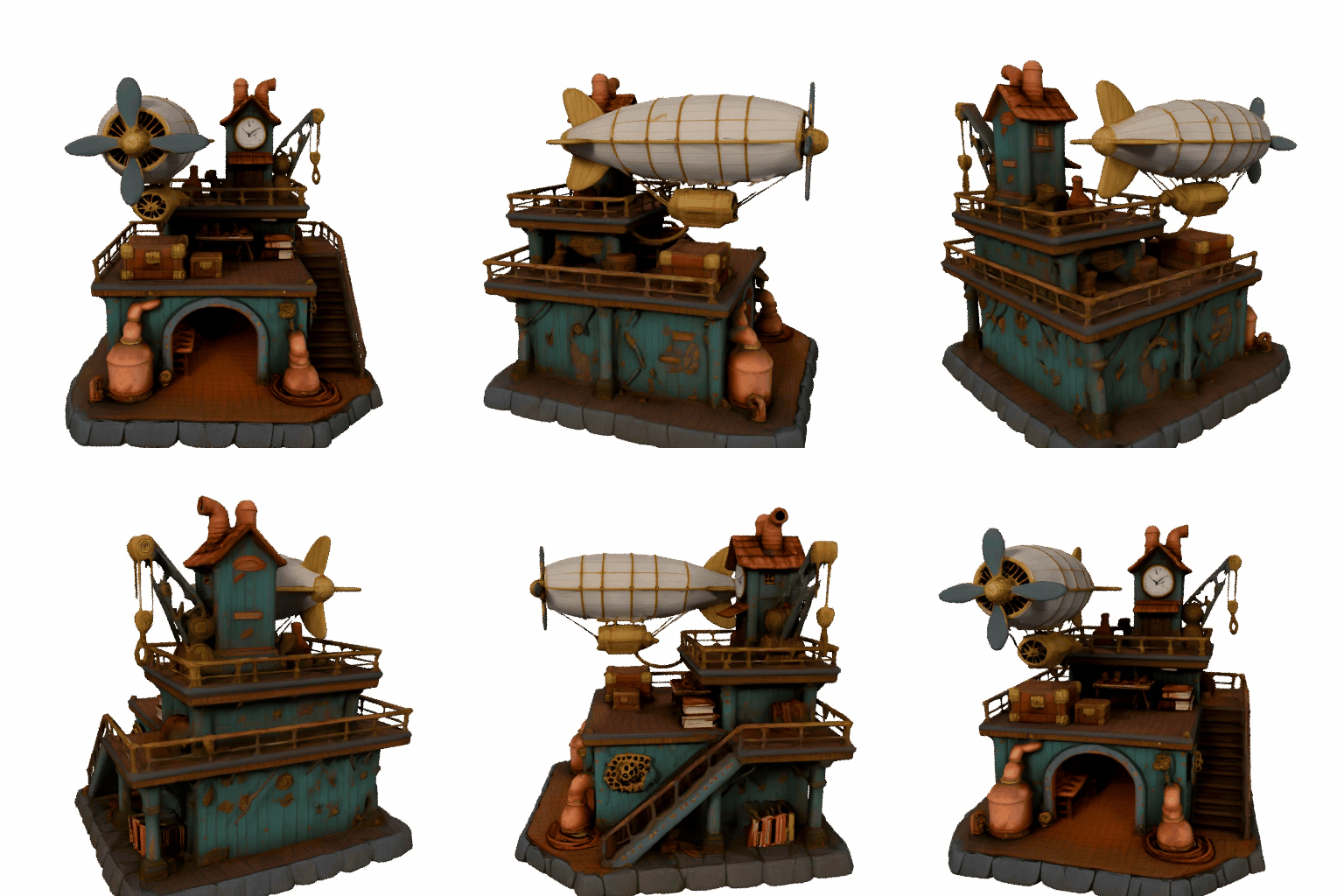
The complete approximately 2-second output, converted from the supplied MP4 to a looping GIF at its original 512 × 512 resolution. The scene includes the airship, clock tower, crane, terraces, and exterior staircase.
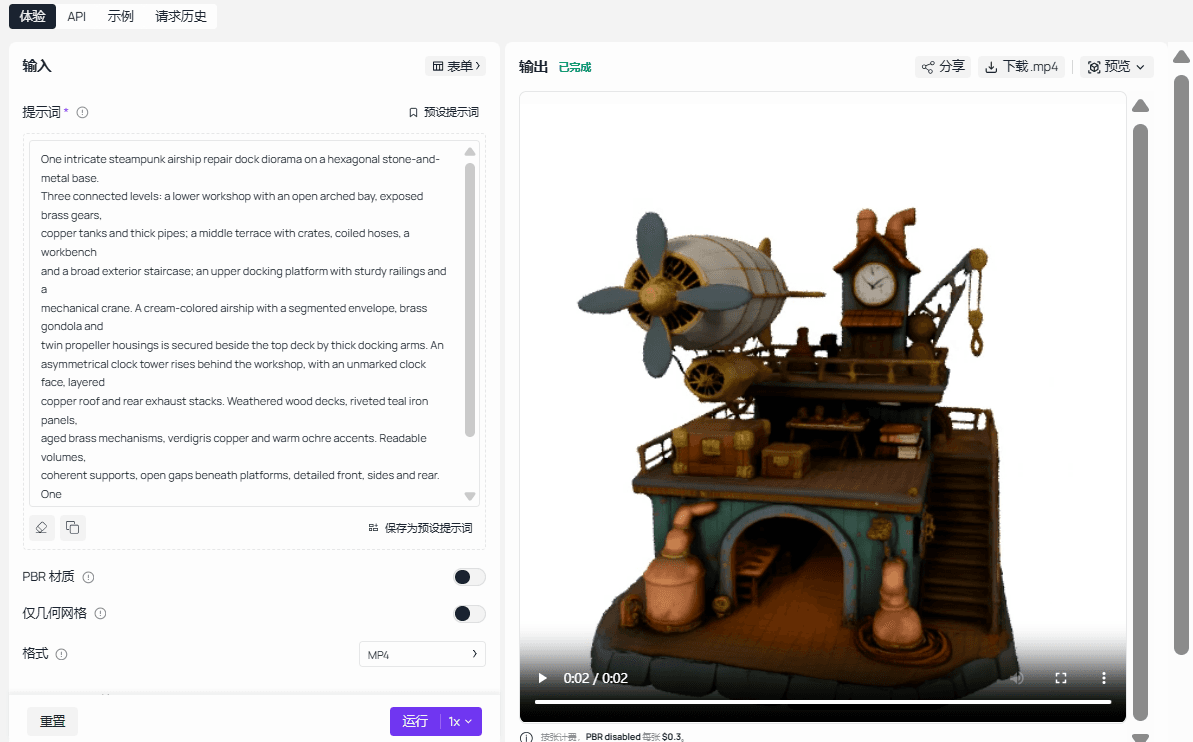
Actual generation screenshot from the same run. The prompt appears on the left, with MP4 selected, and the completed result appears on the right.
The rotation reveals the staircase, railings, elevated decks, crane, and docking arms from several sides. Compare those large forms with the brief. A mesh export is still needed to inspect the underlying geometry, topology, and part separation before deciding how much cleanup the scene requires.
Can AI make 3D models for games or 3D printing?
Yes, but these destinations require different work after generation. An object that renders correctly in a game can have open surfaces that would cause problems in a print. A solid printable sculpture can also be unnecessarily dense for a small real-time prop.
Can AI make 3D models for games?
Start with a static prop when evaluating AI for 3D modeling. It lets you test silhouette, materials, collision, scale, and rendering cost without also solving character deformation. Import one object into the actual engine and inspect it at the distance players will usually see it.
Record its triangle count, material slots, texture sizes, and intended number of simultaneous instances. Those figures help you judge the asset within a scene. A single detailed preview cannot tell you how a room full of the same object will perform on your target hardware.
Characters introduce additional requirements. Retopology organizes the mesh for its intended use; rigging adds the control structure for posing. Skin weights determine how vertices follow bones. A generated character may need work in each area before its shoulders, fingers, or knees bend acceptably.
Test a representative pose before polishing textures. If an elbow collapses or clothing intersects badly when the character moves, inspect the topology and weights. A neutral standing pose can hide those problems. A T-pose export is useful input to rigging, but it does not demonstrate that the rigging has been completed.
Can AI make 3D models for printing?
An AI 3D print generator can supply a starting surface. You must then check whether it describes a suitable printable volume. Look for holes, overlapping surfaces, inverted faces, and features too thin for your chosen printer and material.
Blender's 3D Print Toolbox documents checks for non-manifold edges, intersections, thickness, and overhangs. Its published example below distinguishes an open mesh from one with a flipped face. (Blender Manual, accessed November 2026.)
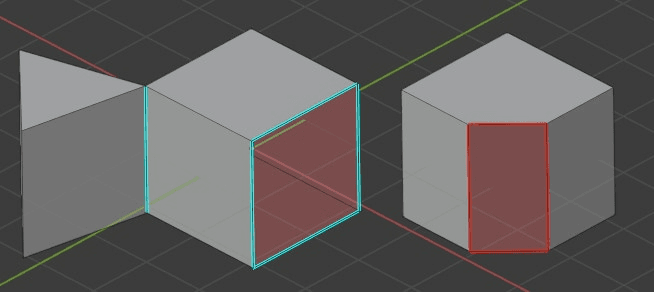
Blender Documentation Team, Blender 3.3 Manual, CC BY-SA 4.0; image recompressed. The left example has an opening; the right has a flipped face. This illustrates geometry checks, not an AI asset's test result.
Set the intended physical dimensions explicitly, then inspect the model in your slicer. Preview layers through thin features and enclosed areas. A file that opens successfully can still produce missing sections or require supports. Do not assume automatic repair preserved every intended opening and detail.
Functional parts need measured fits and suitable construction. A generator cannot recover an unseen internal mechanism or a verified connector tolerance from a product photograph. For a replacement bracket, use measurements and controlled modeling for the critical interfaces, then validate the physical result.
| Intended use | First acceptance test | Likely follow-up work |
|---|---|---|
| Static game prop | Import and evaluate at gameplay distance | Optimize geometry, materials, collision, scale, and pivot |
| Animated character | Pose joints and inspect deformation | Retopology, rigging, weights, and animation tests |
| Decorative print | Check solid volume and preview sliced layers | Repair, thicken fragile features, orient, and support |
| Functional part | Check measured interfaces and required dimensions | CAD reconstruction, fit testing, and physical validation |
What a free AI 3D model generator still costs you
Free generation can be useful for learning and small tests. Check what is included before spending time on repeated attempts: mesh download, texture export, resolution, usage terms, and any limits on the number of generations or exports.
When comparing free AI 3D model generator options, distinguish access to a preview from access to the actual asset. If the free route lets you inspect a model but does not export the required file, it cannot complete your intended workflow on its own.
Local models replace a hosted allowance with hardware and setup requirements. The documented default single-image settings for TripoSR, the model from Tripo AI and Stability AI, use about 6 GB of VRAM. Other models and texture stages have different requirements. Check the exact release and configuration against your hardware instead of treating “open weights” as a promise that it will run on any laptop.
Evaluate the total work for an accepted asset. Generation time, failed attempts, cleanup, material repair, and import problems all contribute. A tool that produces a usable starting mesh more consistently may save work even when another tool offers more free previews.
Keep your first test small enough to finish. Generate one object, download it, and carry it into its intended destination. That end-to-end test reveals more than browsing a large gallery of AI 3D models.
Before you keep the model, run these acceptance checks
Use the following checks on the file you downloaded. Keep a brief record of the input, model version, export format, and changes you made. That makes it easier to reproduce a useful result or explain why you rejected one.
- Confirm the artifact. Open the mesh in your destination application. Check that materials and textures are present when you requested them.
- Inspect hidden views. Rotate through the back, underside, and important openings. Compare visible features against the reference and flag inferred details.
- Separate surface from shading. Inspect a solid or wireframe view. Decide whether a line, gap, or indentation exists in geometry or only in appearance.
- Test the destination. Pose a character, measure a fitted component, render a prop in the engine, or preview a print in the slicer.
- Choose the next action. Keep, repair, regenerate, or rebuild. Base the decision on the failed requirement rather than the attractiveness of the preview.
For the lantern brief, a fused handle calls for a geometry fix. A missing material calls for an export or material fix. Excessive rendering cost calls for optimization. These are different failures, and repeating the same prompt without identifying the cause wastes attempts.
So, can AI make 3D models you can use? Yes, when you match the input and generation route to a clear deliverable, then verify the resulting file. Start with one asset that represents your real project. Carry it through the entire workflow before scaling up.
Frequently Asked Questions
Can AI create 3D models from a single picture?
Yes. Image-to-3D systems can reconstruct a plausible object from one picture. Hidden surfaces remain uncertain. For a specific object, inspect the back and underside and use additional genuine views when the chosen model supports them.
Can AI create STL files for 3D printing?
Some tools export STL directly; you can also export suitable mesh geometry to STL from a 3D application. The file still needs checks for scale, solid volume, thin features, and slicing behavior. Exporting to STL does not itself make the object print-ready.
Do AI-generated 3D models come rigged?
Only when the tool or a separate workflow actually provides a rig. Check for a skeleton and skin weights, then test deformation. A downloadable FBX, a character pose, or a turntable animation alone does not establish that the character is rigged.
Can AI design an exact mechanical part from a photo?
A photograph can guide a shape, but it cannot establish unseen dimensions, fits, or construction details. Use measurements and controlled CAD work for critical geometry. Treat a generated mesh as reference material until the required dimensions and physical behavior have been validated.







