

A small figure stands below an upstairs window in a dark parking lot. Its striped hat is easier to spot than its face. Then it looks up and waves. That is one of the ways TikTok creators have turned The Cat in the Hat into a fictional night-camera encounter. The effect depends on where the viewer sees the figure, how long the shot holds, and what changes before the clip ends. The cat alone is only one part of the joke.
This guide uses two credited creator video examples to explain the format, then follows a separate three-part window-view example: an empty location image, an edited still, and the resulting clip. The proposed prompts are a recipe to try, not a claim about how the credited creators made their videos.
Key takeaways
- The trend began with dark edits of the 2003 live-action film and expanded into AI-made, found-footage-style clips.
- A window view and a doorbell camera create different reveals: one uses distance and a look toward the viewer; the other uses the path to the door.
- A one-clip editing template changes existing footage. Making a new figure appear in your own scene needs an image edit or video generation step.
- Treat any realistic result as fiction when posting it. Credit other creators when discussing their clips.
What started the Cat in the Hat AI trend?
The first widely documented wave used footage from the 2003 live-action film. On June 30, 2026, @dannykelvin47 posted a darkly captioned dancing-cat edit. Other users reused film moments with ominous music, grain, and captions. Know Your Meme's chronology records a shift in early July: @rushyft's AI-generated found-footage clip imagined the character in a horror-style scene rather than recutting the film.
By late summer, posts placed a tall cat figure in familiar-looking streets, parking lots, and doorways. Some were still images; others were short videos styled as phone or security-camera footage. The location made the image feel personal, which is why an AI scene could also be mistaken for a real sighting. Euronews reported on the fictional sightings, and Oxnard Police documented concerns about edited videos with real-world claims. The works below are examples of the fictional format, not evidence of an actual encounter.
Watch two creator cases before making your own
Case 1: The doorbell view uses a route toward the lens
A public showcase credits @darkcasefilesuk1's doorbell-style clip from August 2026. Watch the full eight-second example below: the figure approaches along a wet path, tilts its head, and reacts near the door. The doorway and path establish where the viewer is standing, while the route gives the subject room to move without moving the camera.
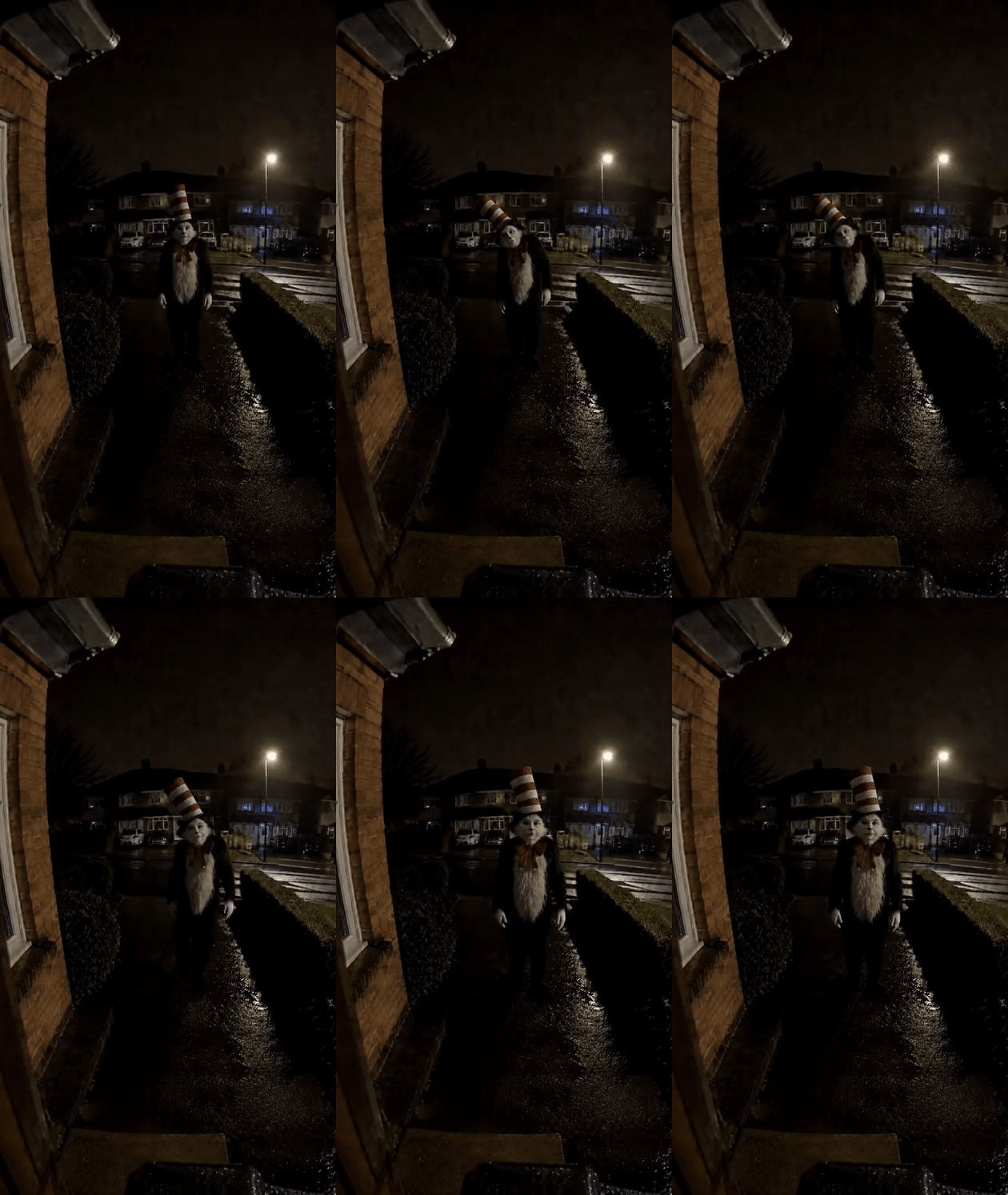
Full eight-second creator video converted to a silent GIF. A public showcase credits the clip to @darkcasefilesuk1. This is a reference clip, not an Atlas Cloud output.
For a doorbell version, do not spend the whole clip on a camera push-in. Let the figure enter or cross the path, pause, react to the lens, and leave or retreat. The change in position is what gives the video a beginning and an end.
Case 2: The window view makes distance part of the reveal
In @lastknownencounter's September 2026 AI clip, the figure is down in a night parking lot, viewed from above. It remains small against the buildings and parked cars, looks up and waves, and the phone briefly hides behind the curtain before looking out again. The viewer notices something far away, then realizes it appears to notice them back.
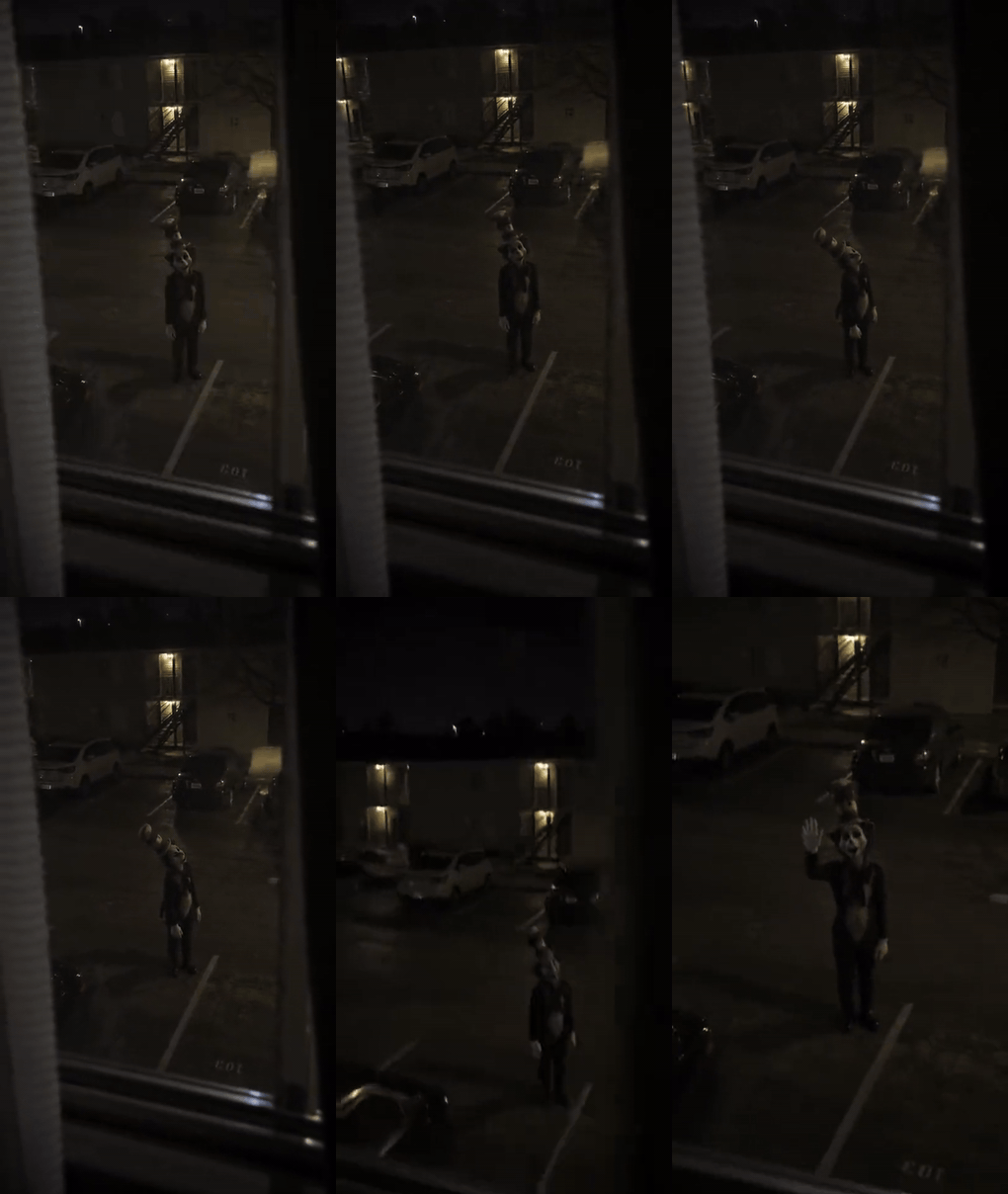
Full ten-second creator video converted to a silent GIF, credited to @lastknownencounter. This is a creator reference, not an output of the prompts below.
The useful production choice here is scale. Keep enough street and building in view to show how far away the figure is. If the subject fills the frame immediately, the window no longer contributes much to the moment.
Is the CapCut template the same as an AI effect?
No single tool defines the trend. One CapCut page titled “Cat in the hat” shows a 9:16 template that takes one clip. Its preview is an edited cat video. That page demonstrates timing and styling for footage you supply; it does not show a new figure being inserted into a photo of your window or porch. Preview the exact template you choose, because similarly named templates can behave differently.
| Starting material | Practical route | What the tool supplies |
|---|---|---|
| Footage you are allowed to edit | One-clip video template | Cuts, pace, captions, and grading |
| Your own window, porch, or hallway photo | Image edit, then image-to-video | A fictional character in that scene, followed by motion |
| No location photo | Text-to-image, then image-to-video | Both a new location and the character |
The middle route gives you the most control over a personal-looking setting. It also lets you inspect the first frame before animating anything.
Make an original window-view clip from one photo
The window video above provides a clear brief: a distant figure, a viewpoint from inside, and a delayed response to the camera. Use your own photo or a location you have permission to use. Keep any house numbers, readable license plates, and identifiable bystanders out of frame. The supplied example below is 16:9 so the full window and parking lot remain visible; make a separate 9:16 version for a vertical TikTok post.
Worked case: A figure below an upstairs window
The supplied input image looks out from an upstairs window onto an empty parking lot at night. The window and an open patch beneath the streetlight give the editor a specific place to add a figure. The desired still is a human-height black-and-white cat-costume character at a believable distance, with a tall red-and-white striped hat and red bow tie visible. This example shows the actual input, edited frame, and video result in order. The prompts below describe a vertical recreation of the same idea; they are not the credited creator's disclosed prompts.
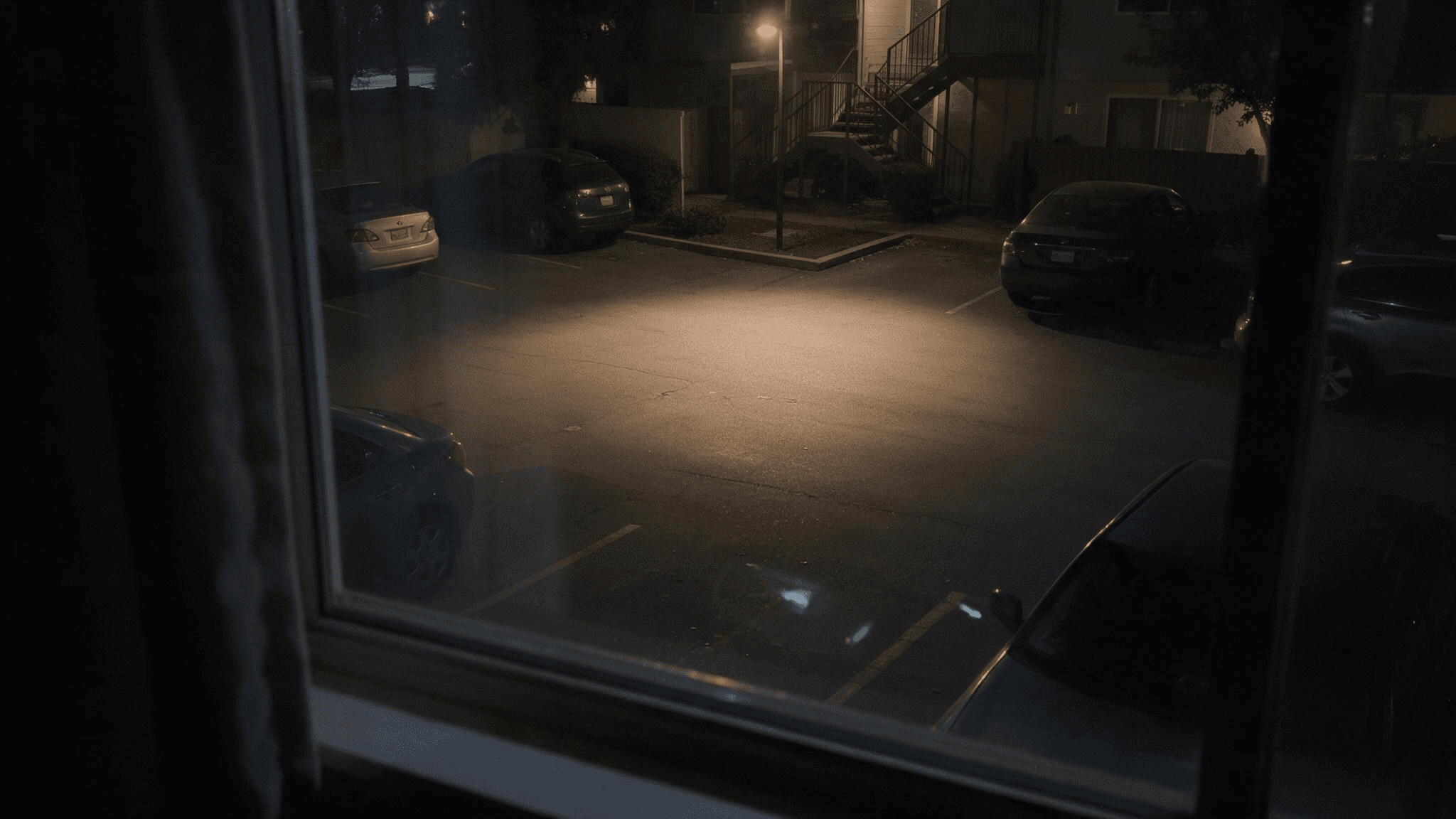
01, the supplied starting image. The window frame, parked cars, stairway, and empty lit pavement establish the scene.
Step 1: Put one original figure into the still
Use an image editor that accepts a reference photo, such as Seedream v5.0 Pro Edit on Atlas Cloud. Upload your window-view photo. This prompt preserves the location and specifies the visual cues in the worked case. Inspect the actual result before using it as a video frame.
plaintext1Edit the uploaded night view from an upstairs window. Preserve the exact window viewpoint, curtain edge, parked cars, streetlights, building positions, road surface, and perspective. On the open ground beneath a streetlight, place one distant adult-height upright cat-costume figure with a narrow silhouette, black fur, a white chest and face, white gloves, a stiff smiling mask, a tall slightly crooked red-and-white striped hat, and a large red bow tie. Keep its whole body visible and small enough to show its distance from the window. Both feet touch the ground and the shadow matches the streetlight. Keep the scene plausibly low-lit, with faint window reflections and mild phone-camera grain. Vertical 9:16. Exactly one figure. No extra people, text, logos, fake timestamp, weapons, threats, or readable address details.
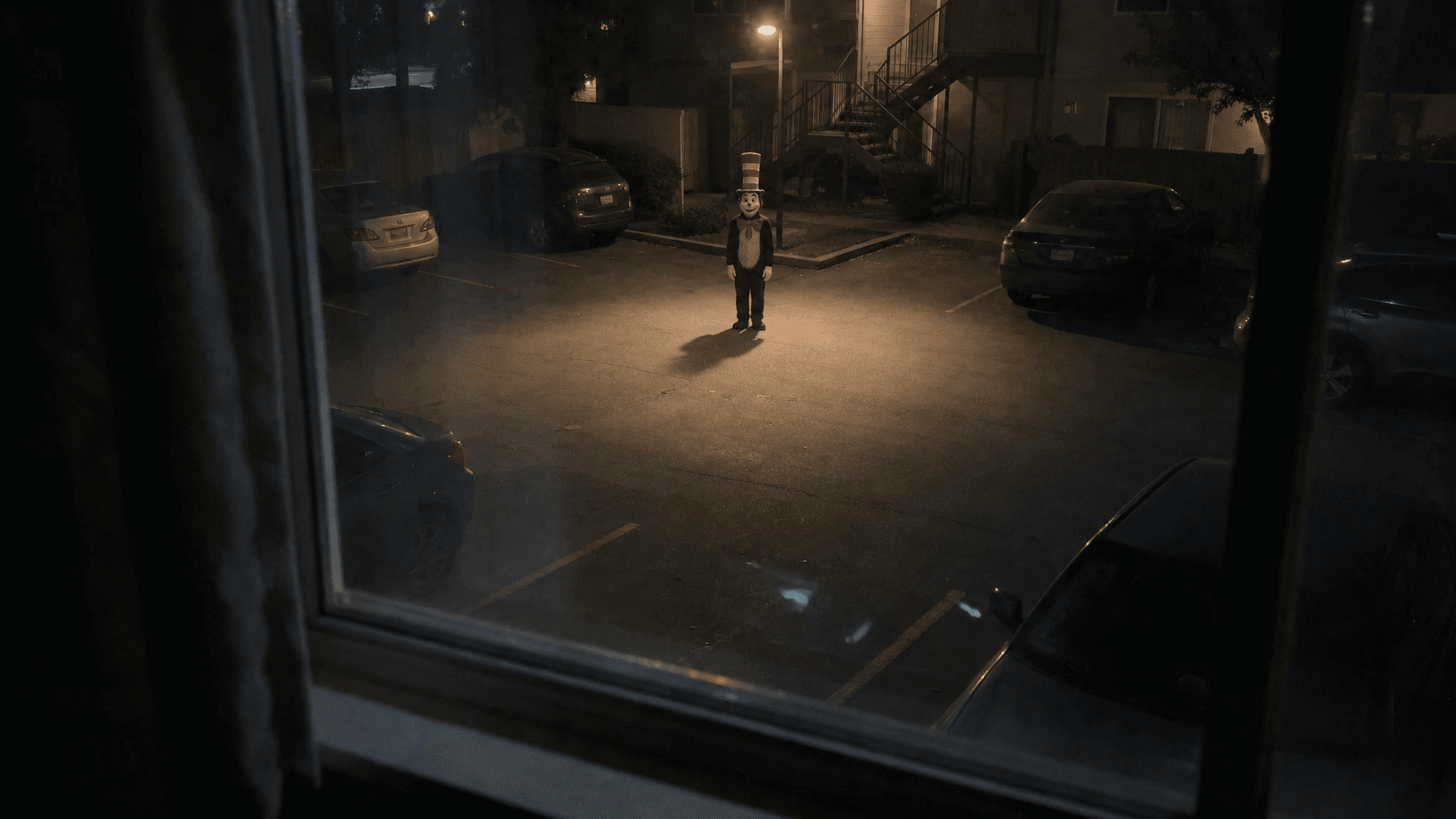
02, the supplied edited still. The character is added to the open area while the cars, stairway, and window viewpoint remain recognizable.
Check the edited still against your source. The buildings and cars should stay in the same places, the subject should have contact with the ground, and the hat should remain visible at phone size. If the model rebuilds the street, correct that before making a video.
Step 2: Give the video one event and one viewpoint change
Upload the approved still to an image-to-video tool such as Kling v3.0 Turbo Image-to-Video on Atlas Cloud. Choose a short vertical clip within the options currently shown by the model. The movement should be legible without sound; the small wave matters more than extra effects.
plaintext1Create a 10-second vertical 9:16 fictional phone video in one continuous take, filmed from inside the upstairs window in the uploaded image. It is a quiet residential parking lot after dark: weak amber light from one streetlamp, muted colors, damp-looking pavement, faint reflections on the glass, soft phone-camera grain, and a slight natural hand tremor. The mood is strangely playful and a little uncanny, like someone unexpectedly noticing a costumed visitor outside, not a violent horror scene. Keep the exact window viewpoint, curtain edge, parked cars, stairway, buildings, road markings, lighting direction, and perspective from the source image. Do not rebuild the location. 2 3The same single adult-height cat-costume figure remains in the middle distance throughout: narrow black-fur body, white chest and face, fixed smiling mask, white gloves, large red bow tie, and tall slightly crooked red-and-white striped hat. Its feet stay grounded and its shadow follows the streetlamp. At first it stands with both feet apart, knees relaxed, shoulders slightly hunched, arms hanging loosely, and head angled down. Its movements are slow and deliberate; the hat, mask, bow tie, body size, and clothing never change. 4 5Seconds 0-3: hold the wide view so the figure looks small among the parked cars. It pauses, then gradually raises its head and looks directly up toward the window. Seconds 3-6: without walking forward, it lifts one white-gloved hand to shoulder height and gives two small, unhurried wrist waves; the other arm stays at its side. The person filming reacts with a tiny handheld shake, not a zoom. Seconds 6-8: the phone withdraws behind the curtain, which briefly covers most of the view while the camera remains inside the same room. Seconds 8-10: the phone cautiously peeks out from a slightly shifted angle. The figure takes one short, visible step closer on the pavement, plants its foot, lowers its waving hand, and keeps looking up. End on that held encounter. 6 7Natural low-light exposure and subtle night ambience if audio is available. No cut, teleportation, sudden jump toward the lens, zoom-only motion, dancing, extra figures, extra limbs, face morphing, costume change, fake CCTV overlay, timestamp, readable address or license plate, text, logo, weapon, or threatening gesture.
03, the supplied fifteen-second video converted to a silent GIF without trimming. It keeps the same parking lot and costumed figure; the figure looks up and approaches the upstairs window. This is a 16:9 result, while the prompt above requests a new 9:16 version.
Compare the result with 02: the location and character should stay recognizable while the camera and figure create a visible event. Here the window viewpoint carries the encounter, even though the exact motion differs from the creator clip in Case 2. If a new generation changes the figure or jumps across the street, reduce the requested motion and rerun from the approved still.
Step 3: Finish the post as fiction
Keep the vertical export short enough for the reveal to land. Watch it on a phone, check that the hat and wave are still readable, and use music or ambience you are allowed to post. TikTok says creators should label realistic AI-generated content. A caption such as “fictional AI window scene” tells viewers what they are seeing without turning a made-up moment into local news.
What makes a recreation worth keeping?
Judge the clip by the event it communicates, not by how much the image moves. A readable result has a recognizable location, a figure at a believable scale, stable clothing and hat, feet that remain grounded, and a response the viewer can actually notice. The best correction is usually specific: move the figure farther away in the still, protect the background geometry, or simplify the motion to one glance and wave.
The real posts above show why the trend works across formats. A film edit uses a familiar performance and changes its meaning through cutting. An AI window or doorbell clip invents a meeting between that kind of character and a familiar-looking place. The viewer's recognition and the camera's point of view carry the joke.
Frequently Asked Questions
Is the Cat in the Hat AI trend made from pictures or videos?
Both. The early dark edits were videos made from film footage. Later AI posts include single images and short clips. A common video workflow starts with a location photo, adds a fictional figure in an image edit, then animates that frame.
Can a one-clip template add the character to my window photo?
Check the template preview and input requirements. The CapCut example above asks for an existing clip. Adding a new figure to a still photo is a separate image-generation or editing task unless a particular template explicitly includes that step.
Do I need the original movie footage?
No. The window and doorbell formats can be made with an original cat-like performer and a location photo you are allowed to use. Credit another creator when discussing their finished clip rather than treating it as your own material.
Are the night-street sightings real?
The AI and edited examples discussed here are fictional. When a post names a real place or implies a real threat, verify the claim before sharing it. The article's production prompts are for a clearly labeled fictional scene.





