


A camera floats over a French cottage at golden hour, glides through an open window, passes a tabby cat by the fireplace and pushes into a laptop screen that is showing the opening shot again. Twenty seconds, no cut. In the top corner, the same move plays out in flat toy blocks.
Those blocks are a Blender scene that Claude built. Eric Ker posted the clip on November 8, 2026, and said he knew nothing about Blender and finished in under 30 minutes.
This Claude Blender workflow has three parts: Claude models a gray box and keys the camera through Blender MCP, Blender renders a rough reference video, and a video model repaints it as live action. We installed the official Blender MCP, had Claude build a rainy Tokyo ramen alley, and rendered it with Seedance 2.5 on Atlas Cloud. Setup, prompts and the 15-second result are below.
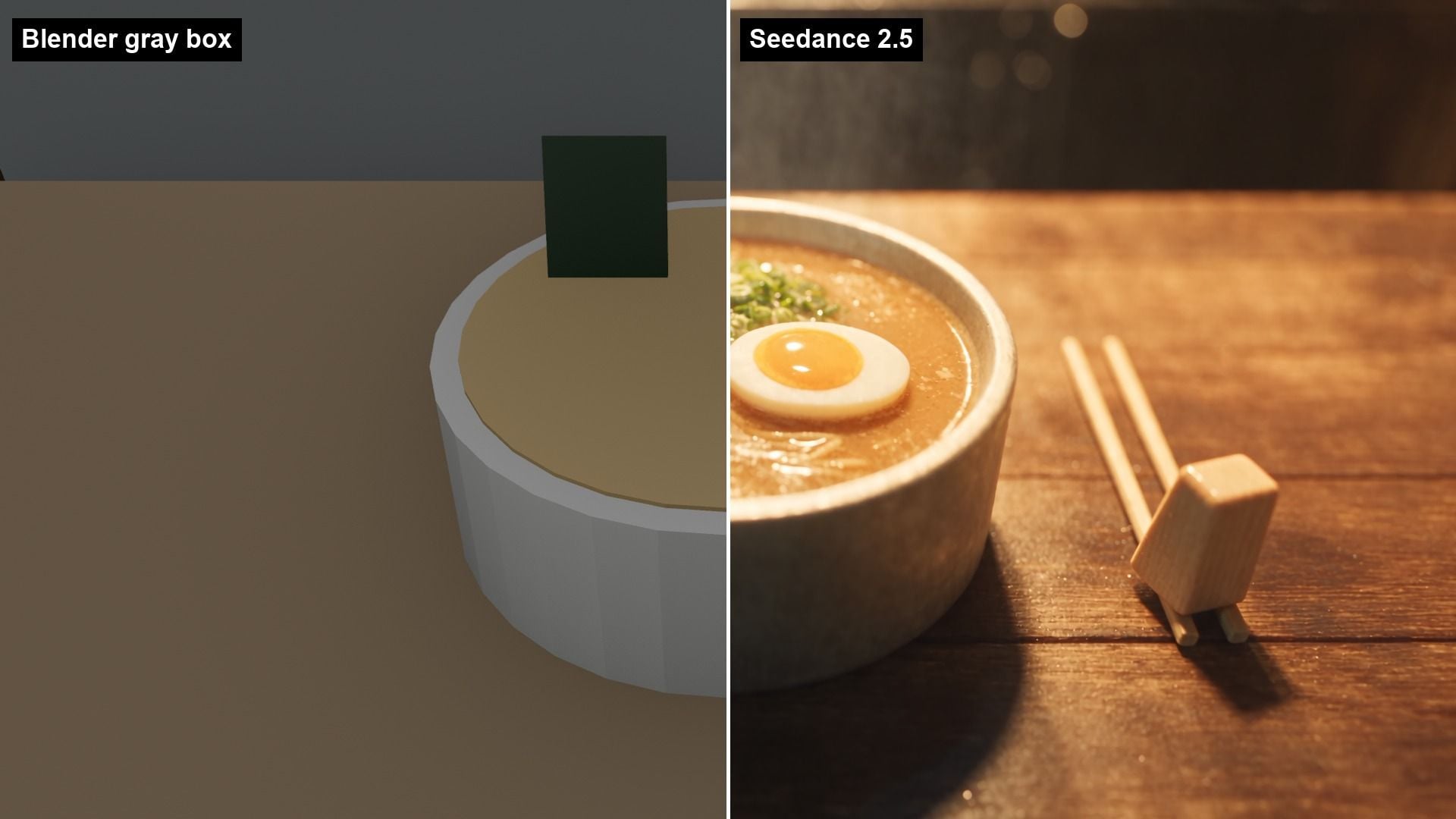
Key Takeaways
- Eric Ker had Claude build a Blender blockout through MCP and finished a 20-second one-take in under 30 minutes.
- Blender's official MCP connector runs in Claude Desktop on any plan, including Free.
- Claude can model the gray box, keyframe the camera and render the reference video while you only describe the shot.
- Seedance 2.5 Reference-to-Video reads that clay render as layout and camera path, then adds light and texture.
- Lock positions and camera in the blockout; describe materials, weather, sound and motion in the prompt.
What the Viral Claude Blender Clip Did, Step by Step
As of November 26, Eric Ker's post had about 125,000 views and 1,869 bookmarks on X. His replies hold the whole recipe:
| Step | What Eric said | What it means for you |
|---|---|---|
| Connect | "you have to connect it to Blender with an MCP first" | One-time setup, no Blender skills |
| Build | His first prompt was close to "I want a charming country house, can you do that?" | Describe the place in plain words |
| Camera | He asked for an animation where "the camera enters through the window and moves toward a laptop on a table" | Describe the path; Claude sets the keyframes |
| Reference | Claude rendered the Blender video on his MacBook Pro M1 Max in under 10 minutes | A four-year-old laptop is enough |
| Generate | Seedance got that video plus one style image, and Claude wrote the Seedance prompt too | Two inputs, one prompt |
| Cost | About €5 for the Seedance generation | Blender itself is free |
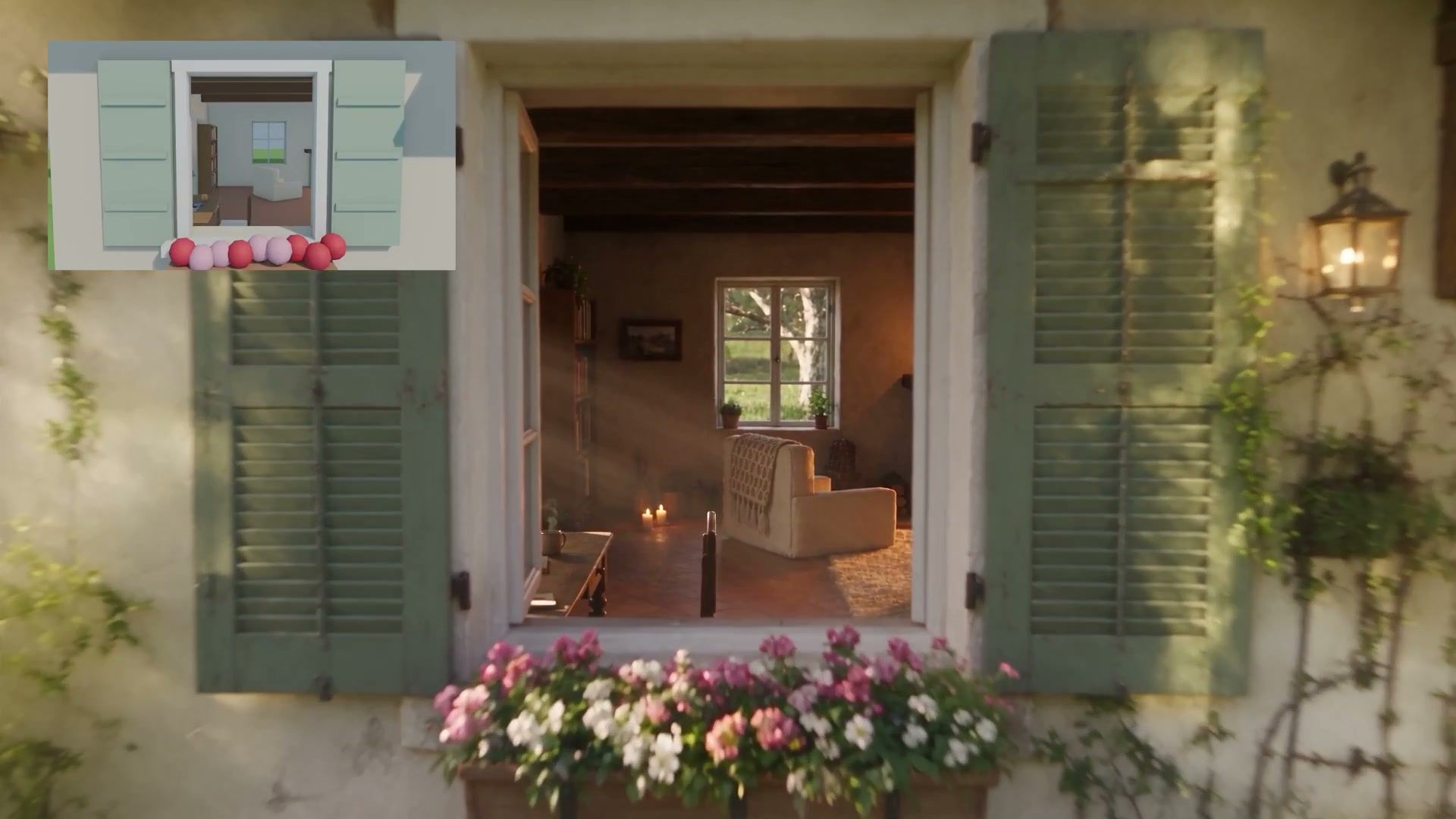
A frame from the video in Eric Ker's post on X, November 8, 2026.
Two details are easy to miss. His blockout is not gray at all: every part has a flat color, from the green lawn and orange roof to cream walls with pale blue shutters. And his post only says "Seedance," while the clip runs 20 seconds without a cut, past the 15-second limit per generation that Seedance 2.0 had.
Render a Clay Render as One Take With Seedance 2.5 on Atlas Cloud
The last step is where the look comes from, and it runs on Atlas Cloud through Seedance 2.5. The Reference-to-Video playground takes the Blender render as @Video1 and a style image as @Image1, keeps the gray box's camera path, and paints in light, rain and texture. Here is the alley from our test:
ByteDance calls this kind of input a clay render. Its Seedance 2.5 launch post describes building a scene's layout, poses, motion paths and camera angles "using textureless 3D models," with the model working out light and shadow from that geometry.
Method 1: Upload the Blockout in the Reference-to-Video Playground
Sign in and open the playground. The form loads with sample references, so click Reset and delete the five sample images first.
- Under Reference Images, upload your style image. It becomes @Image1.
- Under Reference Videos, click Upload Video and add the Blender render. It becomes @Video1.
- Paste your prompt into Prompt. @Image1 and @Video1 point to the uploads in order, and typing @ lets you pick them from a menu instead.
- Under Duration, switch off Auto and enter your reference length (15 for ours).
- Under Aspect Ratio, pick 16:9.
- Click Run.
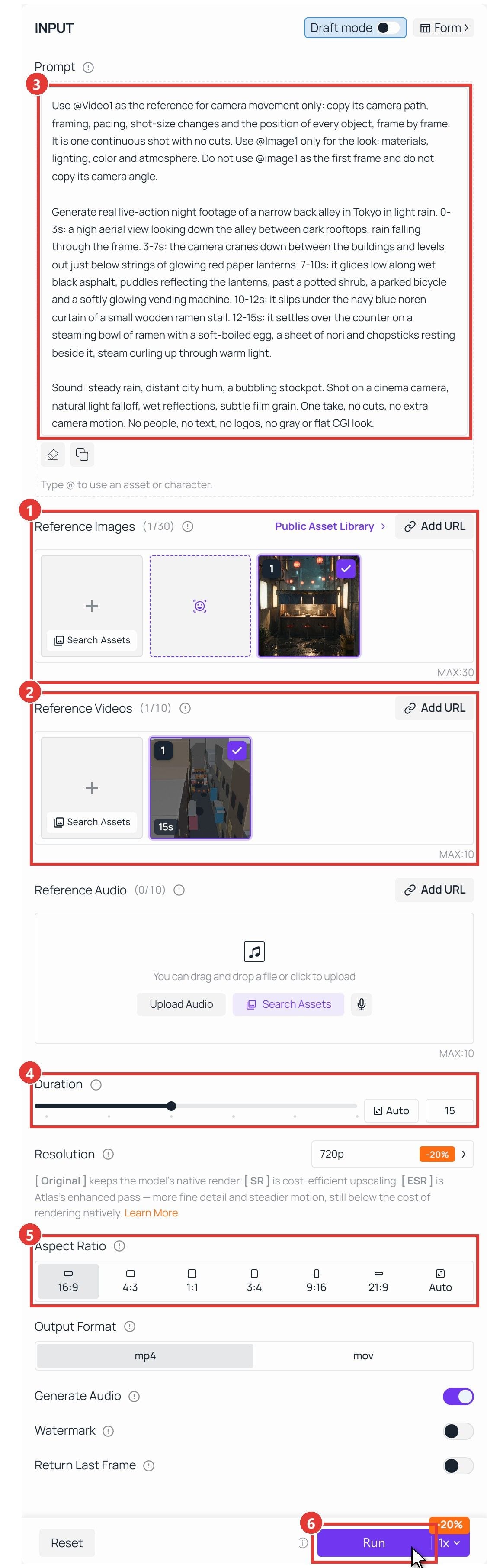
Turn on Draft mode at the top of the form for a quick 480p check before step 6. Once the draft follows the path, open the Seedance 2.5 Draft Complete page, paste the draft's ID and choose 1080p. It reuses the draft's seed, so the shot stays the same.
Method 2: Let Claude Send the Job Through the Atlas Cloud API
Rather stay in the chat? Connect the Atlas Cloud MCP server and Claude can submit the job itself, as our guide to Claude video generation shows.
Step 1: Create an API key. In the console, open Settings, go to API Keys and click Create API Key.
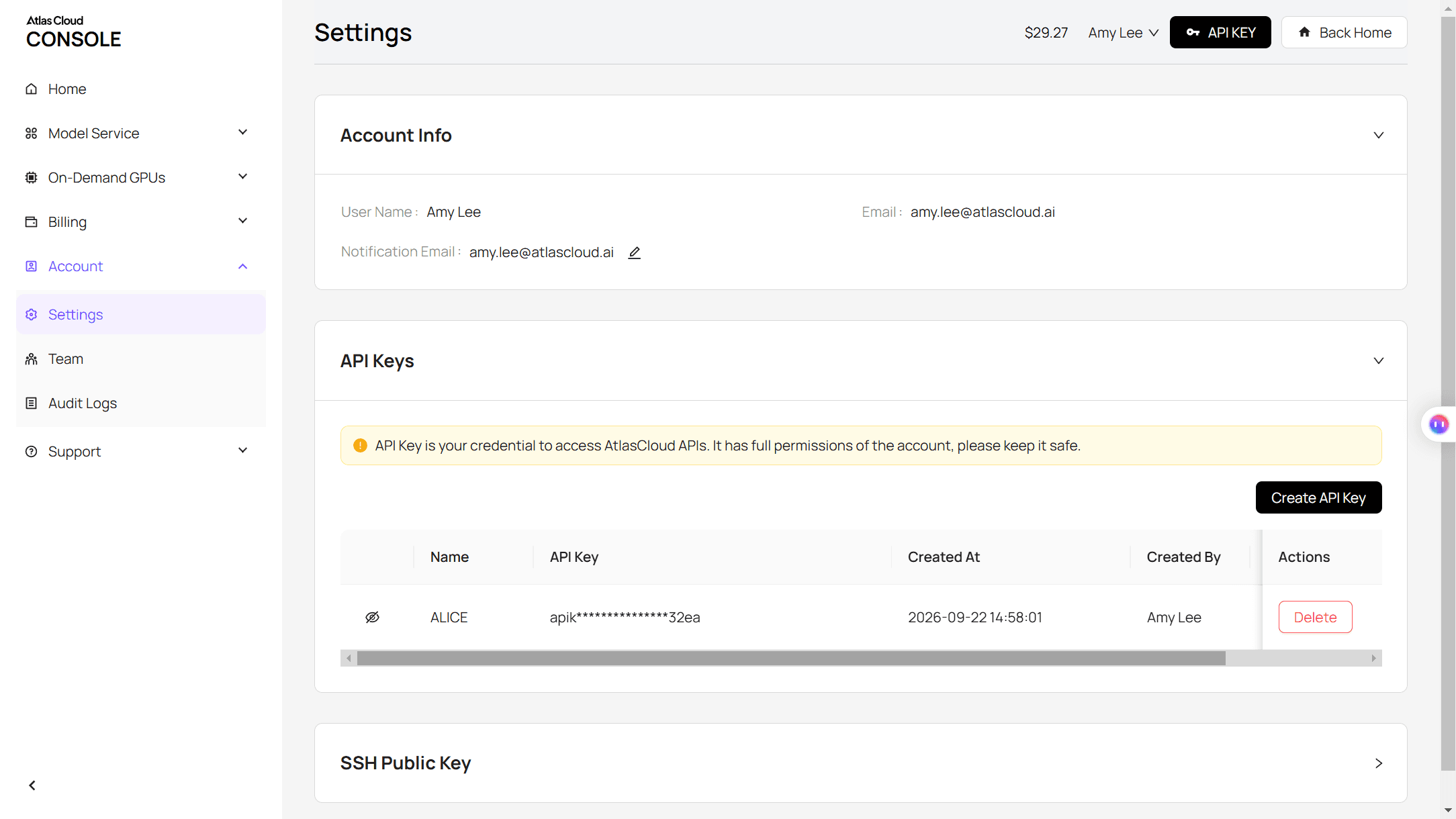
Step 2: Check the request format in the Atlas Cloud API docs. The Blender render and the style image go in as public URLs.
Step 3: Send the request. Setting omni_reference_task_type to "reference" marks this as a new shot that borrows the video's camera, not an edit of the video, and the request is checked before it runs.
plaintext1curl -X POST https://api.atlascloud.ai/api/v1/model/generateVideo \ 2 -H "Content-Type: application/json" \ 3 -H "Authorization: Bearer $ATLASCLOUD_API_KEY" \ 4 -d '{ 5 "model": "bytedance/seedance-2.5/reference-to-video", 6 "prompt": "<paste the full ramen alley prompt from the test section>", 7 "reference_videos": ["https://your-host.com/ramen-alley-blockout-1080p24.mp4"], 8 "reference_images": ["https://your-host.com/style-reference.jpg"], 9 "duration": 15, 10 "resolution": "1080p", 11 "ratio": "16:9", 12 "generate_audio": true, 13 "omni_reference_task_type": "reference" 14 }'
The response returns a prediction ID. Poll it until the status reads completed:
plaintext1curl https://api.atlascloud.ai/api/v1/model/prediction/<prediction_id> \ 2 -H "Authorization: Bearer $ATLASCLOUD_API_KEY"
To draft first, add "draft": true, then send the returned ID as draft_id to bytedance/seedance-2.5/draft-complete with "resolution": "1080p". The same key and submit-and-poll loop work for the other video models on Atlas Cloud, so switching models only changes the model string.
How to Set Up Blender MCP With Claude Desktop or Claude Code
The official Blender MCP comes from Blender Lab, the Blender project's innovation space, and Claude's own tutorial says it "was built by the Blender developers." A Claude Blender MCP setup has two parts that talk over a local socket: an add-on inside Blender and a small server that Claude starts.
The quickest route, from Anthropic's Blender connector tutorial:
- Install a current Blender release. The add-on asks for Blender 5.1 or newer; we used 5.3.
- In Claude Desktop, browse connectors, search for Blender and add it. Any Claude plan works, Free included, but Claude in the browser can't reach a local Blender.
- Open the Blender MCP Server page and drag its install link into Blender twice. The first drag adds the Blender Lab extension repository; the second installs the add-on.
- In Blender, go to Edit > Preferences > Add-ons (1), search for MCP (2) and click Start MCP Bridge Server (3).
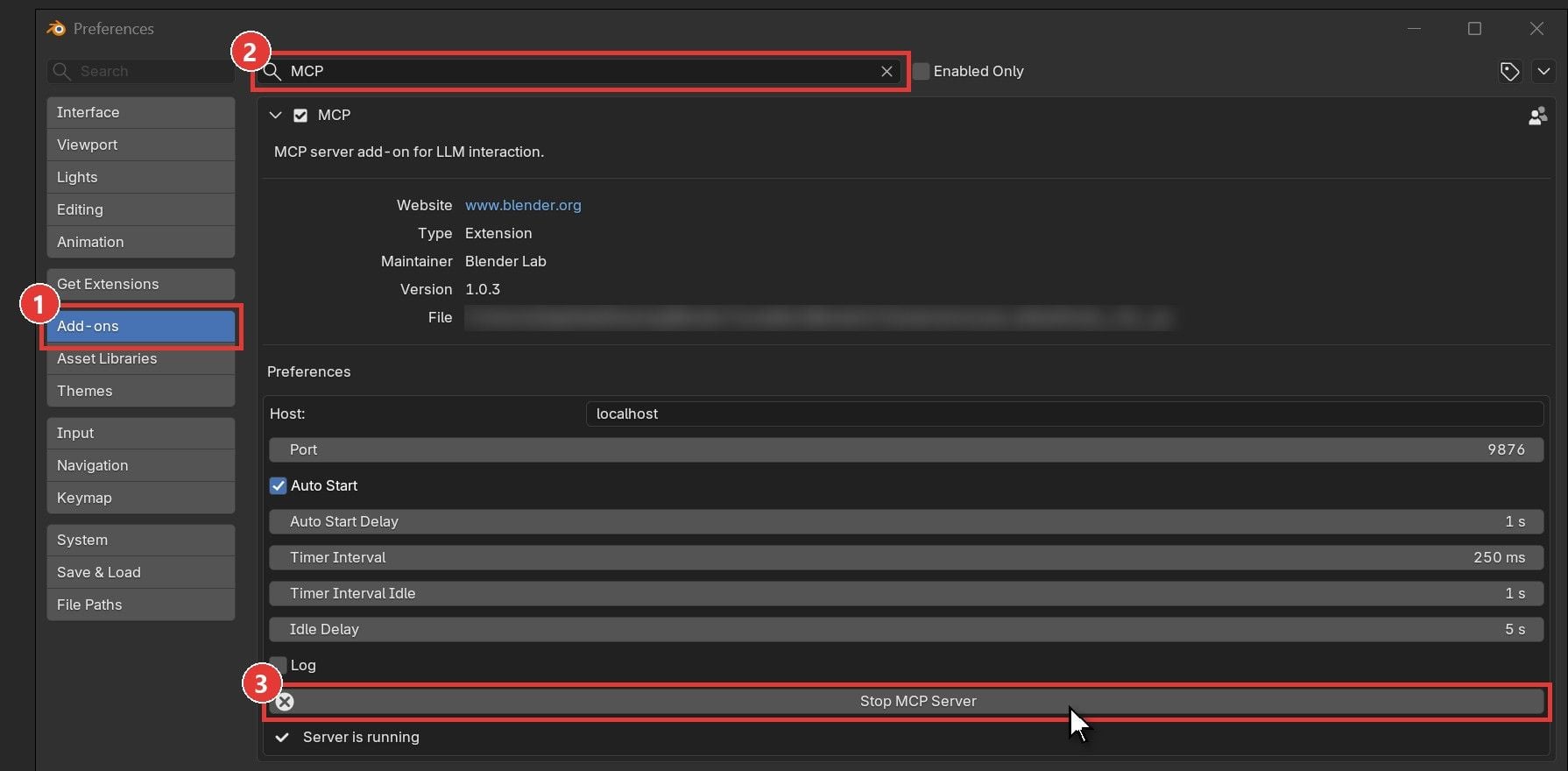
Once it runs, the button flips to Stop MCP Server and the panel reads "Server is running." If it says online access must be enabled, turn on Allow Online Access under Preferences > System.
Claude Code can use the same server. We cloned the official repository and installed its server with pip. Registering it takes one more line:
plaintext1git clone https://projects.blender.org/lab/blender_mcp.git 2cd blender_mcp 3python -m venv .venv 4.venv/bin/pip install -e mcp 5claude mcp add blender -- "$PWD/.venv/bin/blender-mcp"
On Windows the files sit in .venv\Scripts instead of .venv/bin. The Blender add-on still has to be installed and started. Our Claude Code MCP guide explains scopes and where the config is saved.
Build a 3D Previs Gray Box and Camera Path by Chatting With Claude
Film crews call this stage 3D previs. With the connection live, each request turns into Python that Claude runs inside Blender through the server's execute_blender_code tool. We worked from three requests, one per stage:
plaintext11. Build a blockout of a narrow Tokyo back alley at night: 4 m wide, buildings 6 to 13 m tall on both sides with window grids, air conditioners and blank vertical sign boards, strings of red paper lanterns across the alley, and at the far end a small wooden ramen stall with a navy noren curtain, a counter, three red stools and a bowl of ramen on the counter. Primitives only, flat object colors, real-world scale. 2 32. Add a camera and animate one continuous 15-second move at 24 fps: start high above the rooftops looking down the alley, crane down between the buildings to just under the lanterns, glide low along the ground to the stall, pass under the noren and settle on the bowl. No cuts. Show me stills along the path. 4 53. Render it in Workbench with flat object colors at 1920x1080, 24 fps, and save an MP4 I can upload as a reference video.
The first request produced 252 objects in one pass, stall kitchen included. Claude then set seven camera keyframes, aimed the camera with a Track To constraint and eased the lens from 26 mm to 30 mm for the close-up. The stills caught one problem, a cropped bowl in the last frame, and moving the final two keyframes back fixed it.
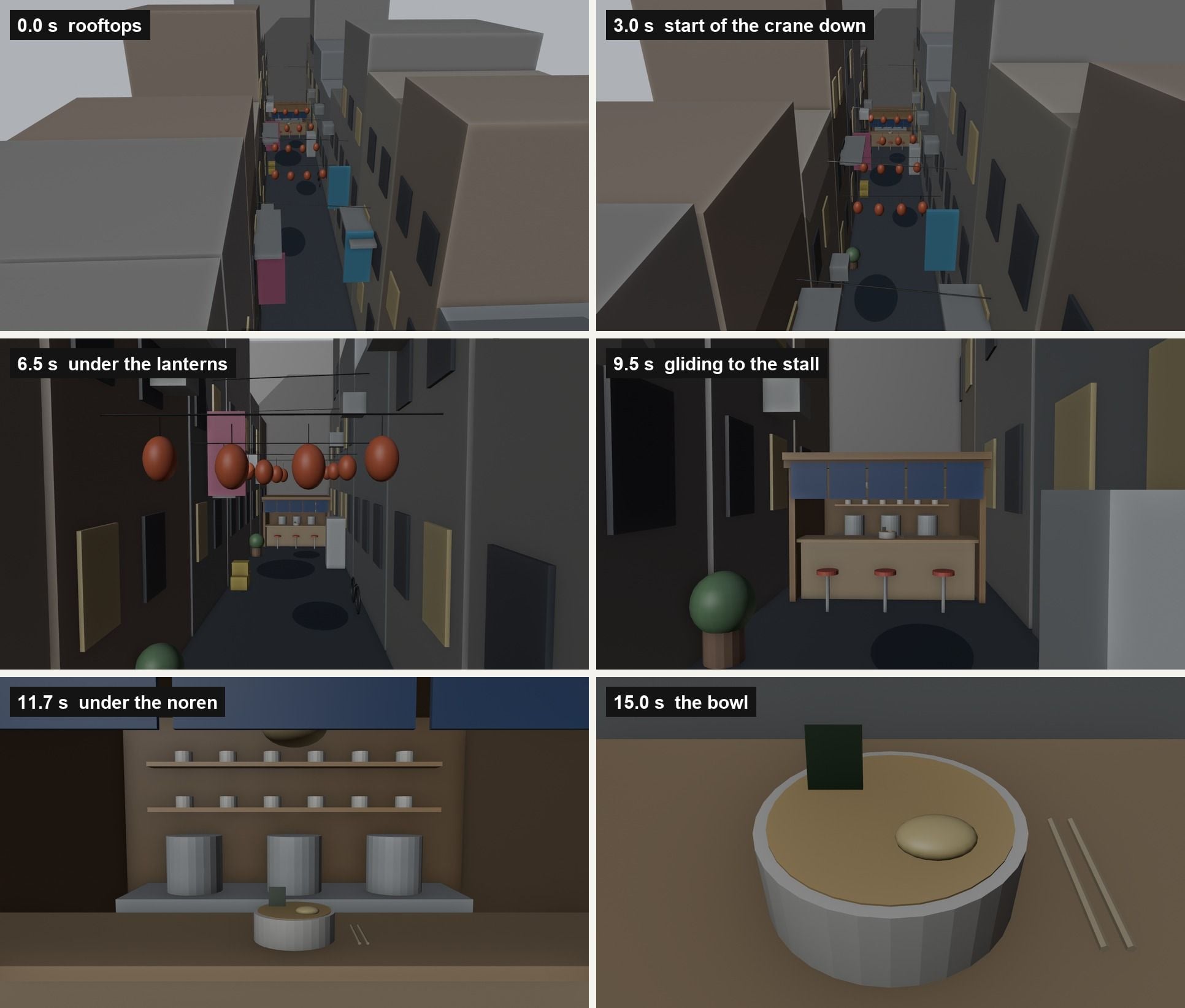
Rendering all 360 frames took about three minutes on our Windows PC. Claude joined them with ffmpeg and added a silent audio track to match the H.264 and AAC format the reference slot lists.
Our Claude Blender Test: A Rainy Ramen Alley in One 15-Second Take
For the style image, we ran frame 228 of the blockout through Seedream v5.5 Edit with a rainy-night description. It kept the layout and added wet asphalt, glowing lanterns and steam over the stockpots.
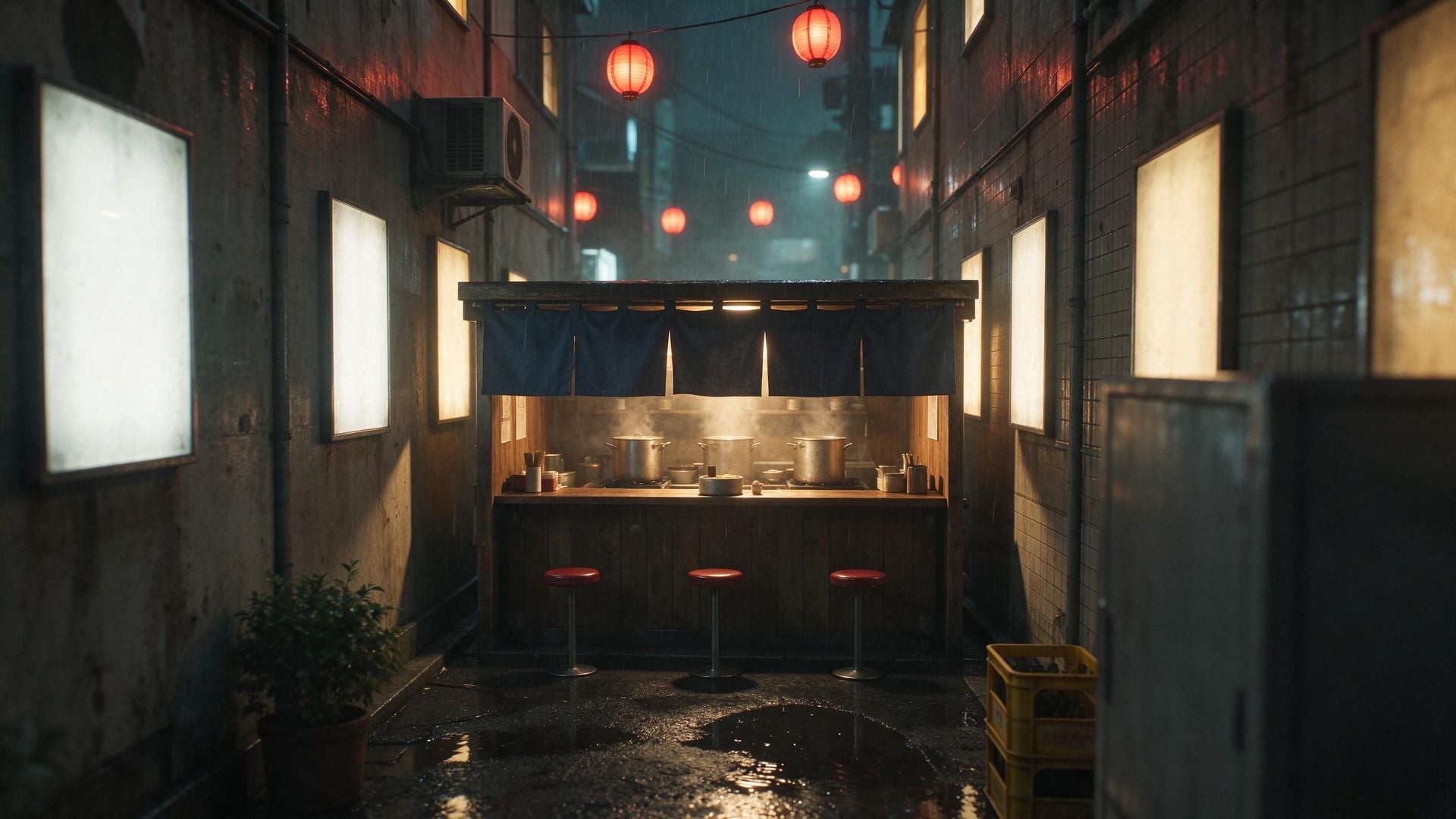
The Seedance prompt splits the job the way Eric's did. @Video1 controls the camera and layout, @Image1 controls the look, and the timeline names what should appear at each point:
plaintext1Use @Video1 as the reference for camera movement only: copy its camera path, framing, pacing, shot-size changes and the position of every object, frame by frame. It is one continuous shot with no cuts. Use @Image1 only for the look: materials, lighting, color and atmosphere. Do not use @Image1 as the first frame and do not copy its camera angle. 2 3Generate real live-action night footage of a narrow back alley in Tokyo in light rain. 0-3s: a high aerial view looking down the alley between dark rooftops, rain falling through the frame. 3-7s: the camera cranes down between the buildings and levels out just below strings of glowing red paper lanterns. 7-10s: it glides low along wet black asphalt, puddles reflecting the lanterns, past a potted shrub, a parked bicycle and a softly glowing vending machine. 10-12s: it slips under the navy blue noren curtain of a small wooden ramen stall. 12-15s: it settles over the counter on a steaming bowl of ramen with a soft-boiled egg, a sheet of nori and chopsticks resting beside it, steam curling up through warm light. 4 5Sound: steady rain, distant city hum, a bubbling stockpot. Shot on a cinema camera, natural light falloff, wet reflections, subtle film grain. One take, no cuts, no extra camera motion. No people, no text, no logos, no gray or flat CGI look.
One 480p draft was enough. It came back in 1 minute 33 seconds and tracked the gray box from the first frame to the last: the crane between the rooftops, the dip under the lanterns and the push under the noren all land where the blockout put them, with no cut.
Seedance filled in what the blocks only hinted at, from puddles that mirror the lanterns to steam over the stockpots and an egg in the broth, and it added an audio track of its own. Completing that draft at 1080p took another 90 seconds.
What Belongs in the Clay Render and What Belongs in the Prompt
The blockout and the prompt each do one job, and a decision in the wrong place costs reruns.
| Put it in the blockout | Put it in the prompt | Why |
|---|---|---|
| Camera path, lens changes and timing | "One take, no cuts" | The reference fixes the path; the prompt only rules out cuts |
| Position and scale of every object | What each object is and what it is made of | A half-meter box reads as a crate, not a building |
| One flat color per object | Real materials, weather and time of day | Textured references tend to come back looking like CG |
| Blank sign boards | "No text, no logos" | Video models often garble lettering |
| Where a subject stands | How it moves | Fine motion reads better from words than from blocks |
The textured-reference row comes from our earlier Colosseum flythrough: fed colored three.js frames, Seedance copied their computer-graphics look, while plain clay frames let it relight the scene with a warm sunrise.
Eric's loop is worth stealing too. End the camera on a screen or window, and say in the prompt that it shows the video's first frame. His asked for "the last frame is identical to the first frame."
Frequently Asked Questions
Can Claude help with Blender if you have never opened it?
Yes. The official connector's FAQ answers "Do I need to know Python?" with a plain no: Claude writes and runs the code, and you can ask to see it first. In our test nobody touched the 3D viewport by hand. You still install Blender and click Start MCP Bridge Server.
Is the Blender MCP connector free?
Yes. Blender is free and open source, the official add-on is GPL-licensed, and Claude's tutorial lists the connector for any Claude plan, including Free. The paid part of this workflow is the video model.
Official Blender MCP or MCP for Blender: which should you use?
The official server comes from Blender Lab, plugs into Claude Desktop as a connector and needs Blender 5.1 or newer. MCP for Blender is a community project, formerly called blender-mcp, that also works with other AI clients. Both run Python inside Blender, so either can build primitives and key a camera; we tested the official one.
How long can a one-take shot from a Blender reference be?
Seedance 2.5 makes up to 30 seconds per generation, and Atlas Cloud accepts reference videos of 2 to 30 seconds each, up to 30 seconds combined, at 24 to 60 fps. For anything longer, extend the clip; ByteDance says Seedance 2.5 keeps characters and scenes consistent across extension rounds.
What does one Claude Blender shot cost?
Blender and the connector cost nothing. Our 15-second shot on Atlas Cloud on November 26, 2026 cost $2.40 for the 480p draft and $13.36 to complete it at 1080p, with a 20% discount applied to Seedance 2.5 at the time. Billing settles on actual usage, so a 480p draft is the cheap way to check the path before paying for the final.
Conclusion
Eric Ker's cottage clip looks like a day with a camera crew, yet the hard part was a list of positions and one camera path, which Claude produced from a couple of sentences. The gray box decides where things are and how the lens moves; the video model decides what they look like.
To try it, install Blender, add the official connector and ask Claude for a blockout and a camera move. Then hand the render and one style image to Seedance 2.5 Reference-to-Video. Start with a 480p draft, keep the prompt about materials and weather, and let the Claude Blender scene carry the camera.







