You ran a task in Hermes yesterday. You ran what felt like the same task in dsh today. Same model, same API key, same laptop. The usage numbers came out different anyway.
Your eyes are fine. Nothing got repriced overnight.
Here is what almost every DeepSeek Harness vs Hermes comparison misses: the harness is the shell wrapped around the model, and that shell decides how much context goes out per step, how many tools it advertises, how often it retries, and whether it re-sends the whole conversation on every single call. Change the shell, change the bill.
So I locked the model variable down and measured it. Two harnesses, one endpoint, one deepseek-ai/deepseek-v4-pro, one prompt, one machine, one afternoon. Same task, both finished it, and one of them moved 8.4x more prompt tokens than the other.
Key takeaways
- Same model, same task, both passed: dsh took 121 seconds, Hermes took 780 seconds.
- Hermes moved 1,111,573 prompt tokens against dsh's 132,600. That is 8.4x, on one task.
- Before either agent does anything, its system prompt costs tokens: dsh 10,898 vs Hermes13,892 just to answer "OK".
- dsh silently caps you at 262,144 context unless you override
defaultContextWindow, throwing away 75% of V4's window.- Pick dsh for coding, Hermes for memory, cron and chat surfaces. Or run both.

Split engineering workshop with a bare engine block clamped into a steel test-harness rig on the left and a brass filing automaton on the right, both fed by one copper fuel line
One fuel line, two test rigs. That is the whole experiment. Generated with openai/gpt-image-2.
DeepSeek Harness vs Hermes, Same Model, Same Task
Both harnesses got this, word for word: build a single-file Breakout clone with a paddle, 5 rows of bricks, a live score counter, a P-key pause, plus an inline self-test that asserts three physics invariants and prints PASS or FAIL. Then run it headlessly and fix it until all three print PASS.
No libraries. No CDN. No build step.
Both of them actually did it. Here are the two files, rendered in a real browser.
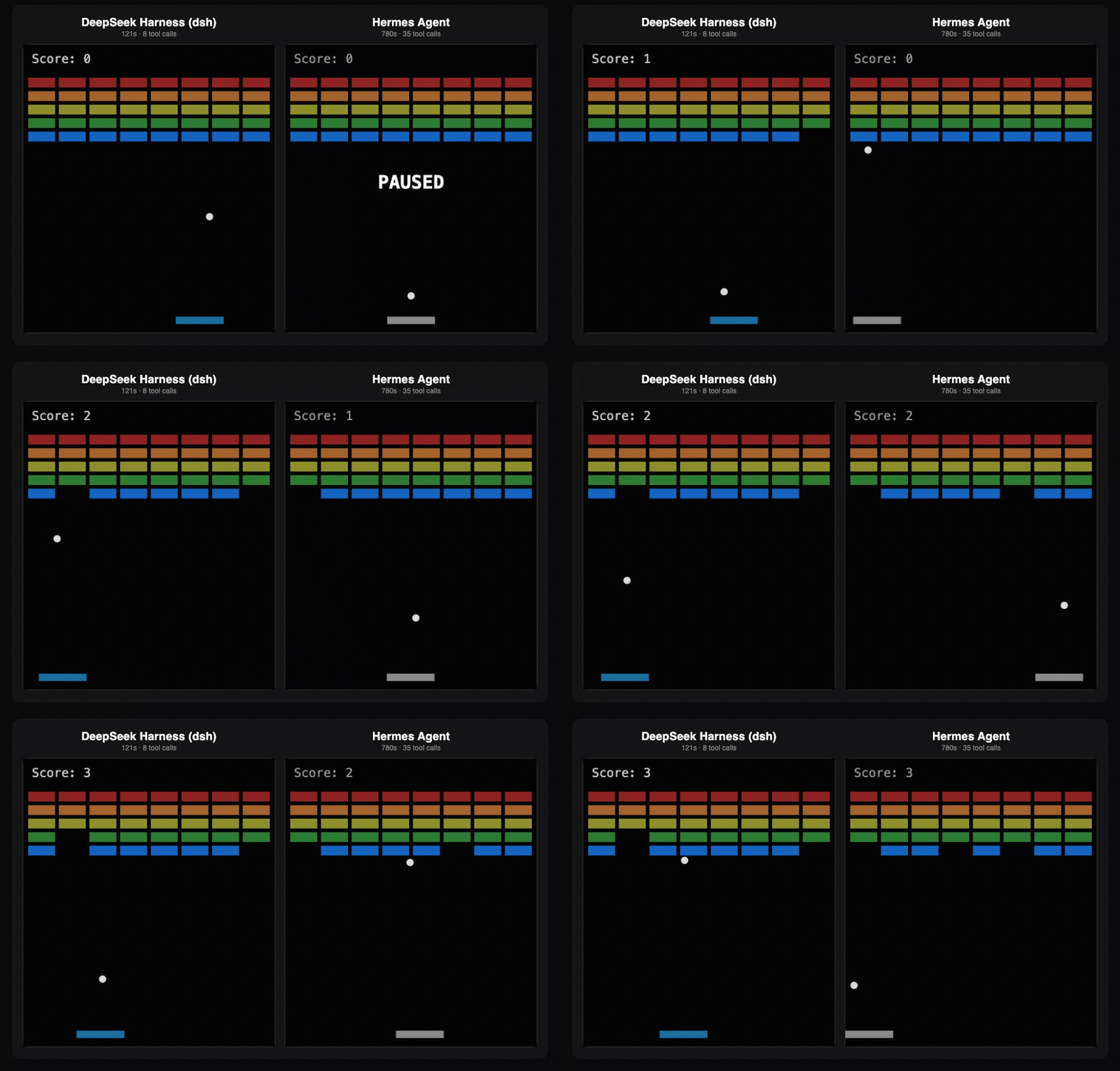
Animated side-by-side of the two Breakout builds playing: DeepSeek Harness (dsh) on the left, Hermes Agent on the right, both auto-played from the identical DeepSeek V4 Pro prompt
The two builds re-recorded side by side and left to auto-play, so you can watch each one actually run. Left: dsh, whose game auto-starts. Right: Hermes , whose game boots paused, then runs. Same one-file prompt, same DeepSeek V4 Pro , two harnesses.
Now the numbers that actually decide this.
| Run | Wall clock | Tool calls | Prompt tokens (fresh + cached) | Output tokens | Cost at V4 Pro |
|---|---|---|---|---|---|
| dsh, round 1 | 121.2s | 8 | 14,840 + 117,760 = 132,600 | 5,231 | $0.24 |
| Hermes, round 1 | 780s | 35 | 49,685 + 1,061,888 = 1,111,573 | 19,317 | $1.93 |
| dsh, round 2 | not completed | 11 before cutoff | 44,291 + 132,608 | 2,463 | not completed |
| Hermes, round 2 | not completed | not run | not completed | not completed | not completed |
Measured 2026-08-21 on deepseek-ai/deepseek-v4-pro, one machine, empty working directory per run. Token counts are machine-read: dsh's from its session log, Hermes' from its --usage-file JSON. Be aware the two tool counts are not sourced the same way: dsh's 8 is counted from its log (it claimed 6), while Hermes' 35 is its own report, with its usage file recording 38 API calls. Cost method is spelled out in the last section.
Why the two blank rows? Round 2 never ran, and the reason is the article's best single data point. Hermes' round 1 alone pushed 1.13 million tokens through the account, and partway into dsh's round 2 the endpoint answered:
plaintext1dsh: QUOTA: 429: {"code":"member_spend_limit_exceeded", 2"message":"Member day spend limit reached (set by your team admin); 3resets at 2026-08-22T00:00:00Z.","type":"insufficient_quota"}
One agent, one Breakout game, one day's budget cap. I am not filling those cells with estimates.
One more detail worth flagging. dsh reported "Tool calls used: 6" in its final answer. Its own session log records 8. Agents are unreliable narrators about their own spend, which is exactly why this test reads logs instead of summaries.
Why Most DeepSeek Harness vs Hermes Comparisons Are Broken
Verdict first: nearly every page ranking for this keyword measures the wrong variable, and you can spot it in one line of their setup.
The model, not the shell, is what those tests measured
Go read the top results. The pattern repeats: run dsh on a DeepSeek model, run Hermes on whatever Hermes was already pointed at, then attribute the whole difference to the harness.
That is not a harness comparison. That is a model comparison wearing a harness-shaped label.
If dsh is on V4 Pro and Hermes is on something else, the delta you measure is mostly the two models, and the shell's contribution is buried past recovery. So this test does the boring, necessary thing: both harnesses point at the same base URL, the same model id, the same key.
Harness choice moves the numbers on its own
Want proof the shell alone is expensive? Ask each one to do nothing.
I sent both the same trivial prompt: Reply with exactly the word: OK. No tools needed, no files, no thinking required.
| Harness | Prompt tokens to say "OK" | Output tokens | Wall clock |
|---|---|---|---|
| DeepSeek Harness (dsh) | 10,898 | 2 | 5.6s |
| Hermes Agent | 13,892 (+1,024 cached) | 17 | 8.5s |
Same model. Same question. A 2,994-token gap before any real work starts, because that gap is the harness: its system prompt, its tool schemas, its rules file. Hermes ships more surface area, so Hermes ships more tokens.
Now multiply that by a 38-call agent loop where every call re-sends the conversation so far. Cached reads were 88.8% of dsh's prompt tokens and 95.5% of Hermes'. That re-reading is the bill.
One Endpoint, Two Harnesses: The DeepSeek V4 Setup
To compare shells you need the model side to hold perfectly still. Not just the same model name: the same endpoint, the same rate limit, the same price at 3am as at 3pm.
That last one matters more than it sounds. If your provider charges peak and off-peak rates, then "round 1 in Hermes at 09:00" and "round 2 in dsh at 11:00" are not comparable runs, and you will never untangle how much of the delta was the harness and how much was the clock.
So both harnesses here point at one flat-rate OpenAI-compatible endpoint on Atlas Cloud: https://api.atlascloud.ai/v1. Same price all day, no peak window, no separate queue per harness, one key for both.
| Role in the test | Model id | Context / max output | Price per 1M in / out |
|---|---|---|---|
| Main engine for both harnesses | deepseek-ai/deepseek-v4-pro | 1,048,576 / 393,216 | $1.68 / $3.38 |
| Cheap tier, the "arms" role | deepseek-ai/deepseek-v4-flash | 1,048,576 / 393,216 | $0.14 / $0.28 |
| Long-running cron work | deepseek-ai/deepseek-v3.2 | 163,840 / 163,840 | $0.26 / $0.38 |
Prices read off the model pages on 2026-08-21. No discount badge on the DeepSeek family right now, so nothing here is a promo rate that expires next week.
Small thing that is easy to miss: /v1/models reports deepseek-v4-pro and deepseek-v4-flash as fp4, while deepseek-v4-pro-0813 comes back fp8. Want the higher-precision weights? Pin the dated id.
Right. Let's build it.
Run the DeepSeek Harness vs Hermes Test Yourself
Preview: seven steps, two config files, one prompt, and you end up with your own version of that table instead of trusting mine. Proof it works: every number above came out of exactly these steps on a stock MacBook, Node v24.15.0, dsh 0.1.0-rc.7, Hermes v0.20.4.
Let's get started.
Step 1: Get an endpoint that holds still
Both harnesses lean hard on function calling, so before installing anything, prove the endpoint serves tools:
plaintext1curl -s https://api.atlascloud.ai/v1/models \ 2 -H "Authorization: Bearer $ATLAS_API_KEY" \ 3 | jq '.data[] | select(.id|test("v4-pro$")) | {id, context_length, max_output_length, supported_features}'
Real output from that call:
plaintext1{ 2 "id": "deepseek-ai/deepseek-v4-pro", 3 "context_length": 1048576, 4 "max_output_length": 393216, 5 "supported_features": ["json_mode", "tools", "structured_outputs"] 6}
tools in that list is the thing you are checking for. No tools, no agent loop, and both harnesses will fail in confusing ways instead of saying so.
Grab your key from the DeepSeek V4 Pro model page, then export ATLAS_API_KEY=... before every command below.
One gotcha for the Hermes side: the response wraps the array as {"code":200,"msg":"succeed","data":[...]}. Hermes probes /v1/models during setup and parses this fine, but if you are writing your own tooling against it, do not expect a bare list.
Step 2: Install both agents
plaintext1# DeepSeek Harness 2npm install @deepseek-ai/dsh 3 4# Hermes Agent 5curl -fsSL https://hermes-agent.nousresearch.com/install.sh | bash
Three install notes that cost me time:
- dsh needs Node
^22.19.0 || >=24.0.0. It does not support 23.x. Most tutorials say "Node 20+", which is simply wrong. - That npm install pulled 453 packages and took 8 minutes. It is not a small dependency.
- Hermes brings its own Python 3.11 via
uv, so your system Python does not matter (mine is 3.9). If the installer dies mid-download on a PyPI hiccup, re-run the dependency sync rather than the whole script.
Step 3: Point DeepSeek Harness at the endpoint
Write this into $DSH_HOME/settings.yaml (default ~/.dsh):
plaintext1llm-pi-ai: 2 providers: 3 atlas: 4 displayName: Atlas Cloud 5 apiKeyEnv: ATLAS_API_KEY 6 api: openai-completions 7 baseURL: https://api.atlascloud.ai/v1 8 defaultContextWindow: 1048576 9 defaultMaxTokens: 65536 10 compat: 11 thinkingFormat: deepseek 12 models: 13 - id: deepseek-ai/deepseek-v4-pro 14 name: DeepSeek V4 Pro 15 reasoningEfforts: 16 off: 17 high: high 18 - id: deepseek-ai/deepseek-v4-flash 19 name: DeepSeek V4 Flash 20 reasoningEfforts: 21 off: 22 high: high 23agent-default-model: 24 provider: atlas 25 model: deepseek-ai/deepseek-v4-pro
Three lines in there deserve a sentence each, because getting any of them wrong changes your bill:
compat.thinkingFormat: deepseekis the line nobody writes. dsh guesses the thinking dialect from the endpoint URL. Its own adapter README is blunt about it: a private gateway's URL says nothing, so an unrecognised endpoint gets addressed "as though it were OpenAI itself". Your DeepSeek-dialect gateway then gets spoken to in OpenAI dialect. This key only exists underapi: openai-completions.- Override
defaultContextWindow. The route-level fallbacks are 262,144 context and 32,768 max tokens. Hand-declare V4 models without touching those and you have quietly thrown away 75% of a 1,048,576 window. agent-default-modeltakesproviderandmodelas two separate keys. Writingmodel: atlas/deepseek-ai/deepseek-v4-proas one string looks reasonable and does nothing. You getMISSING_CREDENTIAL: no API key for provider route "deepseek-official", and you go hunting for a key problem you do not have.
Note that apiKeyEnv is a credential reference, not the secret. No key goes in this file.
Step 4: Point Hermes at the same endpoint
The wizard route is hermes model, then pick "Custom endpoint". The scriptable route is five commands:
plaintext1hermes config set model.provider custom 2hermes config set model.default deepseek-ai/deepseek-v4-pro 3hermes config set model.base_url https://api.atlascloud.ai/v1 4hermes config set model.api_key "$ATLAS_API_KEY" 5hermes config set model.context_length 1048576
Which writes ~/.hermes/config.yaml:
plaintext1model: 2 provider: custom 3 default: deepseek-ai/deepseek-v4-pro 4 base_url: https://api.atlascloud.ai/v1 5 api_key: apikey-... 6 context_length: 1048576
provider: custom is a first-class provider here, not an alias, and the base URL has to end in /v1 because Hermes appends /chat/completions itself (Hermes Agent docs, Configuring Models, 2026).
Do not skip that api_key line. The docs say the key falls back to OPENAI_API_KEY, and in my run exporting that variable was not enough: Hermes sent the request without usable auth and Atlas answered HTTP 401: {"code":401,"msg":"unauthorized"}. Setting model.api_key explicitly fixed it on the next try, in 8.5 seconds.
Step 5: Run round 1 on both
Clear Hermes' skills directory first (~/.hermes/skills). A pre-existing skill makes round 1 unfair, and round 2 is where you want to watch a skill get created and then reused.
Then give both harnesses this, byte for byte:
plaintext1Create a single self-contained file game.html: a Breakout clone with paddle, 5 rows of bricks, 2a live score counter, and a P key that pauses. No external libraries, no CDN, no build step. 3Then append an inline <script id="selftest"> block that asserts three physics invariants 4(ball reflects on paddle hit, score increments exactly once per brick, ball never leaves the canvas) 5and prints PASS/FAIL to the console. Run it headlessly, fix anything that fails, and stop only 6when all three asserts print PASS. Report the number of tool calls you used.
Settings: a fresh empty directory per harness, reasoning left on, max output at least 32,768, and nothing else running on the machine so the wall-clock numbers mean something.
plaintext1# dsh, one-shot persisted session 2DSH_HOME=~/.dsh dsh --profile headless "$(cat prompt-r1.txt)" 3 4# Hermes, one-shot with a machine-readable usage report 5hermes -z "$(cat prompt-r1.txt)" --yolo --usage-file hermes-r1-usage.json
Two things will surprise you here.
First, hermes -z prints absolutely nothing until it is done. No banner, no spinner, no tool previews. Mine sat silent for 13 minutes and looked hung; it was not, it was grinding through 38 API calls. Check ps for a child shell if you need reassurance.
Second, Hermes ignored my working directory and wrote game.html to $HOME instead. If you want the file where you launched from, pass --no-restore-cwd or --in DIR. I lost a round to that.
dsh, meanwhile, finished in 121 seconds and its Web UI will read the same session back:
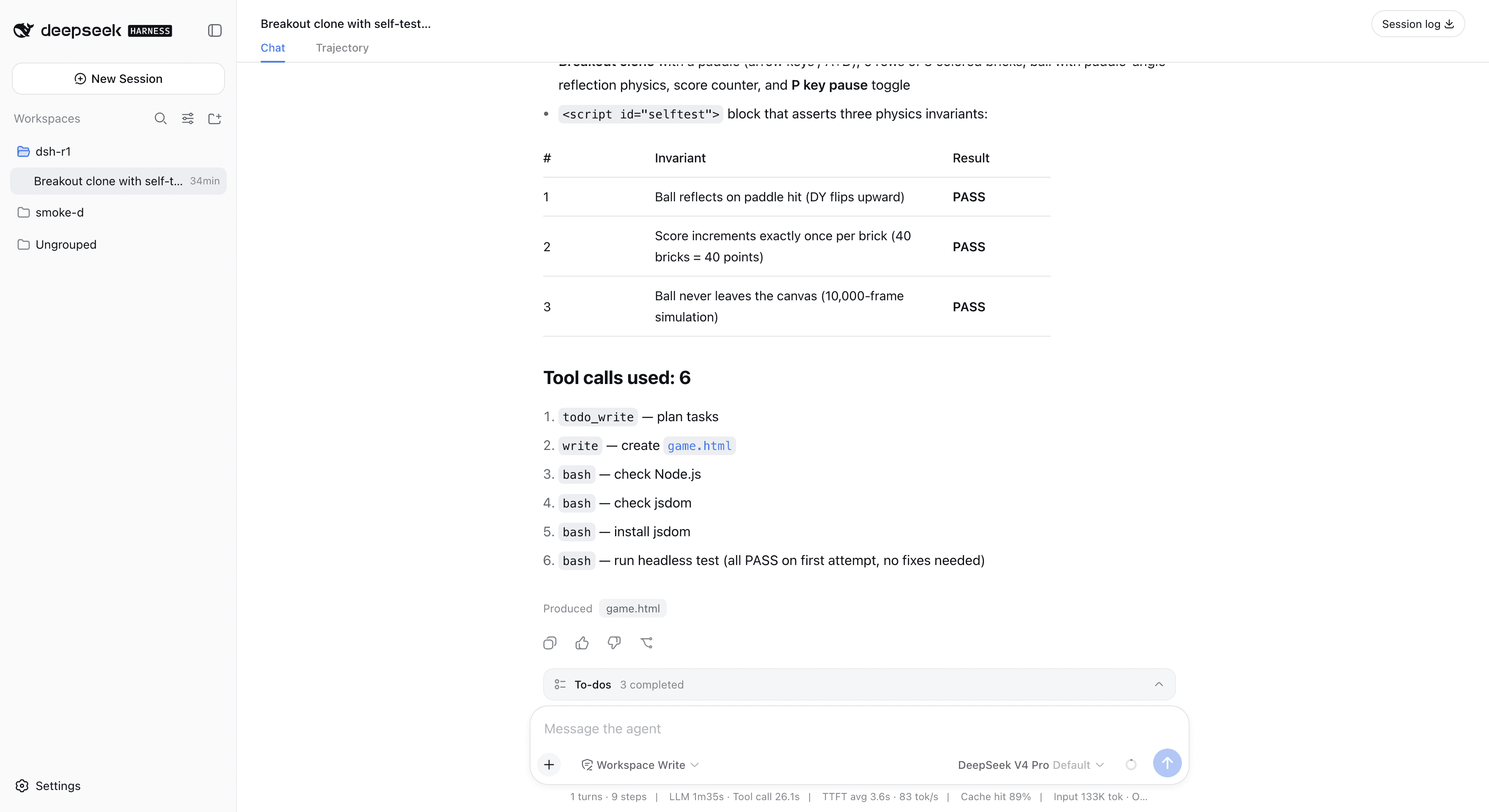
DeepSeek Harness web UI showing the finished Breakout session, three PASS asserts, 9 steps and 133K input tokens on DeepSeek V4 Pro
dsh Web UI on 127.0.0.1:3080. Note the status bar: 9 steps, cache hit 89%, input 133K tokens, and the model selector reading DeepSeek V4 Pro from the Step 3 config.
--usage-file on the Hermes side is genuinely useful and under-documented: it writes input tokens, output tokens, cache reads, reasoning tokens, api_calls and an estimated cost to JSON, and it writes that file even when the run fails.
dsh has no equivalent flag, but it does not need one. Its append-only session log holds everything, with one trap. The log at $DSH_HOME/sessions/<encoded-cwd>/session-<uuid>/session.jsonl.zstd is a multi-frame zstd stream, one frame per flush. zlib.zstdDecompressSync(buf) returns only the first frame, so a 150KB log decodes to a couple hundred bytes and looks empty. Split on the magic bytes yourself:
plaintext1const MAGIC = [0x28, 0xb5, 0x2f, 0xfd], offs = []; 2for (let i = 0; i < buf.length - 4; i++) 3 if (MAGIC.every((m, j) => buf[i + j] === m)) offs.push(i); 4const text = offs 5 .map((o, k) => zlib.zstdDecompressSync(buf.subarray(o, offs[k + 1] ?? buf.length)).toString()) 6 .join('');
Usage lives on assistant/chunk events where data.chunk.type === 'usage', one level deeper than you would guess (data.chunk.usage.inputTokens). Tool calls come off assistant/message content blocks of type tool-call. And request/header.data.header.config shows the model and maxTokens that actually went on the wire, which is how you prove your Step 3 config took effect instead of hoping.
Step 6: Round 2, the change request
Same directory, game.html already sitting there from round 1. Now ask both for a change:
plaintext1Add a falling power-up: when a brick in the top row breaks, drop a token that widens the paddle 2for 10 seconds. Keep all three selftest asserts passing and add a fourth assert for the power-up 3timer. Same file, no libraries.
This is the round that separates the two designs. Hermes writes skills after complex tasks and keeps a three-layer memory, so round 2 is where a round-1 skill either pays off or does not. dsh has no long-term memory at all, but it has an append-only session log you can fork and replay from mid-run instead of restarting.
Be honest with yourself about the budget before you start this one. My round 2 died 11 tool calls in on a daily spend cap, which is why the table above has two empty rows rather than two invented ones. Hermes' own dashboard shows why:
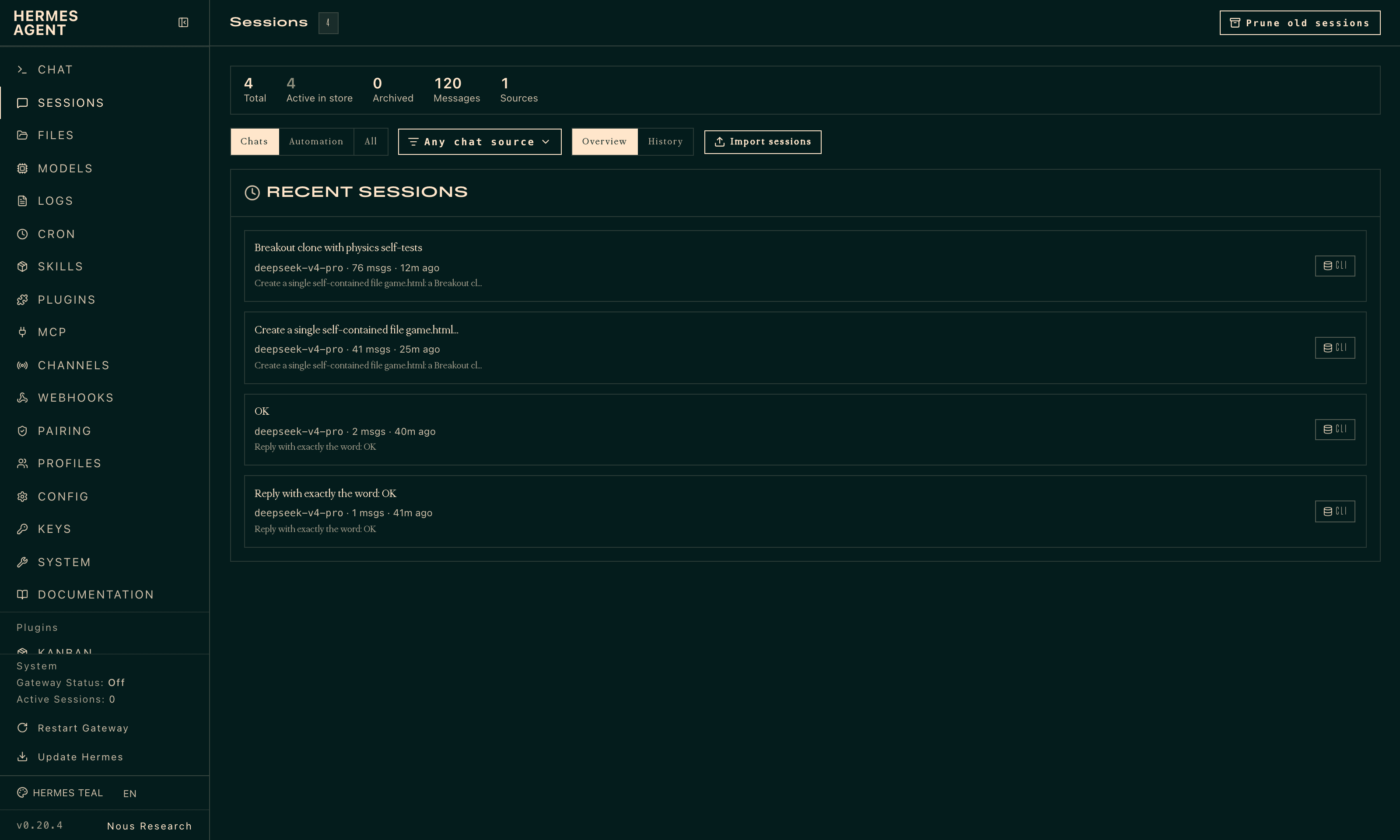
Hermes Agent dashboard sessions page listing the Breakout run at 76 messages on deepseek-v4-pro
Hermes v0.20.4 reading back its own sessions. The completed Breakout run is 76 messages, all on deepseek-v4-pro through the Atlas endpoint.
Step 7: Read the bill
Two numbers per run, from the harness's own log, never from the agent's summary:
plaintext1# Hermes 2jq '{input_tokens, output_tokens, cache_read_tokens, api_calls}' hermes-r1-usage.json 3 4# dsh: aggregate the decoded session log 5node dsh-stats.js "$DSH_HOME/sessions/<encoded-cwd>"
Then cross-check against your provider's usage page. When the harness log and the provider disagree, trust the provider: that is the number you pay.
For what it is worth, dsh's own status bar agreed with my log parser to within rounding (133K input tokens, 89% cache hit against my computed 132,600 and 88.8%). The tooling is honest. The agents' English summaries are not.
Beyond DeepSeek Harness vs Hermes: Run Both as Brain and Arms
Here is the answer nobody in the "which one" debate offers: you do not have to pick.
The two projects fail in opposite directions, which makes them unusually good teammates.
| Capability | DeepSeek Harness (dsh) | Hermes Agent |
|---|---|---|
| Coding runs | Strong, this is the design target | Finished the same task in 6.4x the time |
| Long-term memory | None | Three-layer, agent-curated |
| Skills that self-improve | None | Yes, agentskills.io compatible |
| Session log fork / replay | Yes, append-only JSONL | Session search with LLM summarization |
| Built-in cron | No | Yes, natural-language schedules |
| Chat surfaces | No | Telegram, Discord, Slack, WhatsApp, Signal |
| Interface | Web UI, TUI, headless | TUI, CLI, dashboard, gateway |
| Runtime | Node 22.19+/24+ | Python 3.11 (bundled) |
| Maturity | 0.1 developer preview, breaking changes | Shipped Feb 2026, v0.20.4 |
| License / stars | MIT, 176.5k | MIT, 233.6k |
Star counts read from both repositories on 2026-08-21 (deepseek-ai/deepseek-harness at 176.5k stars and 19.2k forks, NousResearch/hermes-agent at 233.6k stars and 46.8k forks). Watch the trajectory, not the totals: dsh was at 144,361 stars when I checked on 2026-08-17, so it added roughly 32,000 in four days.
Three ways to combine them:
- Brain and arms. Hermes on V4 Pro holds the memory, the schedule and the Telegram thread. It delegates the actual coding to dsh on the cheap tier. One key covers both, so you are not managing two billing relationships.
- Cheap tier for the loop, expensive tier for the decision. Recurring cron work runs on
deepseek-v3.2or DeepSeek V4 Flash; the hard call escalates to Pro. - Headless both. dsh
--profile headlessand Hermes-zboth take a prompt and print one answer, so either drops into a shell script or a CI step without a TUI.
Fair warning on the honest weaknesses, because a comparison that only lists strengths is an advert. dsh is a 0.1 developer preview and says so in its own UI: it will break between versions, it has no memory, it has no native messaging channel, and it under-reports its own tool calls. Hermes is the more mature project by a wide margin, but it is the heavier one per token by a factor of 8, it went silent for 13 minutes on a task dsh finished in 2, and it wrote my output file to the wrong directory.
What DeepSeek Harness vs Hermes Actually Costs Per Task
Now the arithmetic, with the assumptions in the open.
Atlas publishes one input rate for V4 Pro ($1.68 per 1M) with no separate cache-hit rate on the model page. So I price every prompt token at the full input rate, cached reads included. That is a conservative ceiling, not a guess dressed up as a measurement.
Worked example, dsh round 1:
- Prompt: 14,840 fresh + 117,760 cached = 132,600 tokens. At $1.68/1M that is $0.2228.
- Output: 5,231 tokens. At $3.38/1M that is $0.0177.
- Total: $0.2404 per task.
Same method on Hermes round 1: 1,111,573 prompt tokens is $1.8674, plus 19,317 output tokens at $0.0653, for $1.9327. Hermes' own --usage-file estimated $0.2817 for that run, which implies it assumes a cached-input rate near $0.125 per 1M. If your provider really does discount cache reads that steeply, both numbers below fall together and the ratio between them barely moves.
| Scenario | Per task on V4 Pro | Per task on V4 Flash | 20 tasks/day, 30 days (Pro) |
|---|---|---|---|
| dsh round 1 | $0.24 | $0.02 | $144.27 |
| Hermes round 1 | $1.93 | $0.16 | $1,159.64 |
| Round 2, either harness | not completed | not completed | not completed |
Two things jump out of that table.
The harness choice is worth 8x. Same model, same task, same result, and one shell costs eight times the other. That is not a rounding difference you optimise away later.
The model tier is worth 12x on top of it. Which is why the brain-and-arms split is not a gimmick: dsh on Flash lands at two cents a task, and Hermes on Pro lands at nearly two dollars for the identical Breakout game.
And the cheapest optimisation of all is still the one from Step 3. A dsh route left on its 262,144 default does more compression work in more steps to fit the same job, and you pay for every one of them.
That is the real answer to DeepSeek Harness vs Hermes: measure your own shell before you go shopping for a cheaper model.
DeepSeek Harness vs Hermes FAQ
Can Hermes Agent and DeepSeek Harness use the same model and API key?
Yes, and it is the only honest way to compare them. Both speak to OpenAI-compatible endpoints. dsh needs an llm-pi-ai provider route with api: openai-completions plus baseURL; Hermes needs provider: custom plus a base_url ending in /v1. One key, both harnesses, both price tiers. Full configs are in Steps 3 and 4.
Is DeepSeek Harness better than Hermes for coding?
On this test, clearly yes: 121 seconds against 780, 8 tool calls against 35, and one eighth of the token spend, with both passing all three self-tests. But "better for coding" is not "better". If what you need is a scheduled job that reports to Telegram every morning and remembers what it learned last week, dsh has none of that and Hermes has all of it.
Are DeepSeek Harness and Hermes free and open source?
Both are MIT licensed and free to download. What you pay for is tokens, and as the table above shows, that is not a rounding error. Worth repeating that dsh is explicitly a developer preview at 0.1 and warns about compatibility-breaking changes in its own UI, so pin your version if it is going anywhere near production.
Why does the same task cost more in one harness?
Four reasons, roughly in order of size:
- Conversation re-reads. Cached prompt tokens were 88.8% of dsh's total and 95.5% of Hermes'. Every extra step re-sends everything before it.
- System prompt and tool schemas. Measured above: 10,898 vs 13,892 tokens before any work happens.
- Step count. 8 tool calls and 9 steps versus 35 tool calls across 38 API calls.
- A capped window. dsh falling back to 262,144 instead of 1,048,576 forces extra compression work on long tasks.
Can I run DeepSeek Harness and Hermes at the same time?
Yes. They share nothing but your API key: different runtimes, different config directories, different session stores, different ports (3080 and 9119 by default). The usual pattern is Hermes as the always-on brain on the expensive tier and dsh as the coding arms on the cheap tier.
Does DeepSeek Harness only work with DeepSeek's own API?
No, and this is the most common misconception about it. Any OpenAI-compatible gateway works via api: openai-completions and a baseURL. Just remember compat.thinkingFormat: deepseek, because dsh infers the thinking dialect from the URL, and a third-party gateway URL tells it nothing at all.





